2023 HYUNDAI IONIQ 5 remote control
[x] Cancel search: remote controlPage 563 of 680
07
7-161
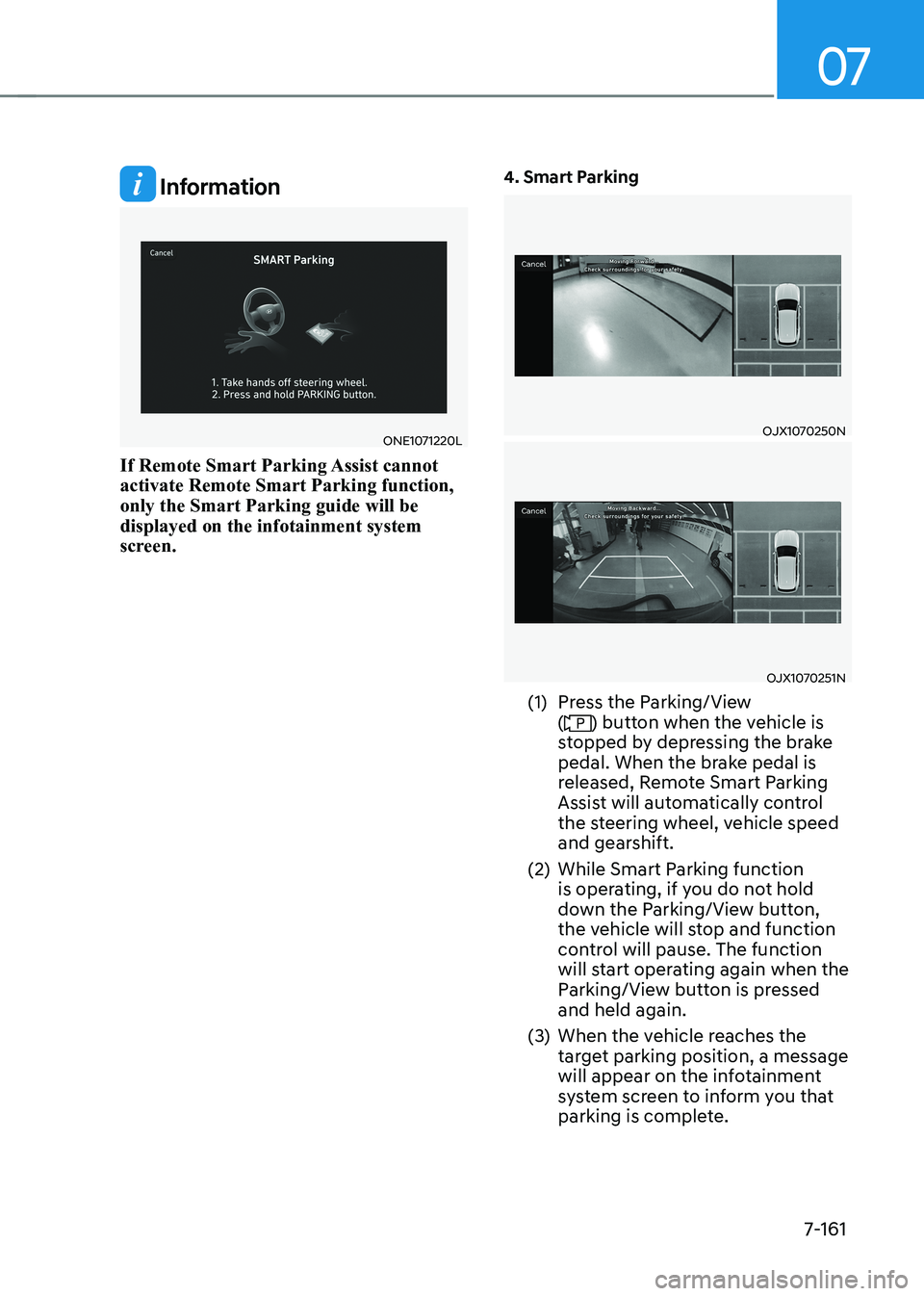
Information
ONE1071220L
If Remote Smart Parking Assist cannot activate Remote Smart Parking function, only the Smart Parking guide will be displayed on the infotainment system
screen. 4. Smart ParkingOJX1070250N
OJX1070251N
(1) Press the Parking/View (
) button when the vehicle is
stopped by depressing the brake
pedal. When the brake pedal is
released, Remote Smart Parking
Assist will automatically control
the steering wheel, vehicle speed
and gearshift.
(2) While Smart Parking function is operating, if you do not hold
down the Parking/View button,
the vehicle will stop and function
control will pause. The function
will start operating again when the
Parking/View button is pressed and held again.
(3) When the vehicle reaches the target parking position, a message
will appear on the infotainment
system screen to inform you that
parking is complete.
Page 564 of 680
Driver Assistance System
7-162•
Smart Parking function will not
operate if the door is open or the
seat belt is not fastened.
• The parking location indicator is
displayed on Surround View Monitor
screen and is displayed until the
vehicle enters the parking space
for the first time by Smart Parking function.
• Vehicle speed can be adjusted
by depressing the brake pedal
while Smart Parking function is
operating. However, the vehicle
does not accelerate even when the
accelerator pedal is depressed.
• Depending on parking
environments, if the vehicle is
stopped by a stopper, parking may
be completed.
• If you need to change the vehicle's
position or location, manually
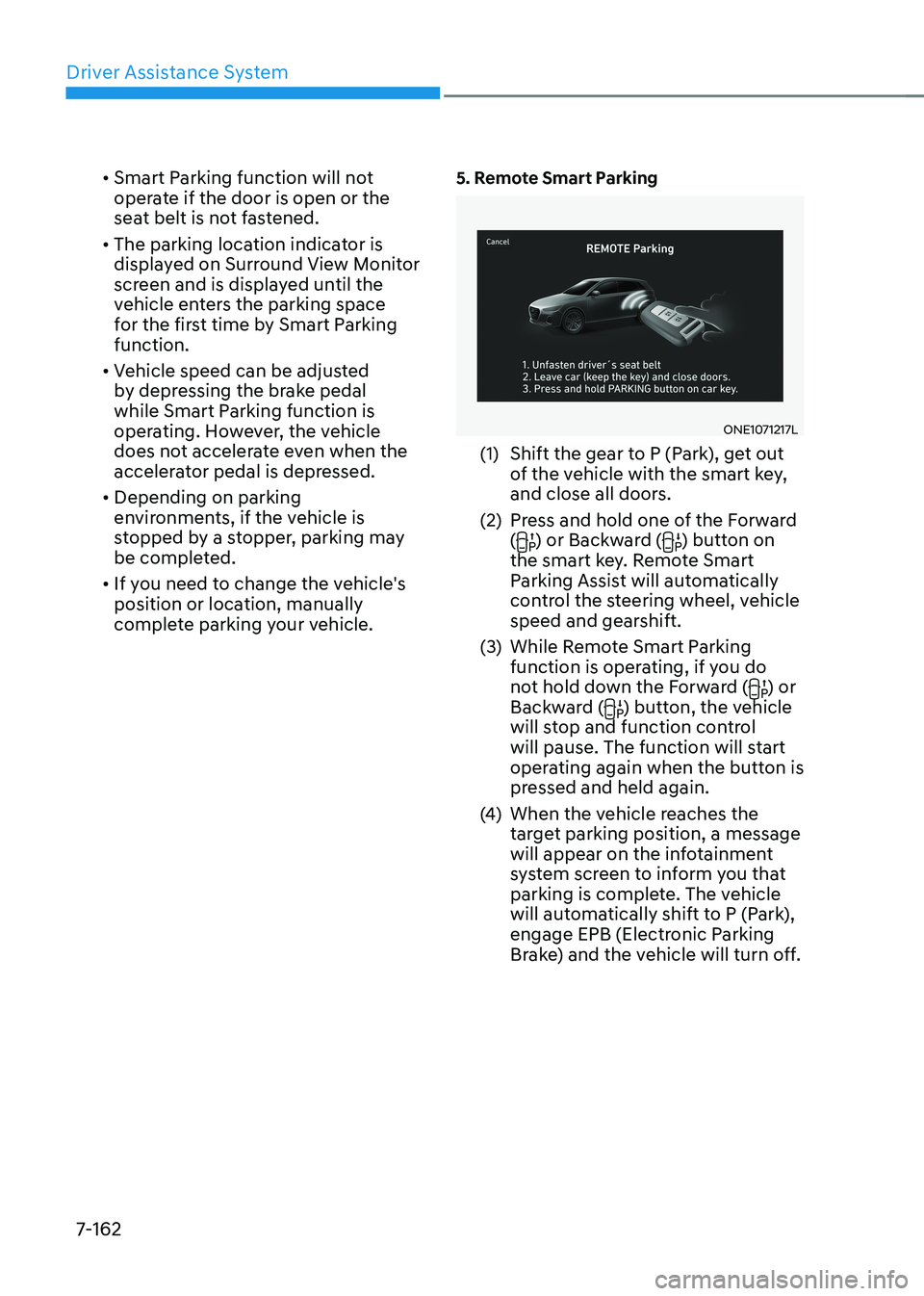
complete parking your vehicle. 5. Remote Smart Parking
ONE1071217L
(1) Shift the gear to P (Park), get out of the vehicle with the smart key,
and close all doors.
(2) Press and hold one of the Forward (
) or Backward () button on
the smart key. Remote Smart
Parking Assist will automatically
control the steering wheel, vehicle
speed and gearshift.
(3) While Remote Smart Parking function is operating, if you do
not hold down the Forward (
) or
Backward () button, the vehicle
will stop and function control
will pause. The function will start
operating again when the button is
pressed and held again.
(4) When the vehicle reaches the
target parking position, a message
will appear on the infotainment
system screen to inform you that
parking is complete. The vehicle
will automatically shift to P (Park),
engage EPB (Electronic Parking
Brake) and the vehicle will turn off.
Page 567 of 680
07
7-165
The function will pause in the
following conditions when: •
Smart Parking
- There is a pedestrian, animal or object in the direction the vehicle is
moving
- The door or liftgate is open
- The driver’s seat belt is not fastened
- Blind-Spot Collision-Avoidance Assist or Rear-Cross Traffic Collision
Assist operates while the vehicle
is being controlled in the reverse
direction
- The Parking/View (
) button is not
continuously pressed
- The vehicle is stopped by depressing the brake pedal
• Remote Smart Parking
- There is a pedestrian, animal or object in the direction the vehicle is
moving
- The door or liftgate is open
- The Forward (
) or Backward ()
button is not continuously pressed
- Simultaneously pressing multiple buttons on a smart key
- The smart key is not operated within 13 ft. (4 m) from the vehicle
- Button of another smart key is pressed in addition to the operating
smart key
- Blind-Spot Collision-Avoidance Assist or Rear-Cross Traffic Collision
Assist operates while the vehicle
is being controlled in the reverse
direction
When Parking function is paused, the
vehicle will automatically stop. If the
condition that made the function to
pause disappears, the function may
operate again. The function will cancel in the
following conditions when: •
Smart Parking
- The steering wheel is steered
- The gear is shifted while the vehicle is moving
- Operating EPB while the vehicle is moving
- The hood is open
- The driver opens the door with the seatbelt unfastened
- Rapid acceleration occurs
- Vehicle skid occurs
- The wheel is stuck by an obstacle and cannot move
- There are pedestrians, animals or objects at the front and rear of the
vehicle at the same time
- Approximately 3 minutes and 50 seconds have past after Smart
Parking function has started to
operate
- The slope of the road exceeds the operational range
- The function is paused for more than 1 minute
- The steering wheel, gearshift, braking, and drive controls are not
working properly
- ABS, TCS or ESC system operates due to slippery road conditions
- The Charging door opens
- The EV mode is utility mode
When Smart Parking function is
canceled, the vehicle will automatically
stop, shift the gear to P (Park) and
engage EPB (Electronic Parking Brake).
Page 568 of 680
Driver Assistance System
7-166
•
Remote Smart Parking
- The steering wheel is steered
- The gear is shifted
- Operating EPB while the vehicle is moving
- The hood is open
- The brake pedal or accelerator pedal is depressed when all the
doors are closed
- The smart key is outside the vehicle when the brake pedal is depressed
while the driver's door is open.
- Rapid acceleration occurs
- Vehicle skid occurs
- The wheel is stuck by an obstacle and cannot move
- There are pedestrians, animals or objects at the front and rear of the
vehicle at the same time
- Approximately 3 minutes and 50 seconds have past after Remote
Smart Parking function has started
to operate
- The slope of the road exceeds the operational range
- The function is paused for more than 1 minute
- The steering wheel, gearshift, braking, and drive controls are not
working properly
- There is a problem with the smart key or the smart key battery is low
- ABS, TCS or ESC system operates due to slippery road conditions
- The alarm of the Theft Alarm System sounds
- The Charging door opens
- The EV mode is utility mode
When Remote Smart Parking function is
canceled, the vehicle will automatically
stop, shift the gear to P (Park) and
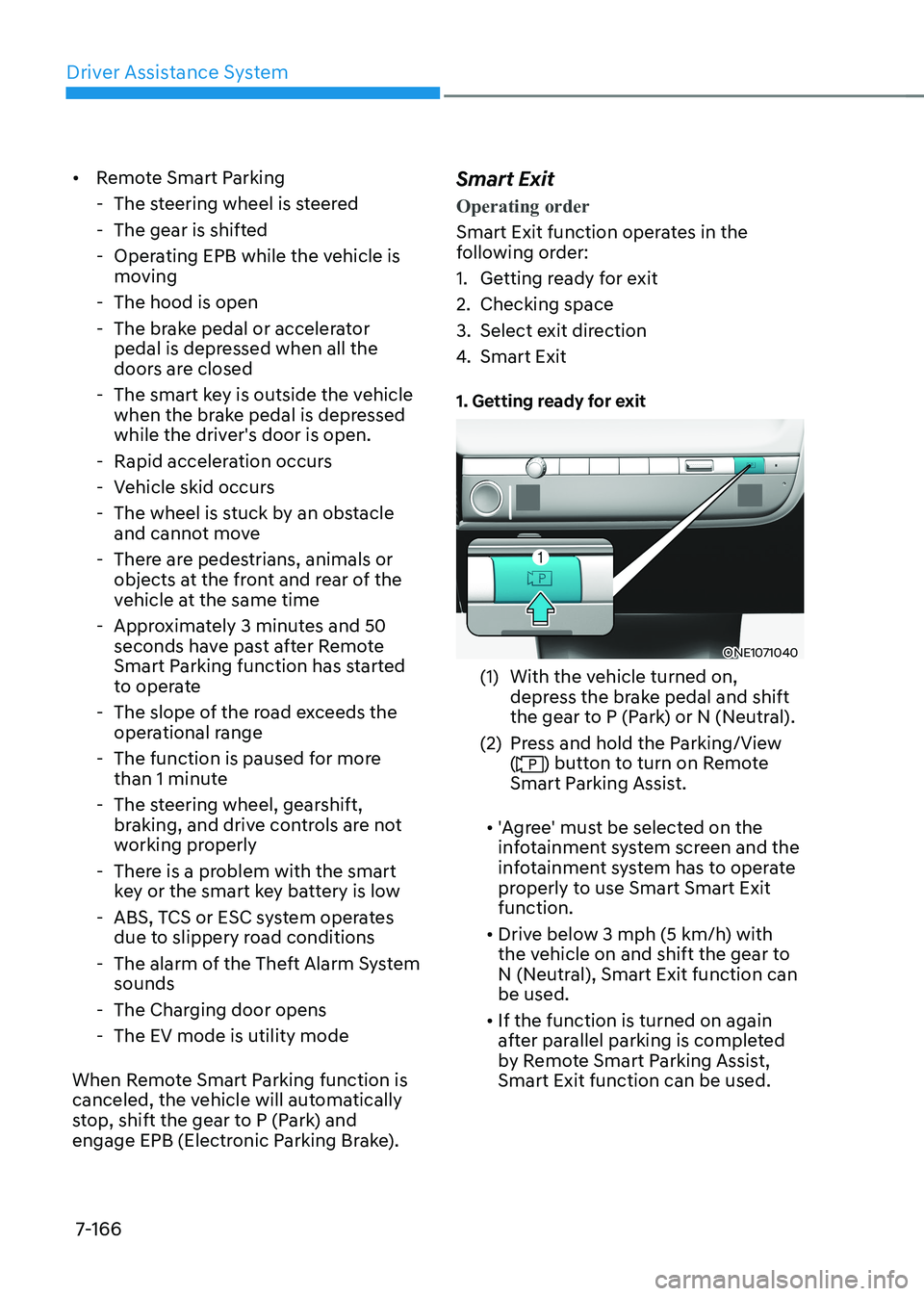
engage EPB (Electronic Parking Brake). Smart Exit
Operating order
Smart Exit function operates in the
following order:
1. Getting ready for exit
2. Checking space
3. Select exit direction
4.
Smart Exit
1. Getting ready for exit
ONE1071040
(1) With the vehicle turned on, depress the brake pedal and shift
the gear to P (Park) or N (Neutral).
(2) Press and hold the Parking/View (
) button to turn on Remote
Smart Parking Assist.
• 'Agree' must be selected on the
infotainment system screen and the
infotainment system has to operate
properly to use Smart Smart Exit function.
• Drive below 3 mph (5 km/h) with
the vehicle on and shift the gear to
N (Neutral), Smart Exit function can be used.
• If the function is turned on again
after parallel parking is completed
by Remote Smart Parking Assist, Smart Exit function can be used.
Page 570 of 680
Driver Assistance System
7-168
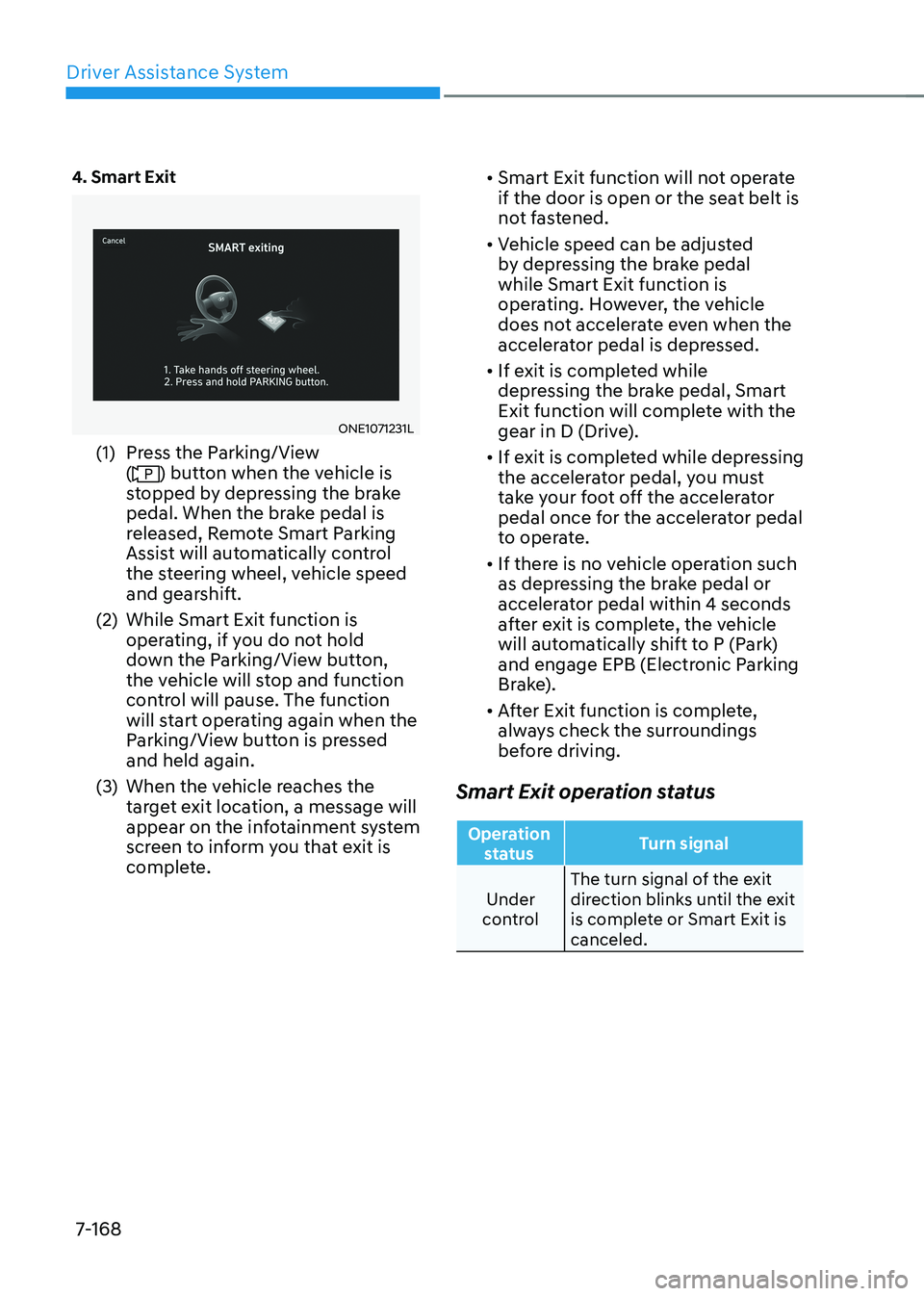
4. Smart Exit
ONE1071231L
(1) Press the Parking/View (
) button when the vehicle is
stopped by depressing the brake
pedal. When the brake pedal is
released, Remote Smart Parking
Assist will automatically control
the steering wheel, vehicle speed
and gearshift.
(2) While Smart Exit function is operating, if you do not hold
down the Parking/View button,
the vehicle will stop and function
control will pause. The function
will start operating again when the
Parking/View button is pressed and held again.
(3) When the vehicle reaches the target exit location, a message will
appear on the infotainment system
screen to inform you that exit is
complete. •
Smart Exit function will not operate
if the door is open or the seat belt is
not fastened.
• Vehicle speed can be adjusted
by depressing the brake pedal while Smart Exit function is
operating. However, the vehicle
does not accelerate even when the
accelerator pedal is depressed.
• If exit is completed while
depressing the brake pedal, Smart
Exit function will complete with the
gear in D (Drive).
• If exit is completed while depressing
the accelerator pedal, you must
take your foot off the accelerator
pedal once for the accelerator pedal
to operate.
• If there is no vehicle operation such
as depressing the brake pedal or
accelerator pedal within 4 seconds
after exit is complete, the vehicle
will automatically shift to P (Park)
and engage EPB (Electronic Parking
Brake).
• After Exit function is complete,
always check the surroundings
before driving.
Smart Exit operation status
Operation status Turn signal
Under
control The turn signal of the exit
direction blinks until the exit
is complete or Smart Exit is canceled.
Page 672 of 680

I
I -7
H
Hazard Warning Flasher ........................................................................................ 8-2
High Beam Assist (HBA) ................................................................................... 5-93
High Beam Assist Malfunction and Limitations ..............................................5-95
High Beam Assist Operation ............................................................................ 5-94
High Beam Assist Settings ............................................................................... 5-93
Highway Driving Assist (HDA) ........................................................................ 7-101
Highway Driving Assist Malfunction and Limitation ....................................7-111
Highway Driving Assist Operation ................................................................ 7-103
Highway Driving Assist Settings ................................................................... 7-102
IIf the vehicle will not start ..................................................................................... 8-3
Confirm the EV Battery is not Low on the Charge Gauge ................................8-3
If You have a Flat Tire (with Tire Mobility Kit) ..................................................8-12
Components of the Tire Mobility Kit ............................................................... 8-14
How to Adjust Tire Pressure ............................................................................ 8-18 Introduction ...................................................................................................... 8-12
Notes on the Safe Use of the Tire Mobility Kit ................................................8-13
Notes on the Safe Use of the Tire Mobility Kit ................................................8-19
Using the Tire Mobility Kit When a Tire is Flat ..............................................8-15
Important Safety Precautions ................................................................................. 3-2
Air Bag Hazards ................................................................................................. 3-2
Always Wear Your Seat Belt .............................................................................. 3-2
Control Your Speed ............................................................................................ 3-2
Driver Distraction ............................................................................................... 3-2
Keep Your Vehicle In Safe Condition ................................................................ 3-2
Restrain All Children .......................................................................................... 3-2
In Case of an Emergency While Driving ...............................................................8-2
If the Vehicle Stalls at A Crossroad or Crossing ................................................8-2
If the Vehicle Stalls While Driving .................................................................... 8-2
If You Have a Flat Tire While Driving ...............................................................8-3
Infotainment System .......................................................................................... 5-132
Antenna .......................................................................................................... 5-132
Bluetooth ®
Wireless Technology .................................................................... 5-134
Infotainment System ...................................................................................... 5-133
Steering Wheel Remote Controls ................................................................... 5-132
USB Port ........................................................................................................ 5-132
Voice Recognition .......................................................................................... 5-134