2023 HYUNDAI I30 smart cruise
[x] Cancel search: smart cruisePage 18 of 533

1-5
Your vehicle at a glance
1
I IN
NS
ST
TR
RU
UM
ME
EN
NT
T
P
PA
AN
NE
EL
L
O
OV
VE
ER
RV
VI
IE
EW
W
(
(I
I)
)
1. Instrument cluster ..........................3-41
2. Light control/Turn signals ................3-81
3. Wiper/Washer..................................3-92
4. Steering wheel audio controls/ ........4-4
Bluetooth
®wireless technology
hands-free controls ..........................4-5
5. Cruise controls/ ............................5-100
Smart cruise controls ....................5-106
6. Horn ................................................3-19
7. Driver’s front air bag........................2-47
8. Key ignition switch/ ..........................5-7
Engine Start/Stop button ................5-11
9. Audio system/ ..................................4-9
Navigation system ..........................4-5
10. Hazard warning flasher switch ........6-2
11. Central door lock switch ..............3-13
12. Manual climate control system/ ..3-105
Automatic climate control
system ........................................3-114
13. Passenger’s front air bag ..............2-47
14. Glove box ....................................3-131
15. Cup holder ..................................3-133
16. Console box ................................3-131
OPD017005RThe actual shape may differ from the illustration.
Page 137 of 533
3-54
Convenient features of your vehicle
Low Fuel Level
Warning Light
This warning light illuminates:
When the fuel tank is nearly empty.
Add fuel as soon as possible.
Driving with the Low Fuel Level
warning light on or with the fuel
level below “E (Empty)” can cause
the engine to misfire and damage
the catalytic converter (if
equipped).
Washer Fluid Warning
Light (if equipped)
This warning light illuminates:
When the washer fluid level in the
reservoir is nearly empty.
In this case, you should refill the
washer fluid.
Master Warning Light
This indicator light illuminates:
When there is a malfunction in the
below systems.
- LED head lamp malfunction
(if equipped)
- Blind-spot Collision Warning
(BCW) system malfunction (if
equipped)
- Forward Collision-Avoidance
Assist (FCA) system malfunction
(if equipped)
- Smart Cruise Control malfunction
(if equipped)
To identify the details of the warn-
ing, look at the LCD display.
NOTICE
Page 152 of 533
3-69
Convenient features of your vehicle
3
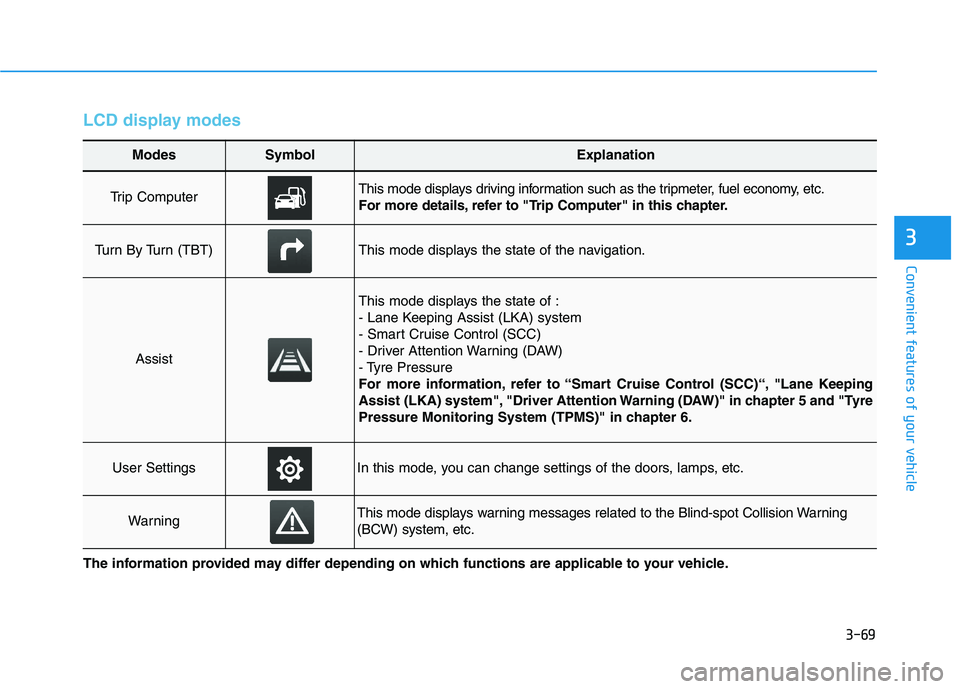
LCD display modes
Modes SymbolExplanation
Trip Computer This mode displays driving information such as the tripmeter, fuel economy, etc.
For more details, refer to "Trip Computer" in this chapter.
Turn By Turn (TBT)This mode displays the state of the navigation.
Assist
This mode displays the state of :
- Lane Keeping Assist (LKA) system
- Smart Cruise Control (SCC)
- Driver Attention Warning (DAW)
- Tyre Pressure
For more information, refer to “Smart Cruise Control (SCC)“, "Lane Keeping
Assist (LKA) system", "Driver Attention Warning (DAW)" in chapter 5 and "Tyre
Pressure Monitoring System (TPMS)" in chapter 6.
User SettingsIn this mode, you can change settings of the doors, lamps, etc.
WarningThis mode displays warning messages related to the Blind-spot Collision Warning
(BCW) system, etc.
The information provided may differ depending on which functions are applicable to your vehicle.
Page 154 of 533
3-71
Convenient features of your vehicle
3
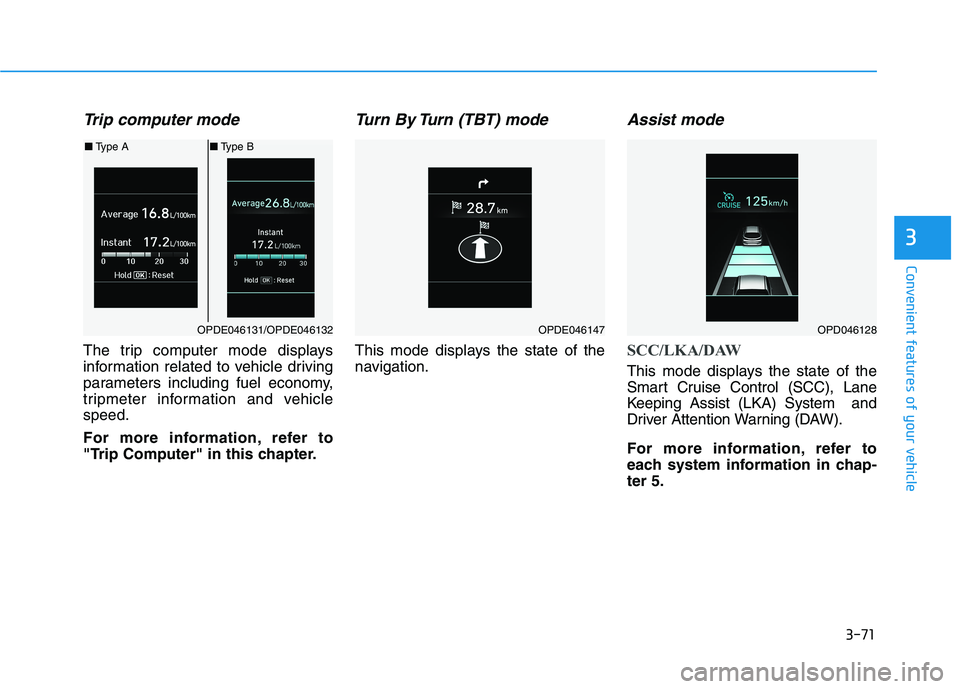
Trip computer mode
The trip computer mode displays
information related to vehicle driving
parameters including fuel economy,
tripmeter information and vehicle
speed.
For more information, refer to
"Trip Computer" in this chapter.
Turn By Turn (TBT) mode
This mode displays the state of the
navigation.
Assist mode
SCC/LKA/DAW
This mode displays the state of the
Smart Cruise Control (SCC), Lane
Keeping Assist (LKA) System and
Driver Attention Warning (DAW).
For more information, refer to
each system information in chap-
ter 5.
OPDE046131/OPDE046132
■Type A■Type B
OPDE046147OPD046128
Page 155 of 533

3-72
Convenient features of your vehicle
Tyre Pressure
This mode displays information relat-
ed to Tyre Pressure.
For more information, refer to
"Tyre Pressure Monitoring System
(TPMS)" in chapter 6.
Warning message mode
If one of followings occurs, warning
messages will be displayed on the
LCD display for several seconds.
- LED head lamp malfunction
(if equipped)
- BCW (Blind-Spot Collision
Warning) malfunction (if equipped)
- FCA (Forward Collision-Avoidance
Assist) malfunction (if equipped)
- SCC (Smart Cruise Control) mal-
function (if equipped)
User settings mode
In this mode, you can change the
settings of the instrument cluster,
doors, lamps, etc.
1. Driver Assistance
2. Door
3. Lights
4. Sound
5. Convenience
6. Service Interval
7. Other Features
8. Reset
The information provided may dif-
fer depending on which functions
are applicable to your vehicle.
OPD047148L
Page 156 of 533
3-73
Convenient features of your vehicle
3
1. Driver Assistance
- Lane Departure Warning/Standard
LKA/Active LKA
To adjust the sensitivity of the Lane
Keeping Assist System.
For more information, refer to the
"Lane Keeping Assist (LKA) sys-
tem" in chapter 5.
- Off/Normal Sensitivity/High
Sensitivity
To adjust the sensitivity of the Driver
Attention Warning (DAW).
For more information, refer to the
"Driver Attention Warning (DAW)
system" in chapter 5.
- Slow/Normal/Fast
To adjust the sensitivity of the Smart
Cruise Control system.
For more information, refer to the
"Smart Cruise Control" in chapter 5.
To activate or deactivate the Forward
Collision-Avoidance Assist (FCA).
For more information, refer to the
"Forward Collision-Avoidance
Assist (FCA) system" in chapter 5.
- Late/Normal/Early
To adjust the initial warning alert time
for Forward Collision-Avoidance
Assist (FCA) system.
For more information, refer to
"Forward Collision-Avoidance
Assist (FCA) system" in chapter 5.
Warning
To activate or deactivate the Rear
Cross-Traffic Collision Warning func-
tion.
For more information, refer to
"Blind-Spot Collision Warning
(BCW)" in chapter 5.
Page 267 of 533

5
Forward collision assist (FCA) system
(Front radar + Front camera) ............................5-76
System Setting and Activation.....................................5-76
FCA Warning Message and System Control ............5-78
FCA Sensor .......................................................................5-80
System Malfunction .......................................................5-82
Limitations of the System .............................................5-84
Lane keeping assist (LKA) system ....................5-88
LKA Operation..................................................................5-90
Warning Light and Message.........................................5-93
Limitations of the System .............................................5-94
LKA Function Change ...................................................5-95
Driver attention warning (DAW) system ..........5-96
System Setting and Activation.....................................5-96
Resetting the System .....................................................5-97
System Standby ...............................................................5-98
System Malfunction .......................................................5-98
Cruise control .....................................................5-100
Cruise Control operation .............................................5-100
Smart cruise control system (SCC) .................5-106
Smart Cruise Control Speed .......................................5-107
Smart Cruise Control Vehicle-to-Vehicle
Distance ...........................................................................5-112
Sensor to Detect Distance to the Vehicle
Ahead ...............................................................................5-115
To Adjust the Sensitivity of Smart Cruise
Control .............................................................................5-117
To Convert to Cruise Control Mode .........................5-117
Limitations of the System...........................................5-118
Special driving conditions .................................5-123
Hazardous driving conditions ....................................5-123
Rocking the vehicle ......................................................5-123
Smooth cornering .........................................................5-124
Driving at night ..............................................................5-124
Driving in the rain .........................................................5-124
Driving in flooded areas..............................................5-125
Highway driving .............................................................5-125
Reducing the risk of a rollover .................................5-126
Page 364 of 533

5-99
Driving your vehicle
5
The Driver Attention Warning
(DAW) system utilises the camera
sensor on the front windscreen for
its operation. To keep the camera
sensor in the best condition, you
should observe the following:
NEVER install any accessories or
stickers on the front windscreen,
nor tint the front windscreen.
NEVER locate any reflective
objects (i.e. white paper, mirror)
over the instrument panel. Any
light reflection may cause a mal-
function of the Driver Attention
Warning (DAW) system.
Pay extreme caution to keep the
camera sensor out of water.
NEVER disassemble the camera
assembly, nor apply any impact
on the camera assembly.
Do not disassemble the camera
temporarily for tinted window or
attaching any types of coatings
and accessories.
(Continued)(Continued)
If you disassemble a camera and
assemble it again, we recom-
mend that you take your vehicle
to an authorised HYUNDAI deal-
er and have the system checked
for calibration.
NOTICE
The Driver Attention Warning
(DAW) system may not operate
properly or operate with limited
alerts in the following situations:
The lane detection perform-
ance is limited. For more
information, refer to "Lane
Keeping Assist (LKA) system"
in this chapter.
The vehicle is violently driven
or is abruptly turned for
obstacle avoidance (e.g. con-
struction area, other vehicles,
fallen objects, bumpy road).
Forward drivability of the
vehicle is severely under-
mined (possibly due to wide
variation in tyre pressures,
uneven tyre wear-out, toe-
in/toe-out alignment).
(Continued)
(Continued)
The vehicle drives on a wind-
ing road.
The vehicle drives on a
bumpy road.
The vehicle drives through a
windy area.
The vehicle is controlled by
the following driving assist
systems:
- Lane Keeping Assist (LKA)
system
- Forward Collision-
Avoidance Assist (FCA) sys-
tem
- Smart Cruise Control (SCC)
system
CAUTION
Playing the vehicle audio sys-
tem at high volume may offset
the Driver Attention Warning
(DAW) system warning sounds.
CAUTION