Page 112 of 533

3-29
Convenient features of your vehicle
3
Remote window closing
function (if equipped)
You can still control the window
movement with the engine turned off
by pressing the door lock button (1)
for more than 3 seconds. The window
moves (up), as long as you press the
door lock button. The window move-
ment stops, when you release the
door lock button. The hazard warning
lights blink 3 times, when the window
is completely closed.
Information
• The remote window closing function
may abruptly stop, when you move
away from your vehicle during the
operation. Stay in close proximity of
your vehicle, whilst monitoring the
window movement.
• One of the windows may stop oper-
ating, when the window is interrupt-
ed by certain force. However, the
other windows will keep operating.
Thus, you should make sure that all
windows are closed, and that the
hazard warning lights blink 3 times.
i
NEVER leave the keys in your
vehicle with unsupervised
children, when the engine is
running.
NEVER leave any child unat-
tended in the vehicle. Even
very young children may inad-
vertently cause the vehicle to
move, entangle themselves in
the windows, or otherwise
injure themselves or others.
Always double check to make
sure arms, hands, head and
other obstructions are safely
out of the way before closing
a window.
Do not allow children to play
with the power windows. Keep
the driver’s door power window
lock switch in the LOCK posi-
tion (pressed). Serious injury
can result from unintentional
window operation by the child.
Do not extend your head,
arms or body outside the win-
dows whilst driving.
WARNING
OPD047044L
Page 124 of 533
3-41
Convenient features of your vehicle
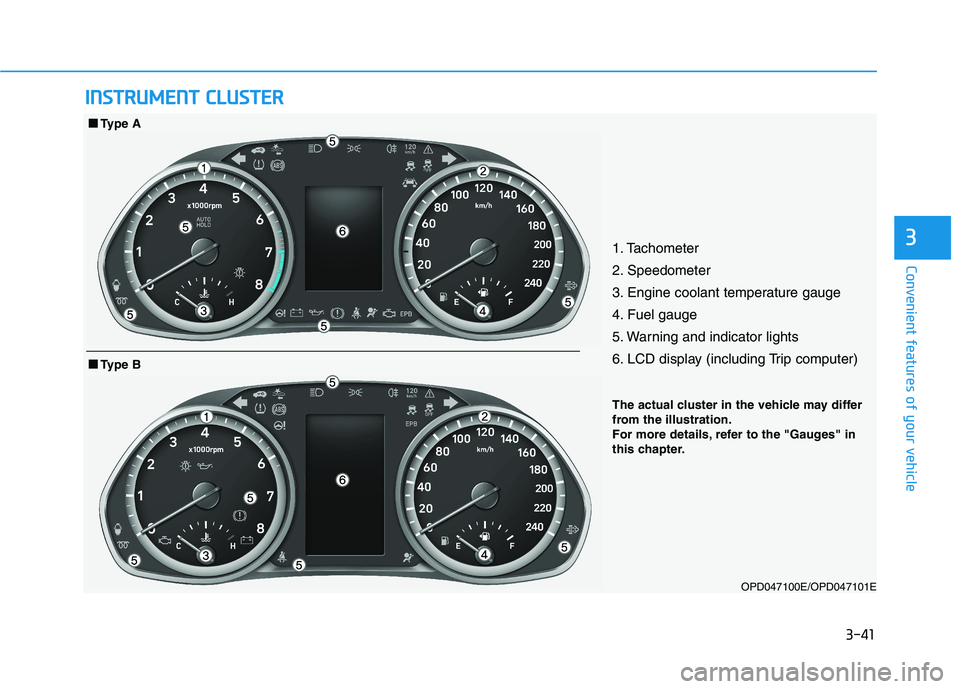
31. Tachometer
2. Speedometer
3. Engine coolant temperature gauge
4. Fuel gauge
5. Warning and indicator lights
6. LCD display (including Trip computer)
OPD047100E/OPD047101E
■ ■
Type B
■ ■
Type A
I IN
NS
ST
TR
RU
UM
ME
EN
NT
T
C
CL
LU
US
ST
TE
ER
R
The actual cluster in the vehicle may differ
from the illustration.
For more details, refer to the "Gauges" in
this chapter.
Page 125 of 533
3-42
Convenient features of your vehicle
Instrument cluster control
Instrument panel illumination
When the vehicle's position lights or
headlamps are on, press the illumi-
nation control button to adjust the
brightness of the instrument panel
illumination.
When pressing the illumination con-
trol button, the interior switch illumi-
nation intensity is also adjusted. The brightness of the instrument
panel illumination is displayed.
If the brightness reaches the maxi-
mum or minimum level, an chime
will sound. Never adjust the instrument clus-
ter whilst driving. This could
result in loss of control and lead
to an accident that may cause
death, serious injury, or vehicle
damage.
WARNING
OPDE046110
OPDE046049R
Page 131 of 533
3-48
Convenient features of your vehicle
Shift Indicator Pop-up (if equipped)
The pop-up that indicates the current
gear position is displayed in the clus-
ter for about 2 seconds when shifting
into other positions (P/R/N/D).
Warning and indicator lights
Information
Make sure that all warning lights are
OFF after starting the engine. If any
light is still ON, this indicates a situa-
tion that needs attention.
Air Bag Warning Light
This warning light illuminates:
When you turn the ignition switch
or the Engine Start/Stop button to
the ON position.
- It illuminates for approximately 6
seconds and then goes off.
When there is a malfunction with
the SRS.
In this case, we recommend that
you have the vehicle inspected by
an authorised HYUNDAI dealer.
Seat Belt Warning Light
This warning light informs the driver
that the seat belt is not fastened.
For more details, refer to “Seat
Belts” in chapter 2.
i
OTL045134
Page 133 of 533

3-50
Convenient features of your vehicle
Anti-lock Brake System
(ABS) Warning Light
This warning light illuminates:
When you set the ignition switch or
the Engine Start/Stop button to the
ON position.
- It illuminates for approximately 3
seconds and then goes off.
When there is a malfunction with
the ABS (The normal braking sys-
tem will still be operational without
the assistance of the anti-lock
brake system).
In this case, we recommend that
you have the vehicle inspected by
an authorised HYUNDAI dealer.
Electronic Brake Force
Distribution (EBD)
System Warning Light
These two warning lights illuminate
at the same time whilst driving:
When the ABS and regular brake
system may not work normally.
In this case, we recommend that
you have the vehicle inspected by
an authorised HYUNDAI dealer.
Electronic Brake Force
Distribution (EBD) System
Warning Light
When both ABS and Parking
Brake & Brake Fluid Warning
Lights are on, the brake system
will not work normally and you
may experience an unexpected
and dangerous situation during
sudden braking.
In this case, avoid high speed
driving and abrupt braking.
We recommend you have the
vehicle inspected by an autho-
rised HYUNDAI dealer as soon
as possible.
WARNING
Page 134 of 533

3-51
Convenient features of your vehicle
3
Information - Electronic
Brake Force Distribution
(EBD) System Warning Light
When the ABS Warning Light is on or
both ABS and Parking Brake & Brake
Fluid Warning Lights are on, the
speedometer, odometer, or tripmeter
may not work. Also, the EPS Warning
Light may illuminate and the steering
effort may increase or decrease.
In this case, we recommend you have
the vehicle inspected by an authorised
HYUNDAI dealer as soon as possible.Electronic Parking
Brake (EPB) Warning
Light (if equipped)
This warning light illuminates:
When you set the ignition switch or
the Engine Start/Stop button to the
ON position.
- It illuminates for approximately 3
seconds and then goes off.
When there is a malfunction with
the EPB.
In this case, we recommend that
you have the vehicle inspected by
an authorised HYUNDAI dealer.
Information
The Electronic Parking Brake (EPB)
Warning Light may illuminate when
the Electronic Stability control (ESC)
Indicator Light comes on to indicate
that the ESC is not working properly
(This does not indicate malfunction of
the EPB).
AUTO HOLD Indicator
Light (if equipped)
This indicator light illuminates:
[White] When you activate the auto
hold system by pressing the AUTO
HOLD button.
[Green] When you stop the vehicle
completely by depressing the
brake pedal with the auto hold sys-
tem activated.
[Yellow] When there is a malfunc-
tion with the auto hold system.
In this case, we recommend that
you have the vehicle inspected by
an authorised HYUNDAI dealer.
For more details, refer to “Auto
Hold” in chapter 5.
i
iEPB
Page 142 of 533
3-59
Convenient features of your vehicle
3
High Beam Indicator
Light
This indicator light illuminates:
When the headlamps are on and in
the high beam position.
When the turn signal lever is pulled
into the Flash-to-Pass position.
Light ON Indicator
Light
This indicator light illuminates:
When the tail lights or headlamps
are on.
Rear Fog Indicator
Light
This indicator light illuminates:
When the rear fog lights are on.
Page 148 of 533
3-65
Convenient features of your vehicle
3
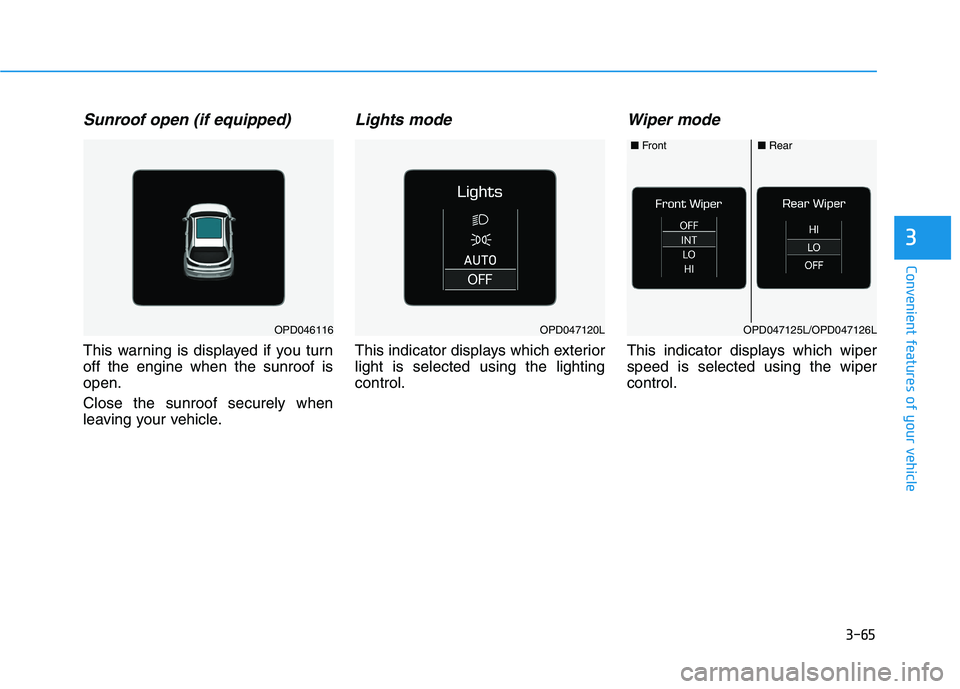
Sunroof open (if equipped)
This warning is displayed if you turn
off the engine when the sunroof is
open.
Close the sunroof securely when
leaving your vehicle.
Lights mode
This indicator displays which exterior
light is selected using the lighting
control.
Wiper mode
This indicator displays which wiper
speed is selected using the wiper
control.
OPD046116OPD047120LOPD047125L/OPD047126L
■Front■Rear