2023 HONDA PILOT remote control
[x] Cancel search: remote controlPage 401 of 814

400
Features
General Information on the Audio System
SiriusXM® Radio Service*
1. You need your radio ID ready before regist ering for subscription. To see the ID on
the screen, select Channel 0.
2. Have your radio ID ready, and either call or visit the SiriusXM ® website to
subscribe.
Switch to the SiriusXM ® mode by using the audio remote controls on the steering
wheel, or through the audio/information screen, and stay in this mode for about 30
minutes until the service is activated. Make sure your vehicle is in an open area with
good reception.
Channel **** is not subscribed. Call SiriusXM to subscribe.
*1
You are not subscribed to the channel selected.
Subscription Updated:
SiriusXM ® radio is receiving informat ion update from the network.
Channel Not Available:
No such channel exists, or the artist or title information is unavailable.
No Signal:
The signal is too weak in the current location.
Check Tuner:
There is a problem with the SiriusXM ® tuner. Contact a dealer.
Antenna Disconnected, Antenna Shorted:
There is a problem with the SiriusXM ® antenna. Contact a dealer.
*1 : ****part is variable characters, and w ill change depending upon the channel selected.
■Subscribing to SiriusXM® Radio
■Receiving SiriusXM ® Radio
■SiriusXM ® Radio Display Messages
1 Subscribing to SiriusXM ® Radio
Contact Information for SiriusXM ® Radio:
•U.S.: SiriusXM ® Radio at www.siriusxm.com/
subscribenow , or 1-866-635-2349
•Canada: SiriusXM ® Canada at www.siriusxm.ca/
subscribe-now , or 1-877-209-0079
1Receiving SiriusXM ® Radio
The SiriusXM ® satellites are in orbit over the equator;
therefore, objects south of the vehicle may cause
satellite reception interruptions. Sa tellite signals are
more likely to be blocked by tall buildings and
mountains the farther north you travel from the
equator.
You may experience rece ption problems under the
following circumstances:
•In a location with an obstruction to the south of
your vehicle.
•In tunnels•On the lower level of a multi-tiered road
•Large items carried on the roof rack
* Not available on all models
23 PILOT-31T906000_03.book 400 ページ 2022年10月31日 月曜日 午前10時26分
Page 448 of 814
447
uuCustomized Features u
Continued
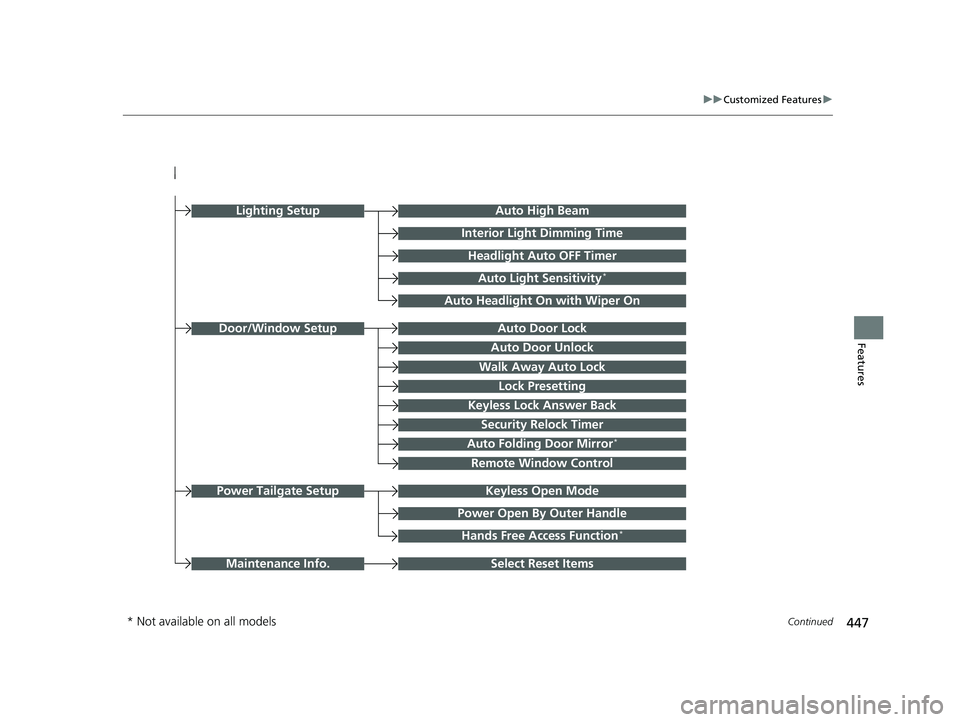
FeaturesAuto Door Unlock
Auto Door Lock
Walk Away Auto Lock
Lock Presetting
Keyless Lock Answer Back
Door/Window Setup
Auto High Beam
Interior Light Dimming Time
Headlight Auto OFF Timer
Auto Light Sensitivity*
Auto Headlight On with Wiper On
Auto Folding Door Mirror*
Keyless Open ModePower Tailgate Setup
Select Reset ItemsMaintenance Info.
Power Open By Outer Handle
Hands Free Access Function*
Remote Window Control
Lighting Setup
Security Relock Timer
* Not available on all models
23 PILOT-31T906000_03.book 447 ページ 2022年10月31日 月曜日 午前10時26分
Page 454 of 814
453
uuCustomized Features u
Continued
Features
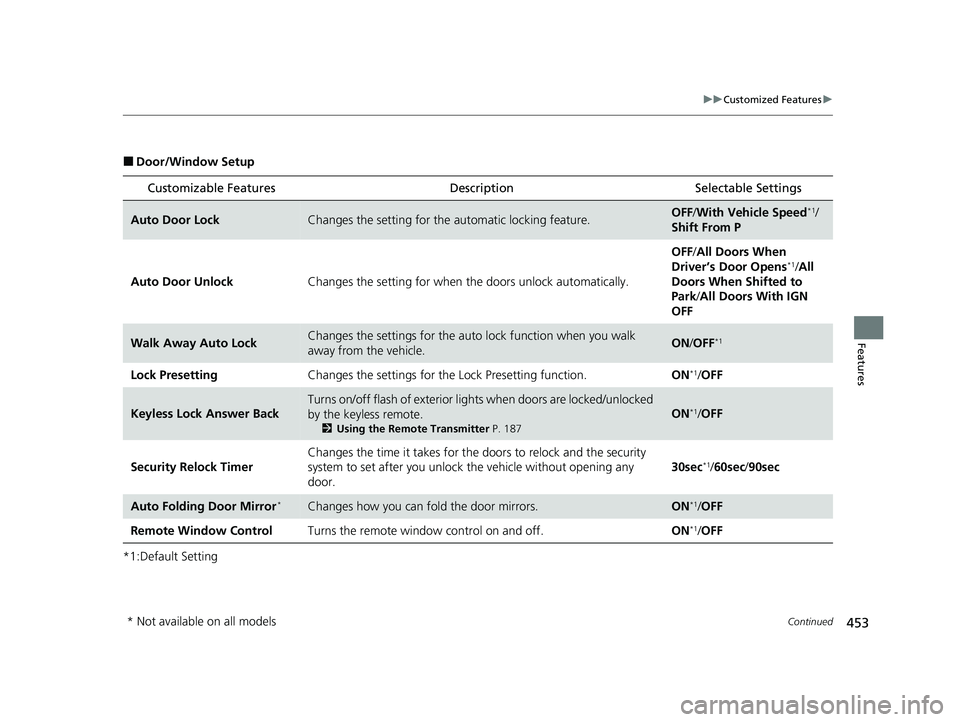
■Door/Window Setup
*1:Default Setting
Customizable Features Description Selectable Settings
Auto Door LockChanges the setting for the automatic locking feature.OFF/With Vehicle Speed*1/
Shift From P
Auto Door Unlock Changes the setting for when the doors unlock automatically. OFF
/All Doors When
Driver’s Door Opens
*1/ All
Doors When Shifted to
Park/ All Doors With IGN
OFF
Walk Away Auto LockChanges the settings for the auto lock function when you walk
away from the vehicle.ON /OFF*1
Lock Presetting Changes the settings for the Lock Presetting function. ON*1/OFF
Keyless Lock Answer Back
Turns on/off flash of exterior light s when doors are locked/unlocked
by the keyless remote.
2 Using the Remote Transmitter P. 187
ON*1/OFF
Security Relock Timer Changes the time it takes for the
doors to relock and the security
system to set after you unlock the vehicle without opening any
door. 30sec
*1/
60sec /90sec
Auto Folding Door Mirror*Changes how you can fold the door mirrors.ON*1/OFF
Remote Window Control Turns the remote window control on and off. ON
*1/OFF
* Not available on all models
23 PILOT-31T906000_03.book 453 ページ 2022年10月31日 月曜日 午前10時26分
Page 457 of 814
456
Features
HomeLink® Universal Transceiver*
The HomeLink ® Universal Transceiver can be pr ogrammed to operate up to three
remote controlled devices around your home , such as garage doors, lighting, or
home security systems.
Refer to the safety information that came wi th your garage door opener to test that
the safety features are functioning properly. If you do not have the safety
information, contac t the manufacturer.
Before programming HomeLink, make sure th at people and objects are out of the
way of the garage or gate to prevent potential injury or damage.
When programming a garage door opener, park just outside the garage door’s path.
■Important Safety Precautions
1HomeLink ® Universal Transceiver*
Before programming HomeLi nk to operate a garage
door opener, confirm that the opener has an external
entrapment protection system , such as an “electronic
eye,” or other safety and reverse stop features. If it
does not, HomeLink may not be able to operate it.
NOTE:
Some LED lightbulbs instal led in the garage door
opener can interfere with th e training and consistent
operation of your HomeLink device. Please consider
use of Low RF interference bulbs in your garage door
opener.
HomeLink will not operate when the vehicle security
is set or about 30 minutes after the power mode is
set to VEHICLE OFF. If Ho meLink indicator (LED) does
not show when a button is pressed, ensure doors are
unlocked or the power mode is set to ACCESSORY or
ON to return HomeLink to operation. 2 Setting the security system alarm P. 208
* Not available on all models
23 PILOT-31T906000_03.book 456 ページ 2022年10月31日 月曜日 午前10時26分
Page 459 of 814
uuHomeLink ® Universal Transceiver*u Training HomeLink
458
Features
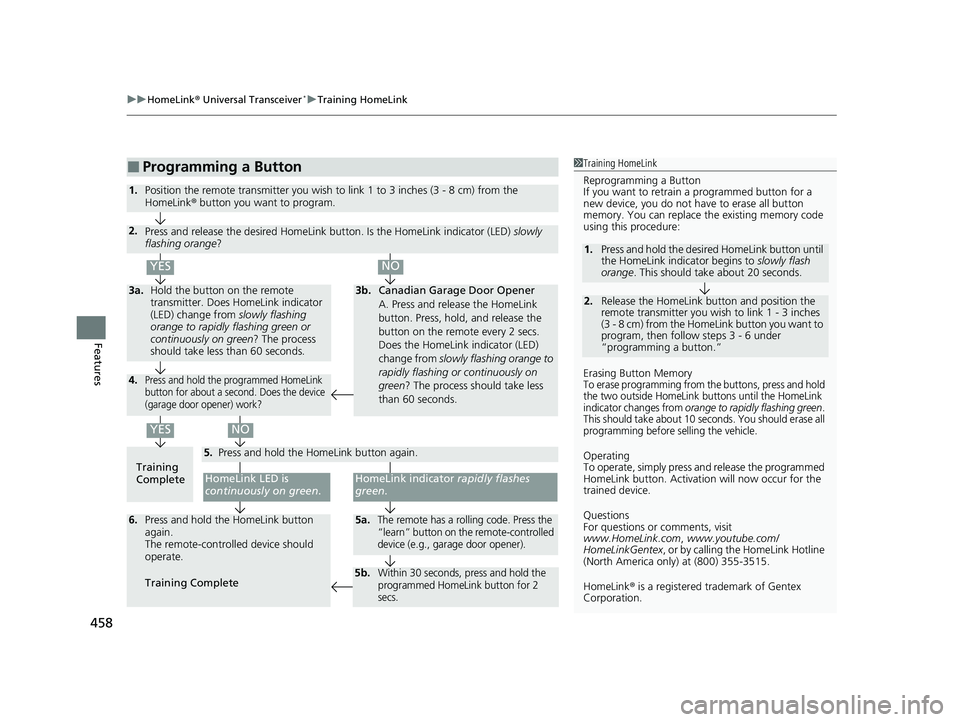
■Programming a Button1Training HomeLink
Reprogramming a Button
If you want to retrain a programmed button for a
new device, you do not ha ve to erase all button
memory. You can replace the existing memory code
using this procedure:
Erasing Button Memory
To erase programming from the buttons, press and hold
the two outside HomeLink buttons until the HomeLink
indicator changes from
orange to rapidly flashing green.
This should take about 10 seconds. You should erase all
programming before selling the vehicle.
Operating
To operate, simply press and release the programmed
HomeLink button. Activati on will now occur for the
trained device.
Questions
For questions or comments, visit
www.HomeLink.com , www.youtube.com/
HomeLinkGentex , or by calling the HomeLink Hotline
(North America only) at (800) 355-3515.
HomeLink® is a registered tra demark of Gentex
Corporation.
2.
1. Press and hold the desired HomeLink button until
the HomeLink indi
cator begins to slowly flash
orange . This should take about 20 seconds.
Release the HomeLink button and position the
remote transmitter you wish to link 1 - 3 inches
(3 - 8 cm) from the Home Link button you want to
program, then follow steps 3 - 6 under
“programming a button.”
Training
CompleteHomeLink LED is
continuously on green .
YES
YES
1.Position the remote transmitter you wish to link 1 to 3 inches (3 - 8 cm) from the
HomeLink® button you want to program.
3b.Canadian Garage Door Opener
A. Press and release the HomeLink
button. Press, hold, and release the
button on the remote every 2 secs.
Does the HomeLink indicator (LED)
change from slowly flashing orange to
rapidly flashing or continuously on
green ? The process should take less
than 60 seconds.
NO
2. Press and release the desired HomeLink but ton. Is the HomeLink indicator (LED) slowly
flashing orange ?
NO
3a.Hold the button on the remote
transmitter. Does HomeLink indicator
(LED) change from slowly flashing
orange to rapidly flashing green or
continuously on green? The process
should take less than 60 seconds.
5. Press and hold the HomeLink button again.
HomeLink indicator rapidly flashes
green .
5a.The remote has a rolling code. Press the
“learn” button on th e remote-controlled
device (e.g., garage door opener).6. Press and hold the HomeLink button
again.
The remote-controll ed device should
operate.
Training Complete
5b.Within 30 seconds, press and hold the
programmed HomeLink button for 2
secs.
4.Press and hold the programmed HomeLink
button for about a second. Does the device
(garage door opener) work?
23 PILOT-31T906000_03.book 458 ページ 2022年10月31日 月曜日 午前10時26分
Page 525 of 814

524
Driving
When Driving
Starting the Engine
1.Make sure the parking brake is applied.
u The parking brake and brake system
indicator (red) comes on for 30 seconds
when you pull up the electric parking
brake switch.
2. Depress the brake pedal.1Starting the Engine
Keep your foot firmly on the brake pedal when
starting the engine.
The engine is harder to st art in cold weather and in
thinner air found at al titudes above 8,000 feet
(2,400 meters).
When starting the engine in cold weather, turn off all
electrical accessories such as the lights, climate
control system and rear de fogger in order to reduce
battery drain.
If you live in a region where winter is extremely cold,
an engine block heater will improve starting and
warming of the engine. Consult a dealer for details.
If the exhaust system sounds abnormal or you can
smell exhaust gas inside the vehicle, have your vehicle
checked by a dealer. There may be a problem with
the engine or exhaust system.
Bring the keyless remote close to the ENGINE
START/STOP button if the batte ry in the keyless
remote is weak.
2 If the Keyless Remote Battery is Weak
P. 764
The engine may not start if the keyless remote is
subjected to strong radio waves.
Brake Pedal
23 PILOT-31T906000_03.book 524 ページ 2022年10月31日 月曜日 午前10時26分
Page 530 of 814

Continued529
uuWhen Driving uStarting the Engine
Driving
■To stop the engine
Press and hold the button for one
second.
If the engine stops successfully, the exterior
lights flash once.
When the keyless remote is out of the keyless
access system range, the exterior lights will
not flash.
The engine will not stop.u Go within the range, and try again.1Remote Engine Start*
The engine may stop whil e it is running if:•You do not start the vehicl e within 10 minutes of
starting the engine with the keyless remote.
•The engine is stopped by using the keyless remote.•The security system alarm is not set.
•The door is unlocked with the built-in key.
•The hood is open, or any door or the tailgate is
unlocked.
•You press the shift lever release button.
•The engine coolant temper ature is extremely high.•The battery is low.
•The engine oil pressure is low.
•The malfunction indicator la mp comes on if there is
a problem with the emissions control systems.
While the engine is running, the vehicle will
automatically preconditi on inside the vehicle.
When it is warm outside:
•The climate control system is activated in
recirculation mode.
When it is cold outside:
•The defroster is activated at a moderately warm
temperature.
•The rear defogger, heated door mirrors*, front seat
heaters*, and heated steering wheel* are activated.
2 Rear Defogger/Heated Door Mirror*
Button P. 232
2 Front Seat Heaters
* P. 280
2 Heated Steering Wheel* P. 279
* Not available on all models
23 PILOT-31T906000_03.book 529 ページ 2022年10月31日 月曜日 午前10時26分
Page 553 of 814

uuWhen Driving uDrive Mode System
552
Driving
Maximizes controllability on soft, sandy roads
or off-highway through powertrain settings.
The mode for the next start-up is sa ved according to the following chart.
Each keyless remote has its own mode saved.
■SAND Mode*1 SAND Mode*
While in SAND mode, the Auto Idle Stop System will
stay disabled regardless of the Auto Idle Stop OFF
button.
2 Auto Idle Stop P. 542
While in SAND mode, the VSA ® OFF indicator turns
on to indicate that the VSA ® system is optimized for
this drive mode. 2 VSA ® On and Off P. 556
■Next Start-up Mode
Last ModeNext Mode
SPORT*NORMAL
NORMALNORMAL
ECONECON
SNOWNORMAL
TRAIL*NORMAL
SAND*NORMAL
TOWNORMAL
Models with driving position memory system
* Not available on all models
23 PILOT-31T906000_03.book 552 ページ 2022年10月31日 月曜日 午前10時26分