2023 HONDA PILOT navigation system
[x] Cancel search: navigation systemPage 393 of 814

392
uuAudio System Basic Operation uAndroid AutoTM
Features
Android AutoTM
When you connect an Android phone to the audio system via the USB port or
wirelessly, Android Auto is automatically initiated. When connected via Android
Auto, you can use the audio/information screen to access the Phone, Google Maps
(Navigation), and Google Now functions. When you first use Android Auto, a
tutorial will appe ar on the screen.
We recommend that you complete this tuto rial while safely parked before using
Android Auto.
2 USB Ports P. 293
2 Auto Pairing Connection P. 393
•Maps
Display Google Maps and use the navigation function just as you would with your
Android phone. When the vehicle is in motion, it is not possible to make keyboard
entries. Stop the vehicle in a safe location to undertake a search or provide other
inputs.
■Android Auto Menu
1 Android AutoTM
We recommend that you upda te Android OS to the
latest version when using Android Auto.
Bluetooth A2DP cannot be used while your phone is
connected to Android Auto.
To use Android Auto on a smartphone with Android
9.0 (Pie) or earl ier, you need to download the
Android Auto app from Google Play to your
smartphone.
Park in a safe place befo re connecting your Android
phone to Android Auto and when launching any
compatible apps.
When your Android phone is connected to Android
Auto, it is not possible to use the Bluetooth® Audio.
However, other previously paired phones can stream
audio via Bluetooth ® while Android Auto is
connected. 2 Phone Setup P. 484
Apple CarPlay and Android Auto cannot run at the
same time.
Android Auto is a trademark of Google LLC.
Android Auto menu screen
Home screen
Android Auto icon
23 PILOT-31T906000_03.book 392 ページ 2022年10月31日 月曜日 午前10時26分
Page 407 of 814

406
uuGeneral Information on the Audio System uHonda App License Agreement
Features
5. Unauthorized Use and Abuse. You are responsible for ensuring your (and any authorized third parties’) use of the SOFTWARE and
SERVICES remains in compliance with this AGREEMENT and all other applicable HONDA TERMS and PROVIDER TERMS. You acknowledge
and agree that any use of the SOFTWARE or SERVICES occurring th rough your VEHICLE will be deemed your actions and that HONDA an d
PROVIDERS may rely upon such actions. You agree to immediately notify us if you suspect fraudulent or abusive activity involvin g the
SOFTWARE or SERVICES. If you so notify us or if we otherwise suspect fraudulent or abusive acti vity, you agree to cooperate with us in any
fraud investigation and to use any fraud prevention measures we pres cribe. Your failure to immediately notify us or cooperate to use such
measures will result in your liability for all fraudulent usage or abusive activity associated with your VEHICLE.
6. SOFTWARE Updates.
The SOFTWARE and SERVICES may be updated when your VEHI CLE is serviced by a DEALER or remotely, over-the-
air, by HONDA from time to time; such update s may occur with or without further notice or your future consent. The SOFTWARE may be
updated at HONDA’s discretion and for any pur pose including, without limitation, to patch or otherwise improve the SOFTWARE or
SERVICES functionality, se curity, or stability. All updates to the SOFTWARE and SERVICES are subject to this AGREEMENT and any other
applicable HONDA TERMS and PROVIDER TERMS.
7. Uninstalling, Removing, and Replacing the SOFTWARE.
Replacing SOFTWARE or HONDA SERVI CES with software or firmware not
provided and installed by HONDA or a DEALER will render all representations and warranties for the SOFTWARE, HONDA SERVICES, an d
VEHICLE functionality reliant upon the SOFTWARE or HONDA SERVICES null and void.
D. SOFTWARE Operationa l Notices and Warnings
1. Vehicle Geolocation Information.
You acknowledge that your VEHICLE may be equi pped with certain traffic and map features. The
traffic feature will automatically collect and transmit, through GPS technology, your Vehicle’s current location (longitude and latitude),
travel direction and speed (“VEHICLE GEOLOCATION INFORMAT ION”) to HONDA and PROVIDERS. The VEHICLE GEOLOCATION
INFORMATION is used by HONDA and PROVIDERS to provide traffic and navigation-related information to you, but may also be used to
provide other SERVICES or offers to you. HONDA will not use such VEHICLE GEOLOCATION INFORMATION for its own marketing efforts,
or provide such information to unaffiliated third parties for their own purposes, without your express consent.
23 PILOT-31T906000_03.book 406 ページ 2022年10月31日 月曜日 午前10時26分
Page 408 of 814

407
uuGeneral Information on the Audio System uHonda App License Agreement
Continued
Features
2. Potential Map Inaccuracy and Route Safety. Maps used by this system may be inaccurate because of changes in roads, traffic controls,
routing, or driving conditions. Always use good judgment and co mmon sense when following suggested routes. Do not follow the ro ute
suggestions if doing so would result in an unsafe or illegal driving maneuver, if you would be placed in an unsafe situation, or if you would
be directed into an area that you consider unsafe. Do not rely on any navigation featur es included in the system to route you to emergency
services. Not all emergency services such as police, fire stations, hospitals, or clinics are likely to be contained in the map database for such
navigation features. Ask local authorities or an emergency services operator for such locations and routes. The driver is ultimately
responsible for the safe operation of the vehicle and therefore, must evaluate whether it is safe to follow the suggested directions. Any
navigation features are pr ovided only as an aid. Make your driving decisions based on your obse rvations of local conditions and existing
traffic regulations. Navigation features are not a substitute for your personal judgment. Any route suggestions made by the SOF TWARE or
SERVICES should never replace any local traffic regulations or your personal judgment or knowledge of safe driving practices.
3. Speech Recognition:
You acknowledge and understand that HONDA and PROV IDERS may record, retain, and use voices commands
when you use the speech recognition componen ts of the SOFTWARE or SERVICES. You and all VEHICLE operators and passengers (a)
consent to the recording and retention of voice commands in support of providing speech recognition components and (b) release HONDA
and PROVIDERS from all claims, liabilities, and losses that may result from any use of such recorded voice commands. Recognitio n errors
are inherent in speech recognition. It is your responsibility to monitor any speech recognition functions included in the syste m and address
any errors. Neither HONDA nor PROVIDERS will be liable for any damages arising out of errors in the speech recognition process.
4. Distraction Hazards.
Navigation features may require manual (non-verbal) input or setup. Attempting to perform such set-up or insert
data while driving can seriously distract your attention and co uld cause a crash or other serious consequences; the ability to undertake such
interactions may also be limited by state or local law, which laws you are responsible to know and follow. Even occasional shor t scans of
the screen may be hazardous if your attention has been diverted away from your driving at a critical time. Pull over and stop the vehicle in
a safe and legal manner before attempting to access a function of the system requiring prolonged attention. Do not raise the vo lume
excessively. Keep the volume at a level where you can still hear outside traffic and emergency signals while driving. Driving while unable
to hear these sounds could result in a crash.
23 PILOT-31T906000_03.book 407 ページ 2022年10月31日 月曜日 午前10時26分
Page 409 of 814
408
uuGeneral Information on the Audio System uHonda App License Agreement
Features
E. Information Coll ection and Storage
1. Information Collection, Use, Transmission and Storage of Data. Consent to Use of Data:
You agree that HONDA and PROVIDERS may
collect and use your information gathered in any manner as part of product support services related to the SOFTWARE or related services.
HONDA may share such information with third parties, including, without limitation, PROVIDERS, th ird party software and services
suppliers, their affiliates and/or their desi gnated agents, solely to improve their products or to provide services or technolo gies to you.
HONDA, third party software and systems s uppliers, their affiliates and/or their designated agent may disclose this information to others,
but not in a form that pe rsonally identifies you.
2. Information Storage.
Depending on the type of multimedia system you have in your VEHICLE, certain information may be stored for ease
of use of the SOFTWARE including, without limitation, search hi story, location history in certain applications, previous and saved
destinations, map locations within certain applications, and device numbers and contact information.
(a) Vehicle Health Information.
Your VEHICLE may remotely trans mit information regarding the status and health of your VEHICLE
(“VEHICLE INFORMATION”) to HONDA without notification to you. VEHICLE INFORMATION may contain VEHICLE maintenance and
malfunction status that is derived from VEHICLE diagnostic data and includes, but is not limited to, status of powered doors and windows,
battery life data, battery charging data, VEHICLE speed, coolant temperat ure, air compressor revolution, output power, warning codes,
diagnostic trouble codes, fuel injection volu me, and engine rotations per minute. VEHICL E HEALTH INFORMATION may be used by HON DA
for research and development, to deliver HONDA SERVICES and information to you, and to contact you, and is retained only for a period
of time necessary to fulfill these goals.
(b) VEHICLE Geolocation Data (non-navigation/map based).
If you opt-in to geolocation-based SERVICES, your vehicle’s geolocation data
(latitude and longitude) will be automatically se nt from your VEHICLE to HONDA and PROVIDERS.
(c) You understand that the inputting or uploading of information to your VEHICLE’s multimedia system or the SOFTWARE or SERVIC ES is
at your own risk and that HONDA is not responsible for unauthorized access to or use of any personal or other information. All information
uploaded to the SOFTWARE and SERVICES may be stored on your VEHICLES’s multimedia system and you understand that the security and
safety of your VEHICLE’s multimedia system is your sole responsibility.
23 PILOT-31T906000_03.book 408 ページ 2022年10月31日 月曜日 午前10時26分
Page 431 of 814
430
uuCustomized Features u
Features
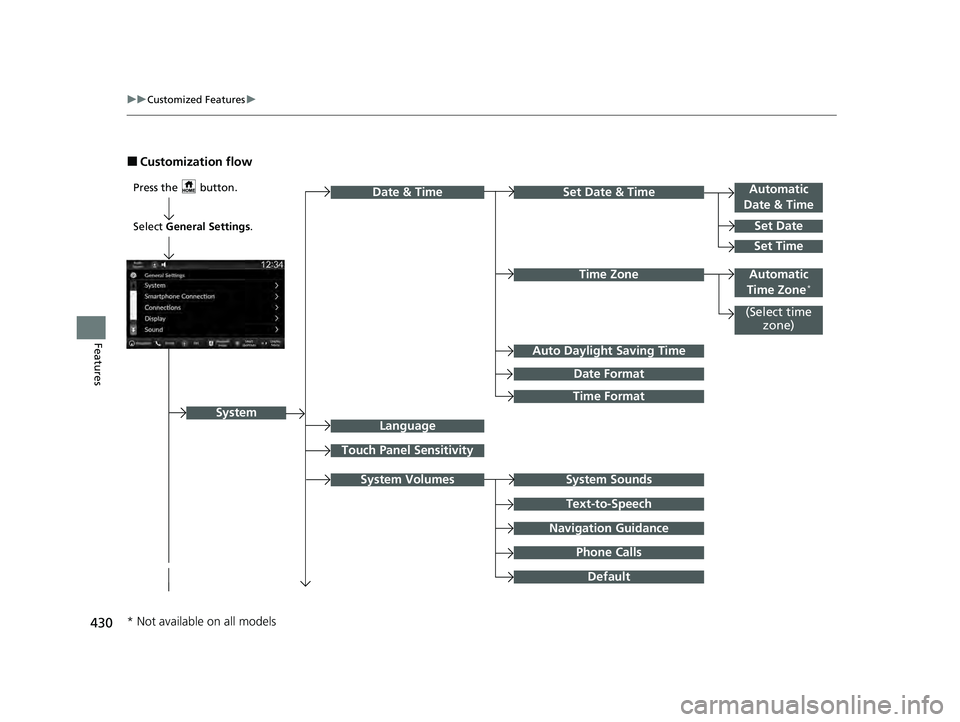
■Customization flow
Press the button.Automatic
Date & Time
Set Date
Touch Panel Sensitivity
Set Date & Time
System Sounds
Date & Time
System
Auto Daylight Saving Time
Date Format
Time Format
Text-to-Speech
Navigation Guidance
Phone Calls
Set Time
(Select time
zone)
System Volumes
Language
Default
Select General Settings .
Automatic
Time Zone*Time Zone
* Not available on all models
23 PILOT-31T906000_03.book 430 ページ 2022年10月31日 月曜日 午前10時26分
Page 437 of 814

436
uuCustomized Features u
Features
*1:Default SettingCustomizable Features
Description Selectable Settings
LanguageChanges the driver information interface and audio/
information screen language separately.English*1/Español /
Français
Touch Panel
SensitivitySets the sensitivity of the touch panel screen.High /Normal*1
System Volumes
System SoundsSets the system sound volume level.—
Text-to-SpeechSets the text-to-speech volume level.—
Navigation
GuidanceSets the navigation guidance volume level.—
Phone CallsSets the phone call volume level.—
DefaultResets all System Volumes settings to default values.
Data Sharing
SettingTurns the data sharing setting on and off.
2Start Up P. 327ON*1/OFF
Refuel Recommend*Turns the refuel recommend function on and off.
2 Refuel Recommend P. 498ON*1/OFF
* Not available on all models
23 PILOT-31T906000_03.book 436 ページ 2022年10月31日 月曜日 午前10時26分
Page 451 of 814
450
uuCustomized Features u
Features
■Meter Setup (Meter/HUD Setup)
*1:Default Setting
Customizable Features Description Selectable Settings
Adjust Outside Temp.
DisplaySelects to adjust outside temperature reading by a few degrees.2Outside Temperature P. 123
-5°F ~ ±0°F*1 ~ +5°F (U.S.)
-3°C ~ ±0°C*1 ~ +3°C (Canada)
"Trip A" Reset Timing Selects the timing to reset Trip A.
2
Range/Fuel/Trip Meter P. 127, 156
2 Speed/Time/Trip Meter P. 129, 158When Fully Refueled /IGN OFF /
Manually Reset*1
"Trip B" Reset TimingSelects the timing to reset Trip B.
2 Range/Fuel/Trip Meter P. 127, 156
2 Speed/Time/Trip Meter P. 129, 158When Fully Refueled /IGN OFF /
Manually Reset*1
Adjust Alarm Volume Changes volume level of all system warnings, door opening
warning, and indicator. High/
Mid*1/Low
Reverse Alert ToneTurns the reverse alert tone on and off.ON*1/OFF
Fuel Efficiency Backlight Turns the ambient meter feature on and off. ON
*1/OFF
Turn By Turn Auto DisplayTurns on/off the pop-up warning in the turn-by-turn navigation
in the driver informatio n interface/head-up display*.2Turn-by-Turn Directions P. 131, 159ON*1/OFF
Speed/Distance Units Selects the trip computer units.
2
Speed/Distance Units P. 138, 166
km/h · km /mph · miles*1 (U.S.)
km/h · km*1/ mph · miles (Canada)
Tachometer*Selects whether the tachometer come on the driver information
interface.ON*1/ OFF
Rear Seat Reminder Turns the Rear Seat Reminder feature on and off. ON
*1/OFF
* Not available on all models
23 PILOT-31T906000_03.book 450 ページ 2022年10月31日 月曜日 午前10時26分
Page 499 of 814
498
Features
Refuel Recommend
Your vehicle is equipped with a feature that automatically calculates when to refuel.
This feature will notify you when refueling is recommended as well as enable you to
search for gas stations that are loca ted in the vicinity of your vehicle.
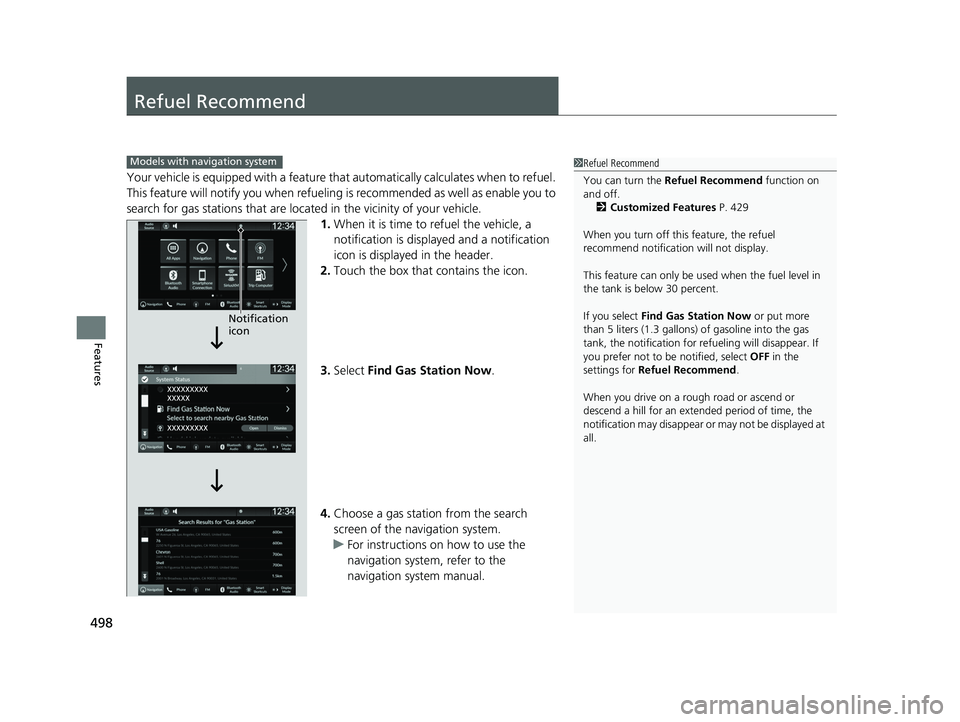
1. When it is time to refuel the vehicle, a
notification is displayed and a notification
icon is displayed in the header.
2. Touch the box that contains the icon.
3. Select Find Gas Station Now .
4. Choose a gas station from the search
screen of the navigation system.
u For instructions on how to use the
navigation system, refer to the
navigation system manual.
1Refuel Recommend
You can turn the Refuel Recommend function on
and off.
2 Customized Features P. 429
When you turn off this feature, the refuel
recommend notification will not display.
This feature can only be used when the fuel level in
the tank is below 30 percent.
If you select Find Gas Station Now or put more
than 5 liters (1.3 gallons) of gasoline into the gas
tank, the notification for refueling will disappear. If
you prefer not to be notified, select OFF in the
settings for Refuel Recommend .
When you drive on a rough road or ascend or
descend a hill for an ex tended period of time, the
notification may disappear or may not be displayed at
all.Models with navigation system
Notification
icon
23 PILOT-31T906000_03.book 498 ページ 2022年10月31日 月曜日 午前10時26分