Page 195 of 814
uuLocking and Unlocking the Doors uChildproof Door Locks
194
Controls
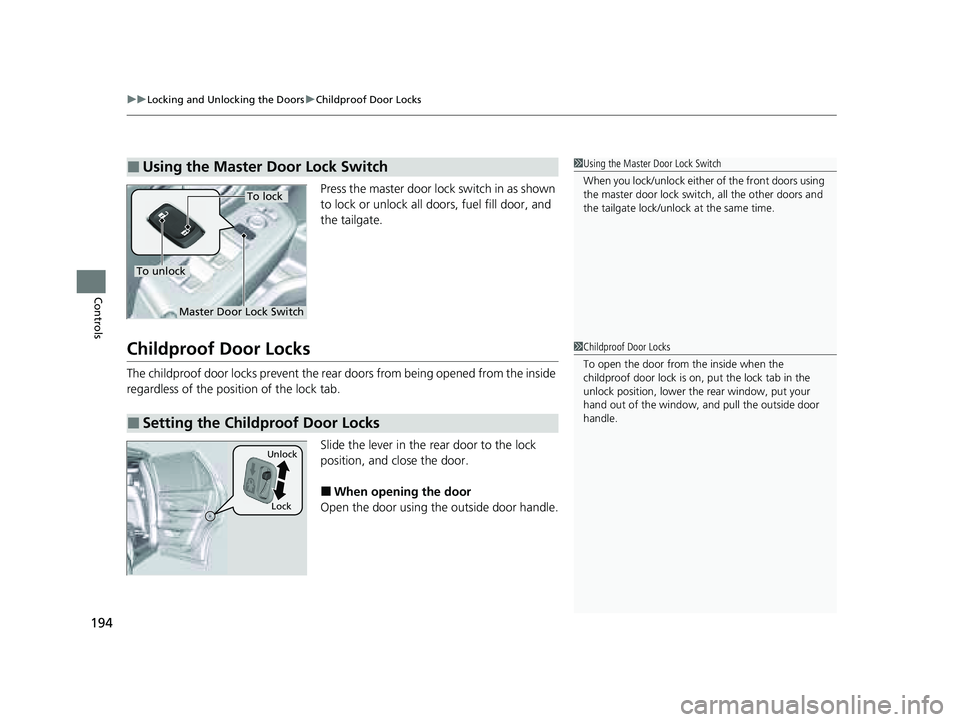
Press the master door lock switch in as shown
to lock or unlock all doors, fuel fill door, and
the tailgate.
Childproof Door Locks
The childproof door locks prevent the rear doors from being opened from the inside
regardless of the position of the lock tab.
Slide the lever in the rear door to the lock
position, and close the door.
■When opening the door
Open the door using the outside door handle.
■Using the Master Door Lock Switch1 Using the Master Door Lock Switch
When you lock/unlock either of the front doors using
the master door lock swit ch, all the other doors and
the tailgate lock/unlock at the same time.
To unlock
Master Door Lock Switch
To lock
■Setting the Childproof Door Locks
1 Childproof Door Locks
To open the door from the inside when the
childproof door lock is on, put the lock tab in the
unlock position, lower the rear window, put your
hand out of the window, and pull the outside door
handle.
Lock
Unlock
23 PILOT-31T906000_03.book 194 ページ 2022年10月31日 月曜日 午前10時26分
Page 200 of 814

199
uuTailgate uOpening/Closing the Power Tailgate*
Continued
Controls
Opening/Closing the Power Tailgate*
The power tailgate can be operated by pr essing the power tailgate button on the
remote transmitter, pressing the power tailga te button in the driver’s side control
panel, pressing the outer handle on the ta ilgate, or by using a forward and back
kicking motion under the center of the rear bumper for hands free access
*.
The power tailgate can be opened/clo sed when the transmission is in
(P.
1Opening/Closing the Power Tailgate*
NOTICE
Do not push or pull on the power tailgate when it is
being automatically opened or closed.
Forcibly opening or closing the power tailgate while
in operation can deform the tailgate frame.
When operating the power tailgate, make sure there
is enough space around your ve hicle. People near the
tailgate may be se riously hurt if the tailgate hits or
closes on their heads. Be especially cautious if
children are around.
The power tailgate may not open or close under the
following conditions:
•You start the engine while the tailgate is
automatically openi ng or closing.
•The vehicle is parked on a steep hill.•The vehicle is swaying in a strong wind.
•The tailgate or the roof is covered with snow or ice.
3WARNING
Opening or closing a power tailgate while
any part of a passenger is in the tailgate’s
operating path can cause serious injury.
Make sure all passengers or objects are
clear of the tailgate operating range
before opening or closing the tailgate.
* Not available on all models
23 PILOT-31T906000_03.book 199 ページ 2022年10月31日 月曜日 午前10時26分
Page 212 of 814
Continued211
uuWindows uOpening/Closing the Power Windows
Controls
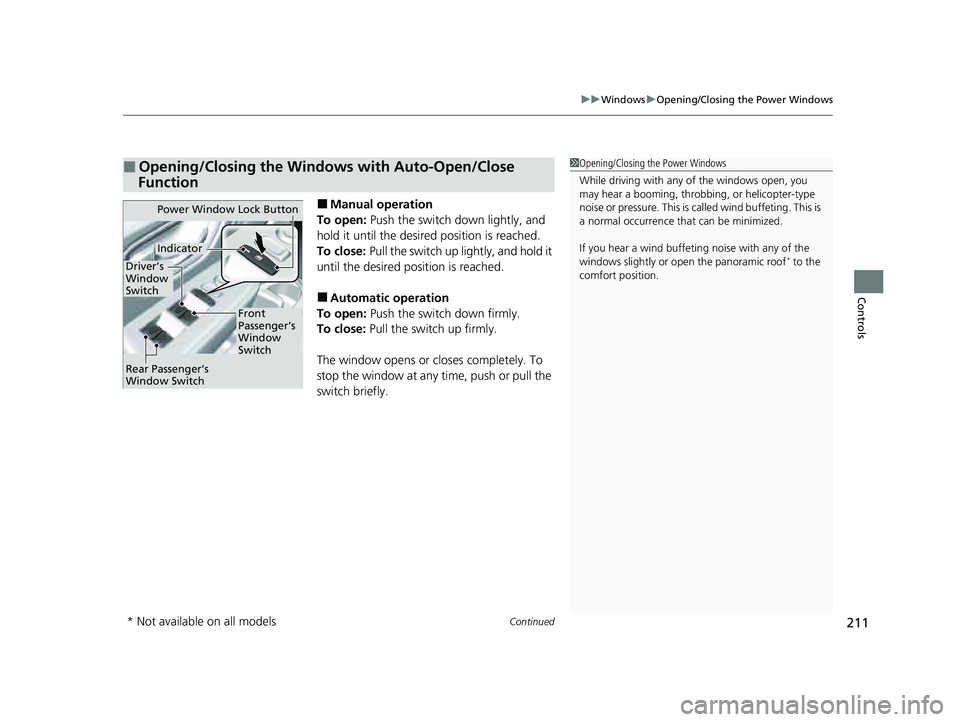
■Manual operation
To open: Push the switch down lightly, and
hold it until the desired position is reached.
To close: Pull the switch up lightly, and hold it
until the desired position is reached.
■Automatic operation
To open: Push the switch down firmly.
To close: Pull the switch up firmly.
The window opens or closes completely. To
stop the window at any time, push or pull the
switch briefly.
■Opening/Closing the Windows with Auto-Open/Close
Function1 Opening/Closing the Power Windows
While driving with any of the windows open, you
may hear a booming, throbbi ng, or helicopter-type
noise or pressure. This is ca lled wind buffeting. This is
a normal occurrence th at can be minimized.
If you hear a wind buffeti ng noise with any of the
windows slightly or ope n the panoramic roof
* to the
comfort position.
Power Window Lock Button
Front
Passenger’s
Window
Switch
Driver’s
Window
Switch
Indicator
Rear Passenger’s
Window Switch
* Not available on all models
23 PILOT-31T906000_03.book 211 ページ 2022年10月31日 月曜日 午前10時26分
Page 213 of 814
uuWindows uOpening/Closing th e Power Windows
212
Controls
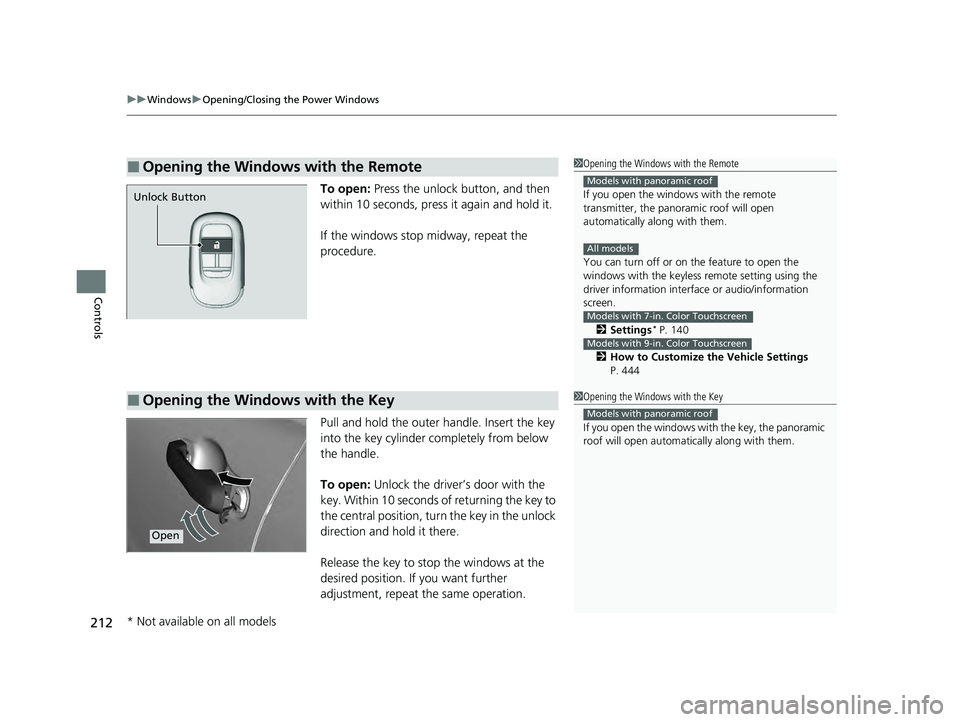
To open: Press the unlock button, and then
within 10 seconds, press it again and hold it.
If the windows stop midway, repeat the
procedure.
Pull and hold the outer handle. Insert the key
into the key cylinder completely from below
the handle.
To open: Unlock the driver’s door with the
key. Within 10 seconds of returning the key to
the central position, turn the key in the unlock
direction and hold it there.
Release the key to stop the windows at the
desired position. If you want further
adjustment, repeat the same operation.
■Opening the Windows with the Remote1 Opening the Windows with the Remote
If you open the window s with the remote
transmitter, the panoramic roof will open
automatically along with them.
You can turn off or on the feature to open the
windows with the keyless re mote setting using the
driver information interf ace or audio/information
screen.
2 Settings
* P. 140
2 How to Customize the Vehicle Settings
P. 444
Models with panoramic roof
All models
Models with 7-in. Color Touchscreen
Models with 9-in. Color Touchscreen
Unlock Button
■Opening the Windows with the Key1 Opening the Windows with the Key
If you open the windows with the key, the panoramic
roof will open automa tically along with them.
Models with panoramic roof
Open
* Not available on all models
23 PILOT-31T906000_03.book 212 ページ 2022年10月31日 月曜日 午前10時26分
Page 214 of 814
213Continued
Controls
Panoramic Roof*
Opening/Closing the Panoramic Roof
You can operate the panoramic roof and sunshade when the power mode is in ON.
Use the switch in the front of the ceiling to open and close the panoramic roof and
sunshade.1 Panoramic Roof*
NOTICE
Opening the panoramic roof in below freezing
temperature or when it is covered with snow or ice
can damage the panoramic roof panel or motor.
The panoramic roof and s unshade can be operated
for up to 10 minutes after you set the power mode to
VEHICLE OFF.
Opening either front door cancels this function.
When resistance is detected, the auto reverse
function causes the panoramic roof and sunshade to
change directions, then stop. Auto reverse stops
sensing when the panoramic roof and sunshade are
almost closed to ensure that it fully closes.
3WARNING
Opening or closing the panoramic roof and
sunshade on someone’s hands or fingers
can cause serious injury.
Make sure all hands and fingers are clear of
the panoramic roof and sunshade before
opening or closing it.
* Not available on all models
23 PILOT-31T906000_03.book 213 ページ 2022年10月31日 月曜日 午前10時26分
Page 215 of 814
uuPanoramic Roof*uOpening/Closing the Panoramic Roof
214
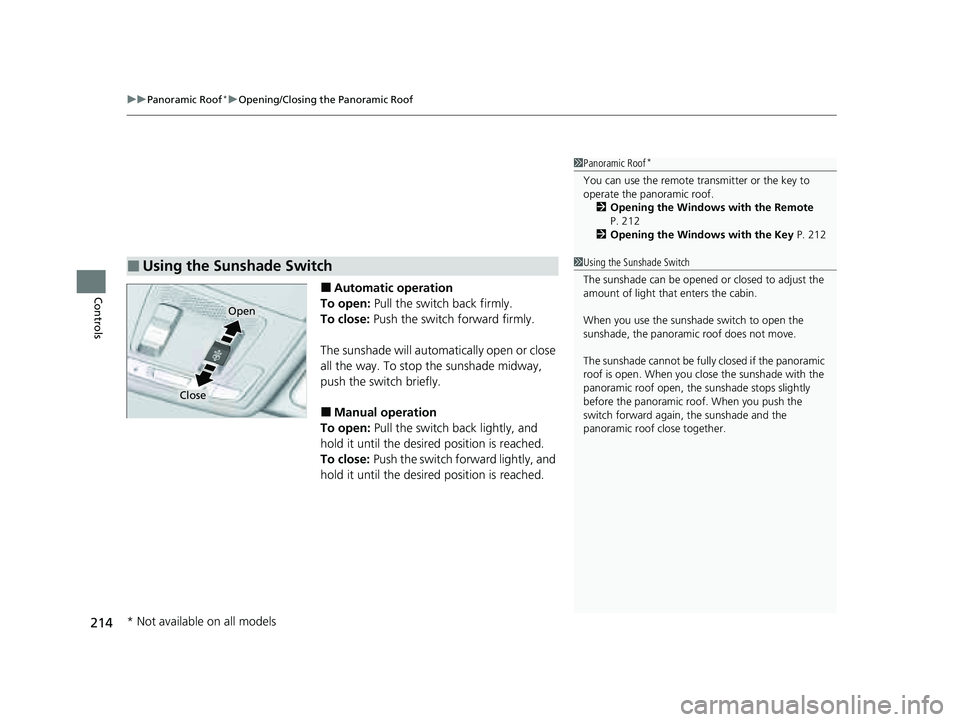
Controls■Automatic operation
To open: Pull the switch back firmly.
To close: Push the switch forward firmly.
The sunshade will automatically open or close
all the way. To stop the sunshade midway,
push the switch briefly.
■Manual operation
To open: Pull the switch back lightly, and
hold it until the desired position is reached.
To close: Push the switch forward lightly, and
hold it until the desired position is reached.
■Using the Sunshade Switch
1 Panoramic Roof*
You can use the remote transmitter or the key to
operate the panoramic roof.
2 Opening the Windows with the Remote
P. 212
2 Opening the Windows with the Key P. 212
Open
Close
1Using the Sunshade Switch
The sunshade can be opened or closed to adjust the
amount of light that enters the cabin.
When you use the sunshade switch to open the
sunshade, the panoramic roof does not move.
The sunshade cannot be full y closed if the panoramic
roof is open. When you close the sunshade with the
panoramic roof open, the sunshade stops slightly
before the panoramic roof. When you push the
switch forward again, the sunshade and the
panoramic roof close together.
* Not available on all models
23 PILOT-31T906000_03.book 214 ページ 2022年10月31日 月曜日 午前10時26分
Page 216 of 814

Continued215
uuPanoramic Roof*uOpening/Closing the Panoramic Roof
Controls
■Automatic operation
To open: Pull the switch back firmly.
To close: Push the switch forward firmly.
The panoramic roof will automatically open or
close all the way. To stop the panoramic roof
midway, pull or push the switch briefly.
■Manual operation
To open: Pull the switch back lightly, and
hold it until the desired position is reached.
To close: Push the switch forward lightly, and
hold it until the desired position is reached.
■Tilting the panoramic roof up
To tilt: Push on the center of the panoramic
roof switch. u The sunshade will open automatically
and the panoramic roof will start to tilt
up.
To close: Push the switch fo rward firmly, then
release.
■Using the Panoramic Roof Switch1 Using the Panoramic Roof Switch
The panoramic roof cannot be fully opened in a
single operation. The pa noramic roof has a
“comfort” position or wind noise reduction position
at which the roof first stops. To open fully, pull the
switch back again after the roof has stopped at this
position.
Whenever the panoramic roof is opening, the
sunshade moves along with it. However, when the
panoramic roof is closin g, the sunshade does not
move.
When you tilt open the panoramic roof, the sunshade
opens slightly to let in fr esh air. When you close the
panoramic roof from this position, the sunshade
returns to its closed position.
Comfort Position
Full Open Position
Open
Close
Tilt
23 PILOT-31T906000_03.book 215 ページ 2022年10月31日 月曜日 午前10時26分
Page 217 of 814
uuPanoramic Roof*uOpening/Closing the Panoramic Roof
216
Controls
1Using the Panoramic Roof Switch
When you tilt open or slide open the panoramic roof,
if the climate control is set to AUTO it will
automatically switch to fresh air mode to reduce
wind noise. When you close the panoramic roof,
depending on the situati on it will change to
recirculation or fresh air mode.
23 PILOT-31T906000_03.book 216 ページ 2022年10月31日 月曜日 午前10時26分