Page 235 of 814
uuOperating the Switches Around the Steering Wheel uDriving Position Memory System*
234
Controls
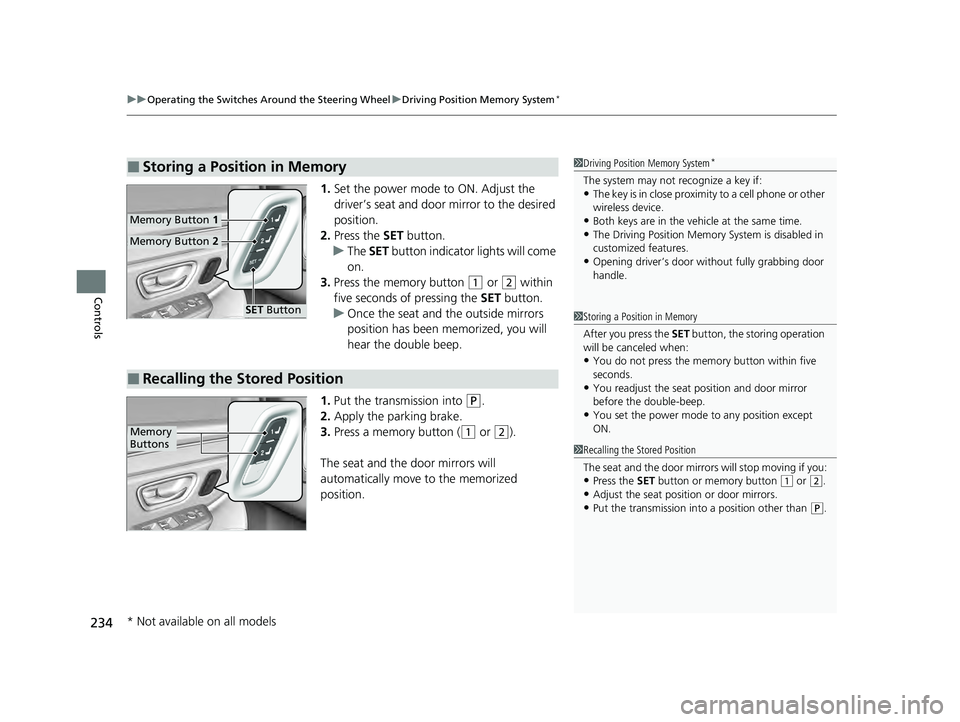
1. Set the power mode to ON. Adjust the
driver’s seat and door mirror to the desired
position.
2. Press the SET button.
u The SET button indicator lights will come
on.
3. Press the memory button
(1 or (2 within
five seconds of pressing the SET button.
u Once the seat and the outside mirrors
position has been memorized, you will
hear the double beep.
1. Put the transmission into
(P.
2. Apply the parking brake.
3. Press a memory button (
(1 or (2).
The seat and the door mirrors will
automatically move to the memorized
position.
■Storing a Position in Memory1 Driving Position Memory System*
The system may not recognize a key if:•The key is in close proximity to a cell phone or other
wireless device.
•Both keys are in the vehicle at the same time.•The Driving Position Memory System is disabled in
customized features.
•Opening driver’s door wi thout fully grabbing door
handle.
Memory Button 1
Memory Button 2
SET Button
■Recalling the Stored Position
1Storing a Position in Memory
After you press the SET button, the storing operation
will be canceled when:
•You do not press the memory button within five
seconds.
•You readjust the seat position and door mirror
before the double-beep.
•You set the power mode to any position except
ON.
1Recalling the Stored Position
The seat and the door mirrors will stop moving if you:
•Press the SET button or memory button (1 or (2.
•Adjust the seat position or door mirrors.•Put the transmission into a position other than (P.
Memory
Buttons
* Not available on all models
23 PILOT-31T906000_03.book 234 ページ 2022年10月31日 月曜日 午前10時26分
Page 257 of 814
uuSeats uHead Restraints
256
Controls
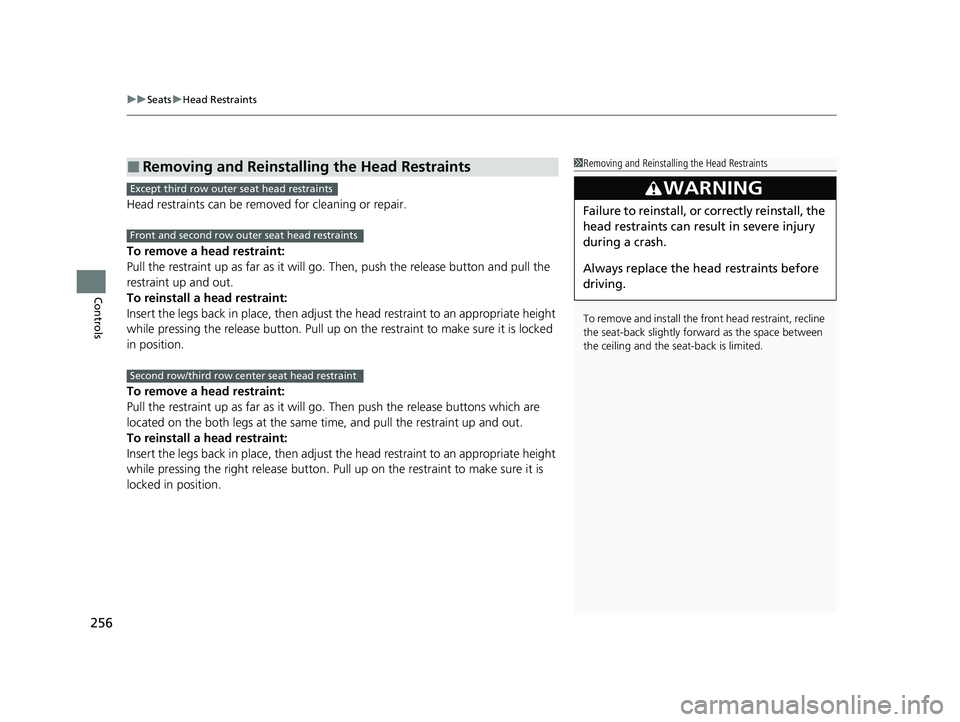
Head restraints can be removed for cleaning or repair.
To remove a head restraint:
Pull the restraint up as far as it will go. Then, push the release button and pull the
restraint up and out.
To reinstall a head restraint:
Insert the legs back in place, then adjust the head restraint to an appropriate height
while pressing the release button. Pull up on the restraint to make sure it is locked
in position.
To remove a head restraint:
Pull the restraint up as far as it will go. Then push the release buttons which are
located on the both legs at the same time, and pull the restraint up and out.
To reinstall a head restraint:
Insert the legs back in place, then adjust the head restraint to an appropriate height
while pressing the right release button. Pull up on the restraint to make sure it is
locked in position.
■Removing and Reinstalling the Head Restraints1 Removing and Reinstalling the Head Restraints
To remove and install the front head restraint, recline
the seat-back slightly forward as the space between
the ceiling and the seat-back is limited.
3WARNING
Failure to reinstall, or correctly reinstall, the
head restraints can result in severe injury
during a crash.
Always replace the he ad restraints before
driving.
Except third row outer seat head restraints
Front and second row outer seat head restraints
Second row/third row center seat head restraint
23 PILOT-31T906000_03.book 256 ページ 2022年10月31日 月曜日 午前10時26分
Page 284 of 814

283Continued
Controls
Climate Control System
Using Automatic Climate Control
The automatic climate control system maintains the interior temperature you select.
The system also selects the proper mix of heat ed or cooled air that raises or lowers
the interior temperature to your pr eference as quickly as possible.
Use the system when the engine is running.
1. Press the AUTO button.
2. Adjust the interior temperature using the driver’s side or passenger’s side
temperature control switch.
3. Press the (ON/OFF) button to cancel.1Using Automatic Climate Control
If any buttons are presse d while using the climate
control system in auto, the function of the button
that was pressed will take priority.
The AUTO indicator will go off, but functions
unrelated to the button th at was pressed will be
controlled automatically.
During idle-stops, air-conditioning is suspended, and
only the blower remains active.
If you do not want air-cond itioning suspended, press
the Auto Idle Stop OFF button to cancel idle-stop.
To prevent cold air from bl owing in from outside, the
fan may not start i mmediately when the AUTO
button is pressed.
If the interior is very warm, you can cool it down
more rapidly by partial ly opening the windows,
turning the system on auto, and setting the
temperature to low. Change the fresh air mode to
recirculation mode until the temperature cools down.
When you set the temperat ure to the lower or upper
limit, Lo or Hi is displayed.
Pressing the button switches the climate
control system between on and off. When turned on,
the system returns to your last selection.
Floor and
windshield
defroster
vents
Floor vents
Dashboard and
floor vents’, and
back of the console
compartment
Dashboard
vents’ and back
of the console
compartment
Driver’s Side
Temperature
Control Dial Passenger’s
Side
Temperature
Control Dial
A/C (Air Conditioning) Button
(ON/OFF) Button
Fan
Control
Dial
(Recirculation)
Button
(Windshield Defroster) Button
AUTO Button SYNC (Synchronization)
Button
MODE
Control
Button
23 PILOT-31T906000_03.book 283 ページ 2022年10月31日 月曜日 午前10時26分
Page 289 of 814
uuClimate Control System uRear Climate Control System
288
Controls
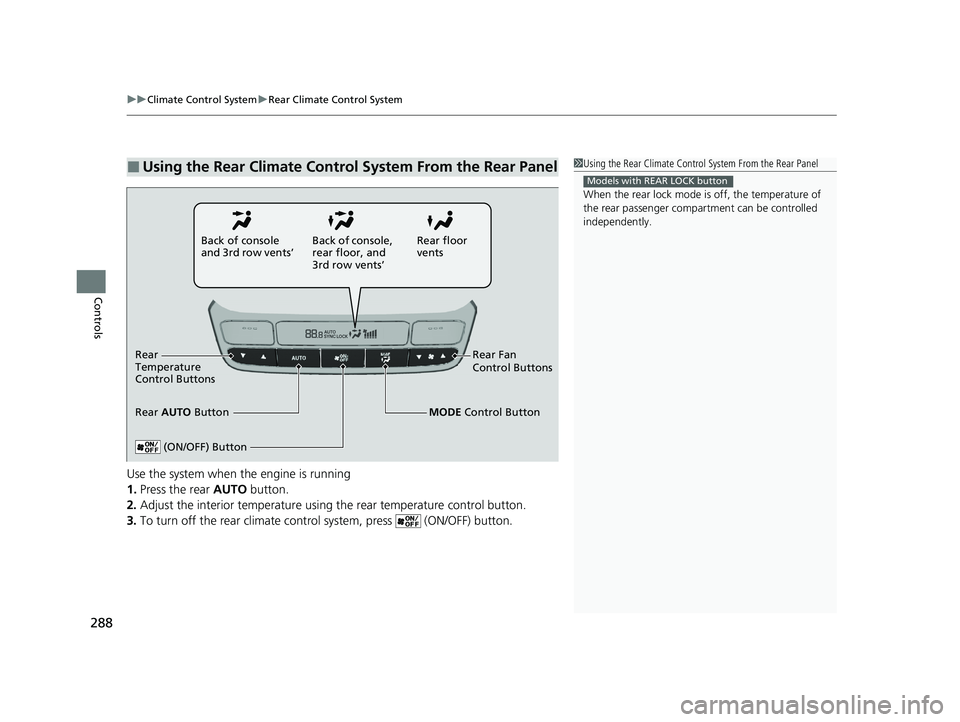
Use the system when the engine is running
1. Press the rear AUTO button.
2. Adjust the interior temperature using the rear temperature control button.
3. To turn off the rear climate con trol system, press (ON/OFF) button.
■Using the Rear Climate Control System From the Rear Panel1Using the Rear Climate Control System From the Rear Panel
When the rear lock mode is off, the temperature of
the rear passenger compar tment can be controlled
independently.
Models with REAR LOCK button
Rear floor
vents
Back of console
and 3rd row vents’
Rear Fan
Control Buttons
(ON/OFF) Button
Rear
Temperature
Control Buttons
Rear AUTO Button Back of console,
rear floor, and
3rd row vents’
MODE Control Button
23 PILOT-31T906000_03.book 288 ページ 2022年10月31日 月曜日 午前10時26分
Page 293 of 814

292
Features
Audio System
About Your Audio System
The audio system features AM/FM radio and SiriusXM® Radio service*. It can also
play USB flash drives, iPod, iPhone, and Bluetooth® devices.
You can operate the audio system from the buttons and switches on the panel, the
remote controls on the steering wheel, or the icons on the touchscreen interface.
*1 : Models with 7-in. Color Touchscreen
*2 : Models with 9-in. Color Touchscreen and A-type meter
*3 : Models with 9-in. Color Touchscreen and B-type meter
1 About Your Audio System
SiriusXM ® Radio
* is available on a subscription basis
only. For more information on SiriusXM ® Radio*,
contact a dealer.
2 General Information on the Audio System
P. 400
SiriusXM ® Radio
* is available in the United States and
Canada, except Ha waii, Alaska, and Puerto Rico.
SiriusXM ®
* is a registered tra demark of SiriusXM
Radio, Inc.
State or local laws may pr ohibit the operation of
handheld electronic devices while operating a
vehicle.
Remote Controls iPod
USB Flash Drive
*2 *1
*3
* Not available on all models
23 PILOT-31T906000_03.book 292 ページ 2022年10月31日 月曜日 午前10時26分
Page 297 of 814

296
uuAudio System uAudio Remote Controls
Features
Audio Remote Controls
Allow you to operate the audio system wh ile driving. The information is shown on
the driver information interface.
SOURCE Button
Cycles through the audio modes as follows:
FMAM USB/iPod/Apple CarPlay/
Android Auto Bluetooth ® Audio
VOL
(+/VOL(- (Volume) Switch
Press Up: To increase the volume.
Press Down: To decrease the volume.
/ (Seek/Skip) Buttons
• When listening to the radio
Press : To select the next preset radio station.
Press : To select the previous preset radio station.
Press and hold : To select the next strong station.
Press and hold : To select the previous strong station.
• When listening to an iPod, USB flash drive, Bluetooth® Audio, or Smartphone
Connection
Press : To skip to the next song.
Press : To go back to the beginning of the current or previous song.
• When listening to a USB flash drive or Bluetooth® Audio
Press and hold : To skip to the next folder/group.
Press and hold : To go back to the previous folder/group.
1Audio Remote Controls
Some modes appear only when an appropriate
device or medium is used.
Depending on the Bluetooth® device you connect,
some functions may not be available.Models with 7-in. Color Touchscreen
/ (Seek/Skip) Buttons
SOURCE
ButtonVOL( +/VOL(-
(Volume) Switch
23 PILOT-31T906000_03.book 296 ページ 2022年10月31日 月曜日 午前10時26分
Page 298 of 814
Continued297
uuAudio System uAudio Remote Controls
Features
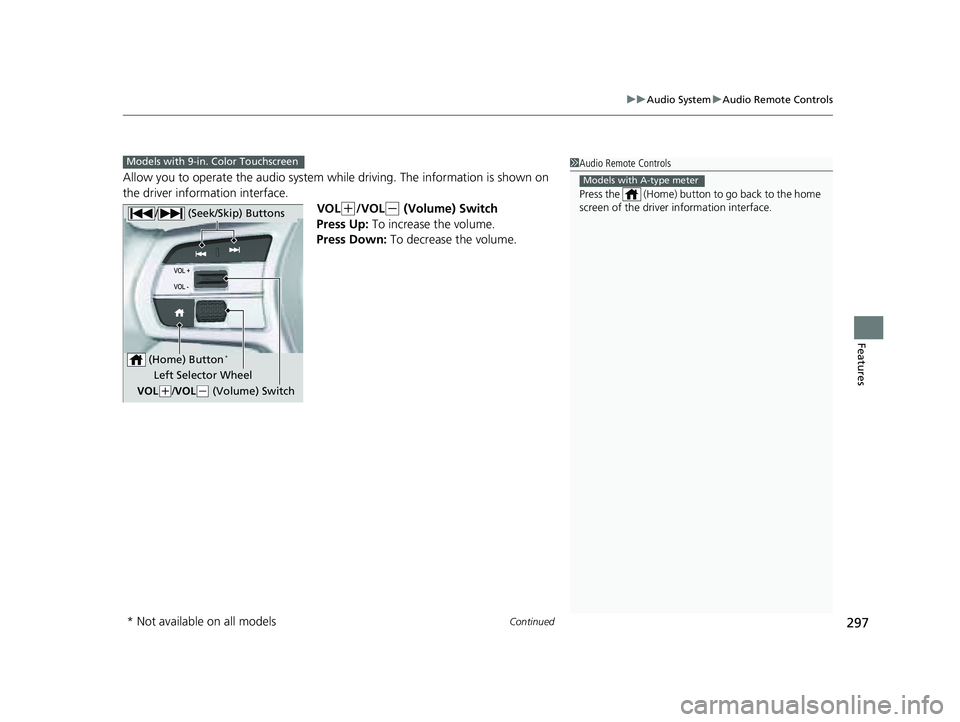
Allow you to operate the audio system whil e driving. The information is shown on
the driver information interface.
VOL
(+/VOL(- (Volume) Switch
Press Up: To increase the volume.
Press Down: To decrease the volume.
1 Audio Remote Controls
Press the (Home) button to go back to the home
screen of the driver information interface.
Models with A-type meter
Models with 9-in. Color Touchscreen
/ (Seek/Skip) Buttons
Left Selector Wheel
VOL
( +/VOL(- (Volume) Switch
(Home) Button
*
* Not available on all models
23 PILOT-31T906000_03.book 297 ページ 2022年10月31日 月曜日 午前10時26分
Page 299 of 814
298
uuAudio System uAudio Remote Controls
Features
/ (Seek/Skip) Buttons
• When listening to the radio
Press : To select the next preset radio station.
Press : To select the previous preset radio station.
Press and hold : To select the next strong station.
Press and hold : To select the previous strong station.
• When listening to an iPod, USB flash drive, Bluetooth® Audio, or Smartphone
Connection
Press : To skip to the next song.
Press : To go back to the beginning of the current or previous song.
• When listening to a USB flash drive
Press and hold : To skip to the next folder.
Press and hold : To go back to the previous folder.
23 PILOT-31T906000_03.book 298 ページ 2022年10月31日 月曜日 午前10時26分