Page 215 of 610
214
uuInterior Lights/Interior Convenience Items uInterior Convenience Items
Controls
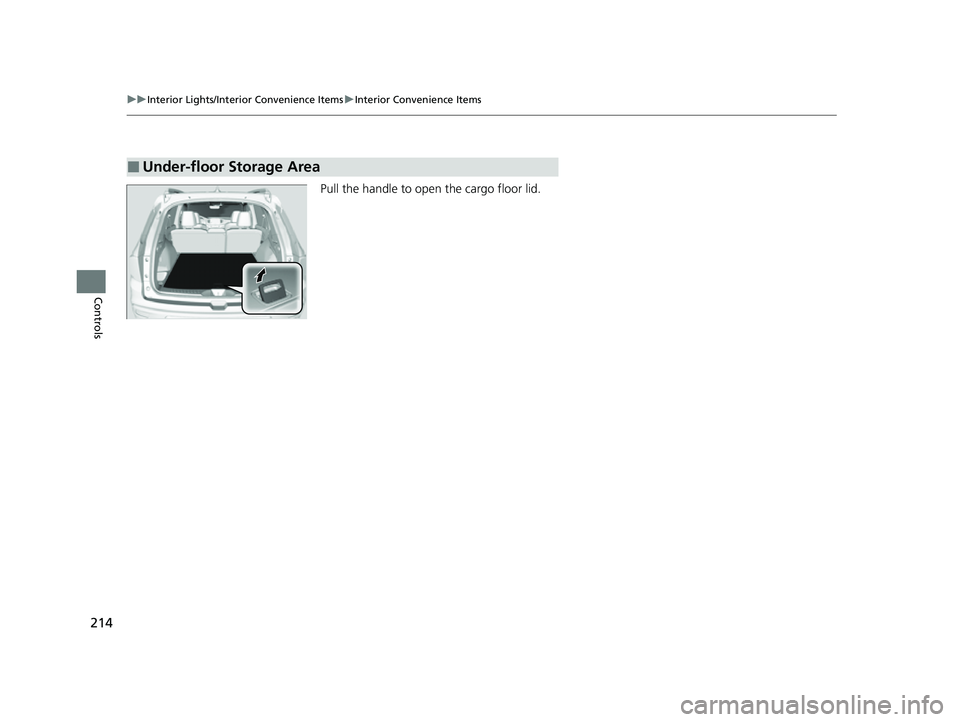
Pull the handle to op en the cargo floor lid.
■Under-floor Storage Area
23 PASSPORT-31TGS6400.book 214 ページ 2022年8月5日 金曜日 午後9時2分
Page 226 of 610
225
uuAudio System uUSB Ports
Continued
Features
USB Ports
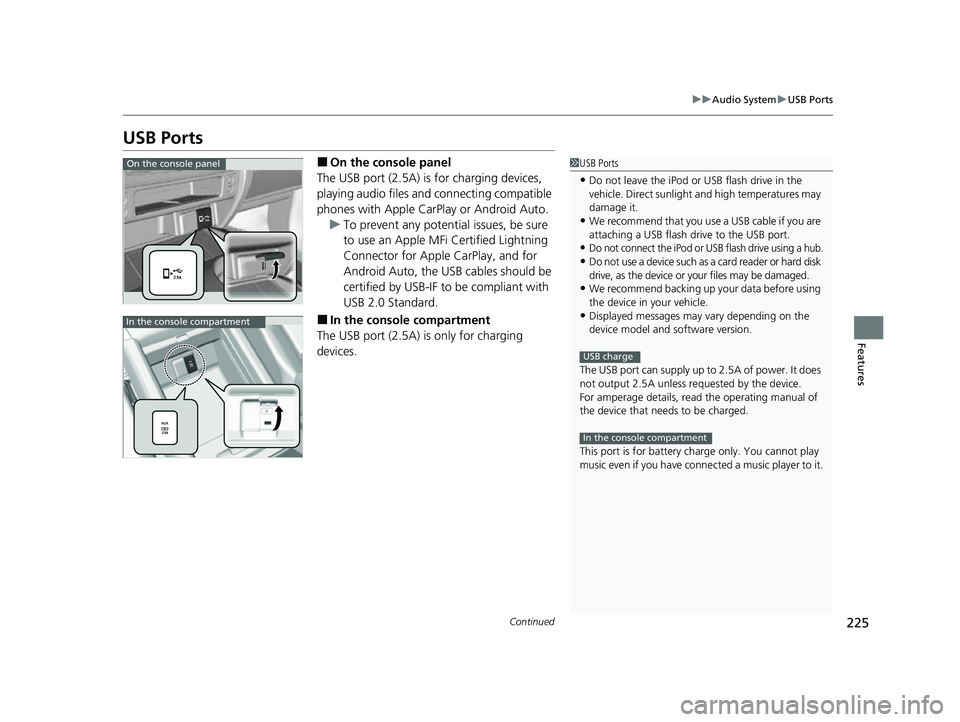
■On the console panel
The USB port (2.5A) is for charging devices,
playing audio files and connecting compatible
phones with Apple CarPlay or Android Auto. u To prevent any potenti al issues, be sure
to use an Apple MFi Certified Lightning
Connector for Apple CarPlay, and for
Android Auto, the USB cables should be
certified by USB-IF to be compliant with
USB 2.0 Standard.
■In the consol e compartment
The USB port (2.5A) is only for charging
devices.
1 USB Ports
•Do not leave the iPod or USB flash drive in the
vehicle. Direct sunlight and high temperatures may
damage it.
•We recommend that you us e a USB cable if you are
attaching a USB flash drive to the USB port.
•Do not connect the iPod or USB flash drive using a hub.
•Do not use a device such as a card reader or hard disk
drive, as the device or your files may be damaged.
•We recommend backing up yo ur data before using
the device in your vehicle.
•Displayed messages may vary depending on the
device model and software version.
The USB port can supply up to 2.5A of power. It does
not output 2.5A unless requested by the device.
For amperage details, read the operating manual of
the device that ne eds to be charged.
This port is for battery charge only. You cannot play
music even if you have conne cted a music player to it.
USB charge
In the console compartment
On the console panel
In the console compartment
23 PASSPORT-31TGS6400.book 225 ページ 2022年8月5日 金曜日 午後9時2分
Page 260 of 610
259
uuAudio System Basic Operation uVoice Control Operation
Continued
Features
Voice Control Operation
Your vehicle has a voice control syst em that allows hands-free operation.
The voice control system uses the (tal k) and (back) buttons on the steering
wheel and a microphone near the map lights on the ceiling.
To achieve optimum voice recognition when using the voice control system:
• Make sure the correct screen is displa yed for the voice command that you are
using.
The system recognizes only certain commands.
Available voice commands:
2 Voice Portal Screen P. 260
•Close the windows and moonroof*.
• Adjust the dashboard and side vents so air does not blow onto the microphone
on the ceiling.
• Speak clearly in a clear, natural speaking voice without pausing between words.
• Reduce any background noise if possibl e. The system may misinterpret your
command if more than one person is speaking at the same time.
■Voice Recognition
1Voice Control Operation
When you press the button, a helpful prompt asks
what you would like to do. Press and release the
button again to bypass th is prompt and give a
command.
1 Voice Recognition
The voice control system can only be used from the
driver’s seat because the microphone unit removes
noises from the front passenger’s side.
* Not available on all models
23 PASSPORT-31TGS6400.book 259 ページ 2022年8月5日 金曜日 午後9時2分
Page 309 of 610
308
uuGeneral Information on the Audio System uCompatible iPod, iPad, iPhone, and USB Flash Drives
Features
Compatible iPod, iPad, iPhone, and USB Flash Drives
• A USB flash drive of 256 MB or higher is recommended.
• Some digital audio players may not be compatible.
• Some USB flash drives (e.g., a device with security lockout) may not work.
• Some software files may not allow for audio play or text data display.
• Some versions of MP3, WMA, or AAC formats may be unsupported.
■iPod, iPad, and iPhone Model Compatibility
Model
Made for iPod nano (7th generation) released 2012
Made for iPod touch (5th and 6th generation) released between 2012 and 2015
Made for iPhone 4s/iPhone 5/iPhone 5c/iPhone 5s/iPhone 6/iPhone 6 Plus/iPhone
6s/iPhone 6s Plus/iPhone SE/iPhone 7/iPhone 7 Plus
Made for iPad Pro 9.7 inch/iPad Pro 12.9 inch (1st generation)
Made for iPad 2/iPad (3rd ge neration)/iPad (4th generation)
Made for iPad Air/iPad Air 2
Made for iPad mini/iPad mini 2/iPad mini 3/iPad mini 4
1iPod, iPad, and iPhone Model Compatibility
This system may not work with all software versions
of these devices.
The Lightning connector work s with iPhone 5, iPhone
5c, iPhone 5s, iPhone 6, iPhone 6 Plus, iPhone 6s,
iPhone 6s Plus, iPhone SE, iPhone 7, iPhone 7 Plus,
iPad Pro 9.7 inch, iPad Pro 12.9 inch (1st generation),
iPad (4th generation), iPad Ai r, iPad Air 2, iPad mini,
iPad mini 2, iPad mini 3, iPad mini 4, iPod nano (7th
generation), iPod touch (5 th and 6th generation).
The 30-pin connector works with iPhone 4s, iPad 2,
iPad (3rd generation).
USB works with iPhone 4s, iPhone 5, iPhone 5c,
iPhone 5s, iPhone 6, iPhone 6 Plus, iPhone 6s, iPhone
6s Plus, iPhone SE, iPhone 7, iPhone 7 Plus, iPad Pro
9.7 inch, iPad Pro 12.9 inch (1st generation), iPad 2,
iPad (3rd generation), iPad (4th generation), iPad Air,
iPad Air 2, iPad mini, iPad mini 2, iPad mini 3, iPad
mini 4, iPod nano (7th gene ration), iPod touch (5th to
6th generation).
■USB Flash Drives1 USB Flash Drives
Files on the USB flash drive are played in their stored
order. This order may be different from the order
displayed on your PC or device.
23 PASSPORT-31TGS6400.book 308 ページ 2022年8月5日 金曜日 午後9時2分
Page 327 of 610
326
uuGeneral Information on the Audio System uLicense Information
Features
“Made for iPod,” “Made for iPhone,” and “Made for iPad” mean that an electronic
accessory has been designed to connect specifically to iPod, iPhone, or iPad,
respectively, and has been certified by the developer to meet Apple performance
standards. Apple is not responsible for the operation of this device or its compliance
with safety and regulatory standards. Please note that the use of this accessory with
iPod, iPhone, or iPad may affect wireless performance.
Apple, the Apple Logo, iPad, iPhone, iPod, iPod classic, iPod nano, and iPod touch
are trademarks of Apple Inc., registered in the U.S. and other countries. iPad Air,
iPad mini, iPad Pro, Apple CarPlay, iPod , iPhone, iTunes, Siri and Lightning are
trademarks of Apple Inc. App Store is a service mark of Apple Inc.
■Apple
23 PASSPORT-31TGS6400.book 326 ページ 2022年8月5日 金曜日 午後9時2分
Page 334 of 610
333
uuCustomized Features u
Continued
Features
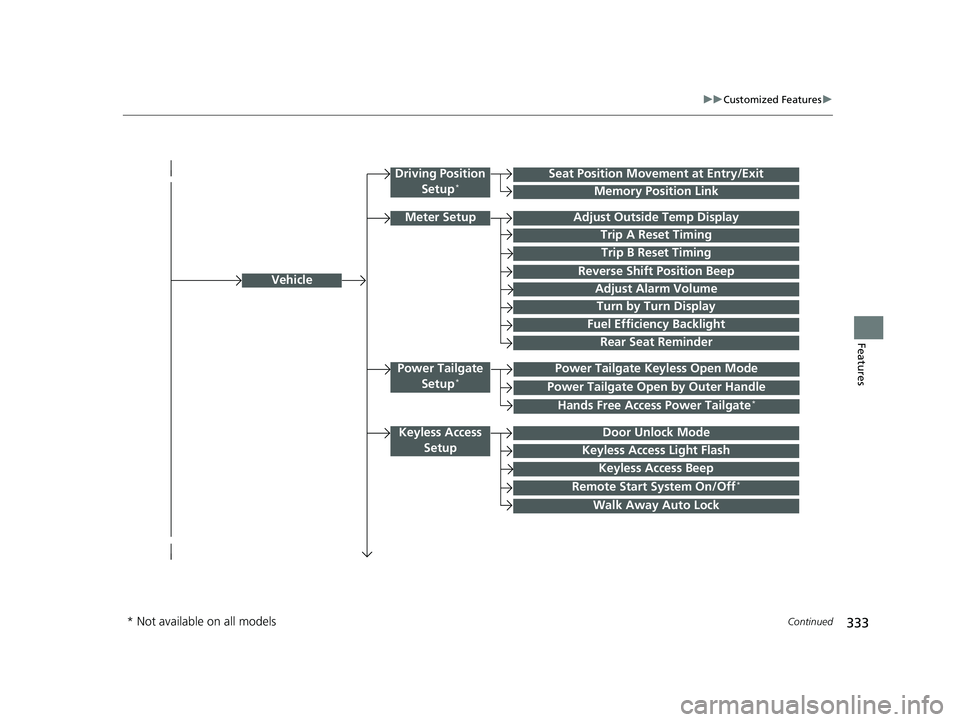
Vehicle
Driving Position
Setup*Seat Position Movement at Entry/Exit
Memory Position Link
Meter SetupAdjust Outside Temp Display
Trip A Reset Timing
Trip B Reset Timing
Reverse Shift Position Beep
Adjust Alarm Volume
Turn by Turn Display
Power Tailgate
Setup*Power Tailgate Keyless Open Mode
Power Tailgate Open by Outer Handle
Keyless Access SetupDoor Unlock Mode
Keyless Access Light Flash
Keyless Access Beep
Remote Start System On/Off*
Walk Away Auto Lock
Fuel Efficiency Backlight
Hands Free Access Power Tailgate*
Rear Seat Reminder
* Not available on all models
23 PASSPORT-31TGS6400.book 333 ページ 2022年8月5日 金曜日 午後9時2分
Page 335 of 610
334
uuCustomized Features u
Features
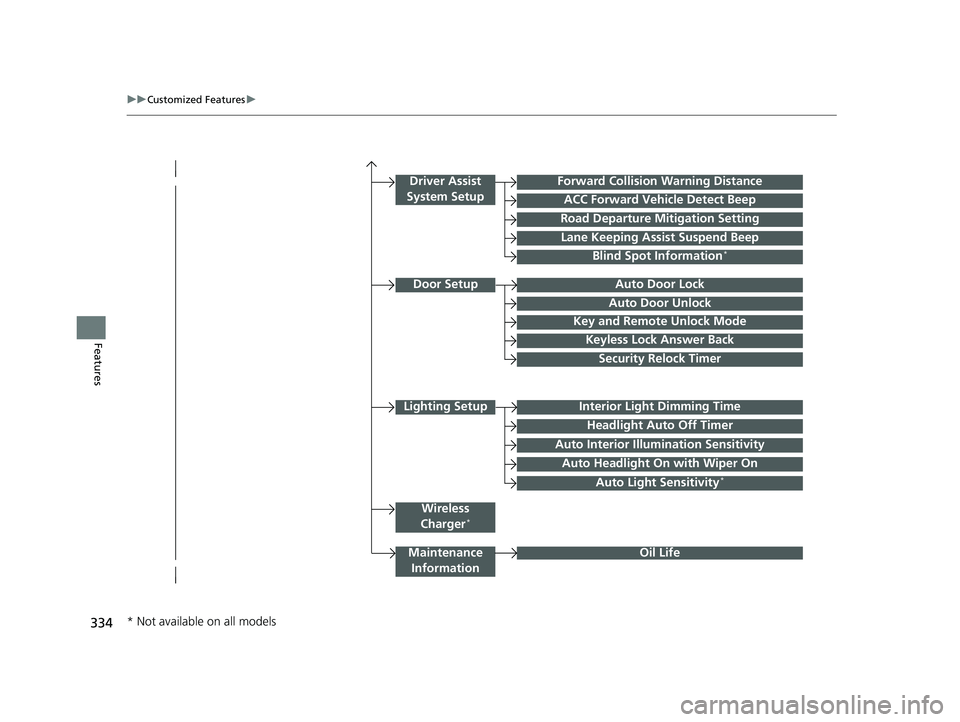
Lighting SetupInterior Light Dimming Time
Headlight Auto Off Timer
Forward Collision Warning Distance
ACC Forward Vehicle Detect Beep
Auto Interior Illumi nation Sensitivity
Door SetupAuto Door Lock
Auto Door Unlock
Key and Remote Unlock Mode
Keyless Lock Answer Back
Security Relock Timer
Maintenance
Information
Driver Assist
System Setup
Oil Life
Road Departure Mitigation Setting
Lane Keeping Assist Suspend Beep
Blind Spot Information*
Wireless
Charger*
Auto Headlight On with Wiper On
Auto Light Sensitivity*
* Not available on all models
23 PASSPORT-31TGS6400.book 334 ページ 2022年8月5日 金曜日 午後9時2分
Page 342 of 610
341
uuCustomized Features u
Continued
Features
*1:Default SettingSetup
Group Customizable Features
DescriptionSelectable Settings
Vehicle
Meter Setup
Turn by Turn DisplaySelects whether the turn-by-turn display comes on
during the route guidance.ON*1/OFF
Fuel Efficiency
BacklightTurns the ambient meter feature on and off.ON*1/OFF
Rear Seat ReminderTurns the Rear Seat Reminder feature on and off.ON*1/OFF
Power
Tailgate
Setup
*
Power Tailgate
Keyless Open ModeChanges the keyless setting for when the power
tailgate opens.Anytime*1/When
Unlocked
Power Tailgate Open
by Outer HandleChanges the setting to open power tailgate by
tailgate outer handle.Off (Manual only) /
On (Power/
Manual)
*1
Hands Free Access
Power Tailgate*
Changes the setting to open power tailgate by a
swift forward in and out kicking motion under the
rear bumper.
ON*1/ OFF
Keyless Access
Setup
Door Unlock ModeChanges which doors unlo ck when you grab the
driver’s door handle.Driver Door or
Tailgate*1/ All Doors
Keyless Access Light
FlashCauses some exterior lights to flash when you
unlock/lock the doors.ON*1/OFF
Keyless Access BeepCauses the beeper to so und when you unlock/lock
the doors.ON*1/ OFF
* Not available on all models
23 PASSPORT-31TGS6400.book 341 ページ 2022年8月5日 金曜日 午後9時2分