2023 HONDA ODYSSEY park assist
[x] Cancel search: park assistPage 8 of 707

6
Quick Reference Guide
Quick Reference Guide
Visual Index
❚ (Vehicle Stability AssistTM (VSA®) System OFF) Button (P500)
❚Power Sliding Door Switch (P175, 176)
❚Power Tailgate Button* (P167)
❚Climate Control System (P250)
❚Driving Position Memory System Buttons* (P206)
❚Parking Sensor System Switch* (P572)
❚Heated Windshield Button* (P204)
❚Safety Support Switch (P508, 516, 550)
❚Electric Parking Brake Switch (P561)
❚Automatic Brake Hold Button (P565)
❚Shift Button
Automatic Transmission
(P484)
❚ECON Button (P497)
❚SNOW Button (P498)
❚Auto Idle Stop OFF Button (P493)
❚Hazard Warning Button
❚System Indicators (P88)
❚Gauges (P127)
❚Driver Information Interface (P128)
❚Audio System (P258)
❚Navigation System*
() See Navigation System Manual
❚Rear Defogger (P203)
❚Heated Mirror Button (P203)
❚Seat Heater Switches* (P247)
❚Seat Heater and Seat Ventilation
Switches* (P248)
❚Center Pocket* (P233)
❚Blu-ray/DVD Rear Entertainment System* (P365)
23 US ODYSSEY-31THR6500.book 6 ページ 2022年1月24日 月曜日 午前11時35分
Page 17 of 707

15
Quick Reference Guide
Instrument Panel (P87)
System Indicators
Malfunction Indicator
Lamp
Charging System
Indicator
Anti-lock Brake System
(ABS ) Indicator
Vehicle Stability
Assist
TM (VSA®
) System
Indicator
VSA ® OFF Indicator Low Tire Pressure/TPMS
Indicator
Immobilizer System Indicator/
Security System Alarm Indicator
Lights Indicators
Lights On Indicator
High Beam Indicator
Fog Light Indicator
Lane Keeping Assist
System (LKAS)
Indicator (Green/
Amber/White) Seat Belt Reminder
Indicator
System Indicators
Econ Mode Indicator
System Message
Indicator Parking Brake and
Brake System Indicator
(Red)
Supplemental Restraint
System Indicator
Driver Information Interface Auto Idle Stop
OFF
Indicator
Tachometer
M
(Sequential mode) Indicator/
Sequential Mode Gear Selection
Indicator
Speedometer
Fuel Gauge
Gear Position Indicator/
Transmission System
Indicator Auto Idle Stop System
Indicator (Amber)/
Auto Idle Stop
Indicator (Green)
Indicators (P88)/Gauges (P127)/
Driver Information Interface
(P128)
Automatic Brake Hold
Indicator Adaptive Cruise
Control (ACC) with
Low Speed Follow
Indicator (Green/
Amber/White) Turn Signal and Hazard
Warning Indicators
Electric Power Steering
(EPS) System Indicator
Cruise Mode Indicator
(White/Green) Auto Idle Stop
Suspend Indicator
Temperature Gauge
Parking Brake and
Brake System Indicator
(Amber)
U.S.
Canada
U.S.
Canada
System Indicators
U.S.
Canada
Low Fuel Indicator
Automatic Brake Hold
System Indicator
Auto High-Beam
Indicator Snow
Mode Indicator
Normal Mode
Indicator
Safety Support
Indicator (Green/
Amber/Gray)
23 US ODYSSEY-31THR6500.book 15 ページ 2022年1月24日 月曜日 午前11時35分
Page 35 of 707

33
Quick Reference Guide
Pulling the electric parking
brake switch does not
release the parking brake.
Why?Pull the electric parking brake switch with the brake pedal
depressed.
Depressing the accelerator
pedal does not release the
parking brake
automatically. Why?●Fasten the driver’s seat belt.
●Check if the transmission is in (P or (N. If so, select any other
position.
Why does the gear position
automatically change to
(P
when I open the driver’s
door to check for parking
space lines when
reversing?
●Fasten the driver’s seat belt.
●Close the driver’s door and manually change the gear
position.
2 When opening the driver’s door (P487)
I’m seeing an amber
indicator of a tire with an
exclamation point. What is
that?The Tire Pressure Monitoring System (TPMS) needs attention.
Check tire pressure.
2 Tire Pressure Monitoring System (TPMS) with Tire Fill Assist (P502, 667)
23 US ODYSSEY-31THR6500.book 33 ページ 2022年1月24日 月曜日 午前11時35分
Page 201 of 707
199
uuOperating the Switches Around the Steering Wheel uAuto High-Beam
Controls
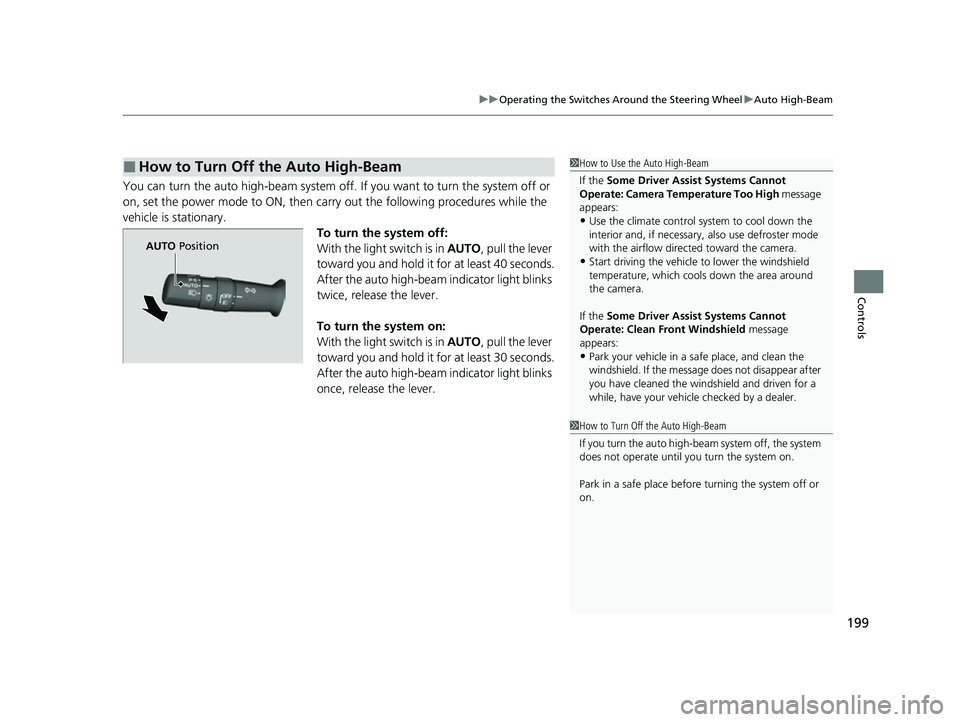
You can turn the auto high-beam system off. If you want to turn the system off or
on, set the power mode to ON, then carry out the following procedures while the
vehicle is stationary. To turn the system off:
With the light switch is in AUTO, pull the lever
toward you and hold it for at least 40 seconds.
After the auto high-beam indicator light blinks
twice, release the lever.
To turn the system on:
With the light switch is in AUTO, pull the lever
toward you and hold it for at least 30 seconds.
After the auto high-beam indicator light blinks
once, release the lever.
■How to Turn Off the Auto High-Beam1 How to Use the Auto High-Beam
If the Some Driver Assist Systems Cannot
Operate: Camera Temperature Too High message
appears:
•Use the climate control system to cool down the
interior and, if necessary, also use defroster mode
with the airflow directed toward the camera.
•Start driving the vehicle to lower the windshield
temperature, which cool s down the area around
the camera.
If the Some Driver Assist Systems Cannot
Operate: Clean Front Windshield message
appears:
•Park your vehicle in a sa fe place, and clean the
windshield. If the message does not disappear after
you have cleaned the windshield and driven for a
while, have your vehicle checked by a dealer.
1 How to Turn Off the Auto High-Beam
If you turn the au to high-beam system off, the system
does not operate until you turn the system on.
Park in a safe place before turning the system off or
on.
AUTO Position
23 US ODYSSEY-31THR6500.book 199 ページ 2022年1月24日 月曜日 午前11時35分
Page 440 of 707

438
uuBluetooth ® HandsFreeLink ®u HFL Menus
Features
HFL Menus
The power mode must be in ACCESSORY or ON to use the system.
■Phone settings screen
1.Select .
2. Select Phone .
3. Select Settings .
1HFL Menus
To use HFL, you must first pair your Bluetooth-
compatible cell phone to th e system while the vehicle
is parked.
Some functions are li mited while driving.
Change Connected Phone
(Existing entry list)
+ Connect New DevicePair a new phone to the system.
Connect, disconnect, or delete a paired device.
RingtoneSelect the ring tone.
Auto Sync PhoneSet phonebook and call history data to be automa tically imported when a phone is paired to HFL.
Turn HondaLink® Assist on and off.
HondaLink Assist
Auto Phone Call TransferSet calls to automatically transfer from your phone to HFL when you enter the vehicle.
23 US ODYSSEY-31THR6500.book 438 ページ 2022年1月24日 月曜日 午前11時35分
Page 461 of 707

459
uuBluetooth ® HandsFreeLink ®u HFL Menus
Features
■To enable notification
1.Go to the phone settings screen.
2 Phone settings screen P. 438
2.Select HondaLink Assist .
3. Select ON or OFF .
■Manual operator connection*
If you need to talk to the HondaLink ® operator
in a situation where no airbag has deployed,
you can manually connect to them by pressing
the ASSIST button with the power mode in
ACCESSORY or ON.
1. Open the cover attached to the ceiling
console.
2. Press the ASSIST button.
u You are connected to the HondaLink ®
operator.
1 To enable notification
Setting options:
•ON : Notification is available.
•OFF: Disable the feature.
1Manual operator connection*
Do not press the button while driving. When you
need to contact the operato r, park the vehicle in a
safe place.
If the unit fails to connect to the operator, it
automatically cancels the action after three minutes.
If necessary, the cover can be broken to access the
ASSIST button.
ASSIST
Button
* Not available on all models
23 US ODYSSEY-31THR6500.book 459 ページ 2022年1月24日 月曜日 午前11時35分
Page 465 of 707

463
Driving
This chapter discusses driving and refueling.
Before DrivingDriving Preparation .......................... 464
Maximum Load Limit........................ 467
Towing a Trailer
Towing Preparation .......................... 470
Driving Safely with a Trailer .............. 474
Towing Behind a Motorhome .......... 475
When Driving
Starting the Engine .......................... 476
Precautions While Driving................. 482
Automatic Transmission ................... 483
Shifting ............................................ 484
Auto Idle Stop .................................. 492
ECON Button ................................... 497 Intelligent Traction Management ..... 498Vehicle Stability AssistTM (VSA®), aka Electronic
Stability Control (ESC), System .............. 499
Agile Handling Assist ....................... 501
Tire Pressure Monitoring System (TPMS) with Tire Fill Assist .......................... 502
Tire Pressure Monitoring System (TPMS) - Required Federal Explanation ......... 504
Blind spot information System.......... 506
Honda Sensing ®................................ 509
Collision Mitigation Braking SystemTM (CMBSTM) .... 512Adaptive Cruise Control (ACC) with Low Speed Follow ....... 523Lane Keeping Assist System (LKAS) .. 539Road Departure Mitigation (RDM) System.... 548Traffic Sign Recognition System ....... 553 Front Sensor Camera ....................... 558
Radar Sensor ................................... 560
Braking Brake System ................................... 561
Anti-lock Brake System (ABS) ........... 567
Brake Assist System ......................... 568
Parking Your Vehicle When Stopped ................................ 569
Parking Sensor System
*................... 571
Cross Traffic Monitor ....................... 576
Multi-View Rear Camera .................. 580
Refueling
Fuel Information .............................. 582
How to Refuel ................................. 583
Fuel Economy and CO
2 Emissions .... 585
* Not available on all models
23 US ODYSSEY-31THR6500.book 463 ページ 2022年1月24日 月曜日 午前11時35分
Page 483 of 707

481
uuWhen Driving uStarting the Engine
Driving
1. Depress and hold the brake pedal, then press the ENGINE START/STOP button.
2. Keeping your right foot on the br ake pedal, press the button. Select
(R
when reversing.
3. With the parking brake applied, release the brake pedal and gently depress the
accelerator pedal.
u Make sure the parking brake and brake system indicator goes off.
2Parking Brake P. 561
2 If the Transmission System Indicator Blinks along with the Warning
Message P. 668
■Hill start assist system
Hill start assist keeps the brake engaged br iefly to help prevent the vehicle from
rolling on inclines as you move your foot from the brake pedal to the accelerator.
Change the gear position to
(D or (S when facing uphill, or (R when facing
downhill, then release the brake pedal.
■Starting to Drive1 Starting to Drive
The engine stops when the gear position is changed
from
( P before the ENGINE START/STOP button is
pressed. Follow the step 1 when starting to drive.
You can also release the parking brake by pulling the
electric parking brake sw itch while depressing the
brake pedal.
When facing downhill, you can start your vehicle
more smoothly by manually releasing it with the
electric parking brake switch than by releasing it with
the accelerator pedal.
When the engine was started using the button on
the remoteWhen the engine was started using the button on the remote
When the engine was started in any case
D/S
1 Hill start assist system
Hill start assist may not prevent the vehicle from
rolling downhill on a very st eep or slippery slope, and
will not operate on small inclines.
Hill start assist is not a replacement for the parking
brake.
Hill start assist will operate even when VSA ® is
switched off.
23 US ODYSSEY-31THR6500.book 481 ページ 2022年1月24日 月曜日 午前11時35分