2023 HONDA ODYSSEY lane assist
[x] Cancel search: lane assistPage 9 of 707

7
Quick Reference Guide
❚Navigation System Voice Control Buttons*
() See Navigation System Manual
❚Audio Remote Control Buttons (P262)
❚Steering Wheel Adjustments (P208)
❚Brightness Control (P205)
❚ENTER Button (P130)
❚/ Button (P130)34
❚Headlights/Turn Signals (P191, 192)
❚Fog Lights (P195)
❚Bluetooth ® HandsFreeLink ® System
Buttons
(P435)
❚Paddle Shifter (Shift down) (P491)
❚Heated Steering Wheel Button* (P246)
❚Paddle Shifter (Shift up) (P491)
❚Adaptive Cruise Control (ACC) with Low Speed
Follow Buttons
(P524)
❚Interval Button (P533)
❚ENGINE START/STOP Button (P188)
❚ Button (P524, 541)
❚Wipers/Washers (P200)
❚Lane Keeping Assist System (LKAS) Button
(P541)
❚ (home) Button (P130, 262)
❚Horn (Press an area around .)
* Not available on all models
23 US ODYSSEY-31THR6500.book 7 ページ 2022年1月24日 月曜日 午前11時35分
Page 17 of 707

15
Quick Reference Guide
Instrument Panel (P87)
System Indicators
Malfunction Indicator
Lamp
Charging System
Indicator
Anti-lock Brake System
(ABS ) Indicator
Vehicle Stability
Assist
TM (VSA®
) System
Indicator
VSA ® OFF Indicator Low Tire Pressure/TPMS
Indicator
Immobilizer System Indicator/
Security System Alarm Indicator
Lights Indicators
Lights On Indicator
High Beam Indicator
Fog Light Indicator
Lane Keeping Assist
System (LKAS)
Indicator (Green/
Amber/White) Seat Belt Reminder
Indicator
System Indicators
Econ Mode Indicator
System Message
Indicator Parking Brake and
Brake System Indicator
(Red)
Supplemental Restraint
System Indicator
Driver Information Interface Auto Idle Stop
OFF
Indicator
Tachometer
M
(Sequential mode) Indicator/
Sequential Mode Gear Selection
Indicator
Speedometer
Fuel Gauge
Gear Position Indicator/
Transmission System
Indicator Auto Idle Stop System
Indicator (Amber)/
Auto Idle Stop
Indicator (Green)
Indicators (P88)/Gauges (P127)/
Driver Information Interface
(P128)
Automatic Brake Hold
Indicator Adaptive Cruise
Control (ACC) with
Low Speed Follow
Indicator (Green/
Amber/White) Turn Signal and Hazard
Warning Indicators
Electric Power Steering
(EPS) System Indicator
Cruise Mode Indicator
(White/Green) Auto Idle Stop
Suspend Indicator
Temperature Gauge
Parking Brake and
Brake System Indicator
(Amber)
U.S.
Canada
U.S.
Canada
System Indicators
U.S.
Canada
Low Fuel Indicator
Automatic Brake Hold
System Indicator
Auto High-Beam
Indicator Snow
Mode Indicator
Normal Mode
Indicator
Safety Support
Indicator (Green/
Amber/Gray)
23 US ODYSSEY-31THR6500.book 15 ページ 2022年1月24日 月曜日 午前11時35分
Page 30 of 707

28
Quick Reference Guide
Honda Sensing® (P509)
Honda Sensing ® is a driver support system
which employs the use of two distinctly
different kinds of sensors, a radar sensor
located in the front grille and a front sensor
camera mounted to the interior side of the
windshield, behind the rear view mirror.
Front Sensor
Camera The camera is located
behind the rearview
mirror.
Radar Sensor
The radar sensor is
in the front grille.
Collision Mitigation
Braking System
TM
(CMBS
TM) (P 512)
The system can assist you when it
determines there is a possibility of your
vehicle colliding with a vehicle or a
pedestrian detected in front of your vehicle.
The CMBS
TM is designed to alert you when
the potential for a collision is determined, as
well as to reduce your vehicle speed to help
minimize collision severity when a collision is
deemed unavoidable.
Adaptive Cruise Control
(ACC) with Low Speed
Follow
(P523)
Helps maintain a constant vehicle speed and
a set following-interval behind a vehicle
detected ahead of yours and, if the detected
vehicle comes to a stop, can decelerate and
stop your vehicle, wi thout you having to
keep your foot on the brake or the
accelerator.
Lane Keeping Assist
System (LKAS)
(P 539)
Provides steering input to help keep the
vehicle in the middle of a detected lane and
provides tactile and visual alerts if the
vehicle is detected drifting out of its lane.
Road Departure
Mitigation (RDM) System
(P 548)
Alerts and helps to assist you when the
system detects a possibility of your vehicle
unintentionally crossing over detected lane
markings.
Traffic Sign Recognition
System
(P 553)
Reminds you of road sign information, such
as the current speed limit, your vehicle has
just passed through, showing it on the
driver information interface.
23 US ODYSSEY-31THR6500.book 28 ページ 2022年1月24日 月曜日 午前11時35分
Page 104 of 707

102
uuIndicators u
Instrument Panel
IndicatorNameOn/BlinkingExplanationMessage
Auto Idle Stop
Suspend
Indicator
—
•If you press and hold the Auto Idle Stop
OFF button, you can select whether to
display the status messages or not.
Lane Keeping
Assist System
(LKAS) Indicator
(Amber)• Comes on for a few seconds when
you set the power mode to ON,
then goes off.
• Comes on if there is a problem
with the LKAS.•Stays on constantly - Have your
vehicle checked by a dealer.
Lane Keeping
Assist System
(LKAS) Indicator
(White/Green)• Lights up in white when you press
the LKAS button.
• Lights up in green when the LKAS
is in operation.
2 Lane Keeping Assist System (LKAS)
P. 539—
23 US ODYSSEY-31THR6500.book 102 ページ 2022年1月24日 月曜日 午前11時35分
Page 127 of 707

125
uuIndicators uDriver Information Interface Wa rning and Information Messages
Continued
Instrument Panel
MessageConditionExplanation
•Appears when the vehicle is driving out of a detected
lane. The steering wheel vibrates rapidly.
•Keep the vehicle within the lane you are driving.
2Lane Keeping Assist System (LKAS) P. 539
•Appears when the vehicle is driving out of a detected
lane.
- The steering wheel vibr ates rapidly when the
vehicle is drifting out of a detected lane.
- The steering wheel vibr ates rapidly when the
vehicle is drifting out of a detected lane. The system
also steers the vehicle to help you remain within
your driving lane.
• Keep the vehicle within the lane you are driving.
2Road Departure Mitigation (RDM) System P. 548
•You can change the setting for the road departure
mitigation system. Normal, Wide , Warning Only and
Narrow can be selected.
2Customized Features P. 413
•Appears when the vehicle is likely to drive out a
detected lane.
The RDM system also steers the vehicle to help you
remain within your driving lane.—
•Blinks when you fail to steer the vehicle. The beeper
sounds simultaneously.•Operate the steering wheel to resume the LKAS.
Lane Keeping Assist System (LKAS)
Road Departure Mitigation (RDM) System
When you selected Warning Only
When you selected Normal, Wide or Narrow
Road Departure Mitigation (RDM) System
When you selected Narrow
23 US ODYSSEY-31THR6500.book 125 ページ 2022年1月24日 月曜日 午前11時35分
Page 420 of 707
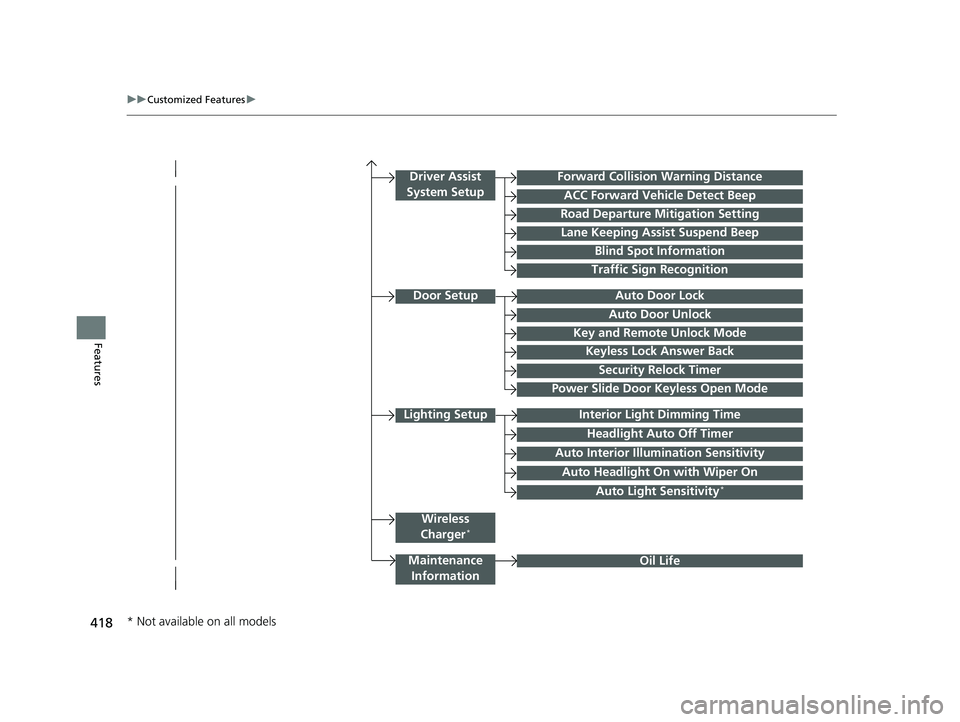
418
uuCustomized Features u
Features
Lighting SetupInterior Light Dimming Time
Headlight Auto Off Timer
Forward Collision Warning Distance
ACC Forward Vehicle Detect Beep
Auto Interior Illu mination Sensitivity
Door SetupAuto Door Lock
Auto Door Unlock
Key and Remote Unlock Mode
Keyless Lock Answer Back
Security Relock Timer
Driver Assist
System Setup
Oil Life
Road Departure Mitigation Setting
Lane Keeping Assist Suspend Beep
Blind Spot Information
Power Slide Door Keyless Open Mode
Wireless
Charger*
Traffic Sign Recognition
Maintenance Information
Auto Headlight On with Wiper On
Auto Light Sensitivity*
* Not available on all models
23 US ODYSSEY-31THR6500.book 418 ページ 2022年1月24日 月曜日 午前11時35分
Page 428 of 707

426
uuCustomized Features u
Features
*1:Default SettingSetup
Group Customizable Features Description Selectable Settings
Vehicle
Keyless Access
Setup
Remote Start System
On/OffTurns the remote engine
start feature on and off.ON*1/OFF
Walk Away Auto
LockChanges the settings for the automatic locking the
doors when you walk away from the vehicle while
carrying the remote.
Enable /Disable*1
Driver Assist
System Setup
Forward Collision
Warning DistanceChanges at which distance CMBSTM alerts.Long /Normal*1/
Short
ACC Forward Vehicle
Detect BeepCauses the system to beep when the system
detects a vehicle, or when the vehicle goes out of
the ACC with Low Speed Follow range.
ON /OFF*1
Road Departure
Mitigation SettingChanges the setting for the road departure
mitigation system.Normal*1/ Wide /
Warning Only /
Narrow
Lane Keeping Assist
Suspend BeepCauses the system to b eep when the LKAS is
suspended.ON /OFF*1
Blind Spot
InformationChanges the setting for the blind spot information
system.Audible and Visual
Alert*1/ Visual Alert
Traffic Sign
RecognitionSelects whether the traffic sign icons come on the
driver information interface.ON*1/OFF
23 US ODYSSEY-31THR6500.book 426 ページ 2022年1月24日 月曜日 午前11時35分
Page 465 of 707

463
Driving
This chapter discusses driving and refueling.
Before DrivingDriving Preparation .......................... 464
Maximum Load Limit........................ 467
Towing a Trailer
Towing Preparation .......................... 470
Driving Safely with a Trailer .............. 474
Towing Behind a Motorhome .......... 475
When Driving
Starting the Engine .......................... 476
Precautions While Driving................. 482
Automatic Transmission ................... 483
Shifting ............................................ 484
Auto Idle Stop .................................. 492
ECON Button ................................... 497 Intelligent Traction Management ..... 498Vehicle Stability AssistTM (VSA®), aka Electronic
Stability Control (ESC), System .............. 499
Agile Handling Assist ....................... 501
Tire Pressure Monitoring System (TPMS) with Tire Fill Assist .......................... 502
Tire Pressure Monitoring System (TPMS) - Required Federal Explanation ......... 504
Blind spot information System.......... 506
Honda Sensing ®................................ 509
Collision Mitigation Braking SystemTM (CMBSTM) .... 512Adaptive Cruise Control (ACC) with Low Speed Follow ....... 523Lane Keeping Assist System (LKAS) .. 539Road Departure Mitigation (RDM) System.... 548Traffic Sign Recognition System ....... 553 Front Sensor Camera ....................... 558
Radar Sensor ................................... 560
Braking Brake System ................................... 561
Anti-lock Brake System (ABS) ........... 567
Brake Assist System ......................... 568
Parking Your Vehicle When Stopped ................................ 569
Parking Sensor System
*................... 571
Cross Traffic Monitor ....................... 576
Multi-View Rear Camera .................. 580
Refueling
Fuel Information .............................. 582
How to Refuel ................................. 583
Fuel Economy and CO
2 Emissions .... 585
* Not available on all models
23 US ODYSSEY-31THR6500.book 463 ページ 2022年1月24日 月曜日 午前11時35分