2023 HONDA ODYSSEY brake
[x] Cancel search: brakePage 190 of 707

188
Controls
Operating the Switches Around the Steering Wheel
ENGINE START/STOP Button
*1:Canadian models
■Changing the Power Mode1ENGINE START/STOP Button
ENGINE START/STOP Button Operating Range
You can start the engine when the keyless remote is
inside the vehicle.
The engine may also run if the keyless remote is close
to the door or window, even if it is outside the
vehicle.
ON mode:
The ENGINE START/STOP button is red when the
engine is running.
If the battery of the keyless remote is getting low, the
engine may not start when you press the ENGINE
START/STOP button. If the engi ne does not start,
refer to the following link.
2 If the Remote Battery is Weak P. 657
Operating Range
VEHICLE OFF (LOCK)
The button is off.
The steering wheel is locked
*1.
The power to all electrical components is turned off.
ACCESSORY
The button blinks (in red).
Operate the audio system and other accessories
in this position.
ON
The button blinks (in red).
All electrical components can be used.
Press the button.
Without pressing the brake pedal
Change to
(P.
U.S. models
Press the button without the
gear position in (P.
Change to
( P then press the
button.
23 US ODYSSEY-31THR6500.book 188 ページ 2022年1月24日 月曜日 午前11時35分
Page 194 of 707
192
uuOperating the Switches Around the Steering Wheel uLight Switches
Controls
Light Switches
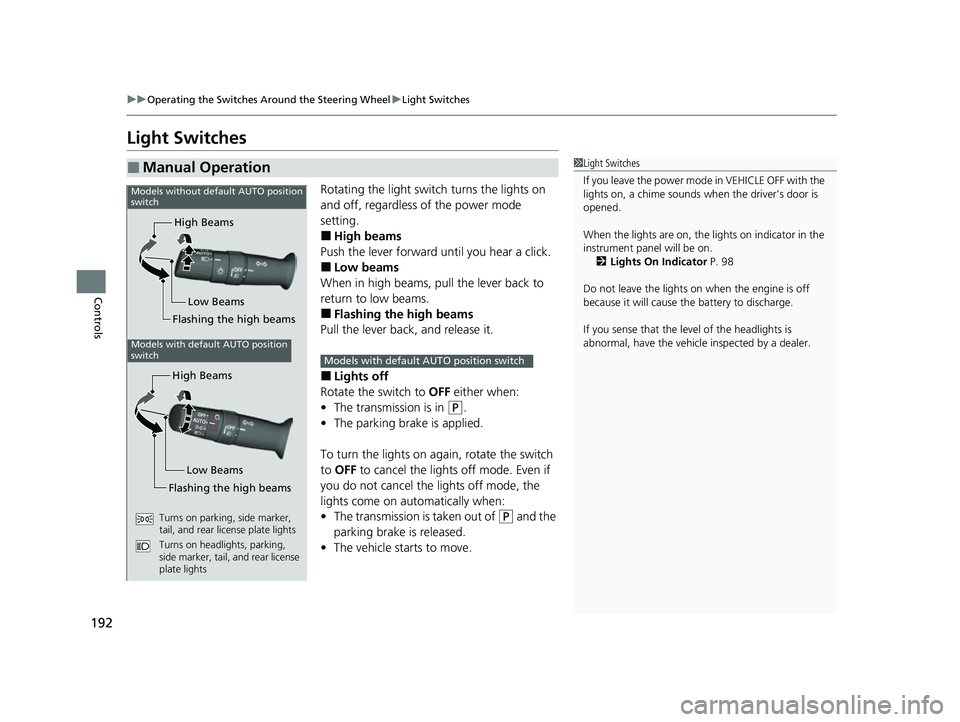
Rotating the light switch turns the lights on
and off, regardless of the power mode
setting.
■High beams
Push the lever forward until you hear a click.
■Low beams
When in high beams, pull the lever back to
return to low beams.
■Flashing the high beams
Pull the lever back, and release it.
■Lights off
Rotate the switch to OFF either when:
• The transmission is in
(P.
• The parking brake is applied.
To turn the lights on again, rotate the switch
to OFF to cancel the lights off mode. Even if
you do not cancel the lights off mode, the
lights come on automatically when:
• The transmission is taken out of
(P and the
parking brake is released.
• The vehicle starts to move.
■Manual Operation1Light Switches
If you leave the power mode in VEHICLE OFF with the
lights on, a chime sounds when the driver’s door is
opened.
When the lights are on, the lights on indicator in the
instrument pane l will be on.
2 Lights On Indicator P. 98
Do not leave the lights on when the engine is off
because it will cause the battery to discharge.
If you sense that the le vel of the headlights is
abnormal, have the vehicl e inspected by a dealer.
High Beams
Flashing the high beams Low Beams
Models without default AUTO position
switch
Models with default AUTO position
switch
High Beams
Flashing the high beams Low Beams
Turns on parking, side marker,
tail, and rear license plate lights
Turns on headlights, parking,
side marker, tail, and rear license
plate lights
Models with default AUTO position switch
23 US ODYSSEY-31THR6500.book 192 ページ 2022年1月24日 月曜日 午前11時35分
Page 198 of 707
196
uuOperating the Switches Around the Steering Wheel uDaytime Running Lights
Controls
Daytime Running Lights
When the conditions listed below are met, the daytime running lights come on:
• The power mode is in ON.
• The headlight switch is off.
• The parking brake is released.
The lights remain on even if you set the parking brake. Setting the power mode to
VEHICLE OFF will turn off the daytime running lights.
The daytime running lights go off once the headlight switch is turned on, or when
the headlight switch is in AUTO and it is getting dark outside.
23 US ODYSSEY-31THR6500.book 196 ページ 2022年1月24日 月曜日 午前11時35分
Page 209 of 707
207
uuOperating the Switches Around the Steering Wheel uDriving Position Memory System*
Controls
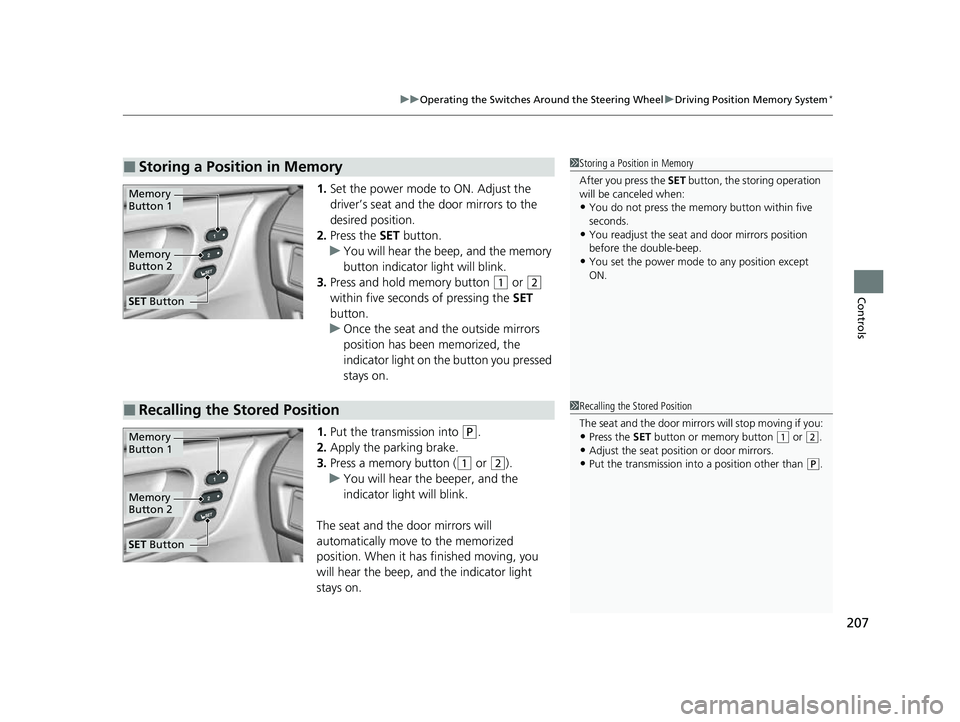
1. Set the power mode to ON. Adjust the
driver’s seat and the door mirrors to the
desired position.
2. Press the SET button.
u You will hear the beep, and the memory
button indicator light will blink.
3. Press and hold memory button
(1 or (2
within five seconds of pressing the SET
button.
u Once the seat and the outside mirrors
position has been memorized, the
indicator light on the button you pressed
stays on.
1. Put the transmission into
(P.
2. Apply the parking brake.
3. Press a memory button (
(1 or (2).
u You will hear the beeper, and the
indicator light will blink.
The seat and the door mirrors will
automatically move to the memorized
position. When it has finished moving, you
will hear the beep, and the indicator light
stays on.
■Storing a Position in Memory1 Storing a Position in Memory
After you press the SET button, the storing operation
will be canceled when:
•You do not press the memory button within five
seconds.
•You readjust the seat and door mirrors position
before the double-beep.
•You set the power mode to any position except
ON.
Memory
Button 1
Memory
Button 2
SET Button
■Recalling the Stored Position1Recalling the Stored Position
The seat and the door mirrors will stop moving if you:
•Press the SET button or memory button (1 or (2.
•Adjust the seat position or door mirrors.•Put the transmission into a position other than (P.
Memory
Button 1
Memory
Button 2
SET Button
23 US ODYSSEY-31THR6500.book 207 ページ 2022年1月24日 月曜日 午前11時35分
Page 223 of 707

Continued221
uuSeats uThird Row Seats
Controls
1. Store the center seat belt first. Insert a key
into the slot on the side of the anchor
buckle.
2. Retract the seat belt into the holder on the
ceiling.
2 Seat Belt with Detachable Anchor P. 45
3.Lower the head restrain ts to their lowest
position.
4. The right and left halves can be tucked
away separately. Pull either strap to release
the front leg lock of the third row seat.
5. Continue pulling the strap to tuck the seat
and strap away into the cargo area.
■One-Motion 60/40 Split 3rd-Row Magic Seat ®1One-Motion 60/40 Split 3rd-Row Magic Seat ®
Remove any items from the cargo area before you
tuck away the third row seat.
The instruction label is atta ched at the back of the
third row seat-back.
When you tuck away one si de of the third row seats
and use the non-recessed pa rt of the cargo area,
make sure to secure the cargo. Loose items can fly
forward and cause injury if you have to brake hard.
Straps
23 US ODYSSEY-31THR6500.book 221 ページ 2022年1月24日 月曜日 午前11時35分
Page 465 of 707

463
Driving
This chapter discusses driving and refueling.
Before DrivingDriving Preparation .......................... 464
Maximum Load Limit........................ 467
Towing a Trailer
Towing Preparation .......................... 470
Driving Safely with a Trailer .............. 474
Towing Behind a Motorhome .......... 475
When Driving
Starting the Engine .......................... 476
Precautions While Driving................. 482
Automatic Transmission ................... 483
Shifting ............................................ 484
Auto Idle Stop .................................. 492
ECON Button ................................... 497 Intelligent Traction Management ..... 498Vehicle Stability AssistTM (VSA®), aka Electronic
Stability Control (ESC), System .............. 499
Agile Handling Assist ....................... 501
Tire Pressure Monitoring System (TPMS) with Tire Fill Assist .......................... 502
Tire Pressure Monitoring System (TPMS) - Required Federal Explanation ......... 504
Blind spot information System.......... 506
Honda Sensing ®................................ 509
Collision Mitigation Braking SystemTM (CMBSTM) .... 512Adaptive Cruise Control (ACC) with Low Speed Follow ....... 523Lane Keeping Assist System (LKAS) .. 539Road Departure Mitigation (RDM) System.... 548Traffic Sign Recognition System ....... 553 Front Sensor Camera ....................... 558
Radar Sensor ................................... 560
Braking Brake System ................................... 561
Anti-lock Brake System (ABS) ........... 567
Brake Assist System ......................... 568
Parking Your Vehicle When Stopped ................................ 569
Parking Sensor System
*................... 571
Cross Traffic Monitor ....................... 576
Multi-View Rear Camera .................. 580
Refueling
Fuel Information .............................. 582
How to Refuel ................................. 583
Fuel Economy and CO
2 Emissions .... 585
* Not available on all models
23 US ODYSSEY-31THR6500.book 463 ページ 2022年1月24日 月曜日 午前11時35分
Page 467 of 707

Continued465
uuBefore Driving uDriving Preparation
Driving
• Store or secure all items on board properly.
u Carrying too much cargo, or improperly storing it, can affect your vehicle’s
handling, stability, sto pping distance, and tires, and make it unsafe.
2Maximum Load Limit P. 467
•Do not pile items higher than the seat height.
u They can block your view and may be thrown forward in the event of sudden
braking.
• Do not place anything in the front seat footwells. Make sure to secure the floor
mat.
u An object or unsecured floor mat can in terfere with your brake and accelerator
pedal operation while driving.
• If you have any animals on board, do not let them move around in the vehicle.
u They may interfere with driving and a crash could occur.
• Securely close and lock al l doors and the tailgate.
2Locking/Unlocking the Doors from the Inside P. 156
•Adjust your seating position properly.
u Adjust the head restraint, too.
2Seats P. 212
2 Adjusting the Front and Second Row Outer and Third Row Outer Head
Restraints Positions P. 225
•Adjust the mirrors and steering wh eel properly for your driving.
u Adjust them while sitting in the proper driving position.
2 Mirrors P. 209
2 Adjusting the Steering Wheel P. 208
■Interior Checks1Interior Checks
The headlight aim is set by the factory, and does not
need to be adjusted. Howeve r, if you regularly carry
heavy items in the cargo area or tow a trailer, have
the aiming readjusted at a dealer or by a qualified
technician.
23 US ODYSSEY-31THR6500.book 465 ページ 2022年1月24日 月曜日 午前11時35分
Page 474 of 707

uuTowing a Trailer uTowing Preparation
472
Driving
■Safety chains
Always use safety chains when you tow a trailer. Leave enough slack to allow the
trailer to turn corners easily, but do not allow the chains to drag on the ground.
■Trailer brakes
Recommended for any trailer with a total weight of 1,000 lbs (450 kg) or more:
There are two common types of trailer brake s: surge and electric. Surge brakes are
common for boat trailers, since the brakes will get wet. If you choose electric brakes,
be sure they are electronically actuated. Do not attempt to attach trailer brakes to
your vehicle’s hydraulic system, as it w ill lower braking effectiveness and create a
potential hazard.
■Trailer light
Trailer lights and equipment must comply with federal, state, province/territory, and
local regulations. Check with your local trailer sales or rental agency for the
requirements in the area where you plan to tow.
We recommend that you have a dealer install
a Honda wiring harness and converter. They
are designed for your vehicle.
1 Towing Equipment and Accessories
Trailer packages and products:
•Ball mount, hitch plug, hitch pin etc.
•Wiring harness kit
•Trailer hitch kit
Are available at a dealer.
1 Trailer light
The trailer lighting connect or is located behind the
left side panel in the cargo area.
Even if you are planning to use the non-Honda trailer
lighting harness and converte r, ask a dealer for the
correct connector and pins.
Right Turn
Signal
Small
Light Stop
Light +B Small
Light
Trailer
Hazard
Light
Left
Turn
Signal
23 US ODYSSEY-31THR6500.book 472 ページ 2022年1月24日 月曜日 午前11時35分