Page 462 of 707
460
Features
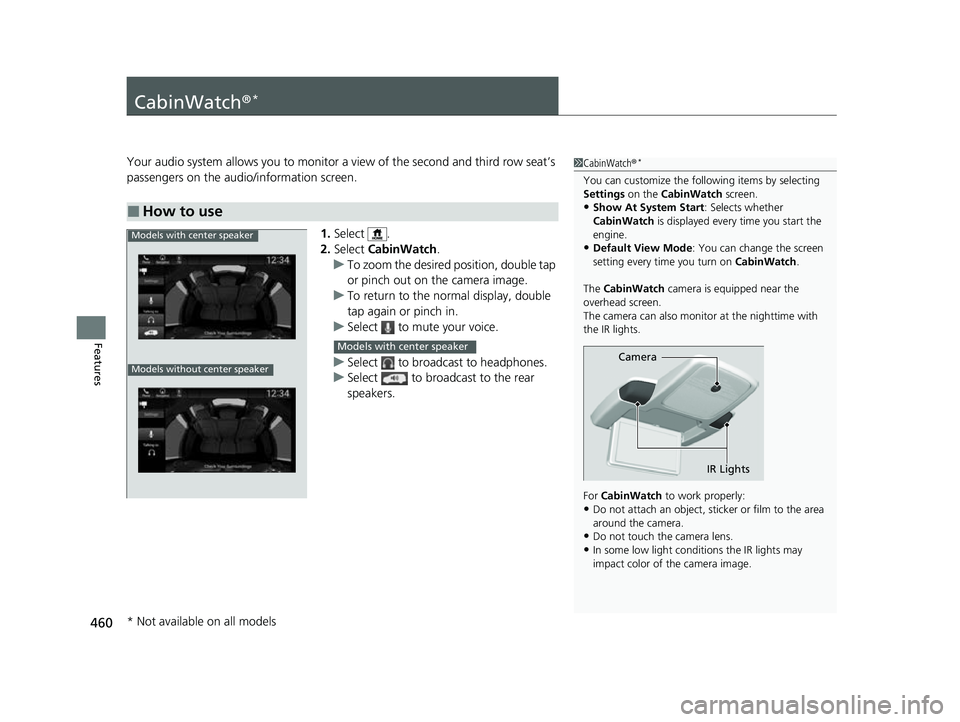
CabinWatch®*
Your audio system allows you to monitor a view of the second and third row seat’s
passengers on the audio/information screen.
1.Select .
2. Select CabinWatch .
u To zoom the desired position, double tap
or pinch out on the camera image.
u To return to the normal display, double
tap again or pinch in.
u Select to mute your voice.
u Select to broadcast to headphones.
u Select to broadcast to the rear
speakers.
■How to use
1CabinWatch ®*
You can customize the foll owing items by selecting
Settings on the CabinWatch screen.
•Show At System Start : Selects whether
CabinWatch is displayed every time you start the
engine.
•Default View Mode : You can change the screen
setting every time you turn on CabinWatch.
The CabinWatch camera is equipped near the
overhead screen.
The camera can also monitor at the nighttime with
the IR lights.
For CabinWatch to work properly:
•Do not attach an object, sticker or film to the area
around the camera.
•Do not touch the camera lens.
•In some low light conditions the IR lights may
impact color of the camera image.
Camera
IR Lights
Models with center speaker
Models without center speaker
Models with center speaker
* Not available on all models
23 US ODYSSEY-31THR6500.book 460 ページ 2022年1月24日 月曜日 午前11時35分
Page 463 of 707
461
Features
CabinTalk®*
Your audio system allows you or the front passenger voices to be broadcast to the
second and third row seat’s passengers us ing the rear speakers and/or headphones.
1. Select .
2. Select CabinTalk .
u Select to mute your voice.
u Select to broadcast to the rear
speakers.
u Select to broadcast to headphones.
■How to use
1CabinTalk ®*
You can also switch to the CabinTalk screen by
selecting CabinTalk on the front control panel for
the Blu-ray/DVD rear entertainment system. 2 Front Control Panel Operation P. 378
When is selected, you can adjust the speaker
volume by turning the volume knob.
Models with center speakerModels with center speaker
Models without center speaker
Models with center speaker
* Not available on all models
23 US ODYSSEY-31THR6500.book 461 ページ 2022年1月24日 月曜日 午前11時35分
Page 481 of 707

Continued479
uuWhen Driving uStarting the Engine
Driving
■To stop the engine1Remote Engine Start with Vehicle Feedback
The engine may not start by the remote engine start if:
•You have disabled a remote engine start setting
using the audio/information screen.
•The power mode is not in VEHICLE OFF.
•The transmission is in a position other than ( P.
•The hood is open, or any door or the tailgate is unlocked.•You have already used the remote twice to start
the engine.
•The battery temp is too low or the battery charge is
too low.
•Another registered remo te is in the vehicle.•There is any antenna failure.
•The door is unlocked with the built-in key.
•The engine oil pressure is low.•The engine coolant temper ature is extremely high.
•The telematics unit* malfunctions.
•The security system alarm is not set.
The engine may stop whil e it is running if:
•You do not start the vehicl e within 10 minutes of
starting the engine with the remote.
•The engine is stopped by using the remote.
•The security system alarm is not set.•The door is unlocked with the built-in key.
•The hood is open, or any door, or the tailgate is
unlocked.
•Any door is open.
•The transmission is in a position other than ( P.•The engine coolant temper ature is extremely high.
•The battery is low.
•The engine oil pressure is low.•The Malfunction Indicator Lamp comes on if there
is a problem with the emissions control systems.
Press and hold the
button for one second.
The exterior lights will not flash when the remote
is out of the keyless access system range.
The engine will not stop.Go within the range,
and try again.
The exterior lights flash once if
the engine stops successfully.
* Not available on all models
23 US ODYSSEY-31THR6500.book 479 ページ 2022年1月24日 月曜日 午前11時35分
Page 516 of 707

uuHonda Sensing ®u Collision Mitigation Braking SystemTM (CMBSTM)
514
Driving
■When the system activates
You can change the distance ( Long/Normal /Short ) between vehicles at which the
system’s earliest collision alert will co me on through the driver information
interface
* or audio/information screen* setting options.
2 List of customizable options P. 420
1When the system activates
The camera in the CMBS
TM is also designed to detect
pedestrians.
However, this pedestrian detection feature may not
activate or may not detect a pedestrian in front of
your vehicle under certain conditions.
Refer to the ones indicating the pedestrian detection
limitations from the list. 2 CMBS
TM Conditions and Limitations P. 517
The system provides visual and audible alerts of a possible collision, and stops if the
collision is avoided.
●Take appropriate action to prevent a collision (apply the brakes, change lanes,
etc.)
Visual Alerts
Beep
Audible Alert
* Not available on all models
23 US ODYSSEY-31THR6500.book 514 ページ 2022年1月24日 月曜日 午前11時35分
Page 551 of 707

Continued549
uuHonda Sensing ®u Road Departure Mitigation (RDM) System
Driving
The system activates when all of the following conditions are met:
• The vehicle is traveling between about 45 and 90 mph (72 and 145 km/h).
• The vehicle is on a straight or slightly curved road.
• The turn signals are off.
• The brake pedal is not depressed.
• The wipers are not in high speed operation.
• The system makes a determination that th e driver is not actively accelerating,
braking, or steering.
■How the System Activates1 Road Departure Mitigation (RDM) System
If LKAS is off and you have selected Narrow from the
customised options using the audio/information
screen, the message below will appear in case the
system determines a possibility of your vehicle
crossing over detect ed lane markings.
2 Driver Information Interface Warning and
Information Messages P. 108
2 Customized Features P. 413
1How the System Activates
The RDM system may automa tically shut off and the
safety support indicator (a mber) comes and stays on.
2 Indicators P. 88
RDM system function can be impacted when the
vehicle is:
•Not driven within a traffic lane.
•Driven on the inside edge of a curve, or outside of
a lane.
•Driven in a narrow lane.
23 US ODYSSEY-31THR6500.book 549 ページ 2022年1月24日 月曜日 午前11時35分
Page 552 of 707
uuHonda Sensing ®u Road Departure Mitigation (RDM) System
550
Driving
When you turn the RDM on and off, do the
following.
1. Press the safety support switch.
2. Press the / button to select symbol,
then press ENTER.
u A tick appears in the box and the color of
the symbol changes green when the
system is on. The tick disappears and the
color of the symbol changes gray
when the system is off.
The RDM is in the previously selected on or off
setting each time you start the power system.
■RDM On and Off1 RDM On and Off
When you have selected Warning Only from the
customized options using the audio/information
screen, the system does not operate the steering
wheel and braking. 2 Customized Features P. 413
Safety Support Switch
/ Button34
34
23 US ODYSSEY-31THR6500.book 550 ページ 2022年1月24日 月曜日 午前11時35分
Page 559 of 707
557
uuHonda Sensing ®u Traffic Sign Recognition System
Driving
The speed limit sign icon is displayed on the upper right half of the screen.
■Speed limit sign on and off
You can switch on and off the speed limit sign on the audio/information screen.
2 Customized Features P. 413
■Signs Displayed on the Driver information interface
Speed Limit Sign
23 US ODYSSEY-31THR6500.book 557 ページ 2022年1月24日 月曜日 午前11時35分
Page 573 of 707

571
uuParking Your Vehicle uParking Sensor System*
Continued
Driving
Parking Sensor System*
The corner and center sensors monitor obstacles around your vehicle, and the
beeper and the driver information interf ace or audio/information screen let you
know the approximate distance betw een your vehicle and the obstacle.
■The sensor location and range
1Parking Sensor System*
Even when the system is on, always confirm if there is
no obstacle near your ve hicle before parking.
The system may not work properly when:
•The sensors are covered with snow, ice, mud, or
dirt, etc.
•The vehicle is on uneven su rface, such as grass,
bumpy road, or a hill.
•The vehicle has been out in hot or cold weather.•The system is affected by devices that emit
ultrasonic waves.
•Driving in bad weather.
The system may not sense:
•Thin or low objects.•Sonic-absorptive materials, such as snow, cotton,
or sponge.
•Objects directly under the bumper.
Do not put any accessories on or around the sensors.Within about 24 in (60 cm) or less Front: Within about 30 in (75 cm) or less Rear: Within about 43 in (110 cm) or less
Front Corner Sensors
Rear Center Sensors
Rear Corner Sensors
Front Center Sensors
* Not available on all models
23 US ODYSSEY-31THR6500.book 571 ページ 2022年1月24日 月曜日 午前11時35分


