Page 449 of 664
Continued447
uuWhen Driving uBlind Spot Information System*
Driving
You can turn the system on and off using the driver information interface.
2 Switching the Display P. 107
2 Safety Support P. 118
The Blind Spot Information System will stay on the previously selected on (checked)
or off (unchecked) setting each time you start the engine.
■Blind Spot Information System On and Off1 Blind Spot Information System*
You can change the settings for the Blind Spot
Information System.
2 Settings
* P. 123
2 Customized Features P. 345
* Not available on all models
23 HR-V-313V06000_01.book 447 ページ 2022年4月4日 月曜日 午前10時49分
Page 459 of 664

Continued457
uuHonda Sensing ®u Collision Mitigation Braking SystemTM (CMBSTM)
Driving
You can turn the system on and off using the driver information interface.
2 Switching the Display P. 107
2 Safety Support P. 118
The CMBSTM is turned on every time you start th e engine, even if you turned it off
the last time you drove the vehicle.
■CMBSTM On and Off1 Collision Mitigation Braking SystemTM (CMBSTM)
You cannot turn the CMBS
TM off while driving.
The CMBS
TM may automatically shut off, and the
safety support indicator (amb er) will come and stay
on under certain conditions: 2 CMBS
TM Conditions and Limitations P. 458
The CMBS
TM is not activated for about 15 seconds
after the engine starts.
The Vehicle Stability Assist
TM (VSA ®) system, Vehicle
Stability AssistTM (VSA ®) OFF , Adaptive Cruise Control
(ACC) with Low Speed Follow*, low tire pressure/
TPMS*, parking brake and bra ke system and safety
support indicators may come on in amber along with
a message in the gauge when you set the power
mode to ON after re connecting the battery.
Drive a short distance at more than 12 mph (20 km/h).
Each indicator should go off. If any do not, have your
vehicle checked by a dealer.
* Not available on all models
23 HR-V-313V06000_01.book 457 ページ 2022年4月4日 月曜日 午前10時49分
Page 469 of 664
467
uuHonda Sensing ®u Low Speed Braking Control*
Continued
Driving
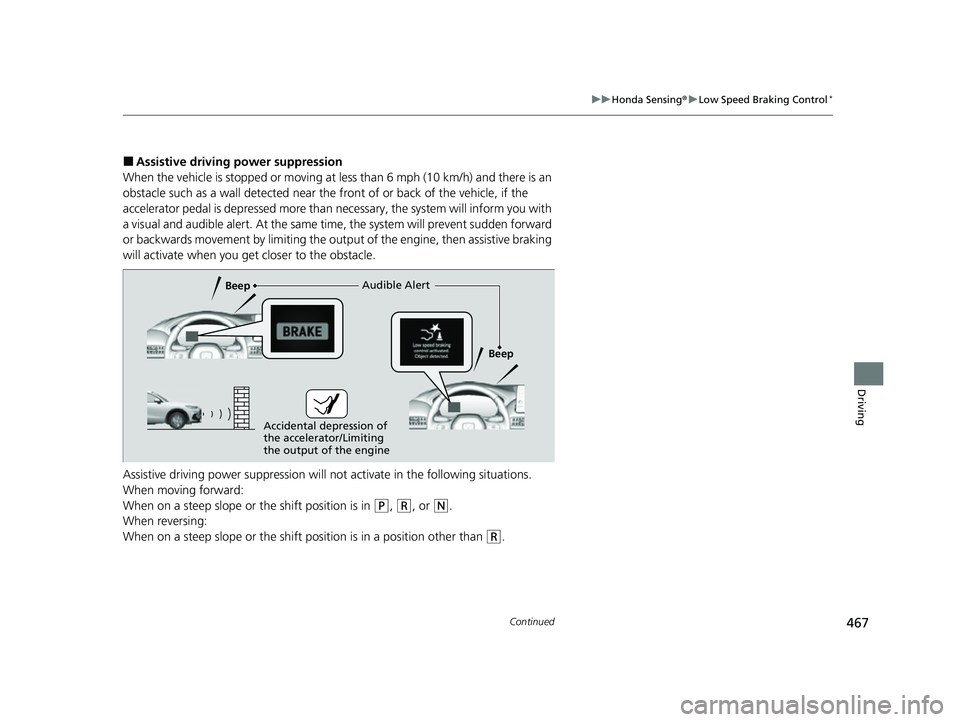
■Assistive driving power suppression
When the vehicle is stopped or moving at less than 6 mph (10 km/h) and there is an
obstacle such as a wall detected near the front of or back of the vehicle, if the
accelerator pedal is depressed more than ne cessary, the system will inform you with
a visual and audible alert. At the same ti me, the system will prevent sudden forward
or backwards movement by limiting the output of the engine, then assistive braking
will activate when you ge t closer to the obstacle.
Assistive driving power suppression will not activate in the following situations.
When moving forward:
When on a steep slope or the shift position is in
(P, (R, or (N.
When reversing:
When on a steep slope or the shift po sition is in a position other than
(R.
Audible Alert
Beep
Beep
Accidental depression of
the accelerator/Limiting
the output of the engine
23 HR-V-313V06000_01.book 467 ページ 2022年4月4日 月曜日 午前10時49分
Page 470 of 664
uuHonda Sensing ®u Low Speed Braking Control*
468
Driving
You can turn the system on and off us ing the driver information interface.
2Switching the Display P. 107
2 Safety Support P. 118
The system is turned on every time you start the engine, even if you turned it off the
last time you drove the vehicle.
■System On and Off 1 System On and Off
The system may temporarily turn off after
reconnecting the battery.
The system will automatically turn ON after the
vehicle has been moving at over 12 mph (20 km/h)
for some time.
If the system does not turn on, have your vehicle
checked by a dealer.
23 HR-V-313V06000_01.book 468 ページ 2022年4月4日 月曜日 午前10時49分
Page 489 of 664
Continued487
uuHonda Sensing ®u Adaptive Cruise Control (ACC) with Low Speed Follow
Driving
■Automatic cancellation
The beeper sounds and a message appears on the driver information interface when
ACC with Low Speed Follow is automatically canceled. Any of these conditions may
cause the ACC with Low Speed Fo llow to automatically cancel:
• Bad weather (rain, fog, snow, etc.)
• The vehicle ahead of yo u cannot be detected.
• An abnormal tire condition is detected, or the tires are skidding.
• Driving on a mountainous road, or driving off road for extended periods.
• Abrupt steering wheel movement.
• When the ABS, VSA ®, CMBS
TM, or Low Speed Braking Control* is activated.
• When the VSA ® system indicator comes on.
• When the vehicle is stopped on a very steep slope.
• When you manually apply the parking brake.
• Water is sprayed by or snow blown from a vehicle ahead.
• Driving into low sunlight (e.g., at dawn or dusk).
• When the detected vehicle within the AC C with Low Speed Follow range is too
close to your vehicle.
• When accelerating rapidly.
• The front of the camera is covered by dirt, fog, rain, mud, wet snow, seals,
accessories, stickers, or film on the windshield.
• The vehicle is loaded heavy load in the carg o area or rear seats.
• When passing through a dark place, such as tunnel.
• When the parking brake and brake system indicator (amber) comes on.
• The vehicle has repeatedly applied the brakes to maintain the set speed (for
example, you are descending a long slope).
• When the system doesn't detect any drivi ng actions from the driver for a certain
amount of time while the LKAS is also activated.
The ACC with Low Speed Follow automatic ca ncellation can be also triggered by the
following causes. In these cases, the parking brake will be automatically applied.
• The driver’s seat belt is unfastene d when the vehicle is stationary.
• The vehicle stops for more than 10 minutes.
• The engine is turned off.
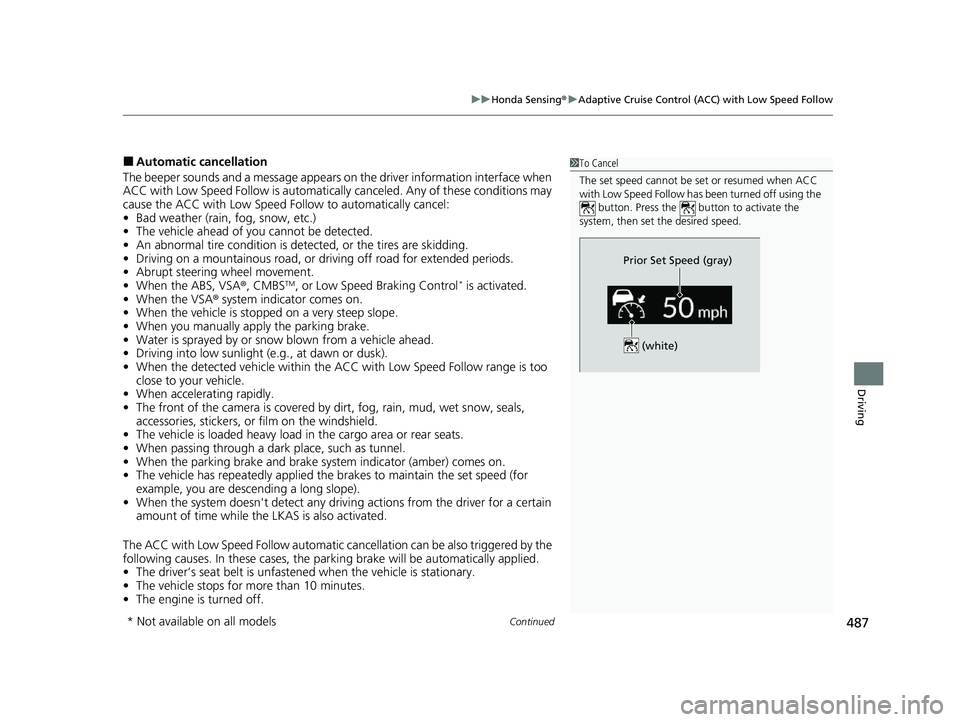
1To Cancel
The set speed cannot be set or resumed when ACC
with Low Speed Follow has been turned off using the
button. Press the button to activate the
system, then set the desired speed.
(white)
Prior Set Speed (gray)
* Not available on all models
23 HR-V-313V06000_01.book 487 ページ 2022年4月4日 月曜日 午前10時49分
Page 497 of 664
495
uuHonda Sensing ®u Lane Keeping Assist System (LKAS)
Continued
Driving
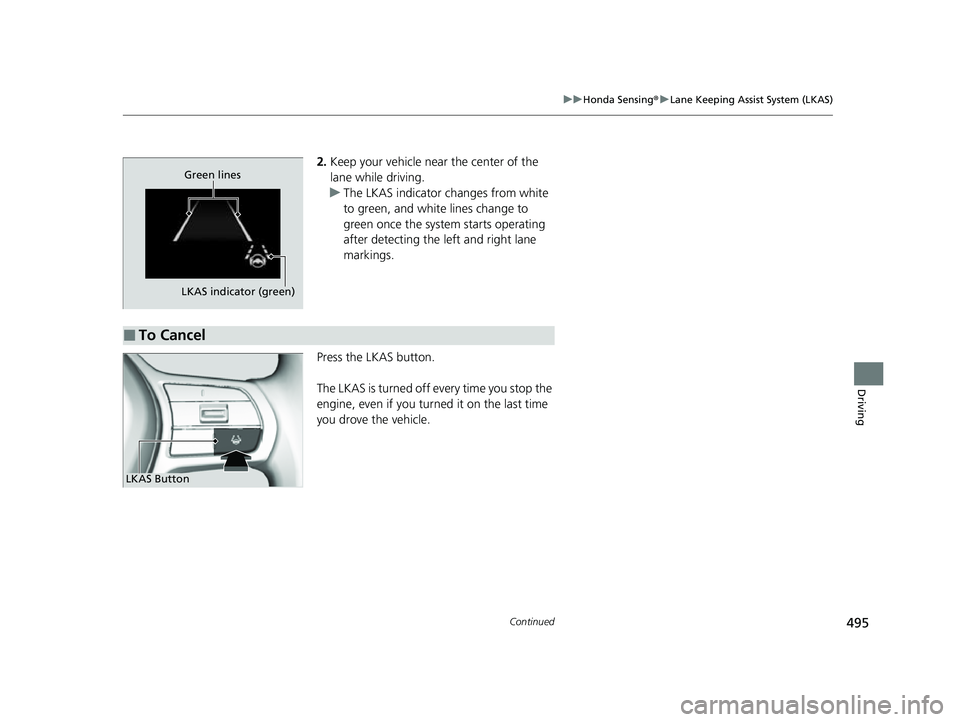
2. Keep your vehicle near the center of the
lane while driving.
u The LKAS indicator changes from white
to green, and white lines change to
green once the system starts operating
after detecting the left and right lane
markings.
Press the LKAS button.
The LKAS is turned off every time you stop the
engine, even if you turned it on the last time
you drove the vehicle.
LKAS indicator (green) Green lines
■To Cancel
LKAS Button
23 HR-V-313V06000_01.book 495 ページ 2022年4月4日 月曜日 午前10時49分
Page 513 of 664
511
uuHonda Sensing ®u Road Departure Mitigation System
Continued
Driving
Road Departure Mi tigation System
Alerts and helps assist you when the system detects a possibility of your vehicle
crossing over detected lane markings, or approaching the outer edge of the
pavement (into grass or gravel bord er) or a detected oncoming vehicle.
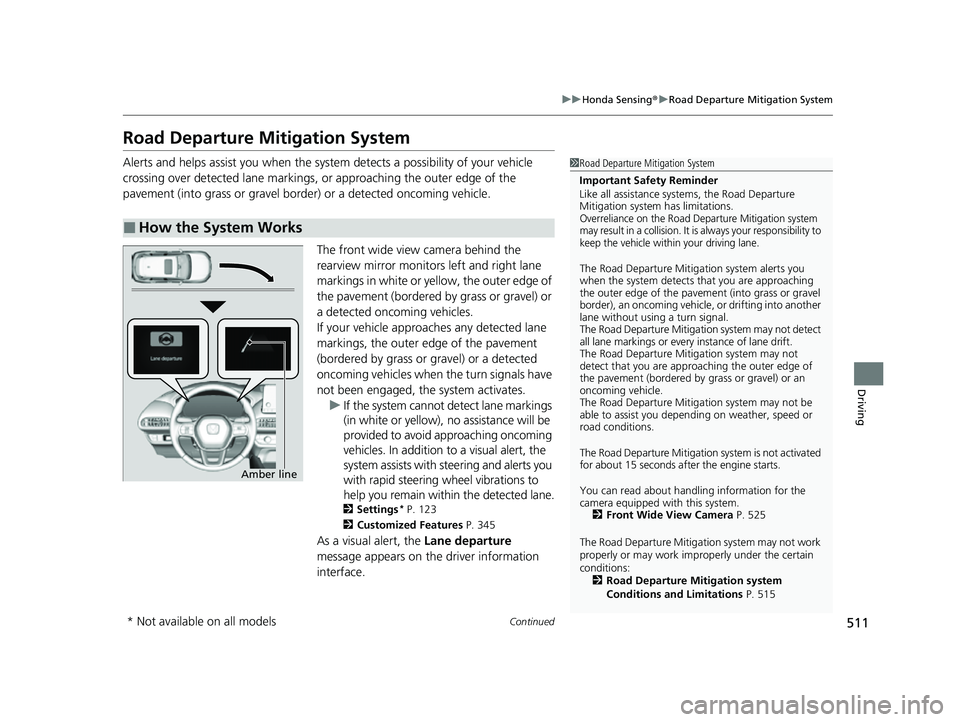
The front wide view camera behind the
rearview mirror monitors left and right lane
markings in white or yellow, the outer edge of
the pavement (bordered by grass or gravel) or
a detected oncoming vehicles.
If your vehicle approach es any detected lane
markings, the outer edge of the pavement
(bordered by grass or gravel) or a detected
oncoming vehicles when the turn signals have
not been engaged, the system activates. u If the system cannot de tect lane markings
(in white or yellow), no assistance will be
provided to avoid approaching oncoming
vehicles. In addition to a visual alert, the
system assists with steering and alerts you
with rapid steering wheel vibrations to
help you remain within the detected lane.
2 Settings* P. 123
2 Customized Features P. 345
As a visual alert, the Lane departure
message appears on the driver information
interface.
■How the System Works
1 Road Departure Mitigation System
Important Safety Reminder
Like all assistance systems, the Road Departure
Mitigation system has limitations.
Overreliance on the Road Departure Mitigation system
may result in a collision. It is always your responsibility to
keep the vehicle within your driving lane.
The Road Departure Mitiga tion system alerts you
when the system detects that you are approaching
the outer edge of the paveme nt (into grass or gravel
border), an oncoming vehicle, or drifting into another
lane without using a turn signal.
The Road Departure Mitigation system may not detect
all lane markings or ever y instance of lane drift.
The Road Departure Miti gation system may not
detect that you are approa ching the outer edge of
the pavement (bordered by grass or gravel) or an
oncoming vehicle.
The Road Departure Mitiga tion system may not be
able to assist you depend ing on weather, speed or
road conditions.
The Road Departure Mitigation system is not activated
for about 15 seconds af ter the engine starts.
You can read about handling information for the
camera equipped with this system. 2 Front Wide View Camera P. 525
The Road Departure Mitigati on system may not work
properly or may work im properly under the certain
conditions: 2 Road Departure Mitigation system
Conditions and Limitations P. 515
Amber line
* Not available on all models
23 HR-V-313V06000_01.book 511 ページ 2022年4月4日 月曜日 午前10時49分
Page 516 of 664

uuHonda Sensing ®u Road Departure Mitigation System
514
Driving
You can turn the system on and off us ing the driver information interface.
2Switching the Display P. 107
2 Safety Support P. 118
The Road Departure Mitigation system is in the previously selected on (checked) or
off (unchecked) setting each time you start the engine.
■Road Departure Mitigation system On and Off1Road Departure Mitigation system On and Off
When you have selected Warning only from the
customized options using the driver information
interface
* or audio/information screen*, the system
does not operate the steering wheel. 2 Settings
* P. 123
2 Customized Features P. 345
The Vehicle Stability Assist
TM (VSA ®) system, Vehicle
Stability AssistTM (VSA ®) OFF , Adaptive Cruise Control
(ACC) with Low Speed Follow, low tire pressure/
TPMS
*, parking brake and bra ke system and safety
support indicators may come on in amber along with
a message in the gauge when you set the power
mode to ON after re connecting the battery.
Drive a short distance at more than 12 mph (20 km/h).
Each indicator should go off. If any do not, have your
vehicle checked by a dealer.
* Not available on all models
23 HR-V-313V06000_01.book 514 ページ 2022年4月4日 月曜日 午前10時49分