2023 HONDA CRV hood open
[x] Cancel search: hood openPage 460 of 719

Continued459
uuWhen Driving uTurning on the Power
Driving
■To turn the power system off
Press and hold the button for one
second.
If the power system is turned off successfully,
the exterior lights flash once.
When the remote is out of the keyless access
system range, the exteri or lights will not flash.
The power system will not be turned off. u Go within the range, and try again.1Remote Engine Start
The power system may be turned off while it is on if:
•You do not start the vehicl e within 10 minutes of
turning the power system on with the keyless
remote.
•The power system is turned off by using the keyless
remote.
•The security system alarm is not set.•The door is unlocked with the built-in key.
•The hood is open, or any door, or the tailgate is
unlocked.
•You press the shift lever release button.
•The engine coolant temper ature is extremely high.
•The 12-volt battery is low.•The engine oil pressure is low.
•The malfunction indicator la mp comes on if there is
a problem with the emissions control systems.
While the power system is on, the vehicle will
automatically preconditi on inside the vehicle.
When it is warm outside:
•The climate control system is activated in
recirculation mode.
When it is cold outside:
•The defroster is activated at a moderately warm
temperature.
•The rear defogger, heated door mirrors, seat
heaters and heated steering wheel* are activated.
2 Rear Defogger/Heated Door Mirror
Button P. 199
2 Heated Steering Wheel
* P. 229
2 Front Seat Heaters P. 230
* Not available on all models
Page 600 of 719

599
Maintenance
This chapter discusses basic maintenance.
Before Performing MaintenanceInspection and Maintenance ............ 600
Safety When Performing Maintenance ....601Parts and Fluids Used in Maintenance Service ........................................... 602
Maintenance Minder
TM..................... 603
Maintenance Under the Hood Maintenance Items Under the Hood .... 611
Opening the Hood ........................... 612
Recommended Engine Oil ................ 613
Oil Check ......................................... 614
Adding Engine Oil ............................ 615
Changing the Engine Oil and Oil Filter ...616
Cooling System ................................ 618
Transmission Fluid ............................ 620
Brake Fluid ....................................... 621
Refilling Window Wa sher Fluid......... 622
Replacing Light Bulbs ....................... 623
Checking and Maintaining Wiper
Blades .......................................... 627
Checking and Maintaining Tires
Checking Tires ................................. 631
Tire and Loading Information Label ... 632
Tire Labeling .................................... 632
DOT Tire Quality Grading (U.S. Vehicles) .... 634Wear Indicators................................ 636 Tire Service Life ................................ 636
Tire and Wheel Replacement ........... 637
Tire Rotation .................................... 638
Winter Tires ..................................... 639
12-Volt Battery ................................. 640
Remote Transmitter Care
Replacing the Remote Battery .......... 642
Climate Control System Maintenance .... 643Cleaning
Interior Care .................................... 644
Exterior Care.................................... 646
Accessories and Modifications .......... 649
Page 613 of 719

612
uuMaintenance Under the Hood uOpening the Hood
Maintenance
Opening the Hood
1. Park the vehicle on a level surface, and set
the parking brake.
2. Pull the hood release handle under the
driver’s side lower corner of the dashboard.
u The hood will pop up slightly.
3. Push the hood latch lever (located under
the front edge of the hood to the center) to
the side and raise the hood. Once you have
raised the hood slightly, you can release the
lever.
4. Lift the hood up most of the way.
u The hydraulic supports will lift it up the
rest of the way and hold it up.
When closing, lower it to approximately
12 inches (30 cm), then press down firmly with
your hands.1 Opening the Hood
NOTICE
Do not open the hood when the wiper arms are
raised. The hood will strike the wipers, resulting in
possible damage to the hood and/or the wipers.
NOTICE
Do not press the engine cover forcibly. This may
damage the engine cover and component parts.
When closing the hood, check that the hood is
securely latched.
If the hood latch lever moves stiffly, or if you can
open the hood without lifti ng the lever, the latch
mechanism should be cl eaned and lubricated.
Pull
Hood Release Handle
Lever
Page 617 of 719
616
uuMaintenance Under the Hood uChanging the Engine Oil and Oil Filter
Maintenance
Changing the Engine Oil and Oil Filter
You must change the engine oil and oil f ilter regularly in order to maintain the
engine's lubrication. The engine may be damaged if they are not changed regularly.
Turn the power system off before changing the engine oil or oil filter.
Change the oil and filter in accordance with the maintenance message on the driver
information interface. 1.Run the engine until it reaches normal
operating temperature, and then turn the
engine off.
2. Open the hood and remove the engine oil
fill cap.
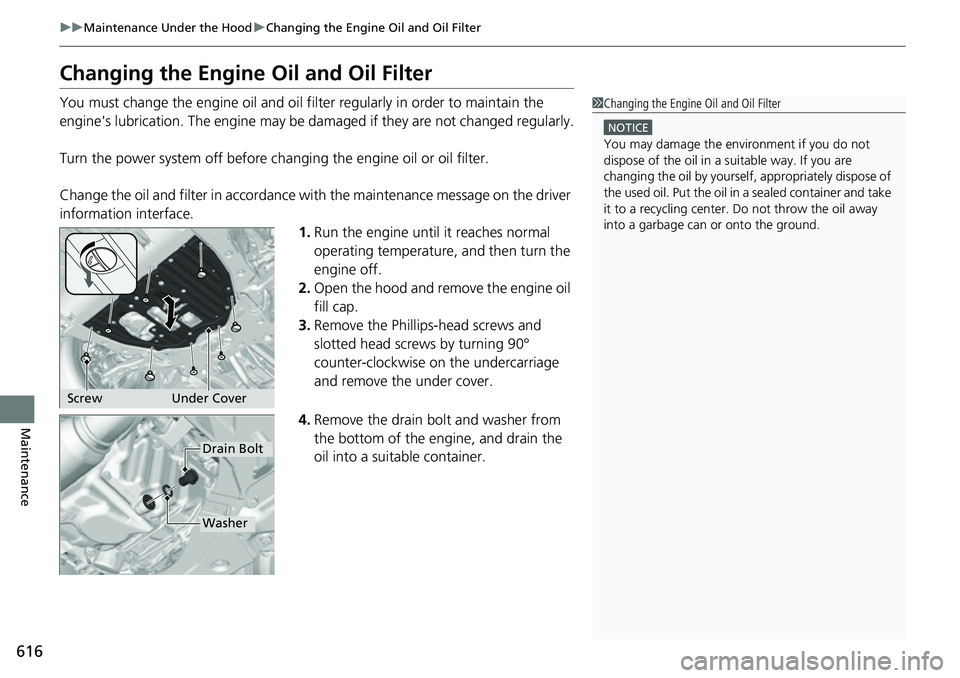
3. Remove the Phillips-head screws and
slotted head screws by turning 90°
counter-clockwise on the undercarriage
and remove the under cover.
4. Remove the drain bolt and washer from
the bottom of the engine, and drain the
oil into a suitable container.1Changing the Engine Oil and Oil Filter
NOTICE
You may damage the environment if you do not
dispose of the oil in a suitable way. If you are
changing the oil by yourself , appropriately dispose of
the used oil. Put the oil in a sealed container and take
it to a recycling center. Do not throw the oil away
into a garbage can or onto the ground.
Screw Under Cover
Drain Bolt
Washer
Page 672 of 719

671Continued
Handling the Unexpected
If the 12-Volt Battery Is Dead
Jump Starting Procedure
Turn off the power to electric devices, such as audio and lights. Turn off the power
system, then open the hood. 1.Open the terminal cover on your vehicle’s
12-volt battery positive + terminal.
2. Connect the first jumper cable to your
vehicle's 12-volt battery + terminal.
3. Connect the other end of the first jumper
cable to the booster battery + terminal.
u Use a 12-volt booster battery only.
u
When using an automotive battery charger
to boost your 12-volt battery, select a
lower charging voltage than 15-volt. Check
the charger manual for the proper setting.
4. Connect the second jumper cable to the
booster battery - terminal.
5. Connect the other end of the second
jumper cable to the engine mounting bolt
as shown. Do not connect this jumper cable
to any other part.
6. If your vehicle is connected to another
vehicle, start the assisting vehicle's engine
and increase its rpm slightly.
7. Attempt to start your ve hicle's engine. If it
turns over slowly, check that the jumper
cables have good metal-to-metal contact.
1 Jump Starting Procedure
Securely attach the jumper cables clips so that they
do not come off when the e ngine vibrates. Be careful
not to tangle the jumper cables or allow the cable
ends to touch each other while attaching or
detaching the jumper cables.
12-volt battery performa nce degrades in cold
conditions and may prevent the engine from starting.
The Vehicle Stability Assist
TM (VSA ®) system, brake
system (Amber), Adaptive Cruise Control (ACC) with
Low Speed Follow, low tire pressure/TPMS
* and
Safety Support indicators may come on along with a
message in the gauge when you set the power mode
to ON after reconnecting the 12-volt battery.
Drive a short distance at more than 12 mph (20 km/h).
Each indicator should go off. If any do not, have your
vehicle checked by a dealer.
3WARNING
A 12-volt battery can explode if you do not
follow the correct procedure, seriously
injuring anyone nearby.
Keep all sparks, open flames, and smoking
materials away from the 12-volt battery.
Booster Battery
* Not available on all models
Page 675 of 719
674
Handling the Unexpected
Overheating
How to Handle Overheating
Overheating symptoms are as follows:
•The Power system temperature high. Power may be reduced. message
appears on the driver information interface.
• The Engine temperature too hot. Do not drive. Allow engine to cool.
message appears on the driv er information interface.
• Steam or spray comes out of the engine compartment.
The Power system temperature hi gh. Power may be reduced. message
appears on the driver informa tion interface when the power system temperature is
high.
1. Immediately park the vehicle in a safe place.
u Set the parking brake, and put the transmission into
(P. Turn off all accessories
and turn on the hazard warning lights.
2. Keep the power mode in ON, and wait until the message disappears.
u If the message does not disappear, have your vehicle inspected at a dealer.
■First thing to do
1. Immediately park the vehicle in a safe place.
2. Turn off all accessories and turn on the hazard warning lights.
u No steam or spray present: Keep the power system on and open the hood.
u Steam or spray is present: Turn off the power system and wait until it
subsides. Then, open the hood.
■The Power system temperature high. Power may be
reduced. Message Appears on the Driver Information
Interface
■The Engine temperature too hot. Do not drive. Allow engine
to cool. Message Appears on the Driver Information
Interface
1 How to Handle Overheating
NOTICE
Continuing to drive with the Engine temperature
too hot. Do not drive. Allow engine to cool.
message on the driver information interface may
damage the engine.
3WARNING
Steam and spray from an overheated
engine can seri ously scald you.
Do not open the hood if steam is coming
out.
Page 677 of 719

676
Handling the Unexpected
Indicator, Coming On/Blinking
If the Engine oil pressure low Warning Appears
■Reasons for the warning to appear
Appears when the engine oil pressure is low.
■What to do as soon as the warning
appears
1. Immediately park the vehicle on level
ground in a safe place.
2. If necessary, turn the hazard warning lights
on.
■What to do after parking the vehicle
1. Turn the power system off and let it sit for
approximately three minutes.
2. Open the hood and check the oil level.
u Add oil as necessary.
2 Oil Check P. 614
3.Start the engine and check the Engine oil
pressure low warning.
u The warning disappears: Start driving
again.
u The warning does not disappear within
10 seconds: Immediately turn the power
system off and contact a dealer for
repairs.
1If the Engine oil pressure low Warning Appears
NOTICE
Running the engine with low oil pressure can cause
serious mechanical damage almost immediately.
Page 714 of 719

713
Index
K
Key Number Tag...................................... 149
Keyless Access System .............................. 151
Keys ........................................................... 148
Master Keys ............................................ 148
Number Tag............................................ 149
Rear Door Won’t Open ........................... 163
Remote Transmitter ................................ 157
Types and Functions................................ 148
Kickdown .................................................. 463
Knee Airbags .............................................. 67
L
Lane Keeping Assist System (LKAS) ........ 533
LATCH (Child Seats) ................................... 84
Lights ................................................ 188, 623
Auto High-Beam ..................................... 193
Automatic............................................... 189
Bulb Replacement ................................... 623
Daytime Running Lights .......................... 192
High Beam Indicator ............................... 106
Interior.................................................... 216
Light Switches......................................... 188
Lights On Indicator.................................. 106
Turn Signals ............................................ 187
Load Limits ............................................... 445
Locking/Unlocking ................................... 148
Auto Door Locking/Unlocking ................. 164
Childproof Door Locks ............................ 163
From Inside ............................................. 161 From Outside ........................................... 151
Keys ........................................................ 148
Using a Key ............................................. 158
Low 12-Volt Battery Charge .................... 677
Low Battery Charge .................................. 677
Low Fuel Indicator (Amber) ..................... 103
Low Keyless Remote Signal Strength ...... 150
Low Oil Pressure Indicator ....................... 676
Low Speed Braking Control ..................... 507
Lower Anchors ............................................ 84
Luggage (Maximum Load Limit) ............. 445
Lumbar Support ........................................ 206
Lumbar Support Adjustment Switch ....... 206M
Maintenance............................................. 599
12-Volt Battery ........................................ 640
Brake Fluid .............................................. 621
Cleaning .................................................. 644
Coolant ................................................... 618
Maintenance Minder
TM............................ 603
Oil ........................................................... 614
Precautions .............................................. 600
Radiator .................................................. 619
Remote Transmitter ................................. 642
Replacing Light Bulbs ............................... 623
Safety ...................................................... 601
Service Items ........................................... 607
Tires ........................................................ 631
Transmission Fluid ................................... 620 Under the Hood ...................................... 611
Malfunction Indicator Lamp ............ 101, 678
Map Lights ................................................ 217
Maximum Load Limit ............................... 445
Meters, Gauges ......................................... 114
Mirrors ...................................................... 203
Adjusting ................................................ 203
Door ....................................................... 204
Exterior ................................................... 204
Interior Rearview ..................................... 203
Modifications (and Accessories) .............. 649
Moonroof ................................................. 183
MP3 ................................................... 254, 314
Multi-View Rear Camera .......................... 593
N
Navigation................................................ 125
No Content ............................................... 132
NORMAL Mode Indicator ........................ 108
Numbers (Identification) .......................... 696