Page 48 of 719
47
uuFor Safe Driving uYour Vehicle’s Safety Features
Safe Driving
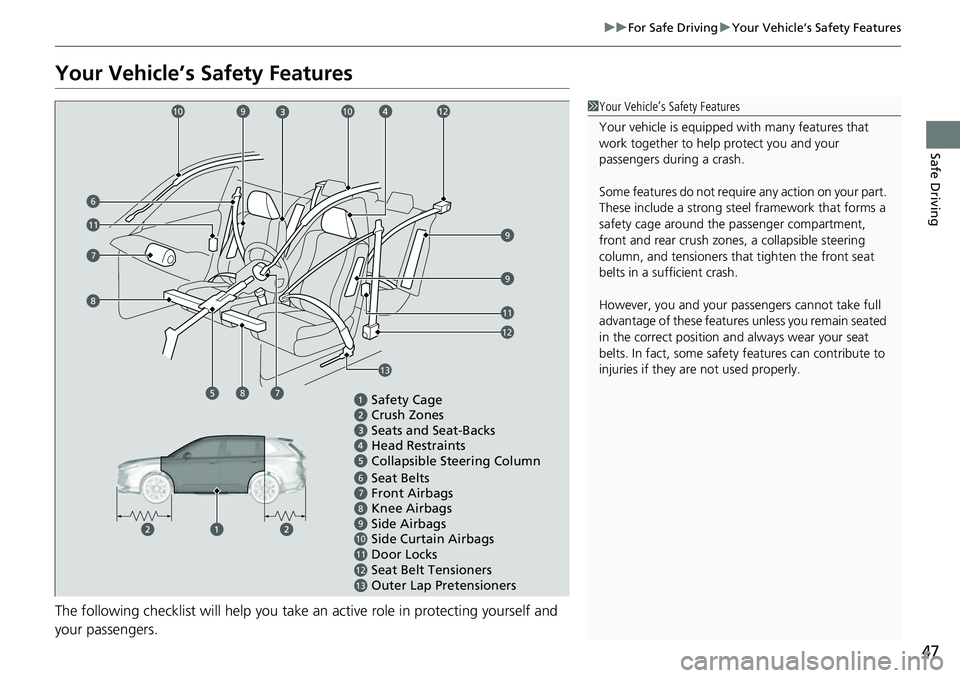
Your Vehicle’s Safety Features
The following checklist will help you take an active role in protecting yourself and
your passengers.
1Your Vehicle’s Safety Features
Your vehicle is equipped wi th many features that
work together to help protect you and your
passengers during a crash.
Some features do not require any action on your part.
These include a strong steel framework that forms a
safety cage around the passenger compartment,
front and rear crush zone s, a collapsible steering
column, and tensioners that tighten the front seat
belts in a sufficient crash.
However, you and your passe ngers cannot take full
advantage of these features unless you remain seated
in the correct position and always wear your seat
belts. In fact, some safety features can contribute to
injuries if they are not used properly.
Safety Cage
Crush Zones
Seats and Seat-Backs
Head Restraints
Collapsible Steering Column
Seat Belts
Front Airbags
Side Airbags
Seat Belt Tensioners Knee Airbags
11109876
Door Locks
11
7
9
Side Curtain Airbags
Outer Lap Pretensioners
1213
87
13
12
11
9
12109
6
8
10
Page 49 of 719
48
uuFor Safe Driving uSafety Checklist
Safe Driving
Safety Checklist
For the safety of you and your passenge rs, make a habit of checking these items
each time before you drive.
• After everyone has entered the vehicle, be sure all doors and the tailgate are
closed and locked. Locking the doors and the tailgate helps prevent an occupant
from being ejected and an outsider from unexpectedly opening a door or the
tailgate.
2 Locking/Unlocking the Doors from the Inside P. 161
•Adjust your seat to a position suitable for driving. Be sure the front seats are
adjusted as far to the rear as possible while allowing the driver to control the
vehicle. Sitting too close to a front airbag can result in serious or fatal injury in a
crash.
2 Seats P. 205
•Adjust head restraints to the proper position. Head restraints are most effective
when the center of the head restraint alig ns with the center of your head. Taller
persons should adjust their head restraint to the highest position.
2 Adjusting the Front Head Restraint Positions P. 213
•Always wear your seat belt, and make sure you wear it properly. Confirm that any
passengers are properly belted as well.
2 Fastening a Seat Belt P. 54
•Protect children by using seat belts or child seats according to a child’s age,
height, and weight.
2 Child Safety P. 79
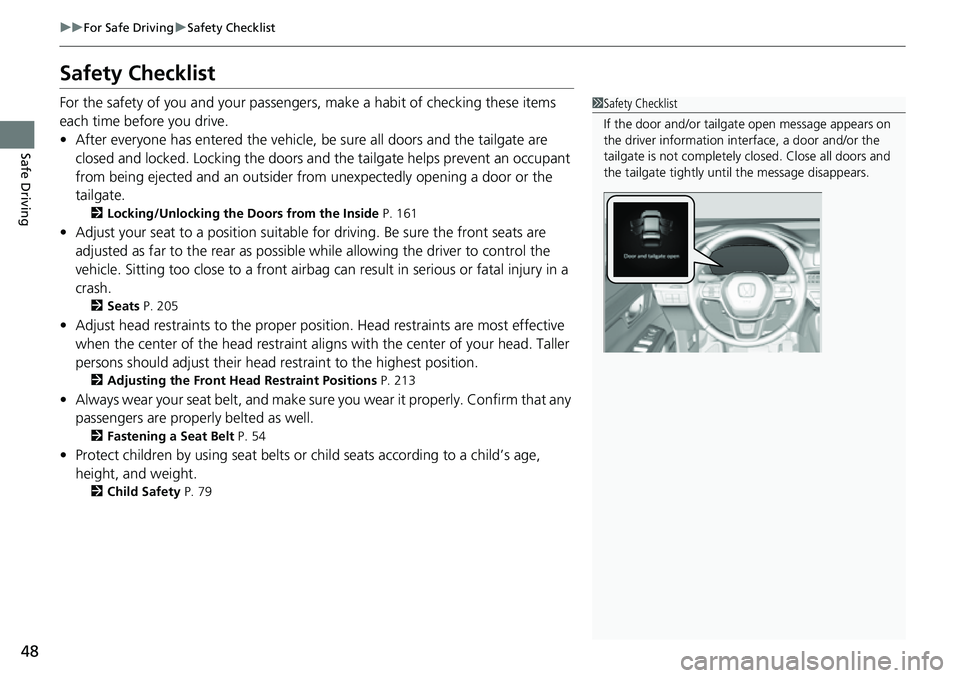
1Safety Checklist
If the door and/or tailga te open message appears on
the driver information inte rface, a door and/or the
tailgate is not completely closed. Close all doors and
the tailgate tightly unti l the message disappears.
Page 81 of 719

uuChild Safety uProtecting Child Passengers
80
Safe Driving
• Never hold a child on your lap because it is impossible to protect them in the
event of a collision.
• Never put a seat belt over yourself and a child. During a crash, the belt would
likely press deep into the child an d cause serious or fatal injuries.
• Never let two children use the same seat belt. Both children could be very
seriously injured in a crash.
• Any child who is too small to wear a seat belt correctly must be restrained in an
approved child seat that is properly secu red to the vehicle using either the seat
belt or the lower anchor s of the LATCH system.
• Do not allow children to operate the doors, windows, or seat adjustments.
• Do not leave children in the vehicle unattended, especially in hot weather when
the inside of the vehicle can get hot enough to kill them. They could also activate
vehicle controls causing it to move unexpectedly.1 Protecting Child Passengers
To deactivate a lockable retractor, release the buckle
and allow the seat belt to wind up all the way.
To remind you of the pa ssenger’s front airbag
hazards and child safety, your vehicle has warning
labels on the dashboard (U.S. models) and on the
front visors. Please read and follow the instructions
on these labels. 2 Safety Labels P. 93
3WARNING
Allowing a child to play with a seat belt or
wrap one around their neck can result in
serious injury or death.
Instruct children not to play with any seat
belt and make sure any unused seat belt a
child can reach is buckled, fully retracted,
and locked.
Page 140 of 719

139
uuGauges and Driver Information Interface uDriver Information Interface
Continued
Instrument Panel
*1:Default Setting Setup Group Customizable Features
Description Selectable Settings
Keyless access
setup Door unlock mode
Changes which doors unlock when you grab the driver’s
door handle. Driver door only
*1/
All
doors
Keyless access light
flash Causes some exterior lights
to flash when you unlock/
lock the doors. ON
*1/
OFF
Keyless access beep Causes the beeper to sound when you unlock/lock the
doors.
ON
*1/
OFF
Remote start system
ON/OFF Turns the remote engine start feature on and off.
ON
*1/OFF
Lighting setup
Auto high-beamTurns the auto high -beam on and off.ON*1/OFF
Interior light dimming
timeChanges the length of time the interior lights stay on
after you close the doors.60sec /30sec*1/ 15sec
Headlight auto off
timerChanges the length of time the exterior lights stay on
after you close the driver’s door.60sec /30sec /15sec*1/0sec
Auto light sensitivity*Changes the timing for th e headlights to come on.Max/High /Mid*1/Low /Min
Auto headlight ON
with wiper ONChanges the settings for the wiper operation when the
headlights automatically come on while the headlight
switch is in the AUTO position.
ON*1/OFF
* Not available on all models
Page 141 of 719

140
uuGauges and Driver Information Interface uDriver Information Interface
Instrument Panel
*1:Default Setting Setup Group Customizable Features
Description Selectable Settings
Door setup Auto door lock
Changes the setting for when the doors and the tailgate
automatically lock. With vehicle speed
*1/
Shift from P /OFF
Auto door unlock Changes the setting for when the doors and the tailgate
automatically unlock. All doors when driver’s
door opens
*1/
All doors
when shifted to Park /
All doors when ignition
switched OFF /OFF
Walk away auto lock Changes the settings for the automatic locking the
doors when you walk away
from the vehicle while
carrying the keyless remote. ON
/OFF
*1
Keyless lock answer
back LOCK/UNLOCK - The exterior lights flash.
LOCK (2nd push) - The beeper sounds.
ON*1/
OFF
Keyless remote power
window control Turns remote window control using the keyless remote
on and off.
ON
*1/
OFF
Lockout prevention Changes the settings for
the lockout protection
function. ON
*1/
OFF
Lock presetting Changes the settings for the Lock Presetting function. ON
*1/OFF
Page 146 of 719

145
Controls
This chapter explains how to operate the various controls necessary for driving.
Clock.................................................. 146
Locking and Unlocking the Doors Key .................................................. 148
Low Keyless Remote Signal Strength ... 150
Locking/Unlocking the Doors from the Outside .......................................... 151
Locking/Unlocking the Doors from the Inside ............................................. 161
Childproof Door Locks ..................... 163
Auto Door Locking/Unlocking .......... 164
Tailgate .............................................. 165
Security System Immobilizer System .......................... 176
Security System Alarm ...................... 176Windows ............................................... 179Moonroof .......................................... 183
Operating the Switches Around the Steering Wheel
POWER Button................................. 184
Turn Signals ..................................... 187
Light Switches.................................. 188
Daytime Running Lights ................... 192
Auto High-Beam .............................. 193
Wipers and Washers ........................ 196
Rear Defogger/Heated Door Mirror Button ... 199
Heated Windshield Button ............... 199
Driving Position Memory System*.... 200
Adjusting the Steering Wheel .......... 202
Mirrors ............................................... 203
Seats .................................................. 205
Interior Convenience Items .............. 216
Climate Control System Using Automatic Climate Control .... 232
Automatic Climate Control Sensors ...... 236
Canadian models
* Not available on all models
Page 149 of 719

148
Controls
Locking and Unlocking the Doors
Key
This vehicle comes with the following keys:Use the keys to turn on and off the power
system, and to lock and unlock the doors,
tailgate, and fuel fill door.
The built-in key can be used to unlock the
doors when the keyless remote battery
becomes weak and the power door unlock
operation is disabled.
To remove the built-in key, push the release
button and then pull out the key. To reinstall
the built-in key, push th e built-in key into the
keyless remote until it clicks.1 Key
All the keys have an immobilizer system. The
immobilizer system helps to protect against vehicle
theft. 2 Immobilizer System P. 176
Follow the advice below to prevent damage to the
keys:
•Do not leave the keys in direct sunlight, or in
locations with high temperature or high humidity.
•Do not drop the keys or set heavy objects on them.•Keep the keys away from liquids, dust and sand.
•Do not take the keys apart except for replacing the
battery.
If the circuits in the keys are damaged, the power
system may not activate, and the remote transmitter
may not work.
If the keys do not work properly, have them
inspected by a dealer.
You can remotely turn the power system on using the
remote engine start. 2 Remote Engine Start P. 457■Built-in Key
Built-in Key
Release Button
Page 150 of 719
149
uuLocking and Unlocking the Doors uKey
Controls
Contains a number that you will need if you
purchase a replacement key.
■Key Number Tag1Key Number Tag
Keep the key number tag separate from the key in a
safe place outside of your vehicle.
If you wish to purchase an additional key, contact a
dealer.
If you lose your key and you cannot activate the
power system, contact a dealer.
