Page 381 of 840
379
uuGeneral Information on the Audio System uLicense Information
Continued
Features
“Made for iPod,” and “Made for iPhone,” mean that an electronic accessory has
been designed to connect specifically to iP od, or iPhone, respectively, and has been
certified by the developer to meet Appl e performance standards. Apple is not
responsible for the operation of this devi ce or its compliance with safety and
regulatory standards. Please no te that the use of this accessory with iPod, or iPhone,
may affect wireless performance.
Apple, the Apple Logo, iPhone, iPod touch are trademarks of Apple Inc., registered
in the U.S. and other countries. Apple CarPlay, iPod, iPhone, iTunes, Siri and
Lightning are trademarks of Apple Inc. A pp Store is a service mark of Apple Inc.
■Apple
23 CIVIC HATCHBACK TYPE R-31T406100_03.book 379 ページ 2022年6月23日 木曜日 午後9時28分
Page 385 of 840
383
uuCustomized Features u
Continued
Features
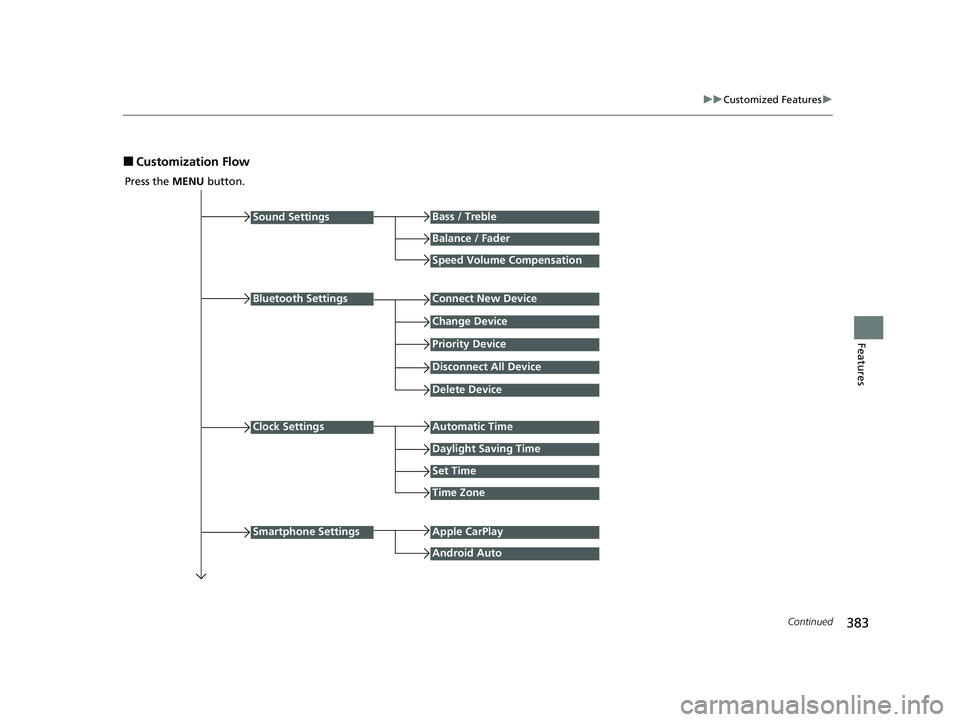
■Customization Flow
Press the MENU button.
Sound Settings
Bluetooth Settings
Bass / Treble
Balance / Fader
Speed Volume Compensation
Connect New Device
Change Device
Priority Device
Clock Settings
Smartphone Settings
Disconnect All Device
Delete Device
Automatic Time
Set Time
Time Zone
Apple CarPlay
Android Auto
Daylight Saving Time
23 CIVIC HATCHBACK TYPE R-31T406100_03.book 383 ページ 2022年6月23日 木曜日 午後9時28分
Page 388 of 840
386
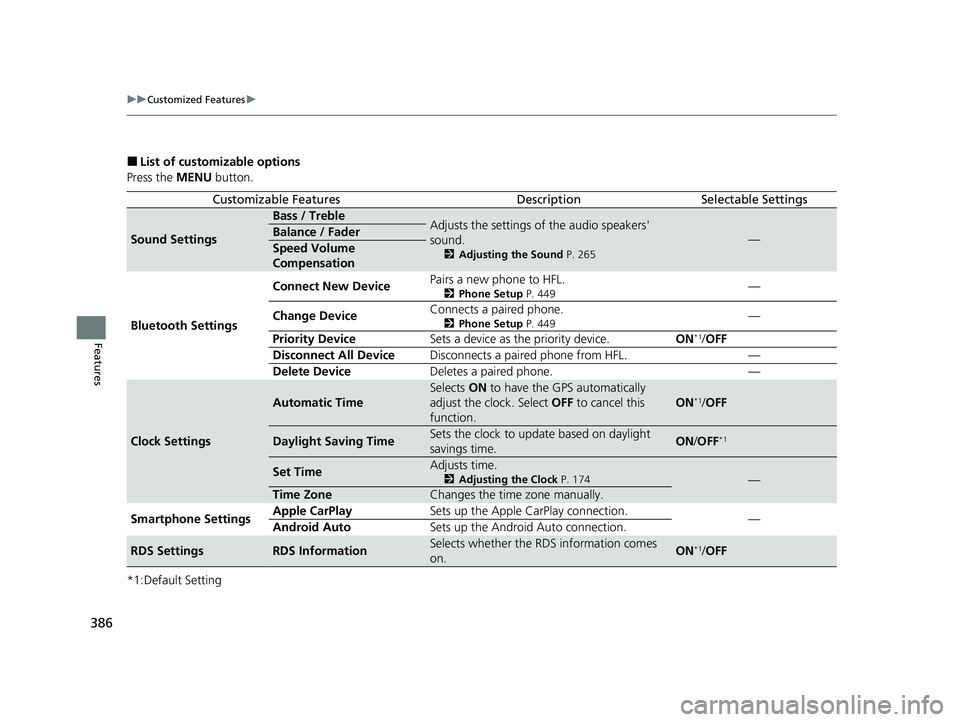
uuCustomized Features u
Features
■List of customizable options
Press the MENU button.
*1:Default Setting
Customizable FeaturesDescriptionSelectable Settings
Sound Settings
Bass / TrebleAdjusts the settings of the audio speakers'
sound.
2 Adjusting the Sound P. 265
—Balance / Fader
Speed Volume
Compensation
Bluetooth Settings Connect New Device
Pairs a new phone to HFL.
2
Phone Setup P. 449—
Change Device Connects a paired phone.
2
Phone Setup P. 449—
Priority Device Sets a device as the priority device. ON
*1/OFF
Disconnect All Device Disconnects a paired phone from HFL. —
Delete Device Deletes a paired phone. —
Clock Settings
Automatic Time
Selects ON to have the GPS automatically
adjust the clock. Select OFF to cancel this
function.
ON*1/ OFF
Daylight Saving TimeSets the clock to update based on daylight
savings time.ON /OFF*1
Set TimeAdjusts time.
2 Adjusting the Clock P. 174—
Time ZoneChanges the time zone manually.
Smartphone Settings Apple CarPlay
Sets up the Apple CarPlay connection.
—
Android Auto Sets up the Android Auto connection.
RDS SettingsRDS InformationSelects whether the RDS information comes
on.ON*1/OFF
23 CIVIC HATCHBACK TYPE R-31T406100_03.book 386 ページ 2022年6月23日 木曜日 午後9時28分
Page 393 of 840
391
uuCustomized Features u
Continued
Features
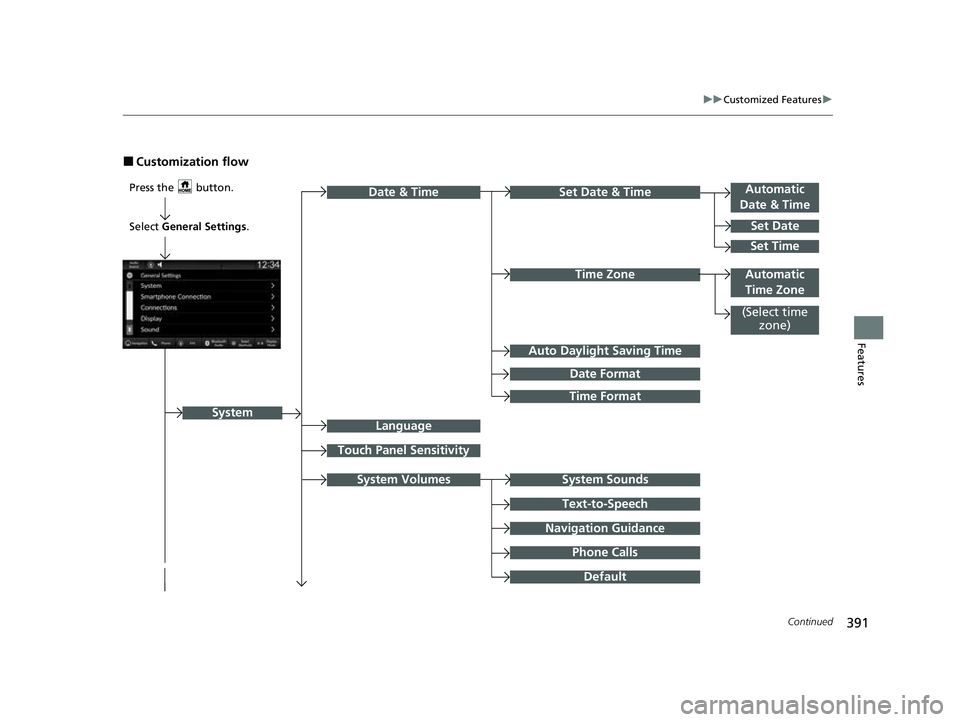
■Customization flow
Press the button.Automatic
Date & Time
Set Date
Touch Panel Sensitivity
Set Date & Time
Time Zone
System Sounds
Date & Time
System
Auto Daylight Saving Time
Date Format
Time Format
Text-to-Speech
Navigation Guidance
Phone Calls
Set Time
(Select time zone)
System Volumes
Language
Default
Select General Settings .
Automatic
Time Zone
23 CIVIC HATCHBACK TYPE R-31T406100_03.book 391 ページ 2022年6月23日 木曜日 午後9時28分
Page 397 of 840
395
uuCustomized Features u
Continued
Features
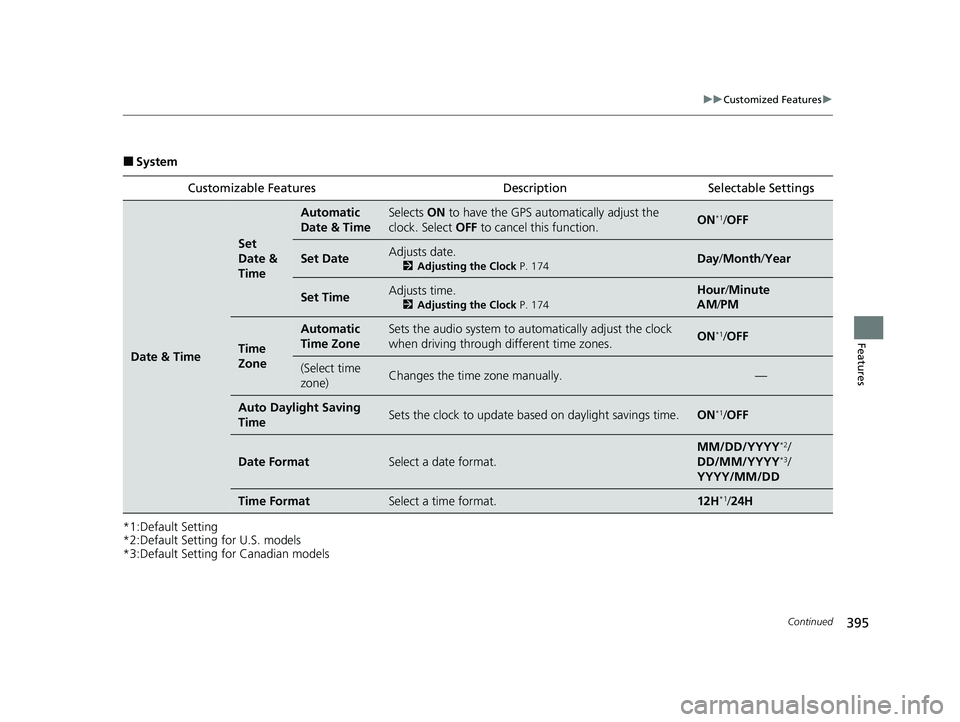
■System
*1:Default Setting
*2:Default Setting for U.S. models
*3:Default Setting for Canadian models Customizable Features Description Selectable Settings
Date & Time
Set
Date &
Time
Automatic
Date & TimeSelects
ON to have the GPS auto matically adjust the
clock. Select OFF to cancel this function.ON*1/OFF
Set DateAdjusts date.
2 Adjusting the Clock P. 174Day/Month/ Year
Set TimeAdjusts time.
2Adjusting the Clock P. 174
Hour/Minute
AM /PM
Time
Zone
Automatic
Time ZoneSets the audio system to au tomatically adjust the clock
when driving through different time zones.ON*1/ OFF
(Select time
zone)Changes the time zone manually.—
Auto Daylight Saving
TimeSets the clock to update based on daylight savings time.ON*1/OFF
Date FormatSelect a date format.
MM/DD/YYYY*2/
DD/MM/YYYY*3/
YYYY/MM/DD
Time FormatSelect a time format.12H*1/ 24H
23 CIVIC HATCHBACK TYPE R-31T406100_03.book 395 ページ 2022年6月23日 木曜日 午後9時28分
Page 406 of 840
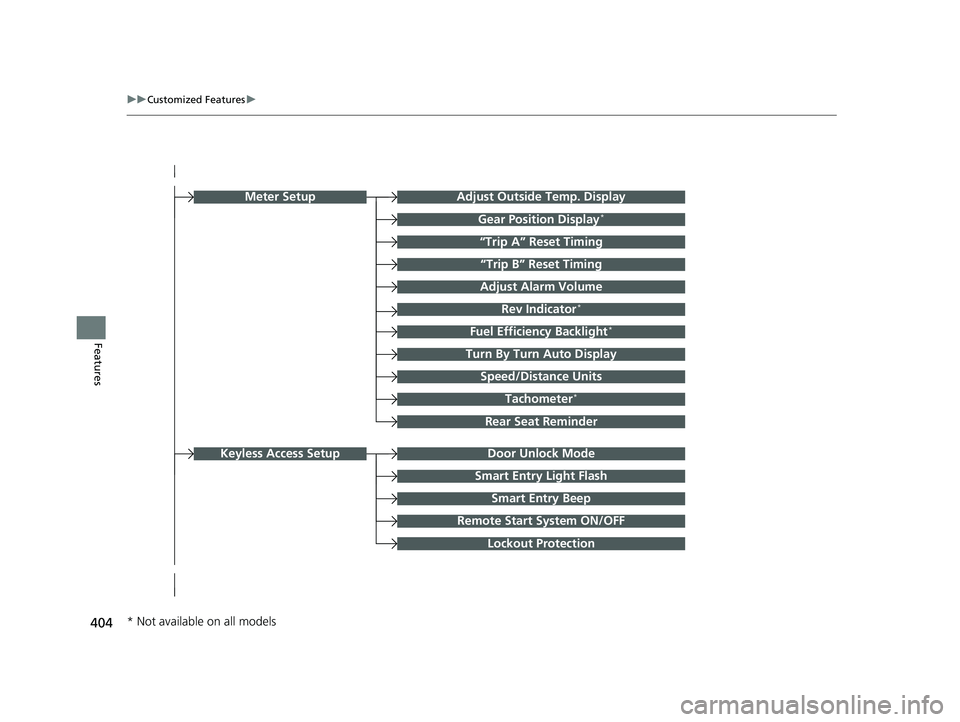
404
uuCustomized Features u
Features
Turn By Turn Auto Display
Speed/Distance Units
Smart Entry Light Flash
Rear Seat Reminder
Door Unlock Mode
Smart Entry Beep
Remote Start System ON/OFF
Lockout Protection
Keyless Access Setup
Adjust Outside Temp. Display
“Trip A” Reset Timing
“Trip B” Reset Timing
Adjust Alarm Volume
Fuel Efficiency Backlight*
Rev Indicator*
Tachometer*
Gear Position Display*
Meter Setup
* Not available on all models
23 CIVIC HATCHBACK TYPE R-31T406100_03.book 404 ページ 2022年6月23日 木曜日 午後9時28分
Page 407 of 840
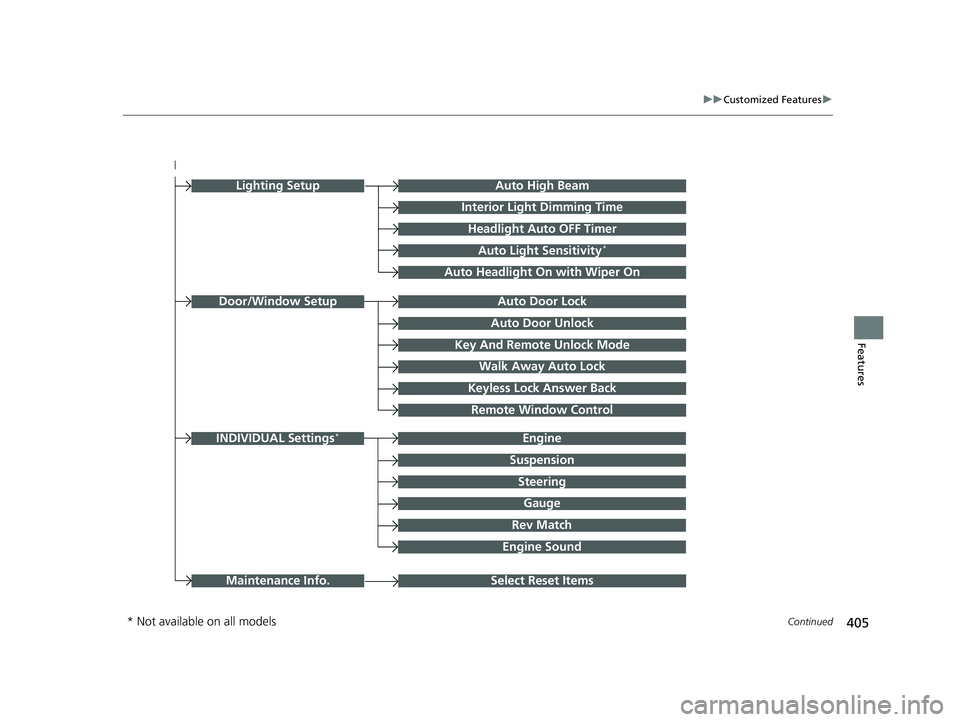
405
uuCustomized Features u
Continued
Features
Auto Door Unlock
Auto Door Lock
Key And Remote Unlock Mode
Walk Away Auto Lock
Keyless Lock Answer Back
Door/Window Setup
Lighting SetupAuto High Beam
Interior Light Dimming Time
Headlight Auto OFF Timer
Auto Light Sensitivity*
Auto Headlight On with Wiper On
Remote Window Control
Select Reset ItemsMaintenance Info.
Suspension
Engine
Steering
Gauge
Rev Match
INDIVIDUAL Settings*
Engine Sound
* Not available on all models
23 CIVIC HATCHBACK TYPE R-31T406100_03.book 405 ページ 2022年6月23日 木曜日 午後9時28分
Page 410 of 840

408
uuCustomized Features u
Features
■Meter Setup
Customizable Features Description Selectable Settings
Adjust Outside Temp.
DisplaySelects to adjust outside temperature reading by a few degrees.2Outside Temperature P. 120
-5°F ~ ±0°F*1 ~ +5°F (U.S.)
-3°C ~ ±0°C*1 ~ +3°C (Canada)
Gear Position Display*Turns the gear position display feature on and off.
2Gear Position Indicator* P. 102ON*1/OFF
“Trip A” Reset TimingSelects the timing to reset Trip A. 2 Range/Fuel/Odometer*/Trip Meter P. 157
2 Speed/Time/Odometer*/Trip Meter P. 159
When Fully Refueled /IGN OFF /
Manually Reset*1
“Trip B” Reset Timing
Selects the timing to reset Trip B.
2 Range/Fuel/Odometer*/Trip Meter P. 157
2 Speed/Time/Odometer*/Trip Meter P. 159
When Fully Refueled /IGN OFF /
Manually Reset*1
Adjust Alarm VolumeChanges volume level of all system warnings, door opening
warning and indicator.High /Mid*1/Low
Rev Indicator*Turns the rev indicators on and off.
2 Rev Indicators* P. 123ON*1/OFF
Fuel Efficiency Backlight*Turns the ambient meter feature on and off.ON*1/OFF
Turn By Turn Auto DisplayTurns on/off the pop-up warning in the turn-by-turn navigation
in the driver information interface.
2 Turn-by-Turn Directions P. 160ON*1/OFF
Speed/Distance UnitsSelects the trip computer units.
2 Speed/Distance Units P. 169
km/h · km/mph · miles*1
(U.S.)
km/h · km
*1/ mph · miles
(Canada)
* Not available on all models
23 CIVIC HATCHBACK TYPE R-31T406100_03.book 408 ページ 2022年6月23日 木曜日 午後9時28分