Page 244 of 840
uuInterior Convenience Items uOther Interior Convenience Items
242
Controls
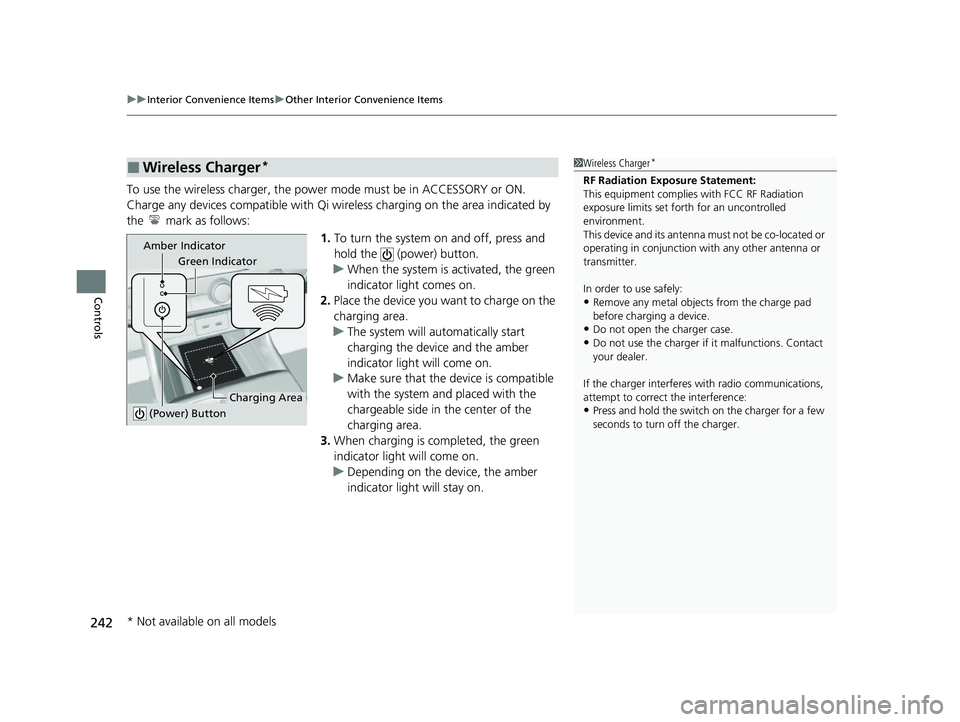
To use the wireless charger, the power mode must be in ACCESSORY or ON.
Charge any devices compatible with Qi wi reless charging on the area indicated by
the mark as follows:
1.To turn the system on and off, press and
hold the (power) button.
u When the system is activated, the green
indicator light comes on.
2. Place the device you want to charge on the
charging area.
u The system will automatically start
charging the device and the amber
indicator light will come on.
u Make sure that the device is compatible
with the system and placed with the
chargeable side in the center of the
charging area.
3. When charging is completed, the green
indicator light will come on.
u Depending on the device, the amber
indicator light will stay on.
■Wireless Charger*1Wireless Charger*
RF Radiation Exposure Statement:
This equipment complies with FCC RF Radiation
exposure limits set forth for an uncontrolled
environment.
This device and its antenna must not be co-located or
operating in conjunction with any other antenna or
transmitter.
In order to use safely:
•Remove any metal objects from the charge pad
before charging a device.
•Do not open the charger case.
•Do not use the charger if it malfunctions. Contact
your dealer.
If the charger interferes with radio communications,
attempt to correct the interference:
•Press and hold the switch on the charger for a few
seconds to turn off the charger.
Green Indicator
Charging Area
(Power) Button
Amber Indicator
* Not available on all models
23 CIVIC HATCHBACK TYPE R-31T406100_03.book 242 ページ 2022年6月23日 木曜日 午後9時28分
Page 246 of 840
uuInterior Convenience Items uOther Interior Convenience Items
244
Controls
1Wireless Charger*
The wireless charger can support up to 15 W, but the
charging rate varies base d on the device and other
conditions.
NOTICE
Do not place any magneti c recording media or
precision machines within the charging area while
charging.
The data on your cards such as credit cards can be
lost because of the magneti c effect. Also, precision
machines such as watc hes can be affected.
“Qi” and marks are the registered trademarks
owned by Wire less Power Consortium (WPC).
In the following cases, ch arging may stop or not start:
•The device is already fully charged.•The temperature of the device is extremely high
while charging.
•You are at a place that emits strong
electromagnetic waves or noises, such as a TV
station, electric power plant, or gas station.
•The device has a cover, ca se or accessories which
are not compatible wi th wireless charging.
A device may not charge if the size or shape of its
chargeable side is not a ppropriate for use with the
charging area.
Not all devices are compatible with the system.
* Not available on all models
23 CIVIC HATCHBACK TYPE R-31T406100_03.book 244 ページ 2022年6月23日 木曜日 午後9時28分
Page 247 of 840
Continued245
uuInterior Convenience Items uOther Interior Convenience Items
Controls
1Wireless Charger*
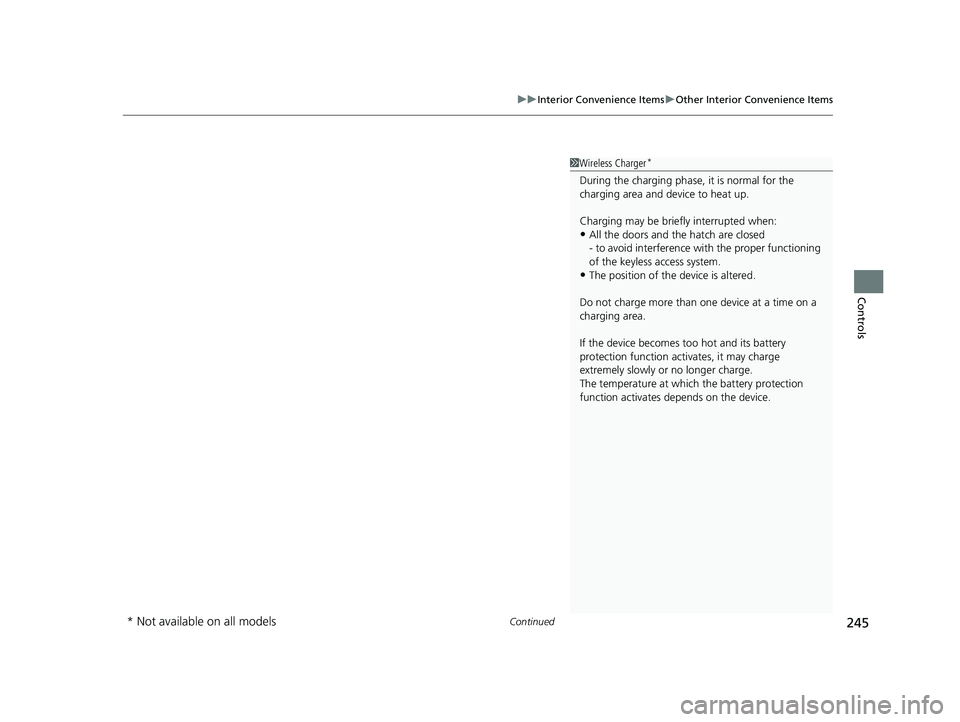
During the charging phase, it is normal for the
charging area and de vice to heat up.
Charging may be briefl y interrupted when:
•All the doors and the hatch are closed
- to avoid interference with the proper functioning
of the keyless access system.
•The position of the device is altered.
Do not charge more than one device at a time on a
charging area.
If the device becomes too hot and its battery
protection function activates, it may charge
extremely slowly or no longer charge.
The temperature at which the battery protection
function activates de pends on the device.
* Not available on all models
23 CIVIC HATCHBACK TYPE R-31T406100_03.book 245 ページ 2022年6月23日 木曜日 午後9時28分
Page 252 of 840
uuClimate Control System uUsing Automatic Climate Control
250
Controls
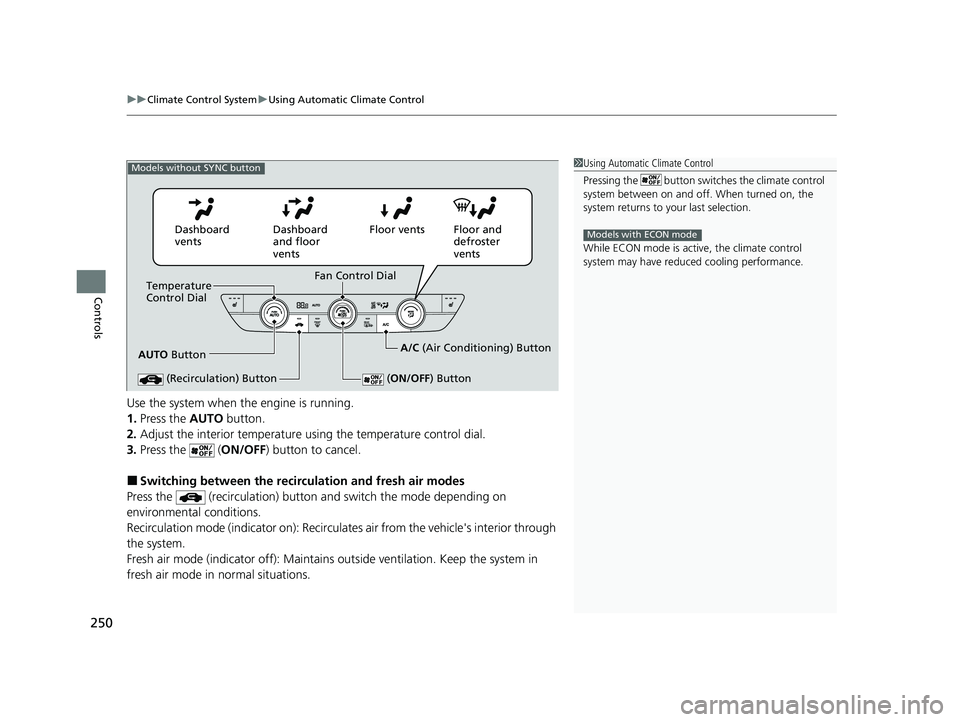
Use the system when the engine is running.
1. Press the AUTO button.
2. Adjust the interior temperature us ing the temperature control dial.
3. Press the ( ON/OFF) button to cancel.
■Switching between the recirc ulation and fresh air modes
Press the (recirculation) button and switch the mode depending on
environmental conditions.
Recirculation mode (indicator on): Recirculates air from the vehicle's interior through
the system.
Fresh air mode (indicator off): Maintains ou tside ventilation. Keep the system in
fresh air mode in normal situations.
1 Using Automatic Climate Control
Pressing the button switches the climate control
system between on and off. When turned on, the
system returns to your last selection.
While ECON mode is active, the climate control
system may have reduced cooling performance.
Models with ECON mode
Models without SYNC button
AUTO Button
Temperature
Control Dial
(Recirculation) Button
(ON/OFF ) Button
Fan Control Dial
Dashboard
vents
Dashboard
and floor
ventsFloor vents Floor and
defroster
vents
A/C (Air Conditioning) Button
23 CIVIC HATCHBACK TYPE R-31T406100_03.book 250 ページ 2022年6月23日 木曜日 午後9時28分
Page 257 of 840
255
Features
This chapter describes how to operate technology features.
Audio System
About Your Audio System................ 256
USB Port(s) ....................................... 257
Audio System Theft Protection ......... 259
Audio Remote Controls.................... 260
Audio System Basic Operation .... 264, 289
Audio Error Messages ...................... 359
General Information on the Audio System ............................................. 361
Customized Features ................ 382, 390
Honda LogR
*..................................... 414
HomeLink ® Universal Transceiver*.. 441 Bluetooth
® HandsFreeLink® ..... 444, 464
Refuel Recommend .......................... 483
* Not available on all models
23 CIVIC HATCHBACK TYPE R-31T406100_03.book 255 ページ 2022年6月23日 木曜日 午後9時28分
Page 259 of 840

257
uuAudio System uUSB Port(s)
Continued
Features
USB Port(s)
■On the front panel ( )
The USB port (2.5A) is for charging devices,
playing audio files, and connecting
compatible phones with Apple CarPlay or
Android Auto. u To prevent any potenti al issues, be sure
to use an Apple MFi Certified Lightning
Connector for Apple CarPlay, and for
Android Auto, the USB cables should be
certified by USB-IF to be compliant with
USB 2.0 Standard.
■On the front panel ( )*
The USB port (2.5A) is only for charging
devices. u You cannot play music even if you have
connected music players to it.
1USB Port(s)
•Do not leave the iPod or USB flash drive in the
vehicle. Direct sunlight and high temperatures may
damage it.
•We recommend that you us e a USB cable if you are
attaching a USB flash drive to the USB port.
•Do not connect the iPod or USB flash drive using a
hub.
•Do not use a device such as a card reader or hard
disk drive, as the device or your files may be
damaged.
•We recommend backing up yo ur data before using
the device in your vehicle.
•Displayed messages may vary depending on the
device model and software version.
The USB port can supply up to 2.5A of power. It does
not output 2.5A unless requested by the device.
For amperage details, read the operating manual of
the device that ne eds to be charged.
Under certain condi tions, a device connected to the
port may generate noise to the radio station you are
listening to.
USB charge
On the front panel
Models with 7-in. Color Touchscreen
Models with 9-in. Color Touchscreen
* Not available on all models
23 CIVIC HATCHBACK TYPE R-31T406100_03.book 257 ページ 2022年6月23日 木曜日 午後9時28分
Page 261 of 840
259
uuAudio System uAudio System Theft Protection
Features
Audio System Theft Protection
The audio system is disabled when it is disconnected from the power source, such as
when the battery is disconnected or goes dead. In certain conditions, the system
may display a code entry screen. If this occurs, reactivate the audio system.
■Reactivating the audio system
1. Set the power mode to ON.
2. Turn on the audio system.
3. Press and hold the VOL/ AUDIO (Volume/Power) knob for more than two
seconds.
u The audio system is reac tivated when the audio co ntrol unit establishes a
connection with the vehicl e control unit. If the control unit fails to recognize
the audio unit, you must go to a deal er and have the audio unit checked.
23 CIVIC HATCHBACK TYPE R-31T406100_03.book 259 ページ 2022年6月23日 木曜日 午後9時28分
Page 270 of 840
uuAudio System Basic Operation uPlaying AM/FM Radio
268
Features
Provides text data information related to your selected RDS capable FM station.
■To find an RDS station from Station List
1. Press while listening to an FM station.
2. Select the station.
■Update List
Updates your available station list at any time.
1. Press while listening to an FM station.
2. Select Refresh .
■Radio text
Displays the radio text informat ion of the selected RDS station.
1. Select Text.
■Scan
Samples each of the strongest stations on the selected band for 10 seconds.
1. Select Scan.
To turn off scan, select Stop or press the button.
■Radio Data System (RDS)1Playing AM/FM Radio
Stereo reproduction in AM is not available.
You can store 12 AM stations and 12 FM stations into
the preset memory.
Switching the Audio Mode
Press the audio source selecting button on the
steering wheel.
2 Audio Remote Controls P. 260
1Radio Data System (RDS)
When you select an RDS-capable FM station, the RDS
automatically turns on, and the station name is
displayed under the frequency. However, when the
signals of that station become weak, the station
name disappears.
23 CIVIC HATCHBACK TYPE R-31T406100_03.book 268 ページ 2022年6月23日 木曜日 午後9時28分