Page 208 of 840
206
uuOperating the Switches Around the Steering Wheel uLight Switches
Controls
Light Switches
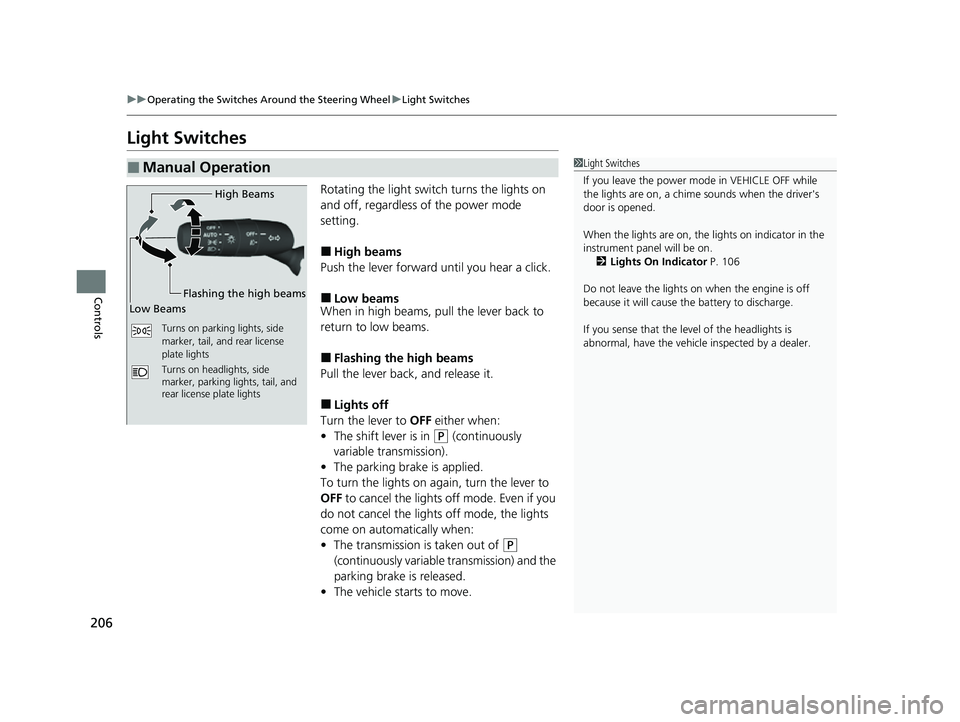
Rotating the light switch turns the lights on
and off, regardless of the power mode
setting.
■High beams
Push the lever forward until you hear a click.
■Low beams
When in high beams, pull the lever back to
return to low beams.
■Flashing the high beams
Pull the lever back, and release it.
■Lights off
Turn the lever to OFF either when:
• The shift lever is in
(P (continuously
variable transmission).
• The parking brake is applied.
To turn the lights on ag ain, turn the lever to
OFF to cancel the lights off mode. Even if you
do not cancel the lights off mode, the lights
come on automatically when:
• The transmission is taken out of
(P
(continuously variable transmission) and the
parking brake is released.
• The vehicle starts to move.
■Manual Operation1Light Switches
If you leave the power mode in VEHICLE OFF while
the lights are on, a chime sounds when the driver's
door is opened.
When the lights are on, the lights on indicator in the
instrument pane l will be on.
2 Lights On Indicator P. 106
Do not leave the lights on when the engine is off
because it will cause the battery to discharge.
If you sense that the le vel of the headlights is
abnormal, have the vehicl e inspected by a dealer.
Turns on parking lights, side
marker, tail, and rear license
plate lights
Turns on headlights, side
marker, parking lights, tail, and
rear license plate lights
High Beams
Flashing the high beams
Low Beams
23 CIVIC HATCHBACK TYPE R-31T406100_03.book 206 ページ 2022年6月23日 木曜日 午後9時28分
Page 209 of 840
Continued207
uuOperating the Switches Around the Steering Wheel uLight Switches
Controls
Automatic lighting control can be used when
the power mode is in ON.
When the light switch is in AUTO, the
headlights and other exterior lights will switch
on and off automatically depending on the
ambient brightness.
The headlights come on when you unlock a
door in dark areas with the headlight switch in
AUTO .
u Once you lock the door, the headlights
will go off.
■Automatic Operation (automatic lighting control)1 Automatic Operation (aut omatic lighting control)
We recommend that you tu rn on the lights manually
when driving at night, in a de nse fog, or in dark areas
such as long tunnels or parking facilities.
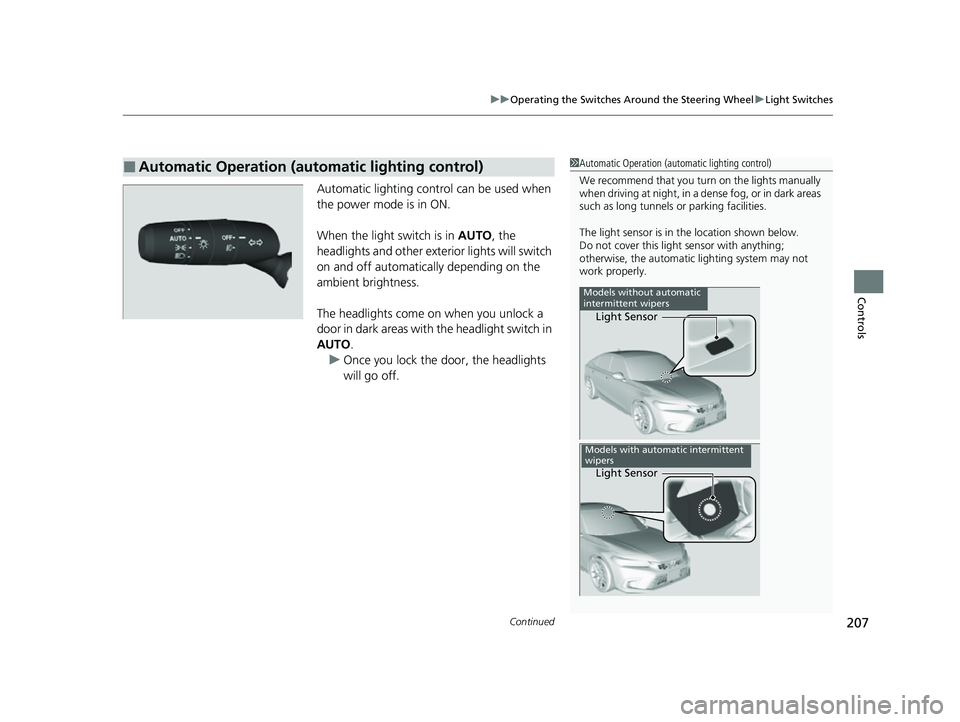
The light sensor is in the location shown below.
Do not cover this light sensor with anything;
otherwise, the automatic lighting system may not
work properly.
Light Sensor
Models without automatic
intermittent wipers
Light Sensor
Models with automatic intermittent
wipers
23 CIVIC HATCHBACK TYPE R-31T406100_03.book 207 ページ 2022年6月23日 木曜日 午後9時28分
Page 211 of 840
209
uuOperating the Switches Around the Steering Wheel uFog Lights*
Controls
Fog Lights*
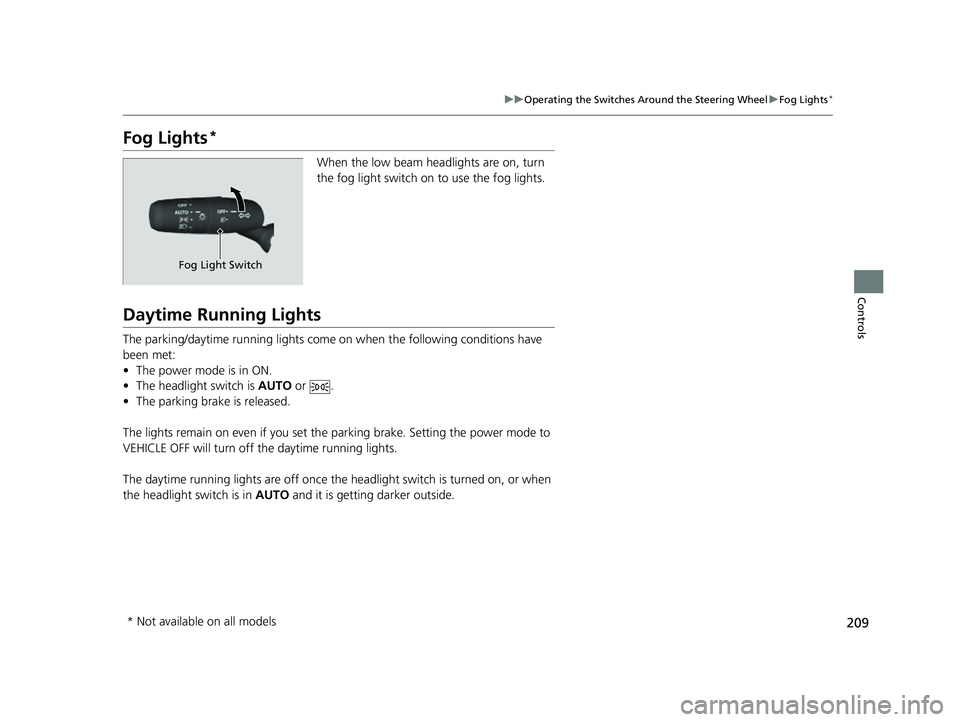
When the low beam headlights are on, turn
the fog light switch on to use the fog lights.
Daytime Running Lights
The parking/daytime running lights come on when the following conditions have
been met:
• The power mode is in ON.
• The headlight switch is AUTO or .
• The parking brake is released.
The lights remain on even if you set th e parking brake. Setting the power mode to
VEHICLE OFF will turn off the daytime running lights.
The daytime running lights are off once the h eadlight switch is turned on, or when
the headlight switch is in AUTO and it is getting darker outside.
Fog Light Switch
* Not available on all models
23 CIVIC HATCHBACK TYPE R-31T406100_03.book 209 ページ 2022年6月23日 木曜日 午後9時28分
Page 219 of 840
217
uuOperating the Switches Around the Steering Wheel uBrightness Control
Controls
Brightness Control
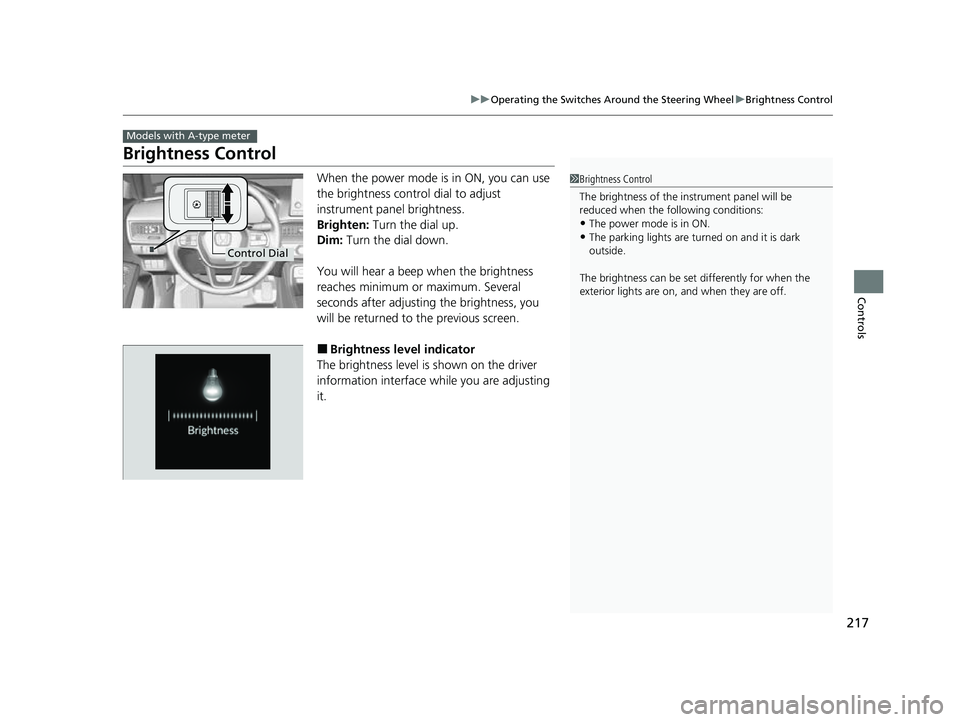
When the power mode is in ON, you can use
the brightness control dial to adjust
instrument panel brightness.
Brighten: Turn the dial up.
Dim: Turn the dial down.
You will hear a beep when the brightness
reaches minimum or maximum. Several
seconds after adjusting the brightness, you
will be returned to the previous screen.
■Brightness level indicator
The brightness level is shown on the driver
information interface while you are adjusting
it.
Models with A-type meter
1 Brightness Control
The brightness of the in strument panel will be
reduced when the following conditions:
•The power mode is in ON.
•The parking lights are turn ed on and it is dark
outside.
The brightness can be set differently for when the
exterior lights are on, and when they are off.
Control Dial
23 CIVIC HATCHBACK TYPE R-31T406100_03.book 217 ページ 2022年6月23日 木曜日 午後9時28分
Page 384 of 840
382
Features
Customized Features
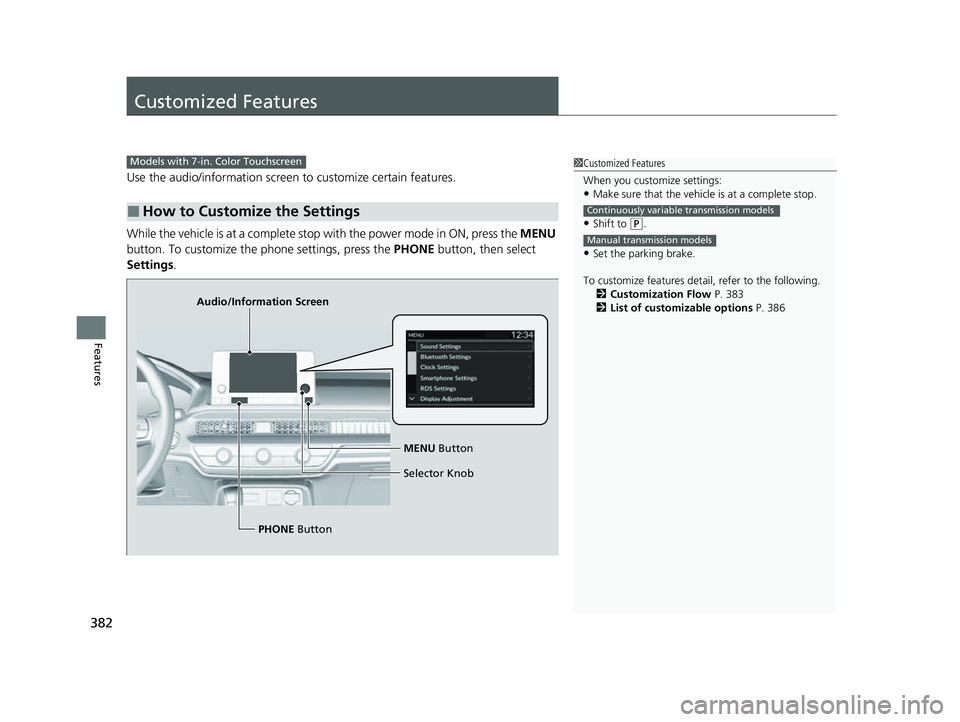
Use the audio/information screen to customize certain features.
While the vehicle is at a complete stop with the power mode in ON, press the MENU
button. To customize the phone settings, press the PHONE button, then select
Settings .
■How to Customize the Settings
1Customized Features
When you customize settings:
•Make sure that the vehicle is at a complete stop.
•Shift to (P.
•Set the parking brake.
To customize features detail, refer to the following. 2 Customization Flow P. 383
2 List of customizable options P. 386
Continuously variable transmission models
Manual transmission models
Models with 7-in. Color Touchscreen
Audio/Information Screen
MENU Button
Selector Knob
PHONE Button
23 CIVIC HATCHBACK TYPE R-31T406100_03.book 382 ページ 2022年6月23日 木曜日 午後9時28分
Page 392 of 840
390
Features
Customized Features
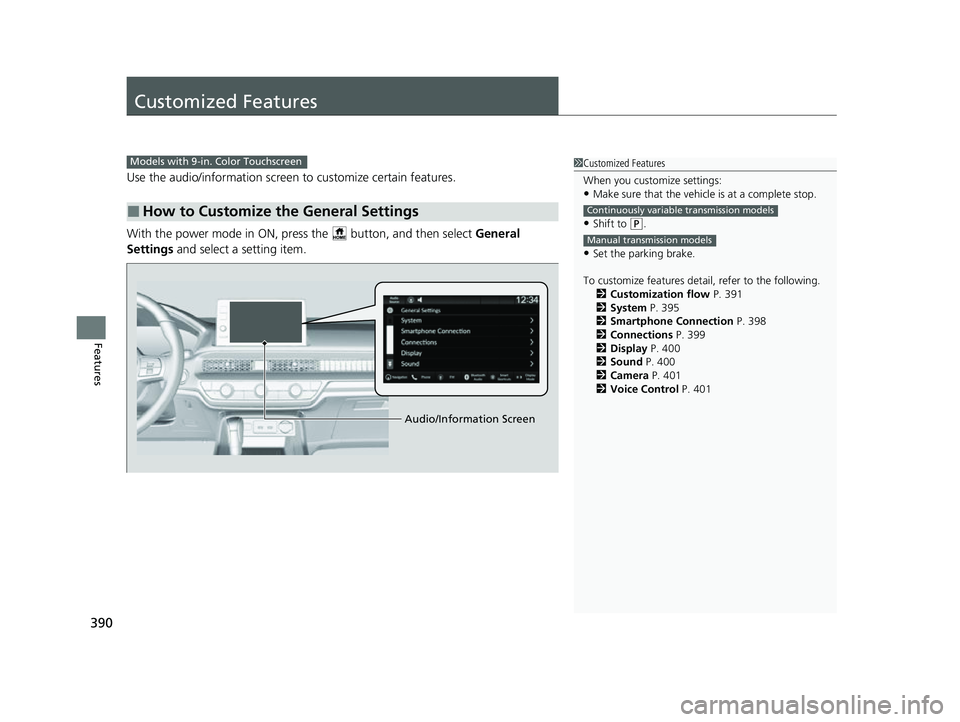
Use the audio/information screen to customize certain features.
With the power mode in ON, pres s the button, and then select General
Settings and select a setting item.
■How to Customize the General Settings
1Customized Features
When you customize settings:
•Make sure that the vehicle is at a complete stop.
•Shift to (P.
•Set the parking brake.
To customize features detail, refer to the following. 2 Customization flow P. 391
2 System P. 395
2 Smartphone Connection P. 398
2 Connections P. 399
2 Display P. 400
2 Sound P. 400
2 Camera P. 401
2 Voice Control P. 401
Continuously variable transmission models
Manual transmission models
Models with 9-in. Color Touchscreen
Audio/Information Screen
23 CIVIC HATCHBACK TYPE R-31T406100_03.book 390 ページ 2022年6月23日 木曜日 午後9時28分
Page 487 of 840
485
Driving
This chapter discusses driving and refueling.
Before Driving................................... 486
Towing a Trailer ................................ 492
When Driving Starting the Engine .......................... 493
Precautions While Driving................. 500
Continuously Variable Transmission*... 502
Shifting ............................ 503 , 505, 509
ECON Button*................................. 513
Auto Idle Stop .......................... 514 , 520
Drive Mode Switch
*................. 525 , 529
Vehicle Stability AssistTM (VSA®), aka Electronic
Stability Control (ESC), System .............. 535
Agile Handling Assist ....................... 538
Limited Slip Differential (LSD)*......... 539Tire Pressure Monitoring System (TPMS)*. 540Tire Pressure Monitoring System (TPMS) - Required Federal Explanation*....... 545
Blind Spot Information System*....... 547
Honda Sensing ®................................ 551
Collision Mitigati on Braking System
TM
(CMBSTM) ....................................... 555
Low Speed Braking Control*.... 567, 573
Adaptive Cruise Control (ACC) with Low
Speed Follow
*............................... 578
Adaptive Cruise Control (ACC)*....... 598 Lane Keeping Assist System (LKAS) .. 618
Traffic Jam Assist
*........................... 630
Road Departure Miti gation System... 639
Traffic Sign Recognition System ....... 647
Front Wide View Camera ................. 653
Sonar Sensors
*................................ 655
Braking .............................................. 657
Parking Your Vehicle ........................ 669
Multi-View Rear Camera .................. 681
Refueling ........................................... 683
Fuel Economy and CO
2 Emissions .... 689
Turbo Engine Vehicle*...................... 690
* Not available on all models
23 CIVIC HATCHBACK TYPE R-31T406100_03.book 485 ページ 2022年6月23日 木曜日 午後9時28分
Page 495 of 840
493Continued
Driving
When Driving
Starting the Engine
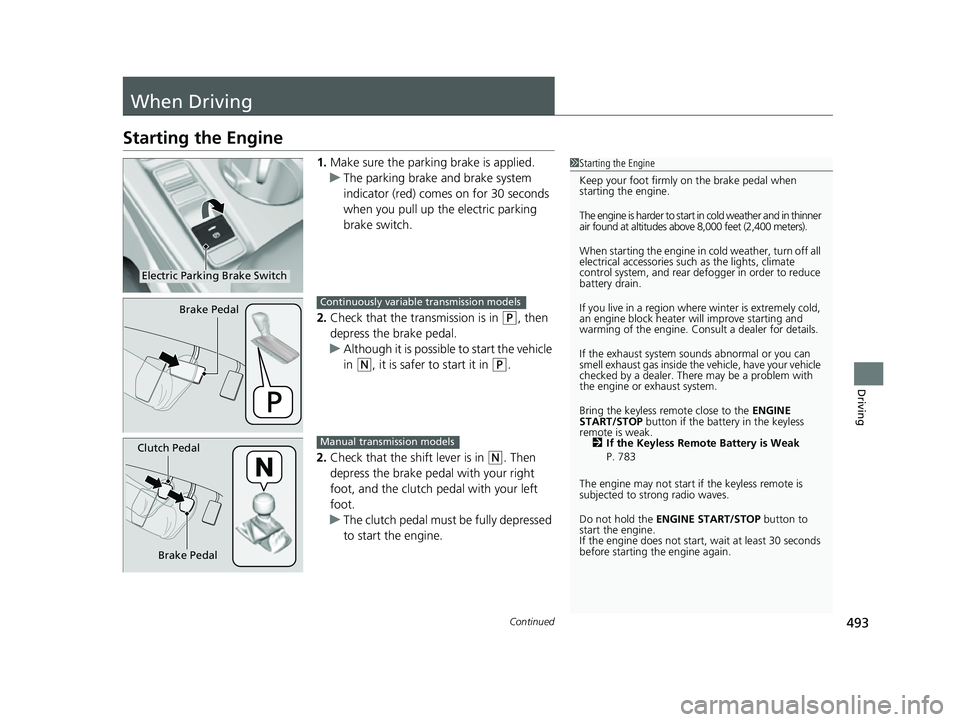
1.Make sure the parkin g brake is applied.
u The parking brake and brake system
indicator (red) comes on for 30 seconds
when you pull up the electric parking
brake switch.
2. Check that the transmission is in
(P, then
depress the brake pedal.
u Although it is possible to start the vehicle
in
(N, it is safer to start it in (P.
2. Check that the shift lever is in
(N. Then
depress the brake pedal with your right
foot, and the clutch pedal with your left
foot.
u The clutch pedal must be fully depressed
to start the engine.
1Starting the Engine
Keep your foot firmly on the brake pedal when
starting the engine.
The engine is harder to start in cold weather and in thinner
air found at altitudes above 8,000 feet (2,400 meters).
When starting the engine in cold weather, turn off all
electrical accessories such as the lights, climate
control system, and rear de fogger in order to reduce
battery drain.
If you live in a region where winter is extremely cold,
an engine block heater will improve starting and
warming of the engine. Cons ult a dealer for details.
If the exhaust system sounds abnormal or you can
smell exhaust gas inside the vehicle, have your vehicle
checked by a dealer. There may be a problem with
the engine or exhaust system.
Bring the keyless remote close to the ENGINE
START/STOP button if the batte ry in the keyless
remote is weak. 2 If the Keyless Remote Battery is Weak
P. 783
The engine may not start if the keyless remote is
subjected to strong radio waves.
Do not hold the ENGINE START/STOP button to
start the engine.
If the engine does not start, wait at least 30 seconds
before starting the engine again.
Electric Parking Brake Switch
Brake PedalContinuously variable transmission models
Brake Pedal
Clutch PedalManual transmission models
23 CIVIC HATCHBACK TYPE R-31T406100_03.book 493 ページ 2022年6月23日 木曜日 午後9時28分