2023 HONDA CIVIC start stop button
[x] Cancel search: start stop buttonPage 251 of 840
249Continued
Controls
Climate Control System
Using Automatic Climate Control
The automatic climate control system maintains the interior temperature you select.
The system also selects the proper mix of heat ed or cooled air that raises or lowers
the interior temperature to your pr eference as quickly as possible.
Use the system when the engine is running.
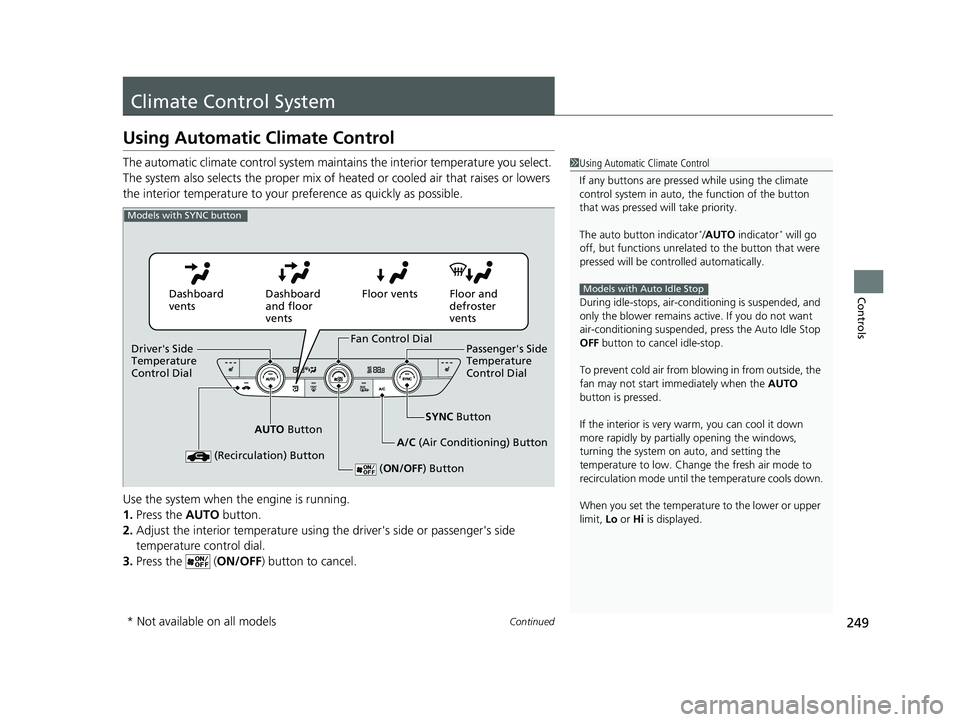
1. Press the AUTO button.
2. Adjust the interior temperature using the driver's side or passenger's side
temperature control dial.
3. Press the ( ON/OFF) button to cancel.1Using Automatic Climate Control
If any buttons are presse d while using the climate
control system in auto, the function of the button
that was pressed will take priority.
The auto button indicator
*/AUTO indicator* will go
off, but functions unrelated to the button that were
pressed will be cont rolled automatically.
During idle-stops, air-conditioning is suspended, and
only the blower remains ac tive. If you do not want
air-conditioning suspended, press the Auto Idle Stop
OFF button to cancel idle-stop.
To prevent cold air from bl owing in from outside, the
fan may not start i mmediately when the AUTO
button is pressed.
If the interior is very warm, you can cool it down
more rapidly by partial ly opening the windows,
turning the system on auto, and setting the
temperature to low. Change the fresh air mode to
recirculation mode until the temperature cools down.
When you set the temperature to the lower or upper
limit, Lo or Hi is displayed.
Models with Auto Idle Stop
Models with SYNC button
Dashboard
vents Dashboard
and floor
ventsFloor vents Floor and
defroster
vents
AUTO Button SYNC
Button
A/C (Air Conditioning) Button
(Recirculation) Button
( ON/OFF) Button
Fan Control Dial
Driver's Side
Temperature
Control Dial Passenger's Side
Temperature
Control Dial
* Not available on all models
23 CIVIC HATCHBACK TYPE R-31T406100_03.book 249 ページ 2022年6月23日 木曜日 午後9時28分
Page 253 of 840
Continued251
uuClimate Control System uUsing Automatic Climate Control
Controls
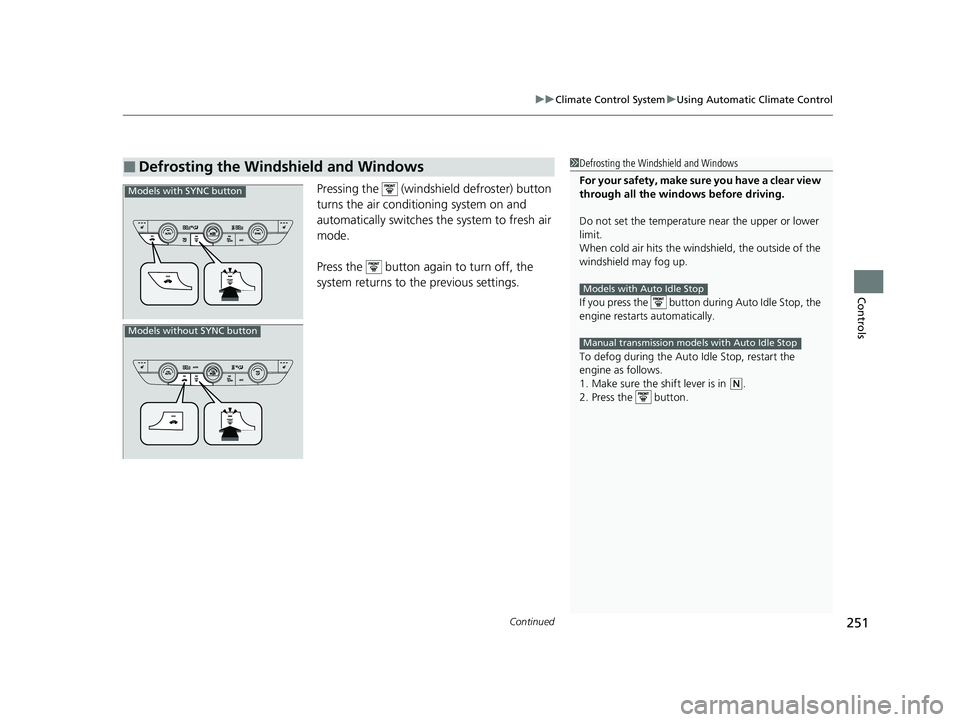
Pressing the (windshield defroster) button
turns the air conditioning system on and
automatically switches th e system to fresh air
mode.
Press the button again to turn off, the
system returns to the previous settings.
■Defrosting the Windshield and Windows1 Defrosting the Windshield and Windows
For your safety, make sure you have a clear view
through all the windows before driving.
Do not set the temperatur e near the upper or lower
limit.
When cold air hits the windshield, the outside of the
windshield may fog up.
If you press the button during Auto Idle Stop, the
engine restarts automatically.
To defog during the Auto Idle Stop, restart the
engine as follows.
1. Make sure the shift lever is in
( N.
2. Press the button.
Models with Auto Idle Stop
Manual transmission models with Auto Idle Stop
Models with SYNC button
Models without SYNC button
23 CIVIC HATCHBACK TYPE R-31T406100_03.book 251 ページ 2022年6月23日 木曜日 午後9時28分
Page 344 of 840
uuAudio System Basic Operation uSmart Shortcuts
342
Features
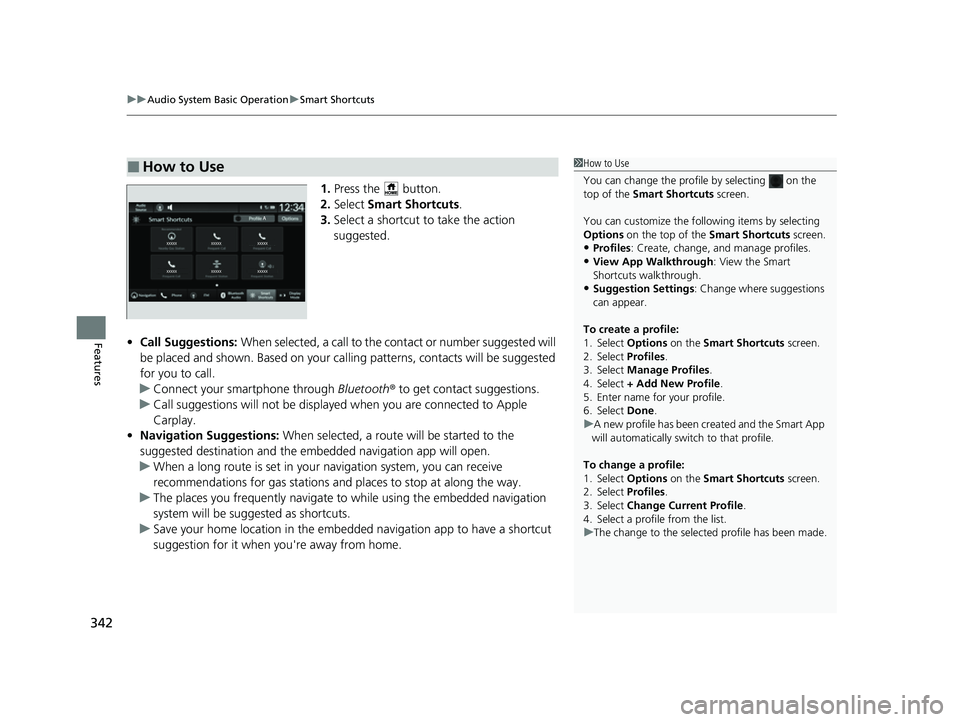
1. Press the button.
2. Select Smart Shortcuts .
3. Select a shortcut to take the action
suggested.
• Call Suggestions: When selected, a call to the c ontact or number suggested will
be placed and shown. Based on your cal ling patterns, contacts will be suggested
for you to call.
u Connect your smartphone through Bluetooth® to get contact suggestions.
u Call suggestions will not be displayed when you are connected to Apple
Carplay.
• Navigation Suggestions: When selected, a route will be started to the
suggested destination and the embedded navigation app will open.
u When a long route is set in your navigation system, you can receive
recommendations for gas stations and places to stop at along the way.
u The places you frequently navigate to while using the embedded navigation
system will be suggested as shortcuts.
u Save your home location in the embedded navigation app to have a shortcut
suggestion for it when you're away from home.
■How to Use1How to Use
You can change the profile by selecting on the
top of the Smart Shortcuts screen.
You can customize the foll owing items by selecting
Options on the top of the Smart Shortcuts screen.
•Profiles: Create, change, a nd manage profiles.
•View App Walkthrough : View the Smart
Shortcuts walkthrough.
•Suggestion Settings : Change where suggestions
can appear.
To create a profile:
1. Select Options on the Smart Shortcuts screen.
2. Select Profiles .
3. Select Manage Profiles .
4. Select + Add New Profile .
5. Enter name for your profile.
6. Select Done .
u A new profile has been cr eated and the Smart App
will automatically switch to that profile.
To change a profile:
1. Select Options on the Smart Shortcuts screen.
2. Select Profiles .
3. Select Change Current Profile .
4. Select a profile from the list.
u The change to the selected profile has been made.
23 CIVIC HATCHBACK TYPE R-31T406100_03.book 342 ページ 2022年6月23日 木曜日 午後9時28分
Page 487 of 840
485
Driving
This chapter discusses driving and refueling.
Before Driving................................... 486
Towing a Trailer ................................ 492
When Driving Starting the Engine .......................... 493
Precautions While Driving................. 500
Continuously Variable Transmission*... 502
Shifting ............................ 503 , 505, 509
ECON Button*................................. 513
Auto Idle Stop .......................... 514 , 520
Drive Mode Switch
*................. 525 , 529
Vehicle Stability AssistTM (VSA®), aka Electronic
Stability Control (ESC), System .............. 535
Agile Handling Assist ....................... 538
Limited Slip Differential (LSD)*......... 539Tire Pressure Monitoring System (TPMS)*. 540Tire Pressure Monitoring System (TPMS) - Required Federal Explanation*....... 545
Blind Spot Information System*....... 547
Honda Sensing ®................................ 551
Collision Mitigati on Braking System
TM
(CMBSTM) ....................................... 555
Low Speed Braking Control*.... 567, 573
Adaptive Cruise Control (ACC) with Low
Speed Follow
*............................... 578
Adaptive Cruise Control (ACC)*....... 598 Lane Keeping Assist System (LKAS) .. 618
Traffic Jam Assist
*........................... 630
Road Departure Miti gation System... 639
Traffic Sign Recognition System ....... 647
Front Wide View Camera ................. 653
Sonar Sensors
*................................ 655
Braking .............................................. 657
Parking Your Vehicle ........................ 669
Multi-View Rear Camera .................. 681
Refueling ........................................... 683
Fuel Economy and CO
2 Emissions .... 689
Turbo Engine Vehicle*...................... 690
* Not available on all models
23 CIVIC HATCHBACK TYPE R-31T406100_03.book 485 ページ 2022年6月23日 木曜日 午後9時28分
Page 495 of 840
493Continued
Driving
When Driving
Starting the Engine
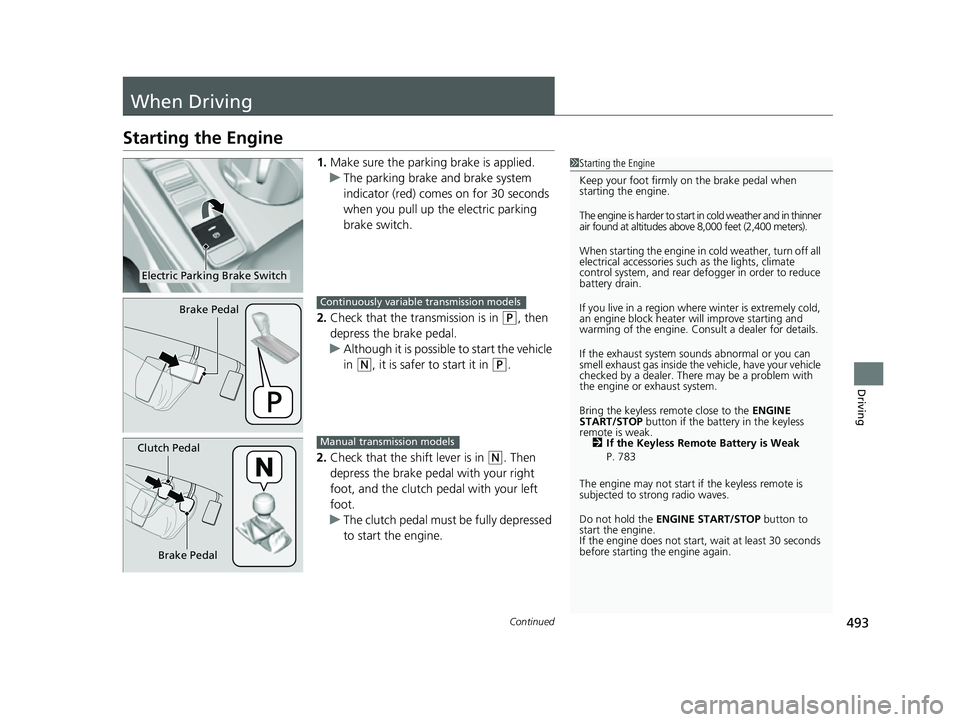
1.Make sure the parkin g brake is applied.
u The parking brake and brake system
indicator (red) comes on for 30 seconds
when you pull up the electric parking
brake switch.
2. Check that the transmission is in
(P, then
depress the brake pedal.
u Although it is possible to start the vehicle
in
(N, it is safer to start it in (P.
2. Check that the shift lever is in
(N. Then
depress the brake pedal with your right
foot, and the clutch pedal with your left
foot.
u The clutch pedal must be fully depressed
to start the engine.
1Starting the Engine
Keep your foot firmly on the brake pedal when
starting the engine.
The engine is harder to start in cold weather and in thinner
air found at altitudes above 8,000 feet (2,400 meters).
When starting the engine in cold weather, turn off all
electrical accessories such as the lights, climate
control system, and rear de fogger in order to reduce
battery drain.
If you live in a region where winter is extremely cold,
an engine block heater will improve starting and
warming of the engine. Cons ult a dealer for details.
If the exhaust system sounds abnormal or you can
smell exhaust gas inside the vehicle, have your vehicle
checked by a dealer. There may be a problem with
the engine or exhaust system.
Bring the keyless remote close to the ENGINE
START/STOP button if the batte ry in the keyless
remote is weak. 2 If the Keyless Remote Battery is Weak
P. 783
The engine may not start if the keyless remote is
subjected to strong radio waves.
Do not hold the ENGINE START/STOP button to
start the engine.
If the engine does not start, wait at least 30 seconds
before starting the engine again.
Electric Parking Brake Switch
Brake PedalContinuously variable transmission models
Brake Pedal
Clutch PedalManual transmission models
23 CIVIC HATCHBACK TYPE R-31T406100_03.book 493 ページ 2022年6月23日 木曜日 午後9時28分
Page 496 of 840
uuWhen Driving uStarting the Engine
494
Driving
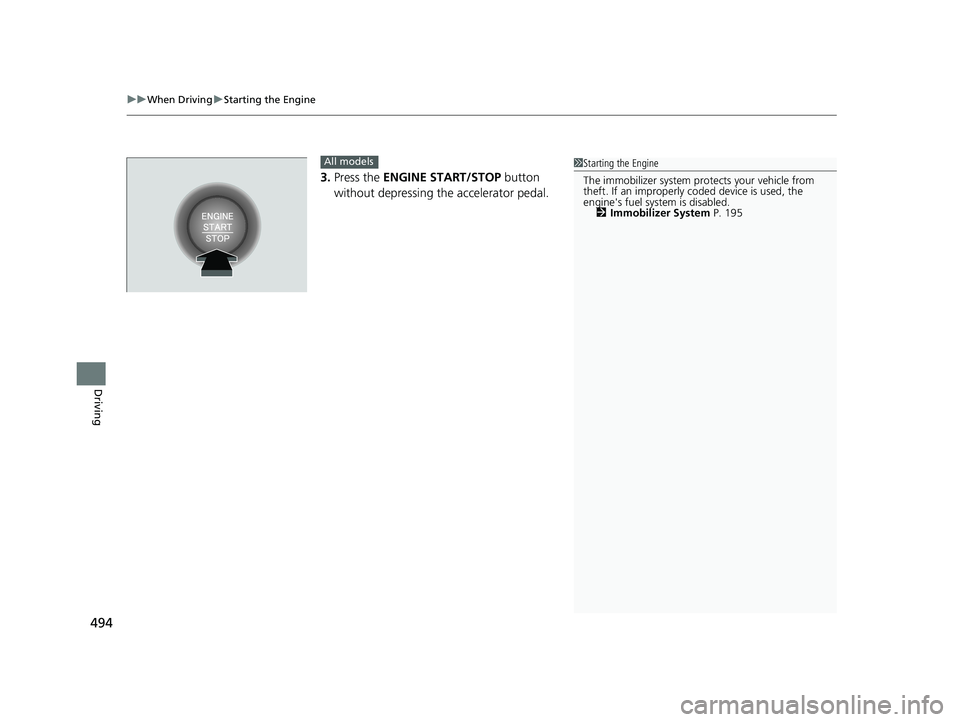
3. Press the ENGINE START/STOP button
without depressing the accelerator pedal.
1 Starting the Engine
The immobilizer system pr otects your vehicle from
theft. If an improperly c oded device is used, the
engine's fuel system is disabled.
2 Immobilizer System P. 195All models
23 CIVIC HATCHBACK TYPE R-31T406100_03.book 494 ページ 2022年6月23日 木曜日 午後9時28分
Page 498 of 840

uuWhen Driving uStarting the Engine
496
Driving
When started remotely, the engine automati cally shuts off after 10 minutes of idling
and/or the brake pedal and ENGINE START/STOP button have not been pressed
simultaneously.
To extend the run time for another 10 minutes during the first run, press the
button, then press and hold the button. u Some exterior lights flash six times if a 10-minute extension request was
transmitted successfully.1Remote Engine Start*
The engine may not start by the remote engine start
if:
•You have disabled a remo te engine start setting
using the driver information interface* or audio/
information screen*.
2 Settings P. 138
2 Customized Features P. 390
•The power mode is not in VEHICLE OFF.
•The transmission is in a position other than (P.•The hood is open, or any door or the hatch is
unlocked.
•You have already used the remote twice to start
the engine.
•Another registered keyless remote is in the vehicle.
•There is any antenna failure.•The door is unlocked with the built-in key.
•The engine oil pressure is low.
•The engine coolant temper ature is extremely high.
•The security system alarm is not set.
* Not available on all models
23 CIVIC HATCHBACK TYPE R-31T406100_03.book 496 ページ 2022年6月23日 木曜日 午後9時28分
Page 499 of 840

Continued497
uuWhen Driving uStarting the Engine
Driving
■To stop the engine
Press and hold the button for one
second.
If the engine stops succ essfully, the exterior
lights flash once.
When the remote is out of the keyless access
system range, the exterior lights will not flash.
The engine will not stop. u Go within the range, and try again.1Remote Engine Start*
The engine may stop whil e it is running if:•You do not start the vehicl e within 10 minutes of
starting the engine with the keyless remote.
•The engine is stopped by using the keyless remote.•The security system alarm is not set.
•The door is unlocked with the built-in key.
•The hood is open, or any door, or the hatch is
unlocked.
•You press the shift lever release button.
•The engine coolant temper ature is extremely high.•The battery is low.
•The engine oil pressure is low.
•The malfunction indicator la mp comes on if there is
a problem with the emissions control systems.
While the engine is running, the vehicle will
automatically preconditi on inside the vehicle.
When it is warm outside:
•The climate control system is activated in
recirculation mode.
When it is cold outside:
•The defroster is activated at a moderately warm
temperature.
•The rear defogger, heated door mirrors*, front seat
heaters* and heated steering wheel* are activated.
2 Rear Defogger/Heated Door Mirror*
Button P. 216
2 Front Seat Heaters
* P. 247
2 Heated Steering Wheel* P. 246
* Not available on all models
23 CIVIC HATCHBACK TYPE R-31T406100_03.book 497 ページ 2022年6月23日 木曜日 午後9時28分