Page 143 of 840
141
uuGauges and Driver Information Interface uDriver Information Interface (A-type Meter)
Continued
Instrument Panel
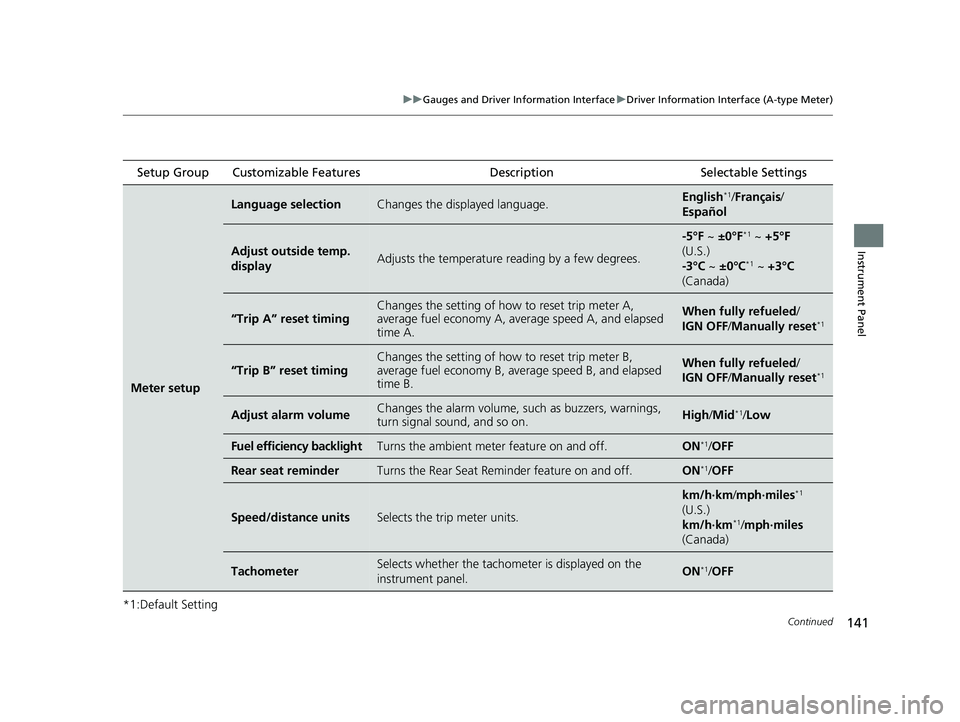
*1:Default Setting Setup Group Customizable Features
Description Selectable Settings
Meter setup
Language selectionChanges the displayed language.English*1/Français /
Español
Adjust outside temp.
displayAdjusts the temperature r eading by a few degrees.
-5°F ~ ±0°F*1 ~ +5°F
(U.S.)
-3°C ~ ±0°C
*1 ~ +3°C
(Canada)
“Trip A” reset timingChanges the setting of how to reset trip meter A,
average fuel economy A, av erage speed A, and elapsed
time A.When fully refueled/
IGN OFF /Manually reset*1
“Trip B” reset timing
Changes the setting of ho w to reset trip meter B,
average fuel economy B, av erage speed B, and elapsed
time B.When fully refueled/
IGN OFF /Manually reset*1
Adjust alarm volumeChanges the alarm volume, su ch as buzzers, warnings,
turn signal sound, and so on.High /Mid*1/Low
Fuel efficiency backlightTurns the ambient meter feature on and off.ON*1/ OFF
Rear seat reminderTurns the Rear Seat Reminder feature on and off.ON*1/OFF
Speed/distance unitsSelects the trip meter units.
km/h∙km /mph∙miles*1
(U.S.)
km/h∙km
*1/ mph∙miles
(Canada)
TachometerSelects whether the tachom eter is displayed on the
instrument panel.ON*1/ OFF
23 CIVIC HATCHBACK TYPE R-31T406100_03.book 141 ページ 2022年6月23日 木曜日 午後9時28分
Page 144 of 840
142
uuGauges and Driver Information Interface uDriver Information Interface (A-type Meter)
Instrument Panel
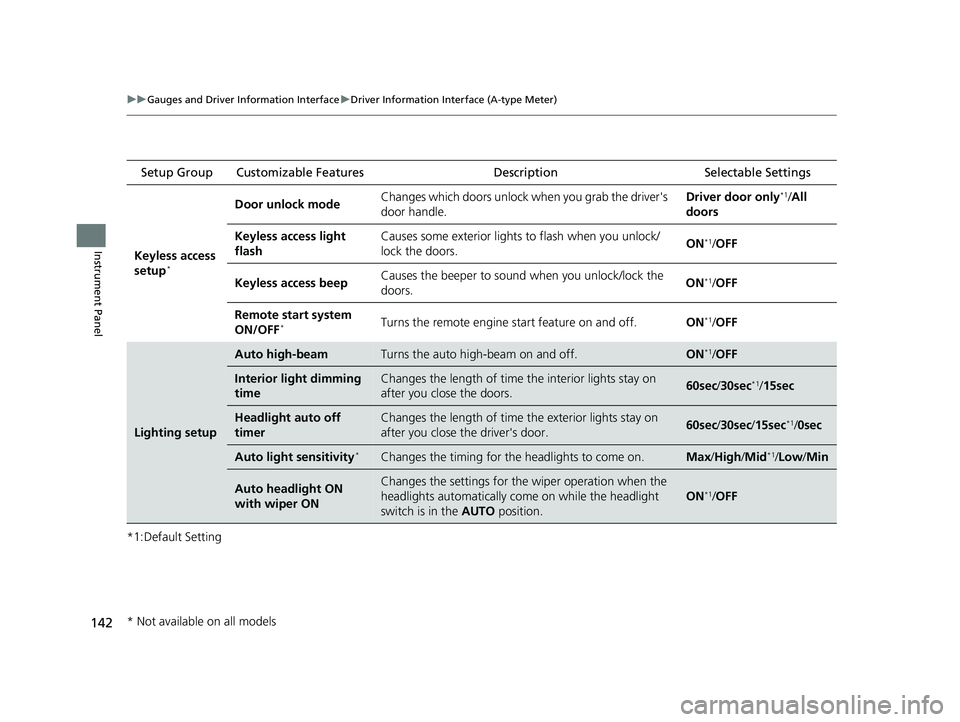
*1:Default Setting Setup Group Customizable Features
Description Selectable Settings
Keyless access
setup
*
Door unlock mode Changes which doors unlock when you grab the driver's
door handle. Driver door only*1/
All
doors
Keyless access light
flash Causes some exterior lights to flash when you unlock/
lock the doors.
ON
*1/
OFF
Keyless access beep Causes the beeper to soun
d when you unlock/lock the
doors. ON
*1/
OFF
Remote start system
ON/OFF
*Turns the remote engine start feature on and off. ON*1/OFF
Lighting setup
Auto high-beamTurns the auto high-beam on and off.ON*1/OFF
Interior light dimming
timeChanges the length of time the interior lights stay on
after you close the doors.60sec /30sec*1/15sec
Headlight auto off
timerChanges the length of time the exterior lights stay on
after you close the driver's door.60sec /30sec /15sec*1/0sec
Auto light sensitivity*Changes the timing for the headlights to come on.Max/High/ Mid*1/Low /Min
Auto headlight ON
with wiper ONChanges the settings for th e wiper operation when the
headlights automatically come on while the headlight
switch is in the AUTO position.
ON*1/OFF
* Not available on all models
23 CIVIC HATCHBACK TYPE R-31T406100_03.book 142 ページ 2022年6月23日 木曜日 午後9時28分
Page 150 of 840
148
uuGauges and Driver Information Interface uDriver Information Interface Left Side Area (B-type-Meter)
Instrument Panel
Driver Information Inte rface Left Side Area
(B-type-Meter)
Shows the current mode for audio and phone information, etc.
2Audio Remote Controls P. 260
2 Bluetooth ® HandsFreeLink ® P. 464
Shows the clock.
■Clock1 Clock
You can adjust the time manually and change the
clock display to show the 12 hour clock or 24 hour
clock. 2 Clock P. 174
You can choose whether the clock is displayed on the
driver information interface. 2 Customize Display P. 151
23 CIVIC HATCHBACK TYPE R-31T406100_03.book 148 ページ 2022年6月23日 木曜日 午後9時28分
Page 151 of 840
Continued149
uuGauges and Driver Information Interface uDriver Information Interface Left Side Area (B-type-Meter)
Instrument Panel
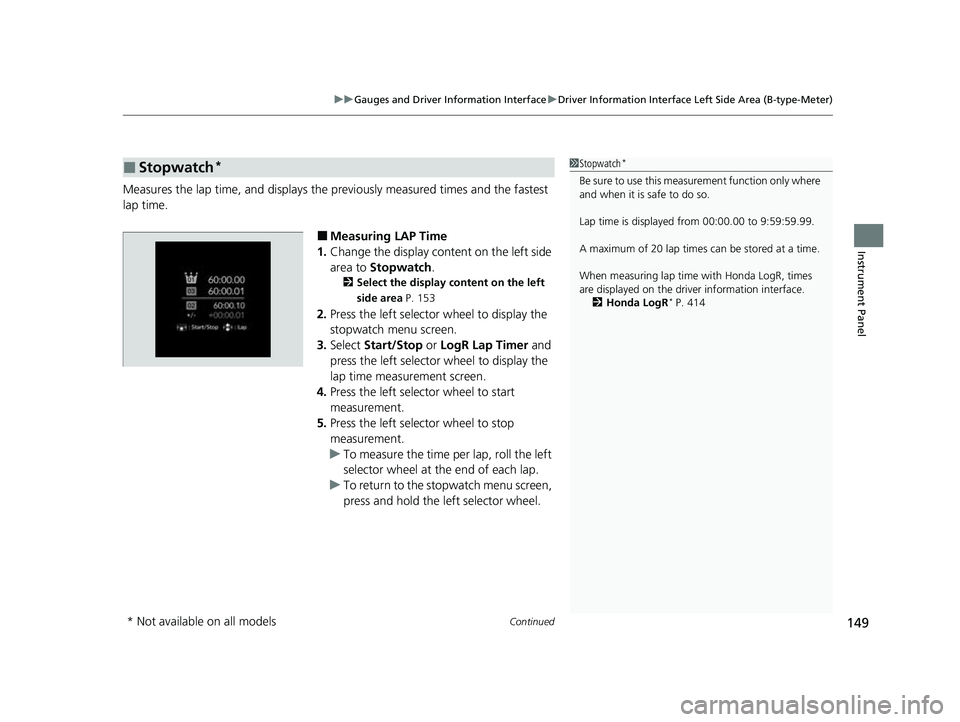
Measures the lap time, and displays the pr eviously measured times and the fastest
lap time.
■Measuring LAP Time
1. Change the display content on the left side
area to Stopwatch .
2Select the display content on the left
side area P. 153
2.Press the left selector wheel to display the
stopwatch menu screen.
3. Select Start/Stop or LogR Lap Timer and
press the left selector wheel to display the
lap time measurement screen.
4. Press the left selector wheel to start
measurement.
5. Press the left selector wheel to stop
measurement.
u To measure the time per lap, roll the left
selector wheel at the end of each lap.
u To return to the stopwatch menu screen,
press and hold the left selector wheel.
■Stopwatch*1Stopwatch*
Be sure to use this measurement function only where
and when it is safe to do so.
Lap time is displayed from 00:00.00 to 9:59:59.99.
A maximum of 20 lap times ca n be stored at a time.
When measuring lap time with Honda LogR, times
are displayed on the driver information interface. 2 Honda LogR
* P. 414
* Not available on all models
23 CIVIC HATCHBACK TYPE R-31T406100_03.book 149 ページ 2022年6月23日 木曜日 午後9時28分
Page 157 of 840
155
uuGauges and Driver Information Interface uDriver Information Interface Right Side Area (B-type-Meter)
Continued
Instrument Panel
Roll the right selector wheel to view different types of content.
■Switching the Display1Switching the Display
You can add or delete the meter contents.
2 Customize Display P. 170
Warning Messages
P. 171Range/Fuel/Trip
Meter
P. 157
No Content/
Unit Change
P. 169 Driver Attention
Monitor
P. 161
Navigation/Compass
P. 160
Speed/Time/
Trip Meter
P. 159
Customize Display
P. 170 Maintenance
P. 166
Safety Support
P. 167 Seat Belts
P. 166
Models with Auto Idle Stop
23 CIVIC HATCHBACK TYPE R-31T406100_03.book 155 ページ 2022年6月23日 木曜日 午後9時28分
Page 158 of 840
156
uuGauges and Driver Information Interface uDriver Information Interface Right Side Area (B-type-Meter)
Instrument Panel
Right Selector Wheel Driver Attention
Monitor
P. 161
G-Meter
P. 165
Accelerator
Position/Braking
Pressure Meter
P. 164
Models without Auto Idle Stop
Maintenance
P. 166 Seat Belts
P. 166
Warning Messages
P. 171 Customize Display
P. 170 No Content/
Unit Change
P. 169Safety Support
P. 167
Range/Fuel/
Odometer/Trip
Meter
P. 157
Speed/Time/
Odometer/Trip
Meter
P. 159Navigation/Compass
P. 160
Turbo Gauge
P. 164
23 CIVIC HATCHBACK TYPE R-31T406100_03.book 156 ページ 2022年6月23日 木曜日 午後9時28分
Page 162 of 840

uuGauges and Driver Information Interface uDriver Information Interface Right Side Area (B-type-Meter)
160
Instrument Panel
■Odometer*
2 Odometer* P. 158
■Trip meter
2Trip meter P. 158
■Average speed
Shows the average speed in mph or km/h since Trip A or Trip B was reset.
■Elapsed time
Shows the time elapsed since Trip A or Trip B was reset.
■Compass
Shows the compass screen.
■Turn-by-Turn Directions
When driving guidance is provided by the navigation system, Apple CarPlay or
Android Auto, turn-by-turn directio ns to your destination appear.
2Refer to the Navigation System Manual
2 Android AutoTM P. 285
2 Apple CarPlay P. 346
■Navigation
1Average speed
You can change when to reset the average speed.
2 Customized Features P. 390
1Elapsed time
You can change when to reset the elapsed time.
2 Customized Features P. 390
1Navigation
You can select whether to have the turn-by-turn
display come on or not dur ing the route guidance.
2 Customized Features P. 390
When the compass or turn-by-turn directions are
displayed, you can contro l some navigation system
functions on the driver information interface by
pressing the right selector wheel. 2 Refer to the Navigation System Manual
Turn-by-turn directions may not be available for all
apps.
* Not available on all models
23 CIVIC HATCHBACK TYPE R-31T406100_03.book 160 ページ 2022年6月23日 木曜日 午後9時28分
Page 167 of 840
Continued165
uuGauges and Driver Information Interface uDriver Information Interface Right Side Area (B-type-Meter)
Instrument Panel
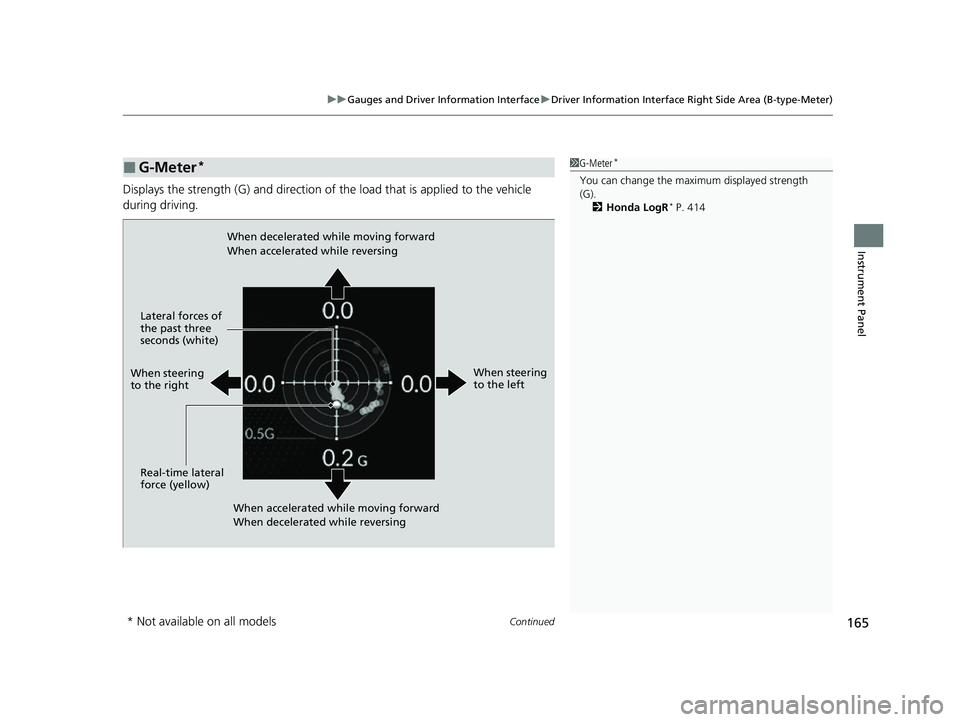
Displays the strength (G) and direction of the load that is applied to the vehicle
during driving.
■G-Meter*1 G-Meter*
You can change the maxi mum displayed strength
(G).
2 Honda LogR
* P. 414
When steering
to the right
When accelerated while moving forward
When decelerated while reversing
When decelerated while moving forward
When accelerated while reversing
When steering
to the left
Real-time lateral
force (yellow) Lateral forces of
the past three
seconds (white)
* Not available on all models
23 CIVIC HATCHBACK TYPE R-31T406100_03.book 165 ページ 2022年6月23日 木曜日 午後9時28分