2023 HONDA CIVIC engine
[x] Cancel search: enginePage 531 of 840
529
uuWhen Driving uDrive Mode Switch*
Continued
Driving
Drive Mode Switch*
You can choose between four modes, +R mode, SPORT mode, COMFORT mode
and INDIVIDUAL mode by using the DRIVE MODE switch or the +R button.
The current mode is displayed on the gauge, and each mode will appear differently.
Manual transmission models without Auto Idle Stop1 Drive Mode Switch*
The mode may not be able to be changed when:
•The vehicle is turning.•The VSA ® system is activating.
•There is a problem with the adaptive damper
system, the engine, the VSA ®, and the EPS.
* Not available on all models
23 CIVIC HATCHBACK TYPE R-31T406100_03.book 529 ページ 2022年6月23日 木曜日 午後9時28分
Page 537 of 840

535
uuWhen Driving uVehicle Stability AssistTM (VSA ®), aka Electronic Stability Control (ESC), System
Continued
Driving
Vehicle Stability AssistTM (VSA ®), aka Electronic
Stability Control (ESC), System
VSA ® helps stabilize the vehicle during cornering if the vehicle turns more or less
than what was intended. It also assists in maintaining traction on slippery surfaces.
It does so by regulating engine outp ut and selectively applying the brakes.
When VSA ® activates, you may notice that the
engine does not respond to the accelerator.
You may also notice some noise from the
hydraulic brake system. You will also see the
indicator blink.
*1 : Models with A-type meter
*2 : Models with B-type meter
*3 : When using the +R gauge
*
■VSA ® Operation
1 Vehicle Stability AssistTM (VSA® ), aka Electronic Stability Control
(ESC), System
The VSA ® may not function properl y if tire type and
size are mixed. Make sure to use the same size and
type of tire, and the air pressures as specified.
When the VSA® system indicator comes on and stays on
while driving, there may be a problem with the system.
While this may not interfere with normal driving, have
your vehicle checked by a dealer immediately.
The Vehicle Stability AssistTM (VSA ®) system, Vehicle
Stability AssistTM (VSA ®) OFF*, Adaptive Cruise Control
(ACC)*, Adaptive Cruise Control (ACC) with Low
Speed Follow*, low tire pressure/TPMS* and safety
support indicators may come on in amber along with a
message in the gauge when you set the power mode
to ON after reconn ecting the battery.
Drive a short distance at more than 12 mph (20 km/h).
Each indicator should go off. If any do not, have your
vehicle checked by a dealer.
VSA ® cannot enhance stability in all driving situations
and does not control the entire braking system. You
still need to drive and corner at speeds appropriate
for the conditions and alwa ys leave a sufficient
margin of safety.
The main function of the VSA ® system is generally
known as Electronic Stability Control (ESC). The
system also includes a traction control function.
VSA® System Indicator
*1
*2*3
* Not available on all models
23 CIVIC HATCHBACK TYPE R-31T406100_03.book 535 ページ 2022年6月23日 木曜日 午後9時28分
Page 538 of 840

uuWhen Driving uVehicle Stability AssistTM (VSA ®), aka Electronic Stability Control (ESC), System
536
Driving
This button is on the driv er side control panel.
To partially disable VSA ® functionality/
features, press and hold it until you hear a
beep.
Your vehicle will have normal braking and
cornering ability, but traction control function
will be less effective.
To restore VSA ® functionality/features, press
the (VSA ® OFF ) button until you hear a
beep.
VSA ® is turned on every time you start the
engine, even if you turned it off the last time
you drove the vehicle.
*1 : Models with A-type meter
*2 : Models with B-type meter
*3 : When using the +R gauge
*
■VSA ® On and Off1 Vehicle Stability AssistTM (VSA ®), aka Electronic Stability Control
(ESC), System
In certain unusual conditions when your vehicle gets
stuck in shallow mud or fr esh snow, it may be easier
to free it with the VSA ® temporarily switched off.
When the button is pressed, the traction control
function becomes less effective. This allows for the
wheels to spin more freely at low speed. You should
only attempt to free your vehicle with the VSA ® off if
you are not able to free it when the VSA ® is on.
Immediately after freeing your vehicle, be sure to
switch VSA ® on again. We do not recommend driving
your vehicle with the VSA ® system switched off.
You may hear a motor sound coming from the
engine compartment while system checks are being
performed immediately after starting the engine or
while driving. This is normal.
VSA ® OFF Indicator
*1
*2*3
* Not available on all models
23 CIVIC HATCHBACK TYPE R-31T406100_03.book 536 ページ 2022年6月23日 木曜日 午後9時28分
Page 540 of 840
538
uuWhen Driving uAgile Handling Assist
Driving
Agile Handling Assist
Lightly brakes the front wheel s, as needed, when you turn the steering wheel, and
helps support the vehicle's stability and performance during cornering.1 Agile Handling Assist
The agile handling assist ca nnot enhance stability in
all driving situations. You still need to drive and
corner at speeds appropriate for the conditions and
always leave a sufficient margin of safety.
When the VSA ® system indicator comes on and stays
on while driving, the agil e handling assist does not
activate.
You may hear a sound coming from the engine
compartment while the agile handling assist is
activated. This is normal.
23 CIVIC HATCHBACK TYPE R-31T406100_03.book 538 ページ 2022年6月23日 木曜日 午後9時28分
Page 551 of 840
Continued549
uuWhen Driving uBlind Spot Information System*
Driving
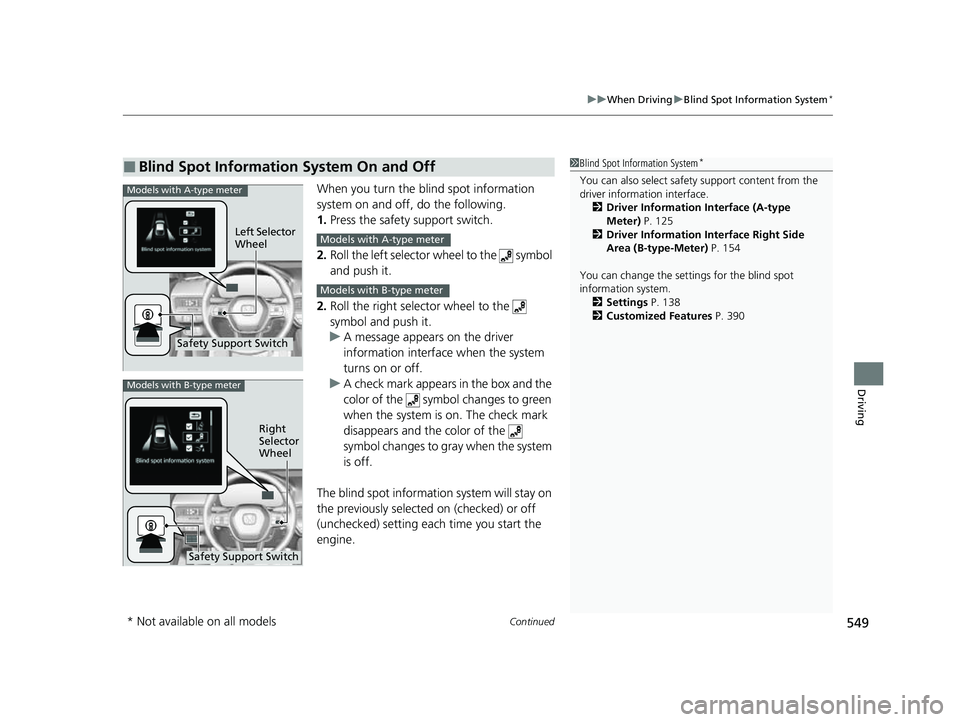
When you turn the b lind spot information
system on and off, do the following.
1. Press the safety support switch.
2. Roll the left selector wheel to the symbol
and push it.
2. Roll the right selector wheel to the
symbol and push it.
u A message appears on the driver
information interface when the system
turns on or off.
u A check mark appears in the box and the
color of the symbol changes to green
when the system is on. The check mark
disappears and the color of the
symbol changes to gray when the system
is off.
The blind spot informatio n system will stay on
the previously selected on (checked) or off
(unchecked) setting eac h time you start the
engine.
■Blind Spot Information System On and Off1 Blind Spot Information System*
You can also sele ct safety support content from the
driver information interface.
2 Driver Information Interface (A-type
Meter) P. 125
2 Driver Information Interface Right Side
Area (B-type-Meter) P. 154
You can change the settings for the blind spot
information system. 2 Settings P. 138
2 Customized Features P. 390Models with A-type meter
Left Selector
Wheel
Safety Support Switch
Models with A-type meter
Models with B-type meter
Models with B-type meter
Right
Selector
Wheel
Safety Support Switch
* Not available on all models
23 CIVIC HATCHBACK TYPE R-31T406100_03.book 549 ページ 2022年6月23日 木曜日 午後9時28分
Page 557 of 840
555
uuHonda Sensing ®u Collision Mitigation Braking SystemTM (CMBSTM)
Continued
Driving
Collision Mitigation Braking SystemTM (CMBSTM)
The system can assist you when it determines there is a possibility of your vehicle
colliding with a vehicle (including moto rcycles) ahead from behind, an oncoming
vehicle in front, a pedestrian, or someone riding a bicycle (moving bicycle).
The CMBS
TM is designed to alert you when the potential for a collision is determined,
as well as assist in reducing speed, avoiding collisions, and reducing collision
severity.
1 Collision Mitigation Braking SystemTM (CMBSTM)
Important Safety Reminder
The CMBS
TM is designed to reduce the severity of an
unavoidable collision. It does not prevent collisions
nor stop the vehicle automati cally. It is still your
responsibility to operate the brake pedal and steering
wheel appropriately acco rding to the driving
conditions.
The CMBS
TM may not activate or may not detect a
vehicle in front of y our vehicle under certain
conditions:
2 CMBS
TM Conditions and Limitations P. 560
You can read about handling information for the
camera equipped with this system. 2 Front Wide View Camera P. 653
When the CMBS
TM is activated, it will continue to
operate even if the accele rator pedal is partially
depressed. However, it w ill be canceled if the
accelerator pedal is fully depressed.
When the CMBS
TM activates, the engine may stop
automatically. Start the engine by normal operation if
the engine stops. 2 Starting the Engine P. 493
CMBS
TM does not function while VSA® is completely
disabled.
Manual transmission models
Models without Auto Idle Stop
23 CIVIC HATCHBACK TYPE R-31T406100_03.book 555 ページ 2022年6月23日 木曜日 午後9時28分
Page 561 of 840
Continued559
uuHonda Sensing ®u Collision Mitigation Braking SystemTM (CMBSTM)
Driving
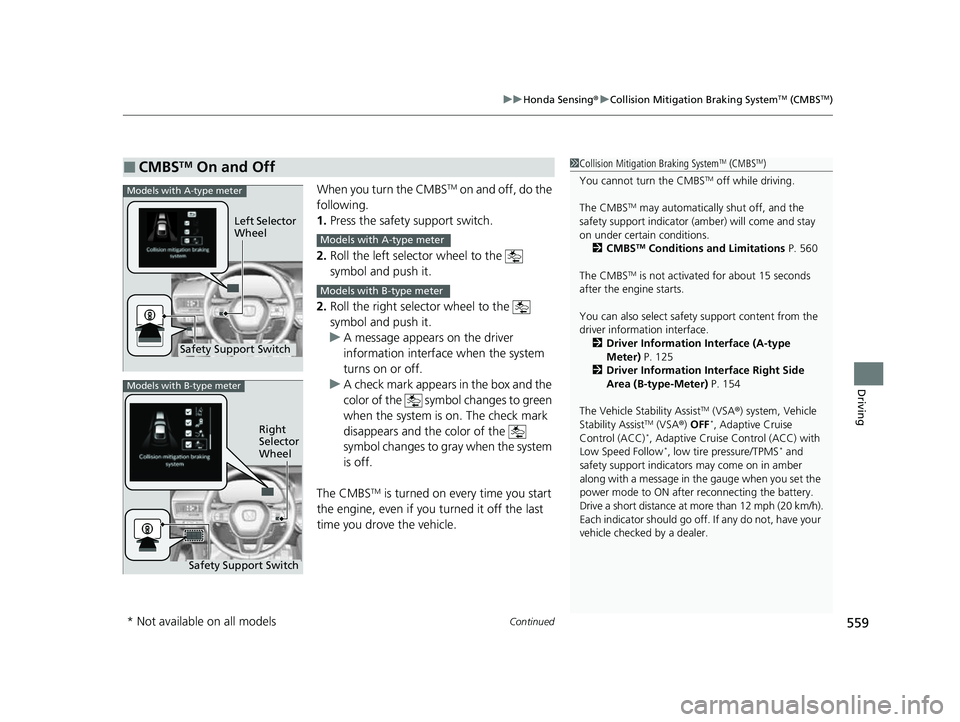
When you turn the CMBSTM on and off, do the
following.
1. Press the safety support switch.
2. Roll the left selector wheel to the
symbol and push it.
2. Roll the right selector wheel to the
symbol and push it.
u A message appears on the driver
information interface when the system
turns on or off.
u A check mark appears in the box and the
color of the symbol changes to green
when the system is on. The check mark
disappears and the color of the
symbol changes to gray when the system
is off.
The CMBS
TM is turned on every time you start
the engine, even if you turned it off the last
time you drove the vehicle.
■CMBSTM On and Off1 Collision Mitigation Braking SystemTM (CMBSTM)
You cannot turn the CMBS
TM off while driving.
The CMBS
TM may automatically shut off, and the
safety support indicator (amb er) will come and stay
on under certain conditions. 2 CMBS
TM Conditions and Limitations P. 560
The CMBS
TM is not activated for about 15 seconds
after the engine starts.
You can also sele ct safety support content from the
driver information interface.
2 Driver Information Interface (A-type
Meter) P. 125
2 Driver Information Interface Right Side
Area (B-type-Meter) P. 154
The Vehicle Stability Assist
TM (VSA ®) system, Vehicle
Stability AssistTM (VSA ®) OFF*, Adaptive Cruise
Control (ACC)*, Adaptive Cruise Control (ACC) with
Low Speed Follow*, low tire pressure/TPMS* and
safety support indicators may come on in amber
along with a message in the gauge when you set the
power mode to ON after reconnecting the battery.
Drive a short distance at more than 12 mph (20 km/h).
Each indicator should go off. If any do not, have your
vehicle checked by a dealer.
Safety Support Switch Left Selector
Wheel
Models with A-type meter
Models with A-type meter
Models with B-type meter
Models with B-type meter
Right
Selector
Wheel
Safety Support Switch
* Not available on all models
23 CIVIC HATCHBACK TYPE R-31T406100_03.book 559 ページ 2022年6月23日 木曜日 午後9時28分
Page 571 of 840
569
uuHonda Sensing ®u Low Speed Braking Control*
Continued
Driving
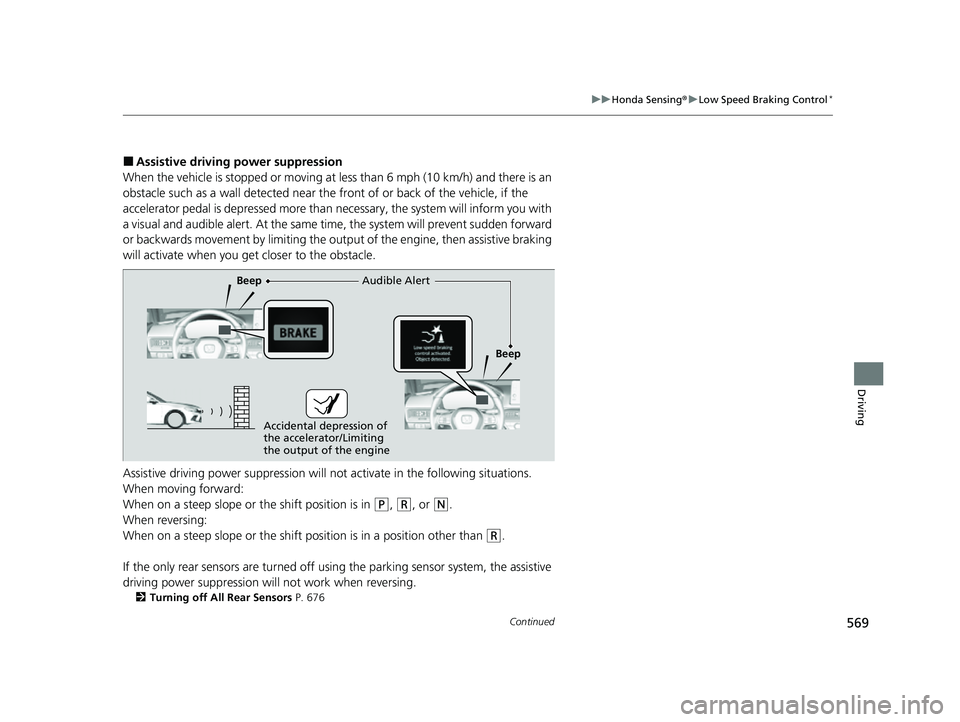
■Assistive driving power suppression
When the vehicle is stopped or moving at less than 6 mph (10 km/h) and there is an
obstacle such as a wall detected near the front of or back of the vehicle, if the
accelerator pedal is depressed more than necessary, the system wi ll inform you with
a visual and audible alert. At the same ti me, the system will prevent sudden forward
or backwards movement by limiting the output of the engine, then assistive braking
will activate when you ge t closer to the obstacle.
Assistive driving power suppression will not activate in the fo llowing situations.
When moving forward:
When on a steep slope or the shift position is in
(P, (R, or (N.
When reversing:
When on a steep slope or the shift po sition is in a position other than
(R.
If the only rear sensors are turned off usi ng the parking sensor system, the assistive
driving power suppression will not work when reversing.
2 Turning off All Rear Sensors P. 676
Audible Alert
Beep
Beep
Accidental depression of
the accelerator/Limiting
the output of the engine
23 CIVIC HATCHBACK TYPE R-31T406100_03.book 569 ページ 2022年6月23日 木曜日 午後9時28分