Page 231 of 533
229
uuAudio System Basic Operation uApple CarPlay
Continued
Features
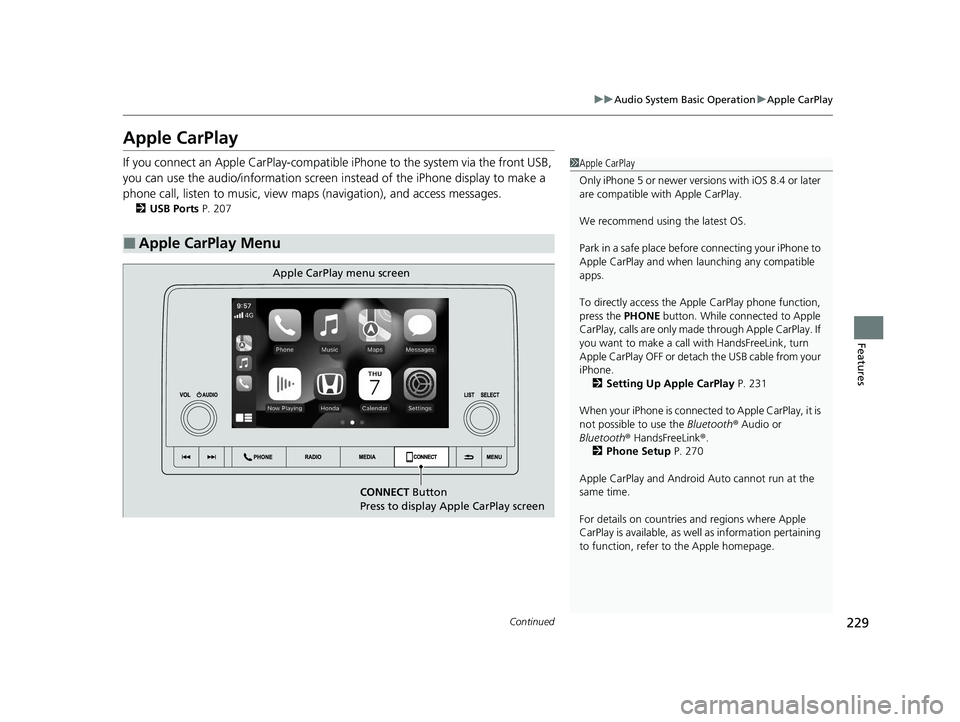
Apple CarPlay
If you connect an Apple CarPlay-compatible iPhone to the system via the front USB,
you can use the audio/information screen instead of the iPhone display to make a
phone call, listen to music, view maps (navigation), and access messages.
2USB Ports P. 207
■Apple CarPlay Menu
1Apple CarPlay
Only iPhone 5 or newer versi ons with iOS 8.4 or later
are compatible with Apple CarPlay.
We recommend using the latest OS.
Park in a safe place before connecting your iPhone to
Apple CarPlay and when launching any compatible
apps.
To directly access the Appl e CarPlay phone function,
press the PHONE button. While connected to Apple
CarPlay, calls are only made through Apple CarPlay. If
you want to make a call with HandsFreeLink, turn
Apple CarPlay OFF or detach the USB cable from your
iPhone. 2 Setting Up Apple CarPlay P. 231
When your iPhone is connected to Apple CarPlay, it is
not possible to use the Bluetooth® Audio or
Bluetooth ® HandsFreeLink ®.
2 Phone Setup P. 270
Apple CarPlay and Android Auto cannot run at the
same time.
For details on c ountries and regions where Apple
CarPlay is available, as well as information pertaining
to function, refer to the Apple homepage.
CONNECT Button
Press to display Apple CarPlay screen
Apple CarPlay menu screen
23 ACCORD 4D US PET MAP-3130A6000_01.book 229 ページ 2022年10月19日 水曜日 午前11時49分
Page 279 of 533
Continued277
uuBluetooth ® HandsFreeLink ®u HFL Menus
Features
When your phone is paired, the contents of its phonebook and call history are
automatically imported to HFL.
■Automatic Import of Cellular Phonebook and Call History1Automatic Import of Cellular Phonebook and Call History
When you select a person from the list in the cellular
phonebook, you can see up to five category icons.
The icons indicate what types of numbers are stored
for that name.
On some phones, it may no t be possible to import the
category icons to HFL.
The phonebook is updated af ter every connection.
Call history is updated after every connection or call.
Pref
Home
Mobile
Pager WorkFax
Car
Other Voice
23 ACCORD 4D US PET MAP-3130A6000_01.book 277 ページ 2022年10月19日 水曜日 午前11時49分
Page 307 of 533

305
uuWhen Driving uShifting
Driving
■Shift Lever Operation1Shift Lever Operation
NOTICE
When you change the shift lever from (D to ( R and
vice versa, come to a complete stop and keep the
brake pedal depressed.
Operating the shift lever be fore the vehicle has come
to a complete standstill can damage the transmission.
Use the shift position indicator to check the lever
position before pulling away.
If the transmission system indicator blinks when
driving, in any shift positi on, there is a problem with
the transmission.
Avoid sudden acceleration and have the transmission
checked by a dealer as soon as possible.
The fuel supply may be cut of f if you drive at engine
speeds in or over the ta chometer red zone (engine
speed limit). If this happe ns, you may experience a
slight jolt.
It may not be possible to operate the shift lever if the
brake pedal is applied while the shift lever release
button is held down.
Depress the brake pedal first.
When shifting positions in extremely low
temperatures (-22°F/-30°C), there may be a short
delay before the shift posit ion is displayed. Always
confirm you are in the corr ect shift position before
driving.
Depress the brake pedal and press the shift lever release
button to shift.
Shift without pres sing the shift lever release button.
Press the shift lever release button and shift.
Shift Position Indicator
(Transmission System Indicator) Tachometer Red Zone
23 ACCORD 4D US PET MAP-3130A6000_01.book 305 ページ 2022年10月19日 水曜日 午前11時49分
