Page 166 of 533
164
Controls
Operating the Switches Around the Steering Wheel
ENGINE START/STOP Button
If you carry the keyless remote and press
ENGINE START/STOP button without
depressing the brake pedal, the power mode
will change in this order: VEHICLE OFF
ACCESSORY ON VEHICLE OFF.
VEHICLE OFF:
Vehicle power is turned OFF.
ACCESSORY:
The audio system and some accessories can be
used.
ON:
All accessories can be used.
■Changing the Power Mode1 ENGINE START/STOP Button
If the keyless remote is set in a storage box or another
place where its signal can be interrupted, the power
mode may not change.
When the power mode is set to ON, the power mode
will change to ACCESSORY if the ENGINE START/
STOP button is pressed while th e transmission is in a
position other than
( P.
23 ACCORD 4D US PET MAP-3130A6000_01.book 164 ページ 2022年10月19日 水曜日 午前11時49分
Page 207 of 533
205
Features
This chapter describes how to operate technology features.
Audio System
About Your Audio System ............... 206
USB Ports......................................... 207
Audio System Theft Protection ......... 208
Audio Remote Controls ................... 209
Audio System Basic Operation ........ 211
Audio Error Messages ...................... 237
General Information on the Audio System ............................................. 239
Customized Features ........................ 259
Bluetooth® HandsFreeLink® ............. 265
Emergency Call (eCall) ...................... 285
23 ACCORD 4D US PET MAP-3130A6000_01.book 205 ページ 2022年10月19日 水曜日 午前11時49分
Page 208 of 533
206
Features
Audio System
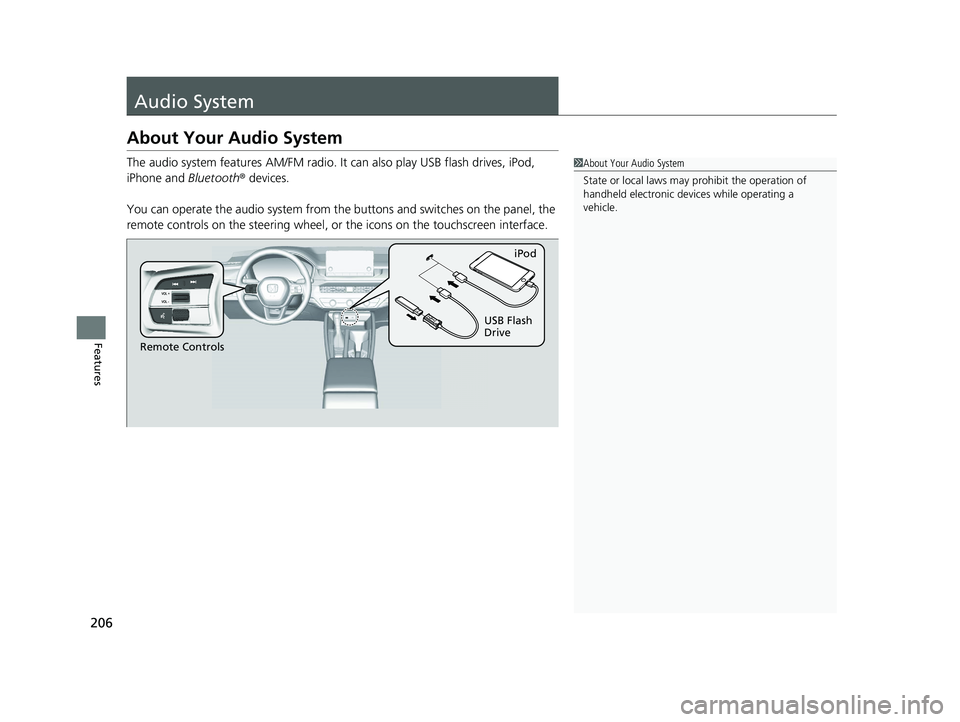
About Your Audio System
The audio system features AM/FM radio. It can also play USB flash drives, iPod,
iPhone and Bluetooth ® devices.
You can operate the audio system from the buttons and switches on the panel, the
remote controls on the steering wheel, or the icons on the touchscreen interface.1 About Your Audio System
State or local laws may pr ohibit the operation of
handheld electronic devices while operating a
vehicle.
Remote Controls iPod
USB Flash
Drive
23 ACCORD 4D US PET MAP-3130A6000_01.book 206 ページ 2022年10月19日 水曜日 午前11時49分
Page 209 of 533

207
uuAudio System uUSB Ports
Features
USB Ports
■On the front panel
The USB port (3.0A) is for charging
devices, playing audio files, and connecting
compatible phones with Apple CarPlay or
Android Auto. u To prevent any potenti al issues, be sure
to use an Apple MFi Certified Lightning
Connector for Apple CarPlay, and for
Android Auto, the USB cables should be
certified by USB-IF to be compliant with
USB 2.0 Standard.
The USB port (3.0A) is only for charging
devices. u You cannot play music even if you have
connected music players to it.1USB Ports
•Do not leave the iPod or USB flash drive in the
vehicle. Direct sunlight and high temperatures may
damage it.
•We recommend that you us e a USB cable if you are
attaching a USB flash drive to the USB port.
•Do not connect the iPod or USB flash drive using a
hub.
•Do not use a device such as a card reader or hard
disk drive, as the device or your files may be
damaged.
•We recommend backing up yo ur data before using
the device in your vehicle.
•Displayed messages may vary depending on the
device model and software version.
The USB port can supply up to 3.0A of power. It does
not output 3.0A unless requested by the device.
For amperage details, read the operating manual of
the device that ne eds to be charged.
Under certain condi tions, a device connected to the
port may generate noise to the radio station you are
listening to.
USB charge
23 ACCORD 4D US PET MAP-3130A6000_01.book 207 ページ 2022年10月19日 水曜日 午前11時49分
Page 210 of 533
208
uuAudio System uAudio System Theft Protection
Features
Audio System Theft Protection
The audio system is disabled when it is disconnected from the power source, such as
when the battery is disconnected or goes dead. In certain conditions, the system
may display a code entry screen. If this occurs, reactivate the audio system.
■Reactivating the audio system
1. Set the power mode to ON.
2. Turn on the audio system.
3. Press and hold the VOL/ AUDIO (Volume/Power) knob for more than two
seconds.
u The audio system is reac tivated when the audio co ntrol unit establishes a
connection with the vehicle control unit. If the control unit fails to recognize
the audio unit, you must go to a dealer and have the audio unit checked.
23 ACCORD 4D US PET MAP-3130A6000_01.book 208 ページ 2022年10月19日 水曜日 午前11時49分
Page 211 of 533

209
uuAudio System uAudio Remote Controls
Continued
Features
Audio Remote Controls
Allow you to operate the audio system whil e driving. The information is shown on
the driver information interface. VOL
(+/VOL(- (Volume) Switch
Press Up: To increase the volume.
Press Down: To decrease the volume.
/ (Seek/Skip) Buttons
• When listening to the radio
Press : To select the next preset radio station.
Press : To select the previous preset radio station.
Press and hold : To select the next strong station.
Press and hold : To select the previous strong station.
• When listening to an iPod, USB flash drive, Bluetooth® Audio, or Smartphone
Connection
Press : To skip to the next song.
Press : To go back to the beginning of the current or previous song.
• When listening to a USB flash drive
Press and hold : To skip to the next folder.
Press and hold : To go back to the previous folder.
1Audio Remote Controls
Some modes appear only when an appropriate
device or medium is used.
Depending on the Bluetooth® device you connect,
some functions may not be available.
/ (Seek/Skip) Buttons
Left Selector
WheelVOL(+/VOL(-
(Volume) Switch
23 ACCORD 4D US PET MAP-3130A6000_01.book 209 ページ 2022年10月19日 水曜日 午前11時49分
Page 212 of 533
210
uuAudio System uAudio Remote Controls
Features
Left Selector Wheel
Roll up or down:
Back
AM
USB
Bluetooth ® Audio
Smartphone
(Apple CarPlay/Android Auto)
Customize display
Phone
FM
To cycle through the modes, roll up or down and
then press the left selector wheel:
23 ACCORD 4D US PET MAP-3130A6000_01.book 210 ページ 2022年10月19日 水曜日 午前11時49分
Page 213 of 533

211
Features
Audio System Basic Operation
To use the audio system, the power mode must be in ACCESSORY or ON.Use the selector knob or MENU button to
access some au dio functions.
Press to switch between the normal and
extended display fo r some functions.
Selector knob: Rotate left or right to scroll
through the available choices. Press to set
your selection.
MENU button: Press to display the menu
screen.
(Back) button: Press to go back to the
previous display.1 Audio System Basic Operation
These indications are used to show how to operate
the selector knob.
Rotate to select.
Press to enter.
Menu Items 2 Adjusting the Clock P. 136
2 Adjusting the Sound P. 213
2 Display Setup P. 214
2 Customized Features P. 259
Press the buttons on the steering wheel to change
any audio setting. 2 Audio Remote Controls P. 209
Touchscreen operation
•Use simple gestures - in cluding touching, swiping
and scrolling - to operate certain audio functions.
•Some items may be grayed out during driving to
reduce the potential for distraction.
•You can select them when the vehicle is stopped.•Wearing gloves may limit or prevent touchscreen
response.
You can change the touchs creen sensitivity setting.
2 Customized Features P. 259
(Back)
Button
Selector Knob
MENU Button
Menu Display
23 ACCORD 4D US PET MAP-3130A6000_01.book 211 ページ 2022年10月19日 水曜日 午前11時49分