2023 GMC YUKON change time
[x] Cancel search: change timePage 230 of 432

GMC Yukon/Yukon XL/Denali Owner Manual (GMNA-Localizing-U.S./
Canada/Mexico-16417394) - 2023 - CRC - 5/16/22
Driving and Operating 229
.To decrease the vehicle speed in larger
increments, hold SET−. While holding
SET−, the vehicle speed decreases to the
next 5 km/h (5 mph) step, then continues
to decrease by 5 km/h (5 mph) at a time.
The set speed can also be decreased while
the vehicle is stopped.
.If stopped with the brake applied, press
or hold SET− until the desired set speed is
displayed.
Selecting the Follow Distance Gap
When a slower moving vehicle is detected
ahead within the selected following gap,
ACC will adjust the vehicle's speed and
attempt to maintain the follow distance gap
selected.
Press
[on the steering wheel to adjust
the following gap. Each press cycles the gap
button through three settings: Far, Medium,
or Near.
When pressed, the current gap setting
displays briefly on the instrument cluster
and HUD (if equipped). The gap setting will
be maintained until it is changed.
Far Gap Setting
Medium Gap Setting
Near Gap Setting
If equipped, and a trailer is electrically
connected, the gap setting display will be as
follows:
Far Gap Setting with Trailer
Page 231 of 432

GMC Yukon/Yukon XL/Denali Owner Manual (GMNA-Localizing-U.S./
Canada/Mexico-16417394) - 2023 - CRC - 5/16/22
230 Driving and Operating
Medium Gap Setting with Trailer
Near Gap Setting with Trailer
Since each gap setting corresponds to a
following time (Far, Medium, or Near), the
following distance will vary based on vehicle
speed. The faster the vehicle speed, the
further back your vehicle will follow a
vehicle detected ahead. Consider traffic and
weather conditions when selecting the following gap. The range of selectable gaps
may not be appropriate for all drivers and
driving conditions.
Changing the gap setting automatically
changes the alert timing sensitivity (Far,
Medium, or Near) for the Forward Collision
Alert (FCA) feature. See
Forward Collision
Alert (FCA) System 0264.
Courtesy Gap
Press and hold
[on the steering wheel
when vehicle is moving to temporarily
increase the gap with the vehicle ahead to
allow for merging traffic.
Press and hold
[when stopped to cancel
ACC from resuming automatically (if the
stop is brief) and remain stationary. This can
be used to allow traffic to merge between
you and the vehicle ahead. Press RES+ or
the accelerator pedal to resume ACC.
Following distance gap will return to the
original selection after hold. Alerting the Driver
With Head-Up Display
Without Head-Up Display
If ACC is engaged, driver action may be
required when ACC cannot apply sufficient
braking because of approaching a vehicle
too rapidly.
When this condition occurs, the collision
alert symbol will flash on the windshield.
Either eight beeps will sound from the front,
or both sides of the Safety Alert Seat (if
equipped) will pulse five times. Touch the
Settings icon on the infotainment home
Page 237 of 432

GMC Yukon/Yukon XL/Denali Owner Manual (GMNA-Localizing-U.S./
Canada/Mexico-16417394) - 2023 - CRC - 5/16/22
236 Driving and Operating
this section and the ACC section before
using Super Cruise. SeeAdaptive Cruise
Control (Advanced) 0225.
An active Connected Service plan that
includes Super Cruise Services is required to
use Super Cruise.
{Warning
Super Cruise does not perform all aspects
of driving, nor does it do everything a
driver can do. Super Cruise only steers to
maintain vehicle position in the current
lane or, under some circumstances, to
change lanes. Super Cruise can only be
used with Adaptive Cruise Control.
Super Cruise does:
.Not prevent crashes or warn of
possible crashes.
.Not steer to avoid stopped or
slow-moving vehicles, cross-traffic,
construction barriers or cones,
motorcycles, children, pedestrians,
animals, or other objects on the road.
.Not steer in response to vehicles or
objects next to your vehicle, including
vehicles attempting to enter your lane. (Continued)
Warning (Continued)
.Not respond to traffic lights, stop
signs, or other traffic control devices.
.Not respond to crossing traffic.
.Not make turns.
.Not steer to merge onto or to exit
highways.
.Not steer to avoid, or steer through
construction zones.
.Not function on surface streets.
.Not respond to oncoming traffic.
.Not function in city driving conditions.
{Warning
Some state and local laws may require
hands to be kept on the steering wheel
at all times. Only remove your hands
from the steering wheel if Super Cruise is
engaged, it is safe to do so, and it is
permitted by state and local laws.
{Warning
Failure to supervise the driving task and
to respond appropriately, even while
Super Cruise is operating, can cause a
crash. Super Cruise may not respond as
you would to all driving situations and
may not maintain lane position under all
conditions.
It is extremely important to pay
attention to the operation of the vehicle,
even while using Super Cruise. Do not
use a hand-held device while driving,
even with Super Cruise engaged. To
prevent serious injury or death:
.Always remain properly seated in the
driver seat with your seat belt
fastened.
.Never remove your hands from the
steering wheel when Super Cruise is
not operating.
.Always make sure traffic conditions
are safe before using Super Cruise.
.Always keep the entire vehicle and the
sensors clean. Sensors are on the
front, sides, and rear of the vehicle.(Continued)
Page 240 of 432

GMC Yukon/Yukon XL/Denali Owner Manual (GMNA-Localizing-U.S./
Canada/Mexico-16417394) - 2023 - CRC - 5/16/22
Driving and Operating 239
wheel until the steering wheel light bar
turns green, and then release the steering
wheel when it is safe to do so.
{Warning
To help prevent crashes before making a
lane change:
.Always check mirrors.
.Glance over your shoulder.
.Use the turn signals.
Super Cruise Lane Change
Super Cruise can steer to perform a single
lane change under certain conditions when
requested by the driver or initiated by the
Super Cruise System.
On Demand Lane Changes
To request a lane change: 1. Verify the lane next to your vehicle is clear and conditions are safe to make a
lane change.
2. Use the turn signal lever to activate the turn signal in the direction of the desired
lane change.
3. Return the turn signal lever to the neutral position after the lane change.
See Turn and Lane-Change Signals 0136. 4. To cancel a lane change, return the turn
signal lever to the neutral position, move
the lever in the opposite direction of the
lane change, or steer manually at
any time.
Automatic Lane Changes
Super Cruise System may initiate a single
lane change when enabled through vehicle
settings under following conditions:.The Super Cruise System may initiate a
lane change to the left to pass a slower
moving vehicle ahead and a subsequent
lane change to right to return to your
original lane.
.Super Cruise System may initiate a lane
change to left or right when current lane
is ending ahead.
.Super Cruise System may initiate an
automatic lane change to left or right
when a slower moving vehicle is detected
in the adjacent ending lane to provide
space for merging vehicle.
.To cancel a Super Cruise automatic lane
change, move the turn signal lever,
or steer manually at any time.
If Super Cruise detects that traffic is clear,
Super Cruise will steer the vehicle to
perform the lane change. A message appears on the Driver Information Center (DIC)
during the lane change to provide more
information on the status of the lane
change.
Super Cruise Lane Change functionality is
only available on Super Cruise capable
Divided Roads.
Super Cruise Lane Change may be disabled
when a trailer or other accessories (e.g. bike
rack, cargo tray, etc.) are detected.
Do not use Super Cruise Lane Change when
towing a trailer.
The Super Cruise Lane Change feature can
be customized to be Off, On Demand Lane
Change, or On Demand Lane Change &
Automatic Lane Change through the vehicle
personalization menu. Touch the Settings
icon on the infotainment home page. Select
"Vehicle" to display the list of available
options and select "Super Cruise Lane
Change".{Warning
Super Cruise Lane Change may not detect
a vehicle in an adjacent lane. Always
supervise the driving task and monitor
traffic conditions when using the Super
(Continued)
Page 241 of 432

GMC Yukon/Yukon XL/Denali Owner Manual (GMNA-Localizing-U.S./
Canada/Mexico-16417394) - 2023 - CRC - 5/16/22
240 Driving and Operating
Warning (Continued)
Cruise Lane Change feature. Only request
a lane change when traffic conditions are
safe for a lane change, and always be
ready to manually steer the vehicle. See
“Steering Manually and Changing Lanes”
listed previously in this section.
Take Over Alert
{Warning
Super Cruise will not maintain the
vehicle’s speed while the steering wheel
light bar is flashing red. If the steering
wheel light bar flashes red, immediately
resume manual steering to prevent
serious injury or death. If you do not
resume manual steering, the vehicle will
begin to slow in the same lane and
eventually come to a complete stop on
the road.
Any time the steering wheel light bar
flashes red, resume manual steering
immediately. To begin steering manually, hold the
steering wheel firmly (with both hands)
using the highlighted regions as shown in
the picture below.
The instrument cluster light^, will also
turn red and a message will display in the
Driver Information Center (DIC). In addition,
beeps will sound, or the Safety Alert Seat
will vibrate. To view Collision and Detection
options, touch the Settings icon on the
infotainment home page. Select “Vehicle”to
display the list of available options and
select “Collision/Detection Systems”. After
you begin steering manually, then Super
Cruise will disengage. The red flashing steering wheel light bar
could occur under any of the following
conditions:
.Lane markings are poor, or visibility is
limited.
.The Driver Attention System (DAS) does
not detect that the driver's head and eyes
are directed toward the road.
.ACC is canceled.
.The vehicle is on a tight curve, or the
lanes are too wide, or the vehicle goes
into a curve too fast.
.The road speed limit of Super Cruise
capable non-divided road is below
28 km/h (45 mph).
.The compatible road ends.
.The vehicle is approaching an intersection
controlled by a traffic light, stop sign,
or other traffic control device.
.A Super Cruise system fault occurs.
.Super Cruise is unable to complete the
lane change maneuver.
Page 242 of 432

GMC Yukon/Yukon XL/Denali Owner Manual (GMNA-Localizing-U.S./
Canada/Mexico-16417394) - 2023 - CRC - 5/16/22
Driving and Operating 241
Attention to the Road
{Warning
Super Cruise is a driver assistance system
and cannot accurately detect or predict
all situations. Super Cruise is not a crash
avoidance system. To prevent serious
injury or death, you must supervise the
driving task and monitor the road
conditions. You may need to respond to
traffic events by steering, braking,
or accelerating. SeeDefensive Driving
0 185. Super Cruise also cannot determine
whether you are awake, asleep, impaired,
or properly focused on safe driving. The
vehicle could crash into other vehicles,
drive out of the lane, or drive off the
road. Complete attention is always
required while driving, even while using
Super Cruise. Be prepared to take over
steering or apply the brakes at any time.
{Warning
To prevent serious injury or death, be
alert and pay special attention when
passing highway exits, entrances, and
crossings with Super Cruise, and be ready
to take control of the vehicle when
necessary. Changes in lane markings
around exits and entrances can
momentarily cause Super Cruise to not
detect the correct lane. If this occurs,
Super Cruise may attempt steering inputs
to bring the vehicle back into the correct
lane and, in rare circumstances, could
over-correct and cause the vehicle to
momentarily cross into a lane next to
your vehicle unless you manually steer to
maintain your lane position. The Driver Attention System (DAS) on the
steering column continually monitors driver
head and eye position to estimate driver
attention to the road. The camera does not
record or share pictures, audio, or video.
Sunglasses, hats, or other types of clothing
that change the shape of the head may
interfere with camera performance. To
improve camera performance, raise or lower
the steering wheel, or change the seat
position.
Page 259 of 432
GMC Yukon/Yukon XL/Denali Owner Manual (GMNA-Localizing-U.S./
Canada/Mexico-16417394) - 2023 - CRC - 5/16/22
258 Driving and Operating
.The accessory trailer cameras are
swapped at the hitch connector. Ensure
that the accessory camera(s) are
connected to the correct input.
.The accessory trailer camera(s) are
connected to the correct camera input.
.The accessory trailer camera(s) are not
installed according to the installation
instructions.
A feature may be unavailable or not
activating as expected if:
.The customization is disabled. Check the
customization settings where applicable.
.The accessory trailer cameras are
swapped at the hitch connector. Ensure
that the accessory camera(s) are
connected to the correct camera input.
A view may switch automatically if:
.The vehicle is shifted to another gear.
Park Assist
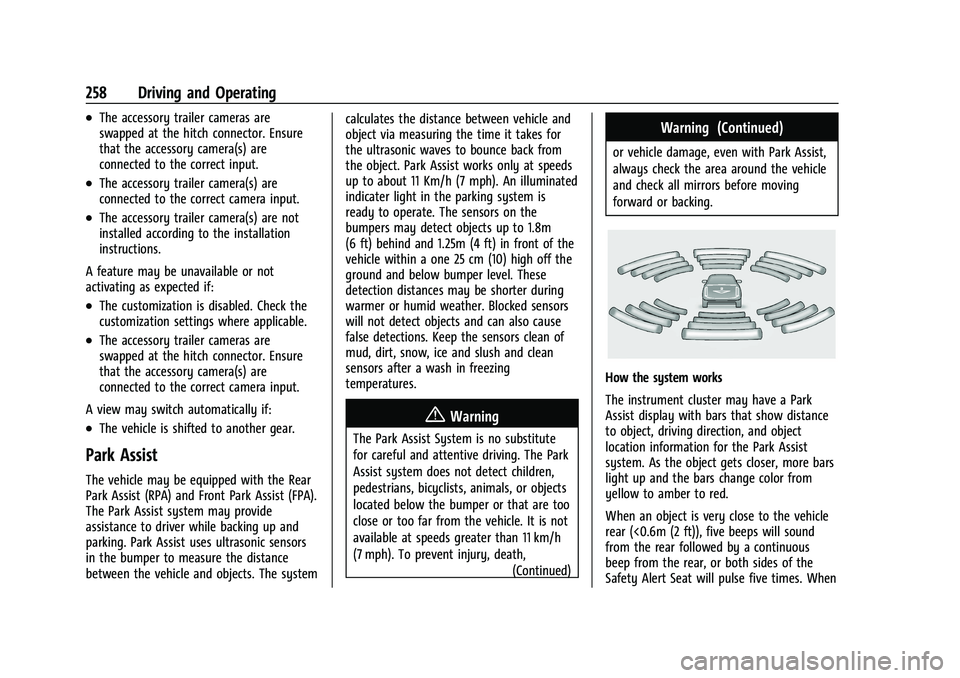
The vehicle may be equipped with the Rear
Park Assist (RPA) and Front Park Assist (FPA).
The Park Assist system may provide
assistance to driver while backing up and
parking. Park Assist uses ultrasonic sensors
in the bumper to measure the distance
between the vehicle and objects. The system calculates the distance between vehicle and
object via measuring the time it takes for
the ultrasonic waves to bounce back from
the object. Park Assist works only at speeds
up to about 11 Km/h (7 mph). An illuminated
indicater light in the parking system is
ready to operate. The sensors on the
bumpers may detect objects up to 1.8m
(6 ft) behind and 1.25m (4 ft) in front of the
vehicle within a one 25 cm (10) high off the
ground and below bumper level. These
detection distances may be shorter during
warmer or humid weather. Blocked sensors
will not detect objects and can also cause
false detections. Keep the sensors clean of
mud, dirt, snow, ice and slush and clean
sensors after a wash in freezing
temperatures.
{Warning
The Park Assist System is no substitute
for careful and attentive driving. The Park
Assist system does not detect children,
pedestrians, bicyclists, animals, or objects
located below the bumper or that are too
close or too far from the vehicle. It is not
available at speeds greater than 11 km/h
(7 mph). To prevent injury, death,
(Continued)
Warning (Continued)
or vehicle damage, even with Park Assist,
always check the area around the vehicle
and check all mirrors before moving
forward or backing.
How the system works
The instrument cluster may have a Park
Assist display with bars that show distance
to object, driving direction, and object
location information for the Park Assist
system. As the object gets closer, more bars
light up and the bars change color from
yellow to amber to red.
When an object is very close to the vehicle
rear (<0.6m (2 ft)), five beeps will sound
from the rear followed by a continuous
beep from the rear, or both sides of the
Safety Alert Seat will pulse five times. When
Page 260 of 432

GMC Yukon/Yukon XL/Denali Owner Manual (GMNA-Localizing-U.S./
Canada/Mexico-16417394) - 2023 - CRC - 5/16/22
Driving and Operating 259
an object is very close to the vehicle front
(<0.3m (1 ft)), a continuous beep will sound
from the front, or both sides of the Safety
Alert Seat will pulse five times. Beeps for
FPA are higher pitched than for RPA.
Turning the Features On or Off
TheXbutton located in the customizing
menu is used to turn on or off the Park
Assist.
Front and Rear Park Assist can be set to Off,
On, or On with Towbar through vehicle
personalization. To view available settings
for this feature, touch the Settings icon on
the infotainment home page. Select
“Vehicle” to display the list of available
options and select “Collision/Detection
Systems”. If Park Assist is turned off through
vehicle personalization, the Park Assist
button will be disabled. To turn the Park
Assist on again, select On in vehicle
personalization. The On with Towbar setting
allows for Park Assist to work properly with
an attached trailer hitch. Turn off Park Assist
when towing a trailer.
To view available settings for this feature,
touch the Settings icon on the infotainment
home page. Select “Vehicle”to display the
list of available options and select “Collision/Detection Systems”. On some models, select
the guidance lines button on the
infotainment display to turn them on or off.
Automatic Parking Assist (APA)
If equipped, under certain conditions
Enhanced Automatic Parking Assist (APA) can
use sensors based on sonar technology
along the vehicle’s front, rear and sides to
detect a parking spot and automatically park
the vehicle. The vehicle will automatically
maneuver into a detected spot moving at or
near idle speed. It does this by
automatically steering, braking, accelerating,
and gear shifting. The driver must always be
prepared to apply braking if necessary. A
display and beeps help to guide the parking
maneuvers.
{Warning
APA may not always detect objects in the
parking space, objects that are not rigid
(e.g. shrubs and chain-link fences), objects
below the bumper, objects high off the
ground (e.g. flatbed trucks), hanging
objects, objects below ground level
(e.g. large potholes), or moving objects
(e.g. pedestrians, cyclists, vehicles).
(Continued)
Warning (Continued)
Always verify that the parking space is
appropriate for parking a vehicle. APA
may not respond to changes in the
parking space, such as movement of an
adjacent vehicle, or a person or object
entering the parking space. APA does not
detect or avoid traffic that is behind or
alongside of the vehicle. Always be
prepared to stop the vehicle during the
parking maneuver.
How to Activate Automatic Parking
To activate APA, press
Oon the Home
Page of the infotainment display for the
system to begin searching for a parking
space while driving forward at no greater
than 30 km/h (18 mph). By default, APA
searches for parallel parking spaces to the
right of the vehicle up to the sensors’ range
of 1.5 m (5 ft). To search for a parking space
to the left, turn on the left turn signal or,
if available, change the side selection in the
infotainment display. To switch the parking
mode between parallel and perpendicular
press and hold
Owhile searching for a
valid parking spot or, if available, change the
parking mode in the infotainment display.