2023 GMC TERRAIN air condition
[x] Cancel search: air conditionPage 187 of 371

GMC Terrain/Terrain Denali Owner Manual (GMNA-Localizing-U.S./Canada/
Mexico-16540740) - 2023 - CRC - 6/16/22
186 Driving and Operating
Trailer Towing
General Towing Information . . . . . . . . . . . 251
Driving Characteristics andTowing Tips . . . . . . . . . . . . . . . . . . . . . . . . . 252
Trailer Towing . . . . . . . . . . . . . . . . . . . . . . . . . 254
Towing Equipment . . . . . . . . . . . . . . . . . . . . 257
Conversions and Add-Ons
Add-On Electrical Equipment . . . . . . . . . . . 259
Driving Information
Driver Behavior
Driving is an important responsibility. Driver
behavior, the driving environment, and the
vehicle's design all affect how well a vehicle
performs.
Being aware of these factors can help in
understanding how the vehicle handles and
what can be done to avoid many types of
crashes, including a rollover crash.
Most serious injuries and fatalities to
unbelted occupants can be reduced or
prevented by the use of seat belts. In a
rollover crash, an unbelted person is
significantly more likely to die than a
person wearing a seat belt. In addition,
avoiding excessive speed, sudden or abrupt
turns, impaired driving, and aggressive
driving can help make trips safer and avoid
the possibility of a crash.
Driving Environment
Be prepared for driving in inclement
weather, at night, or during other times
where visibility or traction may be limited, such as on curves, slippery roads, or hilly
terrain. Unfamiliar surroundings can also
have hidden hazards.
Learn more about driving in different
conditions and off-road driving in this
section.
Vehicle Design
Utility vehicles have a significantly higher
rollover rate than other types of vehicles.
This is because they have a higher ground
clearance and a narrower track or shorter
wheelbase than passenger cars, which makes
them more capable for off-road driving.
While these design characteristics provide
the driver with a better view of the road,
these vehicles do have a higher center of
gravity than other types of vehicles.
A utility vehicle does not handle the same
as a vehicle with a lower center of gravity,
like a car, in similar situations.
Safe driver behavior and understanding of
the environment can help avoid a rollover
crash in any type of vehicle, including utility
vehicles.
Page 188 of 371

GMC Terrain/Terrain Denali Owner Manual (GMNA-Localizing-U.S./Canada/
Mexico-16540740) - 2023 - CRC - 6/16/22
Driving and Operating 187
Driving for Better Fuel Economy
Driving habits can affect fuel mileage. Here
are some driving tips to get the best fuel
economy possible:
.Set the climate controls to the desired
temperature after the engine is started,
or turn them off when not required.
.On AWD vehicles, use Tour Mode. See
Driver Mode Control0218.
.Avoid fast starts and accelerate smoothly.
.Brake gradually and avoid abrupt stops.
.Avoid idling the engine for long periods
of time.
.When road and weather conditions are
appropriate, use cruise control.
.Always follow posted speed limits or
drive more slowly when conditions
require.
.Keep vehicle tires properly inflated.
.Combine several trips into a single trip.
.Replace the vehicle's tires with the same
TPC Spec number molded into the tire's
sidewall near the size.
.Follow recommended scheduled
maintenance.
Distracted Driving
Distraction comes in many forms and can
take your focus from the task of driving.
Exercise good judgment and do not let other
activities divert your attention away from
the road. Many local governments have
enacted laws regarding driver distraction.
Become familiar with the local laws in
your area.
To avoid distracted driving, keep your eyes
on the road, keep your hands on the
steering wheel, and focus your attention on
driving.
.Do not use a phone in demanding driving
situations. Use a hands-free method to
place or receive necessary phone calls.
.Watch the road. Do not read, take notes,
or look up information on phones or
other electronic devices.
.Designate a front seat passenger to
handle potential distractions.
.Become familiar with vehicle features
before driving, such as programming
favorite radio stations and adjusting
climate control and seat settings. Program
all trip information into any navigation
device prior to driving.
.Wait until the vehicle is parked to
retrieve items that have fallen to the
floor.
.Stop or park the vehicle to tend to
children.
.Keep pets in an appropriate carrier or
restraint.
.Avoid stressful conversations while
driving, whether with a passenger or on a
cell phone.
{Warning
Taking your eyes off the road too long or
too often could cause a crash resulting in
injury or death. Focus your attention on
driving.
Refer to the infotainment section for more
information on using that system and the
navigation system, if equipped, including
pairing and using a cell phone.
Defensive Driving
Defensive driving means “always expect the
unexpected.” The first step in driving
defensively is to wear the seat belt. See
Seat Belts 042.
Page 203 of 371

GMC Terrain/Terrain Denali Owner Manual (GMNA-Localizing-U.S./Canada/
Mexico-16540740) - 2023 - CRC - 6/16/22
202 Driving and Operating
Stop/Start System
This vehicle has a Stop/Start system to shut
off the engine to help conserve fuel. It has
components designed for the increased
number of starts.
{Warning
The automatic engine Stop/Start feature
causes the engine to shut off while the
vehicle is still on. Do not exit the vehicle
before shifting to P (Park). The vehicle
may restart and move unexpectedly.
Always shift to P (Park), and then turn
the ignition off before exiting the vehicle.
Auto Engine Stop/Start
When the brakes are applied and the vehicle
is at a complete stop, the engine may turn
off. When stopped, the tachometer displays
AUTO STOP. See Tachometer095. When the
brake pedal is released or the accelerator
pedal is pressed, the engine will restart.
To maintain vehicle performance, other
conditions may cause the engine to
automatically restart before the brake pedal
is released. Auto Stops may not occur and/or auto
restarts may occur because:
.The climate control settings require the
engine to be running to cool or heat the
vehicle interior.
.The vehicle battery needs to charge.
.The vehicle battery has recently been
disconnected.
.Minimum vehicle speed has not been
reached since the last Auto Stop
.The accelerator pedal is pressed.
.The engine or transmission is not at the
required operating temperature.
.The outside temperature is not in the
required operating range.
.The vehicle is shifted out of D (Drive) to
any gear other than P (Park).
.Certain driver modes have been selected.
See
Driver Mode Control 0218.
.The vehicle is on a steep hill or grade.
.The driver door has been opened or driver
seat belt has been unbuckled.
.The hood has been opened.
.The Auto Stop has reached the maximum
allowed time. Auto Stop Disable Switch
The automatic engine Stop/Start feature can
be disabled and enabled by pressing the
switch with the
hsymbol. Auto Stop is
enabled each time you start the vehicle.
When the
hindicator is illuminated, the
system is enabled.
Winter Cover
If equipped, the winter cover can be used to
enhance heater performance in extremely
cold conditions below −0 °C (32 °F). The
winter cover installs over the grille and
restricts airflow to the engine compartment.
Page 206 of 371

GMC Terrain/Terrain Denali Owner Manual (GMNA-Localizing-U.S./Canada/
Mexico-16540740) - 2023 - CRC - 6/16/22
Driving and Operating 205
Warning (Continued)
.Use a weatherproof, heavy-duty,
15 amp-rated extension cord if needed.
Failure to use the recommended
extension cord in good operating
condition, or using a damaged heater
or extension cord, could make it
overheat and cause a fire, property
damage, electric shock, and injury.
.Do not operate the vehicle with the
heater cord permanently attached to
the vehicle. Possible heater cord and
thermostat damage could occur.
.While in use, do not let the heater
cord touch vehicle parts or sharp
edges. Never close the hood on the
heater cord.
.Before starting the vehicle, unplug the
cord, reattach the cover to the plug,
and securely fasten the cord. Keep the
cord away from any moving parts.
The length of time the heater should remain
plugged in depends on several factors. Ask a
dealer in the area where you will be parking
the vehicle for the best advice on this.
Retained Accessory Power (RAP)
When the vehicle is turned from on to off,
the following features (if equipped) will
continue to function for up to 10 minutes,
or until the driver door is opened. These
features will also work when the vehicle is
on or in accessory mode:
.Infotainment System
.Power Windows (during RAP this
functionality will be lost when any door
is opened)
.Sunroof (during RAP this functionality will
be lost when any door is opened)
.Auxiliary Power Outlet
.Audio System
.OnStar System
Shifting Into Park
{Warning
It can be dangerous to get out of the
vehicle if the vehicle is not in P (Park)
with the parking brake set. The vehicle
can roll. If you have left the engine
running, the vehicle can move suddenly.
You or others could be injured. To be (Continued)
Warning (Continued)
sure the vehicle will not move, even
when you are on fairly level ground, use
the steps that follow. If you are pulling a
trailer, seeDriving Characteristics and
Towing Tips 0252.
To shift into P (Park): 1. Hold the brake pedal down and set the parking brake. See Electric Parking Brake
0 212.
2. Press P (Park).
3. Turn the ignition off.
If the vehicle is shifted into P (Park) on a
hill, the Electric Parking Brake (EPB) may
apply automatically. You may not be able to
release the EPB using the EPB switch, but it
should automatically release when the
vehicle is shifted out of P (Park).
Page 209 of 371

GMC Terrain/Terrain Denali Owner Manual (GMNA-Localizing-U.S./Canada/
Mexico-16540740) - 2023 - CRC - 6/16/22
208 Driving and Operating
Automatic Transmission
The shift switches are on the center stack.
The selected gear position will illuminate red
on the shift switch, while all others will be
displayed in white. If the shift is not
immediate, as in very cold conditions, the
indicator on the shift switch may blink until
it is fully engaged.
The transmission does not operate when the
vehicle is off.
If the vehicle is in accessory mode, the
transmission can be shifted into P (Park).If ENGINE START/STOP is pressed twice while
at a relatively high speed, the engine will
turn off and the transmission will
automatically shift to N (Neutral). Once the
vehicle is stopped, P (Park) can be selected.
P :
This position locks the drive wheels. Use
P (Park) when starting the vehicle to ensure
the vehicle does not move.
{Warning
It is dangerous to get out of the vehicle
if the transmission is not in P (Park) with
the parking brake set. The vehicle
can roll.
Do not leave the vehicle when the engine
is running. If the engine has been left
running, the vehicle can move suddenly.
You or others could be injured. To be
sure the vehicle will not move, even
when on fairly level ground, always set
the parking brake and place the
transmission into P (Park). See Shifting
Into Park 0205 and
Driving Characteristics and Towing Tips
0 252. This vehicle is equipped with an electronic
transmission. The R (Reverse) and D (Drive)
shift switches are designed to prevent
inadvertent shifting out of P (Park) unless
the vehicle is on, and the brake pedal is
applied.
When the vehicle is stopped, press ENGINE
START/STOP to turn off the vehicle. The
transmission will shift to P (Park)
automatically unless the vehicle is in
N (Neutral).
The vehicle will not shift into P (Park) if it is
moving too fast. Stop the vehicle and shift
into P (Park).
To shift in and out of P (Park), see
Shifting
Into Park 0205 and
Shifting out of Park 0206.
R : Use this gear to back up.
If the vehicle is shifted from either
R (Reverse) to D (Drive), or D (Drive) to
R (Reverse) while the speed is too high, the
vehicle will shift to N (Neutral). Reduce the
vehicle speed and try the shift again.
To shift into R (Reverse): 1. Bring the vehicle to a complete stop.
2. Pull the R (Reverse) switch on the center stack.
Page 211 of 371

GMC Terrain/Terrain Denali Owner Manual (GMNA-Localizing-U.S./Canada/
Mexico-16540740) - 2023 - CRC - 6/16/22
210 Driving and Operating
Car Wash Mode (Engine Off–Driver Out of
Vehicle)
To place the vehicle in N (Neutral) with the
engine off and the vehicle unoccupied:
1. Drive to the entrance of the car wash.
2. Apply the brake pedal.
3. Open the door.
4. Shift to N (Neutral).
5. Turn off the engine and release the brake pedal.
6. The indicator should continue to show N. If it does not, start the engine and
repeat Steps 2–5.
7. Exit the vehicle and close the door. The vehicle is now ready for the car wash.
8. The vehicle may automatically shift to P (Park) upon re-entry.
Car Wash Mode (Engine On –Driver in
Vehicle)
To place the vehicle in N (Neutral) with the
engine on and the vehicle occupied:
1. Drive to the entrance of the car wash.
2. Apply the brake pedal.
3. Shift to N (Neutral).
4. Release the brake pedal. The vehicle is now ready for the car wash. Car Wash Mode (Engine On
–Driver Out of
Vehicle)
To place the vehicle in N (Neutral) with the
engine on and the vehicle unoccupied:
1. Drive to the entrance of the car wash.
2. Apply the brake pedal.
3. Open the door.
4. Shift to N (Neutral), then release the brake pedal.
5. The indicator should continue to show N. If it does not, repeat Steps 2–4.
6. Exit the vehicle and close the door. The vehicle is now ready for the car wash.
7. The vehicle may automatically shift to P (Park) upon re-entry.
Caution
A transmission hot message may display
if the automatic transmission fluid is too
hot. Driving under this condition can
damage the vehicle. Stop and idle the
engine to cool the automatic
transmission fluid. This message clears
when the transmission fluid has cooled
sufficiently. D :
This position is for normal driving.
If more power is needed for passing, press
the accelerator pedal down.
To shift into D (Drive):
1. Bring the vehicle to a complete stop.
2. Pull the D (Drive) switch on the center stack.
To shift out of D (Drive): 1. Bring the vehicle to a complete stop.
2. Shift to the desired gear.
Downshifting the transmission in slippery
road conditions could result in skidding. See
“Skidding” underLoss of Control 0189.
Caution
Spinning the tires or holding the vehicle
in one place on a hill using only the
accelerator pedal may damage the
transmission. The repair will not be
covered by the vehicle warranty. If the
vehicle is stuck, do not spin the tires.
When stopping on a hill, use the brakes
to hold the vehicle in place.
Page 233 of 371
GMC Terrain/Terrain Denali Owner Manual (GMNA-Localizing-U.S./Canada/
Mexico-16540740) - 2023 - CRC - 6/16/22
232 Driving and Operating
Driver Assistance Systems
This vehicle may have features that work
together to help avoid crashes or reduce
crash damage while driving, backing, and
parking. Read this entire section before
using these systems.
{Warning
Do not rely on the Driver Assistance
Systems. These systems do not replace
the need for paying attention and driving
safely. You may not hear or feel alerts or
warnings provided by these systems.
Failure to use proper care when driving
may result in injury, death, or vehicle
damage. SeeDefensive Driving 0187.
Under many conditions, these systems
will not:
.Detect children, pedestrians, bicyclists,
or animals.
.Detect vehicles or objects outside the
area monitored by the system.
.Work at all driving speeds.
.Warn you or provide you with enough
time to avoid a crash. (Continued)
Warning (Continued)
.Work under poor visibility or bad
weather conditions.
.Work if the detection sensor is not
cleaned or is covered by ice, snow,
mud, or dirt.
.Work if the detection sensor is
covered up, such as with a sticker,
magnet, or metal plate.
.Work if the area surrounding the
detection sensor is damaged or not
properly repaired.
Complete attention is always required
while driving, and you should be ready to
take action and apply the brakes and/or
steer the vehicle to avoid crashes.
Audible or Safety Alert Seat
Some driver assistance features alert the
driver of obstacles by beeping. To view
available settings from the infotainment
screen, touch Settings > Vehicle > Comfort
and Convenience.
If equipped with the Safety Alert Seat, the
driver seat cushion may provide a vibrating
pulse alert instead of beeping. To view available settings from the infotainment
screen, touch Settings > Vehicle > Collision/
Detection Systems.
Cleaning
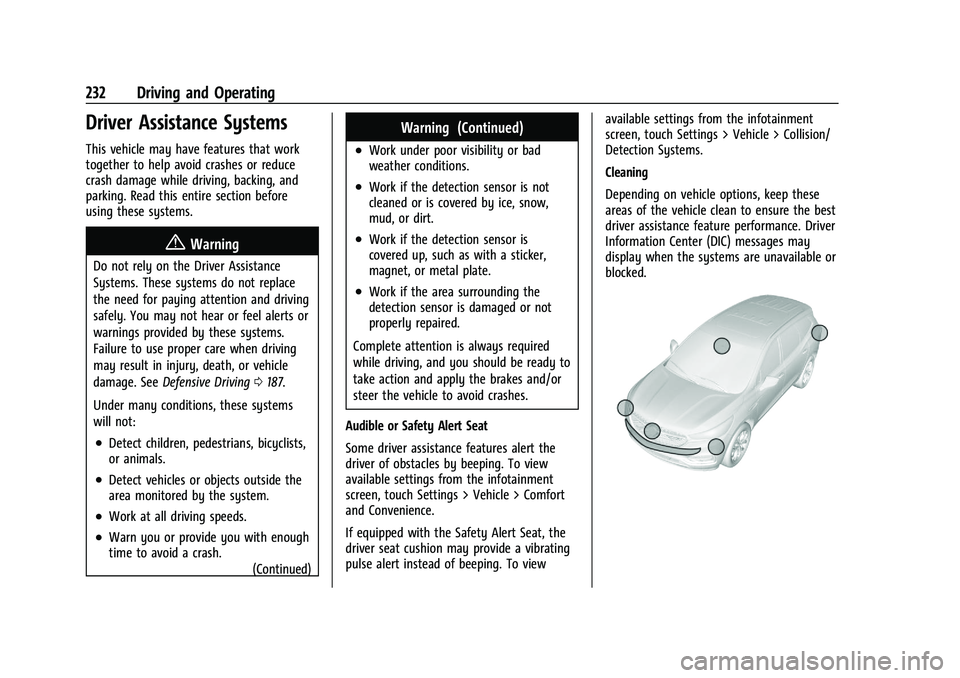
Depending on vehicle options, keep these
areas of the vehicle clean to ensure the best
driver assistance feature performance. Driver
Information Center (DIC) messages may
display when the systems are unavailable or
blocked.
Page 238 of 371

GMC Terrain/Terrain Denali Owner Manual (GMNA-Localizing-U.S./Canada/
Mexico-16540740) - 2023 - CRC - 6/16/22
Driving and Operating 237
Turn off Park Assist when towing a trailer to
prevent unwanted beeps and when a bike
rack is attached to ensure proper operation.
When the System Does Not Seem to Work
Properly
If a service message displays, check the
following conditions:
.The sensors may not be clean. Keep the
vehicle's front and rear bumpers free of
mud, dirt, snow, ice, and slush. For
cleaning instructions, seeExterior Care
0 319.
.The Park Assist sensors may be covered
by frost or ice. Frost or ice can form
around and behind the sensors and may
not always be seen; this can occur after
washing the vehicle in cold weather. The
message may not clear until the frost or
ice has melted.
If a service message displays and the above
conditions do not exist, take the vehicle to
your dealer for repairs.
If the Park Assist System does not activate
due to a temporary condition, a system off
message is shown on the display. This can
occur under the following conditions:
.The driver has disabled the system.
.An object is currently blocking the rear
sensors (for example, bike rack, tailgate,
trailer hitch, etc.). Once the object is
removed, Park Assist will return to normal
operation.
.The bumper is damaged. Take the vehicle
to your dealer for repairs.
.Other conditions, such as vibrations from
a jackhammer or the compression of air
brakes on a very large truck, are affecting
system performance.
Automatic Parking Assist (APA)
If equipped, under certain conditions
Automatic Parking Assist (APA) can use
sensors based on sonar technology along
the vehicle’s front, rear and sides to detect a
parking spot, and automatically park the
vehicle with some driver assistance. The
vehicle will automatically maneuver into a
detected spot moving at idle speed. It does
this by automatically steering while the
driver is responsible for braking, acceleration
and gear shifting as needed. The driver must
always be prepared to apply braking or
additional acceleration, as needed. A display
and beeps help to guide the parking
maneuvers.
{Warning
APA does not apply the brakes. APA may
not always detect objects in the parking
space, objects that are not rigid (e.g.
shrubs and chain-link fences), objects
below the bumper, objects high off the
ground (e.g. flatbed trucks), hanging
objects, objects below ground level such
(e.g. large potholes), or moving objects
(e.g. pedestrians, cyclists, vehicles).
Always verify that the parking space is
appropriate for parking a vehicle. APA
may not respond to changes in the
parking space, such as movement of an
adjacent vehicle, or a person or object
entering the parking space. APA does not
detect or avoid traffic that is behind or
alongside of the vehicle. Always be
prepared to stop the vehicle during the
parking maneuver.
How to Activate Automatic Parking
To activate APA, press the soft-touch button
or hard switch
Ofor the system to begin
searching for a parking space while driving
forward at no greater than
30 km/h (18 mph). By default, APA searches