2023 GMC CANYON horn
[x] Cancel search: hornPage 282 of 371

GMC Canyon/Canyon Denali Owner Manual (GMNA-Localizing-U.S./Canada/
Mexico-16510661) - 2023 - CRC - 11/29/22
Vehicle Care 281
FusesUsage
F78 –
F79 –
F80 –
F81 –
F82 –
F83 LED Cargo Lamp
F84 ELM 7 –Exterior
Lighting Module 7 –Left
Front Park Lamp/
Daytime Running Lamp/
Left Front Turn Lamp/
Center High Mounted
Stop Lamp/Right Rear
Park Lamp/Reverse
Lamps
F85 –
F86 Horn F87 Front Washer Pump
F88 –
F89 – Fuses
Usage
F90 MISC WINDOWS RIGHT –Passenger Door Panel
Switch (Express Down)
Window Motor Right
Front (Express
Up/Down)
Window Switch Right
Rear (Express Down)
Window Motor Right
Rear (Express Up/Down)
F91 –
Instrument Panel Fuse Block
The instrument panel fuse block is behind a
side trim panel. Unclip the sides of the trim,
then pull the cover away from the trim
panel to access the fuse block.
There is a cover on the instrument panel
fuse block. Press the clips on the side to
remove the cover.
Page 294 of 371

GMC Canyon/Canyon Denali Owner Manual (GMNA-Localizing-U.S./Canada/
Mexico-16510661) - 2023 - CRC - 11/29/22
Vehicle Care 293
Caution
Tire sealant materials are not all the
same. A non-approved tire sealant could
damage the TPMS sensors. TPMS sensor
damage caused by using an incorrect tire
sealant is not covered by the vehicle
warranty. Always use only the GM
approved tire sealant available through
your dealer or included in the vehicle.
TPMS Malfunction Light and Message
The TPMS will not function properly if one
or more of the TPMS sensors are missing or
inoperable. When the system detects a
malfunction, the low tire pressure warning
light flashes for about one minute and then
stays on for the remainder of the time the
vehicle is on. A DIC warning message also
displays. The malfunction light and DIC
warning message will come on each time
the vehicle is turned on until the problem is
corrected. Some of the conditions that can
cause these to come on are:
.One of the road tires has been replaced
with the spare tire. The spare tire does
not have a TPMS sensor. The malfunction
light and the DIC message should go off
after the road tire is replaced and thesensor matching process is performed
successfully. See "TPMS Sensor Matching
Process" later in this section.
.The TPMS sensor matching process was
not done or not completed successfully
after rotating the tires. The malfunction
light and the DIC message should go off
after successfully completing the sensor
matching process. See "TPMS Sensor
Matching Process" later in this section.
.One or more TPMS sensors are missing or
damaged. The malfunction light and the
DIC message should go off when the
TPMS sensors are installed and the sensor
matching process is performed
successfully. See your dealer for service.
.Replacement tires or wheels do not match
the original equipment tires or wheels.
Tires and wheels other than those
recommended could prevent the TPMS
from functioning properly. See
Buying
New Tires 0298.
.Operating electronic devices or being near
facilities using radio wave frequencies
similar to the TPMS could cause the TPMS
sensors to malfunction. If the TPMS is not functioning properly, it
cannot detect or signal a low tire pressure
condition. See your dealer for service if the
TPMS malfunction light and DIC message
come on and stay on.
Tire Fill Alert (If Equipped)
This feature provides visual and audible
alerts outside the vehicle to help when
inflating an underinflated tire to the
recommended cold tire pressure.
When the low tire pressure warning light
comes on:
1. Park the vehicle in a safe, level place.
2. Set the parking brake firmly.
3. Place the vehicle in P (Park).
4. Add air to the tire that is underinflated. The turn signal lamp will flash.
When the recommended pressure is
reached, the horn sounds once and the
turn signal lamp will stop flashing and
briefly turn solid.
Repeat these steps for all underinflated tires
that have illuminated the low tire pressure
warning light.
Page 295 of 371
GMC Canyon/Canyon Denali Owner Manual (GMNA-Localizing-U.S./Canada/
Mexico-16510661) - 2023 - CRC - 11/29/22
294 Vehicle Care
{Warning
Overinflating a tire could cause the tire
to rupture and you or others could be
injured. Do not exceed the maximum
pressure listed on the tire sidewall. See
Tire Sidewall Labeling0285 and
Vehicle Load Limits 0162.
If the tire is overinflated by more than
35 kPa (5 psi), the horn will sound multiple
times and the turn signal lamp will continue
to flash for several seconds after filling
stops. To release and correct the pressure,
while the turn signal lamp is still flashing,
briefly press the center of the valve stem.
When the recommended pressure is reached,
the horn sounds once.
If the turn signal lamp does not flash within
15 seconds after starting to inflate the tire,
the tire fill alert has not been activated or is
not working.
If the hazard warning flashers are on, the
tire fill alert visual feedback will not work
properly. The TPMS will not activate the tire fill alert
properly under the following conditions:.There is interference from an external
device or transmitter.
.The air pressure from the inflation device
is not sufficient to inflate the tire.
.There is a malfunction in the TPMS.
.There is a malfunction in the horn or turn
signal lamps.
.The TPMS sensor identification code is not
registered to the system.
.The TPMS sensor battery is low.
If the tire fill alert does not operate due to
TPMS interference, move the vehicle about
1 m (3 ft) back or forward and try again.
If the tire fill alert feature is not working,
use a tire pressure gauge.
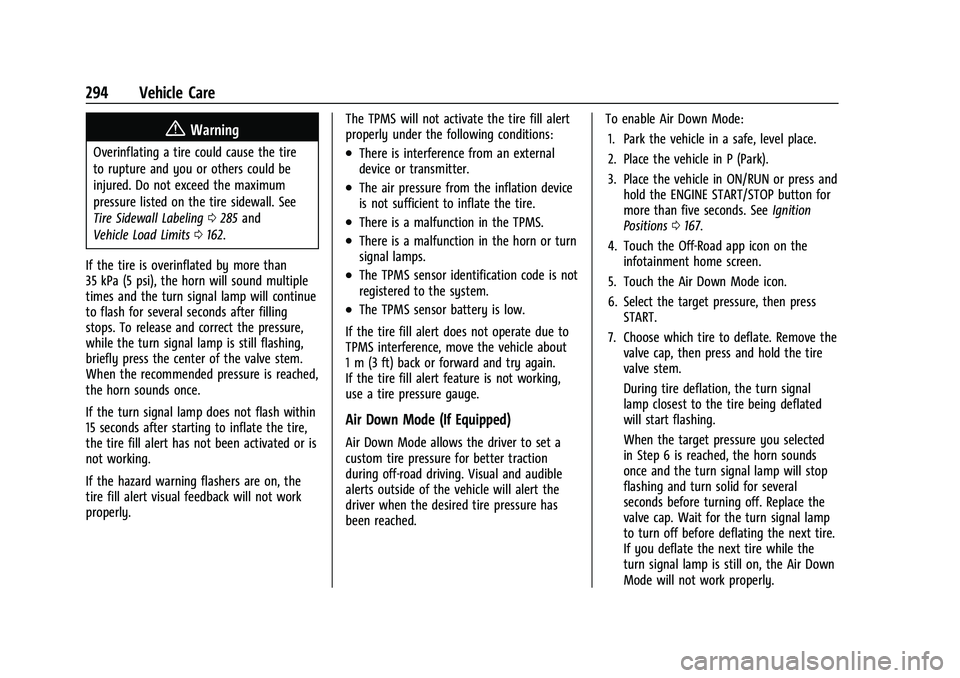
Air Down Mode (If Equipped)
Air Down Mode allows the driver to set a
custom tire pressure for better traction
during off-road driving. Visual and audible
alerts outside of the vehicle will alert the
driver when the desired tire pressure has
been reached. To enable Air Down Mode:
1. Park the vehicle in a safe, level place.
2. Place the vehicle in P (Park).
3. Place the vehicle in ON/RUN or press and hold the ENGINE START/STOP button for
more than five seconds. See Ignition
Positions 0167.
4. Touch the Off-Road app icon on the infotainment home screen.
5. Touch the Air Down Mode icon.
6. Select the target pressure, then press START.
7. Choose which tire to deflate. Remove the valve cap, then press and hold the tire
valve stem.
During tire deflation, the turn signal
lamp closest to the tire being deflated
will start flashing.
When the target pressure you selected
in Step 6 is reached, the horn sounds
once and the turn signal lamp will stop
flashing and turn solid for several
seconds before turning off. Replace the
valve cap. Wait for the turn signal lamp
to turn off before deflating the next tire.
If you deflate the next tire while the
turn signal lamp is still on, the Air Down
Mode will not work properly.
Page 296 of 371

GMC Canyon/Canyon Denali Owner Manual (GMNA-Localizing-U.S./Canada/
Mexico-16510661) - 2023 - CRC - 11/29/22
Vehicle Care 295
Repeat Step 7 until all tires have been
deflated. Same steps can be followed for
inflating all tires to target pressure.
While in Air Down Mode, after all tires have
been deflated lower than the vehicle’s
recommended tire pressure, the low tire
pressure warning light and the DIC warning
message may come on for all tires.
Due to late air adjustment in a tire, the tire
pressure may change by 4 to 8 kpa (0.6 to
1.2 psi) after a few minutes, once you have
stopped deflation.
Ensure that the target pressure you select is
above or below your vehicle’s current tire
pressures by a least 20 kpa (3 psi).
If the tire is underinflated or overinflated by
more than 35 kPa (5 psi) from the target
pressure you selected in Step 6, the horn
will sound multiple times and the turn
signal lamp will continue to flash for several
seconds after tire pressure adjustment stops.
To correct the pressure, while the turn
signal lamp is still flashing, add air to inflate
the tire or briefly press the center of the
valve stem to deflate the tire. When the
target pressure you selected in Step 6 is
reached, the horn sounds once and the turn
signal lamp will stop flashing and turn solid
for several seconds before turning off. If the turn signal lamp does not flash within
15 seconds after starting to inflate the tire,
the Air Down Mode has not been activated
or is not working.
If the hazard warning flashers are on, the
Air Down Mode visual feedback will not
work properly.
The Air Down Mode will not work properly
under the following conditions:
.There is interference from an external
device or transmitter.
.The air pressure from the inflation device
is not sufficient to inflate the tire.
.There is a malfunction in the TPMS.
.There is a malfunction in the horn or turn
signal lamps.
.The TPMS sensor identification code is not
registered to the system.
.The TPMS sensor battery is low.
.The vehicle is not in P (Park).
.The vehicle is off.
.START was not pressed after selecting the
target tire pressure in the Air Down
Mode app.
If the Air Down Mode does not operate due
to TPMS interference, move the vehicle
about 1 m (3 ft) back or forward and try again. If the Air Down Mode is not working,
use a tire pressure gauge to confirm tire
pressure.
{Warning
Neither tire underinflation nor
overinflation is good. Underinflated
tires, or tires that do not have
enough air, can result in:
.Tire overloading and overheating,
which could lead to a blowout
.Premature or irregular wear
.Poor handling
.Reduced fuel economy for
internal combustion engine
vehicles
.Reduced range for electric vehicles
Overinflated tires, or tires that have
too much air, can result in:
.Unusual wear
.Poor handling
.Rough ride
.Needless damage from road
hazards
Page 332 of 371

GMC Canyon/Canyon Denali Owner Manual (GMNA-Localizing-U.S./Canada/
Mexico-16510661) - 2023 - CRC - 11/29/22
Service and Maintenance 331
Systems, Fluids, and Visible Leak
Inspection
.Engine oil
.Transmission
.Drive axle
.Transfer case
.Engine cooling system
.Power steering, if equipped
.Fuel system
.Windshield washer fluid
Tire Inspection
.Tire pressure, tread depth, and wear
.Rotation, if applicable
.Alignment check, optional
.Reset tire pressure monitor
.Check tire sealant expiration date,
if equipped
.Check spare tire, if equipped
Brakes
.Check brake system
Visible and Functional Inspections
.Seat belt components
.Exhaust system
.Accelerator pedal
.Passenger compartment air filter,
if equipped
.Engine air filter
.Hoses
.Belts
.Shocks and struts
.Steering components
.Axle boots or driveshaft and u-joints
.Compartment lift struts, if equipped
.Floor mats secured, no interference with
pedals
.Horn
.Ignition lock, if equipped
.Starter switch
.Evaporative control system
Lubricate
.Chassis components
Special Application Services
.Severe Commercial Use Vehicles Only:
Lubricate chassis components every oil
change.
.Have underbody flushing service
performed. See "Underbody Maintenance"
in Exterior Care 0319.
Page 357 of 371

GMC Canyon/Canyon Denali Owner Manual (GMNA-Localizing-U.S./Canada/
Mexico-16510661) - 2023 - CRC - 11/29/22
356 Connected Services
.Change the default name of the SSID
(Service Set Identifier). This is your
network’s name that is visible to other
wireless devices. Choose a unique name
and avoid family names or vehicle
descriptions.
Wi-Fi Hotspot (If Equipped)
The vehicle may have a built-in Wi-Fi
hotspot that provides access to the Internet
and web content at 4G LTE speed. Up to
seven mobile devices can be connected.
A data plan is required. Use the in-vehicle
controls only when it is safe to do so. 1. To retrieve Wi-Fi hotspot information, press
=to open the OnStar app on the
infotainment display, then select Wi-Fi
Hotspot. On some vehicles, touch Wi-Fi
or Wi-Fi Settings on the screen.
2. The Wi-Fi settings will display the Wi-Fi hotspot name (SSID), password, and on
some vehicles, the connection type (no
Internet connection, 3G, 4G, 4G LTE), and
signal quality (poor, good, excellent). The
LTE icon shows connection to Wi-Fi. It is
possible that the icon may not illuminate
even though the vehicle has an active
connection. 3. To change the SSID or password, press
Qor call 1-888-4ONSTAR to connect
with an Advisor. On some vehicles, the
SSID and password can be changed in
the Wi-Fi Hotspot menu.
After initial set-up, your vehicle’s Wi-Fi
hotspot will connect automatically to your
mobile devices. Manage data usage by
turning Wi-Fi on or off on your mobile
device, using the myGMC mobile app, or by
contacting an OnStar Advisor. On some
vehicles, Wi-Fi can also be managed from
the Wi-Fi Hotspot menu.
MyGMC Mobile App (If Available)
Download the myGMC mobile app to
compatible Apple and Android smartphones.
GMC users can access the following services
from a smartphone:
.Remotely start/stop the vehicle,
if factory-equipped.
.Lock/unlock doors, if equipped with
automatic locks.
.Activate the horn and lamps.
.Check the vehicle’s fuel level, oil life,
or tire pressure, if factory-equipped with
the Tire Pressure Monitor System.
.Send destinations to the vehicle.
.Locate the vehicle on a map
(U.S. market only).
.Turn the vehicle's Wi-Fi hotspot on/off,
manage settings, and monitor data
consumption, if equipped.
.Locate a dealer and schedule service.
.Request Roadside Assistance.
.Set a parking reminder with pin drop,
take a photo, make a note, and set a
timer.
.Connect with GMC on social media.
Features are subject to change. For myGMC
mobile app information and compatibility,
see www.gmc.com.
An active OnStar or connected service plan
may be required. A compatible device,
factory-installed remote start, and power
locks are required. Data rates apply. See
www.onstar.com for details and system
limitations.
Remote Services
Contact an OnStar Advisor to unlock the
doors or sound the horn and flash the
lamps.
Page 364 of 371
GMC Canyon/Canyon Denali Owner Manual (GMNA-Localizing-U.S./Cana-
da/Mexico-16510661) - 2023 - CRC - 11/29/22
Index 363
Headlamps (cont'd)Bulb Replacement . . . . . . . . . . . . . . . . . . . . . . 273
Daytime Running Lamps (DRL) . . . . . . . . . 110
Flash-to-Pass . . . . . . . . . . . . . . . . . . . . . . . . . . . 110
High-Beam On Light . . . . . . . . . . . . . . . . . . . . 97
High/Low Beam Changer . . . . . . . . . . . . . . 110
Lamps On Reminder . . . . . . . . . . . . . . . . . . . . 98
Heated Mirrors . . . . . . . . . . . . . . . . . . . . . . . . . . . . . . . . . 20
Steering Wheel . . . . . . . . . . . . . . . . . . . . . . . . . 73
Ventilated Front Seats . . . . . . . . . . . . . . . . . . . 31
Heater
Engine . . . . . . . . . . . . . . . . . . . . . . . . . . . . . . . . . 170
Heating . . . . . . . . . . . . . . . . . . . . . . . . . . . . . . 143, 144
High-Beam On Light . . . . . . . . . . . . . . . . . . . . . . 97
Hill Descent Control (HDC) . . . . . . . . . . . . . . . . . 187
Descent Control Light . . . . . . . . . . . . . . . . . . . 93
Hill and Mountain Roads . . . . . . . . . . . . . . . . 159
Hill Start Assist (HSA) . . . . . . . . . . . . . . . . . . . . .185
Hood . . . . . . . . . . . . . . . . . . . . . . . . . . . . . . . . . . . . 254
Horn . . . . . . . . . . . . . . . . . . . . . . . . . . . . . . . . . . . . . . .73
How to Wear Seat Belts Properly . . . . . . . . . 34
HVAC . . . . . . . . . . . . . . . . . . . . . . . . . . . . . . . . 143, 144
I
Ignition Positions . . . . . . . . . . . . . . . . . . . . . . . . 167
Immobilizer . . . . . . . . . . . . . . . . . . . . . . . . . . . . . . . .19 Indicator
Auto Stop . . . . . . . . . . . . . . . . . . . . . . . . . . . . . . 97
Pedestrian Ahead . . . . . . . . . . . . . . . . . . . . . . . 94
Vehicle Ahead . . . . . . . . . . . . . . . . . . . . . . . . . . 93
Indicators Warning Lights and Gauges . . . . . . . . . . . . . 79
Infants and Young Children, Restraints . . . . .52
Information
Publication Ordering . . . . . . . . . . . . . . . . . . . 345
Infotainment Using the System . . . . . . . . . . . . . . . . . . . . . . . 118
Infotainment System . . . . . . . . . . . . . . . . . . . . 349
Inspection Multi-Point Vehicle . . . . . . . . . . . . . . . . . . . . 330
Instrument Cluster . . . . . . . . . . . . . . . . . . . . . 79, 81
Instrument Panel Overview . . . . . . . . . . . . . . . . 4
Interior Rearview Mirrors . . . . . . . . . . . . . . . . . 20
Introduction . . . . . . . . . . . . . . . . . . . . . . . . . . . 2, 116
J
Jump Starting - North America . . . . . . . . . . . . . . . 312
K
Keys . . . . . . . . . . . . . . . . . . . . . . . . . . . . . . . . . . . . . . . 6Remote . . . . . . . . . . . . . . . . . . . . . . . . . . . . . . . . . . 7
Remote Operation . . . . . . . . . . . . . . . . . . . . . . . 7
L
Labeling, Tire Sidewall . . . . . . . . . . . . . . . . . . . 285
LampsDaytime Running (DRL) . . . . . . . . . . . . . . . . 110
Dome . . . . . . . . . . . . . . . . . . . . . . . . . . . . . . . . . . . 113
Exterior Cargo . . . . . . . . . . . . . . . . . . . . . . . . . . 113
Exterior Controls . . . . . . . . . . . . . . . . . . . . . . . 109
Exterior Lamps Off Reminder . . . . . . . . . . 110
Exterior Lighting Battery Saver . . . . . . . . . 115
Flash-to-Pass . . . . . . . . . . . . . . . . . . . . . . . . . . . 110
Fog . . . . . . . . . . . . . . . . . . . . . . . . . . . . . . . . . . . . . 112
High/Low Beam Changer . . . . . . . . . . . . . . 110
Malfunction Indicator (CheckEngine) . . . . . . . . . . . . . . . . . . . . . . . . . . . . . . . 89
Off-Road . . . . . . . . . . . . . . . . . . . . . . . . . . . . . . . . 112
On Reminder . . . . . . . . . . . . . . . . . . . . . . . . . . . 98
Reading . . . . . . . . . . . . . . . . . . . . . . . . . . . . . . . . . 114
Lane Change Alert (LCA) . . . . . . . . . . . . . . . . . . . . . 220
Keep Assist (LKA) . . . . . . . . . . . . . . . . . . . . . . 222
Keep Assist Light . . . . . . . . . . . . . . . . . . . . . . . 93
Lap-Shoulder Belt . . . . . . . . . . . . . . . . . . . . . . . . . 36
LATCH System Replacing Parts after a Crash . . . . . . . . . . . 65
LATCH, Lower Anchors and Tethers for Children . . . . . . . . . . . . . . . . . . . . . . . . . . . . . . . . . .57
LED Lighting . . . . . . . . . . . . . . . . . . . . . . . . . . . . . 273