Page 241 of 690

5-50
Convenience Features
NOTICE
�[�While integrated memory system
is being reset, if the resetting
and notification sound stops
incompletely, restart the resetting
procedure again.
�[�Make sure that there is no objects
around the driver’s seat in advance
of resetting the integrated memory
system.
Seat Easy Access
Seat easy access will move the driver’s
seat and steering wheel automatically as
follows:
�[�Exiting the vehicle:
The driver’s seat, steering wheel and
seat bolster will move as follows when
the Start/Stop button is in the OFF
position with the gear in P (Park) and
the driver’s door open.
- Driver seat: Moves rearward
depending on the distance selected
from the Settings menu in the
infotainment system.
- Steering wheel: Moves upward
- Seat bolster (if equipped): Adjusted
to the default position.
However, the driver’s seat may not
move rearward if there is not enough
space between the driver’s seat and
the rear seats.
Also, on a regular basis, the steering
wheel will also move forward to adjust
its location by itself.�[�Entering the vehicle:
The driver’s seat, steering wheel and
seat bolster will move as follows when
the Start/Stop button is pressed to the
ACC, ON or START position or while
carrying the smart key, the driver’s
door is closed with the Start/Stop
button in the OFF position.
- Driver seat: Moves back to its
original position.
- Steering wheel: Moves back to its
original position.
- Seat bolster (if equipped): Adjusted
to the default position.
�[�You can set the Seat Easy Access
function from the Settings menu
in the infotainment system screen.
Select:
- Driver seat
6HWXS��
Page 246 of 690
5-55
05
Heated Steering Wheel
(if equipped)
OJWEV051230
While the vehicle is running, press the
heated steering wheel button to warm
the steering wheel.
�[�Auto. Controls That Use Climate
Control Settings (for driver’s seat)
The heated steering wheel
automatically controls the steering
wheel temperature depending on
the ambient temperature when the
vehicle is running.
If you touch the heated steering wheel
icon, the heated steering wheel will
have to be controlled manually.
To use this function, it must be
enabled from the Settings menu in the
infotainment system screen.
Select:
-6HWXS��
Page 258 of 690
5-67
05
Infotainment system setting
�[�Enable on door unlock
,I��S6HWXS��
Page 278 of 690

5-87
05
Smart Liftgate (if equipped)
OJWEV051049N
On a vehicle equipped with a smart key,
the liftgate can be opened with hands-
free activation using the smart liftgate
system.
Using smart liftgate
The hands-free smart liftgate system
can be opened automatically when the
following conditions are met:
�[�The smart liftgate option is enabled in
the Settings menu in the infotainment
system screen.
�[�The smart liftgate is activated and
ready 15 seconds after all the doors
are closed and locked.
�[�The smart liftgate will open when
the smart key is detected in the area
behind the vehicle for 3 seconds.
�[�When disconnecting the charging
connector, the smart liftgate is
activated.
Information
The smart liftgate will NOT operate when:
�[�A door is not locked or closed.
�[�The smart key is detected within
15 seconds from when the doors were
closed and locked.
�[�The smart key is detected within
15 seconds after the doors are closed
and locked, and within 1.5 m (60 in.)
from the front door handles. (for
YHKLFOHV�HTXLSSHG�ZLWK�:HOFRPH�
0LUURU��
�[�The smart key is in the vehicle.
�[�The vehicle is on charge.
Page 279 of 690
5-88
Convenience Features
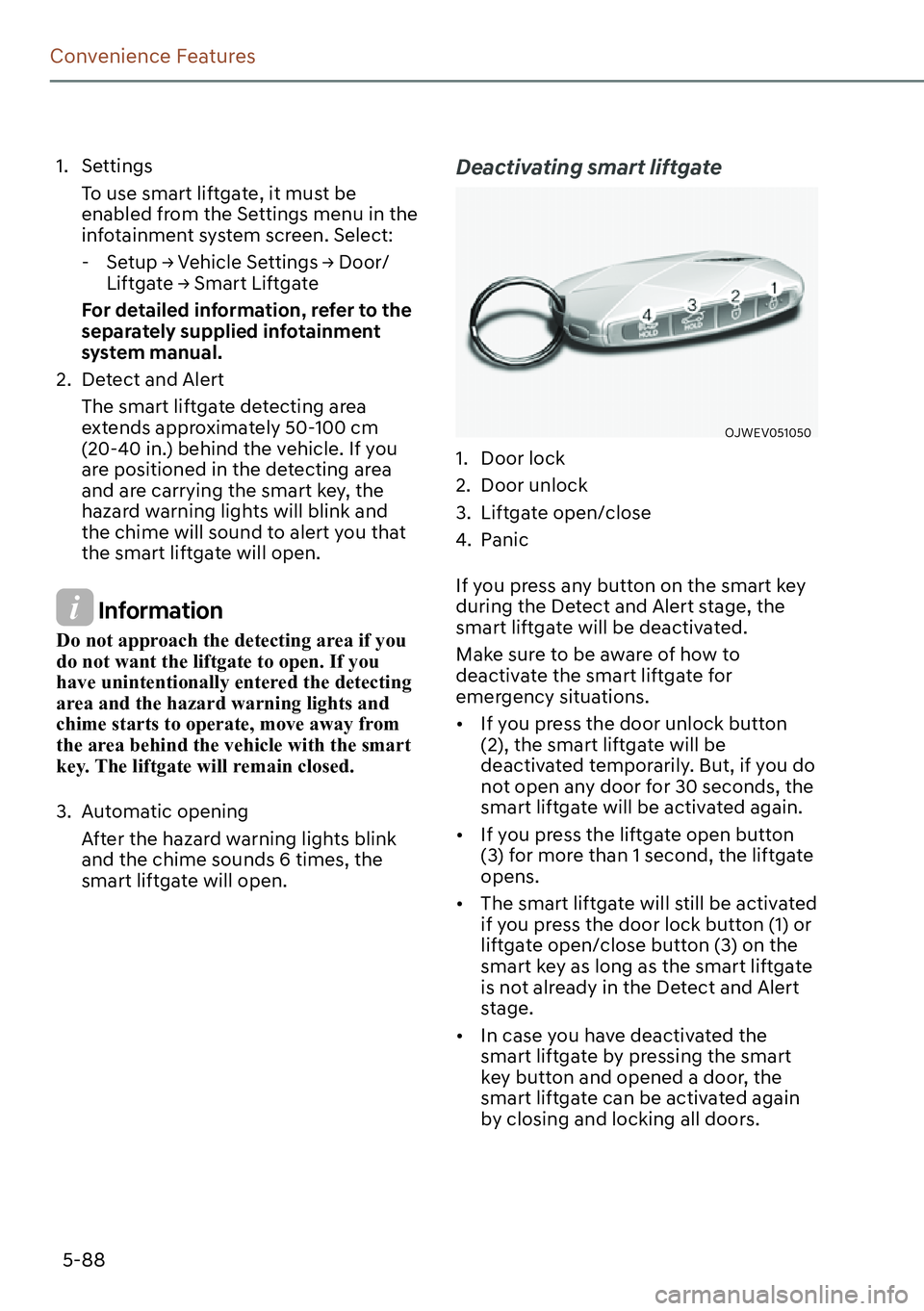
1. Settings
To use smart liftgate, it must be
enabled from the Settings menu in the
infotainment system screen. Select:
-6HWXS��
Page 282 of 690
5-91
05
OJWEV051054N
The Head-Up Display is an optional
feature that allows the driver to view
information projected onto a transparent
screen while still keeping your eyes
safely on the road ahead while driving.
Head-up Display Settings
OJWEV051252L
�[�Head-up display can be enabled from
the Settings menu in the infotainment
system screen. Select:
-6HWXS��
Page 283 of 690

5-92
Convenience Features
Precautions while using the
Head-up Display
�[�It may sometimes be difficult to read
information on the head-up display in
the following situations.
- The driver is improperly positioned
in the driver’s seat.
- The driver wears polarizing-filter
sunglasses.
- An object is located above the
head-up display cover
- The vehicle is driven on a wet road.
- Any improper lighting accessory is
installed inside the vehicle, or there
is incoming light from outside of the
vehicle.
- The driver wears glasses.
- The driver wears contact lenses.
When it is difficult to read the head up
display information, adjust the image
height or brightness level from the
Settings menu in the infotainment
system screen.
For detailed information, refer to the
separately supplied infotainment
system manual.
�[�For your safety, make sure to stop the
vehicle before adjusting the settings.
�[�Do not tint the front windshield glass
or add other types of metallic coating.
Otherwise, the head-up display image
may be invisible.
�[�Do not place any accessories on the
crash pad or attach any objects on the
windshield glass.
�[�When replacing the front windshield
glass, replace it with a windshield
glass designed for head-up display
operation. Otherwise, duplicated
images may be displayed on the
windshield glass.
WARNING
The Blind-Spot Collision Warning
system warnings on the head-up display
are supplemental. Do not solely depend
on them to change lanes. Always take a
look around before changing lanes.
Information
Head-up Display includes GPL, LGPL,
03/�DQG�RWKHU�RSHQ�VRXUFH�OLFHQVH�
softwares. All license notices including
UHODWHG�VRXUFH�FRGH�DUH�SURYLGHG�DW�KWWS���
ZZZ�PRELV�FR�NU�RSHQVRXUFH�OLVW�GR�
If the driver requests on-board
VRIWZDUH�RSHQ�VRXUFH�FRGH�YLD�02%,6B
[email protected] within 3 years
DIWHU�EX\LQJ�WKLV�SURGXFW��D�&'�520�RU�
other storage device will be sent with the
minimum cost covering storage device cost
and delivery cost.
Page 307 of 690

5-116
Convenience Features
Information
For better sound quality, fan speed may
automatically slow down for a couple
of minutes when you activate voice
recognition or hands free.
NOTICE
Operating the fan when the Start/Stop
button is in the ON position could cause
the battery to discharge. Operate the
fan when the vehicle is running.
Driver only
OJWEV051109L
If you touch the DRIVER ONLY icon
() and the indicator light
illuminates in the infotainment climate
control screen, cold air mostly blows
in the driver’s seat. However, some
of the cold air may come out of other
seating position ducts to keep indoor air
pleasant.
If you use the DRIVER ONLY with no
passenger in the front passenger seat,
energy consumption will be reduced.
DRIVER ONLY will be turned off under
the following conditions:
1) Defrost on
2) DRIVER ONLY icon re-touch
3) Passenger’s mode selection
4) SYNC
5) Passenger’s temperature control
Air conditioning
OJWEV051108L
Touch the A/C icon in the infotainment
screen to turn the air conditioning on
(indicator light ON) and off.