Page 41 of 661

1-36
Foreword / Starting Your Electric Vehicle
Information
Even though charging is possible with
the Start/Stop button in the ON/START
position, for your safety, start charging
when the Start/Stop button is in the
OFF position and the vehicle shifted to P
(Park). After charging has started, you
can use electrical components such as the
radio by pressing the Start/Stop button to
the ACC or ON position.
During charging, the gear cannot be
shifted from P (Park) to any other gear.
ORG3EVQ011055L
8. After charging has started, the
estimated charging time is displayed
on the instrument cluster for about 1
minute.
If you open the driver seat door while
charging, the estimated charging time
is also displayed on the instrument
cluster for about 1 minute.
Information
�[�Depending on the condition and
durability of the high voltage battery,
charger specifications, and ambient
temperature, the time required for
charging the battery may vary.
�[�In rare cases, you might hear high
frequency noise (very little beep sound)
outside the car when charging with
400V DC charger that is deteriorated
or has long communication delay.
The high frequency noise can be
generated only when the car tries to
reduce its own electromagnetic waves
to keep DC charging as possible.
So there is no need to worry about this
little noise, because it is the intentional
operation of the car that does not
affect any charging performance or the
vehicle itself at all.
Checking Charging Status
When charging the high voltage battery,
the charge level can be checked from
outside the vehicle.
For more details, refer to ‘Charge
Indicator Lamp for Electric Vehicle’ in
this chapter.
How to Disconnect DC Charger
1. Remove the charging connector
when DC charging is completed, or
after you stop charging using the DC
charger. Refer to each respective DC
charger manual for details about how
to disconnect the charging connector.
2. Make sure to completely close the
charging door.
Page 44 of 661

1-39
01
How to Connect Portable Charger
(ICCB: In-Cable Control Box)
Plug Electric Outlet
ONE1041060N
1. Connect the plug to a household
electric outlet.
ORG3EVQ011077
2. Check if the power lamp (green)
illuminates on the control box.
3. Depress the brake pedal and apply the
parking brake.
4. Turn OFF all switches, shift to P (Park),
and turn OFF the vehicle.
If charging is initiated without the
gear in P (Park), the charging will start
after the gear is automatically shifted
to P (Park).
ORG3EVQ011035
5. Push the charging door where the
triangle symbol (1) is located to open.
The charging door opens only when
the vehicle is unlocked.
6. Open the inlet cover (2).
Information
If you cannot open the charging door due
to freezing weather, tap lightly or remove
any ice near the charging door. Do not try
to forcibly open the charging door.
7. Open the protection caps of the
charging connector and the charging
plug. Check if there are any foreign
substances or dust.
8. Hold the charging connector handle
and connect it to the vehicle charging
inlet. Push the connector all the way
in. If the charging connector and
charging terminal are not connected
properly, this may cause a fire.
Page 46 of 661
1-41
01
ORG3EVQ011054L
11. After charging has started, the
estimated charging time is displayed
on the instrument cluster for about 1
minute.
If you open the driver seat door while
charging, the estimated charging time
is also displayed on the instrument
cluster for about 1 minute. When
scheduled charging or scheduled
air conditioner/heater is set, the
estimated charging time is displayed
as “--” .
Information
Depending on the condition and durability
of the high voltage battery, charger
specifications, and ambient temperature,
the time required for charging the battery
may vary.
Checking Charging Status
When charging the high voltage battery,
the charge level can be checked from
outside the vehicle.
For more details, refer to ‘Charge
Indicator Lamp for Electric Vehicle’ in
this chapter.
Page 52 of 661

1-47
01
How to Disconnect Portable Charger
(ICCB: In-Cable Control Box)
ORG3EVQ011069
1. Hold the charging connector handle
and pull it out.
Information
To prevent charging cable theft,
the charging connector cannot be
disconnected from the inlet when the
doors are locked or the charging connector
is in the ‘Locking while charging’ mode.
Unlock all doors to disconnect the
charging connector from the inlet.
However, if the vehicle is in the charging
connector ‘Always lock’ mode, the
charging connector automatically unlocks
from the inlet when charging is completed.
If the charging connector is disconnected
while the release button is not pressed, the
connector and the inlet may be damaged.
For more details, refer to “Charging
Connector ‘Always lock’/‘Locking while
charging’ Mode” in this chapter.
If the release button does not work even
after the all doors are unlocked, pull
the emergency lift cable in the motor
room and press the release button in the
connector to disconnect it from the vehicle.
If the release button still does not work,
consult an authorized retailer of Genesis
Branded products.
Information
Some connectors installed in public
charging stations stop charging by
pressing the charge release button while
charging is locked, and the connector can
be disconnected.
2. Make sure to completely close the
charging door.
OAEE046507N
3. Disconnect the plug from the
household electric outlet. Do not pull
the cable when disconnecting the
plug.
4. Close the protection caps of the
charging connector and the charging
plug to protect them from foreign
substances.
5. If the personal charging connector is
used, store the connector in the cable
compartment.
Page 63 of 661
1-58
Foreword / Starting Your Electric Vehicle
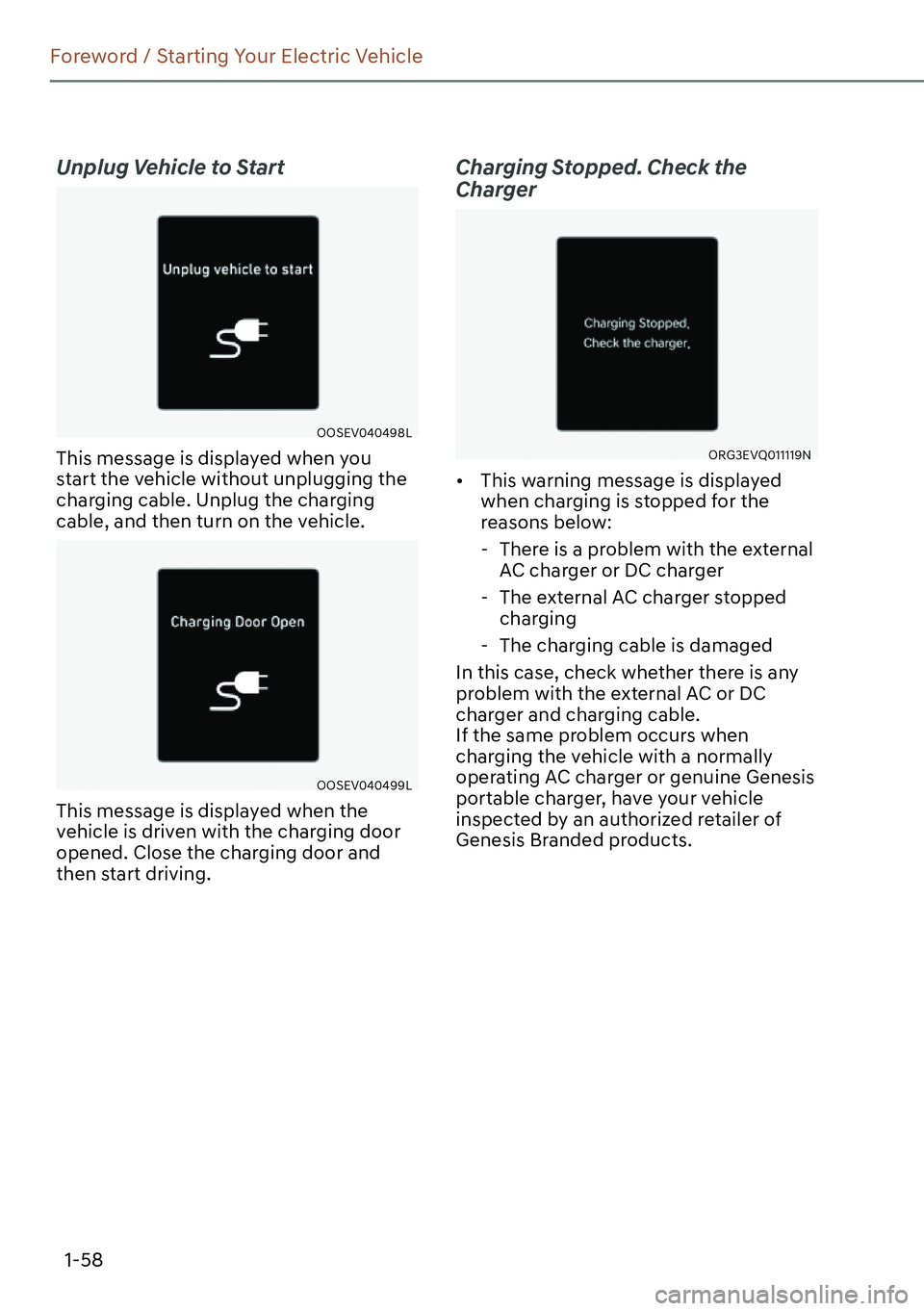
Unplug Vehicle to Start
OOSEV040498L
This message is displayed when you
start the vehicle without unplugging the
charging cable. Unplug the charging
cable, and then turn on the vehicle.
OOSEV040499L
This message is displayed when the
vehicle is driven with the charging door
opened. Close the charging door and
then start driving.
Charging Stopped. Check the
Charger
ORG3EVQ011119N
�[�This warning message is displayed
when charging is stopped for the
reasons below:
-There is a problem with the external
AC charger or DC charger
-The external AC charger stopped
charging
-The charging cable is damaged
In this case, check whether there is any
problem with the external AC or DC
charger and charging cable.
If the same problem occurs when
charging the vehicle with a normally
operating AC charger or genuine Genesis
portable charger, have your vehicle
inspected by an authorized retailer of
Genesis Branded products.
Page 74 of 661
2-4
Vehicle Information, Consumer Information and Reporting Safety Defects
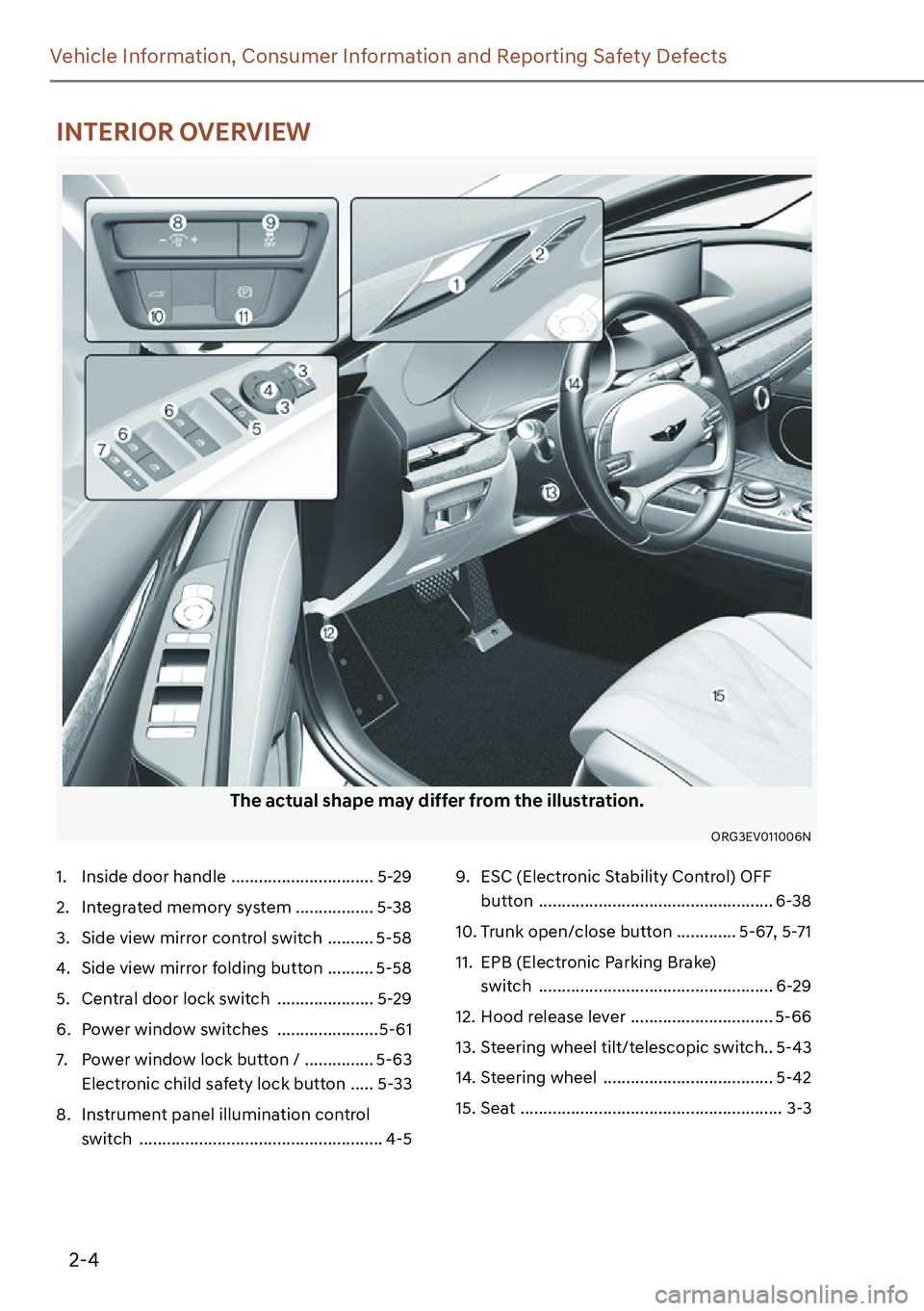
The actual shape may differ from the illustration.
ORG3EV011006N
1. Inside door handle ............................... 5-29
2. Integrated memory system ................. 5-38
3. Side view mirror control switch .......... 5-58
4. Side view mirror folding button .......... 5-58
5. Central door lock switch ..................... 5-29
6. Power window switches ...................... 5-61
7. Power window lock button / ............... 5-63
Electronic child safety lock button ..... 5-33
8. Instrument panel illumination control
switch ..................................................... 4-59. ESC (Electronic Stability Control) OFF
button ................................................... 6-38
10. Trunk open/close button ............. 5-67, 5-71
11. EPB (Electronic Parking Brake)
switch ................................................... 6-29
12. Hood release lever ............................... 5-66
13. Steering wheel tilt/telescopic switch.. 5-43
14. Steering wheel ..................................... 5-42
15. Seat ......................................................... 3-3
INTERIOR OVERVIEW
Page 79 of 661
2-9
02
Light bulb Bulb type Wattage
FrontHeadlampLow LED LED
High LED LED
Turn signal lamp LED LED
Parking lamp LED LED
Side marker LED LED
Daytime Running Lamp (DRL) LED LED
Puddle lamp LED LED
RearStop lamp LED LED
Tail lamp LED LED
Turn signal lamp LED LED
Reverse lamp LED LED
Side marker LED LED
License plate lamp LED LED
High mounted stop lamp LED LED
InteriorMap lamp LED LED
Room lamp (without solar roof) LED LED
Personal lamp (with solar roof) LED LED
Vanity mirror lamp LED LED
Glove box lamp LED LED
Handle lamp / Mood lamp /
Door courtesy lampLED LED
Trunk lamp LED LED
BULB WATTAGE
Page 115 of 661
3-28
Seats and Safety System
Height adjustment
You can adjust the height of the shoulder
belt anchor to one of the four different
positions for maximum comfort and
safety.
The shoulder portion should be adjusted
so it lies across your chest and midway
over your shoulder nearest the door, not
over your neck.
�„Front seat
ORG3EV031035
To adjust the height of the seat belt
anchor, lower or raise the height adjuster
into an appropriate position.
To raise the height adjuster, pull it up
(1). To lower it, push it down (3) while
pressing the height adjuster button (2).
Release the button to lock the anchor
into position. Try sliding the height
adjuster to make sure that it has locked
into position.
ORG3EV031036
To release your seat belt:
Press the release button (1) in the locking
buckle.
Once released, the belt should
automatically draw back into the
retractor. If this does not happen, check
the belt to be sure it is not twisted, then
try again.