2023 FORD SUPER DUTY change time
[x] Cancel search: change timePage 325 of 738

During lane changes, the design of theblind spot assist feature detects vehiclesin, or approaching, your blind spot andprovides a warning, plus steeringassistance to direct your vehicle back intoyour lane.
When active, this system functions with orwithout the use of direction indicators andhazard flashers.
You must keep your hands on the steeringwheel at all times.
BLIND SPOT ASSIST LIMITATIONS
All system limitations present in the basiclane keeping system also apply to blindspot assist.
Blind spot assist does not function underthe following conditions:
•No lane markings are detected.
•One or both rear radar sensors becomeblocked or faulty.
•Attaching bike or cargo racks couldcause false alerts due to obstructionof the sensor.
Blind spot assist may have difficultydetecting hazards under the followingconditions:
•If a vehicle is approaching in anadjacent lane at a speed higher thanyour vehicle.
•Bad weather obstructing the sensors.
BLIND SPOT ASSIST INDICATORS
The lane keeping aid warning lamp or redlane marking in your instrument clusterdisplay indicate blind spot assist activation.In addition, the blind spot informationsystem alert indicator flashes on theexterior mirror on the same side as thedetection. See Blind Spot InformationSystem (page 327).
321
2023 Super Duty (TFH) Canada/United States of America, enUSA, Edition date: 202211, DOMLane Keeping System (If Equipped)E310089
Page 326 of 738

Blind Spot Assist Information Messages
ActionMessage
Displays if you attach a trailer to your vehicle with the blindspot information system switched off or you have notconfigured the trailer.
Blind Spot Assist NotAvailable TrailerAttached
Displays if your blind spot information system sensors areblocked.Blind Spot Assist NotAvailable Side SensorBlocked
The system has detected a fault that requires service. Haveyour vehicle checked as soon as possible.Blind Spot Assist Systemfault
Front camera fault. Blind spot assist is disabled until thefailure is fixed.Front Camera FaultService Required
BLIND SPOT ASSIST WITH
TRAILER COVERAGE (IF EQUIPPED)
WHAT IS BLIND SPOT ASSISTWITH TRAILER COVERAGE
Blind spot assist with trailer coverage is anextension of the lane keeping system.
It may help you identify adjacent vehiclesduring a lane change.
Blind spot assist provides a blind spotwarning and steering assistance to helpduring lane changes.
When attaching a trailer, ensure you haveproperly set up the trailer coveragesettings. See Blind Spot InformationSystem With Trailer Coverage (page328).
HOW DOES BLIND SPOT ASSISTWITH TRAILER COVERAGE WORK
Activate and deactivate thesystem using the lane keepingsystem button on the steeringwheel.
During lane changes, the design of theblind spot assist feature detects vehiclesin, or approaching, your blind spot andprovides a warning, plus steeringassistance to direct your vehicle back intoyour lane.
If a supported trailer is connected, thefunction is reduced to only detectingvehicles on both sides of your vehicle andtrailer, extending rearward from theexterior mirrors to the end of your trailer.See Blind Spot Information SystemWith Trailer Coverage (page 328).
When active, this system functions with orwithout the use of direction indicators andhazard flashers.
You must keep your hands on the steeringwheel at all times.
BLIND SPOT ASSIST WITHTRAILER COVERAGELIMITATIONS
All system limitations present in the basiclane keeping system also apply to blindspot assist.
Blind spot assist does not function underthe following conditions:
322
2023 Super Duty (TFH) Canada/United States of America, enUSA, Edition date: 202211, DOMLane Keeping System (If Equipped)E308131
Page 329 of 738
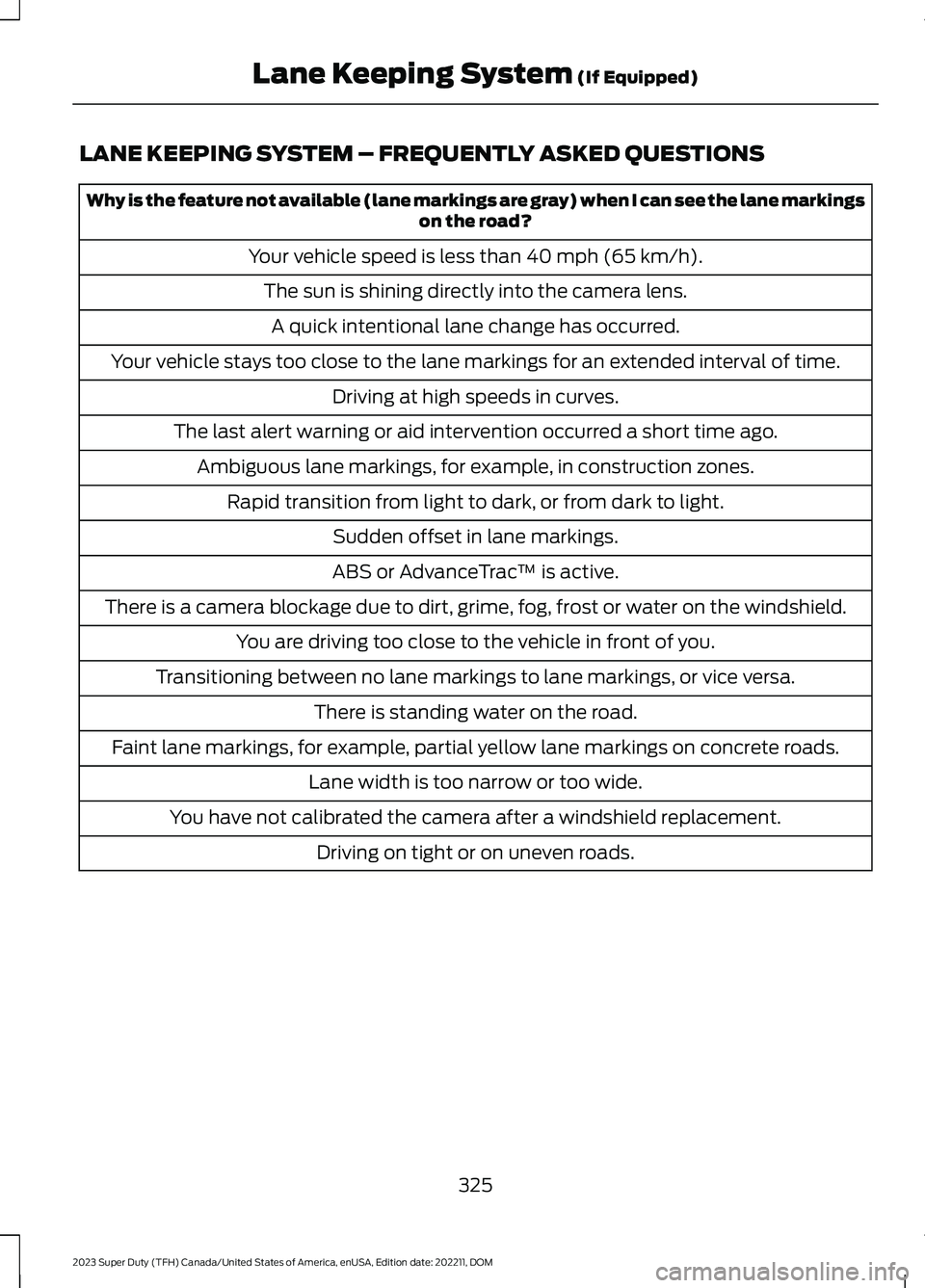
LANE KEEPING SYSTEM – FREQUENTLY ASKED QUESTIONS
Why is the feature not available (lane markings are gray) when I can see the lane markingson the road?
Your vehicle speed is less than 40 mph (65 km/h).
The sun is shining directly into the camera lens.
A quick intentional lane change has occurred.
Your vehicle stays too close to the lane markings for an extended interval of time.
Driving at high speeds in curves.
The last alert warning or aid intervention occurred a short time ago.
Ambiguous lane markings, for example, in construction zones.
Rapid transition from light to dark, or from dark to light.
Sudden offset in lane markings.
ABS or AdvanceTrac™ is active.
There is a camera blockage due to dirt, grime, fog, frost or water on the windshield.
You are driving too close to the vehicle in front of you.
Transitioning between no lane markings to lane markings, or vice versa.
There is standing water on the road.
Faint lane markings, for example, partial yellow lane markings on concrete roads.
Lane width is too narrow or too wide.
You have not calibrated the camera after a windshield replacement.
Driving on tight or on uneven roads.
325
2023 Super Duty (TFH) Canada/United States of America, enUSA, Edition date: 202211, DOMLane Keeping System (If Equipped)
Page 344 of 738

Intersection Assist (If Equipped)
The pre-collision assist system mayoperate in a scenario where you are turningacross the path of an oncoming vehicle, orwith crossing pedestrians and cyclists.Detection of vehicles driving in anoncoming direction is active if your vehicleis driving at speeds up to 50 mph(80 km/h). Detection of crossingpedestrians and cyclists at an intersectionis active if your vehicle is driving at speedsup to 19 mph (30 km/h).
SWITCHING PRE-COLLISION
ASSIST ON AND OFF
To switch the system on or off, use thetouchscreen:
1.Press Features on the touchscreen.
2.Press Driver Assistance.
3.Press Pre-Collision Assist.
4.Switch the feature on or off.
Adjusting the Pre-Collision AssistSettings
You can adjust the following settings byusing the touchscreen controls in thepre-collision assist menu:
•Change alert and distance alertsensitivity to one of three possiblesettings.
•Switch distance indication and alert onor off.
•If required, switch automaticemergency braking on or off.
•If required, switch the entirepre-collision assist feature on or off.
•If required, switch evasive steeringassist on or off.
Note:Automatic emergency braking andevasive steering turn on every time youswitch the ignition on.
Note:If your vehicle has a radar sensor, werecommend that you switch the system offif you install a snow plow or similar objectin such a way that it may block the radarsensor. Your vehicle remembers the selectedsetting across key cycles.
Note:If you switch automatic emergencybraking off, evasive steering assist switchesoff.
340
2023 Super Duty (TFH) Canada/United States of America, enUSA, Edition date: 202211, DOMPre-Collision Assist (If Equipped)E309750
Page 345 of 738

LOCATING THE PRE-
COLLISION ASSIST SENSORS
Camera.1.
Radar sensor (if equipped).2.
If a message regarding a blocked sensoror camera appears in the informationdisplay, something is obstructing the radarsignals or camera images. The radar sensoris behind the fascia cover in the center ofthe lower grille. With a blocked sensor orcamera, the system may not function, orperformance may reduce. SeePre-Collision Assist – InformationMessages (page 344).
Note:Proper system operation requires aclear view of the road by the camera. Haveany windshield damage in the area of thecamera's field of view repaired.
Note:If something hits the front end of yourvehicle or damage occurs and your vehiclehas a radar sensor, the radar sensing zonecould change. This could cause missed orfalse vehicle detections. Have your vehicleserviced to have the radar checked forproper coverage and operation.
Note:If your vehicle detects excessive heatat the camera or a potential misalignmentcondition, a message could display in theinformation display indicating temporarysensor unavailability. When operationalconditions are correct, the messagedeactivates. For example, when the ambienttemperature around the sensor decreasesor the sensor recalibrates successfully.
DISTANCE INDICATION
WHAT IS DISTANCE INDICATION
Distance indication displays the gapbetween your vehicle and the vehicleahead of you.
Note:The graphic does not display if youswitch on cruise control or adaptive cruisecontrol.
Time GapDistance GapDistance Indic-ator ColorSystem Sensit-ivityVehicle Speed
Greater than 0.9seconds.Greater than82 ft (25 m).Blue.Normal.62 mph(100 km/h).
0.6-0.9seconds.56–82 ft(17–25 m).Yellow.
Less than 0.6seconds.Less than 56 ft(17 m).Red.
341
2023 Super Duty (TFH) Canada/United States of America, enUSA, Edition date: 202211, DOMPre-Collision Assist (If Equipped)E390505
Page 402 of 738

TRAILER BACKUP ASSISTANCE– FREQUENTLY ASKEDQUESTIONS
Why does the trailer not reversestraight?
Verify the sensor is correctly installed.Other factors such as the hitchconnection, road camber, road slopeand trailer suspension could influencehow straight the system can reversethe trailer when the control knob is notturned. You can compensate for thetrailer drifting to the right or left byslowly turning the knob until the traileris following your desired path and thenholding the knob in that position.
Why does the system not detect asensor?
There could be an issue with theconnection, the wiring harness couldbe damaged, you could have multiplesensors connected or the sensor couldbe incorrectly installed. Check that the12-way connector is fully inserted intothe 12-way socket. The red rubber sealis not visible when the connector isfully inserted. Also check that thewiring harness sensor connection isfully inserted at the trailer sensor, andcheck for damaged wiring betweenthe 12-way connector and the trailersensor. Also, check that the sensor isinstalled on a vertical surface with thearrows pointing straight up.
What does it mean if the systemremains on one message for anextended time during calibration whensetting up the system with the sticker?
The camera could need to be cleaned,the sticker could be blocked, thedrawbar could be outside the allowedrange of 4–19 in (10–48 cm) or youcould need to move to a different areato change the lighting and background.Verify the sticker is in the properlocation. See Applying the TrailerReversing Aid Sticker (page 388).You can move to a different area orchange the direction you are driving orsetup the system at a different timeof day. Some trailers are notcompatible with the sticker andcamera system. If the issue persistswith the sticker setup, you may chooseto setup the trailer with a sensor.
What does it mean if the system pausesduring calibration?
There could be steering input or trailermovement during the straight driveportion of the calibration process.
What does it mean if the systemremains on one message for anextended time during calibration whensetting up the system with the sensor?
The sensor could be incorrectlyinstalled, the trailer length could beoutside the allowed range or the roadsurface could be too rough or bumpy.
What does it mean if the systemdisplays hold steering steady duringturn?
Part of the calibration process for thesticker setup requires a steady turn. Ifyou are continually moving thesteering wheel during the turn, thisdelays the calibration process. Toenable the calibration process, holdthe steering wheel at the sameposition when turning.
398
2023 Super Duty (TFH) Canada/United States of America, enUSA, Edition date: 202211, DOMTrailer Backup Assistance (If Equipped)
Page 404 of 738

What does it mean when the systemtells you to take control of the steeringwheel?
The system is no longer steering thevehicle and you must take oversteering. There are four reasons thesystem could display this message.The first reason the system coulddisplay this message is that you havetouched the steering wheel when thesystem is steering. The second reasonthe system could display this messageis that you have exceeded themaximum speed for the feature. Thethird reason the system could displaythis message is that the trailer is notdetected. The final reason the systemcould display this message is that aninternal condition for system operationis not met that requires your vehicle toreturn to manual control of thesteering.
How do I use a sticker if I havepreviously setup a trailer with thesensor?
Disconnect the sensor wiring and adda new trailer to the system and followthe instructions for setup with asticker. See Applying the TrailerReversing Aid Sticker (page 388). Ifyour vehicle does not support thesticker option, the touchscreeninstructs you to install the sensoragain.
What if I want to use a sensor for thetrailer instead of a sticker?
Install the sensor and connect thesensor wiring before adding the newtrailer to the system. You mustconnect the sensor before you add thetrailer. If your vehicle did not come witha sensor, you can purchase one fromyour authorized dealer.
What does it mean if the system doesnot detect a trailer that is setup with asticker?
The system requires a clear view of thesticker placed on the trailer. You mustkeep the camera lens and sticker cleanfor the system to correctly operate. Ifthe system cannot initially detect thetrailer, it could be necessary for you tochange the lighting conditions bymoving your vehicle and trailer orwaiting until the conditions change.See Applying the Trailer ReversingAid Sticker (page 388). Some trailersare not compatible with the stickerand camera system. If the systemconsistently does not detect the trailerwith the sticker setup, you may chooseto setup the trailer with a sensor.
Note:The system is designed to be usedwith the same trailer connection every timeyou choose the trailer from the touchscreen.When using a different drawbar or adifferent pin hole on drawbars with morethan one, connecting the drawbar to yourvehicle affects the trailer position and youmay need to repeat the trailer setup andcalibration process.
400
2023 Super Duty (TFH) Canada/United States of America, enUSA, Edition date: 202211, DOMTrailer Backup Assistance (If Equipped)
Page 408 of 738

Note:If your vehicle came with a trailersensor kit, the vehicle will receive an updatethat allows the system to operate with asensor or sticker. If your vehicle did not comewith a trailer sensor kit, your vehicle can besetup using either method, but you need toseparately purchase the trailer sensor kitfrom your authorized dealer. Once yourvehicle is enabled for sticker setup, thedefault setup for new trailers requiresplacement of the sticker. To setup a trailerwith a sensor, install the sensor on the trailerand plug the connector into the connectorin your bumper prior to configuring thetrailer. Trailers that were set up with asensor still require the sensor to function.To change a trailer to use the sticker, deletethe trailer in the system and repeat thetrailer setup with the sticker.
CALIBRATING THE SYSTEM
Calibrating the system requires drivingforward and turning left or right. Follow theinstructions on the touchscreen tocomplete the calibration process.
Note:To calibrate the system, you need anarea where you can safely drive forward andturn left or right. An open parking lot is anideal place to perform the calibration.
Note:Keep the steering wheel straightwhen instructed to by the touchscreen. Ifthe steering wheel is in a turned positionduring this instruction, the calibrationpauses.
Note:During calibration, the systemdetermines the trailer length. The systemsupports trailer lengths of 6–33 ft(1.85–10.05 m) distance from the hitchpoint to the center of the axle or axles. Thesystem is designed to work with drawbarsthat have a license plate to hitch ball centermeasurement of 9–18 in (23–46 cm) wheninstalled. Do not attempt to use drawbarsor trailers that have a length outside of thisrange as the system performance degradesand could cause improper system function.
Note:The touchscreen shows if you aregoing too slow or fast. Calibration pauses ifthe speed is outside the required range of2–9 mph (4–15 km/h).
Note:You need to complete at least a 90°turn, and longer trailers could require a 180°turn. Camera trailer tracking requires thesystem to locate the hitch ball as well asdetermine the trailer length. Some trailerscould require you to drive straight then turnmultiple times before calibration completes.The touchscreen provides instructions andnotifies you when calibration completes.
Note:For best results, do not calibrate thesystem at night when calibrating the systemwith the sticker.
SWITCHING TRAILER
REVERSE GUIDANCE ON AND
OFF
Shift into reverse (R), press the rearcamera button to expand the menu, pressthe trailer icon and use the touchscreen toselect the connected trailer.
404
2023 Super Duty (TFH) Canada/United States of America, enUSA, Edition date: 202211, DOMTrailer Reverse Guidance (If Equipped)E352329