2023 FORD RANGER trailer
[x] Cancel search: trailerPage 177 of 470

ELECTRONIC LOCKING
DIFFERENTIAL (IF EQUIPPED)
Note:Do not operate the system on dryhard surface roads. Doing so could lead toexcessive tire noise and wear. Use thesystem only on consistently slippery or loosesurfaces.
The system locks the left and right portionsof the rear axle together to form a soliddriving axle, resulting in increased rearwheel traction in certain conditions.
Press and hold the electronic differentiallock button for 2 seconds to activate thesystem.
Note:The lock button is on the centerconsole.
Note:Do not perform this operation whencruise control or trail control are selectedand active. The system may not engage asexpected.
The electronic differential lock can lockand unlock when the internal gears arealigned and no torque load is placed onthe differential. To aid alignment, drive thevehicle in a straight line with theaccelerator pedal released. Alternatively,drive slowly forward and backward whilemoving the steering wheel from side to sideto allow the electronic differential lock tolock.
High vehicle speed and high acceleratorpedal application inhibit the electroniclocking differential system engagement.Follow the instruction on the instrumentcluster for engagement anddisengagement.
Note:You can use the system in any drivemode 2H, 4H or 4L.
Note:When you engage the system, theElectronic Stability Program (ESP) functionssuch as Stability Control, Traction Control,Hill Descent Control, Emergency stop signal,Hill Start Assist and Trailer Sway Controlare deactivated, the ESP Off indicatorilluminates, and the HDC on indicator turnsoff.
Note:When the anti-lock braking systemis operating, the system disengages.
The electronic locking differential systemcan affect various terrain modes. SeePrinciple of Operation (page 182).
Operating Electronic LockingDifferential with Spare orMismatched Tires
The size of the spare tire can affect theperformance of the electronic lockingdifferential system. When there is asignificant size difference between the tworear tires, you could have limited electroniclocking differential functionality. If yourelectronic locking differential has difficultydisengaging, release your accelerator pedaland turn the steering wheel in the oppositedirection while rolling forward.
Note:We recommend that you engage anddisengage the electronic locking differentialwhen stopped, and a spare tire is mountedon the rear axle.
173
2023 Ranger (TFG) Canada/United States of America, Vehicles Built From: 10-10-2022, enUSA, Edition date: 202208, First-PrintingRear AxleE277073
Page 190 of 470

PRINCIPLE OF OPERATION
WARNING: To help avoid personalinjury, always use caution when inreverse (R) and when using the sensingsystem.
WARNING: The system may notdetect objects with surfaces that absorbreflection. Always drive with due careand attention. Failure to take care mayresult in a crash.
WARNING: Traffic control systems,fluorescent lamps, inclement weather,air brakes, external motors and fans mayaffect the correct operation of thesensing system. This may cause reducedperformance or false alerts.
WARNING: The system may notdetect small or moving objects,particularly those close to the ground.
WARNING: If damage occurs in theimmediate area surrounding the sensor,have your vehicle checked as soon aspossible.
WARNING: The parking aid systemcan only assist you to detect objectswhen your vehicle is moving at parkingspeeds. To help avoid personal injury youmust take care when using the parkingaid system.
WARNING: In cold and severeweather conditions the system may notfunction. Rain, snow and spray can alllimit sensor performance.
WARNING: The system may notfunction if the sensor is blocked.
Note:If your vehicle has MyKey™, thesensing system cannot be switched offwhen a MyKey™ is present. See Principleof Operation (page 59).
Note:Do not clean the sensors with sharpobjects.
Note:If your vehicle sustains damage tothe bumper or fascia and you leave itmisaligned or bent, the sensing zone couldbe altered causing inaccurate measurementof obstacles or false alerts.
Note:Add-on devices such as large trailerhitches, bike or surfboard racks, license platebrackets, or bumper covers installed aroundthe bumper or facia can block the normaldetection zone of the system causing falsealerts. Remove the add-on devices toprevent false alerts.
Note:When you connect a trailer to yourvehicle, the rear parking aid could detect thetrailer and therefore provide an alert. Disablethe rear parking aid when you connect atrailer to prevent the alert.
The sensing system warns you of obstacleswithin a certain range of your vehicle. Thesystem turns on when you switch theignition on.
You can switch the system off through theinformation display menu or from thepop-up message that appears once youshift the transmission into reverse (R). SeeGeneral Information (page 96). If yourvehicle has a parking aid button, you canswitch the system off by pressing thebutton. The system turns on when youswitch the ignition on.
If a fault is present in the system, a warningmessage appears in the informationdisplay. See Information Messages(page 104).
186
2023 Ranger (TFG) Canada/United States of America, Vehicles Built From: 10-10-2022, enUSA, Edition date: 202208, First-PrintingParking Aids
Page 193 of 470
WARNING: Reverse your vehicleslowly. Failure to follow this instructioncould result in the loss of control of yourvehicle, personal injury or death.
WARNING: Use caution whenturning camera features on or off whenthe transmission is not in park (P). Makesure your vehicle is not moving.
The rear view camera system provides avideo image of the area behind yourvehicle.
During operation, lines appear in thedisplay which represent your vehicle’s pathand proximity to objects behind yourvehicle.
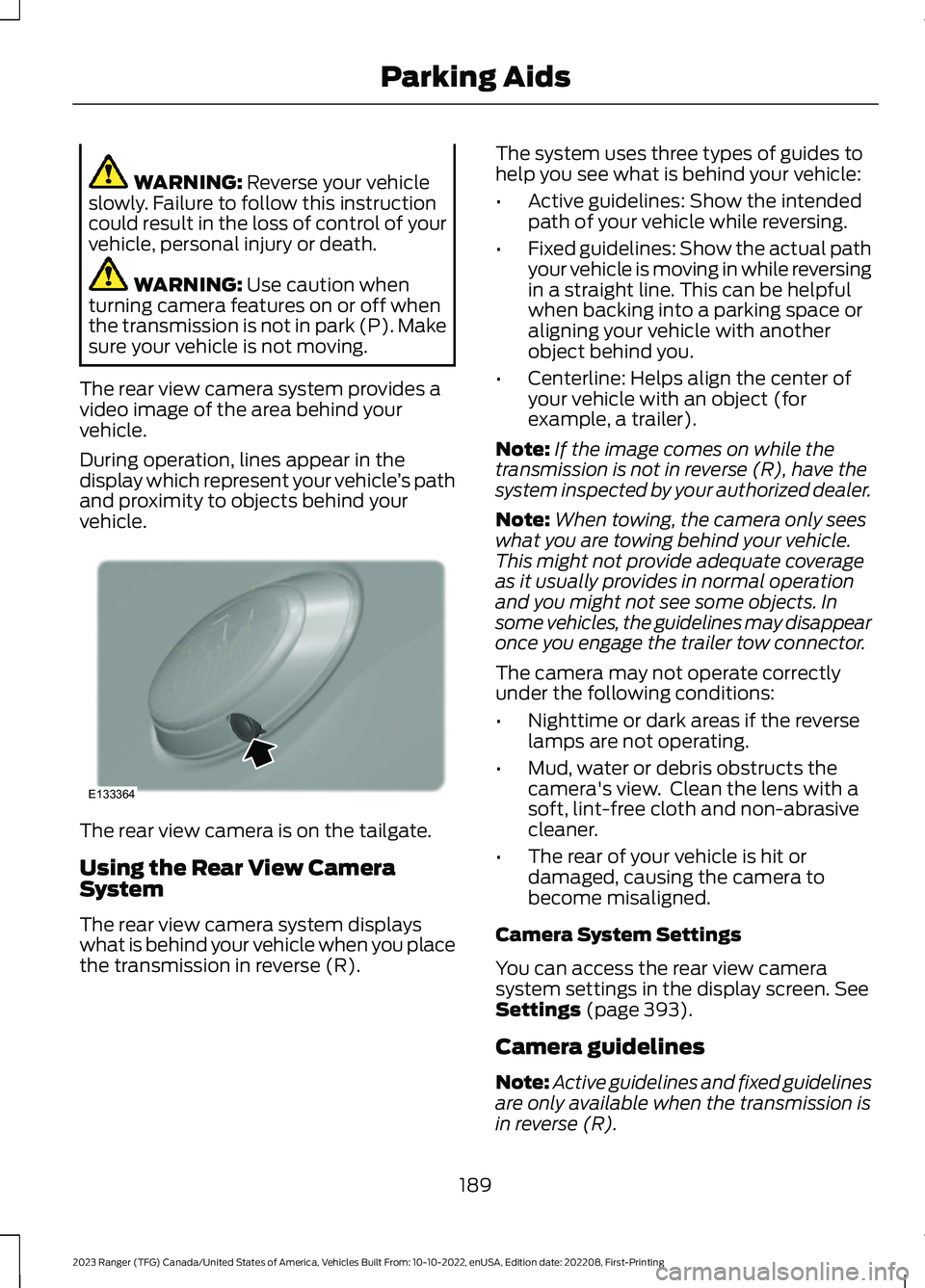
The rear view camera is on the tailgate.
Using the Rear View CameraSystem
The rear view camera system displayswhat is behind your vehicle when you placethe transmission in reverse (R).
The system uses three types of guides tohelp you see what is behind your vehicle:
•Active guidelines: Show the intendedpath of your vehicle while reversing.
•Fixed guidelines: Show the actual pathyour vehicle is moving in while reversingin a straight line. This can be helpfulwhen backing into a parking space oraligning your vehicle with anotherobject behind you.
•Centerline: Helps align the center ofyour vehicle with an object (forexample, a trailer).
Note:If the image comes on while thetransmission is not in reverse (R), have thesystem inspected by your authorized dealer.
Note:When towing, the camera only seeswhat you are towing behind your vehicle.This might not provide adequate coverageas it usually provides in normal operationand you might not see some objects. Insome vehicles, the guidelines may disappearonce you engage the trailer tow connector.
The camera may not operate correctlyunder the following conditions:
•Nighttime or dark areas if the reverselamps are not operating.
•Mud, water or debris obstructs thecamera's view. Clean the lens with asoft, lint-free cloth and non-abrasivecleaner.
•The rear of your vehicle is hit ordamaged, causing the camera tobecome misaligned.
Camera System Settings
You can access the rear view camerasystem settings in the display screen. SeeSettings (page 393).
Camera guidelines
Note:Active guidelines and fixed guidelinesare only available when the transmission isin reverse (R).
189
2023 Ranger (TFG) Canada/United States of America, Vehicles Built From: 10-10-2022, enUSA, Edition date: 202208, First-PrintingParking AidsE133364
Page 197 of 470

Resuming the Set Speed
Press to resume the set speed.
Switching Cruise Control Off
Press and release the buttonwhen the system is in standbymode or switch the ignition off.
Note:You erase the set speed when youswitch the system off.
USING ADAPTIVE CRUISE
CONTROL (IF EQUIPPED)
WARNING: You are responsible forcontrolling your vehicle at all times. Thesystem is designed to be an aid and doesnot relieve you of your responsibility todrive with due care and attention. Failureto follow this instruction could result inthe loss of control of your vehicle,personal injury or death.
WARNING: Pay close attention tochanging road conditions such asentering or leaving a highway, on roadswith intersections or roundabouts, roadswithout visible lanes of travel, roads thatare unpaved, or steep slopes. Failure tofollow this instruction could result in theloss of control of your vehicle, personalinjury or death.
WARNING: Do not use the systemin poor visibility, for example fog, heavyrain, spray or snow.
WARNING: Do not use the systemwhen towing a trailer that hasaftermarket electronic trailer brakecontrols. Failure to follow this instructioncould result in the loss of control of yourvehicle, personal injury or death.
WARNING: Do not use tire sizesother than those recommended becausethis can affect the normal operation ofthe system. Failure to do so may resultin a loss of vehicle control, which couldresult in serious injury.
WARNING: The system may notdetect stationary or slow movingvehicles below 6 mph (10 km/h).
WARNING: The system does notdetect pedestrians or objects in the road.
WARNING: The system does notdetect oncoming vehicles in the samelane.
WARNING: The system is not acrash warning or avoidance system.
WARNING: Do not use the systemwith a snow plow blade installed.
The system adjusts your vehicle speed tomaintain the set gap between you and thevehicle in front of you in the same lane.You can select four gap settings.
The system uses a radar sensor thatdirectly projects a beam in front of yourvehicle.
193
2023 Ranger (TFG) Canada/United States of America, Vehicles Built From: 10-10-2022, enUSA, Edition date: 202208, First-PrintingCruise Control (If Equipped) E265297
Page 211 of 470

Blocked Sensors
The sensors are inside the tail lamp onboth sides of your vehicle.
If the sensors become blocked, a messagemay appear in the information display. SeeInformation Messages (page 104). Thealert indicators remain illuminated but thesystem does not alert you.
Note:Keep the sensors free from snow, iceand large accumulations of dirt.
Note:Do not cover the sensors with bumperstickers, repair compound or other objects.
Note:Blocked sensors could affect systemperformance.
Note:Bike and cargo racks could causefalse alerts due to obstruction of the sensor.We recommend switching the feature offwhen using a bike or cargo rack.
Blind Spot Information Systemwith Trailer Tow (If Equipped)
The blind spot information system withtrailer tow is designed to aid you indetecting vehicles that may have enteredthe detection area zone (A). The detectionarea is on both sides of your vehicle andtrailer, extending rearward from theexterior mirrors to the end of your trailer.When you attach a trailer and have set upa blind spot trailer, the blind spotinformation system with trailer towbecomes active when driving forwardabove 6 mph (10 km/h).
You can switch the system off in theinformation display. See GeneralInformation (page 96). If you switch theblind spot information system off, blindspot information system with trailer towautomatically turns off.
207
2023 Ranger (TFG) Canada/United States of America, Vehicles Built From: 10-10-2022, enUSA, Edition date: 202208, First-PrintingDriving AidsE280125 E225007
Page 212 of 470

Setting up a Blind Spot Trailer
Trailer lengthA
Trailer widthB
Trailer hitch ballC
You can set-up a trailer to work with thesystem through the information display.See General Information (page 96).When setting up a trailer, a sequence ofscreens appear asking for trailerinformation.
•Select Trailer Screen: Trailer A, TrailerB or Trailer C.
Select one of the trailers and press OK.
The menu goes to the next screen.
•Is the width less than 8.2 ft (2.5 m) andlength less than 33 ft (10 m)?
If no, the system turns off.
If yes, the menu goes to the next screen.
•Trailer width measurement:
The width of the trailer is measured at thefront of the trailer. It is not measured at thewidest point of the trailer. The maximumwidth at the front of the trailer that thesystem can support is 8.2 ft (2.5 m).
Note:You do not need to enter an exacttrailer width measurement. You only needto confirm that the width of the trailer is8.2 ft (2.5 m) or less.
•Trailer length measurement:
The trailer length is the distance betweenthe trailer hitch ball and the rear of thetrailer. The maximum length that thesystem can support is 33 ft (10 m).
•Enter length of trailer:
Toggling up or down using the menubuttons increases or decreases themeasurement by 3 ft (1 m). Select a lengththat is equal to or within 3 ft (1 m) of theactual measured length. For example, ifthe actual measured length is 25 ft (7.6 m),toggle the length in the menu to 27 ft(8.2 m). When you enter the length of thetrailer, the system setup is saved.
Note:When you connect a trailer and donot set up a Blind Spot Trailer, the systemturns off and a warning appears in theinstrument display.
Note:If the trailer is actually a bike rack orcargo rack with electrical lighting, enter alength of 3 ft (1 m). Cross Traffic Alertremains on for trailers with a length of 3 ft(1 m) or less.
Note:Proper measurement andmeasurement entry is required for thesystem to function as designed.
System Operation
If you select a trailer in the informationdisplay prior to connecting a trailer, thesystem loads that configuration and theinformation display shows a messagewhen you connect the trailer. A secondmessage appears stating cross traffic alertis off. The blind spot information systemwith trailer tow still normally functionswhen driving forward.
If you connect a trailer prior to selecting atrailer in the information display, amessage appears asking you to select atrailer from the list of trailers or to add atrailer. In order for the blind spotinformation system with trailer tow tofunction, you must select an existing trailer
208
2023 Ranger (TFG) Canada/United States of America, Vehicles Built From: 10-10-2022, enUSA, Edition date: 202208, First-PrintingDriving AidsE225008
Page 213 of 470

or add a new trailer. If you ignore therequest or if you exit the screen, a messageappears stating the system has turned offdue to a trailer connect. This message maynot appear until your vehicle speed reaches22 mph (35 km/h).
The blind spot information system withtrailer tow activates when driving forwardfor that particular trailer set up. If you cyclethe ignition, the blind spot informationsystem with trailer tow continues tofunction using the last trailer you select.
Trailer Considerations
The system is designed to work with atrailer with a front width of 8.2 ft (2.5 m)or less, and a total length from the trailerhitch ball to the rear of the trailer of 33 ft(10 m) or less.
Some trailers may cause a slight changein system performance:
•Large box trailers may cause falsealerts to occur when driving next toinfrastructures or near parked cars. Afalse alert may also occur while makinga 90-degree turn.
•Trailers that have a width greater than8.2 ft (2.5 m) at the front and have atotal length greater than 20 ft (6 m)may cause delayed alerts when avehicle is passing at high speed.
•Box trailers that have a width greaterthan 8.2 ft (2.5 m) at the front maycause early alerts when you pass avehicle.
•Clam shell or V-Nose box trailers witha width greater than 8.2 ft (2.5 m) atthe front may cause delayed alertswhen a vehicle traveling the samespeed as your vehicle merges lanes.
System Errors
If the system detects a fault, a warninglamp illuminates and a message displays.See Information Messages (page 104).
Switching the System On and Off
You can switch the system off using theinformation display. See GeneralInformation (page 96). When you switchthe system off, you do not receive alertsand the information display shows asystem off message. The warning indicatorin the cluster also illuminates. When youswitch the system on or off, the alertindicators flash twice.
Note:The system remembers the lastsetting when you start your vehicle.
To permanently switch the system off,contact an authorized dealer.
CROSS TRAFFIC ALERT (IF
EQUIPPED)
WARNING: Do not use the crosstraffic alert system as a replacement forusing the interior and exterior mirrors orlooking over your shoulder beforereversing out of a parking space. Thecross traffic alert system is not areplacement for careful driving.
WARNING: The system may notoperate properly during severe weatherconditions, for example snow, ice, heavyrain and spray. Always drive with duecare and attention. Failure to take caremay result in a crash.
The system alerts you of vehiclesapproaching from the sides behind yourvehicle when you shift into reverse (R).
209
2023 Ranger (TFG) Canada/United States of America, Vehicles Built From: 10-10-2022, enUSA, Edition date: 202208, First-PrintingDriving Aids
Page 216 of 470

Cross Traffic Alert Behavior WhenTrailer is Attached
Note:The system may not correctly operatewhen towing a trailer. For vehicles with anapproved trailer tow module and tow bar,the system turns off when you attach atrailer. For vehicles with an aftermarkettrailer tow module or tow bar, werecommend that you switch the system offwhen you attach a trailer.
Cross traffic alert remains on when youattach a trailer in vehicles that come withblind spot information system with trailertow under the following conditions:
•You connect a trailer.
•The trailer is a bike rack or cargo rackwith a maximum length of 3 ft (1 m).
•You set the trailer length to 3 ft (1 m)in the information display.
See Blind Spot Information System(page 206).
Switching the System On and Off
To switch the system on or off, adjust thesetting. Depending on your vehicle options,the setting could be in the following:
•Information display. See GeneralInformation (page 96).
•Touchscreen. See Settings (page 393).
Note:The system turns on every time youswitch the ignition on. To permanentlyswitch the system off, contact an authorizeddealer.
Cross Traffic Alert Indicator
When the system detects anapproaching vehicle, a tonesounds, a warning lampilluminates in the relevant exterior mirrorand arrows appear in the informationdisplay to show which side theapproaching vehicle is coming from.
Note:If arrows do not display, a messageappears in the information display.
If the system malfunctions, a warning lampilluminates in the instrument cluster anda message appears in the informationdisplay. Have your vehicle checked as soonas possible.
Note:In exceptional conditions, the systemcould alert you, even when there is nothingin the detection zone, for example a vehiclepassing further away from your vehicle.
Cross Traffic Alert Information Messages
ActionMessage
Displays instead of indication arrows when the systemdetects a vehicle. Check for approaching traffic.Cross Traffic Alert
Indicates blocked cross traffic alert system sensors. Cleanthe sensors. If the message continues to appear, have yourvehicle checked as soon as possible.
Cross Traffic Not Avail-able Sensor Blocked SeeManual
The system has malfunctioned. Have your vehicle checkedas soon as possible.Cross Traffic SystemFault
Displays if you attach a trailer to your vehicle.Cross Traffic Alert Deac-tivated Trailer Attached
212
2023 Ranger (TFG) Canada/United States of America, Vehicles Built From: 10-10-2022, enUSA, Edition date: 202208, First-PrintingDriving AidsE268294