2023 FORD MUSTANG remote control
[x] Cancel search: remote controlPage 141 of 535

Saving a Preset Position
1.Switch the ignition on.
2.Adjust the memory features to yourpreferred position.
3.Press and hold the preferred presetbutton until you hear a single tone.
You can save up to three preset memorypositions at any time.
Recalling a Preset Position
Press and release a preset button.
Note:You can only recall a preset memoryposition when the ignition is off, or when thetransmission is in park (P) or neutral (N) ifthe ignition is on.
You can also recall a preset memoryposition by:
•Pressing the unlock button on yourintelligent access key fob if it is linkedto a preset position.
•Unlocking the intelligent driver doorhandle if a linked key fob is present.
Note:When the ignition is off and you usea linked key fob to recall your memoryposition, the seat moves to the easy entryposition.
Note:Pressing any of the preset buttonsduring a memory recall cancels theoperation.
Seat recall movement also stops if youdrive your vehicle.
Linking a Preset Position to yourRemote Control or IntelligentAccess Key Fob
You can save preset memory positions forup to three remote controls or intelligentaccess keys.
1.With the ignition on, move the memorypositions to the preferred positions.
2.Press and hold a preset button for fiveseconds. A tone sounds after twoseconds. Continue holding until youhear a second tone.
3.Within three seconds, press the lockbutton on the remote control you arelinking.
To unlink a remote control, follow thesame procedure – except in step 3, pressthe unlock button on the remote control.
Note:If more than one linked remotecontrol or intelligent access key is in range,the memory function moves to the settingsof the first key to initiate a memory recall.
Easy Entry and Exit Feature
If you enable the easy entry and exitfeature, it moves the driver seat positionrearward up to 2 in (5 cm) when you switchthe ignition off.
The driver seat returns to the previousposition when you switch the ignition on.
You can enable or disable this featurethrough the information display. SeeInformation Displays (page 98).
137
2023 Mustang (CZG) Canada/United States of America, Vehicles Built From: 14-11-2022, enUSA, Edition date: 202209, First-PrintingSeatsE331901
Page 144 of 535
WHAT IS THE GARAGE DOOR
OPENER
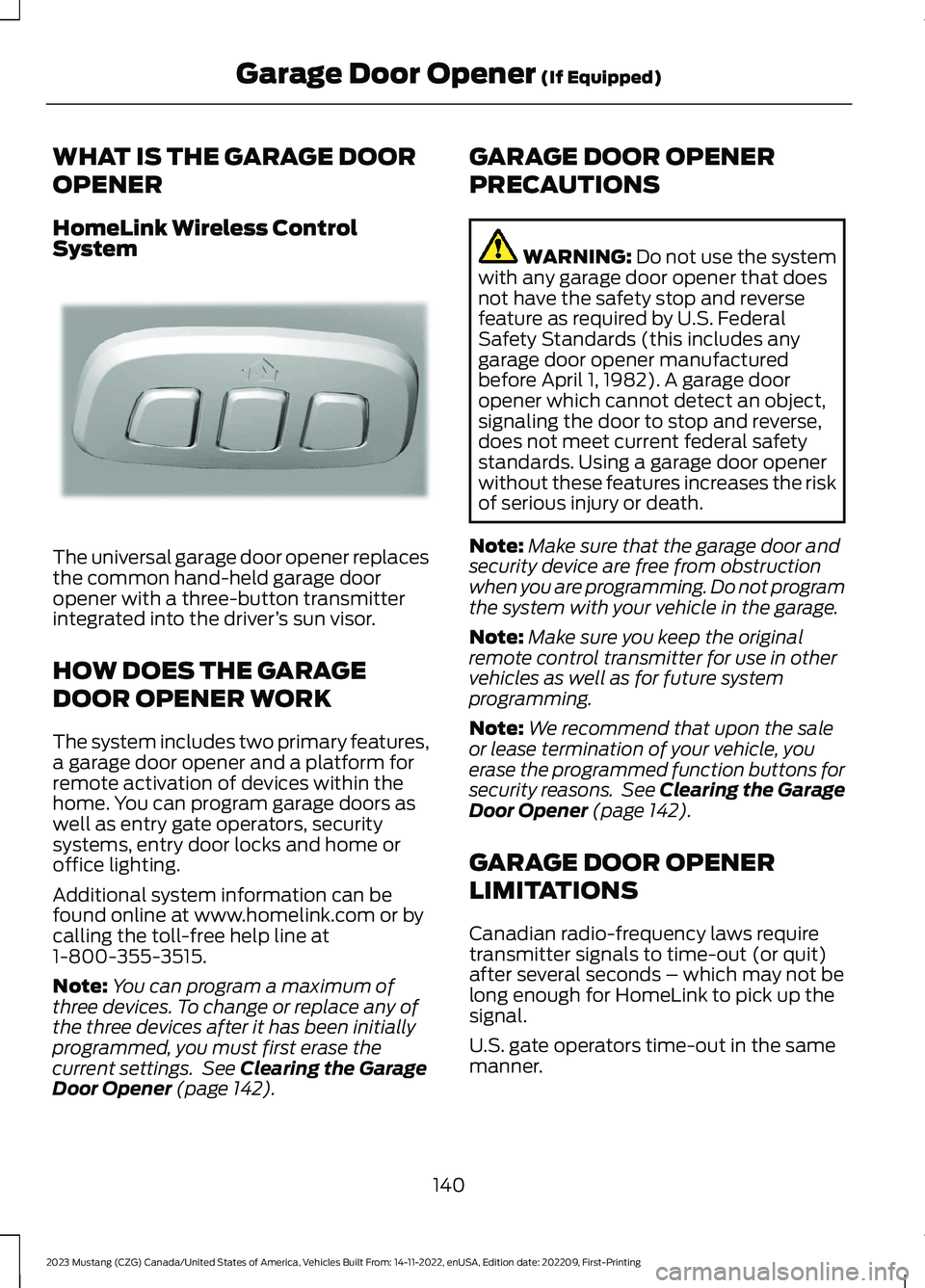
HomeLink Wireless ControlSystem
The universal garage door opener replacesthe common hand-held garage dooropener with a three-button transmitterintegrated into the driver’s sun visor.
HOW DOES THE GARAGE
DOOR OPENER WORK
The system includes two primary features,a garage door opener and a platform forremote activation of devices within thehome. You can program garage doors aswell as entry gate operators, securitysystems, entry door locks and home oroffice lighting.
Additional system information can befound online at www.homelink.com or bycalling the toll-free help line at1-800-355-3515.
Note:You can program a maximum ofthree devices. To change or replace any ofthe three devices after it has been initiallyprogrammed, you must first erase thecurrent settings. See Clearing the GarageDoor Opener (page 142).
GARAGE DOOR OPENER
PRECAUTIONS
WARNING: Do not use the systemwith any garage door opener that doesnot have the safety stop and reversefeature as required by U.S. FederalSafety Standards (this includes anygarage door opener manufacturedbefore April 1, 1982). A garage dooropener which cannot detect an object,signaling the door to stop and reverse,does not meet current federal safetystandards. Using a garage door openerwithout these features increases the riskof serious injury or death.
Note:Make sure that the garage door andsecurity device are free from obstructionwhen you are programming. Do not programthe system with your vehicle in the garage.
Note:Make sure you keep the originalremote control transmitter for use in othervehicles as well as for future systemprogramming.
Note:We recommend that upon the saleor lease termination of your vehicle, youerase the programmed function buttons forsecurity reasons. See Clearing the GarageDoor Opener (page 142).
GARAGE DOOR OPENER
LIMITATIONS
Canadian radio-frequency laws requiretransmitter signals to time-out (or quit)after several seconds – which may not belong enough for HomeLink to pick up thesignal.
U.S. gate operators time-out in the samemanner.
140
2023 Mustang (CZG) Canada/United States of America, Vehicles Built From: 14-11-2022, enUSA, Edition date: 202209, First-PrintingGarage Door Opener (If Equipped)E188211
Page 149 of 535
CENTER CONSOLE
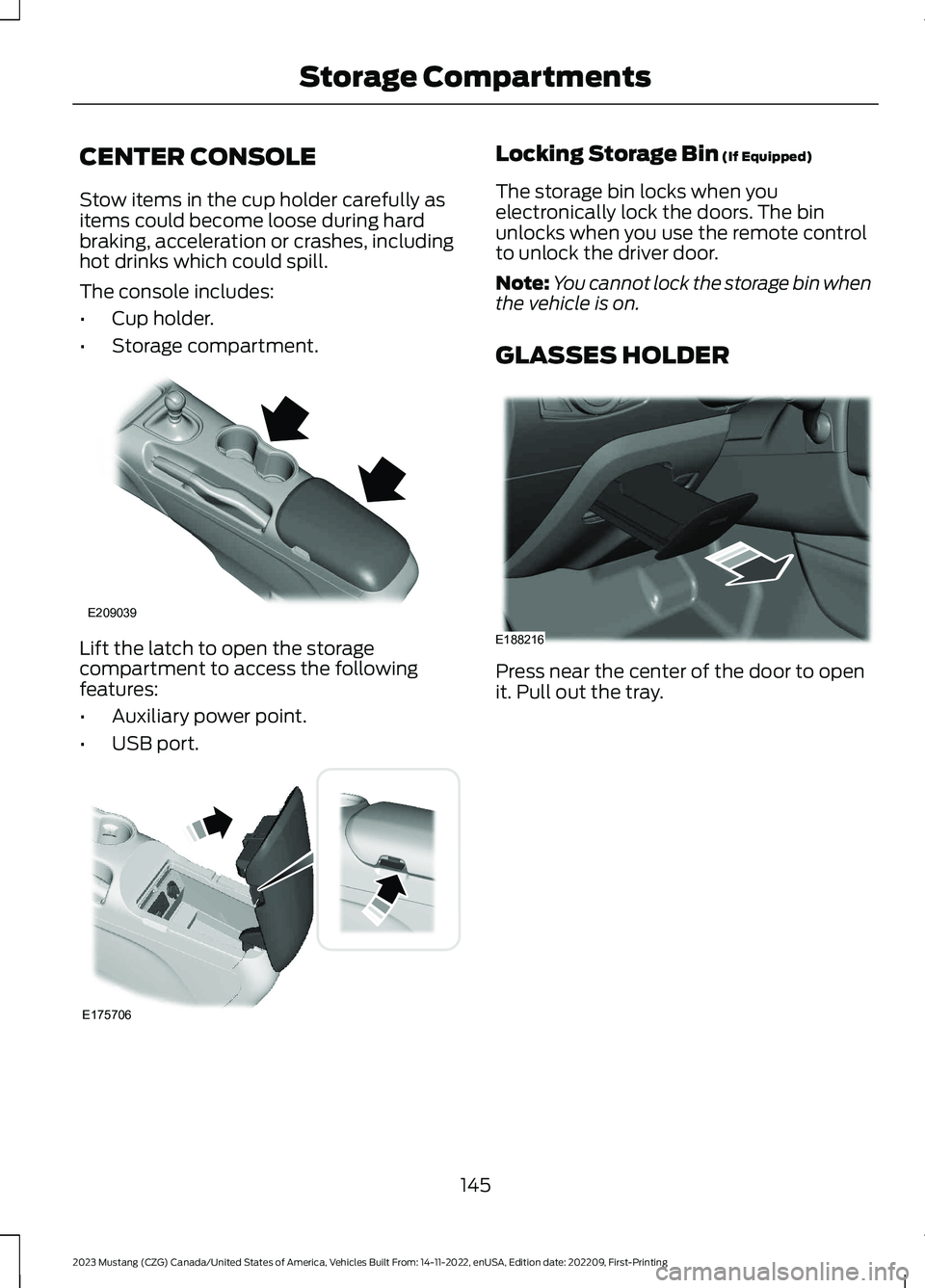
Stow items in the cup holder carefully asitems could become loose during hardbraking, acceleration or crashes, includinghot drinks which could spill.
The console includes:
•Cup holder.
•Storage compartment.
Lift the latch to open the storagecompartment to access the followingfeatures:
•Auxiliary power point.
•USB port.
Locking Storage Bin (If Equipped)
The storage bin locks when youelectronically lock the doors. The binunlocks when you use the remote controlto unlock the driver door.
Note:You cannot lock the storage bin whenthe vehicle is on.
GLASSES HOLDER
Press near the center of the door to openit. Pull out the tray.
145
2023 Mustang (CZG) Canada/United States of America, Vehicles Built From: 14-11-2022, enUSA, Edition date: 202209, First-PrintingStorage CompartmentsE209039 E175706 E188216
Page 241 of 535
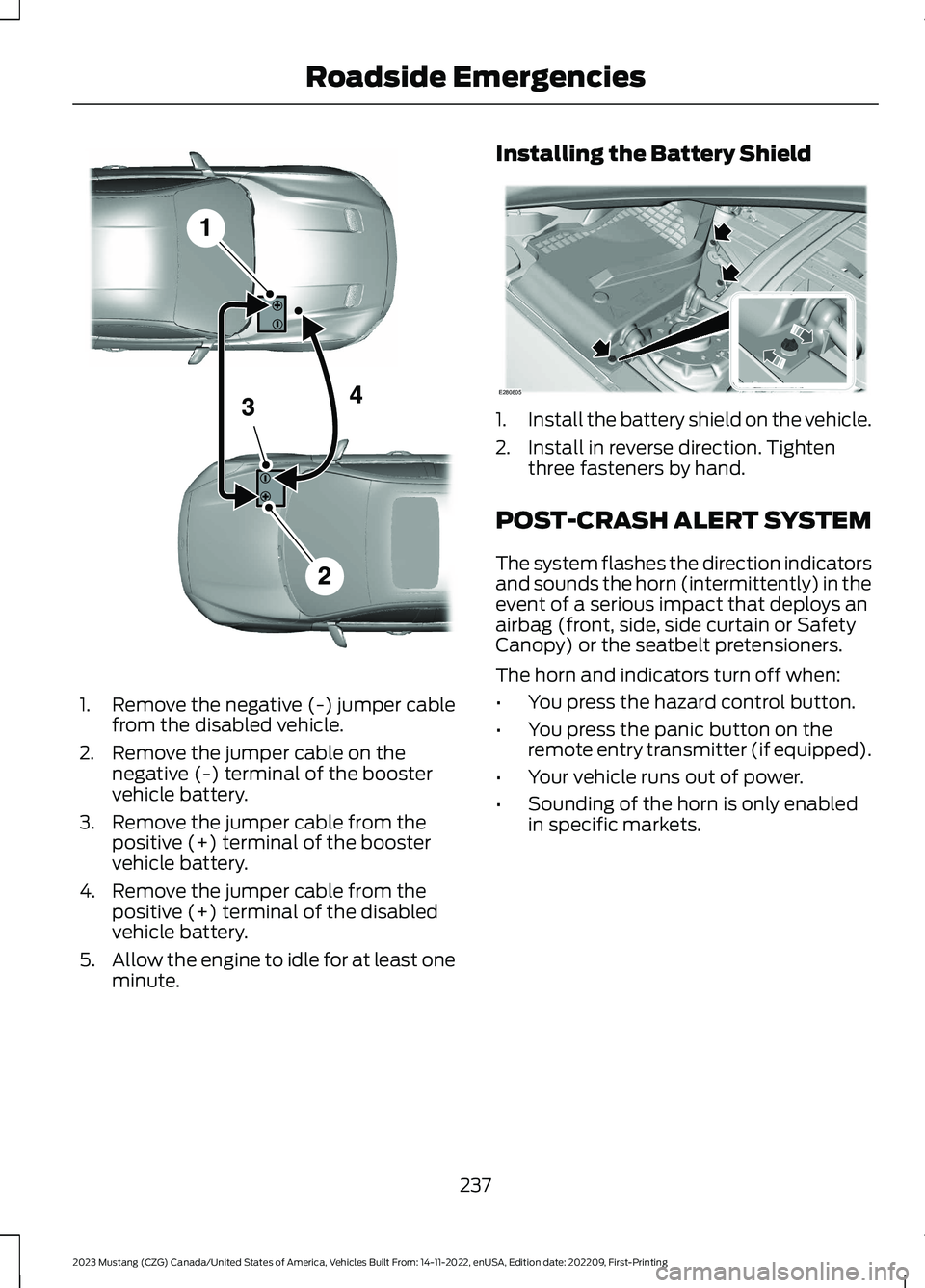
1.Remove the negative (-) jumper cablefrom the disabled vehicle.
2.Remove the jumper cable on thenegative (-) terminal of the boostervehicle battery.
3.Remove the jumper cable from thepositive (+) terminal of the boostervehicle battery.
4.Remove the jumper cable from thepositive (+) terminal of the disabledvehicle battery.
5.Allow the engine to idle for at least oneminute.
Installing the Battery Shield
1.Install the battery shield on the vehicle.
2.Install in reverse direction. Tightenthree fasteners by hand.
POST-CRASH ALERT SYSTEM
The system flashes the direction indicatorsand sounds the horn (intermittently) in theevent of a serious impact that deploys anairbag (front, side, side curtain or SafetyCanopy) or the seatbelt pretensioners.
The horn and indicators turn off when:
•You press the hazard control button.
•You press the panic button on theremote entry transmitter (if equipped).
•Your vehicle runs out of power.
•Sounding of the horn is only enabledin specific markets.
237
2023 Mustang (CZG) Canada/United States of America, Vehicles Built From: 14-11-2022, enUSA, Edition date: 202209, First-PrintingRoadside EmergenciesE281345 E280805
Page 258 of 535

Protected ComponentFuse RatingFuse or RelayNumber
In-vehicle temperature and humiditysensor.5A21
Auxiliary body module.5A22
Amplifier.30A23
Vehicle dynamics module.30A24
Ambient lighting module (base).20A25Auxiliary body module.
Right-hand front-window motor (powerdistribution module).30A26
Passenger door control unit.
Left-hand rear-window power (base).30A27
Not used (GT500).—
Right-hand rear-window power (base).30A28
Not used (GT500).—
Gateway module (base).15A29Not used (spare) (GT500).
Not used (spare)5A30
Remote keyless entry.10A31
Audio unit.20A32
Not used.—33
Run/start bus.30A34
Power distribution box run/start relay(base).5A35
Not used (GT500).—
Front camera (base).15A36
Not used (GT500).—
Heated steering wheel module (base).20A37
Not used (GT500).—
Note:Spare fuse amperage may vary.
254
2023 Mustang (CZG) Canada/United States of America, Vehicles Built From: 14-11-2022, enUSA, Edition date: 202209, First-PrintingFuses
Page 323 of 535
WARNING: Only usereplacement tires and wheelsthat are the same size, loadindex, speed rating and type(such as P-metric versusLT-metric or all-season versusall-terrain) as those originallyprovided by Ford. Therecommended tire and wheelsize may be found on either theSafety Compliance CertificationLabel (affixed to either the doorhinge pillar, door-latch post, orthe door edge that meets thedoor-latch post, next to thedriver's seating position), or theTire Label which is located onthe B-Pillar or edge of thedriver's door. If this informationis not found on these labels, thenyou should contact yourauthorized dealer as soon aspossible. Use of any tire or wheelnot recommended by Ford canaffect the safety andperformance of your vehicle,which could result in anincreased risk of loss of vehiclecontrol, vehicle rollover, personalinjury and death.
WARNING: To reduce therisk of serious injury, whenmounting replacement tires andwheels, you should not exceedthe maximum pressure indicatedon the sidewall of the tire to setthe beads without additionalprecautions listed below. If thebeads do not seat at themaximum pressure indicated,re-lubricate and try again.
WARNING: For a mountingpressure more than 20 psi(1.38 bar) greater than themaximum pressure, a Forddealer or other tire serviceprofessional should do themounting.
WARNING: Always inflatesteel carcass tires with a remoteair fill with the person inflatingstanding at a minimum of 12 ft(3.66 m) away from the wheeland tire assembly.
WARNING: When inflatingthe tire for mounting pressuresup to 20 psi (1.38 bar) greaterthan the maximum pressure onthe tire sidewall, the followingprecautions must be taken toprotect the person mounting thetire:
•Make sure that you have thecorrect tire and wheel size.
•Lubricate the tire bead andwheel bead seat area again.
319
2023 Mustang (CZG) Canada/United States of America, Vehicles Built From: 14-11-2022, enUSA, Edition date: 202209, First-PrintingWheels and Tires
Page 372 of 535
WHAT IS A CONNECTED
VEHICLE
A connected vehicle has technology thatallows your vehicle to connect to a mobilenetwork and for you to access a range offeatures. When used in conjunction withthe FordPass app, it could allow you tomonitor and control your vehicle further,for example checking the tire pressures,the fuel level and the vehicle location. Foradditional information, refer to the localFord website.
CONNECTED VEHICLE
REQUIREMENTS
Connected service and related featurefunctionality requires a compatible vehiclenetwork.
Some remote features require additionalservice activation. Log in to your Fordaccount for details. Some restrictions, thirdparty terms and message or data ratesmay apply.
CONNECTED VEHICLE
LIMITATIONS
Evolving technology, cellular networks, orregulations could affect functionality andavailability, or continued provision of somefeatures. These changes could even stopsome features from functioning.
CONNECTING THE VEHICLE TO
A MOBILE NETWORK
WHAT IS THE MODEM
The modem allows access to arange of features built into yourvehicle.
ENABLING AND DISABLING THEMODEM
1.Press Settings.
2.Press FordPass Connect.
3.Press Connectivity Settings.
4.Switch connectivity features on or off.
CONNECTING FORDPASS TO THEMODEM
1.Make sure that the modem is enabledusing the vehicle settings menu.
2.Open the FordPass app on your deviceand log in.
3.Add your vehicle or select your vehicleif already added.
4.Select the option to activate yourvehicle.
5.Make sure that the name on the screenmatches the name shown in yourFordPass account.
6.Confirm that FordPass account isconnected to the modem.
CONNECTING THE VEHICLE TO
A WI-FI NETWORK
1.Press Settings.
2.Press Wi-Fi.
3.Switch Wi-Fi on.
4.Press View Available Networks.
5.Select an available Wi-Fi network.
Note:Enter the network password toconnect to a secure network.
368
2023 Mustang (CZG) Canada/United States of America, Vehicles Built From: 14-11-2022, enUSA, Edition date: 202209, First-PrintingConnected Vehicle
Page 447 of 535
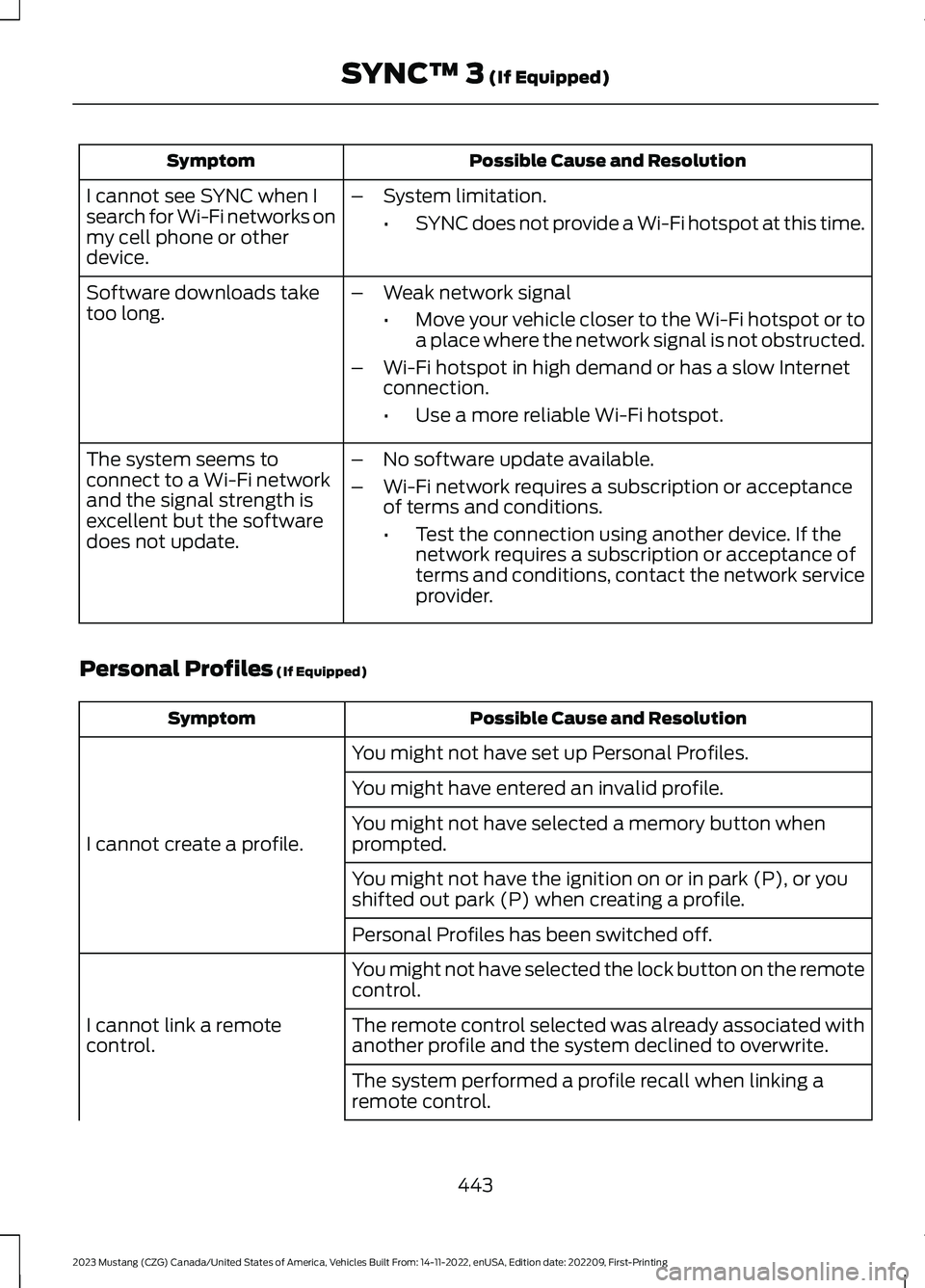
Possible Cause and ResolutionSymptom
I cannot see SYNC when Isearch for Wi-Fi networks onmy cell phone or otherdevice.
–System limitation.
•SYNC does not provide a Wi-Fi hotspot at this time.
–Weak network signal
•Move your vehicle closer to the Wi-Fi hotspot or toa place where the network signal is not obstructed.
–Wi-Fi hotspot in high demand or has a slow Internetconnection.
•Use a more reliable Wi-Fi hotspot.
Software downloads taketoo long.
–No software update available.
–Wi-Fi network requires a subscription or acceptanceof terms and conditions.
•Test the connection using another device. If thenetwork requires a subscription or acceptance ofterms and conditions, contact the network serviceprovider.
The system seems toconnect to a Wi-Fi networkand the signal strength isexcellent but the softwaredoes not update.
Personal Profiles (If Equipped)
Possible Cause and ResolutionSymptom
You might not have set up Personal Profiles.
I cannot create a profile.
You might have entered an invalid profile.
You might not have selected a memory button whenprompted.
You might not have the ignition on or in park (P), or youshifted out park (P) when creating a profile.
Personal Profiles has been switched off.
You might not have selected the lock button on the remotecontrol.
I cannot link a remotecontrol.The remote control selected was already associated withanother profile and the system declined to overwrite.
The system performed a profile recall when linking aremote control.
443
2023 Mustang (CZG) Canada/United States of America, Vehicles Built From: 14-11-2022, enUSA, Edition date: 202209, First-PrintingSYNC™ 3 (If Equipped)