2023 FORD EXPLORER park assist
[x] Cancel search: park assistPage 300 of 573
•As with any vehicle fire, do not inhalesmoke, vapors or gas from the vehicle,as they may be hazardous.
•Stay out of the roadway and stay outof the way of any oncoming trafficwhile awaiting the arrival of emergencyresponders.
Post-Incident
•Do not store a severely damagedvehicle with a lithium-ion battery insidea structure or within 49 ft (15 m) of anystructure or vehicle.
•Make sure that passenger and luggagecompartments remain ventilated.
•Call emergency assistance if youobserve leaking fluids, sparks, smokeor flames, or hear gurgling or bubblingfrom the high-voltage battery.
POST-CRASH ALERT SYSTEM
The system flashes the direction indicatorsand sounds the horn (intermittently) in theevent of a serious impact that deploys anairbag (front, side, side curtain or SafetyCanopy) or the seatbelt pretensioners.
The horn and indicators turn off when:
•You press the hazard control button.
•You press the panic button on theremote entry transmitter (if equipped).
•Your vehicle runs out of power.
•Sounding of the horn is only enabledin specific markets.
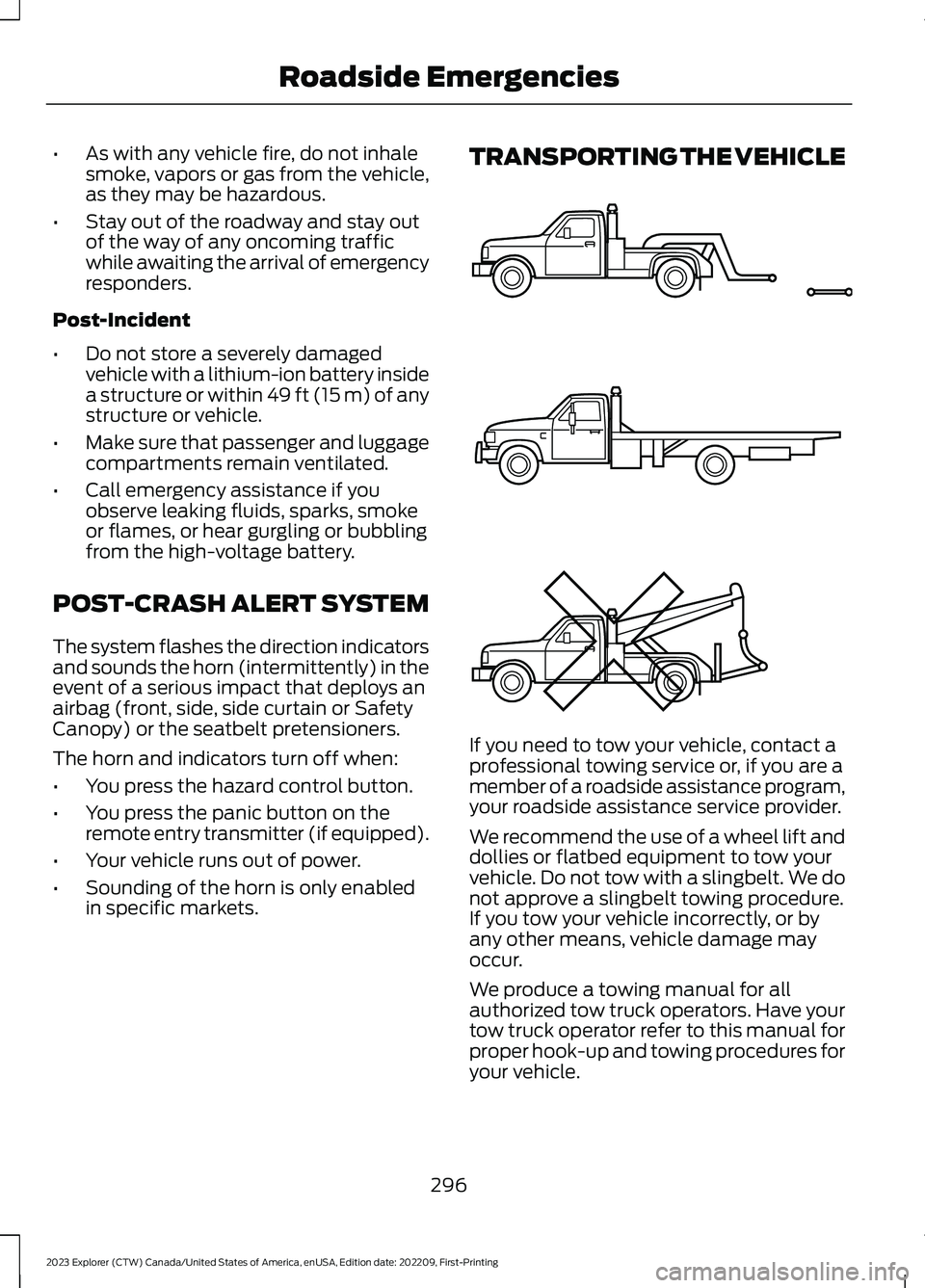
TRANSPORTING THE VEHICLE
If you need to tow your vehicle, contact aprofessional towing service or, if you are amember of a roadside assistance program,your roadside assistance service provider.
We recommend the use of a wheel lift anddollies or flatbed equipment to tow yourvehicle. Do not tow with a slingbelt. We donot approve a slingbelt towing procedure.If you tow your vehicle incorrectly, or byany other means, vehicle damage mayoccur.
We produce a towing manual for allauthorized tow truck operators. Have yourtow truck operator refer to this manual forproper hook-up and towing procedures foryour vehicle.
296
2023 Explorer (CTW) Canada/United States of America, enUSA, Edition date: 202209, First-PrintingRoadside EmergenciesE143886
Page 311 of 573

Protected ComponentFuse RatingFuse or RelayNumber
Windshield and rear window washer pumprelay power.15A16
Charge status indicator (hybrid electricvehicle).5A17
Starter motor.30A18
Headlamp leveling motors.10A21Adaptive headlamps.
Electric power assisted steering module.10A22
Anti-lock brake system module withintegrated park brake.10A23
Powertrain control module.10A24Hybrid powertrain control module.
Air quality sensor.10A25360 camera with park aid.Rear view camera.Blind spot information system.Adaptive cruise control module.
Transmission control module.15A26
Anti-lock brake system valves with integ-rated park brake.40A28
Anti-lock brake system pump with integ-rated park brake.60A29
Driver seat module.30A30
Passenger seat motor.30A31
Front media bin power point.20A32
Rear cargo area power point.20A33
Console end cap power point.20A34
Power point 4.20A35
Power inverter.40A36
Climate controlled seat module.30A38
Power liftgate module.30A41
307
2023 Explorer (CTW) Canada/United States of America, enUSA, Edition date: 202209, First-PrintingFuses
Page 317 of 573
Protected ComponentFuse RatingFuse or RelayNumber
Terrain management switch.10A31Selectable drive mode switch.Transceiver module.
Audio control module.20A32
Not used.—33
Run/start relay.30A34
Not used (spare).5A35
Park assist module.15A36Image processing module A.
Not used (spare).20A37
Left-hand rear power window.30A38Right-hand rear power window.
Note: Spare fuse amperage may vary.
CHANGING A FUSE
Fuses
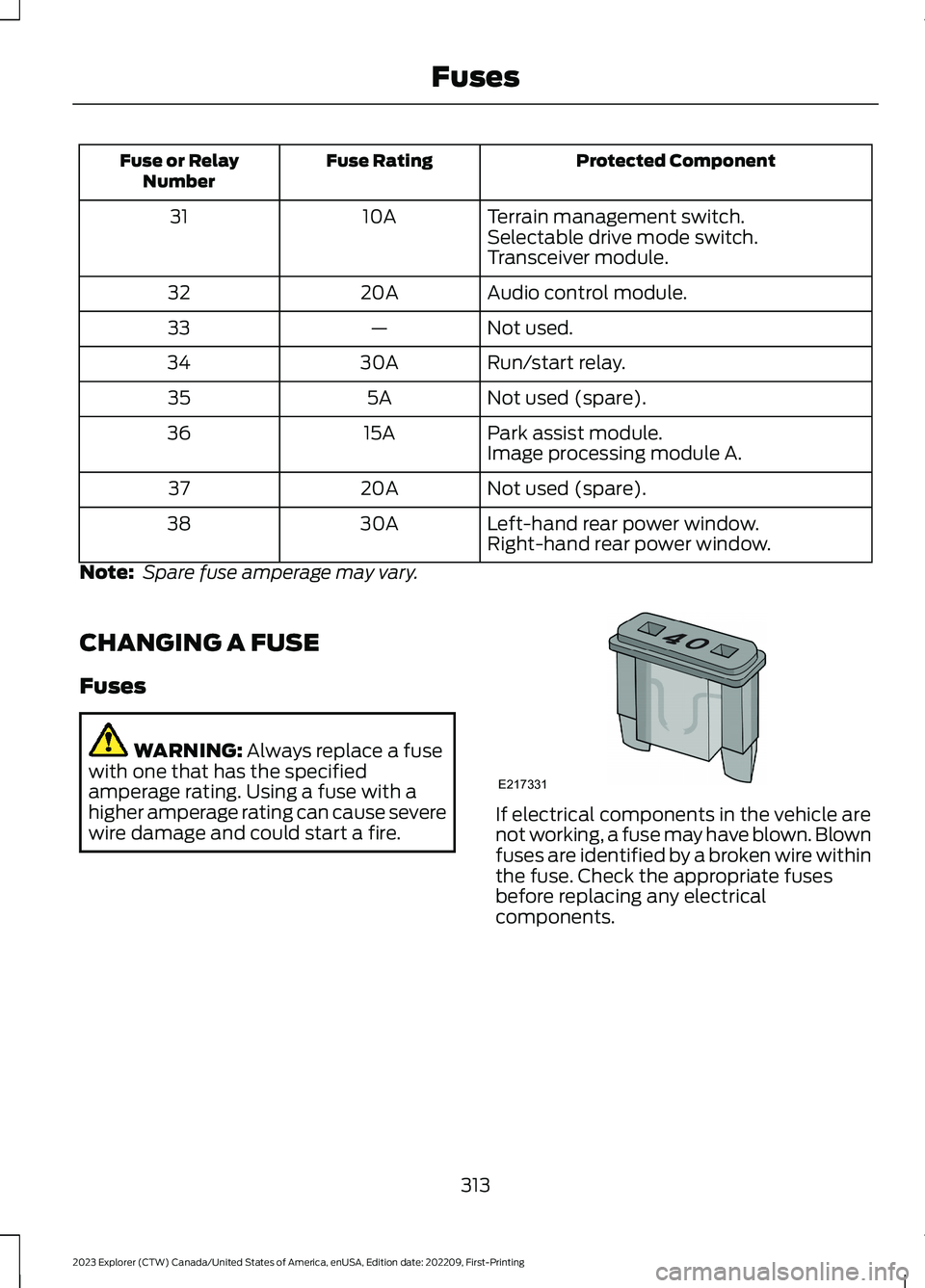
WARNING: Always replace a fusewith one that has the specifiedamperage rating. Using a fuse with ahigher amperage rating can cause severewire damage and could start a fire.If electrical components in the vehicle arenot working, a fuse may have blown. Blownfuses are identified by a broken wire withinthe fuse. Check the appropriate fusesbefore replacing any electricalcomponents.
313
2023 Explorer (CTW) Canada/United States of America, enUSA, Edition date: 202209, First-PrintingFusesE217331
Page 373 of 573

•To reduce the chances of interferencefrom another vehicle, perform thesystem reset procedure at least 3 ft(1 m) away from another Ford MotorCompany vehicle undergoing thesystem reset procedure at the sametime.
•Do not wait more than two minutesbetween resetting each tire sensor orthe system can time-out and you haveto repeat the entire procedure on allfour wheels.
•A double horn sounds indicating theneed to repeat the procedure.
Performing the System Reset Procedure
Read the entire procedure beforeattempting.
1.Drive the vehicle above 20 mph(32 km/h) for at least two minutes,then park in a safe location where youcan easily get to all four tires and haveaccess to an air pump.
2.Place the ignition in the off position andkeep the key in the ignition.
3.Cycle the ignition to the on positionwith the engine off.
4.Turn the hazard flashers on then offthree times. You must accomplish thiswithin 10 seconds. If you successfullyenter the reset mode, the horn soundsonce, the system indicator flashes anda message shows in the informationdisplay. If this does not occur, pleasetry again starting at step 2. If afterrepeated attempts to enter the resetmode, the horn does not sound, thesystem indicator does not flash and nomessage shows in the informationdisplay, seek service from yourauthorized dealer.
5.Train the tire pressure monitoringsystem sensors in the tires using thefollowing system reset sequencestarting with the left front tire in thefollowing clockwise order: Left front -driver side front tire, Right front -passenger side front tire, Right rear -passenger side rear tire, Left rear -driver side rear tire.
6.Remove the valve cap from the valvestem on the left front tire. Decrease theair pressure until the horn sounds.
Note:The single horn tone confirms thatthe sensor identification code has beenlearned by the module for this position. If adouble horn is heard, the reset procedurewas unsuccessful, and you must repeat it.
7.Remove the valve cap from the valvestem on the right front tire. Decreasethe air pressure until the horn sounds.
8.Remove the valve cap from the valvestem on the right rear tire. Decrease theair pressure until the horn sounds.
9.Remove the valve cap from the valvestem on the left rear tire. Decrease theair pressure until the horn sounds.Training is complete after the hornsounds for the last tire trained, driverside rear tire, the system indicatorstops flashing, and a message showsin the information display.
10.Turn the ignition off. If two short hornbeeps are heard, the reset procedurewas unsuccessful and you mustrepeat it. If after repeating theprocedure and two short beeps areheard when the ignition is turned tooff, seek assistance from yourauthorized dealer.
369
2023 Explorer (CTW) Canada/United States of America, enUSA, Edition date: 202209, First-PrintingWheels and Tires
Page 459 of 573
•Idling: The vehicle is running and in park(P). The engine and/or the high voltagebattery are on.
•Electric Driving: The vehicle is runningand in drive (D) or neutral (N). The highvoltage battery provides power to thewheels.
•Hybrid Driving: The vehicle is runningand in drive (D) or neutral (N). Theengine and the high voltage batteryprovide power to the wheels.
•Regenerative Braking: The vehicle isrunning in drive (D) and is slowingdown. Power captured by theregenerative braking system is sentback to the high voltage battery.
Engine On Due To
The following conditions help to explainwhy the engine is on, and what you can doto allow all electric operation.
•Drive Power: The engine is on due toaccelerator pedal pressure or speedcontrol activation. Reduce pressure onthe accelerator pedal or switch off thespeed control to return to full electricmode.
•High Speed: The engine is on becausethe vehicle speed exceeds the level forfull electric operation. Reduce thespeed to return to electric operation.
•Heater Setting: The engine is onbecause of the heater setting. Reduceor turn off the heater setting to returnto electric operation.
•Neutral Gear: The engine is on becausethe vehicle is in neutral (N). Shift outof neutral gear to return to electricoperation.
•Engine Cold: The engine is on becauseit is cold. The vehicle returns to electricoperation once the engine is sufficientlywarm.
•Battery Charging: The engine is on tocharge the high voltage battery. Thevehicle returns to electric operationonce the battery is charged.
•Low Gear: The engine is on becausethe vehicle is in low gear. Shift out oflow gear to return to electric operation.
•Normal Operation: The engine is on tooptimize vehicle operation. The vehiclereturns to electric operation whenpossible.
•Engine Braking Active: The engine is onto provide increased powertrainbraking. This can occur when you turnon grade assist, when speed control ison or when driving with your foot offthe accelerator pedal. Turning offgrade assist or speed control mayallow the vehicle to return to electricoperation.
•Battery Temperature: The engine is ondue to a high or low high voltagebattery temperature. This is a normaloperating condition. The vehicle returnsto electric operation when possible.
•Drive Mode: The engine is on due to thedrive mode selection. Select anappropriate drive mode for electric onlyoperation.
APPS
The system allows you interact with selectmobile apps while keeping your eyes onthe road. Voice commands, your steeringwheel buttons, or a quick tap on yourtouchscreen give you advanced control ofcompatible mobile apps. You can alsostream your favorite music or podcasts,share your time of arrival with friends, andkeep connected safely.
455
2023 Explorer (CTW) Canada/United States of America, enUSA, Edition date: 202209, First-PrintingSYNC™ 3
Page 462 of 573

Action and DescriptionMenu Item
Select to choose from a listing ofweather locations.Area
Touch this button to view scores and schedules from a varietyof sports. You can also save up to 10 favorite teams for easieraccess. The score automatically refreshes when a game is inprogress.
Sports Info
Touch this button to view ski conditions for a specific area.Ski Conditions
SETTINGS
Press the button to enter thesettings menu.
Once you select a tile, press thebutton next to a menu item toview an explanation of thefeature or setting.
Sound
Select this tile to adjust the sound settings.
Clock
Select this tile to adjust the clock settings.
Bluetooth®
Select this tile to switch Bluetooth® onand off and adjust the settings.
Phone
Select this tile to connect, disconnect, andmanage the connected device settings.
Audio
Select this tile to adjust the audio settings.
Driver Assist (If Equipped)
Select this tile to adjust Driver Assistfeatures like Parking Aids, Lane KeepingSystem, Pedestrian Detection, andAuto-Start-Stop.
Vehicle
Select this tile to adjust vehicle settingslike windows, alarm, lighting, and MyKeysettings.
FordPass (If Equipped)
Select this tile to adjust the FordPasssettings
General
Select this tile to adjust settings likelanguage, measurement units, or to resetthe system.
911 Assist (If Equipped)
Select this tile to switch 911 Assist on andoff.
Automatic Updates
Select this tile to adjust the automaticupdate settings.
Mobile Apps
Select this tile to adjust permissions,enable, disable, and update mobile apps.
458
2023 Explorer (CTW) Canada/United States of America, enUSA, Edition date: 202209, First-PrintingSYNC™ 3E280315 E268570
Page 479 of 573

Less Cost to Properly Maintain YourVehicle
Ford Protect extended service plan alsooffers a Premium Maintenance Plan thatcovers all scheduled maintenance, andselected wear items. The coverage isprepaid, so you never have to worry aboutthe cost of your vehicle’s maintenance.
Covered maintenance includes:
•Windshield wiper blades.
•Spark plugs.
•The clutch disc (if equipped).
•Brake pads and linings.
•Shock absorbers.
•Struts.
•Engine belts.
•Engine coolant hoses, clamps andO-rings.
•Diesel exhaust fluid replenishment (ifequipped).
•Cabin air filter replacement every20,000 mi (32,000 km) (electricvehicles only).
Interest Free Finance Options
Just a 5% down payment will provide youwith an affordable, no interest, no feepayment program allowing you all thesecurity and benefits Ford Protectextended service plan has to offer whilepaying over time. You are pre-approvedwith no credit check or hassles. To learnmore, call our Ford Protect extendedservice plan specialists at 800-367-3377.
Ford Protect Extended Service PlanP.O. Box 321067Detroit, MI 48232
Ford Protect Extended ServicePlan (CANADA ONLY)
You can get more protection for yourvehicle by purchasing a Ford Protectextended service plan. Ford Protectextended service plan is the only servicecontract backed by Ford Motor Companyof Canada, Limited. Depending on the planyou purchase, Ford Protect extendedservice plan provides benefits such as:
•Rental reimbursement.
•Coverage for certain maintenance andwear items.
•Protection against repair costs afteryour New Vehicle Limited WarrantyCoverage expires.
•Roadside Assistance benefits.
There are several Ford Protect extendedservice plans available in various time,distance and deductible combinations.Each plan is tailored to fit your own drivingneeds, including reimbursement for towingand rental. When you purchase FordProtect extended service plan, you receiveadded peace-of-mind protectionthroughout Canada, the United States andMexico, provided by a network ofparticipating authorized Ford MotorCompany dealers.
Note:Repairs performed outside of Canadaand the United States are not eligible forFord Protect extended service plancoverage.
This information is subject to change. Formore information; visit your local Ford ofCanada dealer or www.ford.ca to find theFord Protect extended service plan that isright for you.
475
2023 Explorer (CTW) Canada/United States of America, enUSA, Edition date: 202209, First-PrintingFord Protect
Page 565 of 573
3
360 Degree Camera....................................237
4
4WDSee: Four-Wheel Drive.....................................203
9
911 Assist...........................................................55
A
A/CSee: Climate Control..........................................137About This Manual...........................................9ABSSee: Brakes...........................................................210ABS driving hintsSee: Hints on Driving With Anti-LockBrakes..................................................................211Accessories....................................................473AccessoriesSee: Replacement PartsRecommendation............................................12Active Park Assist........................................230Adaptive Cruise Control.............................241Adaptive Cruise Control –Troubleshooting............................................250Adaptive Cruise Control Indicators -Vehicles With: Intelligent AdaptiveCruise Control............................................248Adaptive Cruise Control Indicators -Vehicles With: Lane Centering............248Adaptive Cruise Control Indicators -Vehicles With: Stop and Go..................248Adaptive Cruise Control Limitations -Vehicles With: Lane Centering.............242Adaptive Cruise Control Limitations -Vehicles With: Stop and Go..................243Adaptive Cruise Control Precautions -Vehicles With: Lane Centering..............241Adaptive Cruise Control Precautions -Vehicles With: Stop and Go...................241
Adaptive Cruise Control –Troubleshooting........................................250Adaptive Cruise Control – InformationMessages.........................................................250Adaptive Headlamps...................................89Adjusting the Headlamps.........................335Adjusting the Set SpeedTolerance.....................................................250Adjusting the Steering Wheel - VehiclesWith: Manual Adjustable SteeringColumn............................................................79Adjusting the Steering Wheel - VehiclesWith: Power Adjustable SteeringColumn............................................................79AFSSee: Adaptive Headlamps...............................89Airbag Disposal...............................................53Air ConditioningSee: Climate Control..........................................137Air FilterSee: Changing the Engine Air Filter - 2.3LEcoBoost™......................................................321See: Changing the Engine Air Filter -3.0L.....................................................................322See: Changing the Engine Air Filter -3.3L.....................................................................323AlarmSee: Anti-Theft Alarm.........................................77Ambient Lighting - Vehicles With: 10.1Inch Center Display Screen......................91Ambient Lighting - Vehicles With: 8 InchCenter Display Screen..............................90Anti-Theft Alarm.............................................77Appendices.....................................................531Apps.................................................................455At a Glance.......................................................20At a Glance - ST.............................................20Audible Warnings and Indicators...........109Audio Control...................................................81Audio System.................................................419General Information..........................................419Audio Unit.......................................................419Auto Hold.........................................................214Autolamps........................................................87Automatic Climate Control.......................137Automatic High Beam Control..................92Automatic High Beam ControlIndicators........................................................93
561
2023 Explorer (CTW) Canada/United States of America, enUSA, Edition date: 202209, First-PrintingIndex