2023 FORD EDGE radio
[x] Cancel search: radioPage 443 of 504

The RED 2014/53/EU (replacing R&TTE Directive 1999/5/EC on 13 June 2016) explicitlystates that instructions for intentional radiators include reference to "(a) frequencyband(s) in which the radio equipment operates; and (b) maximum radio-frequencypower transmitted in the frequency band(s) in which the radio equipment operates,"in addition to carrying over the general operational instruction and Declaration ofConformity inclusion requirements from the R&TTE Directive.
Hereby, Schrader Electronics Ltd. declares that the radio equipment type FP4 is incompliance with Directive 2014/53/EU. The full text of the EU declaration of conformityis available at the following internet address:
http://www.tpmseuroshop.com/documents/declaration_conformities
f=433.92MHz
P<10mW (e.i.r.p)
Schrader Electronics Ltd. 11 Technology Park, Belfast Road, Antrim BT41 1QS, NorthernIreland United Kingdom.
Ghana
Independent State of Samoa
Israel
439
2023 Edge (CDQ) Canada/United States of America, enUSA, Edition date: 202207, DOMCustomer InformationE338016 E365127 E382725
Page 451 of 504

United Kingdom
United States and Canada
WARNING: Changes ormodifications not expressively approvedby the party responsible for compliancecould void the user's authority to operatethe equipment. The term "IC:" before theradio certification number only signifiesthat Industry Canada technicalspecifications were met.
FCC ID: L2C0066T
FCC ID: L2C0084T
FCC ID: L2C0074TR
FCC ID: L2C0084TR
IC ID: 3432A-0074TR
This device complies with Part 15 of theFCC Rules and with Innovation, Scienceand Economic Development Canada’slicence-exempt RSS(s). Operation issubject to the following two conditions:
1.This device may not cause harmfulinterference, and
2.This device must accept anyinterference received, includinginterference that may cause undesiredoperation.
Vietnam
Zambia
447
2023 Edge (CDQ) Canada/United States of America, enUSA, Edition date: 202207, DOMCustomer InformationE364895 E362840 E278262 E340659
Page 453 of 504

hand-held device while driving andencourage the use of voice-operatedsystems when possible. Make sure youare aware of all applicable local lawsthat may affect the use of electronicdevices while driving.
Using mobile communications equipmentis becoming increasingly important in theconduct of business and personal affairs.However, you must not compromise yourown or others’ safety when using suchequipment. Mobile communications canenhance personal safety and security whenappropriately used, particularly inemergency situations. Safety must beparamount when using mobilecommunications equipment to avoidnegating these benefits. Mobilecommunication equipment includes, butis not limited to, cellular phones, pagers,portable email devices, text messagingdevices and portable two-way radios.
FEDERAL HIGHWAY
ADMINISTRATION
REGULATION
Regulations such as those issued by theFederal Highway Administration or issuedpursuant to the Occupational Safety andHealth Act (OSHA), and state and locallaws and regulations may requireadditional equipment for the way youintend to use your vehicle. It is theresponsibility of the registered owner todetermine the applicability of such lawsand regulations to your intended use forthe vehicle, and to arrange for theinstallation of required equipment. Thedealer has information about theavailability of equipment which can beordered for your vehicle.
END USER LICENSE
AGREEMENT
VEHICLE SOFTWARE END USERLICENSE AGREEMENT (EULA)
•You (“You” or “Your” as applicable)have acquired a vehicle having severaldevices, including SYNC ® and variouscontrol modules, ("DEVICES") thatinclude software licensed or owned byFord Motor Company and its affiliates("FORD MOTOR COMPANY"). Thosesoftware products of FORD MOTORCOMPANY origin, as well as associatedmedia, printed materials, and "online"or electronic documentation("SOFTWARE") are protected byinternational intellectual property lawsand treaties. The SOFTWARE islicensed, not sold. All rights reserved.
•The SOFTWARE may interface withand/or communicate with, or may belater upgraded to interface with and/orcommunicate with additional softwareand/or systems provided by FORDMOTOR COMPANY.
IF YOU DO NOT AGREE TO THIS ENDUSER LICENSE AGREEMENT ("EULA")DO NOT USE THE DEVICES OR COPYTHE SOFTWARE. ANY USE OF THESOFTWARE, INCLUDING BUT NOTLIMITED TO USE ON THE DEVICES,WILL CONSTITUTE YOUR AGREEMENTTO THIS EULA (OR RATIFICATION OFANY PREVIOUS CONSENT).
GRANT OF SOFTWARE LICENSE: ThisEULA grants you the following license:
•You may use the SOFTWARE asinstalled on the DEVICES and asotherwise interfacing with systemsand/or services provide by or throughFORD MOTOR COMPANY or its thirdparty software and service providers.
449
2023 Edge (CDQ) Canada/United States of America, enUSA, Edition date: 202207, DOMCustomer Information
Page 477 of 504

IMPLIED WARRANTIES OFMERCHANTABILITY, FITNESS FOR APARTICULAR PURPOSE, TITLE, ANDNON-INFRINGEMENT. NEITHERGRACENOTE WARRANTS THE RESULTSTHAT WILL BE OBTAINED BY YOUR USEOF THE GRACENOTE SOFTWARE OR ANYGRACENOTE SERVER. IN NO CASE WILLGRACENOTE BE LIABLE FOR ANYCONSEQUENTIAL OR INCIDENTALDAMAGES OR FOR ANY LOST PROFITSOR LOST REVENUES FOR ANY REASONWHATSOEVER. © Gracenote 2007.
Taiwan Territory
According to the "Technical Specificationsfor Low Power Radio FrequencyEquipment" formulated by the NationalCommunications and CommunicationCommittee of the Executive Yuan: 3.8.2.For the low-power radio frequencyequipment that has obtained theverification certificate, the company, firmor user shall not change the frequency,increase the power or change thecharacteristics and functions of the originaldesign without authorization.
The use of low-power radio frequencyequipment must not affect flight safetyand interfere with legal communications:when the system detects interference,immediately stop using it until there is nointerference.
The aforementioned legal communicationrefers to the wireless communicationoperated in accordance with the provisionsof the Telecommunications ManagementLaw. Low-power radio frequencyequipment needs to endure theinterference of legal communication orindustrial, scientific and medical radiowave radiation electrical equipment.
SUNA TRAFFIC CHANNEL – TERMSAND CONDITIONS
By activating, using and/or accessing theSUNA Traffic Channel, SUNA Predictive orother content or material provided byIntelematics (together,SUNA Productsand/or Services), you must acceptcertain terms and conditions. The followingis a brief summary of the terms andconditions that apply to you. To view thefull terms and conditions relevant to youruse of the SUNA Products and/or Services,please consult:
Website
www.sunatraffic.com.au/termsandcon-ditions/
1. Acceptance
By using SUNA Products and/or Services,you will be deemed to have accepted andagreed to be bound by the terms andconditions fully detailed at:
Website
www.sunatraffic.com.au/termsandcon-ditions/
2. Intellectual Property
SUNA Products and/or Services are foryour personal use. You may not record, orretransmit the content, nor use the contentin association with any other trafficinformation or route guidance service ordevice not approved by Intelematics. Youobtain no right of ownership in anyIntellectual Property Rights (includingcopyright) in the data that is used toprovide SUNA Products and/or Services.
3. Appropriate Use
473
2023 Edge (CDQ) Canada/United States of America, enUSA, Edition date: 202207, DOMCustomer Information
Page 482 of 504

ELECTROMAGNETIC
COMPATIBILITY
WARNING: Do not place objectsor mount equipment on or near theairbag cover, on the side of the front orrear seatbacks, or in areas that maycome into contact with a deployingairbag. Failure to follow theseinstructions may increase the risk ofpersonal injury in the event of a crash.
WARNING: Do not fasten antennacables to vehicle wiring, fuel pipes andbrake pipes.
WARNING: Keep antenna andpower cables at least 4 in (10 cm) fromany electronic modules and airbags.
Note:We test and certify your vehicle tomeet electromagnetic compatibilitylegislation. It is your responsibility to makesure that any equipment an authorizeddealer installs on your vehicle complies withapplicable local legislation and otherrequirements. Installation of someaftermarket electronic devices coulddegrade the performance of vehiclefunctions, which use radio frequency signalssuch as broadcast radio receiver, tirepressure monitoring system, push buttonstart,Bluetooth® connectivity or satellitenavigation.
Note:Any radio frequency transmitterequipment in your vehicle (such as cellulartelephones and amateur radio transmitters)must keep to the parameters in thefollowing illustrations and table. We do notprovide any other special provisions orconditions for installations or use.
Car
478
2023 Edge (CDQ) Canada/United States of America, enUSA, Edition date: 202207, DOMAppendicesE239120
Page 484 of 504
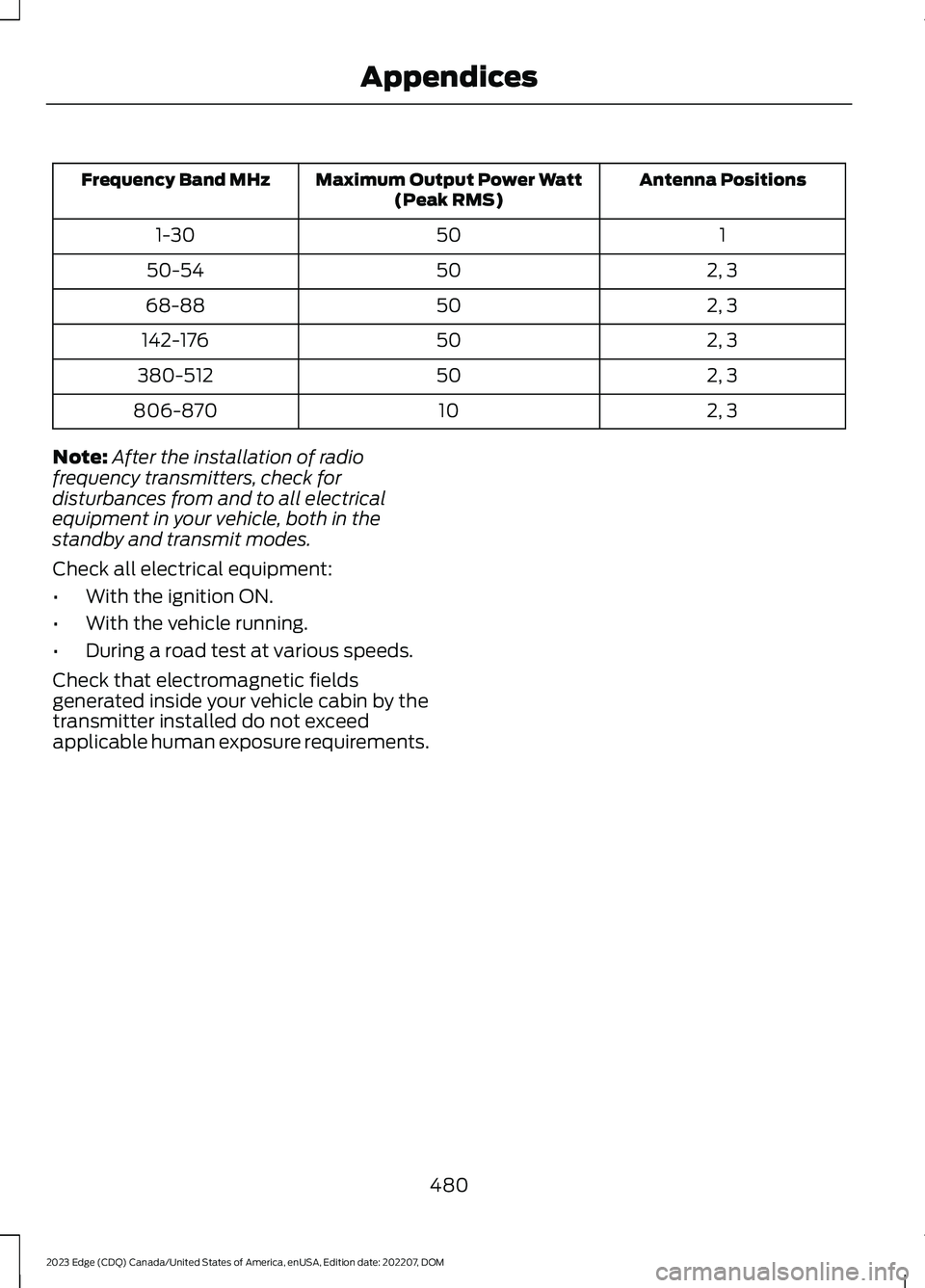
Antenna PositionsMaximum Output Power Watt(Peak RMS)Frequency Band MHz
1501-30
2, 35050-54
2, 35068-88
2, 350142-176
2, 350380-512
2, 310806-870
Note:After the installation of radiofrequency transmitters, check fordisturbances from and to all electricalequipment in your vehicle, both in thestandby and transmit modes.
Check all electrical equipment:
•With the ignition ON.
•With the vehicle running.
•During a road test at various speeds.
Check that electromagnetic fieldsgenerated inside your vehicle cabin by thetransmitter installed do not exceedapplicable human exposure requirements.
480
2023 Edge (CDQ) Canada/United States of America, enUSA, Edition date: 202207, DOMAppendices
Page 486 of 504

Alexa Built-In Requirements...................369Alexa Built-In Settings...............................369All-Wheel Drive.............................................180All-Wheel Drive – Troubleshooting.............180All-Wheel Drive Limitations.....................180All-Wheel Drive Precautions...................180All-Wheel Drive –Troubleshooting........................................180All-Wheel Drive – InformationMessages.........................................................180AM/FM Radio.................................................361AM/FM Radio Limitations...............................361Selecting a Radio Station................................361Ambient Lighting..........................................106Adjusting Ambient Lighting............................106Switching Ambient Lighting On andOff.......................................................................106Anti-Lock Braking System..........................181Anti-Lock Braking SystemLimitations........................................................181Anti-Theft Alarm System...........................88Arming the Anti-Theft Alarm System..........88Disarming the Anti-Theft AlarmSystem................................................................89How Does the Anti-Theft Alarm SystemWork.....................................................................88What Is the Anti-Theft Alarm System.........88What Is the Battery Backup Alarm...............88What Is the Perimeter Alarm...........................88Anti-Theft Alarm System Settings.........89Setting the Alarm Security Level...................89Switching Ask on Exit On and Off.................89What are the Alarm Security Levels.............89What Is Ask on Exit..............................................89Appendices....................................................478Applying the Electric ParkingBrake..............................................................184Applying the Electric Parking Brake in anEmergency...................................................184App Precautions...........................................376App Requirements......................................376Apps..................................................................376Audio System................................................359AM/FM Radio.......................................................361Digital Radio........................................................362Satellite Radio....................................................363Audio System Precautions......................359
Auto-Dimming Exterior Mirror..................110What Is the Auto-Dimming ExteriorMirror...................................................................110Auto-Dimming Interior Mirror..................109Auto-Dimming Interior MirrorLimitations.......................................................109What Is the Auto-Dimming InteriorMirror..................................................................109Auto Hold........................................................188Auto Hold Indicators...................................188Autolamps........................................................99Autolamp Settings..............................................99What Are Autolamps..........................................99Autolock..............................................................71Autolock Requirements.......................................71What Is Autolock....................................................71Automatically Releasing the ElectricParking Brake..............................................185Automatic Crash Shutoff.........................266Automatic Crash ShutoffPrecautions.....................................................267Re-Enabling Your Vehicle................................267What Is Automatic Crash Shutoff...............266Automatic Emergency Braking...............237Switching Automatic Emergency BrakingOn and Off.......................................................237What Is Automatic EmergencyBraking...............................................................237Automatic Engine Stop.............................160How Does Automatic Engine StopWork...................................................................160Overriding Automatic Engine Stop...............161Switching Automatic Engine Stop On andOff.......................................................................160What Is Automatic Engine Stop...................160Automatic High Beam Control.................101Automatic High Beam ControlIndicators..........................................................103Automatic High Beam ControlLimitations.......................................................102Automatic High Beam ControlPrecautions......................................................102Automatic High Beam ControlRequirements.................................................102How Does Automatic High Beam ControlWork....................................................................101Overriding Automatic High BeamControl...............................................................103
482
2023 Edge (CDQ) Canada/United States of America, enUSA, Edition date: 202207, DOMIndex
Page 489 of 504
Closing the Liftgate Using the RemoteControl................................................................84Cold Weather Precautions.......................259Connected Navigation...............................379Connected Vehicle......................................354Connected Vehicle –Troubleshooting............................................355Connecting the Vehicle to a MobileNetwork............................................................354Connected Vehicle Data..............................22Connected Vehicle Limitations..............354Connected Vehicle Requirements........354Connected Vehicle –Troubleshooting........................................355Connected Vehicle – Frequently AskedQuestions........................................................355Connecting a Bluetooth® Device..........375Connecting a Trailer.....................................251Connecting a Trailer Precautions............251Connecting the Vehicle to a MobileNetwork........................................................354Connecting FordPass to the Modem.........354Enabling and Disabling the Modem...........354What Is the Modem..........................................354Connecting the Vehicle to a Wi-FiNetwork........................................................354Connecting Your Phone..............................371Contacting Us...................................................13Cooled Seats..................................................139Switching the Cooled Seats On andOff.......................................................................139Cooling System Capacity andSpecification - 2.0L EcoBoost™........348Cooling System Capacity andSpecification - 2.7L EcoBoost™.........349Crash and BreakdownInformation.................................................263Automatic Crash Shutoff...............................266Jump Starting the Vehicle..............................264Post-Crash Alert System................................266Crash Sensors and Airbag Indicator........55Creating a MyKey...........................................65Creating a Vehicle Wi-Fi Hotspot...........357Cross Traffic Alert.........................................231Cross Traffic Alert –Troubleshooting............................................233Cross Traffic Alert Indicators...................232Cross Traffic Alert Limitations.................231
Cross Traffic Alert Precautions................231Cross Traffic Alert –Troubleshooting........................................233Cross Traffic Alert – InformationMessages.........................................................233Cruise Control...............................................208Cruise Control Indicators..........................209Cup Holders....................................................156Cup Holder Precautions...................................156Customer Information...............................397Radio Frequency CertificationLabels...............................................................400Customizing the Instrument ClusterDisplay...........................................................120
D
Data Privacy.....................................................20Department of Transportation UniformTire Quality Grades...................................310Digital Radio..................................................362Digital Radio Indicators...................................363Digital Radio Limitations................................362How Does Digital Radio Work.......................362Switching Digital Radio Reception On andOff.......................................................................362What Is Digital Radio........................................362Directing the Flow of Air.............................129Disposing of Airbags.....................................56Distance Alert................................................237Adjusting the Sensitivity of DistanceAlert....................................................................237What Is Distance Alert......................................237Distance Indication.....................................236Distance Indication Indicator.........................237Switching Distance Indication On andOff.......................................................................237What Is Distance Indication...........................236Doors and Locks Audible Warnings..........71Doors and Locks.............................................69Autolock....................................................................71Autounlock.............................................................70Doors and Locks – Troubleshooting...............71Mislock.......................................................................71Operating the Doors From Inside YourVehicle.................................................................70Operating the Doors From Outside YourVehicle.................................................................69
485
2023 Edge (CDQ) Canada/United States of America, enUSA, Edition date: 202207, DOMIndex