2023 FORD BRONCO ignition
[x] Cancel search: ignitionPage 344 of 642

2.Starting with the brake pedal releasedand the transmission in neutral (N),fully press and hold the brake pedal forapproximately seven seconds and shiftthe transmission to park (P). Continueholding the brake pedal until theinstrument cluster display shows 2Hand Neutral Tow Disabled.
Note:If completed successfully, theinstrument cluster displays 2H and NeutralTow Disabled.
Note:Perform the switching neutral towon and switching neutral tow off proceduresagain from the beginning if the indicatorlight and message do not display.
Note:You could hear a noise as the transfercase shifts out of its neutral position. Thisis normal.
3.Release the brake pedal.
4.Apply the parking brake, thendisconnect your vehicle from the towvehicle.
5.Release the parking brake, start yourvehicle, and shift into either drive (D)or reverse (R) to make sure the transfercase is out of the neutral tow position.
6.If the transfer case did not successfullyshift out of its neutral position, set theparking brake. Have your vehiclechecked as soon as possible.
Resolving the Shift Delayed DriveForward Message
1.Fully press and hold the brake pedal.
2.Press the push button ignition switch.
3.With the vehicle running, shift into drive(D). Let the vehicle roll forward up to3 ft (1 m).
Note:You could hear a noise as the transfercase shifts out of its neutral position. Thisis normal.
4.Make sure the instrument clusterdisplays Neutral Tow Disabled.
EMERGENCY TOWING
If you need to tow your vehicle, contact aprofessional towing service or, if you are amember of a roadside assistance program,your roadside assistance service provider.
TOWING YOUR VEHICLE – TROUBLESHOOTING
TOWING YOUR VEHICLE – INFORMATION MESSAGES
DescriptionMessage
The transfer case is in the neutral position and your vehicleis safe to tow with all four wheels on the ground.Neutral Tow EnabledLeave Transmission inNeutral
There is a transfer case gear tooth blockage present. Withyour vehicle on, shift the transmission into drive (D) and letthe vehicle roll forward, up to 3 ft (1 m).
Shift Delayed DriveForward
The transfer case is not in the neutral position and your vehicleis not safe to tow with all four wheels on the ground.Neutral Tow Disabled
340
2023 Bronco (TG1) Canada/United States of America, enUSA, Edition date: 202208, DOMTowing Your Vehicle
Page 346 of 642

IDENTIFYING THE FUSES IN THE UNDER HOOD FUSE BOX
Protected ComponentRatingItem
Body control module -battery power in feed 1.30 A1
Body control module -battery power in feed 2.30 A3
Fuel pump.30 A4
Powertrain control modulepower.25 A6
Powertrain components.30 A7
Powertrain components.20 A8
Ignition coils.20 A9
Blower motor.40 A13
Rear windshield washer.10 A16
Starter motor.30 A18
342
2023 Bronco (TG1) Canada/United States of America, enUSA, Edition date: 202208, DOMFusesE386390
Page 351 of 642

Protected ComponentRatingItem
Gateway module.
Steering column controlmodule.7.5 A13
Instrument cluster module.
Not used (spare).15 A14
Not used (spare).15 A15
Not used.—16
Not used (spare).7.5 A17
Not used (spare).7.5 A18
Ignition switch.5 A19Headlamps.
Telematics modem.5 A20
In-vehicle temperature andhumidity sensor.5 A21
Not used.5 A22
Not used (spare).30 A23
Not used (spare).30 A24
Not used (spare).20 A25
Not used (spare).30 A26
Not used (spare).30 A27
Not used (spare).30 A28
Not used (spare).15 A29
Not used.—30
Terrain management switch.10 A31Integrated control panelswitch.Driveline and chassiscontrols switch panel.12 inch center display.Radio frequency receivermodule.
347
2023 Bronco (TG1) Canada/United States of America, enUSA, Edition date: 202208, DOMFuses
Page 366 of 642

WARNING: This vehicle may havemore than one battery. Removing thebattery cables from only one batterydoes not disconnect your vehicleelectrical system. Make sure youdisconnect the battery cables from allbatteries when disconnecting power.Failure to do so may cause seriouspersonal injury or property damage.
WARNING: For vehicles withAuto-Start-Stop the battery requirementis different. You must replace the batterywith one of exactly the samespecification.
WHAT IS THE BATTERYMANAGEMENT SYSTEM
The battery management system monitorsbattery conditions and takes actions toextend battery life.
HOW DOES THE BATTERYMANAGEMENT SYSTEM WORK
If excessive battery drain is detected, thesystem temporarily disables someelectrical systems to protect the battery.
Systems included are:
•Heated rear window.
•Heated seats.
•Climate control.
•Heated steering wheel.
•Audio unit.
•Navigation system.
A message could appear in the informationdisplay to alert you that battery protectionactions are active. This message is only fornotification that an action is taking place,and not intended to indicate an electricalproblem or that the battery requiresreplacement.
BATTERY MANAGEMENT SYSTEMLIMITATIONS
After battery replacement, or in somecases after charging the battery with anexternal charger, the battery managementsystem requires eight hours of vehicle sleeptime to relearn the battery state of charge.During this time, your vehicle must remainfully locked with the ignition switched off.
Note:Prior to relearning the battery stateof charge, the battery management systemcould temporarily disable some electricalsystems.
Electrical Accessory Installation
To make sure the battery managementsystem works correctly, do not connect anelectrical device ground connectiondirectly to the battery negative post. Thiscan cause inaccurate measurements ofthe battery condition and potentialincorrect system operation.
Note:If you add electrical accessories orcomponents to the vehicle, it couldadversely affect battery performance anddurability. This could also affect theperformance of other electrical systems inthe vehicle.
CHANGING THE 12V BATTERY
The battery is in the engine compartment.See Maintenance (page 349).
Your vehicle has a maintenance-freebattery. It does not require additionalwater during service.
If the vehicle battery has a cover, makesure you correctly install it after cleaningor replacing the battery.
362
2023 Bronco (TG1) Canada/United States of America, enUSA, Edition date: 202208, DOMMaintenance
Page 367 of 642

For longer, trouble-free operation, keep thetop of the battery clean and dry and thebattery cables tightly fastened to thebattery terminals. If any corrosion ispresent on the battery or terminals, removethe cables from the terminals and cleanwith a wire brush. You can neutralize theacid with a solution of baking soda andwater.
We recommend that you disconnect thenegative battery cable terminal from thebattery if you plan to store your vehicle foran extended period.
Note:If you only disconnect the negativebattery cable terminal, make sure it isisolated or placed away from the batteryterminal to avoid unintended connection orarcing.
If you disconnect or replace the batteryand your vehicle has an automatictransmission, it must relearn its adaptivestrategy. Because of this, the transmissionmay shift firmly when first driven. This isnormal operation while the transmissionfully updates its operation to optimumshift feel.
Removing the Battery
1.Apply the parking brake and switch theignition off.
2.Switch all electrical equipment off, forexample lights and radio.
3.Wait a minimum of two minutes beforedisconnecting the battery.
Note:The engine management system hasa power hold function and remains poweredfor a period of time after you switch theignition off. This is to allow diagnostic andadaptive tables to be stored. Disconnectingthe battery without waiting can causedamage not covered by the vehicleWarranty.
4.Disconnect and isolate the negativebattery cable terminal.
5.Disconnect and isolate the positivebattery cable terminal.
6.Remove the battery securing clamp.
7.Remove the battery.
If you disconnect or replace the vehiclebattery, you must reset the followingfeatures:
•Window bounce-back. See WindowBounce-Back (page 114).
•Clock Settings.
•Pre-set radio stations.
Replacing the Battery
Note:Before reconnecting the battery,make sure the ignition remains switched off.
You must replace the battery with one ofexactly the same specification.
To install, reverse the removal procedure.
Note:Make sure that you correctly installthe battery terminal covers, battery coverand battery cable terminals.
RESETTING THE BATTERYSENSOR
When you install a new battery, reset thebattery sensor by doing the following:
1.Switch the ignition on, and leave theengine off.
Note:Complete Steps 2 and 3 within 10seconds.
2.Flash the high beam headlamps fivetimes, ending with the high beams off.
3.Press and release the brake pedal threetimes.
The battery warning lamp flashes threetimes to confirm that the reset issuccessful.
363
2023 Bronco (TG1) Canada/United States of America, enUSA, Edition date: 202208, DOMMaintenance
Page 369 of 642

DetailsMessage
The battery management system determines that the 12Vbattery is at a low state of charge. Start the engine to chargethe battery or charge the battery using an aftermarket batterycharger. Always use the vehicle ground point when connectingthe negative cable of the external battery charger. See JumpStarting the Vehicle (page 330). This message clears onceyou restart your vehicle and the battery state of charge hasrecovered. Do not switch on the ignition when a batterycharger is in use to charge the battery.
Battery State of ChargeLow
The battery management system determines that the batteryis at a low state of charge. Turn the ignition off as soon aspossible to protect the battery. This message will clear oncethe vehicle has been started and the battery state of chargehas recovered. Turning off unnecessary electrical loads willallow faster battery state-of-charge recovery.
Turn Power Off To SaveBattery
Displayed when the battery management system detects anextended low-voltage condition. Various vehicle features willbe disabled to help preserve the battery. Turn off as many ofthe electrical loads as soon as possible to improve systemvoltage. If the system voltage has recovered, the disabledfeatures will operate again as normal.
Electrical Power SaverActive Some FeaturesTurned Off See Manual
ADJUSTING THE HEADLAMPS
Vertical Aim Adjustment
The headlamps on your vehicle areproperly aimed at the assembly plant. Ifyour vehicle has been in an accident,contact an authorized dealer to have yourvehicle headlamps checked for properalignment.
Headlamp Aiming Target
8 ft (2.4 m).A
Center height of lamp to ground.B
25 ft (7.6 m).C
Horizontal reference line.D
365
2023 Bronco (TG1) Canada/United States of America, enUSA, Edition date: 202208, DOMMaintenanceE142592
Page 382 of 642
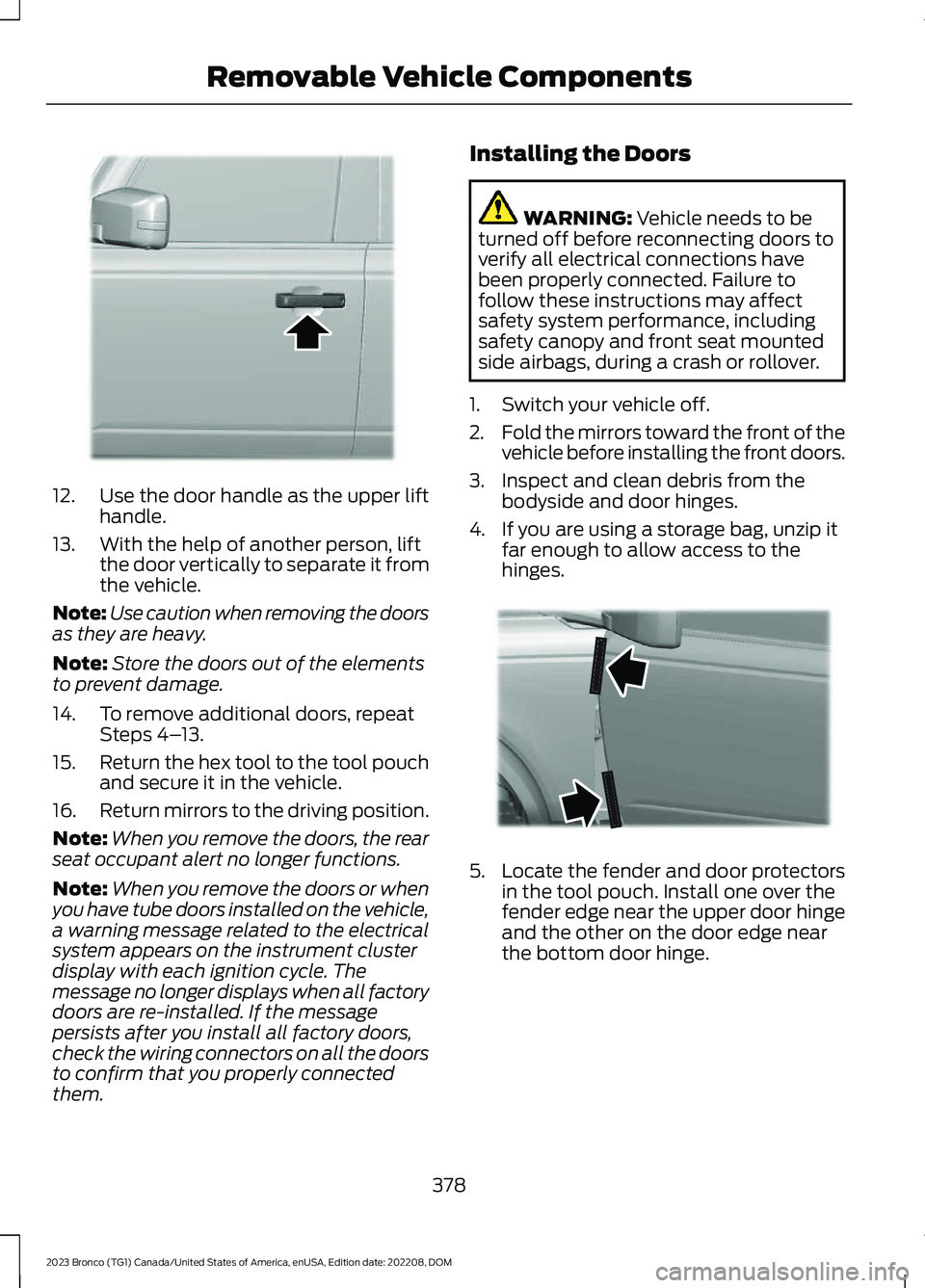
12.Use the door handle as the upper lifthandle.
13.With the help of another person, liftthe door vertically to separate it fromthe vehicle.
Note:Use caution when removing the doorsas they are heavy.
Note:Store the doors out of the elementsto prevent damage.
14.To remove additional doors, repeatSteps 4–13.
15.Return the hex tool to the tool pouchand secure it in the vehicle.
16.Return mirrors to the driving position.
Note:When you remove the doors, the rearseat occupant alert no longer functions.
Note:When you remove the doors or whenyou have tube doors installed on the vehicle,a warning message related to the electricalsystem appears on the instrument clusterdisplay with each ignition cycle. Themessage no longer displays when all factorydoors are re-installed. If the messagepersists after you install all factory doors,check the wiring connectors on all the doorsto confirm that you properly connectedthem.
Installing the Doors
WARNING: Vehicle needs to beturned off before reconnecting doors toverify all electrical connections havebeen properly connected. Failure tofollow these instructions may affectsafety system performance, includingsafety canopy and front seat mountedside airbags, during a crash or rollover.
1.Switch your vehicle off.
2.Fold the mirrors toward the front of thevehicle before installing the front doors.
3.Inspect and clean debris from thebodyside and door hinges.
4.If you are using a storage bag, unzip itfar enough to allow access to thehinges.
5.Locate the fender and door protectorsin the tool pouch. Install one over thefender edge near the upper door hingeand the other on the door edge nearthe bottom door hinge.
378
2023 Bronco (TG1) Canada/United States of America, enUSA, Edition date: 202208, DOMRemovable Vehicle ComponentsE346854 E347604
Page 384 of 642

11.Hand start the hinge bolts to theupper and lower door hinges.
12.Use the hex tool to tighten the bolts.
Note:We recommend that you use a torquewrench to tighten the bolts to the required22 lb.ft (30 Nm) specification.
13.If using a storage bag, remove it fromthe door.
14.Open the harness connector door.
15.Insert the door harness into theconnector.
16.Open and close the installed door afew times to make sure you alignedit properly and that it operatesnormally.
17.To install additional doors, repeatSteps 3–16.
18.Close the doors and switch theignition on. Check for any warningmessages.
19.Return the mirrors to the drivingposition.
REMOVING AND INSTALLING THEDOORS - VEHICLES WITH: TUBEDOORS (If Equipped)
WARNING: Tube doors are foroff-road use only. Tube doors are notdesigned like factory doors. Occupantprotection, door system performance,and safety system performance,including safety canopy and front seatmounted side airbags, may be affectedduring a crash or rollover.
WARNING: Always keep hands,feet and other body parts inside thevehicle at all times.
Installing the Doors
1.If not already removed, remove thefactory doors. See Removing andInstalling the Doors (page 376).
Note:When you remove the doors, the rearseat occupant alert no longer functions.
2.Switch your vehicle off.
3.Fold the mirrors completely toward thefront of your vehicle before installingthe front doors.
4.Inspect and clean debris from thebodyside and door hinges.
380
2023 Bronco (TG1) Canada/United States of America, enUSA, Edition date: 202208, DOMRemovable Vehicle ComponentsE328723 E328726