2023 FORD BRONCO service
[x] Cancel search: servicePage 233 of 642
WHAT IS THE STABILIZER BAR
DISCONNECT
Stabilizer bar disconnect is a feature thatallows the front stabilizer bar to bedisconnected for off-road use. This allowsfor increased front wheel articulation toimprove capability and comfort on off-roadterrain.
STABILIZER BAR DISCONNECT
PRECAUTIONS
WARNING: If the stabilizer bardisconnect warning lamp illuminates red,a fault could be detected and thestabilizer bar could not be connected.Do not drive your vehicle above 20 mph(32 km/h) and have the system checkedas soon as possible. Driving your vehicleabove 20 mph (32 km/h) could reducevehicle stability.
WARNING: Do not get under avehicle that is switched on as thestabilizer bar disconnect could activateand the vehicle could unexpectedly drop.Failure to follow this instruction couldresult in personal injury or death.
If an amber warning message appears inthe cluster indicating that the systemrequires service, the stabilizer bardisconnect will not be available. Have yourvehicle checked by an authorized dealeras soon as possible.
SWITCHING THE STABILIZER
BAR DISCONNECT ON AND
OFF - EXCLUDING: RAPTOR
Bronco 4x4 Systems
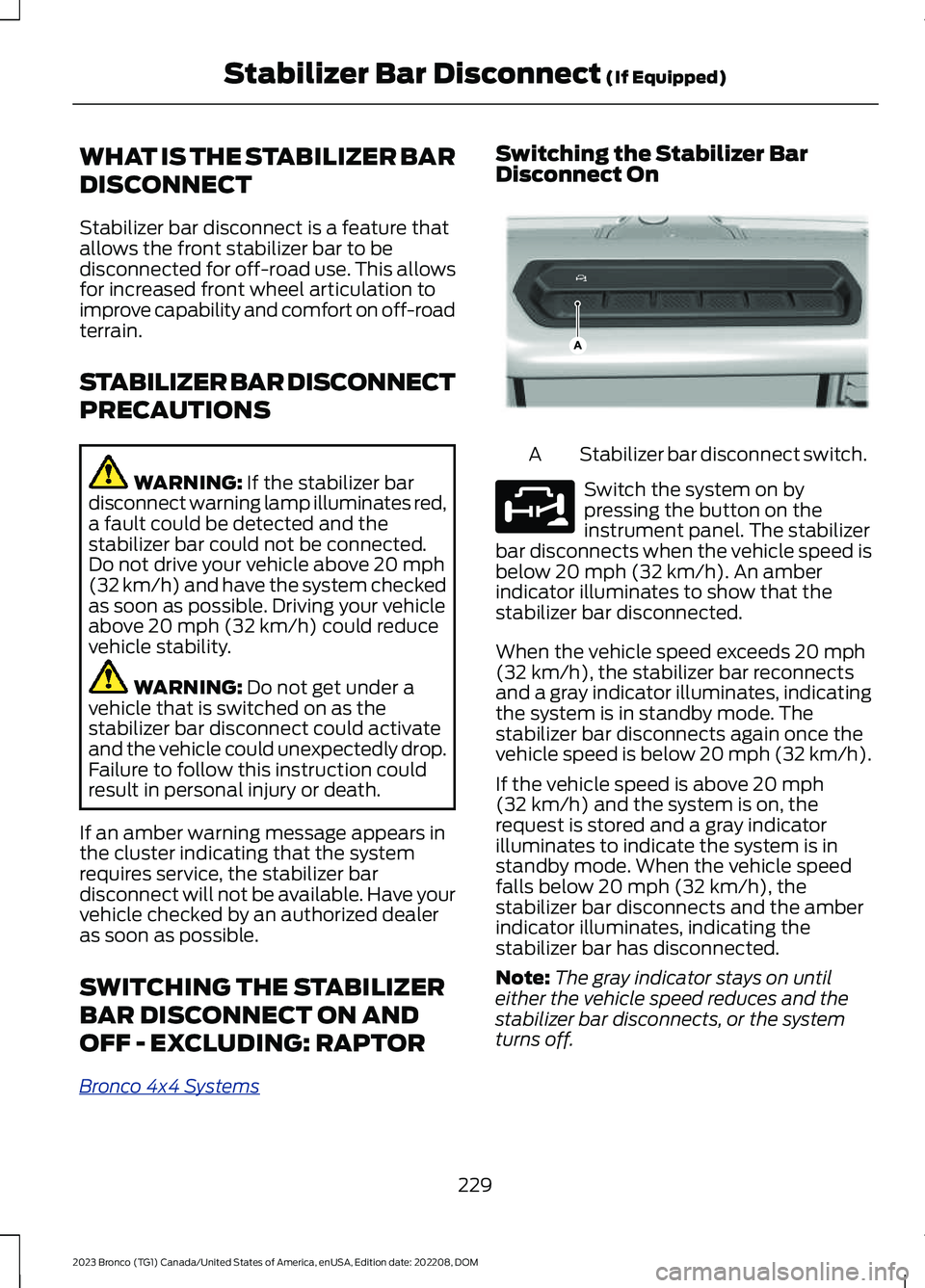
Switching the Stabilizer BarDisconnect On
Stabilizer bar disconnect switch.A
Switch the system on bypressing the button on theinstrument panel. The stabilizerbar disconnects when the vehicle speed isbelow 20 mph (32 km/h). An amberindicator illuminates to show that thestabilizer bar disconnected.
When the vehicle speed exceeds 20 mph(32 km/h), the stabilizer bar reconnectsand a gray indicator illuminates, indicatingthe system is in standby mode. Thestabilizer bar disconnects again once thevehicle speed is below 20 mph (32 km/h).
If the vehicle speed is above 20 mph(32 km/h) and the system is on, therequest is stored and a gray indicatorilluminates to indicate the system is instandby mode. When the vehicle speedfalls below 20 mph (32 km/h), thestabilizer bar disconnects and the amberindicator illuminates, indicating thestabilizer bar has disconnected.
Note:The gray indicator stays on untileither the vehicle speed reduces and thestabilizer bar disconnects, or the systemturns off.
229
2023 Bronco (TG1) Canada/United States of America, enUSA, Edition date: 202208, DOMStabilizer Bar Disconnect (If Equipped)E358560 E329476
Page 236 of 642

ActionMessage
The selected 4WDmode does notallow you to turn onthe stabilizer bardisconnect feature.
Sta-Bar DisconnectAvailable in 4L or4H
ActionMessage
Stabilizer bardisconnect is notavailable. SeeStabilizer BarDisconnect –Frequently AskedQuestions (page233).
Sta-Bar DisconnectNot Available SeeManual
Stabilizer bardisconnect faultdetected, drivebelow 20 mph(32 km/h). Haveyour vehiclechecked by anauthorized dealeras soon as possible.
Sta-Bar DisconnectDrive Below 32km/h Service Now
Sta-Bar DisconnectDrive Below 20MPH Service Now
STABILIZER BAR DISCONNECT –INFORMATION MESSAGES -RAPTOR
ActionMessage
The selected drivemode does notallow you to switchon the stabilizer bardisconnect feature.See G.O.A.T.Mode Control(page 260).
Sta-Bar DisconnectNot Available InSelected DriveMode
The stabilizer barhas been discon-nected.
Sta-Bar Discon-nected
The stabilizer bardisconnect is avail-able below 30 mph(48 km/h).
Reduce Speed toDisconnect Sta-Bar
232
2023 Bronco (TG1) Canada/United States of America, enUSA, Edition date: 202208, DOMStabilizer Bar Disconnect (If Equipped)
Page 237 of 642

ActionMessage
The selected 4WDmode does notallow you to turn onthe stabilizer bardisconnect feature.
Sta-Bar DisconnectAvailable in 4L or4H
Stabilizer bardisconnect is notavailable. SeeStabilizer BarDisconnect –Frequently AskedQuestions (page233).
Sta-Bar DisconnectNot Available SeeManual
Stabilizer bardisconnect faultdetected, drivebelow 30 mph(48 km/h). Haveyour vehiclechecked as soon aspossible.
Sta-Bar DisconnectDrive below 48km/h Service now
Sta-Bar DisconnectDrive below 30MPH Service now
STABILIZER BAR DISCONNECT –FREQUENTLY ASKED QUESTIONS- EXCLUDING: RAPTOR
Why is the stabilizer bar disconnect notdisconnecting?
The engine is turned off and needs tobe turned on.
Why is the stabilizer bar disconnect notdisconnecting?
The vehicle is not in four-wheel drivelow (4L) or four-wheel drive high (4H),and needs to be switched to eithermode.
Why is the stabilizer bar disconnect notdisconnecting?
Vehicle speed is above 20 mph(32 km/h) and needs to be reduced inorder for the stabilizer bar todisconnect.
Why is the stabilizer bar disconnect notdisconnecting?
The vehicle is on a very significantlateral incline, and needs to be movedto more level ground.
Why is the stabilizer bar disconnect notdisconnecting?
The vehicle's battery charge is low andneeds to be changed or charged.
Why is the stabilizer bar disconnect notdisconnecting?
There is a fault active in anothersystem on the vehicle, have the systemchecked as soon as possible.
Why is the stabilizer bar disconnect notdisconnecting?
The vehicle is in a drive mode thatdoes not allow the stabilizer bar todisconnect and needs to be switchedto a different drive mode.
STABILIZER BAR DISCONNECT –FREQUENTLY ASKED QUESTIONS- RAPTOR
Why is the stabilizer bar disconnect notdisconnecting?
The engine is turned off. Switch theengine on.
Why is the stabilizer bar disconnect notdisconnecting?
Your vehicle is not in four-wheel drivelow (4L) or four-wheel drive high (4H),switch it to either mode.
233
2023 Bronco (TG1) Canada/United States of America, enUSA, Edition date: 202208, DOMStabilizer Bar Disconnect (If Equipped)
Page 242 of 642

STEERING – INFORMATION MESSAGES
ActionMessage
The power steering system has detected acondition that requires service. Have yourvehicle checked as soon as possible.
Steering Fault Service Now
The power steering system is not working.Stop your vehicle in a safe place. Have yourvehicle checked as soon as possible.
Steering Loss Stop Safely
The power steering system has detected acondition that requires service. Have yourvehicle checked as soon as possible.
Steering Assist Fault Service Required
The steering system has detected a condi-tion that could prevent you from startingyour vehicle. Have your vehicle checked assoon as possible.
Steering Lock Malfunction Service Now
238
2023 Bronco (TG1) Canada/United States of America, enUSA, Edition date: 202208, DOMSteering
Page 247 of 642

PARKING AID INDICATORS
The system provides object distanceindication through the information display.
•As the distance to the objectdecreases, the indicator blocksilluminate and move toward the vehicleicon.
•If there is no object detected, thedistance indicator blocks are gray.
Visual indication remains on when thetransmission is in reverse (R). When youstop your vehicle, visual indication turnsoff after four seconds.
If the system is not available, the sidedistance indicator blocks do not display.
PARKING AIDS –
TROUBLESHOOTING
PARKING AIDS – INFORMATIONMESSAGES
If a fault is present in the parking aids, awarning message appears in theinstrument cluster or the touchscreen.
Note:When the front or rear park aidpresents a fault message, the side parkingaid also disables.
ActionMessage
The system detects a condition thatrequires service. Have your vehicle checkedas soon as possible.
Check Front Park Aid
The system detects a condition thatrequires service. Have your vehicle checkedas soon as possible.
Check Rear Park Aid
Displays the park aid status.Front Park Aid On Off
Displays the park aid status.Rear Park Aid On Off
243
2023 Bronco (TG1) Canada/United States of America, enUSA, Edition date: 202208, DOMParking AidsE190459
Page 280 of 642

LANE KEEPING SYSTEM – TROUBLESHOOTING
LANE KEEPING SYSTEM – INFORMATION MESSAGES
ActionMessage
The system has malfunctioned. Have yourvehicle checked as soon as possible.Lane Keeping Sys. Malfunction ServiceRequired
The system has detected a condition thathas caused the system to be temporarilyunavailable.
Front Camera Temporarily Not Available
The system has detected a condition thatrequires you to clean the windshield in orderfor it to operate properly.
Front Camera Low Visibility Clean Screen
The system has malfunctioned. Have yourvehicle checked as soon as possible.Front Camera Malfunction Service Required
The system requests that you keep yourhands on the steering wheel.Keep Hands on Steering Wheel
276
2023 Bronco (TG1) Canada/United States of America, enUSA, Edition date: 202208, DOMLane Keeping System (If Equipped)
Page 292 of 642

Adjusting the Pre-Collision AssistSettings
You can adjust the following settings byusing the touchscreen controls in thepre-collision assist menu:
•Change alert and distance alertsensitivity to one of three possiblesettings.
•Switch distance indication and alert onor off.
•If required, switch automaticemergency braking on or off.
•If required, switch the entirepre-collision assist feature on or off.
•If required, switch evasive steeringassist on or off.
Note:Automatic emergency braking andevasive steering turn on every time youswitch the ignition on.
Note:If your vehicle has a radar sensor, werecommend that you switch the system offif you install a snow plow or similar objectin such a way that it may block the radarsensor. Your vehicle remembers the selectedsetting across key cycles.
Note:If you switch automatic emergencybraking off, evasive steering assist switchesoff.
LOCATING THE PRE-
COLLISION ASSIST SENSORS
Camera.1
Radar sensor (if equipped).2
If a message regarding a blocked sensoror camera appears in the informationdisplay, something is obstructing the radarsignals or camera images. If your vehiclehas a radar sensor, it is behind the fasciacover in the center of the lower grille. Witha blocked sensor or camera, the systemmay not function, or performance mayreduce. See Pre-Collision Assist –Information Messages (page 291).
Note:Proper system operation requires aclear view of the road by the camera. Haveany windshield damage in the area of thecamera's field of view repaired.
Note:If something hits the front end of yourvehicle or damage occurs and your vehiclehas a radar sensor, the radar sensing zonecould change. This could cause missed orfalse vehicle detections. Have your vehicleserviced to have the radar checked forproper coverage and operation.
288
2023 Bronco (TG1) Canada/United States of America, enUSA, Edition date: 202208, DOMPre-Collision AssistE327933
Page 296 of 642

PRE-COLLISION ASSIST –FREQUENTLY ASKED QUESTIONS
Camera Troubleshooting
The windshield in front of the camerais dirty or obstructed.
Clean the outside of the windshield infront of the camera.
The windshield in front of the camerais clean, but the message remains inthe instrument cluster display.
Wait a short time. It could take severalminutes for the camera to detect thatthere is no obstruction.
Radar Troubleshooting (If Equipped)
The surface of the radar in the grille isdirty or obstructed.
Clean the grille surface in front of theradar or remove the object causing theobstruction.
The surface of the radar in the grille isclean, but the message remains in theinstrument cluster display.
Wait a short time. It could take severalminutes for the radar to detect thatthere is no obstruction.
Heavy rain, spray or fog is interferingwith the radar signals.
The pre-collision assist system istemporarily disabled. Pre-collisionassist reactivates a short time afterthe weather conditions improve.
Swirling water or snow or ice on thesurface of the road could interfere withthe radar signals.
The pre-collision assist system istemporarily disabled. Pre-collisionassist reactivates a short time afterthe weather conditions improve.
Radar is out of alignment due to a frontend impact.
Have your vehicle serviced to have theradar checked for proper coverage andoperation.
292
2023 Bronco (TG1) Canada/United States of America, enUSA, Edition date: 202208, DOMPre-Collision Assist