2023 FORD BRONCO tailgate
[x] Cancel search: tailgatePage 100 of 642

TAILGATE – INFORMATION MESSAGES
Tailgate
DetailsMessage
The tailgate is not completely closed.Tailgate Ajar
96
2023 Bronco (TG1) Canada/United States of America, enUSA, Edition date: 202208, DOMTailgate
Page 117 of 642

OPENING AND CLOSING THE
WINDOWS
WARNING: Do not leave childrenunattended in your vehicle and do notlet them play with the power windows.Failure to follow this instruction couldresult in personal injury.
WARNING: When closing thepower windows, verify they are free ofobstruction and make sure that childrenand pets are not in the proximity of thewindow openings.
Press the control to open thewindow. Lift the control to closethe window.
Note:The power windows operate with theignition on, and for several minutes after youswitch the ignition off or until you open afront door.
To reduce wind noise or pulsing noise whenone window is open, slightly open theopposite window.
One-Touch Open (If Equipped)
Fully press the window control and releaseit. Press again or lift it to stop the window.
One-Touch Close (If Equipped)
Fully lift the window control and releaseit. Press again or lift it to stop the window.
Resetting One-Touch Close
Carry out all steps within 30 seconds ofstarting the sequence.
1.Fully open the window.
2.Lift and hold the window control untilthe window is fully closed. Keep thewindow control held for a two seconds
3.Press and hold the window control untilthe window is fully open. Keep thewindow control pressed for twoseconds.
4.Lift and hold the window control untilthe window is fully closed. Keep thewindow control held for a two seconds
Note:Repeat the procedure if the windowdoes not close when you use one-touch.
Tailgate Window
To open the window, do the following:
1.Open the tailgate. See Opening theTailgate From Outside Your Vehicle(page 93).
2.Lift the window.
To close the window, do the following:
1.Push the window down.
2.Close the tailgate. See Closing theTailgate From Outside Your Vehicle(page 93).
GLOBAL OPENING
WHAT IS GLOBAL OPENING
You can use the remote control to openthe windows with the ignition off.
USING GLOBAL OPENING
1.Press and release the unlock button onthe remote control.
2.Press and hold the unlock button onthe remote control.
3.Release the button when the windowsstart to open.
Press the lock or the unlock button on theremote control to stop global opening.
Note:You can use global opening for ashort period of time when you unlock yourvehicle using the remote control.
113
2023 Bronco (TG1) Canada/United States of America, enUSA, Edition date: 202208, DOMWindows
Page 125 of 642

Low Washer Fluid Level
It illuminates when the washerfluid is low.
Malfunction Indicator Lamp
It illuminates when the ignitionis on and the engine is off, this isnormal operation. If it illuminateswhen the engine is on this indicates thatthe emission control system requiresservice. If it flashes, have your vehiclechecked immediately. See Emission Law(page 609).
Oil Pressure
It illuminates when the engineoil pressure is low.
Powertrain Malfunction
Illuminates when the powertrainrequires service. Have thesystem checked as soon aspossible.
Tailgate Ajar
It illuminates when the ignitionis on and the tailgate is notcompletely closed.
WHAT ARE THE INSTRUMENT
CLUSTER INDICATORS
Indicators notify you of various featuresthat are active on your vehicle.
INSTRUMENT CLUSTER
INDICATORS - EXCLUDING:
RAPTOR
Adaptive Cruise Control
See Adaptive Cruise Control(page 252).
Automatic Headlamp High Beam
See Automatic High BeamControl (page 108).
Auto-Start-Stop
See Auto-Start-Stop (page174).
Blind Spot Monitor
See Blind Spot InformationSystem (page 279).
Cruise Control
See Cruise Control (page 250).
Differential Lock
See Electronic LockingDifferential (page 203).
121
2023 Bronco (TG1) Canada/United States of America, enUSA, Edition date: 202208, DOMInstrument ClusterE132353 E67028 E67022 E340897 E144524 E146105 E121377 E323542 E71340 E328595 E325779
Page 244 of 642

PARKING AID PRECAUTIONS
WARNING: To help avoid personalinjury, always use caution when inreverse (R) and when using the sensingsystem.
WARNING: The system may notdetect objects with surfaces that absorbreflection. Always drive with due careand attention. Failure to take care mayresult in a crash.
WARNING: Traffic control systems,fluorescent lamps, inclement weather,air brakes, external motors and fans mayaffect the correct operation of thesensing system. This may cause reducedperformance or false alerts.
WARNING: The system may notdetect small or moving objects,particularly those close to the ground.
WARNING: The parking aid systemcan only assist you to detect objectswhen your vehicle is moving at parkingspeeds. To help avoid personal injury youmust take care when using the parkingaid system.
WARNING: The system may notfunction if the sensor is blocked.
WARNING: In cold and severeweather conditions the system may notfunction. Rain, snow and spray can alllimit sensor performance.
WARNING: If damage occurs in theimmediate area surrounding the sensor,have your vehicle checked as soon aspossible.
Note:If your vehicle sustains damageleaving the sensors misaligned, this willcause inaccurate measurements or falsealerts.
When you connect a trailer to your vehicle,the rear parking aid detects the trailer andprovides an alert. Disable the parking aidwhen you connect a trailer to prevent thealert.
Note:Connected trailers might be detectedby the vehicle and parking aid turns offautomatically in those instances.
Note:Certain add-on devices installedaround the bumper or fascia may createfalse alerts, for example, large trailerhitches, bike or surfboard racks, license platebrackets, bumper covers or any other devicethat could block the normal detection zoneof the parking aid system. Aftermarket sparetires or spare tire covers mounted to the reartailgate could cause false alerts from thepark aid system. Remove the add-on deviceto prevent false alerts.
Note: Keep the sensors free from snow, iceand large accumulations of dirt. If thesensors are covered, the system's accuracycan be affected.
Do not clean the sensors with sharpobjects.
Note: When using a programmed MyKey,you cannot switch the parking aids off. SeeMyKey™ (page 84).
SWITCHING PARKING AID ON
AND OFF
Press the parking aid button toswitch the system on and off.
Switching Parking Aid On and OffLong-Term
The system can be set to stay disabled inbetween ignition cycles.
240
2023 Bronco (TG1) Canada/United States of America, enUSA, Edition date: 202208, DOMParking AidsE139213
Page 248 of 642

WHAT IS THE REAR VIEW
CAMERA
The rear view camera provides a videoimage of the area behind your vehicle whenthe transmission is in reverse (R).
REAR VIEW CAMERA
PRECAUTIONS
WARNING: The rear view camerasystem is a reverse aid supplementdevice that still requires the driver to useit in conjunction with the interior andexterior mirrors for maximum coverage.
WARNING: Objects that are closeto either corner of the bumper or underthe bumper, might not be seen on thescreen due to the limited coverage of thecamera system.
WARNING: Reverse your vehicleslowly. Failure to follow this instructioncould result in the loss of control of yourvehicle, personal injury or death.
WARNING: Use caution when thetailgate is ajar. If the tailgate is ajar, thecamera is out of position and the videoimage could be incorrect. All guide linesdisappear when the tailgate is ajar.Failure to follow this instruction couldresult in personal injury.
WARNING: Use caution whenturning camera features on or off whenthe transmission is not in park (P). Makesure your vehicle is not moving.
Note: When towing, the camera only seeswhat you are towing. This might not provideadequate coverage and you might not seesome objects. In some vehicles, the guidelines may disappear when you connect thetrailer tow connector.
LOCATING THE REAR VIEW
CAMERA
The rear view camera is in the spare tirecarrier.
REAR VIEW CAMERA GUIDE
LINES
Note:Active guide lines and fixed guidelines are only available when thetransmission is in reverse (R).
Note:The centerline is only available if theactive or fixed guide lines are on.
244
2023 Bronco (TG1) Canada/United States of America, enUSA, Edition date: 202208, DOMRear View Camera
Page 251 of 642

WHAT IS THE 360 DEGREE
CAMERA
The 360 degree camera system providesvisibility around your vehicle in parkingmaneuvers such as:
•Centering in a parking space.
•Obstacles near your vehicle.
•Parallel parking.
The 360 degree camera system consistsof front, side and rear cameras.
HOW DOES THE 360 DEGREE
CAMERA WORK
The 360 degree camera system:
•Allows you to see what is directly infront of or behind your vehicle.
•Helps you when parallel parking andcentering in a parking space.
•Provides a cross traffic view in front ofand behind your vehicle.
•Allows you to see a top-down view ofthe area outside your vehicle, includingthe blind spots and obstacles near yourvehicle.
360 DEGREE CAMERA
PRECAUTIONS
WARNING: The 360 degreecamera system still requires the driverto use it in conjunction with looking outof the windows, and checking the interiorand exterior mirrors for maximumcoverage.
WARNING: Objects that are closeto either corner of the bumper or underthe bumper, might not be seen on thescreen due to the limited coverage of thecamera system.
WARNING: Do not switch thecamera features on or off when yourvehicle is moving.
WARNING: You are responsible forcontrolling your vehicle at all times. Thesystem is designed to be an aid and doesnot relieve you of your responsibility todrive with due care and attention. Failureto follow this instruction could result inthe loss of control of your vehicle,personal injury or death.
WARNING: Use caution when thetailgate is ajar. If the tailgate is ajar, thecamera is out of position and the videoimage could be incorrect. All guide linesdisappear when the tailgate is ajar.Failure to follow this instruction couldresult in personal injury.
WARNING: When manual zoom ison, the full area behind your vehicle maynot show. Be aware of your surroundingswhen using the manual zoom feature.
LOCATING THE 360 DEGREE
CAMERAS
Rear View Camera
The rear view camera is in the spare tirecarrier. It provides an image of the areabehind your vehicle.
Front View Camera
The front video camera is in the grille. Itprovides a video image of the area in frontof your vehicle.
247
2023 Bronco (TG1) Canada/United States of America, enUSA, Edition date: 202208, DOM360 Degree Camera
Page 372 of 642

REMOVING A REAR LAMPASSEMBLY
1.Make sure the headlamps are off.
2.Loosen the quarter-turn fastener onthe rearmost fender flare.
3.Fully open the tailgate. See Openingthe Tailgate From Outside YourVehicle (page 93).
4.Remove the three pushpins from insidethe trim panel.
5.Remove the lower trim piece bydisengaging the retaining tabs. Pullfrom the inside edge first, then pullfrom the outside edge.
6.Remove the lower retaining bolt fromthe inside trim piece. Pull on the lowerpart of the trim piece to disengage theupper retaining clips.
368
2023 Bronco (TG1) Canada/United States of America, enUSA, Edition date: 202208, DOMMaintenanceE334894 E334848 E334849 E334850 E339584
Page 378 of 642
Note:When installing the rear edge of therear quarter window into the slot, unlatchthe soft top for easier installation. SeeOpening and Closing the Soft Top (page393).
7.When sliding the rear quarter windowsback into the window slot, make sureto slide the window all the way in sothat the window securely fits into bothslots.
8.After installing the rear quarterwindows, press along the top of thewindow to secure the hook and loopfastener strips.
Note:The buckles snap together and thewindows are flush when correctly installed.If the parts have visible gaps or stick out,they are not correctly secured.
REMOVING AND INSTALLING THEREAR WINDOW - VEHICLES WITH:SOFT TOP
1.If not already removed, remove the rearquarter windows. See Removing andInstalling the Rear QuarterWindows (page 372).
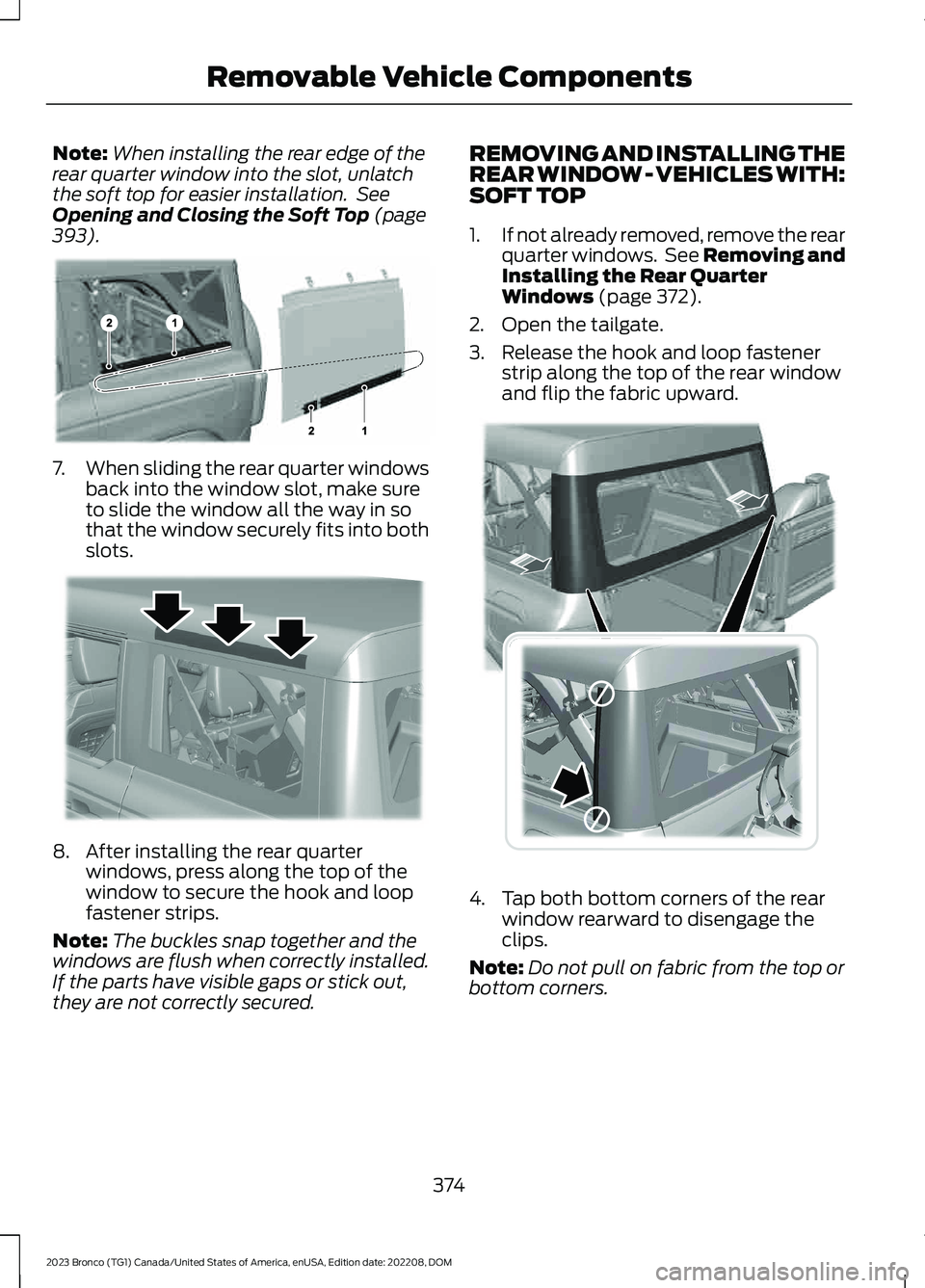
2.Open the tailgate.
3.Release the hook and loop fastenerstrip along the top of the rear windowand flip the fabric upward.
4.Tap both bottom corners of the rearwindow rearward to disengage theclips.
Note:Do not pull on fabric from the top orbottom corners.
374
2023 Bronco (TG1) Canada/United States of America, enUSA, Edition date: 202208, DOMRemovable Vehicle ComponentsE385272 E347139 E374615