2023 FORD BRONCO air condition
[x] Cancel search: air conditionPage 123 of 642

FUEL GAUGE LIMITATIONS
The fuel gauge may not provide anaccurate reading when your vehicle is onan incline.
LOCATING THE FUEL FILLERDOOR
The arrow adjacent to the fuel pumpsymbol indicates on which side of yourvehicle the fuel filler door is located.
WHAT IS THE LOW FUELREMINDER
A low fuel level reminder displays andsounds when the distance to emptyreaches 75 mi (120 km) to empty forMyKey, and at 50 mi (80 km),25 mi(40 km),12 mi (20 km) and 0 mi (0 km)for all vehicle keys.
Note:The low fuel reminder can appear atdifferent fuel gauge positions depending onfuel economy conditions. This variation isnormal.
WHAT IS DISTANCE TO EMPTY
Indicates the approximate distance yourvehicle can travel on the fuel remaining inthe tank. Changes in driving pattern cancause the value to not only decrease butalso increase or stay constant for periodsof time.
ENGINE COOLANT
TEMPERATURE GAUGE
Indicates the engine coolant temperature.
TRANSMISSION FLUID
TEMPERATURE GAUGE
Indicates the transmission fluidtemperature.
Special operating conditions can causehigher than normal operatingtemperatures. See Special OperatingConditions Scheduled Maintenance(page 533).
Note:This is a configurable gauge.
TURBO BOOST GAUGE - 2.3L
ECOBOOST™
Indicates the amount of manifold airpressure in the engine.
Note:This is a configurable gauge.
WHAT IS THE INFORMATION
BAR
Displays information for navigation, outsideair temperature, odometer and distanceto empty.
WHAT ARE THE INSTRUMENT
CLUSTER WARNING LAMPS
Warning lamps alert you to a vehiclecondition that could become serious.Some lamps illuminate when you startyour vehicle to make sure they work. If anylamps remain on after starting your vehicle,refer to the respective system warninglamp for further information.
119
2023 Bronco (TG1) Canada/United States of America, enUSA, Edition date: 202208, DOMInstrument Cluster
Page 135 of 642
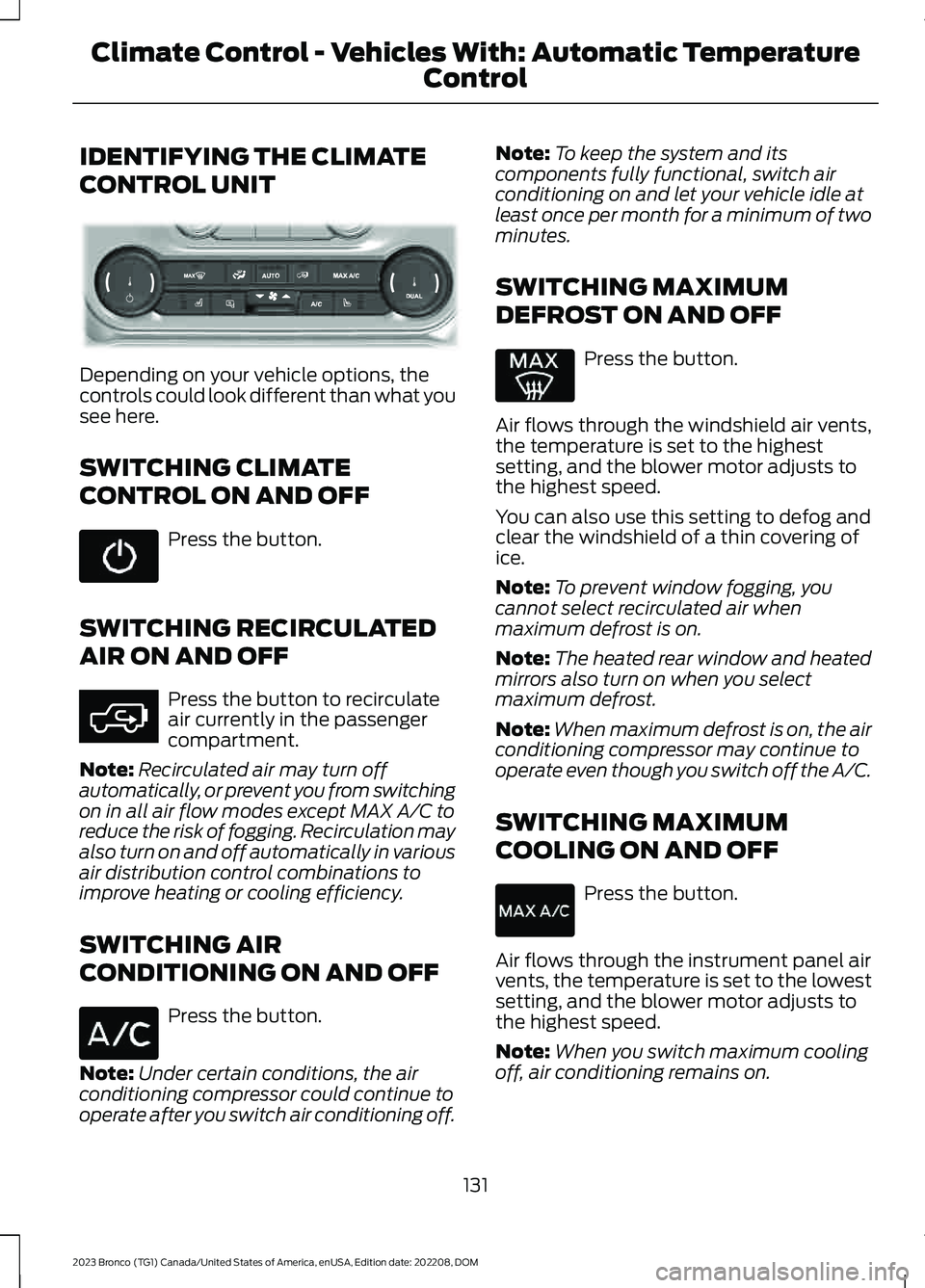
IDENTIFYING THE CLIMATE
CONTROL UNIT
Depending on your vehicle options, thecontrols could look different than what yousee here.
SWITCHING CLIMATE
CONTROL ON AND OFF
Press the button.
SWITCHING RECIRCULATED
AIR ON AND OFF
Press the button to recirculateair currently in the passengercompartment.
Note:Recirculated air may turn offautomatically, or prevent you from switchingon in all air flow modes except MAX A/C toreduce the risk of fogging. Recirculation mayalso turn on and off automatically in variousair distribution control combinations toimprove heating or cooling efficiency.
SWITCHING AIR
CONDITIONING ON AND OFF
Press the button.
Note:Under certain conditions, the airconditioning compressor could continue tooperate after you switch air conditioning off.
Note:To keep the system and itscomponents fully functional, switch airconditioning on and let your vehicle idle atleast once per month for a minimum of twominutes.
SWITCHING MAXIMUM
DEFROST ON AND OFF
Press the button.
Air flows through the windshield air vents,the temperature is set to the highestsetting, and the blower motor adjusts tothe highest speed.
You can also use this setting to defog andclear the windshield of a thin covering ofice.
Note:To prevent window fogging, youcannot select recirculated air whenmaximum defrost is on.
Note:The heated rear window and heatedmirrors also turn on when you selectmaximum defrost.
Note:When maximum defrost is on, the airconditioning compressor may continue tooperate even though you switch off the A/C.
SWITCHING MAXIMUM
COOLING ON AND OFF
Press the button.
Air flows through the instrument panel airvents, the temperature is set to the lowestsetting, and the blower motor adjusts tothe highest speed.
Note:When you switch maximum coolingoff, air conditioning remains on.
131
2023 Bronco (TG1) Canada/United States of America, enUSA, Edition date: 202208, DOMClimate Control - Vehicles With: Automatic Temperature
Control E358353 E363177
Page 136 of 642

SWITCHING THE HEATED
REAR WINDOW ON AND OFF (IF
EQUIPPED)
Press the button to clear the rearwindow of thin ice and fog. Theheated rear window turns offafter a short period of time.
Note:This button also activates the heatedmirrors.
Note:Do not use harsh chemicals, razorblades or other sharp objects to clean orremove decals from the inside of the heatedrear window as this could cause damage tothe heated rear window grid lines notcovered by the vehicle Warranty.
SETTING THE BLOWER MOTOR
SPEED
Press up or down on the controlto select the blower motorspeed.
Note:Lights on the control illuminate toindicate the blower motor speed.
Note: When you switch the blower motoroff, air conditioning turns off and thewindows could fog up.
SWITCHING THE HEATED
MIRRORS ON AND OFF (IF
EQUIPPED)
Heated Mirrors
Press the button.
SETTING THE TEMPERATURE
Turn the control on the left-hand side ofthe climate control to set the left-handtemperature.
Note:This control also sets the right-handside temperature when you switch off dualzone mode.
Turn the control on the right-hand side ofthe climate control to set the right-handtemperature.
DIRECTING THE FLOW OF AIR
Directing Air to the Windshield AirVents
Press the button to activate theselection screen.
Press the button on thetouchscreen.
Directing Air to the InstrumentPanel Air Vents
Press the button to activate theselection screen.
132
2023 Bronco (TG1) Canada/United States of America, enUSA, Edition date: 202208, DOMClimate Control - Vehicles With: Automatic Temperature
Control E387423 E266189 E244115 E265283 E265283
Page 140 of 642

IDENTIFYING THE CLIMATE
CONTROL UNIT
Depending on your vehicle options, thecontrols could look different than what yousee here.
SWITCHING CLIMATE
CONTROL ON AND OFF
Press the button.
SWITCHING RECIRCULATED
AIR ON AND OFF
Press the button to recirculateair currently in the passengercompartment.
Note:Recirculated air may turn offautomatically, or prevent you from switchingon in all air flow modes except MAX A/C toreduce the risk of fogging. Recirculation mayalso turn on and off automatically in variousair distribution control combinations toimprove heating or cooling efficiency.
SWITCHING AIR
CONDITIONING ON AND OFF
Press the button.
Note:Under certain conditions, the airconditioning compressor could continue tooperate after you switch air conditioning off.
Note:To keep the system and itscomponents fully functional, switch airconditioning on and let your vehicle idle atleast once per month for a minimum of twominutes.
SWITCHING MAXIMUM
DEFROST ON AND OFF
Turn the temperature controlclockwise past the highestsetting to maximize defrosting.
Note:The temperature control springs backto the highest setting.
Air flows through the windshield air vents,and the blower motor adjusts to thehighest speed.
Note:To prevent window fogging, youcannot select recirculated air whenmaximum defrost is on.
Note:The heated rear window also turnson when you select maximum defrost.
SWITCHING MAXIMUM
COOLING ON AND OFF
Turn the temperature controlcounterclockwise past thelowest setting to maximizecooling.
Note:The temperature control springs backto the lowest setting.
Note:When you switch maximum coolingoff, air conditioning remains on.
136
2023 Bronco (TG1) Canada/United States of America, enUSA, Edition date: 202208, DOMClimate Control - Vehicles With: Manual Temperature ControlE308141 E363177
Page 141 of 642

SWITCHING THE HEATED
REAR WINDOW ON AND OFF (IF
EQUIPPED)
Press the button to clear the rearwindow of thin ice and fog. Theheated rear window turns offafter a short period of time.
Note:Do not use harsh chemicals, razorblades or other sharp objects to clean orremove decals from the inside of the heatedrear window as this could cause damage tothe heated rear window grid lines notcovered by the vehicle Warranty.
SETTING THE BLOWER MOTOR
SPEED
Turn the blower motor controlcounterclockwise for a lower blowersetting.
Turn the blower motor control clockwisefor a higher blower setting.
Note:Lights on the control illuminate toindicate the blower motor speed.
Note: When you switch the blower motoroff, air conditioning turns off and thewindows could fog up.
SWITCHING THE HEATED
MIRRORS ON AND OFF (IF
EQUIPPED)
Heated Mirrors
Press the button.
SETTING THE TEMPERATURE
Turn the temperature controlcounterclockwise for cooler temperaturesettings.
Turn the temperature control clockwisefor warmer temperature settings.
137
2023 Bronco (TG1) Canada/United States of America, enUSA, Edition date: 202208, DOMClimate Control - Vehicles With: Manual Temperature Control E317606 E266189 E244106
Page 184 of 642

FUEL QUALITY
SELECTING THE CORRECT FUEL
Your vehicle operates on regular unleadedgasoline with a minimum pump (R+M)/2octane rating of 87.
Some fuel stations, particularly those inhigh altitude areas, offer fuels posted asregular unleaded gasoline with an octanerating below 87. The use of these fuelscould result in engine damage that will notbe covered by the vehicle Warranty.
For best overall vehicle and engineperformance, premium fuel with an octanerating of 91 or higher is recommended. Theperformance gained by using premium fuelis most noticeable in hot weather as wellas other conditions, for example whentowing a trailer. See Towing a Trailer(page 307).
Do not be concerned if the enginesometimes knocks lightly. However, if theengine knocks heavily while using fuel withthe recommended octane rating, contactan authorized dealer to prevent any enginedamage.
We recommend Top Tier detergentgasolines, where available to help minimizeengine deposits and maintain optimalvehicle and engine performance.
For additional information, visitwww.toptiergas.com.
Note:Use of any fuel for which the vehiclewas not designed can impair the emissioncontrol system, cause loss of vehicleperformance, and cause damage to theengine which may not be covered by thevehicle Warranty.
Do not use:
•Diesel fuel.
•Fuels containing kerosene or paraffin.
•Fuel containing more than 15% ethanolor E85 fuel.
•Fuels containing methanol.
•Fuels containing metallic-basedadditives, including manganese-basedcompounds.
•Fuels containing the octane boosteradditive, methylcyclopentadienylmanganese tricarbonyl (MMT).
•Leaded fuel, using leaded fuel isprohibited by law.
The use of fuels with metallic compoundssuch as methylcyclopentadienylmanganese tricarbonyl, which is amanganese-based fuel additive, will impairengine performance and affect theemission control system.
LOCATING THE FUEL FILLER
FUNNEL
The fuel filler funnel is in the rear floorcompartment with the jack and tools.
180
2023 Bronco (TG1) Canada/United States of America, enUSA, Edition date: 202208, DOMFuel and RefuelingE161513
Page 244 of 642

PARKING AID PRECAUTIONS
WARNING: To help avoid personalinjury, always use caution when inreverse (R) and when using the sensingsystem.
WARNING: The system may notdetect objects with surfaces that absorbreflection. Always drive with due careand attention. Failure to take care mayresult in a crash.
WARNING: Traffic control systems,fluorescent lamps, inclement weather,air brakes, external motors and fans mayaffect the correct operation of thesensing system. This may cause reducedperformance or false alerts.
WARNING: The system may notdetect small or moving objects,particularly those close to the ground.
WARNING: The parking aid systemcan only assist you to detect objectswhen your vehicle is moving at parkingspeeds. To help avoid personal injury youmust take care when using the parkingaid system.
WARNING: The system may notfunction if the sensor is blocked.
WARNING: In cold and severeweather conditions the system may notfunction. Rain, snow and spray can alllimit sensor performance.
WARNING: If damage occurs in theimmediate area surrounding the sensor,have your vehicle checked as soon aspossible.
Note:If your vehicle sustains damageleaving the sensors misaligned, this willcause inaccurate measurements or falsealerts.
When you connect a trailer to your vehicle,the rear parking aid detects the trailer andprovides an alert. Disable the parking aidwhen you connect a trailer to prevent thealert.
Note:Connected trailers might be detectedby the vehicle and parking aid turns offautomatically in those instances.
Note:Certain add-on devices installedaround the bumper or fascia may createfalse alerts, for example, large trailerhitches, bike or surfboard racks, license platebrackets, bumper covers or any other devicethat could block the normal detection zoneof the parking aid system. Aftermarket sparetires or spare tire covers mounted to the reartailgate could cause false alerts from thepark aid system. Remove the add-on deviceto prevent false alerts.
Note: Keep the sensors free from snow, iceand large accumulations of dirt. If thesensors are covered, the system's accuracycan be affected.
Do not clean the sensors with sharpobjects.
Note: When using a programmed MyKey,you cannot switch the parking aids off. SeeMyKey™ (page 84).
SWITCHING PARKING AID ON
AND OFF
Press the parking aid button toswitch the system on and off.
Switching Parking Aid On and OffLong-Term
The system can be set to stay disabled inbetween ignition cycles.
240
2023 Bronco (TG1) Canada/United States of America, enUSA, Edition date: 202208, DOMParking AidsE139213
Page 319 of 642

WARNING: Never link two winchropes together with a clevis pin. Theseheavy metal objects could becomeprojectiles if the winch rope breaks.
WARNING: When using the winch,take care not to get your fingers or handscaught in the mechanism. Failure tofollow this instruction could result inpersonal injury.
WARNING: Avoid wearing loosefitting clothing or jewelry when winching.
WARNING: Make sure to wear eyeprotection when winching.
WARNING: Do not exceed thewinch or winch rope capacity. Failure tofollow this instruction could result inpersonal injury.
WARNING: Wear gloves whenhandling the winch rope. Failure to followthis instruction could result in personalinjury.
WARNING: Do not use the winchto secure loads.
WARNING: Do not use the winchto tow a trailer. This can damage,overload and break the winch rope.
WARNING: Make sure the anchorpoint can properly support the load andsecure the winching equipment. Failureto follow this instruction could result inpersonal injury.
WARNING: Only use theequipment supplied with the winch whenwinching.
WARNING: Do not engage ordisengage the winch clutch when thewinch is in use.
WARNING: The winch andassociated components become hotwhen in use. Let them cool down beforeremoving them.
WARNING: Do not attempt toservice, repair or modify the winchingsystem. Failure to follow this instructioncould result in personal injury or death.
WARNING: Make sure to properlystore the winch rope to the shackle pointor fairlead when not in use. Failure toproperly store the winch rope couldcause it to become a projectile.
WINCHING REQUIREMENTS
To winch your vehicle, make sure of thefollowing:
•The intended anchor point is secure.The anchor point must be strongenough to hold the weight of yourvehicle when winching.
•The intended anchor point allows youto pull your vehicle straight ahead.
•The intended anchor point is as faraway as possible, within the 100 ft(30 m) rope length. This allows thegreatest pulling power for the winch.
•The winch rope is in good condition andfree of visible cuts, tear or damage.
•Use a damper device such as a tarp,heavy blanket or piece of carpet, andplace it over the winch rope to helpabsorb the energy in the event thewinch rope breaks.
•Bystanders are to the sides of thevehicle, at a distance of at least twicethe length of the winch rope.
315
2023 Bronco (TG1) Canada/United States of America, enUSA, Edition date: 202208, DOMWinching - Everglades