2023 DODGE HORNET warning
[x] Cancel search: warningPage 29 of 288

GETTING TO KNOW YOUR VEHICLE27
For information on use with the Remote Start system, see Úpage 19.
DRIVER MEMORY SETTINGS — IF EQUIPPED
This feature allows the driver to save up to two different
memory profiles for easy recall through a memory switch.
Each memory profile saves desired position settings for
the following features:
Driver seat position
A set of desired radio station presets
Memory Switches
The memory setting switch is located on the driver’s door
trim panel. The switch consists of three buttons:
The (1) and (3) buttons which are used to recall either
of two saved memory profiles.
The set (2) button, which is used to activate the
memory save function.
PROGRAMMING THE MEMORY FEATURE
To create a new memory profile, perform the following:
NOTE:Saving a new memory profile will erase an existing profile
from memory.
1. Place the vehicle’s ignition in the ON position.
2. Adjust all memory profile settings to desired
preferences (i.e., seat and radio station presets).
3. Push and release the (2) button on the memory switch, and then push the desired memory profile
button (1 or 3) within five seconds. A beep will sound to confirm the memory profile has
been successfully stored.
MEMORY POSITION RECALL
To recall the memory settings for driver one or two, push
the desired memory button number (1 or 3).
NOTE:
Recalling a memory setting profile can also be done
about 20 minutes after the doors are opened and
about 20 minutes after the engine is stopped.
The movement of the seat is suspended if the engine is
started following the recall.
SEATS
Seats are a part of the Occupant Restraint system of the
vehicle.
WARNING!
Persons who are unable to feel pain to the skin
because of advanced age, chronic illness, diabetes,
spinal cord injury, medication, alcohol use, exhaus -
tion, or other physical conditions must exercise care
when using the steering wheel heater. It may cause
burns even at low temperatures, especially if used
for long periods.
Do not place anything on the steering wheel that
insulates against heat, such as a blanket or steering
wheel covers of any type or material. This may cause
the steering wheel heater to overheat.
WARNING!
It is dangerous to ride in a cargo area, inside or
outside of a vehicle. In a collision, people riding in
these areas are more likely to be seriously injured or
killed.
Do not allow people to ride in any area of your vehicle
that is not equipped with seats and seat belts. In a
collision, people riding in these areas are more likely
to be seriously injured or killed.
Be sure everyone in your vehicle is in a seat and
using a seat belt properly.
2
23_GG_OM_EN_USC_t.book Page 27
Page 30 of 288
28GETTING TO KNOW YOUR VEHICLE
MANUAL ADJUSTMENT (FRONT SEATS) —
I
F EQUIPPED
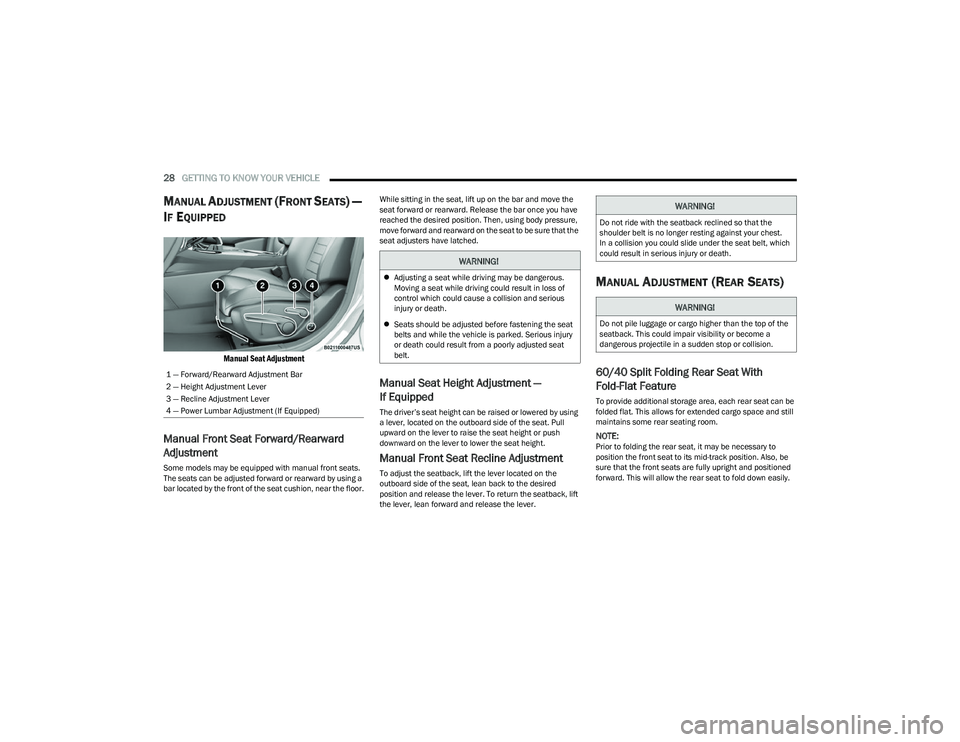
Manual Seat Adjustment
Manual Front Seat Forward/Rearward
Adjustment
Some models may be equipped with manual front seats.
The seats can be adjusted forward or rearward by using a
bar located by the front of the seat cushion, near the floor. While sitting in the seat, lift up on the bar and move the
seat forward or rearward. Release the bar once you have
reached the desired position. Then, using body pressure,
move forward and rearward on the seat to be sure that the
seat adjusters have latched.
Manual Seat Height Adjustment —
If Equipped
The driver’s seat height can be raised or lowered by using
a lever, located on the outboard side of the seat. Pull
upward on the lever to raise the seat height or push
downward on the lever to lower the seat height.
Manual Front Seat Recline Adjustment
To adjust the seatback, lift the lever located on the
outboard side of the seat, lean back to the desired
position and release the lever. To return the seatback, lift
the lever, lean forward and release the lever.
MANUAL ADJUSTMENT (REAR SEATS)
60/40 Split Folding Rear Seat With
Fold-Flat Feature
To provide additional storage area, each rear seat can be
folded flat. This allows for extended cargo space and still
maintains some rear seating room.
NOTE:Prior to folding the rear seat, it may be necessary to
position the front seat to its mid-track position. Also, be
sure that the front seats are fully upright and positioned
forward. This will allow the rear seat to fold down easily.
1 — Forward/Rearward Adjustment Bar
2 — Height Adjustment Lever
3 — Recline Adjustment Lever
4 — Power Lumbar Adjustment (If Equipped)
WARNING!
Adjusting a seat while driving may be dangerous.
Moving a seat while driving could result in loss of
control which could cause a collision and serious
injury or death.
Seats should be adjusted before fastening the seat
belts and while the vehicle is parked. Serious injury
or death could result from a poorly adjusted seat
belt.
WARNING!
Do not ride with the seatback reclined so that the
shoulder belt is no longer resting against your chest.
In a collision you could slide under the seat belt, which
could result in serious injury or death.
WARNING!
Do not pile luggage or cargo higher than the top of the
seatback. This could impair visibility or become a
dangerous projectile in a sudden stop or collision.
23_GG_OM_EN_USC_t.book Page 28
Page 31 of 288
GETTING TO KNOW YOUR VEHICLE29
TO LOWER THE REAR SEAT
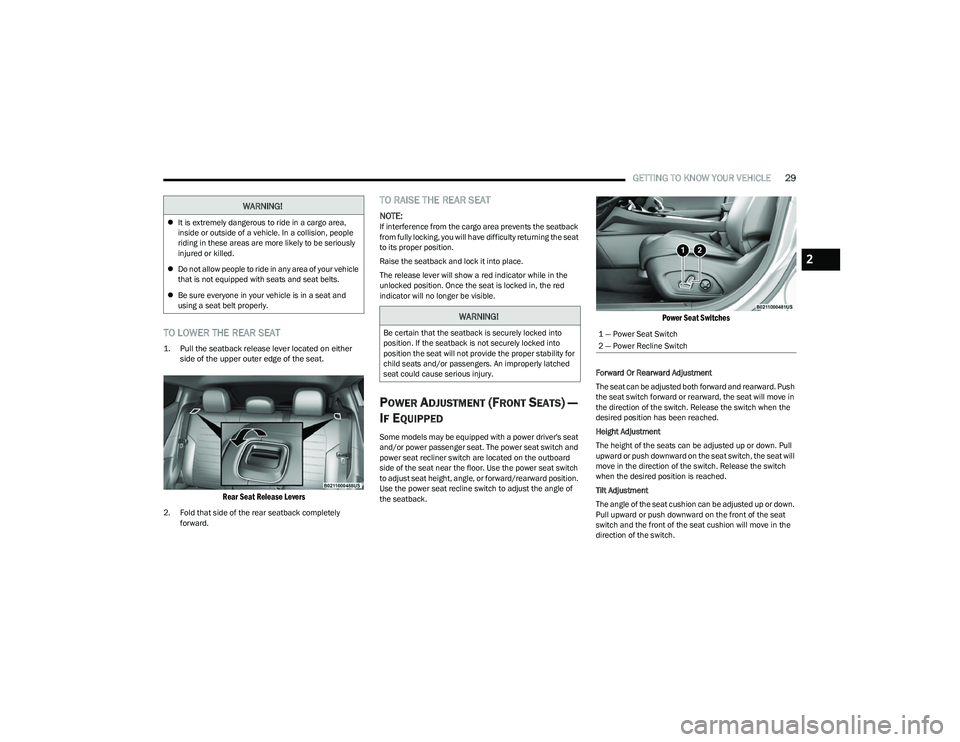
1. Pull the seatback release lever located on either
side of the upper outer edge of the seat.
Rear Seat Release Levers
2. Fold that side of the rear seatback completely forward.
TO RAISE THE REAR SEAT
NOTE:If interference from the cargo area prevents the seatback
from fully locking, you will have difficulty returning the seat
to its proper position.
Raise the seatback and lock it into place.
The release lever will show a red indicator while in the
unlocked position. Once the seat is locked in, the red
indicator will no longer be visible.
POWER ADJUSTMENT (FRONT SEATS) —
I
F EQUIPPED
Some models may be equipped with a power driver's seat
and/or power passenger seat. The power seat switch and
power seat recliner switch are located on the outboard
side of the seat near the floor. Use the power seat switch
to adjust seat height, angle, or forward/rearward position.
Use the power seat recline switch to adjust the angle of
the seatback.
Power Seat Switches
Forward Or Rearward Adjustment
The seat can be adjusted both forward and rearward. Push
the seat switch forward or rearward, the seat will move in
the direction of the switch. Release the switch when the
desired position has been reached.
Height Adjustment
The height of the seats can be adjusted up or down. Pull
upward or push downward on the seat switch, the seat will
move in the direction of the switch. Release the switch
when the desired position is reached.
Tilt Adjustment
The angle of the seat cushion can be adjusted up or down.
Pull upward or push downward on the front of the seat
switch and the front of the seat cushion will move in the
direction of the switch.
WARNING!
It is extremely dangerous to ride in a cargo area,
inside or outside of a vehicle. In a collision, people
riding in these areas are more likely to be seriously
injured or killed.
Do not allow people to ride in any area of your vehicle
that is not equipped with seats and seat belts.
Be sure everyone in your vehicle is in a seat and
using a seat belt properly.
WARNING!
Be certain that the seatback is securely locked into
position. If the seatback is not securely locked into
position the seat will not provide the proper stability for
child seats and/or passengers. An improperly latched
seat could cause serious injury.1 — Power Seat Switch
2 — Power Recline Switch
2
23_GG_OM_EN_USC_t.book Page 29
Page 32 of 288

30GETTING TO KNOW YOUR VEHICLE
Reclining The Seatback Forward Or
Rearward
The seatback can be reclined both forward and rearward.
Push the seat recliner switch forward or rearward. The
seatback will move in the direction of the switch. Release
the switch when the desired position has been reached.
Power Lumbar — If Equipped
Vehicles equipped with power driver or passenger seats
may be equipped with power lumbar. The power lumbar
switch is located on the outboard side of the power seat.
Push the switch forward to increase the lumbar support.
Push the switch rearward to decrease the lumbar support.
Pushing upward or downward on the switch will raise and
lower the position of the support.
Power Lumbar Switch
FRONT HEATED SEATS — IF EQUIPPED
The front heated seats control buttons are
located within the Uconnect system. You can
gain access to the control buttons through the
climate or controls screen.
Press the heated seat button once to turn the
HI setting on.
Press the heated seat button a second time to turn the
MED setting on.
Press the heated seat button a third time to turn the
LO setting on.
Press the heated seat button a fourth time to turn the
heating elements off.
If the HI level setting is selected, the system will
automatically switch to a lower level after approximately
15 minutes (depending on environmental conditions) of
continuous operation. The heated seat feature will then
turn off automatically approximately 45 minutes after
switching to a lower level.
NOTE:The engine must be running for the heated seats to
operate.
For information on use with the Remote Start system, see
Úpage 19.
WARNING!
Do not ride with the seatback reclined so that the
shoulder belt is no longer resting against your chest.
In a collision you could slide under the seat belt, which
could result in serious injury or death.
WARNING!
Persons who are unable to feel pain to the skin
because of advanced age, chronic illness, diabetes,
spinal cord injury, medication, alcohol use, exhaus -
tion or other physical condition must exercise care
when using the seat heater. It may cause burns even
at low temperatures, especially if used for long
periods of time.
Do not place anything on the seat or seatback that
insulates against heat, such as a blanket or cushion.
This may cause the seat heater to overheat. Sitting in
a seat that has been overheated could cause serious
burns due to the increased surface temperature of
the seat.
23_GG_OM_EN_USC_t.book Page 30
Page 33 of 288

GETTING TO KNOW YOUR VEHICLE31
FRONT VENTILATED SEATS —
I
F EQUIPPED
Located in the seat cushion and seat back are
fans that draw the air from the passenger
compartment and move air through fine
perforations in the seat cover to help keep the
driver and front passenger cooler in higher ambient
temperatures. The fans operate at three speeds:
HI, MED, and LO.
The front ventilated seats control buttons are located
within the Uconnect system. You can gain access to the
control buttons through the climate screen or the controls
screen.
Press the ventilated seat button once to choose HI.
Press the ventilated seat button a second time to
choose MED.
Press the ventilated seat button a third time to
choose LO.
Press the ventilated seat button a fourth time to turn
the ventilated seat off.
NOTE:The engine must be running for the ventilated seats to
operate.
For information on use with the Remote Start system, see
Úpage 19.
REAR SEAT ARMREST — IF EQUIPPED
The center part of the rear seat can also be used as a rear
armrest with cup holders, pull the rear armrest strap to
release it from the seat and pull forward.
Pull Rear Armrest Strap
HEAD RESTRAINTS
Head restraints are designed to reduce the risk of injury by
restricting head movement in the event of a rear impact.
Head restraints should be adjusted so that the top of the
head restraint is located above the top of your ear.
NOTE:Do not reverse the head restraints (making the rear of the
head restraint face forward) in an attempt to gain addi -
tional clearance to the back of your head.
WARNING!
Be certain that the seatback is securely locked into
position. If the seatback is not securely locked into
position the seat will not provide the proper stability for
child seats and/or passengers. An improperly latched
seat could cause serious injury.
WARNING!
All occupants, including the driver, should not
operate a vehicle or sit in a vehicle’s seat until the
head restraints are placed in their proper positions in
order to minimize the risk of neck injury in the event
of a crash.
Head restraints should never be adjusted while the
vehicle is in motion. Driving a vehicle with the head
restraints improperly adjusted or removed could
cause serious injury or death in the event of a
collision.
2
23_GG_OM_EN_USC_t.book Page 31
Page 34 of 288

32GETTING TO KNOW YOUR VEHICLE
(Continued)
Front Head Restraint Adjustment
Your vehicle is equipped with front two-way driver and
passenger head restraints.
To raise the head restraint, pull upward on the head
restraint. To lower the head restraint, push the adjustment
button, located at the base of the head restraint, and push
downward on the head restraint.
Head Restraint Adjustment
Rear Head Restraint Adjustment
The rear outboard head restraints can be adjusted up or
down.
To raise the outboard head restraint, pull upward on the
head restraint. To lower the head restraint, push the
adjustment button, located at the base of the head
restraint, and push downward on the head restraint.
Outboard Head Restraint Adjustment Button
Head Restraint Removal
To remove the front or rear outboard head restraints,
proceed as follows:
1. Raise the head restraint to its maximum height.
2. Push the adjustment button and the release button
at the side of the two supports at the same time.
3. Pull upward on the head restraint to fully remove it.
To reinstall the head restraints, proceed as follows:
1. Hold down both the adjustment button and release button while placing the head restraint posts into
the holes.
2. Then, reposition the head restraint to the appropriate height for the passengers.
3. Replace the seatback to the appropriate position for passengers.
NOTE:The rear center head restraint is fixed, and is not
adjustable or removable.
1 — Release Button
2 — Adjustment Button
WARNING!
All occupants, including the driver, should not
operate a vehicle or sit in a vehicle’s seat until the
head restraints are placed in their proper positions in
order to minimize the risk of neck injury in the event
of a crash.
Head restraints should never be adjusted while the
vehicle is in motion. Driving a vehicle with the head
restraints improperly adjusted or removed could
cause serious injury or death in the event of
a collision.
WARNING!
ALL the head restraints MUST be reinstalled in the
vehicle to properly protect the occupants.
WARNING!
WARNING!
A loose head restraint thrown forward in a collision or
hard stop could cause serious injury or death to occu -
pants of the vehicle. Always securely stow removed
head restraints in a location outside the occupant
compartment.
ALL the head restraints MUST be reinstalled in the
vehicle to properly protect the occupants. Follow the
preceding reinstallation instructions prior to oper -
ating the vehicle or occupying a seat.
23_GG_OM_EN_USC_t.book Page 32
Page 37 of 288

GETTING TO KNOW YOUR VEHICLE35
OUTSIDE MIRRORS
The outside mirror(s) can be adjusted to the center of the
adjacent lane of traffic to achieve the optimal view.
NOTE:The passenger side convex outside mirror will give a much
wider view to the rear, and especially of the lane next to
your vehicle.
POWER ADJUSTMENT MIRRORS
The power mirror control switch is located on the driver's
side door trim panel.
To adjust a mirror, rotate the mirror selection switch to the
left or to the right, and then push the mirror adjustment
switch in any of the four directions.
Power Mirror Switch
NOTE:
To adjust the power mirrors, the ignition must be in the
ON/RUN position.
Once adjustment is complete, rotate the knob to the
neutral position to prevent accidental movements.
The power mirror switches will remain active for up to
three minutes after the ignition is placed in the OFF
position. Opening either front door will cancel this
feature.
Power Folding — If Equipped
To fold the outside mirrors in, push the power folding
mirror switch. Push the switch a second time to unfold the
mirrors to the driving position. Any push of the power
folding mirror switch will reverse the operation.
If the power mirror control switch is moved again during
door mirror folding (from closed to open position and vice
versa), the movement direction is reversed.
NOTE:The outside mirrors must always be in the unfolded
position when the vehicle is in motion, except when driving
through narrow locations.
WARNING!
Vehicles and other objects seen in the passenger side
convex mirror will look smaller and farther away than
they really are. Relying too much on your passenger
side convex mirror could cause you to collide with
another vehicle or other object. Use your inside mirror
when judging the size or distance of a vehicle seen in
the passenger side convex mirror.
1 — Mirror Selector Switch
2 — Mirror Adjustment Switch
3 — Power Folding Position (If Equipped)
2
23_GG_OM_EN_USC_t.book Page 35
Page 40 of 288

38GETTING TO KNOW YOUR VEHICLE
Non-Rolling Code Garage Door Opener Final Steps
1. Push and hold the programmed HomeLink® button
and observe the HomeLink® indicator light. If the
HomeLink® indicator light stays on constantly,
programming is complete.
2. Push the programmed HomeLink® button to confirm that the garage door opener motor operates. If the
garage door opener motor does not operate, repeat
the steps from the beginning.PROGRAMMING HOMELINK® TO A
M
ISCELLANEOUS DEVICE
The procedure on how to program HomeLink® to a
miscellaneous device follows the same procedure as
programming to a garage door opener
Úpage 130.
Be sure to determine if the device has a rolling code, or
non-rolling code before beginning the programming
process.
NOTE:Canadian Radio Frequency (RF) laws require transmitter
signals to time-out (or quit) after several seconds of trans -
mission, which may not be long enough for HomeLink® to
pick up the signal during programming. Similar to this
Canadian law, some U.S. gate operators are designed to
time-out in the same manner. The procedure may need to
be performed multiple times to successfully pair the
device to your HomeLink® buttons.
REPROGRAMMING A SINGLE
H
OMELINK® BUTTON
To reprogram a single HomeLink® button that has been
previously trained, without erasing all the channels,
proceed as follows. Be sure to determine whether the new
device you want to program the HomeLink® button to has
a rolling code, or non-rolling code.
1. Place the ignition in the ON/RUN position, without
starting the engine.
2. Push and hold the desired HomeLink® button until
the HomeLink® indicator light begins to flash after
20 seconds. Do not release the button.
3. Without releasing the button , proceed with Step 2 in
“Programming HomeLink® To A Garage Door
Opener” and follow all remaining steps.
CANADIAN/GATE OPERATOR
P
ROGRAMMING
For programming transmitters in Canada/United States
that require the transmitter signals to “time-out” after
several seconds of transmission:
Canadian Radio Frequency (RF) laws require transmitter
signals to time-out (or quit) after several seconds of
transmission, which may not be long enough for
HomeLink® to pick up the signal during programming.
Similar to this Canadian law, some U.S. gate operators are
designed to time-out in the same manner.
It may be helpful to unplug the device during the cycling
process to prevent possible overheating of the garage
door or gate motor.
1. Place the ignition in the ON/RUN position.
NOTE:For vehicles equipped with Keyless Enter ‘n Go™, place
the ignition in the RUN position. Make sure while
programming HomeLink® with the engine on that your
vehicle is outside of your garage, or that the garage door
remains open at all times.
WARNING!
Your motorized door or gate will open and close while
you are programming the universal transmitter. Do
not program the transmitter if people or pets are in
the path of the door or gate.
Do not run your vehicle in a closed garage or
confined area while programming the transmitter.
Exhaust gas from your vehicle contains carbon
monoxide (CO) which is odorless and colorless.
Carbon monoxide is poisonous when inhaled and
can cause you and others to be severely injured
or killed.
23_GG_OM_EN_USC_t.book Page 38