2023 DODGE CHALLENGER climate settings
[x] Cancel search: climate settingsPage 50 of 300

48GETTING TO KNOW YOUR VEHICLE
AUTOMATIC TEMPERATURE CONTROL
(ATC)
Automatic Operation
1. Push the AUTO button on the faceplate, or the AUTO
button on the touchscreen on the Automatic
Temperature Control (ATC) Panel.
2. Next, adjust the temperature that you would like the system to maintain by adjusting the driver and
passenger temperature control buttons. Once the
desired temperature is displayed, the system will
achieve and automatically maintain that comfort
level.
3. When the system is set up for your comfort level, it is not necessary to change the settings. You will
experience the greatest efficiency by simply allowing
the system to function automatically.
NOTE:
It is not necessary to move the temperature settings for
cold or hot vehicles. The system automatically adjusts
the temperature, mode, and blower speed to provide
comfort as quickly as possible.
The temperature can be displayed in US or Metric units
within Uconnect Settings
Úpage 107.
To provide you with maximum comfort in the Automatic
mode during cold start-ups, the blower fan will remain on
low until the engine warms up. The blower will increase in
speed and transition into Auto mode.
Manual Operation Override
This system offers a full complement of manual override
features. The AUTO symbol in the front ATC display will be
turned off when the system is being used in the manual
mode.
CLIMATE VOICE COMMANDS
Adjust vehicle temperatures hands-free and keep
everyone comfortable while you keep moving ahead.
Push the VR button. After the beep, say one of the
following commands:
“Set driver temperature to 70 degrees”
“Set passenger temperature to 70 degrees”
TIP:Voice Command for Climate may only be used to adjust
the interior temperature of your vehicle. Voice Command
will not work to adjust the heated seats or steering wheel
if equipped.
OPERATING TIPS
Refer to the chart at the end of this section for suggested
control settings for various weather conditions.
Summer Operation
The engine cooling system must be protected with a
high-quality antifreeze coolant to provide proper corrosion
protection and to protect against engine overheating. OAT
coolant (conforming to MS.90032) is recommended.
Winter Operation
To ensure the best possible heater and defroster
performance, make sure the engine cooling system is
functioning properly and the proper amount, type, and
concentration of coolant is used. Use of the Air
Recirculation mode during Winter months is not
recommended, because it may cause window fogging.
Vacation/Storage
For information on maintaining the Climate Control system
when the vehicle is being stored for an extended period of
time, see
Úpage 269.
Window Fogging
Vehicle windows tend to fog on the inside in mild, rainy,
and/or humid weather. To clear the windows, select
Defrost or Mix mode and increase the front blower speed.
Do not use the Recirculation mode without A/C for long
periods, as fogging may occur.
Outside Air Intake
Make sure the air intake, located directly in front of the
windshield, is free of obstructions, such as leaves. Leaves
collected in the air intake may reduce airflow, and if they
enter the air distribution box, they could plug the water
drains. In Winter months, make sure the air intake is clear
of ice, slush, and snow.
23_LA_OM_EN_USC_t.book Page 48
Page 51 of 300
GETTING TO KNOW YOUR VEHICLE49
Cabin Air Filter
The Climate Control system filters out dust and pollen
from the air. Contact an authorized dealer to service your
cabin air filter, and to have it replaced when needed.
Operating Tips Chart
INTERIOR STORAGE AND EQUIPMENT
STORAGE
Glove Compartment
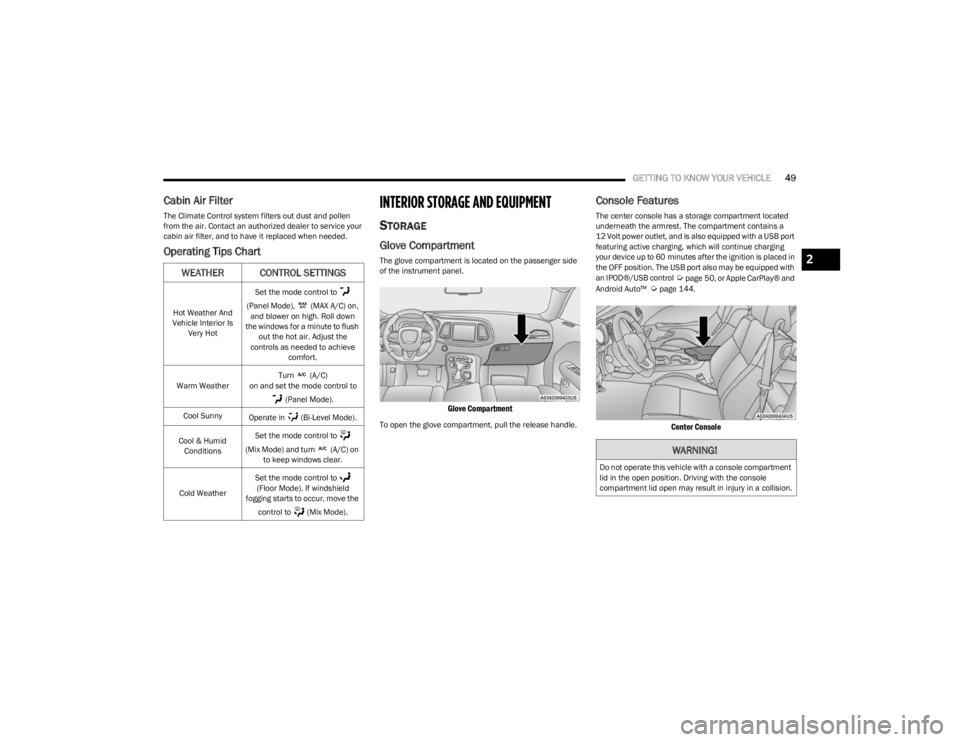
The glove compartment is located on the passenger side
of the instrument panel.
Glove Compartment
To open the glove compartment, pull the release handle.
Console Features
The center console has a storage compartment located
underneath the armrest. The compartment contains a
12 Volt power outlet, and is also equipped with a USB port
featuring active charging, which will continue charging
your device up to 60 minutes after the ignition is placed in
the OFF position. The USB port also may be equipped with
an IPOD®/USB control
Úpage 50, or Apple CarPlay® and
Android Auto™ Úpage 144.
Center Console
WEATHER CONTROL SETTINGS
Hot Weather And
Vehicle Interior Is Very Hot Set the mode control to
(Panel Mode), (MAX A/C) on, and blower on high. Roll down
the windows for a minute to flush out the hot air. Adjust the
controls as needed to achieve comfort.
Warm Weather Turn (A/C)
on and set the mode control to
(Panel Mode).
Cool Sunny Operate in (Bi-Level Mode).
Cool & Humid Conditions Set the mode control to
(Mix Mode) and turn (A/C) on to keep windows clear.
Cold Weather Set the mode control to
(Floor Mode). If windshield
fogging starts to occur, move the
control to (Mix Mode).
WARNING!
Do not operate this vehicle with a console compartment
lid in the open position. Driving with the console
compartment lid open may result in injury in a collision.
2
23_LA_OM_EN_USC_t.book Page 49
Page 123 of 300

MULTIMEDIA121
UCONNECT INTRODUCTION
SYSTEM OVERVIEW
Uconnect 4 With 7-inch Display
NOTE:
Uconnect screen images are for illustration purposes only and may not reflect exact software for your vehicle. 1 — Radio Button
5 — Controls Button
2 — Media Button 6 — Phone Button
3 — Climate Button 7 — Settings Button
4 — Apps Button
5
23_LA_OM_EN_USC_t.book Page 121
Page 288 of 300

286
Brake Assist System .................................................... 160
Brake Control System .................................................. 160
Brake Fluid .......................................................... 240
, 279
Brake System ...................................................... 240, 273
Fluid Check..................................................... 240, 279
Master Cylinder ....................................................... 240
Parking ....................................................................... 74
Warning Light ................................................... 64
, 273
Brake/Transmission Interlock........................................79
Break-In Recommendations, New Vehicle .................... 74
Brightness, Interior Lights .............................................. 43
Bulb Replacement ....................................................... 250
Bulbs, Light.......................................................... 198
, 250
CCamera, Rear ..................................................................96
Capacities, Fluid ........................................................... 277
Caps, Filler Fuel .............................................................................96
Oil (Engine) .............................................................. 228
Radiator (Coolant Pressure)................................... 239
Car Washes .................................................................. 270
Carbon Monoxide Warning .......................................... 198
Cargo Vehicle Loading..........................................................97
Cargo Net .........................................................................55
CD.................................................................................. 133
Cellular Phone .............................................................. 158
Certification Label ...........................................................98
Chains, Tire................................................................... 267
Chart, Tire Sizing .......................................................... 255
Check Engine Light (Malfunction Indicator Light) .........70
Checking Your Vehicle For Safety ............................... 196
Checks, Safety.............................................................. 196 Child Restraint .............................................................. 185
Child Restraints
Booster Seats .......................................................... 187
Child Seat Installation ............................................. 194How To Stow An unused ALR Seat Belt .................192Infant And Child Restraints ..................................... 186
Lower Anchors And Tethers For Children............... 188
Older Children And Child Restraints....................... 187
Seating Positions ..................................................... 188
Clean Air Gasoline ........................................................ 275
Cleaning Wheels .....................................................................266
Climate Control ............................................................... 45
Cold Weather Operation ................................................. 74
Compact Spare Tire ...................................................... 265
Contract, Service .......................................................... 282
Controls ......................................................................... 125
Cooling Pressure Cap (Radiator Cap) ..........................239
Cooling System ............................................................. 237 Adding Coolant (Antifreeze) ....................................238
Coolant Level ................................................. 238
, 239
Cooling Capacity ...................................................... 277
Disposal Of Used Coolant ....................................... 239 Drain, Flush, And Refill............................................238
Inspection ................................................................ 239
Points To Remember............................................... 239
Pressure Cap ...........................................................239
Radiator Cap ............................................................239Selection Of Coolant (Antifreeze) ........ 238
, 277, 278
Corrosion Protection ..................................................... 270
Cruise Control ................................................................. 84
Cruise Control (Speed Control) ...................................... 84 Cruise Light ..................................................................... 69 Cupholders
Illuminated................................................................. 50
Customer Assistance ................................................... 280
Customer Programmable Features ............................. 107
Cybersecurity ................................................................ 106
DDaytime Running Lights ................................................. 40 Dealer Service .............................................................. 231
Defroster, Windshield .................................................. 197
De-Icer, Remote Start .................................................... 19
Delay (Intermittent) Wipers............................................ 44
Deleting A Phone .......................................................... 139
Deluxe Vehicle Security System .................................... 20
Diagnostic System, Onboard ......................................... 69Dimmer Control .............................................................. 43Dipsticks Oil (Engine) .............................................................. 230
Disabled Vehicle Towing .............................................. 221
Disc Drive ...................................................................... 133
Disconnecting ............................................................... 139
Disposal Antifreeze (Engine Coolant) .................................... 239
Disturb........................................................................... 141
Door Ajar ......................................................................... 64
Door Ajar Light ................................................................ 64
Door Locks Automatic .................................................................. 24
Remote Keyless Entry ............................................... 12
Doors ............................................................................... 21
Drag & Drop .................................................................. 123
Drive Modes.................................................................. 154
Driver Memory Presets ................................................ 131
Driver Memory Settings ................................................. 27
23_LA_OM_EN_USC_t.book Page 286