2023 CITROEN E-MEHARI ignition
[x] Cancel search: ignitionPage 58 of 84
56
Reinitialisation
The system must be reinitialised after any
adjustment to the pressures of one or more
tyres, and after changing one or more wheels.Before reinitialising the system, ensure
that the pressures of the four tyres are
correct for the use of the vehicle and in
line with the recommendations on the tyre
pressure label.
The under-inflation detection system
does not give a
warning if a pressure is
incorrect at the time of reinitialisation.
The system must be reinitialised with the
ignition on and the vehicle stationary, via the
vehicle's configuration menu, in Advanced
settings.
The under-inflation alert can only be relied
on if the reinitialisation of the system has
been done with the pressures in the four
tyres correctly adjusted.
Driving
Page 63 of 84
61
Starting the charge
To start charging, the ignition must be
switched off, the car must be unlocked
with the RFID key ring, and the parking
brake activated.
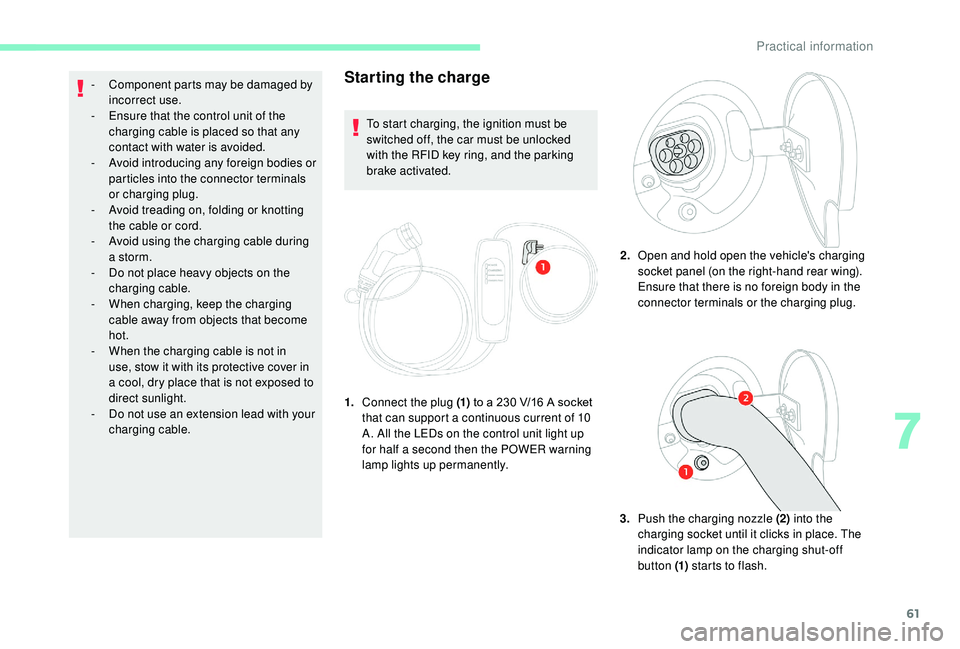
1. Connect the plug (1) to a
230 V/16 A socket
that can support a
continuous current of 10
A. All the LEDs on the control unit light up
for half a
second then the POWER warning
lamp lights up permanently. 2.
Open and hold open the vehicle's charging
socket panel (on the right-hand rear wing).
Ensure that there is no foreign body in the
connector terminals or the charging plug.
3. Push the charging nozzle (2) into the
charging socket until it clicks in place. The
indicator lamp on the charging shut-off
button (1) starts to flash.
-
C
omponent parts may be damaged by
incorrect use.
-
E
nsure that the control unit of the
charging cable is placed so that any
contact with water is avoided.
-
A
void introducing any foreign bodies or
particles into the connector terminals
or charging plug.
-
A
void treading on, folding or knotting
the cable or cord.
-
A
void using the charging cable during
a
storm.
-
D
o not place heavy objects on the
charging cable.
-
W
hen charging, keep the charging
cable away from objects that become
hot.
-
W
hen the charging cable is not in
use, stow it with its protective cover in
a
cool, dry place that is not exposed to
direct sunlight.
-
D
o not use an extension lead with your
charging cable.
7
Practical information
Page 67 of 84

65
If you notice when driving that the bonnet
is not closed correctly, slow down and
stop where it is safe to do so, and then
close the bonnet correctly.
Underbonnet layout
(1)Drive train
(2) Your E-MEHARI's heating system
(3) Motor coolant
Return the stay to its original position and allow
the bonnet to drop and latch home.
Check that the bonnet has latched correctly.
There are high voltage components under
the bonnet of your E-MEHARI.
We recommend that you do not attempt
to per form maintenance on your vehicle
yourself.
Incorrect handling of these components
could cause an electric shock and serious
or fatal injuries.
Brake fluid and motor
coolant levels
Make a regular visual check of the brake fluid
an d coolant levels.
These levels should be topped up by
a
CITROËN authorised repairer or a qualified
professional.
If work is needed on your vehicle, contact
a
CITROËN authorised repairer or
a
qualified professional without delay.
(4)
Brake fluid
(5) Screenwash fluid reservoir
(6) Heating system fluid
Screenwash fluid level
Always per form the following operations in
the order indicated before carrying out any
operations under the bonnet of your E-MEHARI
to top up the screenwash fluid level:
1.Park the vehicle in a
safe place
2. Press and hold the brake pedal in this
position until you have switched off the
ignition
3. Apply the parking brake fully
4. Move the drive selector to position "N"
5. Switch off the ignition and remove the key
from the switch
6. Keep children and other persons away
from the underbonnet
7. Ensure that the vehicle is correctly
immobilised
Failure to follow the list of operations
above risks causing serious injury.
Always carry out the operations in the
order given and always obser ve the safety
recommendations.
7
Practical information
Page 68 of 84

66
To top up the screenwash fluid: remove the cap
from the reser voir, place a funnel in the neck
of the reser voir and fill the reser voir up to the
"MAX" mark.
In low temperatures, use a
screenwash
fluid with adequate protection against
freezing.
Always be extremely vigilant when
filling the screenwash reservoir and
take account of the general safety
recommendations mentioned in this
handbook.
Hibernation mode
Hibernation mode allows the consumption
of energy from the battery to be reduced to
a
minimum.
In this way you can park your E-MEHARI, not
connected and therefore with no consumption
of electrical energy, for several weeks or even
several months.
Coming out of hibernation mode takes 4
hours
and is followed by the charging time (a
maximum of between 8
and 13 hours).
You cannot put your E-MEHARI into
hibernation with a
battery state of charge
of less than 25%.
Going into hibernation
mode
Maximum hibernation period
depending on the state of charge
of the battery
In hibernation, the battery will self-discharge by
between 0.5% and 1% per day.
Therefore, the maximum duration of
hibernation depending on the battery charge
level is:
100%: 4
months
75% – 99%: 3
months
50% – 74%: 2
months
25% – 49%: 1
month 2.
If necessary, unlock your vehicle and
disconnect the charging plug.
3. Turn the ignition key to the first position,
the screen then displays:
4. Press the settings button (1) on the
right of the screen. The screen displays
various possible choices.
5. Select "Extended dormancy" using the
arrows.
6. Press and hold the settings button for
5
seconds.
7. Switch off the ignition. Entry into
hibernation mode is confirmed.
1. Move your vehicle close to a
charging
point.
Practical information
Page 69 of 84
67
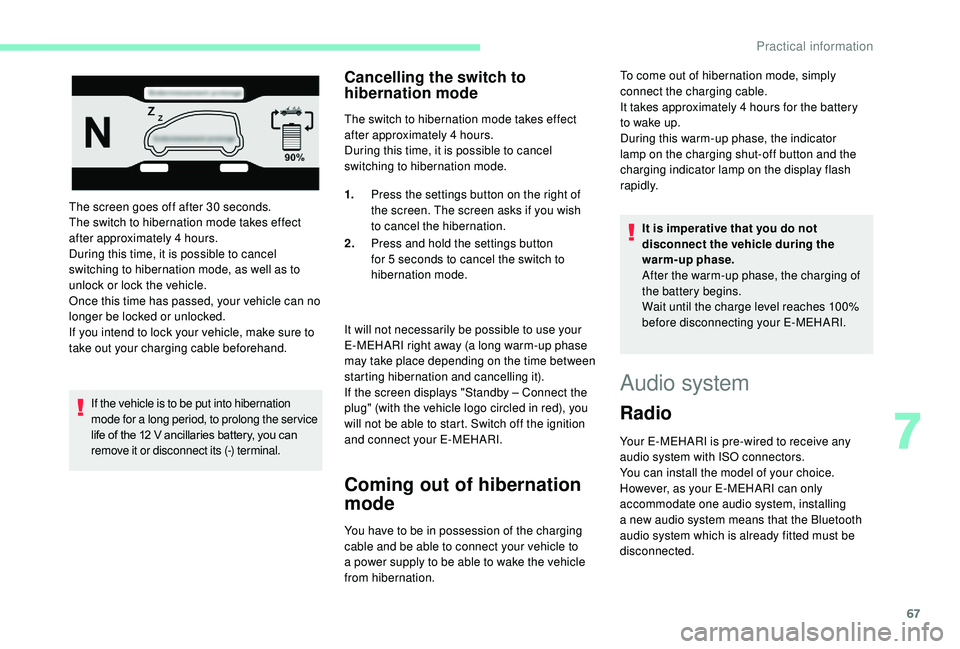
The screen goes off after 30 seconds.
T he switch to hibernation mode takes effect
after approximately 4
hours.
During this time, it is possible to cancel
switching to hibernation mode, as well as to
unlock or lock the vehicle.
Once this time has passed, your vehicle can no
longer be locked or unlocked.
If you intend to lock your vehicle, make sure to
take out your charging cable beforehand.
If the vehicle is to be put into hibernation
mode for a
long period, to prolong the ser vice
life of the 12
V ancillaries battery, you can
remove it or disconnect its (-) terminal.
Cancelling the switch to
hibernation mode
The switch to hibernation mode takes effect
after approximately 4 hours.
During this time, it is possible to cancel
switching to hibernation mode.
It will not necessarily be possible to use your
E-MEHARI right away (a long warm-up phase
may take place depending on the time between
starting hibernation and cancelling it).
If the screen displays "Standby – Connect the
plug" (with the vehicle logo circled in red), you
will not be able to start. Switch off the ignition
and connect your E-MEHARI.
Coming out of hibernation
mode
You have to be in possession of the charging
cable and be able to connect your vehicle to
a
power supply to be able to wake the vehicle
from hibernation. 1.
Press the settings button on the right of
the screen. The screen asks if you wish
to cancel the hibernation.
2. Press and hold the settings button
for 5 seconds to cancel the switch to
hibernation mode. It is imperative that you do not
disconnect the vehicle during the
warm-up phase.
After the warm-up phase, the charging of
the battery begins.
Wait until the charge level reaches 100%
before disconnecting your E-MEHARI.
Audio system
Radio
Your E-MEHARI is pre-wired to receive any
audio system with ISO connectors.
You can install the model of your choice.
However, as your E-MEHARI can only
accommodate one audio system, installing
a
new audio system means that the Bluetooth
audio system which is already fitted must be
disconnected. To come out of hibernation mode, simply
connect the charging cable.
It takes approximately 4
hours for the battery
to wake up.
During this warm-up phase, the indicator
lamp on the charging shut-off button and the
charging indicator lamp on the display flash
rapidly.
7
Practical information