2023 CITROEN E-MEHARI charging
[x] Cancel search: chargingPage 61 of 84
59
A hibernation mode is available to reduce
energy consumption from the battery to
a
minimum.
In this way you can park your E-MEHARI, not
connected and therefore with no consumption
of electrical energy, for several weeks or even
several months.
If the LMP
® battery is completely discharged,
the 12
V battery could be damaged and require
replacement.
At a public or private
c harging point
You can charge your E-MEHARI at a public or
p rivate charging point, provided that you have
a
suitable cable for the type of charging point.
At home
Using a 16 A power point
If you have a 16 A charging power point or have
h ad one installed by an electrician, you can use
it to charge your E-MEHARI.
Using an ordinary domestic power point (230 V/16 A 10 A consumed)
Your E-MEHARI is supplied with a charging cable that has CCID electronic protection, allowing you
t o charge your E-MEHARI from any 230 V/16 A domestic power point that can support a continuous
current of 10
A.
Using this solution, the charging time is longer than if charged from a
16 A power point.
Use of CCID charging cable
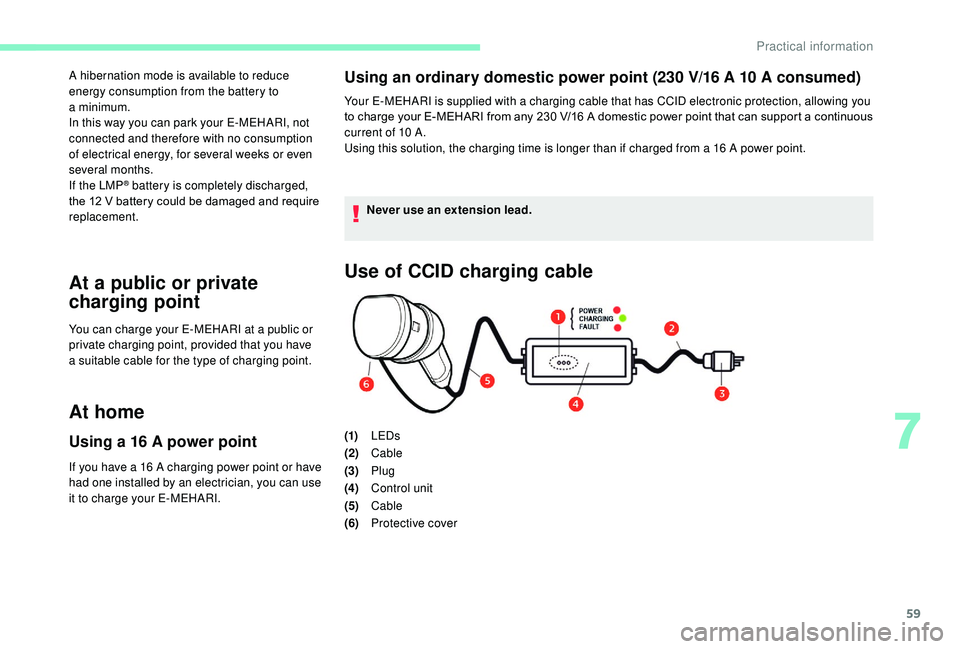
(1)LEDs
(2) Cable
(3) Plug
(4) Control unit
(5) Cable
(6) Protective cover
Never use an extension lead.
7
Practical information
Page 62 of 84
60
Obser ve the safety rules and follow the
steps indicated before use.
-
Us
e only the original charging cable.
-
D
o not attempt to dismantle or repair the
charging cable.
-
D
o not use an extension lead or adapter.
-
I
ncorrect use of the charging cable would
risk causing an accident such as an
electrical discharge or fire.
-
I
mmediately stop using the charging cable
if a
fault or problem occurs or if the FAULT
warning lamp lights up or flashes.
-
E
nsure that the plug is not allowed to
become wet.
-
D
o not touch the terminals on the charging
cable or the vehicle's charging socket.
-
D
o not use the charging cable if parts of
it are broken, frayed, cracked, open or
showing any other sign of damage.
-
K
eep the charging cable out of reach of
children.
-
W
hen using the charging cable, the
ambient temperature must not exceed
45
degrees Celsius.
-
H
andle the charging cable with care, avoid
dropping it and do not pull heavily on the
cable or the cord. The components of your E-MEHARI
comply with electromagnetic emission
standards. However, as a
precaution,
if you have a
pacemaker or any other
electrical medical device, ask your doctor
about any precautions to take.
-
E nsure that the electrical power supply is
220 -240 V 50 Hz alternating current.
-
B
efore connecting the charging cable,
check the nominal current indicated on
the charging cable, to ensure that the
power point and supply circuit are rated
sufficiently highly to charge your vehicle.
-
T
he charging cable allows 10 A of
continuous consumption, you must ensure
that the electrical installation (socket,
cables, etc.) for the charging have this
value of nominal current at a
minimum
and comply with the most recent electrical
cable standards and regulations in force in
your country or region.
-
T
he maximum nominal current depends
on the country.
-
T
he socket and wiring circuit must be
earthed and protected by a
circuit breaker
specifically designed for this purpose or
a
fuse to avoid any accident of electrical
origin.
-
C
ontact a qualified electrician if in any
doubt over the power point and wiring
circuit.
Practical information
Page 63 of 84
61
Starting the charge
To start charging, the ignition must be
switched off, the car must be unlocked
with the RFID key ring, and the parking
brake activated.
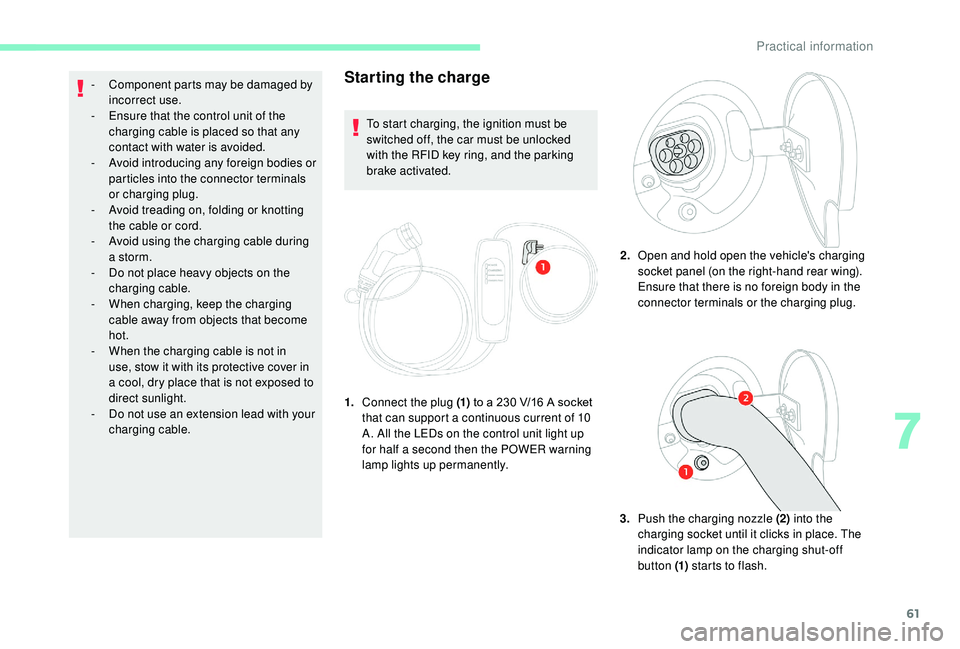
1. Connect the plug (1) to a
230 V/16 A socket
that can support a
continuous current of 10
A. All the LEDs on the control unit light up
for half a
second then the POWER warning
lamp lights up permanently. 2.
Open and hold open the vehicle's charging
socket panel (on the right-hand rear wing).
Ensure that there is no foreign body in the
connector terminals or the charging plug.
3. Push the charging nozzle (2) into the
charging socket until it clicks in place. The
indicator lamp on the charging shut-off
button (1) starts to flash.
-
C
omponent parts may be damaged by
incorrect use.
-
E
nsure that the control unit of the
charging cable is placed so that any
contact with water is avoided.
-
A
void introducing any foreign bodies or
particles into the connector terminals
or charging plug.
-
A
void treading on, folding or knotting
the cable or cord.
-
A
void using the charging cable during
a
storm.
-
D
o not place heavy objects on the
charging cable.
-
W
hen charging, keep the charging
cable away from objects that become
hot.
-
W
hen the charging cable is not in
use, stow it with its protective cover in
a
cool, dry place that is not exposed to
direct sunlight.
-
D
o not use an extension lead with your
charging cable.
7
Practical information
Page 64 of 84

62
Stopping the charge
The charging nozzle will only disconnect if
your E-MEHARI is unlocked using the personal
RFID key ring.
1.Press the charging shut-off button in
the charging socket panel, wait until the
charging nozzle is unlocked then pull it
out. If you do not remove the charging
nozzle within the next 10
seconds, the
vehicle star ts charging again. You will
then have to star t the operation again.
2. Refit the protective cover on the charging
nozzle.
3. Disconnect the plug from the power point.
4.
Charging starts automatically. The
CHARGING indicator lamp on the control
unit comes on to indicate that charging is
in progress.
Several signals indicate that the vehicle's
battery is charging:
-
T
he right-hand rear lamp flashes 5
times at
the start of the charge.
-
T
he charging indicator lamp (in the form of
a
green plug) in the display screen flashes
continuously.
Flashing green continuously: charging is in
progress.
Fixed green: charging is complete.
-
T
he indicator lamp on the charging shut-off
button gives the same indication as the
charging indicator lamp on the display.
Flashing green continuously: charging is in
progress.
Fixed green: charging is complete.
If the central screen is lit, the message
"Charging" will be displayed as well as an
estimate of the charge time remaining. Notes on charging
Once you have connected your
E-MEHARI, you have 30
seconds to lock
the vehicle.
After this, your E-MEHARI will remain
unlocked.
However, as a
security measure, the
driving permissions will be cancelled.
-
I
f you wish to use your E-MEHARI
again, offer up your key ring in front of
the RFID reader to regain the driving
permissions.
-
T
o lock your E-MEHARI, scan twice.
The 1
st time will be interpreted as
a
recovery of the driving permissions, the
2
nd time will lock the vehicle.
Practical information
Page 65 of 84
63
Indications given by the LEDs on the control unit
POWER LEDCHARGING
LEDFA U LT L E D
Description
On for ½ sec. On for ½ sec. On for ½ sec. All of the LEDs come on for ½ second to verify that they work, when the charging cable is
plugged into the power point.
On OffOffThe charging cable is plugged into the power
point. If the Type 2
connector is in the vehicle's
charging socket, the charge has finished.
On OnOffThe vehicle's battery is charging.
On OffOn/flashingFault with the charging cable. Stop using
the charging cable immediately and
contact CITROËN ASSISTANCE.
Off OffOffNo electrical power supply is detected at the
power point by the charging cable. Check
the circuit breaker for the power point. If the
power point electrical supply is correct and
all the LEDs do not light up for half a
second
to verify that they are working properly,
the charging cable may be damaged. Stop
using it immediately and contact CITROËN
ASSISTANCE.
Comparison of charging times
Charging type Estimated charging
time (0-100%)
Charging point: 16
A8
to 9 hours
230 V/16 A
power point 10 A
consumed 13 hour s
When charging the vehicle, particularly
at the roadside, be especially careful of
children when handling the cable and the
charging point.
The cable reel can operate sharply and
cause injury.
Children could trap their fingers in the
charging point closing mechanism.
7
Practical information
Page 68 of 84

66
To top up the screenwash fluid: remove the cap
from the reser voir, place a funnel in the neck
of the reser voir and fill the reser voir up to the
"MAX" mark.
In low temperatures, use a
screenwash
fluid with adequate protection against
freezing.
Always be extremely vigilant when
filling the screenwash reservoir and
take account of the general safety
recommendations mentioned in this
handbook.
Hibernation mode
Hibernation mode allows the consumption
of energy from the battery to be reduced to
a
minimum.
In this way you can park your E-MEHARI, not
connected and therefore with no consumption
of electrical energy, for several weeks or even
several months.
Coming out of hibernation mode takes 4
hours
and is followed by the charging time (a
maximum of between 8
and 13 hours).
You cannot put your E-MEHARI into
hibernation with a
battery state of charge
of less than 25%.
Going into hibernation
mode
Maximum hibernation period
depending on the state of charge
of the battery
In hibernation, the battery will self-discharge by
between 0.5% and 1% per day.
Therefore, the maximum duration of
hibernation depending on the battery charge
level is:
100%: 4
months
75% – 99%: 3
months
50% – 74%: 2
months
25% – 49%: 1
month 2.
If necessary, unlock your vehicle and
disconnect the charging plug.
3. Turn the ignition key to the first position,
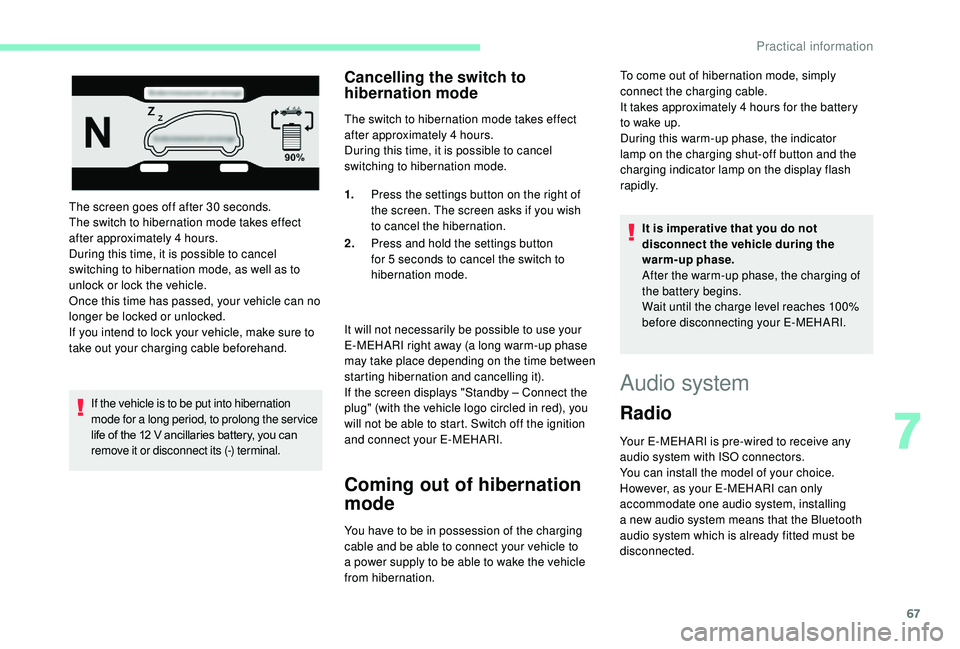
the screen then displays:
4. Press the settings button (1) on the
right of the screen. The screen displays
various possible choices.
5. Select "Extended dormancy" using the
arrows.
6. Press and hold the settings button for
5
seconds.
7. Switch off the ignition. Entry into
hibernation mode is confirmed.
1. Move your vehicle close to a
charging
point.
Practical information
Page 69 of 84
67
The screen goes off after 30 seconds.
T he switch to hibernation mode takes effect
after approximately 4
hours.
During this time, it is possible to cancel
switching to hibernation mode, as well as to
unlock or lock the vehicle.
Once this time has passed, your vehicle can no
longer be locked or unlocked.
If you intend to lock your vehicle, make sure to
take out your charging cable beforehand.
If the vehicle is to be put into hibernation
mode for a
long period, to prolong the ser vice
life of the 12
V ancillaries battery, you can
remove it or disconnect its (-) terminal.
Cancelling the switch to
hibernation mode
The switch to hibernation mode takes effect
after approximately 4 hours.
During this time, it is possible to cancel
switching to hibernation mode.
It will not necessarily be possible to use your
E-MEHARI right away (a long warm-up phase
may take place depending on the time between
starting hibernation and cancelling it).
If the screen displays "Standby – Connect the
plug" (with the vehicle logo circled in red), you
will not be able to start. Switch off the ignition
and connect your E-MEHARI.
Coming out of hibernation
mode
You have to be in possession of the charging
cable and be able to connect your vehicle to
a
power supply to be able to wake the vehicle
from hibernation. 1.
Press the settings button on the right of
the screen. The screen asks if you wish
to cancel the hibernation.
2. Press and hold the settings button
for 5 seconds to cancel the switch to
hibernation mode. It is imperative that you do not
disconnect the vehicle during the
warm-up phase.
After the warm-up phase, the charging of
the battery begins.
Wait until the charge level reaches 100%
before disconnecting your E-MEHARI.
Audio system
Radio
Your E-MEHARI is pre-wired to receive any
audio system with ISO connectors.
You can install the model of your choice.
However, as your E-MEHARI can only
accommodate one audio system, installing
a
new audio system means that the Bluetooth
audio system which is already fitted must be
disconnected. To come out of hibernation mode, simply
connect the charging cable.
It takes approximately 4
hours for the battery
to wake up.
During this warm-up phase, the indicator
lamp on the charging shut-off button and the
charging indicator lamp on the display flash
rapidly.
7
Practical information
Page 75 of 84

73
Electric characteristics
Energy 30
kWh
Nominal voltage 410 V
Peak power 45
kW (30 s)
Min/max LMP
®
battery voltage 300/435 V
Capacity at C/4 75
Ah
Mass density 10 0
Wh/kg
Volume density 10 0
Wh/l
Maximum current 140
A
Your E-MEHARI contains a
high
voltage LMP
® battery isolated from its
surroundings by its unique packaging
arrangement.
The LMP
® battery must only be handled
by trained and qualified persons.
On-board charger
To make your E-MEHARI as versatile as
possible, it is fitted with an internal charger.
Your E-MEHARI can be charged from any
power point; the charger transforms the supply
to suit the LMP
® battery.
The charger in your E-MEHARI has the
following characteristics: Characteristics of the charger in your E-MEHARI
Operating voltage 230
V
Charger current rating 16
A
Charging power rating at 16 A 3,300
W
Charging power rating at 10 A 2,200
W
Dimensions/Weights
Exterior dimensions
Dimensions of your E-MEHARILength 3.81
m
Width 1.87
m (including the m i r r o r s)
Height 1.6 5
m
Interior dimensions
Interior volumes of your E- MEHARIBoot volume
200 litres/800 litres with
t he bench seat folded
Number of seats 4
9
Technical data