2023 CHRYSLER PACIFICA ground
[x] Cancel search: groundPage 155 of 328

STARTING AND OPERATING153
The electrical connections are all complete to the vehicle
but you must mate the harness to a trailer connector.
Refer to the following illustrations.
NOTE:
Disconnect the trailer wiring connector from the vehicle
(or any other device plugged into vehicle’s electrical
connectors) before launching a boat into water.
Be sure to reconnect once clear from water area.
Four-Pin Connector Seven-Pin Connector
TOWING TIPS
Before towing, practice turning, stopping, and backing up
the trailer in an area located away from heavy traffic.
Automatic Transmission
Select the DRIVE range when towing. The transmission
controls include a drive strategy to avoid frequent shifting
when towing. For increased engine braking on steep
downhill grades, select the LOW range.
Cruise Control — If Equipped
Do not use on hilly terrain or with heavy loads.
When using the Cruise Control, if you experience speed
drops greater than 10 mph (16 km/h), disengage until
you can get back to cruising speed.
Use Cruise Control in flat terrain and with light loads to
maximize fuel efficiency.
1 — Ground
2 — Park
3 — Left Stop/Turn
4 — Right Stop/Turn1 — Backup Lamps
2 — Running Lamps
3 — Left Stop/Turn
4 — Ground
5 — Battery
6 — Right Stop/Turn
7 — Electric Brakes
4
23_RUP_OM_EN_USC_t.book Page 153
Page 156 of 328
154STARTING AND OPERATING
RECREATIONAL TOWING (BEHIND MOTORHOME)
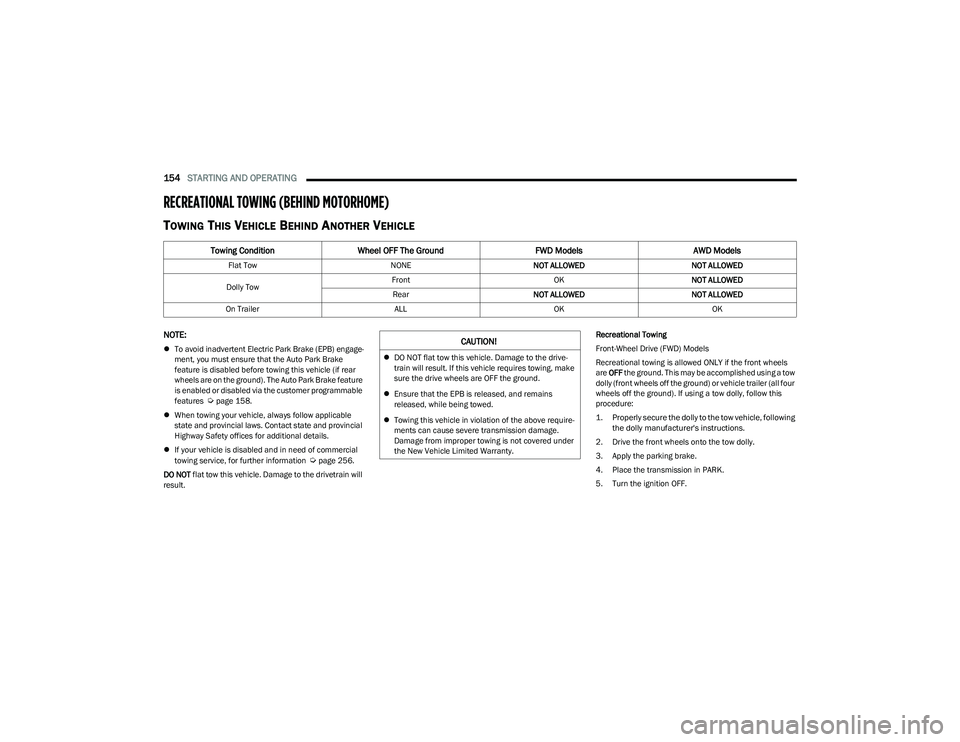
TOWING THIS VEHICLE BEHIND ANOTHER VEHICLE
NOTE:
To avoid inadvertent Electric Park Brake (EPB) engage -
ment, you must ensure that the Auto Park Brake
feature is disabled before towing this vehicle (if rear
wheels are on the ground). The Auto Park Brake feature
is enabled or disabled via the customer programmable
features
Úpage 158.
When towing your vehicle, always follow applicable
state and provincial laws. Contact state and provincial
Highway Safety offices for additional details.
If your vehicle is disabled and in need of commercial
towing service, for further information
Úpage 256.
DO NOT flat tow this vehicle. Damage to the drivetrain will
result. Recreational Towing
Front-Wheel Drive (FWD) Models
Recreational towing is allowed ONLY if the front wheels
are
OFF the ground. This may be accomplished using a tow
dolly (front wheels off the ground) or vehicle trailer (all four
wheels off the ground). If using a tow dolly, follow this
procedure:
1. Properly secure the dolly to the tow vehicle, following the dolly manufacturer's instructions.
2. Drive the front wheels onto the tow dolly.
3. Apply the parking brake.
4. Place the transmission in PARK.
5. Turn the ignition OFF.
Towing Condition Wheel OFF The Ground FWD ModelsAWD Models
Flat Tow NONENOT ALLOWED NOT ALLOWED
Dolly Tow Front
OKNOT ALLOWED
Rear NOT ALLOWED NOT ALLOWED
On Trailer ALLOKOK
CAUTION!
DO NOT flat tow this vehicle. Damage to the drive -
train will result. If this vehicle requires towing, make
sure the drive wheels are OFF the ground.
Ensure that the EPB is released, and remains
released, while being towed.
Towing this vehicle in violation of the above require -
ments can cause severe transmission damage.
Damage from improper towing is not covered under
the New Vehicle Limited Warranty.
23_RUP_OM_EN_USC_t.book Page 154
Page 157 of 328

STARTING AND OPERATING155
6. Properly secure the front wheels to the dolly, following
the dolly manufacturer's instructions.
7. Turn the ignition to the ON/RUN position, but do not start the vehicle.
8. Press and hold the brake pedal.
9. Release the parking brake.
10. Turn the ignition OFF.
11. Release the brake pedal.
All-Wheel Drive (AWD) Models
Recreational towing (with all four wheels on the ground, or
using a towing dolly) is NOT ALLOWED. The only
acceptable method for towing this vehicle (behind another
vehicle) is on a vehicle trailer with all four wheels OFF the
ground.DRIVING TIPS
DRIVING ON SLIPPERY SURFACES
Information in this section will aid in safe controlled
launches in adverse conditions.
Acceleration
Rapid acceleration on snow covered, wet, or other slippery
surfaces may cause the driving wheels to pull erratically to
the right or left. This phenomenon occurs when there is a
difference in the surface traction under the front (driving)
wheels.
Traction
When driving on wet or slushy roads, it is possible for a
wedge of water to build up between the tire and road
surface. This is hydroplaning and may cause partial or
complete loss of vehicle control and stopping ability. To
reduce this possibility, the following precautions should be
observed:
Slow down during rainstorms or when the roads are
slushy.
Slow down if the road has standing water or puddles.
Replace the tires when tread wear indicators first
become visible.
Keep tires properly inflated.
Maintain sufficient distance between your vehicle and
the vehicle in front of you to avoid a collision in a
sudden stop.
CAUTION!
Towing this vehicle with ANY of its wheels on the ground
can cause severe transmission and/or power transfer
unit damage. Damage from improper towing is not
covered under the New Vehicle Limited Warranty.
WARNING!
Rapid acceleration on slippery surfaces is dangerous.
Unequal traction can cause sudden pulling of the front
wheels. You could lose control of the vehicle and
possibly have a collision. Accelerate slowly and carefully
whenever there is likely to be poor traction (ice, snow,
wet, mud, loose sand, etc.).
4
23_RUP_OM_EN_USC_t.book Page 155
Page 198 of 328
196SAFETY
The FCW system is intended for on-road use only. If the
vehicle is taken off-road, the FCW system should be
deactivated to prevent unnecessary warnings to the
surroundings.
Turning FCW On Or Off
The Forward Collision menu setting is located in the
Uconnect settings.
NOTE:The default status of FCW is “on”, this allows the system
to warn you of a possible collision with the vehicle in front
of you.
Changing the FCW status to “off” deactivates the system,
so no warning or active braking will be available in case of
a possible collision.
NOTE:
The FCW system state is kept in memory from one key
cycle to the next. If the system is turned off, it will
remain off when the vehicle is restarted.
FCW can work in conjunction with the KeySense func -
tion of the vehicle (if equipped)
Úpage 98.
FCW Braking Status And Sensitivity
The FCW Sensitivity and Active Braking status are
programmable through the Uconnect system
Úpage 157.
The default sensitivity of FCW is the “Medium” setting and
the system status is “Warning & Braking”. This allows the
system to warn the driver of a possible collision with the
vehicle in front using audible/visual warnings and it
applies autonomous braking.
By changing the FCW status setting to "Far", the system
provides possible collision warnings on objects farther
away. This results in earlier warnings and provides the
most reaction time to avoid possible collisions.
NOTE:The “Far” setting may result in a greater number of FCW
possible collision warnings experienced.
By changing the FCW status setting to "Near", the system
provides possible collision warnings on objects closer to
the vehicle. This results in later warnings and provides
less reaction time than the "Far" and "Medium" settings,
which allows for a more dynamic driving experience.
NOTE:The “Near” setting may result in a lesser number of FCW
possible collision warnings experienced.
NOTE:
Changing the FCW status to “Only Warning” prevents
the system from providing limited active braking, or
additional brake support if the driver is not braking
adequately in the event of a potential frontal collision,
but maintains the audible and visual warnings.
Changing the FCW status to “Off” prevents the system
from providing autonomous braking, or additional
brake support if the driver is not braking adequately in
the event of a potential frontal collision.
The system will retain the last setting selected by the
driver after ignition shut down.
FCW may not react to irrelevant objects such as over -
head objects, ground reflections, objects not in the
path of the vehicle, stationary objects that are far away,
oncoming traffic, or leading vehicles with the same or
higher rates of speed.
FCW will be disabled like ACC, with the unavailable
screens.
FCW Limited Warning
If the instrument cluster displays “ACC/FCW Limited
Functionality”, “FCW Limited Functionality”, “ACC/FCW
Limited Functionality Clean Front Windshield”, or “FCW
Limited Functionality Clean Front Windshield”
momentarily, there may be a condition that limits FCW
functionality. Although the vehicle is still drivable under
normal conditions, the active braking may not be fully
available. Once the condition that limited the system
performance is no longer present, the system will return to
its full performance state. If the problem persists, see an
authorized dealer.
Service FCW Warning
If the system turns off, and the instrument cluster
displays:
ACC/FCW Unavailable Service Required
FCW Unavailable Service Required
WARNING!
Forward Collision Warning (FCW) is not intended to
avoid a collision on its own, nor can FCW detect every
type of potential collision. The driver has the
responsibility to avoid a collision by controlling the
vehicle via braking and steering. Failure to follow this
warning could lead to serious injury or death.
23_RUP_OM_EN_USC_t.book Page 196
Page 220 of 328

218SAFETY
(Continued)
Enhanced Accident Response System
In the event of an impact, if the communication network
remains intact, and the power remains intact, depending
on the nature of the event, the Occupant Restraint
Controller (ORC) will determine whether to have the
Enhanced Accident Response System perform the
following functions:
Cut off fuel to the engine (if equipped).
Cut off battery power to the electric motor (if equipped).
Flash hazard lights as long as the battery has power.
Turn on the interior lights, which remain on as long as
the battery has power or for 15 minutes from the inter -
vention of the Enhanced Accident Response System.
Unlock the power door locks.
Your vehicle may also be designed to perform any of these
other functions in response to the Enhanced Accident
Response System:
Turn off the Fuel Filter Heater, Turn off the HVAC Blower
Motor, Close the HVAC Circulation Door
Cut off battery power to the:
Engine
Electric Motor (if equipped)
Electric power steering
Brake booster
Electric park brake
Automatic transmission gear selector
Horn
Front wiper
Headlight washer pump (if equipped)
NOTE:After an accident, remember to cycle the ignition to the
STOP (OFF/LOCK) position and remove the key from the
ignition switch to avoid draining the battery. Carefully
check the vehicle for fuel leaks in the engine compartment
and on the ground near the engine compartment and fuel
tank before resetting the system and starting the engine.
If there are no fuel leaks or damage to the vehicle elec -
trical devices (e.g. headlights) after an accident, reset the
system by following the procedure described below. If you
have any doubt, contact an authorized dealer.
Enhanced Accident Response System
Reset Procedure
If applicable, refer to the “Hybrid Supplement” for
additional information.
In order to reset the Enhanced Accident Response System
functions after an event, the ignition switch must be
changed from ignition START or ON/RUN to ignition OFF.
Carefully check the vehicle for fuel leaks in the engine
compartment and on the ground near the engine
compartment and fuel tank before resetting the system
and starting the engine.
After an accident, if the vehicle will not start after
performing the reset procedure, the vehicle must be
towed to an authorized dealer to be inspected and to have
the Enhanced Accident Response System reset.
Maintaining Your Air Bag System
WARNING!
Modifications to any part of the air bag system could
cause it to fail when you need it. You could be injured
if the air bag system is not there to protect you. Do
not modify the components or wiring, including
adding any kind of badges or stickers to the steering
wheel hub trim cover or the upper passenger side of
the instrument panel. Do not modify the front fascia/
bumper, vehicle body structure, or add aftermarket
side steps or running boards.
23_RUP_OM_EN_USC_t.book Page 218
Page 243 of 328

IN CASE OF EMERGENCY241
Jack Warning Label
Detailed information about the inflatable spare tire, its
use, and operation Úpage 295.
Extending The Wrench
1. Loosen (but do not remove) the wheel lug nuts by
turning them to the left, one turn while the wheel is
still on the ground.
2. There are two jack engagement locations on each side of the vehicle body. These locations are on the
sill flange of the vehicle body.
NOTE:Placement for the front and rear jacking locations are
critical. See the following images for proper jacking loca -
tions.
Jacking Locations
Front Lifting Point
Apply the parking brake firmly and set the transmis -
sion in PARK.
Block the wheel diagonally opposite the wheel to be
raised.
Do not let any passenger sit in the vehicle when it is
on a jack.
Do not get under the vehicle when it is on a jack. If
you need to get under a raised vehicle, take it to a
service center where it can be raised on a lift.
Only use the jack in the positions indicated and for
lifting this vehicle during a tire change.
If working on or near a roadway, be extremely careful
of motor traffic.
WARNING!CAUTION!
Do not attempt to raise the vehicle by jacking on
locations other than those indicated in the Jacking
Instructions for this vehicle.
7
23_RUP_OM_EN_USC_t.book Page 241
Page 246 of 328

244IN CASE OF EMERGENCY
ROAD TIRE INSTALLATION
Vehicles Equipped With Wheel Covers
1. Mount the road tire on the axle.
2. To ease the installation process for steel wheels with
wheel covers, install two lug nuts on the mounting
studs which are on each side of the valve stem. Install
the lug nuts with the cone shaped end of the nut
toward the wheel. Lightly tighten the lug nuts.
Tire And Wheel Cover Or Center Cap
3. Align the valve notch in the wheel cover with the valve stem on the wheel. Install the cover by hand,
snapping the cover over the two lug nuts. Do not use
a hammer or excessive force to install the cover.
4. Install the remaining lug nuts with the cone shaped end of the nut toward the wheel. Lightly tighten all the
lug nuts until the wheel sits flush onto the hub and
there is no play. The nuts will have to be fully
tightened once the vehicle is lowered. Tightening an
improperly seated wheel under vehicle load can
damage the threads, cause vibration, and undermine
safety.
5. Lower the vehicle to the ground by turning the jack handle counterclockwise.
6. Finish tightening the lug nuts. Push down on the wrench while at the end of the handle for increased
leverage. Tighten the lug nuts in a star pattern until
each nut has been tightened twice
Úpage 303. If in
doubt about the correct tightness, have them
checked with a torque wrench by an authorized
dealer or at a service station.
7. After 25 miles (40 km) check the lug nut torque with a torque wrench to ensure that all lug nuts are
properly seated against the wheel.
PORTABLE AIR COMPRESSOR —
I
F EQUIPPED
Your vehicle may be equipped with a Portable Air
Compressor. Use the Portable Air Compressor located in
the side compartment of the cargo area to inflate the
inflatable tire to 60 psi (4.2 Bar).
Portable Air Compressor
1 — Valve Stem
2 — Valve Notch
3 — Road Tire
4 — Wheel Cover
5 — Wheel Lug Nut
WARNING!
To avoid the risk of forcing the vehicle off the jack, do
not tighten the wheel nuts fully until the vehicle has
been lowered. Failure to follow this warning may result
in serious injury.
1 — Power Plug
2 — Deflation Button
3 — Pressure Gauge
4 — Power Button
5 — Air Hose
23_RUP_OM_EN_USC_t.book Page 244
Page 247 of 328

IN CASE OF EMERGENCY245
Portable Air Compressor Usage With Inflatable Spare Tire
1. Remove the Portable Air Compressor from the
storage location.
2. Raise the vehicle as described in the
Jacking Instructions within this section.
3. Install the Inflatable Spare tire as
described in the Jack Instructions section
in this manual. Make sure that the valve
stem is located near the ground, and
then screw the air hose of the Portable Air
Compressor to the valve stem.
4. Uncoil the power plug and connect it
the vehicles 12 Volt power Outlet.
5. Always start the engine before turning
ON the Portable Air Compressor.
6. Switch the power button ON.
7. Inflate the tire to 60 psi (4.2 Bar)
recommended as per the label on the
wheel or if the vehicle equipped with the
inflatable spare tire pressure indicated
on the Tire and Loading information label
located on the driver-side door opening.
NOTE:If the tire is overinflated, use the deflation button to
reduce the tire air pressure. 8. After the tire reaches the
recommended pressure, lower the
vehicle with the jack as described in the
Jack Instructions section in this manual.
9. Remove the speed limit label sticker
from the Portable Air Compressor and
place it on the center of the steering
wheel.
10. Return the Portable Air Compressor to the foam tray and secure it with the strap. Store the foam tray in the
cargo area.
RETURN INFLATABLE SPARE TIRE
To return Inflatable Spare Tire to its storage location.
1. Return the Jack.
2. Deflate the spare tire. Use the Tire Service Kit or Portable Air Compressor and push the deflation
button to do this step. See the Portable Air
Compressor in this section for additional information. The inflatable spare tire will return to its original
shape.
3. Install the inflatable spare tire back into its original stowage location and position facing outward.
4. Install the foam tray with wrench and funnel installed.
5. Install and tighten the wing nut by hand.
6. Install the Tire Service Kit or Portable Air Compressor (if equipped) and tighten the strap.
7. Install access panel door.
TIRE SERVICE KIT — IF EQUIPPED
Use this QR code to access your digital
experience.
Your vehicle may be equipped with a
Tire Service Kit. Small punctures up to
1/4 inch (6 mm) in the tire tread can
be sealed with Tire Service Kit. Foreign
objects (e.g., screws or nails) should
not be removed from the tire. Tire
Service Kit can be used in outside temperatures down to
approximately -4°F (-20°C). This kit will provide a
temporary tire seal, allowing you to drive your vehicle up to
100 miles (160 km) with a maximum speed of 50 mph
(80 km/h).WARNING!
Do not lift or carry the Portable Air Compressor by the
hose.
Always stow the Portable Air Compressor only in the
provided place.
The metal end fitting from Power Plug may get hot
after use, so it should be handled carefully.
Keep the Portable Air Compressor away from open
flames or heat source.
7
23_RUP_OM_EN_USC_t.book Page 245