2023 CHRYSLER PACIFICA HYBRID remote control
[x] Cancel search: remote controlPage 181 of 328
MULTIMEDIA179
Account Sign-in
The next step will be the option to sign in to your Amazon
account.
There are two options to sign into the system:
I already have an Amazon account: Sign in with an
already existing Amazon account
I am new to Amazon: Create a new Amazon Account
If “I am new to Amazon” is selected, follow the on-screen
steps to set up an Amazon account with the system.
Parental Controls
Another feature that will appear during this first time set
up is parental controls.
When the parental controls page appears, it will give the
options “Enable Parental Controls” and “No Parental
Controls”. If “Enable Parental Controls” is selected, follow
the on-screen steps to set up parental controls for the
system.
ALEXA VOICE CONTROL
A feature with Rear Seat Entertainment with Fire TV
built-in that enhances your experience is Alexa. It is simple
to get started using this feature. Push the Microphone
button at the top of the Voice Remote with Alexa to
activate Alexa and get started.
LISTEN VIA VEHICLE SPEAKERS
A feature within Rear Seat Entertainment with Fire TV
built-in is the front radio Listen feature. On the front radio
Home screen for Fire TV, select the Listen button in the top
right corner on either card for Screen 1 or 2. This will allow
you to have either rear screen play audio through all the
speakers in the vehicle.
QUICK MENU
Accessing the quick menu will give you more options for
Fire TV.
To access the quick menu, tap the screen and it will
appear. The quick menu is also accessible by pushing the
Gear/Settings button on the Voice Remote with Alexa.
Some options of the quick menu are:
Power — This will power the screen off.
On-Screen Remote — This will bring up the on-screen
remote to use with the system.
Back — This will let you go back a page.
Home — This will take you to the Home screen.
Gear/Settings — This will let you access certain settings
in the system. For more setting options, select
“Settings” within the on-screen Gear/Settings menu.
Vehicle — This will bring up the Vehicle menu. From
here you can adjust rear climate controls and the Are
We There Yet? app.
PARENTAL CONTROLS (USING THE REAR
S
CREENS)
If parental controls were not set during the first time start
up of the system, they can be set by following these steps:
1. Push the Gear/Settings button on the Voice Remote
with Alexa or tap the screen to access Settings in the
“quick menu”.
2. Select the Gear/Settings icon on the screen.
3. Select “Settings” on the screen.
4. While in Settings, select “Preferences”.
5. Select “Parental Controls”; from here you can turn Parental Controls on or off and set up a PIN for the
controls using the Voice Remote with Alexa.
VOICE REMOTE WITH ALEXA PAIRING
(U
SING THE REAR SCREENS)
If the Voice Remote with Alexa needs to be paired again or
a new remote is being paired, follow these procedures:
1. Install batteries into the remote.
2. Tap the screen and Select the Gear/Settings icon on
the screen.
3. Select “Settings” on the screen.
4. In Settings, select “Controllers & Bluetooth® Devices”.
5. From this menu, select “Add New Remote”.
6. Follow the on-screen steps for Voice Remote with Alexa pairing.
5
23_RUP_OM_EN_USC_t.book Page 179
Page 182 of 328
180MULTIMEDIA
A long press on the Home button can also re-pair a Voice
Remote with Alexa that has become disconnected.
NOTE:Your vehicle is included with two Voice Remotes with
Alexa. A Voice Remote with Alexa can be paired to each
rear screen. It will function with the rear screen it was
paired with. The pairing steps will need to be done for each
rear screen.
MEDIA SOURCES INPUT (USING THE
F
RONT RADIO AND REAR SCREENS)
Front Radio Screen
Inputs available within Launch Source under “Inputs” are
“Fire TV”, “HDMI”, “Blu-ray™”, “DVD”, and “USB”.
Rear Screens
To select inputs on the rear screen, scroll down on the Fire
TV Home screen and select your desired input under
“Input”.
Inputs can also be selected from the Brand tab in the top
menu. While in this tab, scroll down to “Inputs” for
selection options.
NOTE:The Brand tab naming in the top menu will depend on the
naming of the vehicle’s brand.
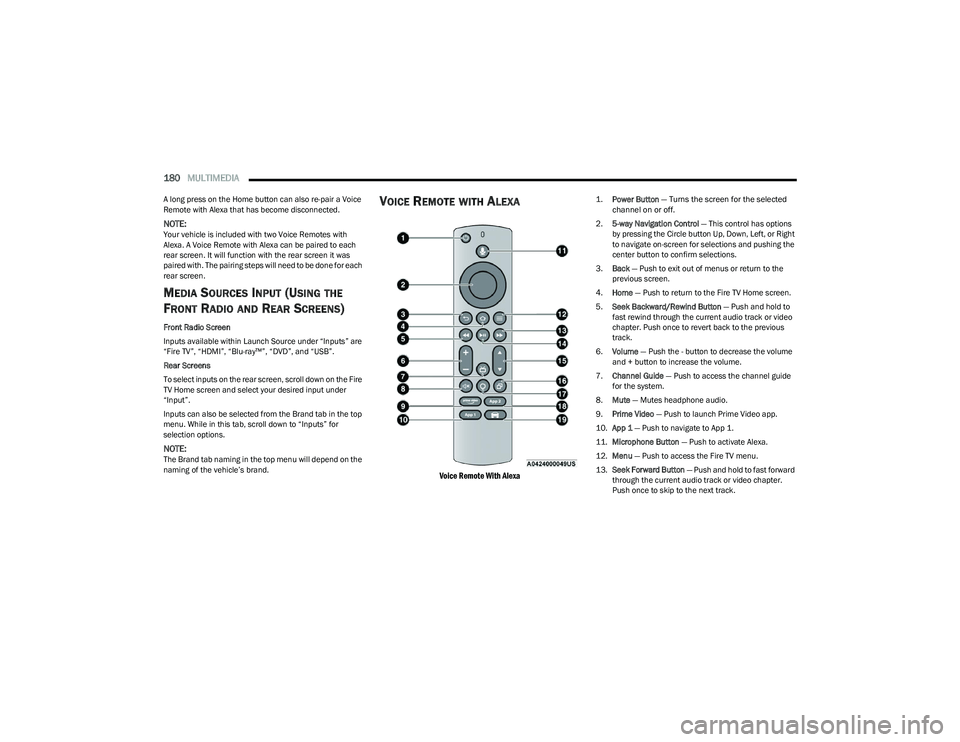
VOICE REMOTE WITH ALEXA
Voice Remote With Alexa
1.
Power Button
— Turns the screen for the selected
channel on or off.
2. 5-way Navigation Control — This control has options
by pressing the Circle button Up, Down, Left, or Right
to navigate on-screen for selections and pushing the
center button to confirm selections.
3. Back — Push to exit out of menus or return to the
previous screen.
4. Home — Push to return to the Fire TV Home screen.
5. Seek Backward/Rewind Button — Push and hold to
fast rewind through the current audio track or video
chapter. Push once to revert back to the previous
track.
6. Volume — Push the - button to decrease the volume
and + button to increase the volume.
7. Channel Guide — Push to access the channel guide
for the system.
8. Mute — Mutes headphone audio.
9. Prime Video — Push to launch Prime Video app.
10. App 1 — Push to navigate to App 1.
11. Microphone Button — Push to activate Alexa.
12. Menu — Push to access the Fire TV menu.
13. Seek Forward Button — Push and hold to fast forward
through the current audio track or video chapter.
Push once to skip to the next track.
23_RUP_OM_EN_USC_t.book Page 180
Page 183 of 328
MULTIMEDIA181
14.Play/Pause Button ‖ — Begin/resume or pause disc
play.
15. Channel +/- — Push the up or down arrow button on
the Channel button to browse channels available in
Fire TV.
16. Recent — Push to access recently viewed content on
Fire TV.
17. Gear/Settings — Push to bring up setting options for
Fire TV.
18. App 2 — Push to launch App 2.
19. Vehicle Button — Push to activate the Vehicle menu.
Replacing the Voice Remote with Alexa
Batteries
Each Voice Remote with Alexa requires two AAA batteries
for operation.
To replace the batteries:
1. Locate the battery compartment on the back of the
Voice Remote with Alexa, then slide the battery
cover downward.
2. Remove the old batteries and follow battery recycling procedures for your area.
3. Install new batteries, making sure to orient them according to the polarity diagram shown inside the
battery compartment.
4. Slide the battery compartment cover back on.
REAR SEAT ENTERTAINMENT WITH FIRE
TV
BUILT-IN STREAMING (USING THE
F
RONT RADIO AND REAR SCREENS)
Access Using Launch Source
To access Rear Seat Entertainment with Fire TV built-in
from the front radio, press the Media tab located on the
bottom menu bar. Then select the Rear Seat option
located on the top menu bar. Select “Launch Source”, and
then under “Inputs” select “Fire TV Home”.
Access Using Browse Media
Selecting “Browse Media” on the front radio screen will
give access to different media within Rear Seat
Entertainment with Fire TV built-in.
These options will be in the top menu of “Browse Media”
and include:
Fire TV — Selecting “Fire TV” will show streaming
options for categories and to select apps. This option
will be selectable on the left slider menu in “Browse
Media”. While in “Browse Media” under Fire TV, it will
display recent activity under “Recent”. This will display
recent videos viewed from Fire TV and recent down -
loads as well.
USB Video — Under “USB Videos”, videos will appear
that are options with a USB device connected to Rear
Seat Entertainment with Fire TV built-in.
USB Music — Under “USB Music”, music will appear
that are options with a USB device connected to Rear
Seat Entertainment with Fire TV built-in. Access Using the Voice Remote with Alexa and Rear
Screens
Rear passengers will be able to access some options for
streaming by pressing the “Prime Video”, “App 1”, or
“App 2” button on the Voice Remote with Alexa. Selecting
one of those buttons on the Voice Remote with Alexa will
take you to the home page for that respective streaming
service. Turning on either of the rear screens will launch
Fire TV. By default, the rear screens will always launch in
Fire TV. More streaming options can be selected on the
Fire TV home page.
Fire TV
Fire TV is your source for online streaming with Rear Seat
Entertainment with Fire TV built-in.
NOTE:A data source needs to be connected to the system for
streaming to be accessible. This can be set up when Fire
TV is turned on for the first time from the rear screens.
Some of these options can be an in-vehicle 4G Wi-Fi hot
spot, capable Wi-Fi hot spot from a mobile device, or Wi-Fi
from an outside source like a home or a garage.
To access Fire TV on the front screen, select “Launch
Source” on the front touchscreen, rear seat screen, and
then “Fire TV Home” under “Inputs”.
Viewing from the front radio screen mirrors or controls the
Fire TV experience from one of the rear Fire TV displays.
The menu bar for Fire TV will have the options for “Home”,
“Find”, “Library”, “Brand”, and “Live”.
Below the menu bar will be streaming options linked to
your Prime account like “Prime Video”.
5
23_RUP_OM_EN_USC_t.book Page 181
Page 184 of 328
182MULTIMEDIA
The front radio screen offers some options:
Power — This will turn Fire TV on or off.
Screen 1 and Screen 2 Toggle — This toggles between
the Rear Screens (for use with front radio screen only).
Collapse — While viewing on the front radio screen, this
will collapse the screen to dashboard view.
Source Drawer — This will open the “Source Drawer”
and the source logo will be displayed on the icon.
Browse Media — This will open the “Browse Media”
pop-up.
Back — This will let you go back the previous page.
Fire TV Home — This will take you back to the Fire TV
home page.
Menu — This will open the Fire TV menu.
Remote icon — This will display the on-screen remote.
NOTE:Front radio screen mirroring and watching can only be
done when the vehicle is in PARK. The vehicle must be in
an active and usable cellular range and properly equipped
with a Uconnect 5 NAV system and Rear Seat Enter -
tainment with Fire TV package. For streaming, a Wi-Fi
connection and registered Amazon account are required
to run Fire TV in the vehicle. Streaming service subscrip -
tions are not included. Services and features are subject
to change or withdrawal at any time, may not be available
in all areas and languages, and may require separate
subscriptions.
PLAY A BLU-RAY™ OR DVD —
I
F EQUIPPED
Playing a Blu-ray™ or DVD from the Front Radio Screen
1. Insert a Blu-ray™ disc or DVD disc into the disc
player with the label facing up.
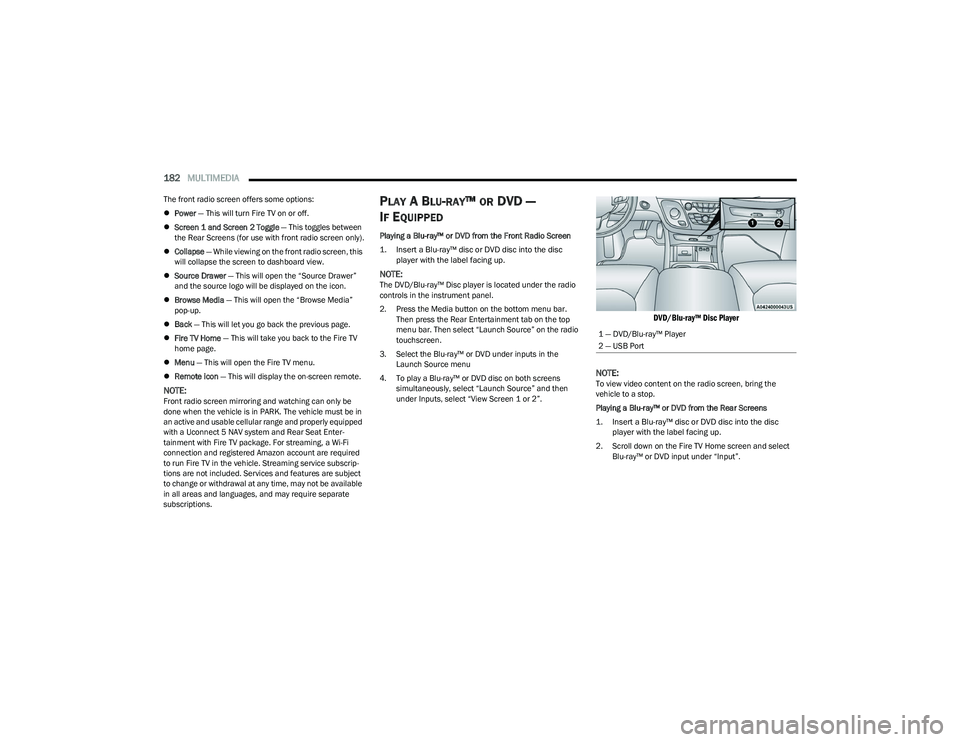
NOTE:The DVD/Blu-ray™ Disc player is located under the radio
controls in the instrument panel.
2. Press the Media button on the bottom menu bar. Then press the Rear Entertainment tab on the top
menu bar. Then select “Launch Source” on the radio
touchscreen.
3. Select the Blu-ray™ or DVD under inputs in the Launch Source menu
4. To play a Blu-ray™ or DVD disc on both screens simultaneously, select “Launch Source” and then
under Inputs, select “View Screen 1 or 2”.
DVD/Blu-ray™ Disc Player
NOTE:
To view video content on the radio screen, bring the
vehicle to a stop.
Playing a Blu-ray™ or DVD from the Rear Screens
1. Insert a Blu-ray™ disc or DVD disc into the disc player with the label facing up.
2. Scroll down on the Fire TV Home screen and select Blu-ray™ or DVD input under “Input”.
1 — DVD/Blu-ray™ Player
2 — USB Port
23_RUP_OM_EN_USC_t.book Page 182
Page 185 of 328
MULTIMEDIA183
FIRE TV APPS/GAMES (USING THE
R
EAR SCREENS)
Apps and games can be accessed using Rear Seat
Entertainment with Fire TV built-in.
To access Apps on the rear screen, turn on the system and
select “Find” in the top menu. On the Find page, select
“App store®”. Within the App store® you can purchase
apps and games. From here you can also select from all
the apps and games that have been purchased.
USING THE VIDEO USB PORT
Plug in a USB drive or mass storage device and play your
favorite music or movies.
NOTE:To view USB media on the rear screens, insert a USB drive
into the port next to the DVD/Blu-ray™ Disc player. The
USB drive port is located under the radio controls in the
instrument panel.
On the rear screen you can browse the content of the USB
device by going to the USB source in the inputs. Use the
search feature to find your media faster.
PLAY VIDEO GAMES
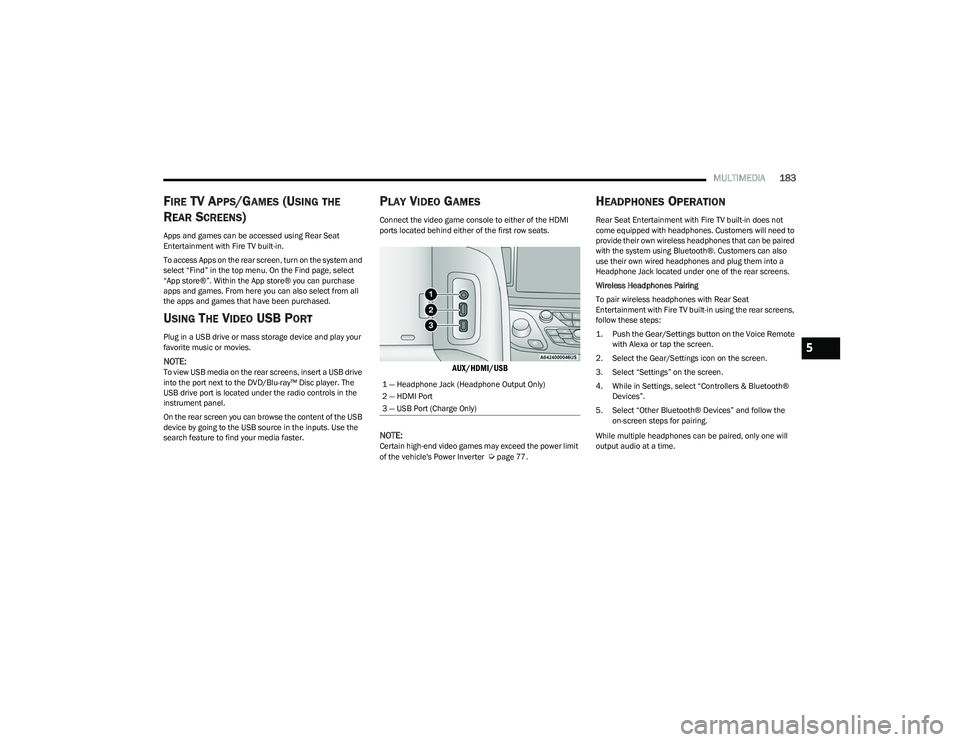
Connect the video game console to either of the HDMI
ports located behind either of the first row seats.
AUX/HDMI/USB
NOTE:
Certain high-end video games may exceed the power limit
of the vehicle's Power Inverter Úpage 77.
HEADPHONES OPERATION
Rear Seat Entertainment with Fire TV built-in does not
come equipped with headphones. Customers will need to
provide their own wireless headphones that can be paired
with the system using Bluetooth®. Customers can also
use their own wired headphones and plug them into a
Headphone Jack located under one of the rear screens.
Wireless Headphones Pairing
To pair wireless headphones with Rear Seat
Entertainment with Fire TV built-in using the rear screens,
follow these steps:
1. Push the Gear/Settings button on the Voice Remote with Alexa or tap the screen.
2. Select the Gear/Settings icon on the screen.
3. Select “Settings” on the screen.
4. While in Settings, select “Controllers & Bluetooth® Devices”.
5. Select “Other Bluetooth® Devices” and follow the on-screen steps for pairing.
While multiple headphones can be paired, only one will
output audio at a time.
1 — Headphone Jack (Headphone Output Only)
2 — HDMI Port
3 — USB Port (Charge Only)
5
23_RUP_OM_EN_USC_t.book Page 183
Page 186 of 328
184MULTIMEDIA
REAR CLIMATE CONTROLS
The Rear Climate Controls can also be controlled using Rear Seat Entertainment with Fire TV built-in Úpage 60.
Rear Climate Controls can be accessed by using the Vehicle menu. Tap on either rear screen and select the Vehicle icon or press the Vehicle button on the Voice Remote with Alexa.
Then select the Rear Climate Controls option.
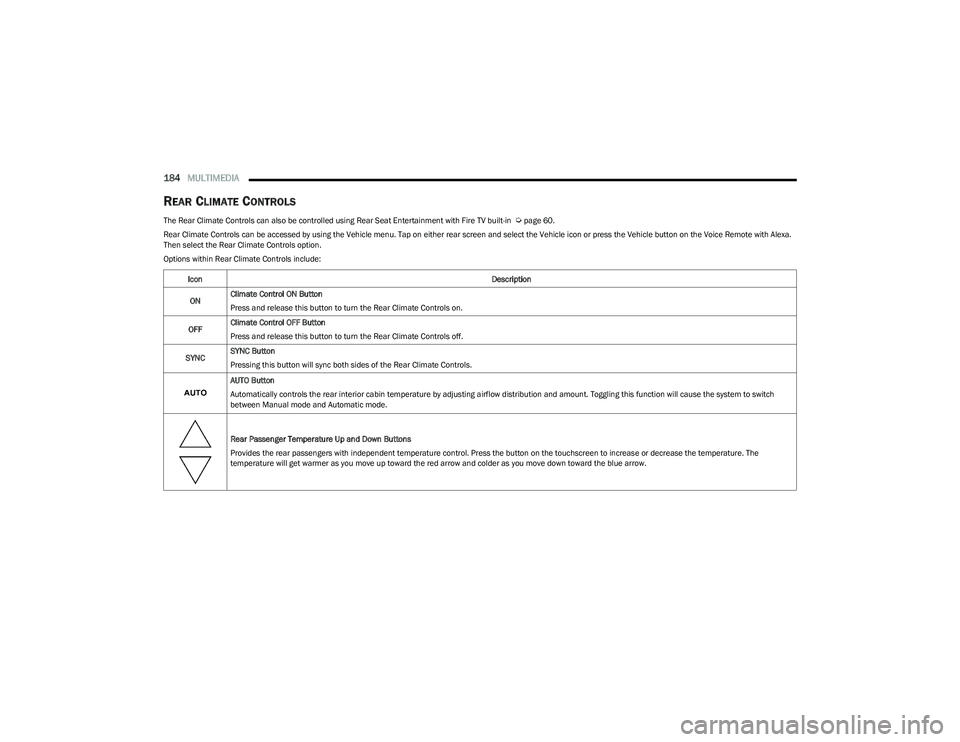
Options within Rear Climate Controls include:
Icon Description
ON Climate Control ON Button
Press and release this button to turn the Rear Climate Controls on.
OFF Climate Control OFF Button
Press and release this button to turn the Rear Climate Controls off.
SYNC SYNC Button
Pressing this button will sync both sides of the Rear Climate Controls.
AUTO Button
Automatically controls the rear interior cabin temperature by adjusting airflow distribution and amount. Toggling this function will cause the system to switch
between Manual mode and Automatic mode.
Rear Passenger Temperature Up and Down Buttons
Provides the rear passengers with independent temperature control. Press the button on the touchscreen to increase or decrease the temperature. The
temperature will get warmer as you move up toward the red arrow and colder as you move down toward the blue arrow.
23_RUP_OM_EN_USC_t.book Page 184
Page 319 of 328

317
K
Key Fob ............................................................................12 Arm The System .........................................................19
Disarm The Alarm ...................................................... 19
Programming Additional Key Fobs ...........................14
Key Fob Battery Service (Remote Keyless Entry) .........13
Key Fob Programming (Remote Keyless Entry) ............ 14
Keyless Enter 'n Go™ ...................................................... 21 Passive Entry .............................................................. 21
Keys .................................................................................12
Keysense .........................................................................98
LLane Change And Turn Signals ...................................... 54
Lane Change Assist .................................................54, 57
LaneSense.................................................................... 140
Lap/Shoulder Belts ...................................................... 202
Latches ......................................................................... 235 Hood ...........................................................................82
Lead Free Gasoline ...................................................... 304
Leaks, Fluid .................................................................. 235
Life Of Tires .................................................................. 293
Liftgate .............................................................................83 Hands-Free .................................................................84
Power ..........................................................................83
Light Bulbs ........................................................... 235
, 282 Lights .............................................................................235
Air Bag ................................................... 102
, 209, 233
Anti Lock Brake System ..........................................105
Automatic Emergency Braking OFF ........................ 107 Battery Saver ............................................................. 57
Brake Assist Warning .............................................. 190Brake Warning ......................................................... 103
Bulb Replacement...................................................282
Cruise ............................................................. 107
, 108
Daytime Running ....................................................... 54
Dimmer Switch, Headlight ........................................ 54
Electric Power Steering Fault..................................103
Electronic Park Brake.............................................. 105 Electronic Stability Control Active...........................105
Electronic Throttle Control ...................................... 104Engine Temperature Warning................................. 104
Exterior ........................................................... 235
, 282
Fog.....................................................................57, 108
Headlights ........................................................... 54, 56
High Beam ............................................................... 109
High Beam/Low Beam Select .................................. 54
Hood Open ............................................................... 104
Instrument Cluster .................................................... 54
Intensity Control ........................................................ 58
Interior........................................................................ 58
KeySense ................................................................. 108
LaneSense ..................................................... 105
, 108 Liftgate Open ........................................................... 104
Lights On Reminder ........................................... 54
, 57
Low Fuel................................................................... 105
Low Washer Fluid .................................................... 106
Malfunction Indicator (Check Engine) ................... 106 Oil Pressure ............................................................. 104
Oil Temperature ...................................................... 104
Park .......................................................................... 108
Passing ............................................................... 54
, 56
Reading...................................................................... 58
Seat Belt Reminder ................................................. 104 Security Alarm ......................................................... 105
Service ..................................................................... 282Service Automatic Emergency Braking.................. 106
Service AWD ............................................................ 106
Service LaneSense ................................................. 106Service Stop Start System ...................................... 106
Side Marker ............................................................. 282
SmartBeams.............................................................. 56
Stop Start Active...................................................... 108
Tire Pressure Monitoring (TPMS) ........................... 106Traction Control ....................................................... 190Transmission Temperature .................................... 104
Turn Signals................................... 54
, 108, 235, 282
Load Floor, Cargo ........................................................... 86
Load Shed Battery Saver Mode................................... 101
11
23_RUP_OM_EN_USC_t.book Page 317
Page 321 of 328

319
PowerBrakes ..................................................................... 303
Inverter ....................................................................... 77
Mirrors ........................................................................49
Outlet (Auxiliary Electrical Outlet) ............................. 75
Seats.................................................................... 40
, 42
Steering ................................................................... 121
Power Seats Down...........................................................................41
Forward ...................................................................... 40
Rearward ....................................................................40
Up................................................................................ 41
Power Sliding Door On / Off Switch.................................................... 24
, 83
Pregnant Women And Seat Belts................................ 206
Preparation For Jacking ............................................... 239
Pretensioners Seat Belts ................................................................ 207
RRadial Ply Tires ............................................................. 292
Radiator Cap (Coolant Pressure Cap) ......................... 272
Radio Operation ........................................................... 186
Rear Air Conditioning ............................................... 64
, 69
Rear Camera ................................................................ 143
Rear Cross Path ........................................................... 194
Rear ParkSense System .............................................. 132
Rear Seat Entertainment............................................. 177
Rear Seat Reminder .................................................... 191
Rear View .........................................................................48 Reclining Front Seats ..................................................... 29
Recreational Towing ..................................................... 154
Reformulated Gasoline ................................................ 304
Refrigerant ....................................................................266
Release, Hood................................................................. 82
Reminder, Lights On ....................................................... 54
Reminder, Seat Belt ..................................................... 201
Remote Control Starting System ......................................................... 16
Remote Keyless Entry Arm The Alarm ........................................................... 19
Disarm The Alarm ...................................................... 19
Programming Additional Key Fobs ........................... 14
Remote Starting Exit Remote Start Mode ............................................ 17
Remote Starting System ................................................ 16
Replacement Bulbs ...................................................... 282
Replacement Tires........................................................ 293
Reporting Safety Defects ............................................. 311
Restraints, Child ...........................................................219
Restraints, Head ............................................................. 45
Roof Luggage Rack......................................................... 90
Rotation, Tires ............................................................... 298SSafety Checks Inside Vehicle ....................................... 233
Safety Checks Outside Vehicle ....................................234
Safety Defects, Reporting ............................................311
Safety Information, Tire ................................................ 283
Safety Tips.....................................................................233 Safety, Exhaust Gas ..................................................... 235
Schedule, Maintenance ............................................... 259
Screen Setup ................................................................ 100
Seat Belt Reminder ...................................................... 104
Seat Belts............................................................. 201
, 233
Adjustable Shoulder Belt ........................................ 204 Adjustable Upper Shoulder Anchorage.................. 204
Adjustable Upper Shoulder Belt Anchorage .......... 204
Automatic Locking Retractor (ALR) ........................ 207
Child Restraints ....................................................... 219Energy Management Feature................................. 207Extender................................................................... 206
Front Seat ............................................. 201
, 202, 203
Inspection ................................................................ 233
Lap/Shoulder Belt Operation ................................. 203 Lap/Shoulder Belt Untwisting ................................ 204
Lap/Shoulder Belts ................................................. 202Operating Instructions ............................................ 203
Pregnant Women .................................................... 206
Pretensioners .......................................................... 207
Rear Seat ................................................................. 202
Reminder ................................................................. 201
Seat Belt Extender .................................................. 206
Seat Belt Pretensioner............................................ 207
Untwisting Procedure.............................................. 204
Seat Belts Maintenance .............................................. 301
11
23_RUP_OM_EN_USC_t.book Page 319