2023 CHEVROLET TAHOE console
[x] Cancel search: consolePage 89 of 443
Chevrolet Tahoe/Suburban Owner Manual (GMNA-Localizing-U.S./Canada/
Mexico-16416971) - 2023 - CRC - 4/25/22
88 Storage
Storage
Storage Compartments
Storage Compartments . . . . . . . . . . . . . . . . . 88
Instrument Panel Storage . . . . . . . . . . . . . . 88
Glove Box . . . . . . . . . . . . . . . . . . . . . . . . . . . . . . 88
Cupholders . . . . . . . . . . . . . . . . . . . . . . . . . . . . . 88
Rear Storage . . . . . . . . . . . . . . . . . . . . . . . . . . . 89
Center Console Storage . . . . . . . . . . . . . . . . 90
Floor Console Storage . . . . . . . . . . . . . . . . . . 91
Additional Storage Features
Cargo Tie-Downs . . . . . . . . . . . . . . . . . . . . . . . . 91
Convenience Net . . . . . . . . . . . . . . . . . . . . . . . 92
Roof Rack System
Roof Rack System . . . . . . . . . . . . . . . . . . . . . . 92
Storage Compartments{
Warning
Do not store heavy or sharp objects in
storage compartments. In a crash, these
objects may cause the cover to open and
could result in injury.
Instrument Panel Storage
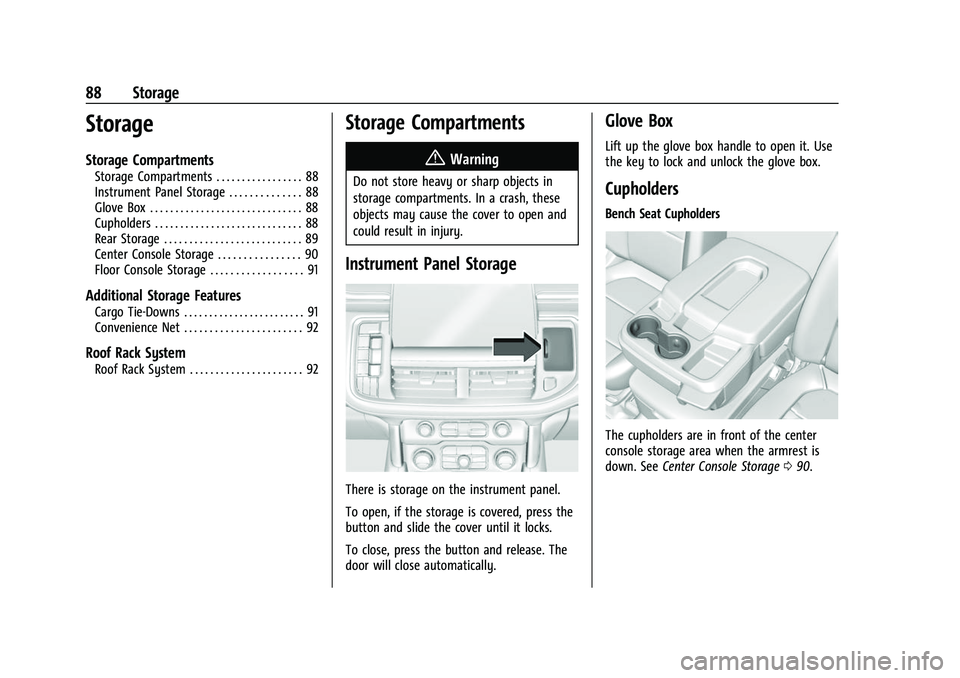
There is storage on the instrument panel.
To open, if the storage is covered, press the
button and slide the cover until it locks.
To close, press the button and release. The
door will close automatically.
Glove Box
Lift up the glove box handle to open it. Use
the key to lock and unlock the glove box.
Cupholders
Bench Seat Cupholders
The cupholders are in front of the center
console storage area when the armrest is
down. See Center Console Storage 090.
Page 90 of 443
Chevrolet Tahoe/Suburban Owner Manual (GMNA-Localizing-U.S./Canada/
Mexico-16416971) - 2023 - CRC - 4/25/22
Storage 89
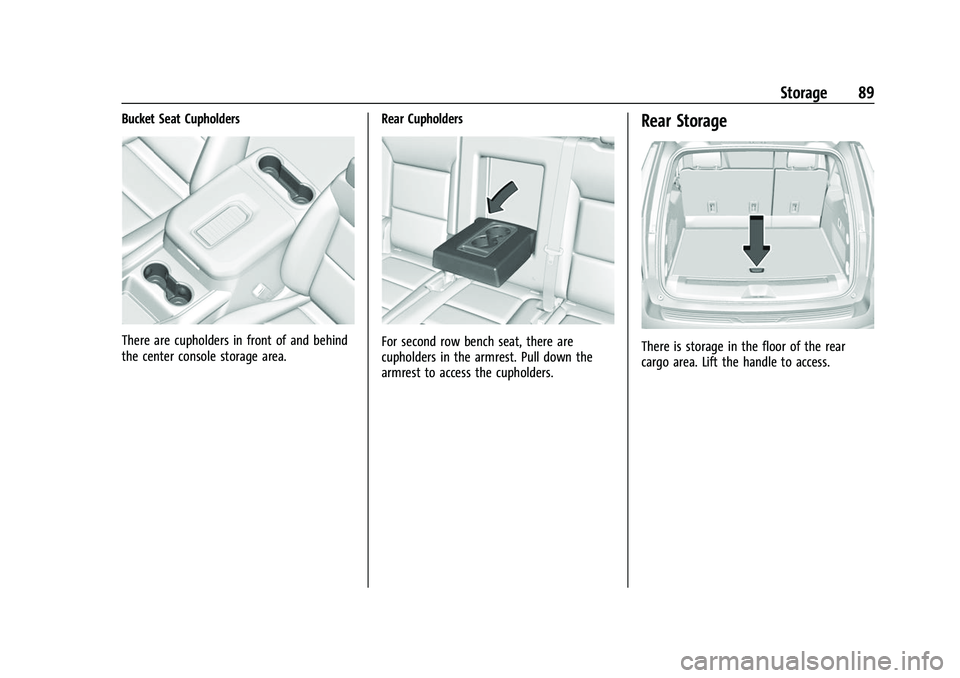
Bucket Seat Cupholders
There are cupholders in front of and behind
the center console storage area.Rear CupholdersFor second row bench seat, there are
cupholders in the armrest. Pull down the
armrest to access the cupholders.
Rear Storage
There is storage in the floor of the rear
cargo area. Lift the handle to access.
Page 91 of 443
Chevrolet Tahoe/Suburban Owner Manual (GMNA-Localizing-U.S./Canada/
Mexico-16416971) - 2023 - CRC - 4/25/22
90 Storage
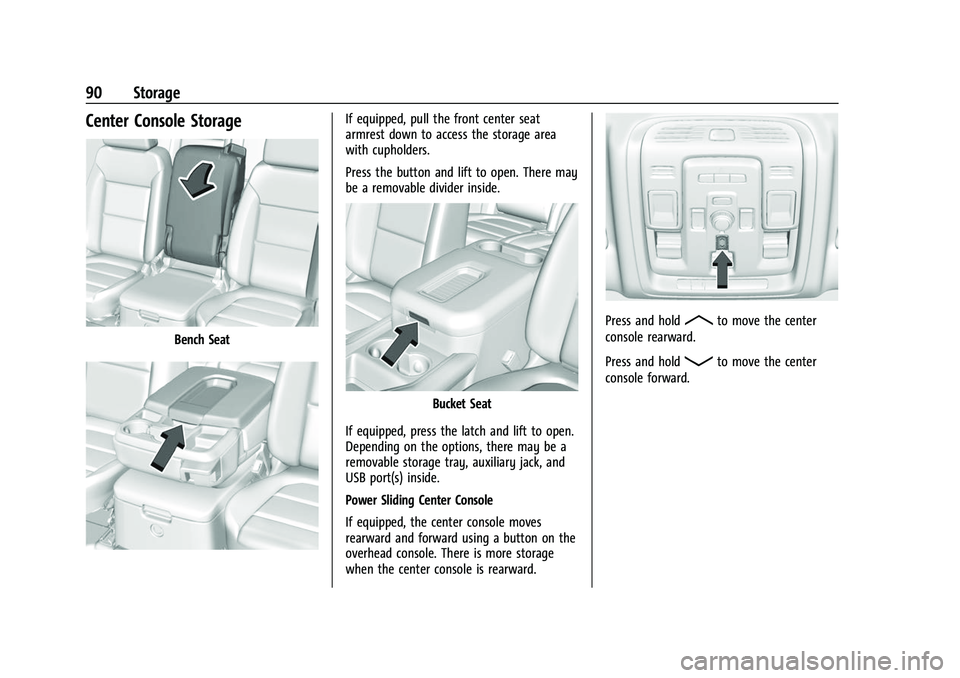
Center Console Storage
Bench Seat
If equipped, pull the front center seat
armrest down to access the storage area
with cupholders.
Press the button and lift to open. There may
be a removable divider inside.
Bucket Seat
If equipped, press the latch and lift to open.
Depending on the options, there may be a
removable storage tray, auxiliary jack, and
USB port(s) inside.
Power Sliding Center Console
If equipped, the center console moves
rearward and forward using a button on the
overhead console. There is more storage
when the center console is rearward.
Press and holdRto move the center
console rearward.
Press and hold
Qto move the center
console forward.
Page 92 of 443
Chevrolet Tahoe/Suburban Owner Manual (GMNA-Localizing-U.S./Canada/
Mexico-16416971) - 2023 - CRC - 4/25/22
Storage 91
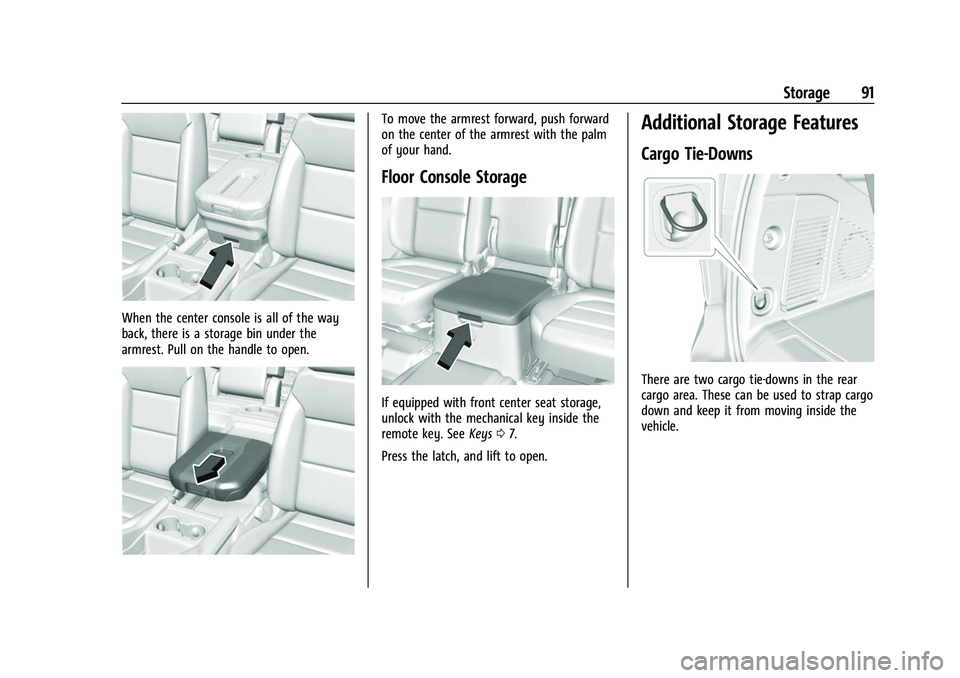
When the center console is all of the way
back, there is a storage bin under the
armrest. Pull on the handle to open.
To move the armrest forward, push forward
on the center of the armrest with the palm
of your hand.
Floor Console Storage
If equipped with front center seat storage,
unlock with the mechanical key inside the
remote key. SeeKeys07.
Press the latch, and lift to open.
Additional Storage Features
Cargo Tie-Downs
There are two cargo tie-downs in the rear
cargo area. These can be used to strap cargo
down and keep it from moving inside the
vehicle.
Page 99 of 443

Chevrolet Tahoe/Suburban Owner Manual (GMNA-Localizing-U.S./Canada/
Mexico-16416971) - 2023 - CRC - 4/25/22
98 Instruments and Controls
Power Outlets
Accessory power outlets can be used to plug
in electrical equipment, such as a cell phone
or MP3 player.
The vehicle has one 12 Volt accessory power
outlet under the climate control system and
one 110/120 Volt Alternating Current outlet
on the rear of the center console.
12 Volt Power Outlet
Caution
Do not insert metal objects such as USB
cord plugs, electronic accessories, keys,
or coins into the 12-volt power outlet.
(Continued)
Caution (Continued)
Objects may become hot, melt, or cause
a spark damaging the outlet or the metal
object. Only use compatible 12-volt power
accessories in the power outlet.
Caution
Leaving electrical equipment plugged in
for an extended period of time while the
vehicle is off will drain the battery.
Always unplug electrical equipment when
not in use and do not plug in equipment
that exceeds the maximum 15 amp
rating.
Certain power accessory plugs may not be
compatible with the accessory power outlet
and could overload vehicle or adapter fuses.
If a problem is experienced, see your dealer.
When adding electrical equipment, be sure
to follow the proper installation instructions
included with the equipment. See Add-On
Electrical Equipment 0316.
Caution
Hanging heavy equipment from the
power outlet can cause damage not
covered by the vehicle warranty. The
power outlets are designed for accessory
power plugs only, such as cell phone
charge cords.
Power Outlet 110/120 Volt Alternating
Current
If equipped, the vehicle has two alternating
current power outlets. One on the back of
the center console and one in the rear of
the vehicle.
Page 114 of 443

Chevrolet Tahoe/Suburban Owner Manual (GMNA-Localizing-U.S./Canada/
Mexico-16416971) - 2023 - CRC - 4/25/22
Instruments and Controls 113
If there is a problem with the airbag
system, a Driver Information Center (DIC)
message may also come on.
Passenger Airbag Status Indicator
The vehicle has a passenger sensing system.
SeePassenger Sensing System 065 for
important safety information. The overhead
console has a passenger airbag status
indicator.
United States and Canada
When the vehicle is started, the passenger
airbag status indicator will light ON and OFF,
and the symbols for on and off, for several
seconds as a system check. Then, after
several more seconds, the status indicator
will light either ON or OFF, and the symbol
for on or off, to let you know the status of
the front outboard passenger frontal airbag. If the word ON, and the on symbol, are lit
on the passenger airbag status indicator, it
means that the front outboard passenger
frontal airbag is allowed to inflate.
If the word OFF, and the off symbol, are lit
on the passenger airbag status indicator, it
means that the passenger sensing system
has turned off the front outboard passenger
frontal airbag.
If, after several seconds, both status
indicator lights remain on, if there are no
lights at all, or if the airbag readiness light
is on, there may be a problem with the
lights or the passenger sensing system. See
your dealer for service right away.{Warning
If the airbag readiness light ever comes
on and stays on, it means that
something may be wrong with the airbag
system. To help avoid injury to yourself
or others, have the vehicle serviced right
away. See
Airbag Readiness Light 0112
for more information, including important
safety information.
Charging System Light
The charging system light comes on briefly
when the ignition is turned on, but the
engine is not running, as a check to show
the light is working. It should go out when
the engine is started.
If the light stays on, or comes on while
driving, there may be a problem with the
electrical charging system. Have it checked
by your dealer. Driving while this light is on
could drain the battery.
When this light comes on, or is flashing, the
Driver Information Center (DIC) also displays
a message.
If a short distance must be driven with the
light on, be sure to turn off all accessories,
such as the radio and air conditioner. Find a
safe place to stop the vehicle.
Page 134 of 443

Chevrolet Tahoe/Suburban Owner Manual (GMNA-Localizing-U.S./Canada/
Mexico-16416971) - 2023 - CRC - 4/25/22
Instruments and Controls 133
Universal Remote System
Programming
If equipped, these buttons are in the
overhead console.
This system can replace up to three remote
control transmitters used to activate devices
such as garage door openers, security
systems, and home automation devices.
These instructions refer to a garage door
opener, but can be used for other devices.
Do not use the Universal Remote system
with any garage door opener that does not
have the stop and reverse feature. This
includes any garage door opener model
manufactured before April 1, 1982.Keep the original hand-held transmitter for
use in other vehicles as well as for future
programming. Erase the programming when
vehicle ownership is terminated. See
“Erasing Universal Remote System Buttons”
later in this section.
To program a garage door opener, park
outside directly in line with and facing the
garage door opener receiver. Clear all people
and objects near the garage door.
Make sure the hand-held transmitter has a
new battery for quick and accurate
transmission of the radio-frequency signal.
Programming the Universal Remote
System
Programming involves time-sensitive actions
and may time out, requiring the procedure
to be repeated. Read these instructions
completely before programming the
Universal Remote system. It may help to
have another person assist with the
programming process.
1. Hold the end of the hand-held transmitter about 3 to 8 cm (1 to 3 in)
away from the Universal Remote system
buttons with the indicator light in view. The hand-held transmitter was supplied
by the manufacturer of the garage door
opener receiver.
2. Press and release one of the three Universal Remote system buttons to be
programmed. Press and hold the
hand-held transmitter button. Do not
release the hand-held transmitter button
until the indicator light changes from a
slow to a rapid flash or continuous light.
Then release the hand-held transmitter
button.
Some garage door openers may require
substitution of Step 2 with the procedure
under “Radio Signals for Some Gate
Operators” later in this section.
3. Press and hold the newly programmed Universal Remote system button for
five seconds while watching the indicator
light and garage door activation.
.If the indicator light stays on
continuously or the garage door
moves when the button is pressed,
then programming is complete. There
is no need to complete Steps 4–6.
.If the indicator light does not come
on or the garage door does not
move, a second button press may be
required. For a second time, press
Page 141 of 443

Chevrolet Tahoe/Suburban Owner Manual (GMNA-Localizing-U.S./Canada/
Mexico-16416971) - 2023 - CRC - 4/25/22
140 Lighting
If after signaling a turn or a lane change the
arrows flash rapidly or do not come on, a
signal bulb could be burned out.
Replace any burned out bulbs. If a bulb is
not burned out, check the fuse. SeeFuses
and Circuit Breakers 0344.
Turn Signal On Chime
If the turn signal is left on for more than
1.2 km (0.75 mi), a chime sounds at each
flash of the turn signal. The message TURN
SIGNAL ON will also appear in the Driver
Information Center (DIC). To turn the chime
and message off, move the turn signal lever
to the off position.Interior Lighting
Instrument Panel Illumination
Control
This feature adjusts the brightness of all
illuminated controls. The instrument panel
illumination control is above the exterior
lamp control.
D: Press the −or + to brighten or dim
the lights.
This feature is functional at night, or when
the headlamps or parking lamps are ON.
Dome Lamps
There are dome lamps in the overhead
console.
The dome lamps come on when any door is
opened,
Kon the remote key is pressed,
or when the vehicle is turned off.
To change the dome lamp settings, press
the following:
jOFF : Press to turn off the dome
lamps. An indicator light on the button will
turn on when the dome lamp override is
activated. Press
jOFF again to
deactivate this feature and the indicator
light turns off.