2023 CHEVROLET SUBURBAN compass
[x] Cancel search: compassPage 94 of 443

Chevrolet Tahoe/Suburban Owner Manual (GMNA-Localizing-U.S./Canada/
Mexico-16416971) - 2023 - CRC - 4/25/22
Instruments and Controls 93
Instruments and Controls
Controls
Steering Wheel Adjustment . . . . . . . . . . . . 94
Heated Steering Wheel . . . . . . . . . . . . . . . . . 94
Horn . . . . . . . . . . . . . . . . . . . . . . . . . . . . . . . . . . . 95
Windshield Wiper/Washer . . . . . . . . . . . . . . 95
Rear Window Wiper/Washer . . . . . . . . . . . 96
Compass . . . . . . . . . . . . . . . . . . . . . . . . . . . . . . . 97
Clock . . . . . . . . . . . . . . . . . . . . . . . . . . . . . . . . . . . 97
Power Outlets . . . . . . . . . . . . . . . . . . . . . . . . . . 98
Wireless Charging . . . . . . . . . . . . . . . . . . . . . . 99
Warning Lights, Gauges, and Indicators
Warning Lights, Gauges, andIndicators . . . . . . . . . . . . . . . . . . . . . . . . . . . . 101
Instrument Cluster (Base Level) . . . . . . . . 102
Instrument Cluster (Uplevel) . . . . . . . . . . . 104
Speedometer . . . . . . . . . . . . . . . . . . . . . . . . . . 107
Odometer . . . . . . . . . . . . . . . . . . . . . . . . . . . . . 107
Trip Odometer . . . . . . . . . . . . . . . . . . . . . . . . . 107
Tachometer . . . . . . . . . . . . . . . . . . . . . . . . . . . . 107
Fuel Gauge . . . . . . . . . . . . . . . . . . . . . . . . . . . . 107
Engine Oil Pressure Gauge . . . . . . . . . . . . 108
Engine Coolant Temperature Gauge . . . 109
Transmission Temperature Gauge (Uplevel only) . . . . . . . . . . . . . . . . . . . . . . . . 110
Voltmeter Gauge . . . . . . . . . . . . . . . . . . . . . . 110
Seat Belt Reminders . . . . . . . . . . . . . . . . . . . . 111
Airbag Readiness Light . . . . . . . . . . . . . . . . . 112 Passenger Airbag Status Indicator . . . . . . 113
Charging System Light . . . . . . . . . . . . . . . . . 113
Malfunction Indicator Lamp (Check
Engine Light) . . . . . . . . . . . . . . . . . . . . . . . . . 114
Brake System Warning Light . . . . . . . . . . . 115
Electric Parking Brake Light . . . . . . . . . . . . 116
Service Electric Parking Brake Light . . . . 116
Antilock Brake System (ABS) Warning
Light . . . . . . . . . . . . . . . . . . . . . . . . . . . . . . . . . 116
Four-Wheel-Drive Light . . . . . . . . . . . . . . . . . 116
Hill Descent Control Light . . . . . . . . . . . . . . 117
Lane Keep Assist (LKA) Light . . . . . . . . . . . 117
Automatic Emergency Braking (AEB) Disabled Light . . . . . . . . . . . . . . . . . . . . . . . . 117
Vehicle Ahead Indicator . . . . . . . . . . . . . . . . 117
Pedestrian Ahead Indicator . . . . . . . . . . . . . 118
Traction Off Light . . . . . . . . . . . . . . . . . . . . . . 118
StabiliTrak OFF Light . . . . . . . . . . . . . . . . . . . 118
Traction Control System (TCS)/ StabiliTrak Light . . . . . . . . . . . . . . . . . . . . . . 118
Engine Coolant Temperature Warning Light . . . . . . . . . . . . . . . . . . . . . . . . . . . . . . . . . 119
Driver Mode Control Light . . . . . . . . . . . . . 119
Four Corner Air Suspension Light . . . . . . 120
Tire Pressure Light . . . . . . . . . . . . . . . . . . . . . 121
Engine Oil Pressure Light . . . . . . . . . . . . . . . 121
Low Fuel Warning Light . . . . . . . . . . . . . . . . 122
Security Light . . . . . . . . . . . . . . . . . . . . . . . . . . 122
High-Beam On Light . . . . . . . . . . . . . . . . . . . 122
Lamps On Reminder . . . . . . . . . . . . . . . . . . . 122 Cruise Control Light . . . . . . . . . . . . . . . . . . . . 122
Door Ajar Light . . . . . . . . . . . . . . . . . . . . . . . . 123
Information Displays
Driver Information Center (DIC) (Base
Level) . . . . . . . . . . . . . . . . . . . . . . . . . . . . . . . . 123
Driver Information Center (DIC) (Uplevel) . . . . . . . . . . . . . . . . . . . . . . . . . . . . . 126
Head-Up Display (HUD) . . . . . . . . . . . . . . . . 128
Vehicle Messages
Vehicle Messages . . . . . . . . . . . . . . . . . . . . . . 132
Engine Power Messages . . . . . . . . . . . . . . . 132
Vehicle Speed Messages . . . . . . . . . . . . . . . 132
Universal Remote System
Universal Remote System . . . . . . . . . . . . . . 132
Universal Remote System Programming . . . . . . . . . . . . . . . . . . . . . . . . 133
Universal Remote System Operation . . . 134
Page 98 of 443

Chevrolet Tahoe/Suburban Owner Manual (GMNA-Localizing-U.S./Canada/
Mexico-16416971) - 2023 - CRC - 4/25/22
Instruments and Controls 97
The rear window wiper/washer will not
operate if the liftgate is open or ajar. If the
liftgate is opened while the rear wiper is on,
the wiper returns to the parked position and
stops.
See“Rear Camera Washer” later in this
section.
Rear Wiper Arm Assembly Protection
When using an automatic car wash, move
the rear wiper control to OFF to disable the
rear wiper. In some vehicles, if the
transmission is in N (Neutral) and the
vehicle speed is very slow, the rear wiper
will automatically park under the rear
spoiler.
The wiper operations return to normal when
the transmission is no longer in N (Neutral)
or the vehicle speed has increased.
Auto Wipe in Reverse Gear
If the rear wiper control is off, the rear
wiper will automatically operate
continuously when the transmission is in
R (Reverse), and the front windshield wiper
is performing low or high speed wipes.
If the rear wiper control is off, the
transmission is in R (Reverse), and the front windshield wiper is performing INT wipes,
then the rear wiper automatically performs
INT wipes.
This feature can be turned on or off. See
“Auto Wipe in Reverse Gear”
under Settings
> Vehicle > Comfort and Convenience > Auto
Wipe in Reverse Gear.
The windshield washer reservoir is used for
the windshield, rear window, and rear mirror
camera, if equipped. See Rear Camera Mirror
0 29. Check the fluid level in the reservoir if
either washer is not working. See Washer
Fluid 0334.
Rear Camera Washer
If equipped, turn the windshield wiper band
fully upward or downward to spray washer
fluid on the rear camera. The wipers will
clear the rear camera and either stop or return to your preset speed. For more
washer cycles, turn and hold the band. See
Rear Camera Mirror
029.
Compass
The vehicle may have a compass display on
the Driver Information Center (DIC). The
compass receives its heading and other
information from the Global Positioning
System (GPS) antenna, Electronic Stability
Control (ESC), and vehicle speed information.
The compass system is designed to operate
for a certain number of miles or degrees of
turn before needing a signal from the GPS
satellites. When the compass display shows
CAL, drive the vehicle for a short distance in
an open area where it can receive a GPS
signal. The compass system will
automatically determine when a GPS signal
is restored and provide a heading again.
Clock
Set the time and date using the
infotainment system. See "Time/Date" under
Settings (Base Radio) 0177 or
Settings (Uplevel Radio) 0178.
Page 104 of 443

Chevrolet Tahoe/Suburban Owner Manual (GMNA-Localizing-U.S./Canada/
Mexico-16416971) - 2023 - CRC - 4/25/22
Instruments and Controls 103
.Navigation
.Phone
.Options
Home
Information displayed here can be
customized from the Options menu.
Speedometer : Displays how fast the vehicle
is moving in either kilometers per hour
(km/h) or miles per hour (mph).
Speed Sign : If equipped, shows sign
information, which comes from a roadway
database in the onboard navigation,
if equipped.
Temperature : Displays the outside air
temperature.
Time : Displays the current time.
Fuel Range : Displays the approximate
distance the vehicle can be driven without
refueling. The fuel range estimate is based
on an average of the vehicle’s fuel economy
over recent driving history and the amount
of fuel remaining in the fuel tank. Fuel
range cannot be reset. Audio
In the Audio menu, use the thumbwheel to
scroll through options, browse for music,
select from favorites, or change the audio
source. In the main view, scroll to change
the station or go to the next or previous
track.
Navigation
In the Navigation menu, if there is no active
route, a compass will be displayed. If there
is an active route, press the thumbwheel to
cancel or resume route guidance, mute or
unmute voice guidance, or access Recents or
Favorites.
Phone
In the Phone menu, if there is no active
phone call, view recent calls, scroll through
contacts, select from the favorites, or change
the phone source. If there is an active call,
mute the phone or switch to handset
operation.
Options
Use the thumbwheel to scroll through items
in the Options menu.
Units :
Press the thumbwheel while Units is
displayed to enter the Units menu. Choose
US or metric units by pressing the thumbwheel while the desired item is
highlighted. A selected mark will be
displayed next to the selected item.
Info Page Options :
Press the thumbwheel
while Info Page Options is displayed to
enter and select the items to be displayed
in the Info app. A selected mark will be
displayed next to the selected item.
Home : Press the thumbwheel to select the
available elements to display. Not all
elements will be available on all vehicles:
Speedometer, Speed Sign, Time, and Fuel
Range.
Speed Warning : Allows the driver to set a
speed that they do not want to exceed. To
set the Speed Warning, press the
thumbwheel when Speed Warning is
displayed, or press the thumbwheel on the
main view to set the speed value. Scroll to
adjust the value. Press the thumbwheel to
set the speed. Once the speed is set, this
feature can be turned off by pressing the
thumbwheel while viewing this page. If the
selected speed limit is exceeded, a pop-up
warning is displayed with a chime.
Software Information : Press the
thumbwheel while Software Information is
highlighted to display open source software
information.
Page 106 of 443
Chevrolet Tahoe/Suburban Owner Manual (GMNA-Localizing-U.S./Canada/
Mexico-16416971) - 2023 - CRC - 4/25/22
Instruments and Controls 105
.Digital configuration displays the info
display areas on the far left and right
sides of the display. The DIC area is larger
and located in the center of the display.
.Clean configuration is a simplified display
that has a digital speed in the center. The
DIC area is located on the far right of the
display.
Cluster Menu
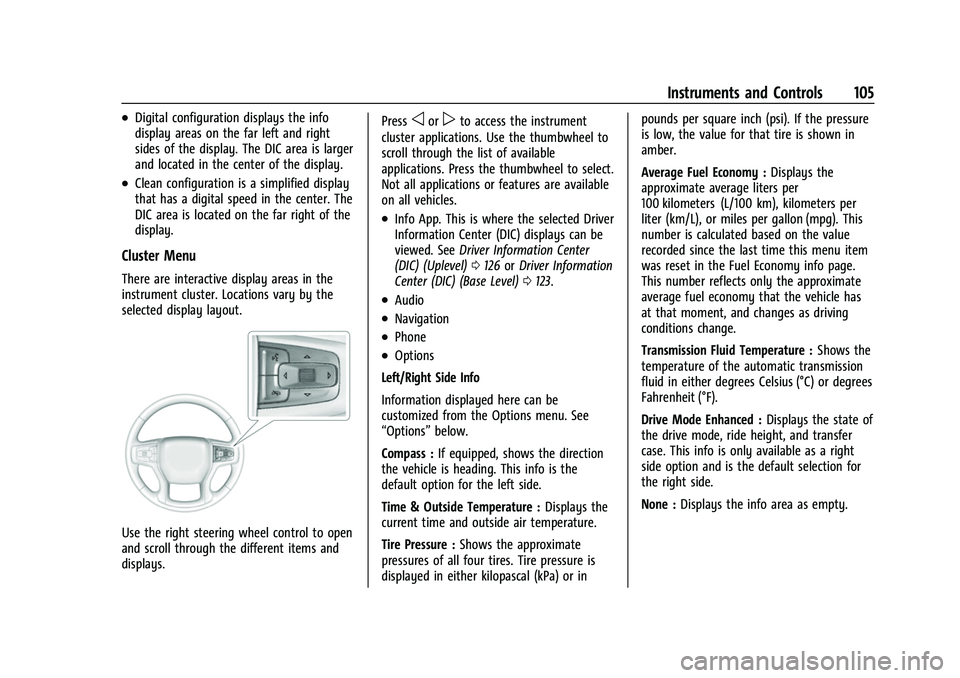
There are interactive display areas in the
instrument cluster. Locations vary by the
selected display layout.
Use the right steering wheel control to open
and scroll through the different items and
displays.Press
oorpto access the instrument
cluster applications. Use the thumbwheel to
scroll through the list of available
applications. Press the thumbwheel to select.
Not all applications or features are available
on all vehicles.
.Info App. This is where the selected Driver
Information Center (DIC) displays can be
viewed. See Driver Information Center
(DIC) (Uplevel) 0126 orDriver Information
Center (DIC) (Base Level) 0123.
.Audio
.Navigation
.Phone
.Options
Left/Right Side Info
Information displayed here can be
customized from the Options menu. See
“Options” below.
Compass : If equipped, shows the direction
the vehicle is heading. This info is the
default option for the left side.
Time & Outside Temperature : Displays the
current time and outside air temperature.
Tire Pressure : Shows the approximate
pressures of all four tires. Tire pressure is
displayed in either kilopascal (kPa) or in pounds per square inch (psi). If the pressure
is low, the value for that tire is shown in
amber.
Average Fuel Economy :
Displays the
approximate average liters per
100 kilometers (L/100 km), kilometers per
liter (km/L), or miles per gallon (mpg). This
number is calculated based on the value
recorded since the last time this menu item
was reset in the Fuel Economy info page.
This number reflects only the approximate
average fuel economy that the vehicle has
at that moment, and changes as driving
conditions change.
Transmission Fluid Temperature : Shows the
temperature of the automatic transmission
fluid in either degrees Celsius (°C) or degrees
Fahrenheit (°F).
Drive Mode Enhanced : Displays the state of
the drive mode, ride height, and transfer
case. This info is only available as a right
side option and is the default selection for
the right side.
None : Displays the info area as empty.
Page 107 of 443
Chevrolet Tahoe/Suburban Owner Manual (GMNA-Localizing-U.S./Canada/
Mexico-16416971) - 2023 - CRC - 4/25/22
106 Instruments and Controls
Audio
Browse music, select from the favorites,
or change the audio source. Use the
thumbwheel to change the station or go to
the next or previous track.
Navigation
If there is an active route, the Turn-by-Turn
directions will appear on the Navigation
Page, if there is no active route a compass
will be displayed.
Phone
If there is no active phone call, view recent
calls, or scroll through contacts.
Options
Use the thumbwheel to scroll through items
in the Options menu.
Display Layout :Choose Classic, Progressive,
Digital, and Clean layout by pressing the
thumbwheel while the desired item is
highlighted. Exit the Layout menu by
pressing
o.
Left/Right Side Info : Press the thumbwheel
to select the items to be displayed in the
display areas. See "Left/Right Side Info"
previously in this section. Lower Gauges :
Choose one of three gauge
configurations by pressing the thumbwheel
while the desired item is highlighted. The
selected configuration will be displayed at
the bottom of the display.
Maximum displays fuel level, coolant
temperature, engine oil pressure, and
battery voltage. Transmission fluid
temperature displays instead of battery
voltage while in Tow Haul mode.
Medium displays fuel level, and coolant
temperature.
Minimum displays only the fuel level.
Info Page Options : Press the thumbwheel
to select the items to be displayed in the
Info app. See Driver Information Center (DIC)
(Uplevel) 0126 orDriver Information Center
(DIC) (Base Level) 0123.
Units : Choose US or metric units by
pressing the thumbwheel while the desired
item is highlighted.
Speed Warning : Allows the driver to set a
speed that they do not want to exceed. To
set the Speed Warning press the
thumbwheel when Speed Warning is
displayed. Use the thumbwheel to adjust
the value and press to set the speed. Once the speed is set, this feature can be
turned off by pressing the thumbwheel
while viewing this page. If the selected
speed limit is exceeded, a pop-up warning is
displayed with a chime.
Speed Sign Display :
Shows sign
information, which comes from a roadway
database in the onboard navigation system,
if equipped. The sign will show “− −”when
offline maps are unavailable. See Maps
0 162.
Head-up Display (HUD) : If equipped, this
feature allows for adjusting the angle of the
HUD image and changing or turning off the
Speed Limit Sign.
HUD Rotation: Press the thumbwheel while
Adjust Rotation is highlighted to enter
Adjust Mode. Scroll to adjust the angle of
the HUD display. Press the thumbwheel to
confirm and save the setting. This feature
may only be available in P (Park).
Speed Limit Style: Press the thumbwheel
while Speed Limit Style is highlighted to
change the speed sign style or to turn it off.
Software Information : Displays open source
software information.
Reset To Defaults : Allows the driver to
reset to default settings.
Page 131 of 443
Chevrolet Tahoe/Suburban Owner Manual (GMNA-Localizing-U.S./Canada/
Mexico-16416971) - 2023 - CRC - 4/25/22
130 Instruments and Controls
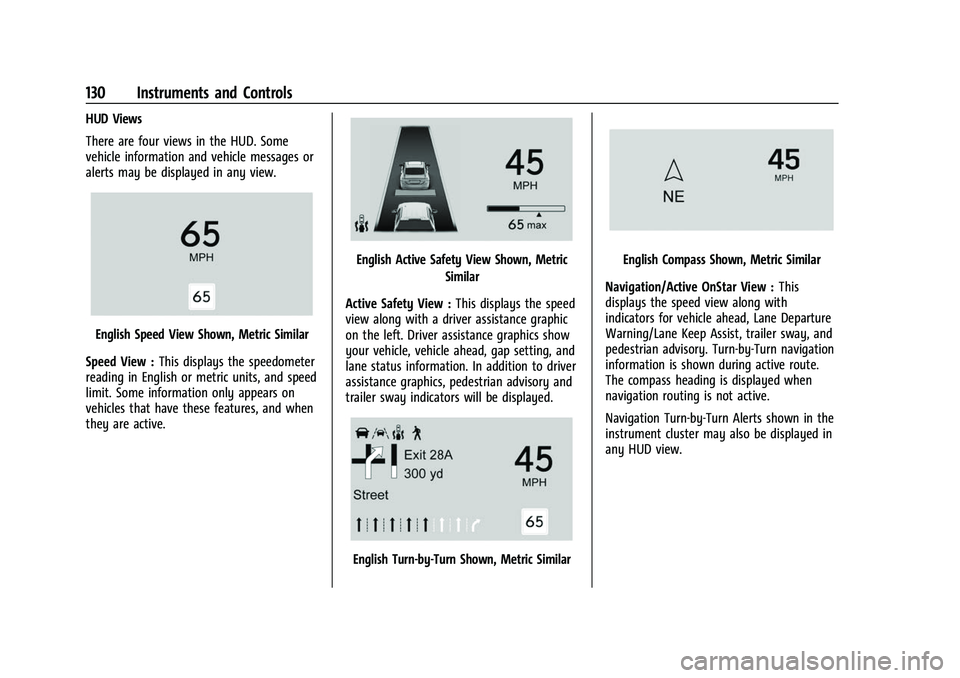
HUD Views
There are four views in the HUD. Some
vehicle information and vehicle messages or
alerts may be displayed in any view.
English Speed View Shown, Metric Similar
Speed View : This displays the speedometer
reading in English or metric units, and speed
limit. Some information only appears on
vehicles that have these features, and when
they are active.
English Active Safety View Shown, Metric
Similar
Active Safety View : This displays the speed
view along with a driver assistance graphic
on the left. Driver assistance graphics show
your vehicle, vehicle ahead, gap setting, and
lane status information. In addition to driver
assistance graphics, pedestrian advisory and
trailer sway indicators will be displayed.
English Turn-by-Turn Shown, Metric Similar
English Compass Shown, Metric Similar
Navigation/Active OnStar View : This
displays the speed view along with
indicators for vehicle ahead, Lane Departure
Warning/Lane Keep Assist, trailer sway, and
pedestrian advisory. Turn-by-Turn navigation
information is shown during active route.
The compass heading is displayed when
navigation routing is not active.
Navigation Turn-by-Turn Alerts shown in the
instrument cluster may also be displayed in
any HUD view.
Page 162 of 443
Chevrolet Tahoe/Suburban Owner Manual (GMNA-Localizing-U.S./Canada/
Mexico-16416971) - 2023 - CRC - 4/26/22
Infotainment System 161
There is no sound from the headphones
with the indicator light on :Make sure the
headphones have sufficient charge. Plug the
headphones to a USB-C port to charge.
Check to see if headphones are paired to the
screens. Make sure that you are listening in
to the correct screen by pressing the
channel select button.
If the steps above do not work, then unpair
the headphones from the RSI screens, turn
the headphones off, turn them back on and
attempt to pair them. See pairing
procedures for the Bluetooth headphone
previously in this section.
Video Distortion
Video distortion can occur when operating
cellular phones, scanners, CB radios, Global
Positioning Systems (GPS), two-way radios,
mobile faxes, or walkie talkies.
It might be necessary to turn off the video
player when operating one of these devices
in or near the vehicle.
Navigation
Using the Navigation System
The Navigation software is provided by
Google Maps. The information provided in
this section is a general overview and is
subject to change. For the latest functional
information, see g.co/mapsincar.
Accept the Terms and Conditions to use.
Internet Connectivity
Google Maps relies on a subscription data
plan for full functionality, including
availability of offline maps. With an
applicable connected services plan, Google
Maps can be used offline when driving
through connectivity dead zones by
auto-downloading offline maps prior to
going offline.
Profiles
Sign in to a Google Account for personalized
service. Information available in the Google
Account will be shown.
To log into a profile, see Accounts under
Settings (Base Radio) 0177 or
Settings (Uplevel Radio) 0178. Voice Assistant
If equipped, Google Maps can be controlled
by voice commands, see Google Assistant
under
Voice Recognition 0164.
Language and Units
To change the language, see Settings (Base
Radio) 0177 orSettings (Uplevel Radio)
0 178.
To change the units, see Instrument Cluster
(Base Level) 0102 or
Instrument Cluster (Uplevel) 0104.
Mute Settings
During active route guidance, Google Maps
can give audible voice directions, traffic
alerts, or can be muted. In the Google Maps
app, touch Settings, then Mute settings to
access the options. Alternatively, audible
voice directions and traffic alerts can be
muted by touching the sound icon on the
turn card during active navigation.
Compass
The Google Maps orientation can be
changed between the direction currently
traveling and pointing North. Touch the
compass to switch between these options.
Page 432 of 443
Chevrolet Tahoe/Suburban Owner Manual (GMNA-Localizing-U.S./Canada/-
Mexico-16416971) - 2023 - CRC - 4/25/22
Index 431
Assistance SystemsDriving . . . . . . . . . . . . . . . . . . . . . . . . . . . . . . . . 275
Parking and Backing . . . . . . . . . . . . . . . . . . . 262
Audio Bluetooth . . . . . . . . . . . . . . . . . . . . . . . . . . 153, 154
Automatic Dimming Mirrors . . . . . . . . . . . . . . . . . . . . . . . 28
Door Locks . . . . . . . . . . . . . . . . . . . . . . . . . . . . . . 16
Emergency Braking (AEB) . . . . . . . . . . . . . . 277
Emergency Braking (AEB) DisabledLight . . . . . . . . . . . . . . . . . . . . . . . . . . . . . . . . . . 117
Headlamp System . . . . . . . . . . . . . . . . . . . . . 138
Parking Assist (APA) . . . . . . . . . . . . . . . . . . . 270
Transmission . . . . . . . . . . . . . . . . . . . . . . . . . . . 215
Transmission Fluid . . . . . . . . . . . . . . . . . . . . . 327
Automatic Transmission
Manual Mode . . . . . . . . . . . . . . . . . . . . . . . . . 218
Avoiding Untrusted Media Devices . . . . . . . . 153
Axle Front . . . . . . . . . . . . . . . . . . . . . . . . . . . . . . . . . . 338
Rear . . . . . . . . . . . . . . . . . . . . . . . . . . . . . . . . . . . 338
B
BatteryExterior Lighting Battery Saver . . . . . . . . 142
Load Management . . . . . . . . . . . . . . . . . . . . . 142
Power Protection . . . . . . . . . . . . . . . . . . . . . . 142 Battery - North America . . . . . . . . . . . . .337, 383
Blade Replacement, Wiper . . . . . . . . . . . . . . . 339
Bluetooth
Audio . . . . . . . . . . . . . . . . . . . . . . . . . . . . . . 153, 154
Overview . . . . . . . . . . . . . . . . . . . . . 166, 167, 170
Brake Fluid . . . . . . . . . . . . . . . . . . . . . . . . . . . . . . . . . . . 336
Pad Life System . . . . . . . . . . . . . . . . . . . . . . . 335
System Warning Light . . . . . . . . . . . . . . . . . . 115
Brake Pad Life System . . . . . . . . . . . . . . . . . . . 335
Brakes . . . . . . . . . . . . . . . . . . . . . . . . . . . . . . . . . . . 335 Antilock . . . . . . . . . . . . . . . . . . . . . . . . . . . . . . . . 223
Brake Assist . . . . . . . . . . . . . . . . . . . . . . . . . . . 225
Electric Brake Boost . . . . . . . . . . . . . . . . . . . . 223
Electric Parking Brake . . . . . . . . . . . . . . . . . . 223
Braking . . . . . . . . . . . . . . . . . . . . . . . . . . . . . . . . . . 196
Automatic Emergency (AEB) . . . . . . . . . . . 277
Reverse Automatic . . . . . . . . . . . . . . . . . . . . . 272
Braking System Front Pedestrian (FPB) . . . . . . . . . . . . . . . . . 278
Break-In, New Vehicle . . . . . . . . . . . . . . . . . . . . 208
Buckle To Drive . . . . . . . . . . . . . . . . . . . . . . . . . . . .53
Bulb Replacement . . . . . . . . . . . . . . . . . . . . . . . . .341
Headlamp Aiming . . . . . . . . . . . . . . . . . . . . . . 341
Taillamps, Turn Signal, Stoplamps,and Back-up Lamps . . . . . . . . . . . . . . . . . . 342
Buying New Tires . . . . . . . . . . . . . . . . . . . . . . . . 367
C
Calibration Compass . . . . . . . . . . . . . . . . . . . . . . . . . . . . . . . . 97
California Perchlorate Materials Requirements . . . 319
California Proposition 65 Warning . . . . . 1, 383
Camera Rear Vision (RVC) . . . . . . . . . . . . . . . . . . . . . . 262
Canadian Vehicle Owners . . . . . . . . . . . . . . . . . . .2
Capacities and Specifications . . . . . . . . . . . . . 408
Carbon Monoxide Engine Exhaust . . . . . . . . . . . . . . . . . . . . . . . . 214
Liftgate . . . . . . . . . . . . . . . . . . . . . . . . . . . . . . . . . 18
Winter Driving . . . . . . . . . . . . . . . . . . . . . . . . . 203
Cargo Tie-Downs . . . . . . . . . . . . . . . . . . . . . . . . . . . . . . 91
Caution, Danger, and Warning . . . . . . . . . . . . . .2
Center Console Storage . . . . . . . . . . . . . . . . . . . . . . . . . . . . . . . . . 90
Chains, Tire . . . . . . . . . . . . . . . . . . . . . . . . . . . . . . 370
Charging System Light . . . . . . . . . . . . . . . . . . . . . . . . . . . 113
Wireless . . . . . . . . . . . . . . . . . . . . . . . . . . . . . . . . 99
Check Engine Light (Malfunction
Indicator) . . . . . . . . . . . . . . . . . . . . . . . . . . . . . . . 114
Child Restraints Infants and Young Children . . . . . . . . . . . . . . 71