2023 CHEVROLET SILVERADO 1500 front turn signal
[x] Cancel search: front turn signalPage 7 of 463
Chevrolet Silverado 1500 Owner Manual (GMNA-Localizing-U.S./Canada/
Mexico/Paraguay-16515119) - 2023 - CRC - 6/2/22
6 Introduction
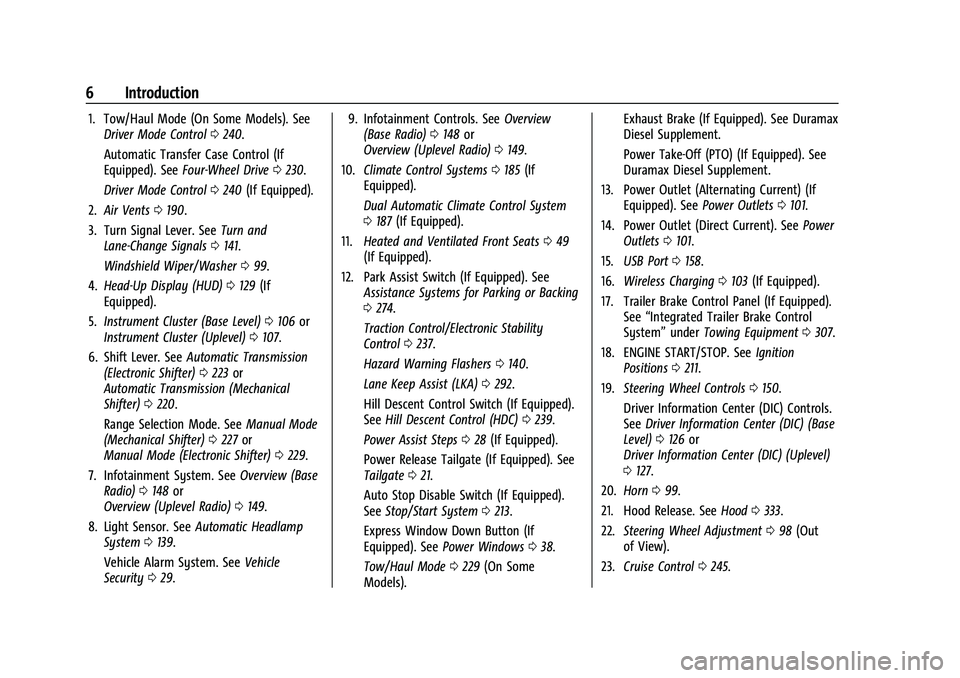
1. Tow/Haul Mode (On Some Models). SeeDriver Mode Control 0240.
Automatic Transfer Case Control (If
Equipped). See Four-Wheel Drive 0230.
Driver Mode Control 0240 (If Equipped).
2. Air Vents 0190.
3. Turn Signal Lever. See Turn and
Lane-Change Signals 0141.
Windshield Wiper/Washer 099.
4. Head-Up Display (HUD) 0129 (If
Equipped).
5. Instrument Cluster (Base Level) 0106 or
Instrument Cluster (Uplevel) 0107.
6. Shift Lever. See Automatic Transmission
(Electronic Shifter) 0223 or
Automatic Transmission (Mechanical
Shifter) 0220.
Range Selection Mode. See Manual Mode
(Mechanical Shifter) 0227 or
Manual Mode (Electronic Shifter) 0229.
7. Infotainment System. See Overview (Base
Radio) 0148 or
Overview (Uplevel Radio) 0149.
8. Light Sensor. See Automatic Headlamp
System 0139.
Vehicle Alarm System. See Vehicle
Security 029. 9. Infotainment Controls. See
Overview
(Base Radio) 0148 or
Overview (Uplevel Radio) 0149.
10. Climate Control Systems 0185 (If
Equipped).
Dual Automatic Climate Control System
0 187 (If Equipped).
11. Heated and Ventilated Front Seats 049
(If Equipped).
12. Park Assist Switch (If Equipped). See Assistance Systems for Parking or Backing
0274.
Traction Control/Electronic Stability
Control 0237.
Hazard Warning Flashers 0140.
Lane Keep Assist (LKA) 0292.
Hill Descent Control Switch (If Equipped).
See Hill Descent Control (HDC) 0239.
Power Assist Steps 028 (If Equipped).
Power Release Tailgate (If Equipped). See
Tailgate 021.
Auto Stop Disable Switch (If Equipped).
See Stop/Start System 0213.
Express Window Down Button (If
Equipped). See Power Windows 038.
Tow/Haul Mode 0229 (On Some
Models). Exhaust Brake (If Equipped). See Duramax
Diesel Supplement.
Power Take-Off (PTO) (If Equipped). See
Duramax Diesel Supplement.
13. Power Outlet (Alternating Current) (If Equipped). See Power Outlets0101.
14. Power Outlet (Direct Current). See Power
Outlets 0101.
15. USB Port 0158.
16. Wireless Charging 0103 (If Equipped).
17. Trailer Brake Control Panel (If Equipped). See“Integrated Trailer Brake Control
System” underTowing Equipment 0307.
18. ENGINE START/STOP. See Ignition
Positions 0211.
19. Steering Wheel Controls 0150.
Driver Information Center (DIC) Controls.
See Driver Information Center (DIC) (Base
Level) 0126 or
Driver Information Center (DIC) (Uplevel)
0 127.
20. Horn 099.
21. Hood Release. See Hood0333.
22. Steering Wheel Adjustment 098 (Out
of View).
23. Cruise Control 0245.
Page 10 of 463
Chevrolet Silverado 1500 Owner Manual (GMNA-Localizing-U.S./Canada/
Mexico/Paraguay-16515119) - 2023 - CRC - 6/2/22
Introduction 9
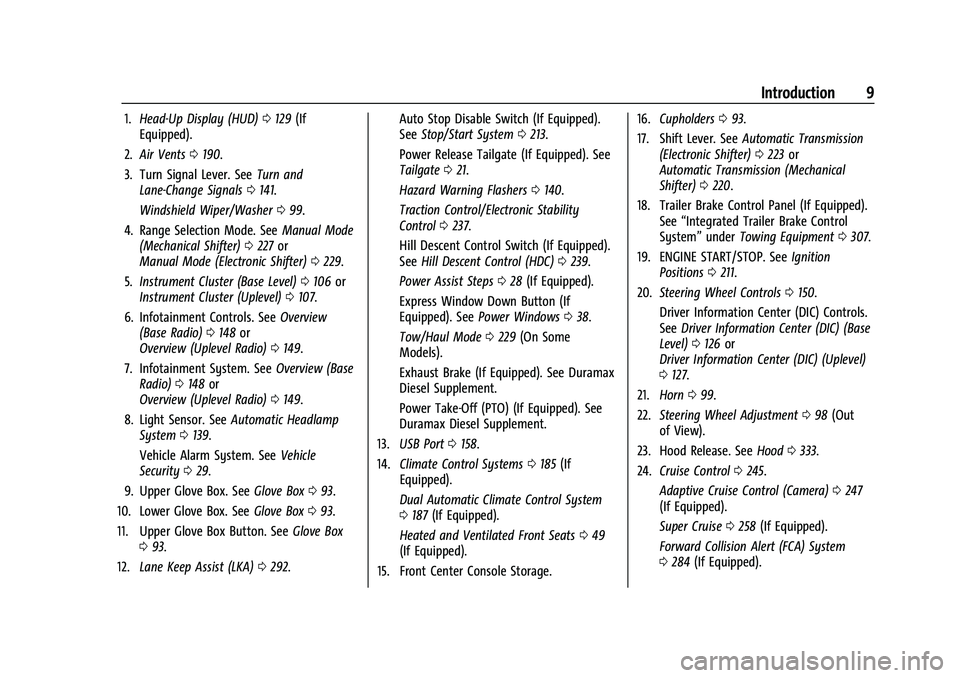
1.Head-Up Display (HUD) 0129 (If
Equipped).
2. Air Vents 0190.
3. Turn Signal Lever. See Turn and
Lane-Change Signals 0141.
Windshield Wiper/Washer 099.
4. Range Selection Mode. See Manual Mode
(Mechanical Shifter) 0227 or
Manual Mode (Electronic Shifter) 0229.
5. Instrument Cluster (Base Level) 0106 or
Instrument Cluster (Uplevel) 0107.
6. Infotainment Controls. See Overview
(Base Radio) 0148 or
Overview (Uplevel Radio) 0149.
7. Infotainment System. See Overview (Base
Radio) 0148 or
Overview (Uplevel Radio) 0149.
8. Light Sensor. See Automatic Headlamp
System 0139.
Vehicle Alarm System. See Vehicle
Security 029.
9. Upper Glove Box. See Glove Box093.
10. Lower Glove Box. See Glove Box093.
11. Upper Glove Box Button. See Glove Box
0 93.
12. Lane Keep Assist (LKA) 0292. Auto Stop Disable Switch (If Equipped).
See
Stop/Start System 0213.
Power Release Tailgate (If Equipped). See
Tailgate 021.
Hazard Warning Flashers 0140.
Traction Control/Electronic Stability
Control 0237.
Hill Descent Control Switch (If Equipped).
See Hill Descent Control (HDC) 0239.
Power Assist Steps 028 (If Equipped).
Express Window Down Button (If
Equipped). See Power Windows 038.
Tow/Haul Mode 0229 (On Some
Models).
Exhaust Brake (If Equipped). See Duramax
Diesel Supplement.
Power Take-Off (PTO) (If Equipped). See
Duramax Diesel Supplement.
13. USB Port 0158.
14. Climate Control Systems 0185 (If
Equipped).
Dual Automatic Climate Control System
0 187 (If Equipped).
Heated and Ventilated Front Seats 049
(If Equipped).
15. Front Center Console Storage. 16.
Cupholders 093.
17. Shift Lever. See Automatic Transmission
(Electronic Shifter) 0223 or
Automatic Transmission (Mechanical
Shifter) 0220.
18. Trailer Brake Control Panel (If Equipped). See“Integrated Trailer Brake Control
System” underTowing Equipment 0307.
19. ENGINE START/STOP. See Ignition
Positions 0211.
20. Steering Wheel Controls 0150.
Driver Information Center (DIC) Controls.
See Driver Information Center (DIC) (Base
Level) 0126 or
Driver Information Center (DIC) (Uplevel)
0 127.
21. Horn 099.
22. Steering Wheel Adjustment 098 (Out
of View).
23. Hood Release. See Hood0333.
24. Cruise Control 0245.
Adaptive Cruise Control (Camera) 0247
(If Equipped).
Super Cruise 0258 (If Equipped).
Forward Collision Alert (FCA) System
0 284 (If Equipped).
Page 19 of 463

Chevrolet Silverado 1500 Owner Manual (GMNA-Localizing-U.S./Canada/
Mexico/Paraguay-16515119) - 2023 - CRC - 6/2/22
18 Keys, Doors, and Windows
4. Pull the seal by pulling on the tab toaccess the battery.
5. Remove the old battery. Do not use a metal object.
6. Insert the new battery, positive side facing up. Replace with a CR2450 or
equivalent battery.
7. Place the seal back into the groove around the battery compartment.
8. Replace the battery cover by snapping it back into the remote key.
9. Reinsert the mechanical key.
Remote Vehicle Start
If equipped with the remote start feature,
the climate control system will come on
when the vehicle is started remotely,
depending on the outside temperature.
The rear defog and heated and ventilated
seats, if equipped, may also come on. See
Heated and Ventilated Front Seats 049. To
view available settings from the
infotainment screen, touch Settings >
Vehicle > Comfort and Convenience.
If equipped, the automatic heated steering
wheel may also come on. See Heated
Steering Wheel 099. Laws in some communities may restrict the
use of remote starters. Check local
regulations for any requirements on remote
starting of vehicles.
Do not use remote start if the vehicle is low
on fuel. The vehicle may run out of fuel.
The vehicle cannot be remote started if:
.The remote key is inside the vehicle or if
the key is in the ignition.
.The hood is not closed.
.There is an emission control system
malfunction and the lamp is on.
.The ignition is in any mode other
than off.
.The hazard warning flashers are on.
.The 30 minutes of engine run time have
been used.
.The vehicle is not in P (Park).
The engine will turn off during a remote
vehicle start if:
.The coolant temperature gets too high.
.The oil pressure gets low.
The remote key range may be reduced
while the vehicle is running.
Other conditions can affect the performance
of the remote key. See Remote Key012. Starting the Engine Using Remote Start
Press
Stwice on the remote key. The turn
signal lamps will flash. The lamps flash to
confirm the request to remote start the
vehicle has been received. During the
remote start the parking lamps will remain
on as long as the engine is running.
The engine will shut off after 15 minutes or
after the remainder of the 30 minute total
running time is used, unless you stop the
remote start before engine running has
completed or the vehicle is turned on.
Press the brake pedal and turn the ignition
on to drive the vehicle.
Total Engine Run Time
Remote start can be used for up to
30 minutes of total engine run time.
After two remote starts of 15 minutes,
or multiple shorter time starts totaling
30 minutes have been used, the vehicle
must be started and then turned off before
the remote start can be used again.
Canceling a Remote Start
To cancel a remote start, do one of the
following:
.PressS. The parking lamps will turn off.
Page 31 of 463
Chevrolet Silverado 1500 Owner Manual (GMNA-Localizing-U.S./Canada/
Mexico/Paraguay-16515119) - 2023 - CRC - 6/2/22
30 Keys, Doors, and Windows
or the door is not unlocked by pressingK
on the remote key during the 10-second
pre-alarm, the alarm will be activated.
The alarm will also be activated if a
passenger door or the hood is opened
without first disarming the system. When
the alarm is activated, the turn signals flash
and the horn sounds for about 30 seconds.
The alarm system will then re-arm to
monitor for the next unauthorized event.
Disarming the Alarm System
To disarm the alarm system or turn off the
alarm if it has been activated:
.PressKon the remote key.
.Start the vehicle.
To avoid setting off the alarm by mistake:
.Lock the vehicle after all occupants have
exited.
.Always unlock a door with the
remote key.
Unlocking the driver door with the key
will not disarm the system or turn off the
alarm.
How to Detect a Tamper Condition
IfKis pressed on the remote key and the
horn chirps three times, an alarm occurred
previously while the alarm system was
armed.
If the alarm has been activated, a message
will appear on the DIC.
Steering Column Lock
If equipped, the steering column lock is a
theft-deterrent device. This feature locks the
steering column when the vehicle is turned
off and the driver door is opened, or when
the driver door is opened and then the
vehicle is turned off. The steering column
unlocks when the vehicle is turned on.
The Driver Information Center (DIC) may
display one of these messages:
.A message to service the steering column
lock indicates that an issue has been
detected with the column lock feature
and the vehicle should be serviced.
.A message that the steering column is
locked indicates that the engine is
running, but the steering column is still
locked. It is normal for the column to be
locked during a remote start, but the
column should unlock after the brake pedal is pressed and the vehicle is started.
No message will display during a remote
start.
.A message that the steering wheel must
be turned and the vehicle must be started
again indicates that the column lock
mechanism is bound, the column locking
device was unable to unlock the steering
column, and the vehicle did not start.
If this happens, immediately turn the
steering wheel from side to side to
unbind the column lock. If this does not
unlock the steering column, turn the
vehicle off and open the driver door to
reset the system. Then turn the vehicle
on and immediately turn the steering
wheel side to side for about 15 seconds.
In some cases, it may take significant
force to unbind the column.
To keep the steering column from binding,
straighten the front wheels before turning
off the vehicle.
Immobilizer
See Radio Frequency Statement 0438.
Page 100 of 463
Chevrolet Silverado 1500 Owner Manual (GMNA-Localizing-U.S./Canada/
Mexico/Paraguay-16515119) - 2023 - CRC - 6/2/22
Instruments and Controls 99
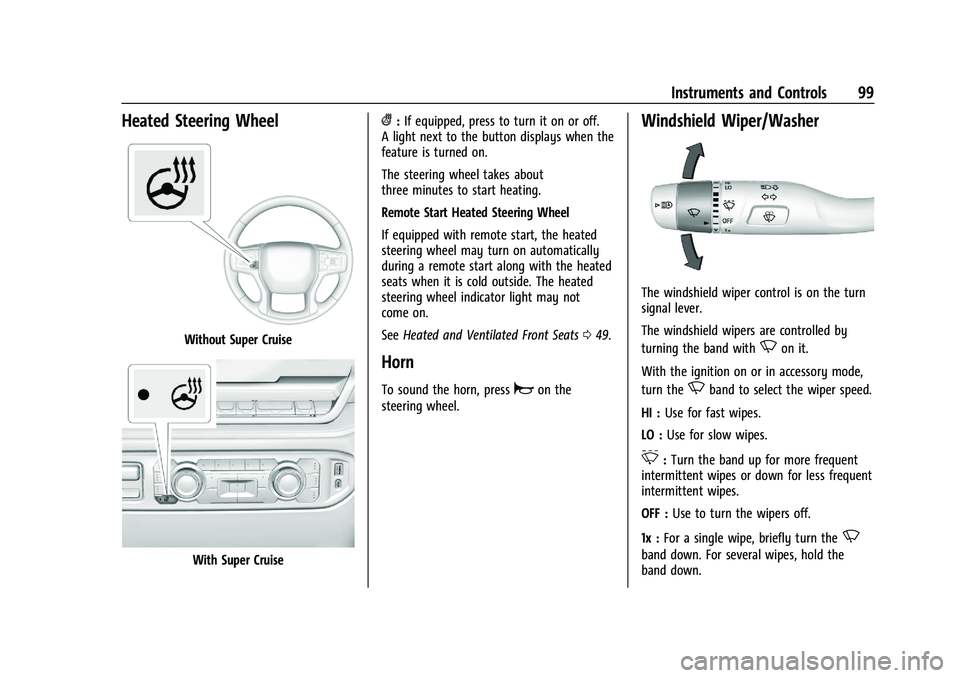
Heated Steering Wheel
Without Super Cruise
With Super Cruise
(:If equipped, press to turn it on or off.
A light next to the button displays when the
feature is turned on.
The steering wheel takes about
three minutes to start heating.
Remote Start Heated Steering Wheel
If equipped with remote start, the heated
steering wheel may turn on automatically
during a remote start along with the heated
seats when it is cold outside. The heated
steering wheel indicator light may not
come on.
See Heated and Ventilated Front Seats 049.
Horn
To sound the horn, pressaon the
steering wheel.
Windshield Wiper/Washer
The windshield wiper control is on the turn
signal lever.
The windshield wipers are controlled by
turning the band with
Non it.
With the ignition on or in accessory mode,
turn the
Nband to select the wiper speed.
HI : Use for fast wipes.
LO : Use for slow wipes.
3:Turn the band up for more frequent
intermittent wipes or down for less frequent
intermittent wipes.
OFF : Use to turn the wipers off.
1x : For a single wipe, briefly turn the
N
band down. For several wipes, hold the
band down.
Page 101 of 463
Chevrolet Silverado 1500 Owner Manual (GMNA-Localizing-U.S./Canada/
Mexico/Paraguay-16515119) - 2023 - CRC - 6/2/22
100 Instruments and Controls
L:PressLon the windshield wiper
control to spray windshield washer fluid and
activate the wipers. The front 360 degree
viewing camera will also be washed,
if equipped. The wipers will continue until
Lis released or the maximum wash time
is reached. When
Lis released, additional
wipes may occur depending on how long
the windshield washer had been activated.
See Washer Fluid 0348 for information on
filling the windshield washer fluid reservoir.
Clear snow and ice from the wiper blades
before using them. If frozen to the
windshield, carefully loosen or thaw them.
Damaged blades should be replaced. See
Wiper Blade Replacement 0355.
Heavy snow or ice can overload the wiper
motor.
{Warning
In freezing weather, do not use the
washer until the windshield is warmed.
Otherwise the washer fluid can form ice
on the windshield, blocking your vision.
{Warning
Before driving the vehicle, always clear
snow and ice from the hood, windshield,
washer nozzles, roof, and rear of the
vehicle, including all lamps and windows.
Reduced visibility from snow and ice
buildup could lead to a crash.
Wipe Parking
If the ignition is turned off while the wipers
are on LO, HI, or
3, they will
immediately stop.
If the windshield wiper control is ON then
moved to OFF before the driver door is
opened or within 10 minutes, the wipers will
restart and move to the base of the
windshield.
If the ignition is turned off while the wipers
are performing wipes due to windshield
washing, the wipers continue to run until
they reach the base of the windshield.
Compass
The vehicle may have a compass display on
the Driver Information Center (DIC). The
compass receives its heading and other
information from the Global Positioning
System (GPS) antenna, Electronic Stability
Control (ESC), and vehicle speed information.
The compass system is designed to operate
for a certain number of miles or degrees of
turn before needing a signal from the GPS
satellites. When the compass display shows
CAL, drive the vehicle for a short distance in
an open area where it can receive a GPS
signal. The compass system will
automatically determine when a GPS signal
is restored and provide a heading again.
Clock
Set the time and date using the
infotainment system. See "Time/Date" under
Settings (Uplevel Radio) 0177 or
Settings (Base Radio) 0175.
Page 121 of 463
Chevrolet Silverado 1500 Owner Manual (GMNA-Localizing-U.S./Canada/
Mexico/Paraguay-16515119) - 2023 - CRC - 6/2/22
120 Instruments and Controls
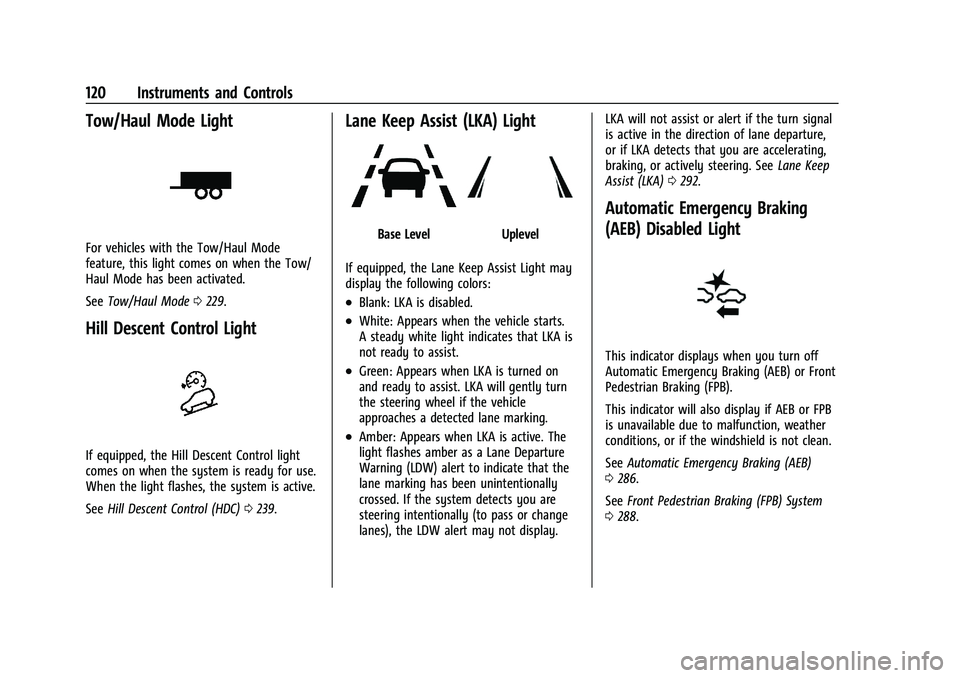
Tow/Haul Mode Light
For vehicles with the Tow/Haul Mode
feature, this light comes on when the Tow/
Haul Mode has been activated.
SeeTow/Haul Mode 0229.
Hill Descent Control Light
If equipped, the Hill Descent Control light
comes on when the system is ready for use.
When the light flashes, the system is active.
See Hill Descent Control (HDC) 0239.
Lane Keep Assist (LKA) Light
Base LevelUplevel
If equipped, the Lane Keep Assist Light may
display the following colors:
.Blank: LKA is disabled.
.White: Appears when the vehicle starts.
A steady white light indicates that LKA is
not ready to assist.
.Green: Appears when LKA is turned on
and ready to assist. LKA will gently turn
the steering wheel if the vehicle
approaches a detected lane marking.
.Amber: Appears when LKA is active. The
light flashes amber as a Lane Departure
Warning (LDW) alert to indicate that the
lane marking has been unintentionally
crossed. If the system detects you are
steering intentionally (to pass or change
lanes), the LDW alert may not display. LKA will not assist or alert if the turn signal
is active in the direction of lane departure,
or if LKA detects that you are accelerating,
braking, or actively steering. See
Lane Keep
Assist (LKA) 0292.
Automatic Emergency Braking
(AEB) Disabled Light
This indicator displays when you turn off
Automatic Emergency Braking (AEB) or Front
Pedestrian Braking (FPB).
This indicator will also display if AEB or FPB
is unavailable due to malfunction, weather
conditions, or if the windshield is not clean.
See Automatic Emergency Braking (AEB)
0 286.
See Front Pedestrian Braking (FPB) System
0 288.
Page 138 of 463
Chevrolet Silverado 1500 Owner Manual (GMNA-Localizing-U.S./Canada/
Mexico/Paraguay-16515119) - 2023 - CRC - 6/2/22
Lighting 137
Lighting
Exterior Lighting
Exterior Lamp Controls . . . . . . . . . . . . . . . . . 137
Exterior Lamps Off Reminder . . . . . . . . . . 139
Headlamp High/Low-Beam Changer . . . 139
Flash-to-Pass . . . . . . . . . . . . . . . . . . . . . . . . . . . 139
Daytime Running Lamps (DRL) . . . . . . . . . 139
Automatic Headlamp System . . . . . . . . . . 139
Hazard Warning Flashers . . . . . . . . . . . . . . 140
Turn and Lane-Change Signals . . . . . . . . . 141
Fog Lamps . . . . . . . . . . . . . . . . . . . . . . . . . . . . . 141
Task Lighting . . . . . . . . . . . . . . . . . . . . . . . . . . 142
Auxiliary Roof-Mounted Lamp . . . . . . . . . 142
Exterior Cargo Lamps . . . . . . . . . . . . . . . . . . 143
Interior Lighting
Instrument Panel IlluminationControl . . . . . . . . . . . . . . . . . . . . . . . . . . . . . . 143
Dome Lamps . . . . . . . . . . . . . . . . . . . . . . . . . . 144
Reading Lamps . . . . . . . . . . . . . . . . . . . . . . . . 144
Lighting Features
Entry Lighting . . . . . . . . . . . . . . . . . . . . . . . . . 145
Exit Lighting . . . . . . . . . . . . . . . . . . . . . . . . . . . 145
Battery Load Management . . . . . . . . . . . . 145
Battery Power Protection . . . . . . . . . . . . . . 146
Exterior Lighting Battery Saver . . . . . . . . 146
Exterior Lighting
Exterior Lamp Controls
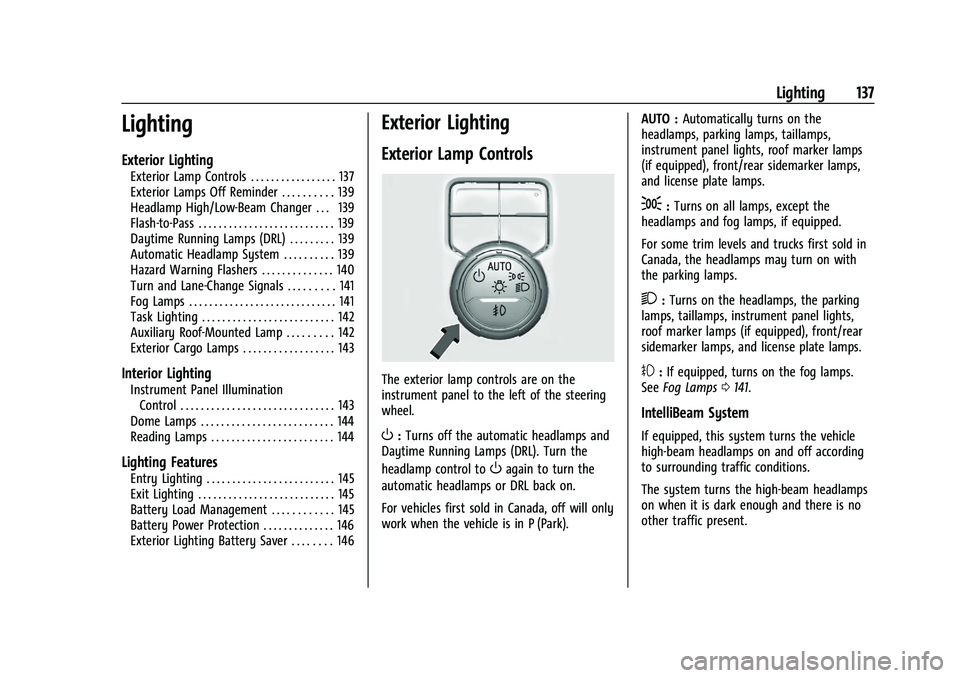
The exterior lamp controls are on the
instrument panel to the left of the steering
wheel.
O: Turns off the automatic headlamps and
Daytime Running Lamps (DRL). Turn the
headlamp control to
Oagain to turn the
automatic headlamps or DRL back on.
For vehicles first sold in Canada, off will only
work when the vehicle is in P (Park). AUTO :
Automatically turns on the
headlamps, parking lamps, taillamps,
instrument panel lights, roof marker lamps
(if equipped), front/rear sidemarker lamps,
and license plate lamps.
;: Turns on all lamps, except the
headlamps and fog lamps, if equipped.
For some trim levels and trucks first sold in
Canada, the headlamps may turn on with
the parking lamps.
2: Turns on the headlamps, the parking
lamps, taillamps, instrument panel lights,
roof marker lamps (if equipped), front/rear
sidemarker lamps, and license plate lamps.
#: If equipped, turns on the fog lamps.
See Fog Lamps 0141.
IntelliBeam System
If equipped, this system turns the vehicle
high-beam headlamps on and off according
to surrounding traffic conditions.
The system turns the high-beam headlamps
on when it is dark enough and there is no
other traffic present.