2023 CHEVROLET CORVETTE brakes
[x] Cancel search: brakesPage 204 of 351
Chevrolet Corvette Owner Manual (GMNA-Localizing-U.S./Canada/Mexico-
16287457) - 2023 - CRC - 3/10/22
Driving and Operating 203
.Vehicle is in R (Reverse)
.Paddles are released separately
If the vehicle was in Temporary Manual
Paddle Shift mode before entering Double
Paddle Declutch, the vehicle will return to
D (Drive) with automatic shifting upon
exiting Double Paddle Declutch.
Rapid Exit : This is intended for use at a
closed course race track and not on public
roads. Engine power is reapplied to the
wheels quickly to support spirited driving.
The rate of launch is dependent on how
much the accelerator pedal is pressed when
the paddles are released. The further the
accelerator pedal is pressed, the greater the
rate of launch. Tire spin may occur if the
Traction Control System (TCS) is turned off
while performing a Rapid Exit. Rapid Exit
launch occurs when all of the following
conditions are met:
.Vehicle speed is below 10 km/h (6 mph)
.Vehicle is in D (Drive) or
M (Manual Mode)
.Both paddles are released at the
same time With the accelerator fully pressed and the
engine at the rev limiter, peak performance
only occurs if the paddles are released
within a short period of time after reaching
the rev limit (i.e., a few seconds).
Manual Launch (Z06 model only) :
While
the vehicle is in Double Paddle Declutch,
Manual Launch can be activated to gain
more precise control over the engine speed
to prepare for a Standard or Rapid Exit. To
activate this feature, first enter Double
Paddle Declutch, then release and repull
either the + paddle or −paddle while
keeping the opposite paddle held. The
Performance Transmission Active Light will
illuminate in the gauge cluster to indicate
that Manual Launch has been activated. See
Performance Transmission Active 089.
When Manual Launch is active, the engine
will respond differently when the accelerator
pedal is pressed compared to normal Double
Paddle Declutch. The accelerator pedal must
be pressed further to increase the engine
rpm and a lower engine rpm limit will be
applied. This feature also provides faster
engine response during a Rapid Exit if any
of the Performance Traction Management
(PTM) modes or Electronic Stability Control
(ESC) Off has been selected. To exit Manual Launch, release both the + paddle and
−
paddle. The vehicle will also exit Double
Paddle Declutch and the engine will
reconnect to the wheels. A Standard Exit or
Rapid Exit will be performed based on the
same conditions listed previously.
{Warning
When exiting Double Paddle Declutch, the
vehicle may move rapidly. You could lose
control and cause a crash with nearby
people or objects. Be ready to release the
accelerator pedal or apply the brakes
immediately if the vehicle moves too
quickly. Do not use the Double Paddle
Declutch when people or objects are near.
Brakes
Electric Brake Boost
Vehicles equipped with electric brake boost
have hydraulic brake circuits that are
electronically controlled when the brake
pedal is applied during normal operation.
The system performs routine tests and turns
off within a few minutes after the vehicle is
turned off. Noise may be heard during this
time. If the brake pedal is pressed during
Page 205 of 351
Chevrolet Corvette Owner Manual (GMNA-Localizing-U.S./Canada/Mexico-
16287457) - 2023 - CRC - 3/10/22
204 Driving and Operating
the tests or when the electric brake boost
system is off, a noticeable change in pedal
force and travel may be felt. This is normal.
Antilock Brake System (ABS)
The Antilock Brake System (ABS) helps
prevent a braking skid and maintain steering
while braking hard.
If there is a problem with ABS, this warning
light stays on. SeeAntilock Brake System
(ABS) Warning Light 088.
ABS does not change the time needed to
get a foot on the brake pedal and does not
always decrease stopping distance. If you
get too close to the vehicle ahead, there will
not be enough time to apply the brakes if
that vehicle suddenly slows or stops. Always
leave enough room ahead to stop, even
with ABS.
Using ABS
Do not pump the brakes. Just hold the brake
pedal down firmly. Hearing and feeling ABS
operate is normal.
Braking in Emergencies
ABS allows steering and braking at the same
time. In many emergencies, steering can
help even more than braking.
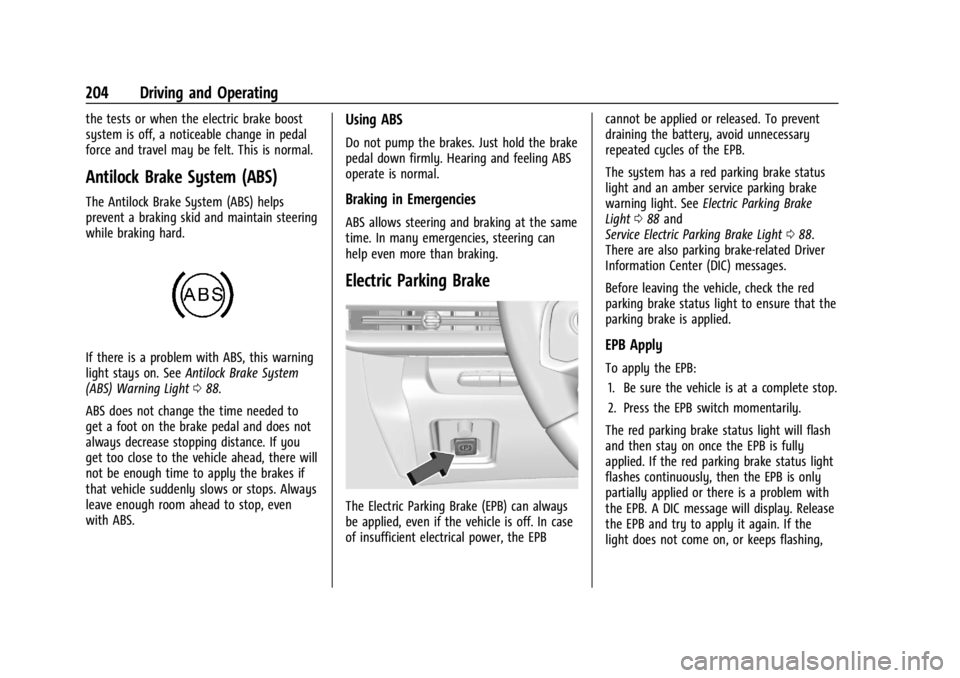
Electric Parking Brake
The Electric Parking Brake (EPB) can always
be applied, even if the vehicle is off. In case
of insufficient electrical power, the EPB cannot be applied or released. To prevent
draining the battery, avoid unnecessary
repeated cycles of the EPB.
The system has a red parking brake status
light and an amber service parking brake
warning light. See
Electric Parking Brake
Light 088 and
Service Electric Parking Brake Light 088.
There are also parking brake-related Driver
Information Center (DIC) messages.
Before leaving the vehicle, check the red
parking brake status light to ensure that the
parking brake is applied.
EPB Apply
To apply the EPB:
1. Be sure the vehicle is at a complete stop.
2. Press the EPB switch momentarily.
The red parking brake status light will flash
and then stay on once the EPB is fully
applied. If the red parking brake status light
flashes continuously, then the EPB is only
partially applied or there is a problem with
the EPB. A DIC message will display. Release
the EPB and try to apply it again. If the
light does not come on, or keeps flashing,
Page 207 of 351

Chevrolet Corvette Owner Manual (GMNA-Localizing-U.S./Canada/Mexico-
16287457) - 2023 - CRC - 3/10/22
206 Driving and Operating
accelerator pedal apply. The brakes release
when the accelerator pedal is applied. If the
accelerator pedal is not applied within a few
minutes, the Electric Parking Brake will
apply. The brakes may also release under
other conditions. Do not rely on HSA to hold
the vehicle.
HSA is available when the vehicle is facing
uphill in a forward gear, or when facing
downhill in R (Reverse). The vehicle must
come to a complete stop on a grade for HSA
to activate.
Ride Control Systems
Traction Control/Electronic
Stability Control
The vehicle has a Traction Control
System (TCS) and a StabiliTrak/Electronic
Stability Control (ESC) system. These
systems help limit wheel spin and assist the
driver in maintaining control, especially on
slippery road conditions.
TCS activates if it senses that the rear
wheels are spinning too much or are
beginning to lose traction. When this
happens, TCS applies the brakes to thespinning wheel and reduces engine power
(by closing the throttle and managing
engine spark) to limit wheel spin.
StabiliTrak/ESC activates when the vehicle
senses a difference between the intended
path and the direction the vehicle is actually
traveling. StabiliTrak/ESC selectively applies
braking pressure to any one of the vehicle
wheel brakes to assist the driver in keeping
the vehicle on the intended path.
If cruise control is being used when TCS
begins to limit wheel spin, the cruise control
will automatically disengage. Cruise control
may be reengaged when road conditions
allow. See
Cruise Control 0219.
If the driver disables TCS, cruise control will
disengage. Cruise control will also be
disabled if Performance Traction
Management (PTM) is selected, or if
StabiliTrak is turned off.
Both systems come on automatically when
the vehicle is started and begins to move.
The systems may be heard or felt while
they are operating or while performing
diagnostic checks. This is normal and does
not mean there is a problem with the
vehicle. It is recommended to leave both systems on
for normal driving conditions, but it may be
necessary to turn TCS off if the vehicle gets
stuck in sand, mud, ice, or snow. See
If the
Vehicle Is Stuck 0185 and “Turning the
Systems Off and On” later in this section.
The indicator light for both systems is in the
instrument cluster. This light will:
.Flash when TCS is limiting wheel spin
.Flash when StabiliTrak/ESC is activated
.Flash when ABS is active
.Turn on and stay on when either system
is not working
If either system fails to turn on or to
activate, a message displays in the Driver
Information Center (DIC), and
=comes on
and stays on to indicate that the system is
inactive and is not assisting the driver in
maintaining control. The vehicle is safe to
drive, but driving should be adjusted
accordingly.
Page 213 of 351
Chevrolet Corvette Owner Manual (GMNA-Localizing-U.S./Canada/Mexico-
16287457) - 2023 - CRC - 3/10/22
212 Driving and Operating
Cluster Display
For more information on the display themes
of the Drive modes on the instrument
cluster, seeInstrument Cluster 079 >
Options > Display themes.
Throttle Progression
Adjusts throttle sensitivity by selecting how
quickly or slowly the throttle reacts to
input.
Throttle Progression is a preset of
Powertrain and cannot be modified or
changed independently.
Transmission Shift Operation
Basic:
.Transmission upshifts and downshifts are
selected based on vehicle speed and
accelerator position to optimize comfort
and fuel economy during mild driving
conditions.
Driver Influenced Gear Selection:
.Aggressive driving will influence both the
upshift and downshift points in all modes.
When engaged, the Performance
Transmission Active light displays. See
Performance Transmission Active 089. When Performance Transmission is
activated from a standstill, by selecting
PTM Race 1 or Race 2, the transmission
shift map is in the most aggressive state
where upshifts are only achieved at high
revolutions per minute (rpm), downshifts
happen early, and the lowest gear is
selected for cornering. Transmission
behavior will transition to a level
appropriate to the current driving
behavior after a short period of time.
If PTM Race 1 or Race 2 are not selected,
the Performance Transmission Active
behavior still activates automatically after
a sustained period of performance driving
is detected. See
“Performance Traction
Management (PTM)” later on in this
section.
.Criteria which have influence are: driving
mode, accelerator, brakes, lateral, and
longitudinal loading.
.Changes in gear selection behavior due to
aggressive driving can include:
‐ Downshifting early with higher rpm’s
during aggressive braking (i.e. entering
a corner)
‐ Altering upshifts while experiencing
lateral acceleration ‐
Not upshifting when the accelerator is
released to avoid unnecessary shifts if
the accelerator is re-applied
‐ Recognizing sporty driving and
anticipate upcoming corners with the
appropriate gear selection entering and
exiting
.Driver Modes
‐Driver influenced changes are effective
in all driving modes, however the
aggressiveness of the transmission
response will increase between Tour,
Sport, and Track Modes respectively.
Active Fuel Management (Engine Cylinder
Shuts Off)
.Normal with Dual Clutch Transmission:
The engine uses 8-cylinder mode when
accelerating, but changes to 4-cylinder
mode when coasting.
Active Fuel Management is a preset of
Powertrain and cannot be modified or
changed independently.
Page 216 of 351
Chevrolet Corvette Owner Manual (GMNA-Localizing-U.S./Canada/Mexico-
16287457) - 2023 - CRC - 3/10/22
Driving and Operating 215
The Front Lift System can also be used in
accessory mode. Put the vehicle in accessory
mode and press and hold the button on the
center console for 10 consecutive seconds to
automatically raise the vehicle.
The Driver Information Center (DIC) may
display the message“Lift System
Unavailable” if:
.any doors are ajar
.the hood is open
.the vehicle is moving over 38 km/h
(24 mph)
.too many lift requests within a short
period
The Front Lift System should not be used to
service the vehicle. Do not place anything or
body parts under the vehicle while lifted.
See Recommended Fluids and Lubricants
0 310.
Competitive Driving Mode
If equipped, Competitive Driving Mode,
Performance Traction Management (PTM),
and Launch Control are systems designed to
allow increased performance while
accelerating and/or cornering. This is
accomplished by regulating and optimizing
the engine, brakes, and suspension performance. These modes are for use at a
closed course race track and are not
intended for use on public roads. They will
not compensate for driver inexperience or
lack of familiarity with a race track. Drivers
who prefer to allow the system to have
more control of the engine, brakes, and
suspension are advised to turn on the
normal traction control and StabiliTrak/
Electronic Stability Control (ESC) systems on.
Competitive Driving Mode
Competitive Driving Mode allows full engine
power while StabiliTrak/ESC helps maintain
directional control of the vehicle by selective
brake application. In this mode, the Traction
Control System (TCS) is off and Launch
Control is available.
Adjust your driving style to account for the
available engine power. See
“Launch
Control” later in this section.
These lights are on when the vehicle is in
the Competitive Driving Mode.
To select this optional handling mode, the
vehicle mode must be Sport or Track (if
equipped with PTM, then Competitive
Driving Mode is only available in Sport).
Then quickly press
@on the center console
two times. ESC COMPETITIVE MODE displays
in the Driver Information Center (DIC).
When
@is pressed again, the traction off
light
iand StabiliTrak/ESC OFF light@
will go out.
Performance Traction
Management (PTM)
If equipped, PTM integrates the TCS,
StabiliTrak/ESC, and Magnetic Ride Control
systems to provide improved and consistent
performance when cornering. The amount of
available engine power is based on the
mode selected, track conditions, driver skill,
and the radius of each corner.
Page 221 of 351
Chevrolet Corvette Owner Manual (GMNA-Localizing-U.S./Canada/Mexico-
16287457) - 2023 - CRC - 3/10/22
220 Driving and Operating
If the brakes are applied, cruise control
disengages.
Cruise control will disengage if either TCS or
StabiliTrak/Electronic Stability Control (ESC)
is turned off.
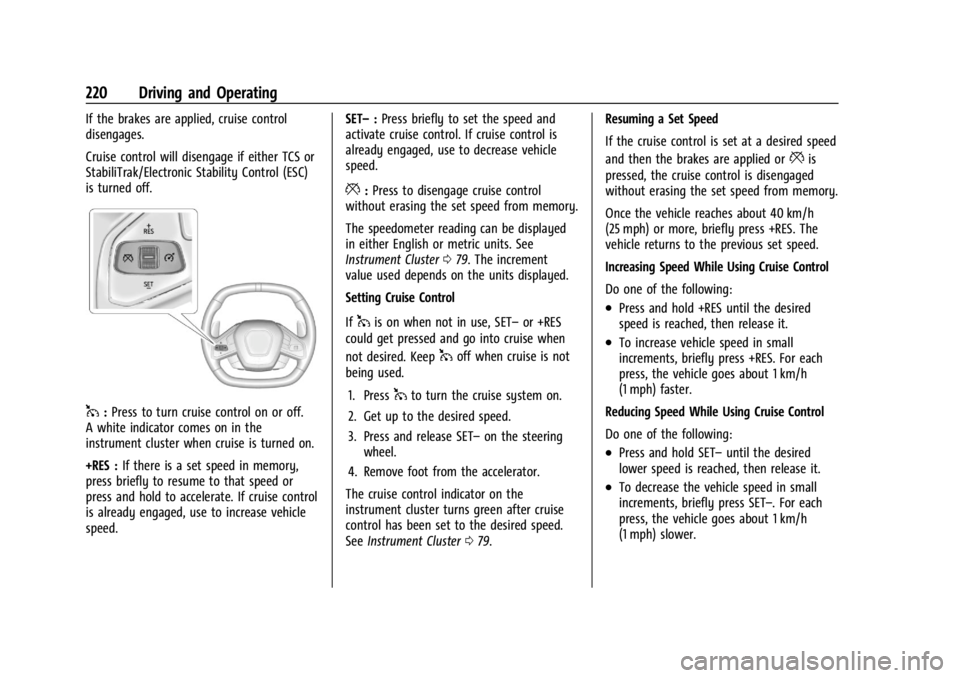
1:Press to turn cruise control on or off.
A white indicator comes on in the
instrument cluster when cruise is turned on.
+RES : If there is a set speed in memory,
press briefly to resume to that speed or
press and hold to accelerate. If cruise control
is already engaged, use to increase vehicle
speed. SET–
:Press briefly to set the speed and
activate cruise control. If cruise control is
already engaged, use to decrease vehicle
speed.
*: Press to disengage cruise control
without erasing the set speed from memory.
The speedometer reading can be displayed
in either English or metric units. See
Instrument Cluster 079. The increment
value used depends on the units displayed.
Setting Cruise Control
If
1is on when not in use, SET– or +RES
could get pressed and go into cruise when
not desired. Keep
1off when cruise is not
being used.
1. Press
1to turn the cruise system on.
2. Get up to the desired speed.
3. Press and release SET– on the steering
wheel.
4. Remove foot from the accelerator.
The cruise control indicator on the
instrument cluster turns green after cruise
control has been set to the desired speed.
See Instrument Cluster 079. Resuming a Set Speed
If the cruise control is set at a desired speed
and then the brakes are applied or
*is
pressed, the cruise control is disengaged
without erasing the set speed from memory.
Once the vehicle reaches about 40 km/h
(25 mph) or more, briefly press +RES. The
vehicle returns to the previous set speed.
Increasing Speed While Using Cruise Control
Do one of the following:
.Press and hold +RES until the desired
speed is reached, then release it.
.To increase vehicle speed in small
increments, briefly press +RES. For each
press, the vehicle goes about 1 km/h
(1 mph) faster.
Reducing Speed While Using Cruise Control
Do one of the following:
.Press and hold SET– until the desired
lower speed is reached, then release it.
.To decrease the vehicle speed in small
increments, briefly press SET–. For each
press, the vehicle goes about 1 km/h
(1 mph) slower.
Page 223 of 351

Chevrolet Corvette Owner Manual (GMNA-Localizing-U.S./Canada/Mexico-
16287457) - 2023 - CRC - 3/10/22
222 Driving and Operating
Warning (Continued)
.Detect vehicles or objects outside the
area monitored by the system.
.Work at all driving speeds.
.Warn you or provide you with enough
time to avoid a crash.
.Work under poor visibility or bad
weather conditions.
.Work if the detection sensor is not
cleaned or is covered by ice, snow,
mud, or dirt.
.Work if the detection sensor is
covered up, such as with a sticker,
magnet, or metal plate.
.Work if the area surrounding the
detection sensor is damaged or not
properly repaired.
Complete attention is always required
while driving, and you should be ready to
take action and apply the brakes and/or
steer the vehicle to avoid crashes. Audible Alert
Some driver assistance features alert the
driver of obstacles by beeping. To view
available settings for this feature, touch the
Settings icon on the infotainment home
page. Select
“Vehicle”to display the list of
available options and select “Comfort and
Convenience”.
Cleaning
Depending on vehicle options, keep these
areas of the vehicle clean to ensure the best
driver assistance feature performance. Driver
Information Center (DIC) messages may
display when the systems are unavailable or
blocked.
.Front and rear bumpers and the area
below the bumpers
.Front grille and headlamps
.Front camera lenses in the front grille or
near the front emblem
.Front side and rear side panels
.Outside of the windshield in front of the
rearview mirror
.Rear side corner bumpers
.Rear Vision Camera above the license
plate
Radio Frequency
This vehicle may be equipped with driver
assistance systems that operate using radio
frequency. See Radio Frequency Statement
0 327.
Page 232 of 351

Chevrolet Corvette Owner Manual (GMNA-Localizing-U.S./Canada/Mexico-
16287457) - 2023 - CRC - 3/10/22
Vehicle Care 231
Vehicle Care
General Information
General Information . . . . . . . . . . . . . . . . . . . 232
California Perchlorate MaterialsRequirements . . . . . . . . . . . . . . . . . . . . . . . . 232
Accessories and Modifications . . . . . . . . . 232
Lifting the Vehicle . . . . . . . . . . . . . . . . . . . . . 232
Vehicle Checks
Doing Your Own Service Work . . . . . . . . 234
Underhood Compartment Overview . . . 234
Engine Compartment Overview . . . . . . . . 235
Engine Oil (5.5L LT6 Engine) . . . . . . . . . . . 242
Engine Oil (6.2L LT2 Engine) . . . . . . . . . . . 245
Engine Oil Life System . . . . . . . . . . . . . . . . 248
Dual Clutch Transmission Fluid . . . . . . . . 249
Dual Clutch Transmission Fluid Life System . . . . . . . . . . . . . . . . . . . . . . . . . . . . . . 249
Engine Air Filter Life System . . . . . . . . . . 250
Engine Air Cleaner/Filter . . . . . . . . . . . . . . . 251
Cooling System . . . . . . . . . . . . . . . . . . . . . . . . 252
Engine Overheating . . . . . . . . . . . . . . . . . . . . 255
Washer Fluid . . . . . . . . . . . . . . . . . . . . . . . . . . 256
Brakes . . . . . . . . . . . . . . . . . . . . . . . . . . . . . . . . . 257
Brake Pad Life System (If Equipped) . . . 259
Brake Fluid . . . . . . . . . . . . . . . . . . . . . . . . . . . . 260
Battery - North America . . . . . . . . . . . . . . . 261
Park Brake and P (Park) Mechanism Check . . . . . . . . . . . . . . . . . . . . . . . . . . . . . . . . 262 Wiper Blade Replacement . . . . . . . . . . . . . 262
Windshield Replacement . . . . . . . . . . . . . . 263
Gas Strut(s) . . . . . . . . . . . . . . . . . . . . . . . . . . . 263
Headlamp Aiming
Front Headlamp Aiming . . . . . . . . . . . . . . . 264
Bulb Replacement
LED Lighting . . . . . . . . . . . . . . . . . . . . . . . . . . . 264
Electrical System
Electrical System Overload . . . . . . . . . . . . 264
Fuses and Circuit Breakers . . . . . . . . . . . . 266
Instrument Panel Fuse Block . . . . . . . . . . 266
Rear Compartment Fuse Block . . . . . . . . . 268
Wheels and Tires
Tires . . . . . . . . . . . . . . . . . . . . . . . . . . . . . . . . . . . 271
All-Season Tires . . . . . . . . . . . . . . . . . . . . . . . . 272
Winter Tires . . . . . . . . . . . . . . . . . . . . . . . . . . . 272
Run-Flat Tires . . . . . . . . . . . . . . . . . . . . . . . . . . 272
Low-Profile Tires . . . . . . . . . . . . . . . . . . . . . . . 273
Competition Oriented Tires . . . . . . . . . . . . 273
Summer Tires . . . . . . . . . . . . . . . . . . . . . . . . . 274
Tire Sidewall Labeling . . . . . . . . . . . . . . . . . 274
Tire Designations . . . . . . . . . . . . . . . . . . . . . . 275
Tire Terminology and Definitions . . . . . . 276
Tire Pressure . . . . . . . . . . . . . . . . . . . . . . . . . . 278
Tire Pressure for High-Speed
Operation . . . . . . . . . . . . . . . . . . . . . . . . . . . 279
Tire Pressure Monitor System . . . . . . . . . 280
Tire Pressure Monitor Operation . . . . . . . 281 Tire Inspection . . . . . . . . . . . . . . . . . . . . . . . . 283
Tire Rotation . . . . . . . . . . . . . . . . . . . . . . . . . . 283
When It Is Time for New Tires . . . . . . . . 285
Buying New Tires . . . . . . . . . . . . . . . . . . . . . 285
Different Size Tires and Wheels . . . . . . . 286
Uniform Tire Quality Grading . . . . . . . . . . 287
Wheel Alignment and Tire Balance . . . . 288
Wheel Replacement . . . . . . . . . . . . . . . . . . . 288
Tire Chains . . . . . . . . . . . . . . . . . . . . . . . . . . . . 289
If a Tire Goes Flat . . . . . . . . . . . . . . . . . . . . . 290
Jump Starting
Jump Starting - North America . . . . . . . . 290
Towing the Vehicle
Transporting a Disabled Vehicle . . . . . . . 293
Recreational Vehicle Towing . . . . . . . . . . . 296
Appearance Care
Exterior Care . . . . . . . . . . . . . . . . . . . . . . . . . . 296
Interior Care . . . . . . . . . . . . . . . . . . . . . . . . . . . 301
Floor Mats . . . . . . . . . . . . . . . . . . . . . . . . . . . . 304