2023 CHEVROLET BOLT EV service indicator
[x] Cancel search: service indicatorPage 165 of 308
Chevrolet BOLT EV Owner Manual (GMNA-Localizing-U.S./Canada-
16404388) - 2023 - CRC - 3/7/22
164 Driving and Operating
Warning (Continued)
vehicle can move suddenly. You or others
could be injured. To be sure the vehicle
will not move, even when you are on
fairly level ground, always set the
parking brake and press the P (Park)
button.
If you have to leave the vehicle with the
propulsion system running, the vehicle must
be in P (Park) with the parking brake set
before leaving the vehicle. After pressing the
P (Park) button, hold down the regular brake
pedal. If you cannot see the P (Park)
indicator in the instrument cluster, the
vehicle has not shifted into P (Park).
Shifting out of Park
This vehicle is equipped with an electric
drive unit. To shift out of P (Park), the
vehicle must be on, the brake pedal must be
applied, and the charge cord must be
unplugged.
Parking the vehicle in extreme cold for
several days without the charge cord
connected may cause the vehicle not to start. The vehicle will need to be plugged in
to allow the high voltage battery to be
warmed sufficiently.
To shift out of P (Park):
1. Apply the brake pedal.
2. Press POWER
Oto start the vehicle.
3. Verify that the vehicle is unplugged and the vehicle ready light is on.
4. Press or pull the desired shift switch on the center console. For N (Neutral) press
and hold the N (Neutral) switch until the
N indicator illuminates red.
The P indicator will turn white and the gear
indicator on the selected shift switch will
turn red when the vehicle is no longer in
P (Park).
If the vehicle cannot shift from P (Park), a
Driver Information Center (DIC) message
may be displayed. Check that the vehicle is
on, the vehicle ready light is on, and the
brake pedal is applied when you are
attempting to shift out of P (Park). If all of
these are met but the vehicle will not shift
out of P (Park), see your dealer for service.
Extended Parking
It is best not to park with the vehicle
running. If the vehicle is left on, be sure it
will not move.
See Shifting Into Park 0163.
If the vehicle is left parked and on with the
remote key outside the vehicle, it will
remain on for up to an hour.
If the vehicle is left parked and on with the
remote key inside the vehicle, it will remain
on for up to two hours.
The timer will reset if the vehicle is taken
out of P (Park) while it is on.
Electric Vehicle Operating
Modes
Driver Selected Operating Modes
Sport Mode
Sport Mode provides more responsive
acceleration than Normal Mode, but can
reduce efficiency. When the SPORT indicator
is not on, the vehicle is in Normal Mode.
Page 182 of 308

Chevrolet BOLT EV Owner Manual (GMNA-Localizing-U.S./Canada-
16404388) - 2023 - CRC - 3/7/22
Driving and Operating 181
Warning (Continued)
attention in curves and be ready to use
the brakes if necessary. Select an
appropriate speed while driving in curves.
ACC may operate differently in a sharp
curve. It may reduce the vehicle speed if the
curve is too sharp.
ACC automatically slows the vehicle down
while navigating the curve and may increase
speed out of the curve, but will not exceed
the set speed.
When following a vehicle and entering a
curve, ACC may not detect the vehicle ahead
and accelerate to the set speed. When this
happens, the vehicle ahead indicator will not
appear.
ACC may detect a vehicle that is not in your
lane and apply the brakes.
ACC may occasionally provide an alert and/
or braking that is considered unnecessary.
It could respond to vehicles in different
lanes or stationary objects when entering or
exiting a curve. This is normal operation.
The vehicle does not need service.
Other Vehicle Lane Changes
ACC will not detect a vehicle ahead until it
is completely in the lane. The brakes may
need to be manually applied.
Objects Not Directly in Front of Your Vehicle
The detection of objects in front of the
vehicle may not be possible if:
.The vehicle or object ahead is not within
your lane.
.The vehicle ahead is shifted, not centered,
or is shifted to one side of the lane.
Driving in Narrow Lanes
Vehicles in adjacent traffic lanes or roadside
objects may be incorrectly detected when
located along the roadway.
Do Not Use ACC on Hills
Do not use ACC when driving on steep hills
as ACC may not detect a vehicle ahead.
Page 191 of 308

Chevrolet BOLT EV Owner Manual (GMNA-Localizing-U.S./Canada-
16404388) - 2023 - CRC - 3/7/22
190 Driving and Operating
occurs, the brake system may prepare for
driver braking to occur more rapidly which
can cause a brief, mild deceleration.
Continue to apply the brake pedal as the
driving situation dictates. Cruise control may
be disengaged when the Collision Alert
occurs.
Tailgating Alert
The vehicle ahead indicator will display
amber when you are following a detected
vehicle ahead much too closely.
Selecting the Alert Timing
The Collision Alert control is on the steering
wheel. Press
[to set the FCA timing to
far, medium, near, or off. The first button
press shows the current control setting on
the DIC. Additional button presses will
change this setting. The chosen setting will
remain until it is changed and will affect the
timing of both the Collision Alert and the
Tailgating Alert features. The timing of both
alerts will vary based on vehicle speed. The
faster the vehicle speed, the farther away
the alert will occur. Consider traffic and
weather conditions when selecting the alert
timing. The range of selectable alert timing
may not be appropriate for all drivers and
driving conditions. If your vehicle is equipped with Adaptive
Cruise Control (ACC), change the FCA timing
setting automatically changes the following
gap setting (Far, Medium, or Near).
Following Distance Indication
The following distance to a moving vehicle
you are following is indicated in following
time in seconds on the Driver Information
Center (DIC).
The minimum following time is 0.5 seconds
away. If there is no vehicle detected ahead,
or the vehicle ahead is out of sensor range,
dashes will be displayed.
Unnecessary Alerts
FCA may provide unnecessary alerts to
turning vehicles, vehicles in other lanes,
objects that are not vehicles, or shadows.
These alerts are normal operation and the
vehicle does not need service.
Cleaning the System
If the FCA system does not seem to operate
properly, this may correct the issue:
.Clean the outside of the windshield in
front of the rearview mirror.
.Clean the entire front of the vehicle.
.Clean the headlamps.
Automatic Emergency
Braking (AEB)
The AEB system may help avoid or reduce
the harm caused by front-end crashes. AEB
also includes Intelligent Brake Assist (IBA).
When the system detects a vehicle ahead in
your path that is traveling in the same
direction that you may be about to crash
into, it can provide a boost to braking or
automatically brake the vehicle. This can
help avoid or lessen the severity of crashes
when driving in a forward gear. Depending
on the situation, the vehicle may
automatically brake moderately or hard. This
automatic emergency braking can only occur
if a vehicle is detected. This is shown by the
FCA vehicle ahead indicator being lit. See
Forward Collision Alert (FCA) System
0189.
The system works when driving in a forward
gear between 8 km/h (5 mph) and 80 km/h
(50 mph). It can detect vehicles up to
approximately 60 m (197 ft).
{Warning
AEB is an emergency crash preparation
feature and is not designed to avoid
crashes. Do not rely on AEB to brake the (Continued)
Page 192 of 308

Chevrolet BOLT EV Owner Manual (GMNA-Localizing-U.S./Canada-
16404388) - 2023 - CRC - 3/7/22
Driving and Operating 191
Warning (Continued)
vehicle. AEB will not brake outside of its
operating speed range and only responds
to detected vehicles.
AEB may not:
.Detect a vehicle ahead on winding or
hilly roads.
.Detect all vehicles, especially vehicles
with a trailer, tractors, muddy
vehicles, etc.
.Detect a vehicle when weather limits
visibility, such as in fog, rain, or snow.
.Detect a vehicle ahead if it is partially
blocked by pedestrians or other
objects.
Complete attention is always required
while driving, and you should be ready to
take action and apply the brakes and/or
steer the vehicle to avoid crashes.
AEB may slow the vehicle to a complete
stop to try to avoid a potential crash. If this
happens, AEB may engage the Electric
Parking Brake (EPB) to hold the vehicle at a
stop. Release the EPB or firmly press the
accelerator pedal.
{Warning
AEB may automatically brake the vehicle
suddenly in situations where it is
unexpected and undesired. It could
respond to a turning vehicle ahead,
guardrails, signs, and other non-moving
objects. To override AEB, firmly press the
accelerator pedal, if it is safe to do so.
Intelligent Brake Assist (IBA)
IBA may activate when the brake pedal is
applied quickly by providing a boost to
braking based on the speed of approach and
distance to a vehicle ahead.
Minor brake pedal pulsations or pedal
movement during this time is normal and
the brake pedal should continue to be
applied as needed. IBA will automatically
disengage only when the brake pedal is
released.
{Warning
IBA may increase vehicle braking in
situations when it may not be necessary.
You could block the flow of traffic. If this
occurs, take your foot off the brake pedal
and then apply the brakes as needed. AEB and IBA can be disabled through vehicle
personalization. To view available settings
for this feature, touch the Settings icon on
the infotainment home page. Select
“Vehicle”
to display the list of available
options and select “Collision/Detection
Systems”.
A system unavailable message may
display if:
.The front of the vehicle or windshield is
not clean.
.Heavy rain or snow is interfering with
object detection.
.There is a problem with the StabiliTrak
system.
The AEB system does not need service.
Front Pedestrian Braking (FPB)
System
The FPB system may help avoid or reduce
the harm caused by front-end crashes with
nearby pedestrians when driving in a
forward gear. FPB displays an amber
indicator,
~, when a pedestrian is detected
ahead. When approaching a detected
pedestrian too quickly, FPB provides a red
flashing alert on the windshield and rapidly
beeps. FPB can provide a boost to braking or
Page 197 of 308

Chevrolet BOLT EV Owner Manual (GMNA-Localizing-U.S./Canada-
16404388) - 2023 - CRC - 3/7/22
196 Driving and Operating
audible alert or the driver seat may pulse
indicating that a lane marking has been
crossed.
To turn LKA on and off, press
Aon the
center console. If equipped, the indicator
light on the button comes on when LKA is
on and turns off when LKA is disabled.
When on,
Ais white, if equipped,
indicating that the system is not ready to
assist.
Ais green if LKA is ready to
assist. LKA may assist by gently turning the
steering wheel if the vehicle approaches a
detected lane marking.
Ais amber when
assisting. It may also provide a Lane
Departure Warning (LDW) alert by flashing
Aamber if the vehicle crosses a
detected lane marking. Additionally, there
may be three beeps, or the driver seat may
pulse three times, on the right or left,
depending on the lane departure direction.
Take Steering
The LKA system does not continuously steer
the vehicle. If LKA does not detect active
driver steering, an alert and chime may be
provided. Steer the vehicle to dismiss. LKA
may become temporarily unavailable after
repeated take steering alerts.
When the System Does Not Seem to
Work Properly
The system performance may be
affected by:
.Close vehicles ahead.
.Sudden lighting changes, such as when
driving through tunnels.
.Banked roads.
.Roads with poor lane markings, such as
two-lane roads.
If the LKA system is not functioning
properly when lane markings are clearly
visible, cleaning the windshield may help.
A camera blocked message may display if
the camera is blocked. Some driver
assistance systems may have reduced
performance or not work at all. An LKA or
LDW unavailable message may display if the
systems are temporarily unavailable. This
message could be due to a blocked camera.
The LKA system does not need service. Clean
the outside of the windshield behind the
rearview mirror.
LKA assistance and/or LDW alerts may occur
due to tar marks, shadows, cracks in the
road, temporary or construction lane
markings, or other road imperfections. This is normal system operation; the vehicle does
not need service. Turn LKA off if these
conditions continue.
Charging
When to Charge
When the high voltage battery is low, the
following charging messages may display on
the Driver Information Center (DIC):
CHARGE VEHICLE SOON :
The battery needs
to be charged soon.
PROPULSION POWER IS REDUCED : The
accelerator pedal response is reduced and
the remaining range value changes to LOW,
charge the vehicle immediately.
OUT OF ENERGY, CHARGE VEHICLE NOW :
The battery charge is fully depleted. The
vehicle will slow to a stop. Brake and
steering assist will continue operating. Once
stopped, turn the vehicle off. See Propulsion
Power Messages 0101.
Page 200 of 308

Chevrolet BOLT EV Owner Manual (GMNA-Localizing-U.S./Canada-
16404388) - 2023 - CRC - 3/7/22
Driving and Operating 199
6. Verify that the Charging Status Indicatorilluminates on top of the instrument
panel and an audible chirp occurs. See
Charging Status Feedback 0201.
7. To arm the charge cord theft alert, lock the vehicle twice with the remote key.
To arm this feature, see Charging
Options 099.
To End AC Charging 1. If armed, unlock the vehicle with the remote key to disarm the charge cord
theft alert.
2. Unlock the charge cord from the vehicle by pressing the button on the top of the
charge cord plug. Unplug the charge cord
from the vehicle.
3. Close the charge port door by pressing firmly until it latches.
4. Unplug the charge cord from the electrical outlet.
5. Place the charge cord into the storage compartment.DC Charging
DC Charging Station Hardware
The vehicle can be charged using DC
charging equipment typically found at
service stations and other public locations.
Check the charging station DC vehicle plug
for compatibility with the DC charge port on
this vehicle. This vehicle is compatible with a
J1772 DC charge cord
When recharging at a DC charge station, the
charging cable connected to the vehicle
must be less than 10 m (33 ft) in length to
meet functionality and regulatory
requirements.
Follow the steps listed on the charging
station to perform a DC vehicle charge.
If for any reason DC charging does not
begin or is interrupted, check the DC charge
station display for messages. Unplug to
restart the DC charge process.
To Start DC Charging
1. Put the vehicle in P (Park).
2. Press the Electric Parking brake (EPB) switch. See Electric Parking Brake 0168. 3. Push the rearward edge of the charge
port door and release to open the door.
In cold weather conditions, ice may form
around the charge port door. The charge
port door may not open on the first
attempt. Remove ice from the area and
repeat attempting to open the charge
port door.
4. Unlatch the DC charging dust cover andlower it fully.
Page 203 of 308
Chevrolet BOLT EV Owner Manual (GMNA-Localizing-U.S./Canada-
16404388) - 2023 - CRC - 3/7/22
202 Driving and Operating
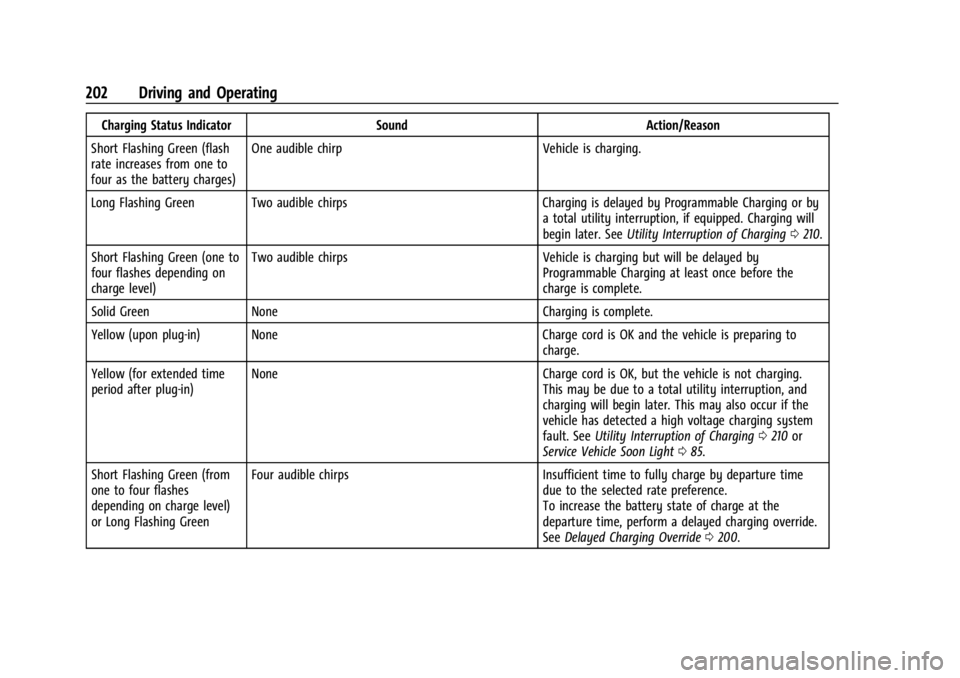
Charging Status IndicatorSoundAction/Reason
Short Flashing Green (flash
rate increases from one to
four as the battery charges) One audible chirp
Vehicle is charging.
Long Flashing Green Two audible chirps Charging is delayed by Programmable Charging or by
a total utility interruption, if equipped. Charging will
begin later. See Utility Interruption of Charging 0210.
Short Flashing Green (one to
four flashes depending on
charge level) Two audible chirps
Vehicle is charging but will be delayed by
Programmable Charging at least once before the
charge is complete.
Solid Green None Charging is complete.
Yellow (upon plug-in) None Charge cord is OK and the vehicle is preparing to
charge.
Yellow (for extended time
period after plug-in) None
Charge cord is OK, but the vehicle is not charging.
This may be due to a total utility interruption, and
charging will begin later. This may also occur if the
vehicle has detected a high voltage charging system
fault. See Utility Interruption of Charging 0210 or
Service Vehicle Soon Light 085.
Short Flashing Green (from
one to four flashes
depending on charge level)
or Long Flashing Green Four audible chirps
Insufficient time to fully charge by departure time
due to the selected rate preference.
To increase the battery state of charge at the
departure time, perform a delayed charging override.
See Delayed Charging Override 0200.
Page 204 of 308

Chevrolet BOLT EV Owner Manual (GMNA-Localizing-U.S./Canada-
16404388) - 2023 - CRC - 3/7/22
Driving and Operating 203
Charging Status IndicatorSoundAction/Reason
None (upon plug-in) None Check charge cord connection.
None (after Green or Yellow
CSI observed) None
Check charge cord connection. If connection is good,
this may be due to a power failure or a total utility
interruption, and charging will begin later. This may
also occur if the vehicle has detected a high voltage
charging system fault. See Utility Interruption of
Charging 0210 or
Service Vehicle Soon Light 085.
None Repeated audible chirps
To disable this feature, see “Charge Power Loss Alert”
under Programmable Charging 090.
To stop this alert, do one of the following:
.Unplug the charge cord.
.PressKon the RKE transmitter.
.Press and hold7on the RKE transmitter, then
press again to stop the panic alarm.
.Press the horn pad. Electricity was interrupted before charging was
complete. Repeated chirps will stop if power is
restored within 90 seconds.
None Three audible chirps Charge port door is open.