2023 CHEVROLET BOLT EV lights
[x] Cancel search: lightsPage 107 of 308

Chevrolet BOLT EV Owner Manual (GMNA-Localizing-U.S./Canada-
16404388) - 2023 - CRC - 3/7/22
106 Lighting
Hazard Warning Flashers
The hazard warning flasher button is on the
center stack.
|:Press to make the front and rear turn
signal lamps flash on and off. This warns
others that you are having trouble. Press
the button again to turn the flashers off.
When the hazard warning flashers are on,
the turn signals will not work.
Turn and Lane-Change Signals
Move the lever all the way up or down to
signal a turn.
An arrow on the instrument cluster flashes
in the direction of the turn or lane change.
Raise or lower the lever until the arrow
starts to flash to signal a lane change. Hold
it there until the lane change is completed.
If the lever is briefly pressed and released,
the turn signal flashes three times.
The turn and lane-change signal can be
turned off manually by moving the lever
back to its original position.
If after signaling a turn or lane change, the
arrow flashes rapidly or does not come on, a
signal bulb may be burned out. Replace any burned out bulbs. If a bulb is
not burned out, check the fuse. See
Underhood Compartment Fuse Block
0229.
Interior Lighting
Instrument Panel Illumination
Control
This feature adjusts the brightness of all
illuminated controls. The instrument panel
illumination control is next to the exterior
lamp control.
Push the knob in all the way until it extends
out and then turn the knob clockwise or
counterclockwise to brighten or dim the
lights. Push the knob back in when finished.
The knob is functional at night, or when the
headlamps or parking lamps are ON.
Page 109 of 308

Chevrolet BOLT EV Owner Manual (GMNA-Localizing-U.S./Canada-
16404388) - 2023 - CRC - 3/7/22
108 Lighting
Entry lighting can be disabled manually by
closing all doors, pressing
Qon the remote
key, or starting the vehicle.
This feature can be changed. On the
infotainment home screen, select the
Settings icon
TVehicleTVehicle Locator
Lights.
Exit Lighting
Some exterior lamps and interior lamps turn
on when the driver door is opened after the
vehicle is turned off.
The exterior and interior lamps remain on
for a set amount of time, then automatically
turn off.
The interior lights turn on when the vehicle
is turned off.
The exterior lamps turn off immediately by
turning the exterior lamp control off.
This feature can be changed. On the
infotainment home screen, select the
Settings icon
TVehicleTExit Lighting.
Battery Power Protection
This feature helps prevent the battery from
being drained if the interior courtesy lamps
or reading lamps are accidentally left on.
If any of these lamps are left on, they
automatically turn off after 10 minutes when
the vehicle is turned off. The lamps will not
come back on again until one of the
following occurs:
.The vehicle is started.
.The doors are closed and then re-opened.
Battery Saver
The vehicle is equipped with electrical power
management (EPM). EPM monitors and
controls the charging system. The message
BATTERY SAVER ACTIVE displays on the
Driver Information Center (DIC) when the
EPM detects the battery may be draining
too quickly, the charge state needs to be
reset, or the Auxiliary Power Module failed.
If safe to do so, when BATTERY SAVER
ACTIVE displays, manually shut off
windshield wipers, communications
equipment, climate controls, etc. to slow the
battery from draining. See Automatic
Climate Control System 0144. If the message still displays, fully charge the
vehicle. Once fully charged, unplug the
vehicle and let the vehicle sit an additional
8.5 hours or greater without being
interrupted to allow the Body Control
Module (BCM) to reset the battery to the
required state of charge.
The following may interrupt the vehicle:
.Charging the vehicle
.Battery Maintenance Mode
.Approach Detection is activated
.The remote key is left in the car or left in
close proximity of the vehicle
.Pressing buttons on the remote key
.Opening the doors or tailgate
To reduce the occurrence of this alert, GM
recommends letting the vehicle sit
uninterrupted for 8.5 hours or greater on a
weekly basis.
If after completing this process the BATTERY
SAVER ACTIVE message remains, see your
dealer for service.
Page 148 of 308

Chevrolet BOLT EV Owner Manual (GMNA-Localizing-U.S./Canada-
16404388) - 2023 - CRC - 3/7/22
Climate Controls 147
The defogger only works when the vehicle is
on. The defogger will turn off if the vehicle
is turned off.
Caution
Do not try to clear frost or other material
from the inside of the front windshield
and rear window with a razor blade or
anything else that is sharp. This may
damage the rear window defogger grid
and affect the radio's ability to pick up
stations clearly. The repairs would not be
covered by the vehicle warranty.
Heated Seats (If Equipped)
Liftxoryto heat the driver or
passenger seat cushion. See Heated Front
Seats 029.
Remote Start Climate Control Operation
If equipped with the remote start feature,
the climate control system may run when
the vehicle is started remotely. The system
uses the driver’s previous settings to heat or
cool the inside of the vehicle. The rear defog
may come on during remote start based on
cold ambient conditions. The rear defog
indicator light does not come on during a
remote start. If equipped, the heated seats will turn on if
it is cold outside. The heated seat indicator
lights may not come on during a remote
start. See
Heated Front Seats 029.
Remote Start : The climate control system
may be started by using the remote key.
The climate control system will default to
an appropriate heating or cooling mode. See
Remote Start 014.
The rear window defogger turns on if it is
cold outside.
Sensors
Indicator Light and Solar Sensor (ILSS)
The ILSS is on top of the instrument panel,
near the windshield, where it monitors solar
intensity.
The climate control system uses the sensor
information to adjust the temperature, fan
speed, recirculation, and air delivery mode
for best comfort.
Do not cover the sensor; otherwise the
automatic climate control system may not
work properly. Humidity Sensor
The humidity sensor is near the base of the
inside rearview mirror. The climate control
system uses the sensor information to
adjust the temperature and recirculation for
best comfort.
Outside Air Temperature Sensor
The outside air temperature sensor is behind
the front grille of the vehicle. The vehicle
uses the sensor information to display
outside air temperature. The climate control
system uses the information to adjust the
climate system operation.
Afterblow Feature
If equipped, under certain conditions, the
fan may stay on or may turn on and off
several times after you turn off and lock the
vehicle. This is normal.
Air Vents
Adjustable air vents are in the center and on
the side of the instrument panel.
Page 190 of 308

Chevrolet BOLT EV Owner Manual (GMNA-Localizing-U.S./Canada-
16404388) - 2023 - CRC - 3/7/22
Driving and Operating 189
Forward Collision Alert (FCA)
System
The FCA system may help to avoid or
reduce the harm caused by front-end
crashes. When approaching a vehicle ahead
too quickly, FCA provides a red flashing alert
on the windshield and rapidly beeps. FCA
also lights an amber visual alert if following
another vehicle much too closely. FCA
detects vehicles within a distance of
approximately 60 m (197 ft) and operates at
speeds above 8 km/h (5 mph).
{Warning
FCA is a warning system and does not
apply the brakes. When approaching a
slower-moving or stopped vehicle ahead
too rapidly, or when following a vehicle
too closely, FCA may not provide a
warning with enough time to help avoid
a crash. It also may not provide any
warning at all. FCA does not warn of
pedestrians, animals, signs, guardrails,
bridges, construction barrels, or other
objects. Be ready to take action and
apply the brakes.FCA can be disabled through vehicle
personalization. To view available settings
for this feature, touch the Settings icon on
the infotainment home page. Select
“Vehicle”
to display the list of available
options and select “Collision/Detection
Systems”.
Detecting the Vehicle Ahead
FCA warnings will not occur unless the FCA
system detects a vehicle ahead. When a
vehicle is detected, the vehicle ahead
indicator will display green. Vehicles may
not be detected on curves, highway exit
ramps, or hills, due to poor visibility; or if a
vehicle ahead is partially blocked by
pedestrians or other objects. FCA will not
detect another vehicle ahead until it is
completely in the driving lane.
{Warning
FCA does not provide a warning to help
avoid a crash, unless it detects a vehicle.
FCA may not detect a vehicle ahead if
the FCA sensor is blocked by dirt, snow,
or ice, or if the windshield is damaged.
It may also not detect a vehicle on
winding or hilly roads, or in conditions
that can limit visibility such as fog, rain,
or snow, or if the headlamps or
windshield are not cleaned or in proper
condition. Keep the windshield,
headlamps, and FCA sensors clean and in
good repair.
Collision Alert
When your vehicle approaches another
detected vehicle too rapidly, the red FCA
display will flash on the windshield. Also,
eight rapid high-pitched beeps will sound
from the front. When this Collision Alert
Page 195 of 308
Chevrolet BOLT EV Owner Manual (GMNA-Localizing-U.S./Canada-
16404388) - 2023 - CRC - 3/7/22
194 Driving and Operating
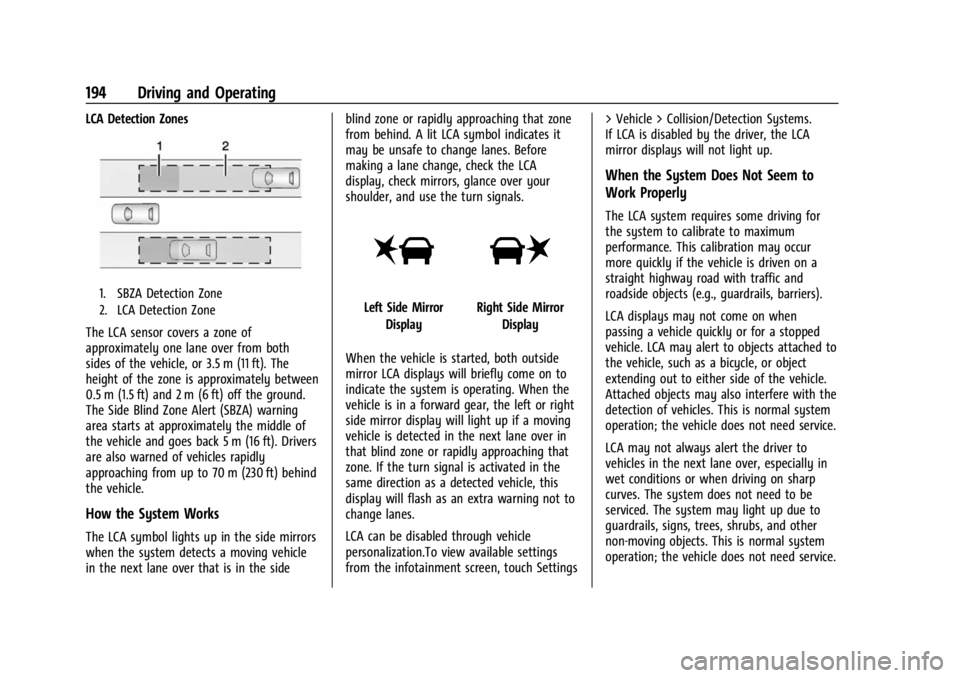
LCA Detection Zones
1. SBZA Detection Zone
2. LCA Detection Zone
The LCA sensor covers a zone of
approximately one lane over from both
sides of the vehicle, or 3.5 m (11 ft). The
height of the zone is approximately between
0.5 m (1.5 ft) and 2 m (6 ft) off the ground.
The Side Blind Zone Alert (SBZA) warning
area starts at approximately the middle of
the vehicle and goes back 5 m (16 ft). Drivers
are also warned of vehicles rapidly
approaching from up to 70 m (230 ft) behind
the vehicle.
How the System Works
The LCA symbol lights up in the side mirrors
when the system detects a moving vehicle
in the next lane over that is in the sideblind zone or rapidly approaching that zone
from behind. A lit LCA symbol indicates it
may be unsafe to change lanes. Before
making a lane change, check the LCA
display, check mirrors, glance over your
shoulder, and use the turn signals.
Left Side Mirror
DisplayRight Side Mirror Display
When the vehicle is started, both outside
mirror LCA displays will briefly come on to
indicate the system is operating. When the
vehicle is in a forward gear, the left or right
side mirror display will light up if a moving
vehicle is detected in the next lane over in
that blind zone or rapidly approaching that
zone. If the turn signal is activated in the
same direction as a detected vehicle, this
display will flash as an extra warning not to
change lanes.
LCA can be disabled through vehicle
personalization.To view available settings
from the infotainment screen, touch Settings > Vehicle > Collision/Detection Systems.
If LCA is disabled by the driver, the LCA
mirror displays will not light up.
When the System Does Not Seem to
Work Properly
The LCA system requires some driving for
the system to calibrate to maximum
performance. This calibration may occur
more quickly if the vehicle is driven on a
straight highway road with traffic and
roadside objects (e.g., guardrails, barriers).
LCA displays may not come on when
passing a vehicle quickly or for a stopped
vehicle. LCA may alert to objects attached to
the vehicle, such as a bicycle, or object
extending out to either side of the vehicle.
Attached objects may also interfere with the
detection of vehicles. This is normal system
operation; the vehicle does not need service.
LCA may not always alert the driver to
vehicles in the next lane over, especially in
wet conditions or when driving on sharp
curves. The system does not need to be
serviced. The system may light up due to
guardrails, signs, trees, shrubs, and other
non-moving objects. This is normal system
operation; the vehicle does not need service.
Page 258 of 308

Chevrolet BOLT EV Owner Manual (GMNA-Localizing-U.S./Canada-
16404388) - 2023 - CRC - 3/7/22
Vehicle Care 257
Remove the bracket and open the trim cover
to expose the terminal.
Discharged Battery Negative (–) GroundingPoint
The discharged battery negative (–)
grounding point is a stud on a bracket
located near the Accessory Power
Module (APM).
The good battery positive (+) terminal and
the good battery negative (–) terminal are
on the battery of the vehicle providing the
jump start. 1. Check the other vehicle. It must have a 12-volt battery with a negative ground
system.
Caution
If the other vehicle does not have a
12-volt system with a negative ground,
both vehicles can be damaged. Only use
a vehicle that has a 12-volt system with a
negative ground for jump starting.
2. Position the two vehicles so that they are not touching.
3. Set the parking brake and shift into P (Park). See Shifting Into Park 0163.
Caution
If any accessories are left on or plugged
in during the jump starting procedure,
they could be damaged. The repairs
would not be covered by the vehicle
warranty. Whenever possible, turn off or
unplug all accessories on either vehicle
when jump starting.
4. Turn the vehicle off. Turn off all lights and accessories in both vehicles, except
the hazard warning flashers if needed.
{Warning
An electric fan can start up even when
the propulsion system is not operating
and can injure you. Keep hands, clothing
and tools away from any underhood
electric fan.
{Warning
Using a match near a battery can cause
battery gas to explode. People have been
hurt doing this, and some have been
blinded. Use a flashlight if you need
more light.
Battery fluid contains acid that can burn
you. Do not get it on you. If you
accidentally get it in your eyes or on
your skin, flush the place with water and
get medical help immediately.
{Warning
Fans or other moving propulsion system
parts can injure you badly. Keep your
hands away from moving parts once the
propulsion system is operating.
Page 273 of 308

Chevrolet BOLT EV Owner Manual (GMNA-Localizing-U.S./Canada-
16404388) - 2023 - CRC - 3/7/22
272 Service and Maintenance
Multi-Point Vehicle
Inspection (MPVI)
A Multi Point Vehicle Inspection (MPVI)
completed by a GM dealer technician is a
maintenance assessment of your vehicle.
The benefit of the MPVI is to identify and
inform the customer of service items that
require immediate attention and those that
may require attention in the future.
The technician will perform the following
checks on your vehicle. For a complete list
of checks, inspections, and services, see your
dealer.
Some items may not apply to your vehicle
and/or region.
Diagnostics
.OnStar active, if equipped
.Service history/recall check
Exterior Lights
.Visual inspection
Windshield and Wipers
.Visual inspection
Battery
.Battery visual inspection
.Battery test results
.Battery cables and connections
Systems, Fluids, and Visible Leak
Inspection
.Electric Drive Unit
.Drive axle
.Transfer case
.Power electronics cooling system
.Windshield washer fluid
Tire Inspection
.Tire pressure, tread depth, and wear
.Rotation, if applicable
.Alignment check, optional
.Reset tire pressure monitor
.Check tire sealant expiration date,
if equipped
.Check spare tire, if equipped
Brakes
.Check brake system
Visible and Functional Inspections
.Seat belt components
.Accelerator pedal
.Passenger compartment air filter,
if equipped
.Hoses
.Shocks and struts
.Steering components
.Axle boots or driveshaft and u-joints
.Compartment lift struts, if equipped
.Floor mats secured, no interference with
pedals
.Horn
.Starter switch
Lubricate
.Chassis components
Owner Checks and Services
.At least twice a year, have underbody
flushing service performed. See
"Underbody Maintenance" in Exterior Care
0 262.
Page 301 of 308

Chevrolet BOLT EV Owner Manual (GMNA-Localizing-U.S./Canada-
16404388) - 2023 - CRC - 3/7/22
300 Index
Driving (cont'd)One-Pedal . . . . . . . . . . . . . . . . . . . . . . . . . . . . . . 167
Vehicle Load Limits . . . . . . . . . . . . . . . . . . . . 158
Wet Roads . . . . . . . . . . . . . . . . . . . . . . . . . . . . . 156
Winter . . . . . . . . . . . . . . . . . . . . . . . . . . . . . . . . . . 157
Driving for Better Energy Efficiency . . . . . . . 152
E
Electric Drive Unit . . . . . . . . . . . . . . . . . . . . . . . . . . . . . 165
Parking Brake . . . . . . . . . . . . . . . . . . . . . . . . . . 168
Parking Brake Light . . . . . . . . . . . . . . . . . . . . . 85
Electrical Equipment, Add-On . . . . . . . . . . . . . . . . . . . . . 211
Requirements for Battery Charging . . . . 210
System Overload . . . . . . . . . . . . . . . . . . . . . . 227
Electrical System
Fuses and Circuit Breakers . . . . . . . . . . . . . 229
Instrument Panel Fuse Block . . . . . . . . . . . 232
Emergency OnStar . . . . . . . . . . . . . . . . . . . . . . . . . . . . . . . . . 290
Energy Efficiency
Driving . . . . . . . . . . . . . . . . . . . . . . . . . . . . . . . . 152
Energy Information . . . . . . . . . . . . . . . . . . . . . . . 97
Engine Cooling System . . . . . . . . . . . . . . . . . . . . . . . . . 217
Entry Lighting . . . . . . . . . . . . . . . . . . . . . . . . . . . 107
Event Data Recorders . . . . . . . . . . . . . . . . . . . . 287 Exit Lighting . . . . . . . . . . . . . . . . . . . . . . . . . . . . . 108
Extended Parking . . . . . . . . . . . . . . . . . . . . . . . . 164
Extender, Seat Belt . . . . . . . . . . . . . . . . . . . . . . . .37
Exterior
Lamp Controls . . . . . . . . . . . . . . . . . . . . . . . . . 103
Lamps Off Reminder . . . . . . . . . . . . . . . . . . . 104
Lighting Battery Saver . . . . . . . . . . . . . . . . . 109F
Flash-to-Pass . . . . . . . . . . . . . . . . . . . . . . . . . . . . . 105
Flashers, Hazard Warning . . . . . . . . . . . . . . . . 106
Flat Tire . . . . . . . . . . . . . . . . . . . . . . . . . . . . . . . . . 249
Floor Mats . . . . . . . . . . . . . . . . . . . . . . . . . . . . . . . 268
FluidBrakes . . . . . . . . . . . . . . . . . . . . . . . . . . . . . . . . . 219
Washer . . . . . . . . . . . . . . . . . . . . . . . . . . . . . . . . 218
Folding Mirrors . . . . . . . . . . . . . . . . . . . . . . . . . . . . 21
Forward
Collision Alert (FCA) System . . . . . . . . . . . 189
Frequency Statement Radio . . . . . . . . . . . . . . . . . . . . . . . . . . . . . . . . . . 286
Front Heated Seats . . . . . . . . . . . . . . . . . . . . . . . . . . . 29
Pedestrian Braking (FPB) System . . . . . . . . 191
Front Seats Adjustment . . . . . . . . . . . . . . . . . . . . . . . . . . . . . 27
Fuses Fuses and Circuit Breakers . . . . . . . . . . . . . 229 Fuses (cont'd)
Instrument Panel Fuse Block . . . . . . . . . . . 232
Underhood Compartment . . . . . . . . . . . . . . 229
G
Gas Strut(s) . . . . . . . . . . . . . . . . . . . . . . . . . . . . . . 224
Gauges
Battery . . . . . . . . . . . . . . . . . . . . . . . . . . . . . . . . . 81
Driver Efficiency . . . . . . . . . . . . . . . . . . . . . . . . 82
Odometer . . . . . . . . . . . . . . . . . . . . . . . . . . . . . . 81
Power Indicator . . . . . . . . . . . . . . . . . . . . . . . . . 82
Speedometer . . . . . . . . . . . . . . . . . . . . . . . . . . . 81
Trip Odometer . . . . . . . . . . . . . . . . . . . . . . . . . . 81
Warning Lights and Indicators . . . . . . . . . . 79
General Information Service and Maintenance . . . . . . . . . . . . . . 270
Towing . . . . . . . . . . . . . . . . . . . . . . . . . . . . . . . . . 211
Vehicle Care . . . . . . . . . . . . . . . . . . . . . . . . . . . 213
Glove Box . . . . . . . . . . . . . . . . . . . . . . . . . . . . . . . . 69
GM Mobility Reimbursement Program . . . . . . . . . . . . . . . . . . . . . . . . . . . . . . . 280
H
Halogen Bulbs . . . . . . . . . . . . . . . . . . . . . . . . . . . 225
Hazard Warning Flashers . . . . . . . . . . . . . . . . 106
Head Restraints . . . . . . . . . . . . . . . . . . . . . . . . . . . .25
HeadlampsAiming . . . . . . . . . . . . . . . . . . . . . . . . . . . . . . . . 225
Automatic . . . . . . . . . . . . . . . . . . . . . . . . . . . . . 105