2023 CADILLAC XT4 radio
[x] Cancel search: radioPage 193 of 476
Cadillac XT4 Owner Manual (GMNA-Localizing-U.S./Canada/Mexico-
16412876) - 2023 - CRC - 3/25/22
192 Infotainment System
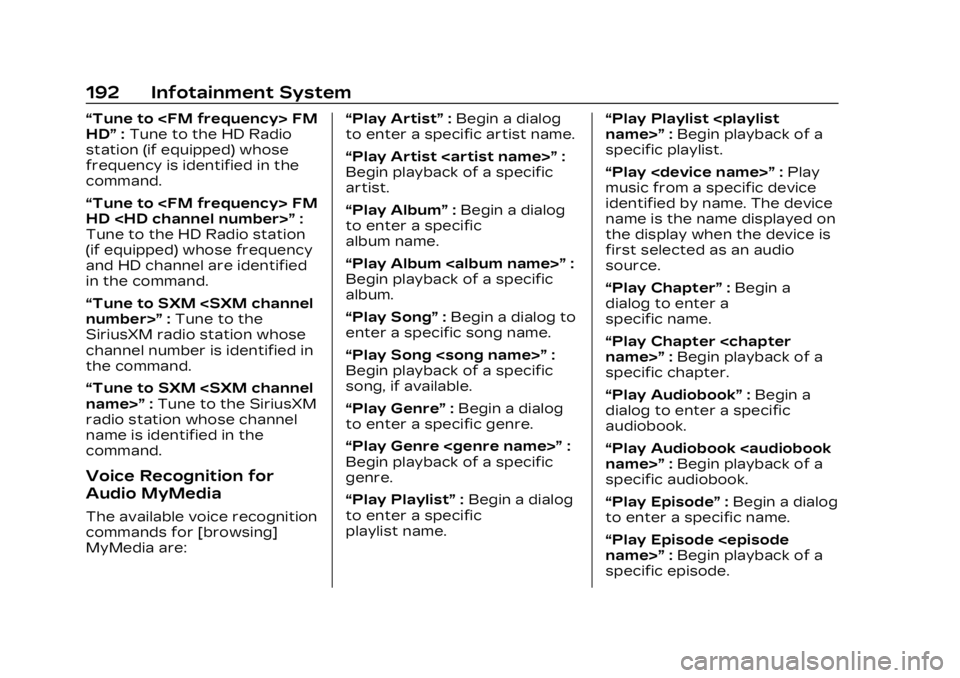
“Tune to
HD”:Tune to the HD Radio
station (if equipped) whose
frequency is identified in the
command.
“Tune to
HD
Tune to the HD Radio station
(if equipped) whose frequency
and HD channel are identified
in the command.
“Tune to SXM
SiriusXM radio station whose
channel number is identified in
the command.
“Tune to SXM
radio station whose channel
name is identified in the
command.
Voice Recognition for
Audio MyMedia
The available voice recognition
commands for [browsing]
MyMedia are: “Play Artist”
:Begin a dialog
to enter a specific artist name.
“Play Artist
Begin playback of a specific
artist.
“Play Album” :Begin a dialog
to enter a specific
album name.
“Play Album
Begin playback of a specific
album.
“Play Song” :Begin a dialog to
enter a specific song name.
“Play Song
Begin playback of a specific
song, if available.
“Play Genre” :Begin a dialog
to enter a specific genre.
“Play Genre
Begin playback of a specific
genre.
“Play Playlist” :Begin a dialog
to enter a specific
playlist name. “Play Playlist
:Begin playback of a
specific playlist.
“Play
music from a specific device
identified by name. The device
name is the name displayed on
the display when the device is
first selected as an audio
source.
“Play Chapter” :Begin a
dialog to enter a
specific name.
“Play Chapter
specific chapter.
“Play Audiobook” :Begin a
dialog to enter a specific
audiobook.
“Play Audiobook
specific audiobook.
“Play Episode” :Begin a dialog
to enter a specific name.
“Play Episode
specific episode.
Page 196 of 476
Cadillac XT4 Owner Manual (GMNA-Localizing-U.S./Canada/Mexico-
16412876) - 2023 - CRC - 3/25/22
Infotainment System 195
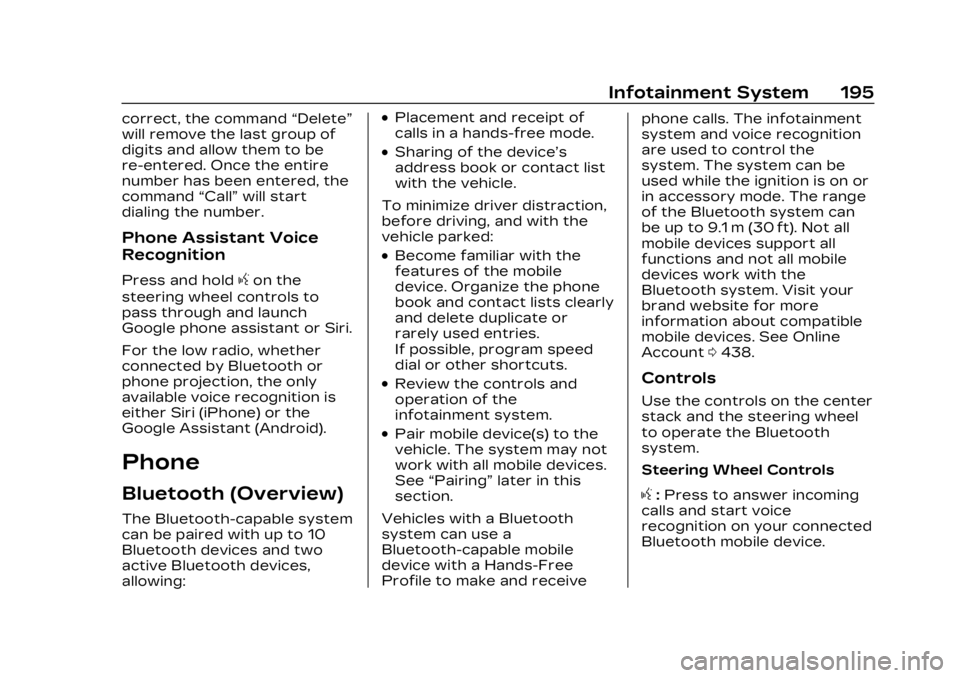
correct, the command“Delete”
will remove the last group of
digits and allow them to be
re-entered. Once the entire
number has been entered, the
command “Call”will start
dialing the number.
Phone Assistant Voice
Recognition
Press and holdgon the
steering wheel controls to
pass through and launch
Google phone assistant or Siri.
For the low radio, whether
connected by Bluetooth or
phone projection, the only
available voice recognition is
either Siri (iPhone) or the
Google Assistant (Android).
Phone
Bluetooth (Overview)
The Bluetooth-capable system
can be paired with up to 10
Bluetooth devices and two
active Bluetooth devices,
allowing:
.Placement and receipt of
calls in a hands-free mode.
.Sharing of the device’s
address book or contact list
with the vehicle.
To minimize driver distraction,
before driving, and with the
vehicle parked:
.Become familiar with the
features of the mobile
device. Organize the phone
book and contact lists clearly
and delete duplicate or
rarely used entries.
If possible, program speed
dial or other shortcuts.
.Review the controls and
operation of the
infotainment system.
.Pair mobile device(s) to the
vehicle. The system may not
work with all mobile devices.
See “Pairing” later in this
section.
Vehicles with a Bluetooth
system can use a
Bluetooth-capable mobile
device with a Hands-Free
Profile to make and receive phone calls. The infotainment
system and voice recognition
are used to control the
system. The system can be
used while the ignition is on or
in accessory mode. The range
of the Bluetooth system can
be up to 9.1 m (30 ft). Not all
mobile devices support all
functions and not all mobile
devices work with the
Bluetooth system. Visit your
brand website for more
information about compatible
mobile devices. See Online
Account
0438.
Controls
Use the controls on the center
stack and the steering wheel
to operate the Bluetooth
system.
Steering Wheel Controls
g:Press to answer incoming
calls and start voice
recognition on your connected
Bluetooth mobile device.
Page 211 of 476

Cadillac XT4 Owner Manual (GMNA-Localizing-U.S./Canada/Mexico-
16412876) - 2023 - CRC - 3/25/22
210 Infotainment System
systems, touch Set Teen
Driver Speed Warning to set
the warning speed.
Set Teen Driver Speed
Warning :Choose the desired
speed warning level. The
speed warning does not limit
the speed of the vehicle.
SiriusXM Explicit Content
Filter : Allows the SiriusXM
Explicit Content Filter to be
turned ON or OFF. When ON,
the teen driver will not be able
to listen to SiriusXM stations
that contain explicit content,
and the Explicit Content Filter
selection in the Audio Settings
will be unavailable for change.
When Teen Driver is Active:
.If equipped, the radio will
mute when the driver seat
belt, and in some vehicles
the front passenger seat
belt, is not buckled. The
audio from any device paired
to the vehicle will also be
muted.
.An object placed on the
front passenger seat, such
as a briefcase, handbag,
grocery bag, laptop, or other
electronic device, could
cause the passenger
sensing system to falsely
sense an unbuckled front
passenger and mute the
radio. If this happens,
remove the object from the
seat. See Passenger
Sensing System 072.
.Some safety systems, such
as Automatic Emergency
Braking, if equipped, cannot
be turned off.
.The gap setting for Adaptive
Cruise Control and alert
timing for Forward Collision
Alert, if equipped, cannot be
changed.
.When trying to change a
safety feature that is not
configurable in Teen Driver,
the feature may be grayed
out or removed from the
infotainment menu, or the
DIC will display a message indicating that Teen Driver is
active and the action is not
available.
.Super Cruise, if equipped, is
not available.
.Enhanced Low Fuel Warning
(if equipped)
–When the
vehicle is low on fuel, the low
fuel light on the instrument
cluster flashes and the DIC
low fuel warning cannot be
dismissed.
.Do not tow a trailer if
equipped with Automatic
Emergency Braking.
Report Card
The vehicle owner must
secure the driver’s consent to
record certain vehicle data
when the vehicle is driven with
a registered Teen Driver key.
There is one Report Card per
vehicle. Data is only recorded
when a registered Teen Driver
key is used to operate the
vehicle.
Page 213 of 476

Cadillac XT4 Owner Manual (GMNA-Localizing-U.S./Canada/Mexico-
16412876) - 2023 - CRC - 3/25/22
212 Infotainment System
Trademarks and
License
Agreements
FCC Information
See Radio Frequency
Statement0446.
"Made for iPhone," means that
an electronic accessory has
been designed to connect
specifically to iPhone, and has
been certified by the
developer to meet Apple
performance standards. Apple
is not responsible for the
operation of this device or its
compliance with safety and
regulatory standards. Please
note that the use of this
accessory with iPhone may
affect wireless performance. iPhone are trademarks of
Apple Inc., registered in the
U.S. and other countries.
If you decide to continue
service after your trial, your
selected subscription plan will
automatically renew
thereafter. You will be
charged at then-current rates.
Fees and taxes apply. Please
see the SiriusXM Customer
Agreement at siriusxm.com for
complete terms and how to
cancel, which includes calling
SiriusXM at 1-866-635-2349.
All fees and programming are
subject to change.
Fees and Taxes: Subscription
fee, taxes, one time activation
fee, and other fees may apply.
Subscription fee is consumer
only. All fees and programming
subject to change.Subscriptions subject to
Customer Agreement available
at www.siriusxm.com. SiriusXM
service is only available in the
48 contiguous United States
and Canada.
In Canada: Some deterioration
of service may occur in
extreme northern latitudes.
This is beyond the control of
SiriusXM Satellite Radio.
Explicit Language Notice:
Channels with frequent
explicit language are indicated
with an
“XL”preceding the
channel name. Channel
blocking is available for
SiriusXM Satellite Radio
receivers by notifying
SiriusXM:
.USA Customers —See
www.siriusxm.com or call
1-888-601–6296.
.Canada Customers —See
www.siriusxm.ca or call
1-877-438-9677.
It is prohibited to copy,
decompile, disassemble,
reverse engineer, hack,
Page 214 of 476

Cadillac XT4 Owner Manual (GMNA-Localizing-U.S./Canada/Mexico-
16412876) - 2023 - CRC - 3/25/22
Infotainment System 213
manipulate, or otherwise make
available any technology or
software incorporated in
receivers compatible with the
SiriusXM Satellite Radio
System or that support the
SiriusXM website, the Online
Service or any of its content.
Furthermore, the AMBER
voice compression software
included in this product is
protected by intellectual
property rights including
patent rights, copyrights, and
trade secrets of Digital Voice
Systems, Inc.
General Requirements:1. A License Agreement from SiriusXM is required for
any product that
incorporates SiriusXM
Technology and/or for use
of any of the SiriusXM
marks to be manufactured,
distributed, or marketed in
the SiriusXM Service Area.
2. For products to be distributed, marketed, and/
or sold in Canada, a separate agreement is
required with Canadian
Satellite Radio Inc.
(operating as SiriusXM
Canada).
TouchSense Technology and
TouchSense System 1000
Series Licensed from
Immersion Corporation.
TouchSense System 1000
protected under one or more
of the U.S. Patents at the
following address
www.immersion.com/
patent-marking.html and other
patents pending.
Bose
Bose AudioPilot and Bose
Centerpoint surround are
registered trademarks of Bose
Corporation in the U.S. and
other countries.Bluetooth
The Bluetooth word mark and
logos are owned by the
Bluetooth SIG, Inc. and any use
of such marks by General
Motors is under license. Other
trademarks and trade names
are those of their respective
owners.
Java
Java is a registered trademark
of Oracle and/or its affiliates.
MPEG4–AVC (H.264)
THIS PRODUCT IS LICENSED
UNDER THE AVC PATENT
PORTFOLIO LICENSE FOR
THE PERSONAL AND
NON-COMMERCIAL USE OF
A CONSUMER TO (i) ENCODE
VIDEO IN COMPLIANCE WITH
THE AVC STANDARD (“AVC
VIDEO”) AND/OR (ii) DECODE
AVC VIDEO THAT WAS
ENCODED BY A CONSUMER
ENGAGED IN A PERSONAL
AND NON-COMMERCIAL
ACTIVITY AND/OR WAS
OBTAINED FROM A VIDEO
Page 226 of 476

Cadillac XT4 Owner Manual (GMNA-Localizing-U.S./Canada/Mexico-
16412876) - 2023 - CRC - 3/25/22
Climate Controls 225
fog or frost from the surface
of the mirror. See Heated
Mirrors036.
Caution
Do not try to clear frost or
other material from the
inside of the front
windshield and rear window
with a razor blade or
anything else that is sharp.
This may damage the rear
window defogger grid and
affect the radio's ability to
pick up stations clearly. The
repairs would not be
covered by the vehicle
warranty.
Remote Start Climate
Control Operation :
If equipped with remote start,
the climate control system
may run when the vehicle is
started remotely. If equipped
with heated or ventilated
seats or a heated steering
wheel, these features may
come on during a remote start. See Remote Vehicle Start
018,
Heated and Ventilated Front
Seats 053, and Heated
Steering Wheel 0110.Sensor
The solar sensor, on top of the
instrument panel near the
windshield, monitors the solar
intensity.
The climate control system
uses the sensor information to
adjust the temperature, fan
speed, recirculation, and air
delivery mode for best
comfort. If the sensor is covered, the
automatic climate control
system may not work properly.
Afterblow Feature
If equipped, under certain
conditions, the fan may stay
on or may turn on and off
several times after you turn
off and lock the vehicle. This is
normal.
Air Vents
Page 231 of 476

Cadillac XT4 Owner Manual (GMNA-Localizing-U.S./Canada/Mexico-
16412876) - 2023 - CRC - 3/25/22
230 Driving and Operating
governments have enacted
laws regarding driver
distraction. Become familiar
with the local laws in
your area.
To avoid distracted driving,
keep your eyes on the road,
keep your hands on the
steering wheel, and focus your
attention on driving.
.Do not use a phone in
demanding driving situations.
Use a hands-free method to
place or receive necessary
phone calls.
.Watch the road. Do not read,
take notes, or look up
information on phones or
other electronic devices.
.Designate a front seat
passenger to handle
potential distractions.
.Become familiar with vehicle
features before driving, such
as programming favorite
radio stations and adjusting
climate control and seat
settings. Program all tripinformation into any
navigation device prior to
driving.
.Wait until the vehicle is
parked to retrieve items that
have fallen to the floor.
.Stop or park the vehicle to
tend to children.
.Keep pets in an appropriate
carrier or restraint.
.Avoid stressful
conversations while driving,
whether with a passenger or
on a cell phone.
{Warning
Taking your eyes off the
road too long or too often
could cause a crash
resulting in injury or death.
Focus your attention on
driving.
Refer to the infotainment
section for more information
on using that system and the
navigation system, if equipped,
including pairing and using a
cell phone.
Defensive Driving
Defensive driving means
“always expect the
unexpected.” The first step in
driving defensively is to wear
the seat belt. See Seat Belts
0 57.
.Assume that other road
users (pedestrians,
bicyclists, and other drivers)
are going to be careless and
make mistakes. Anticipate
what they may do and be
ready.
.Allow enough following
distance between you and
the driver in front of you.
.Focus on the task of driving.
Impaired Driving
Death and injury associated
with impaired driving is a
global tragedy.
Page 248 of 476

Cadillac XT4 Owner Manual (GMNA-Localizing-U.S./Canada/Mexico-
16412876) - 2023 - CRC - 3/25/22
Driving and Operating 247
Ignition Positions
The vehicle has an electronic
keyless ignition with
pushbutton start.
If the pushbutton start is not
working, the vehicle may be
near a strong radio antenna
signal causing interference to
the Keyless Access system.
See Remote Key Operation
09.
To shift out of P (Park), the
vehicle must be turned on and
the brake pedal must be
applied. Stopping the Engine/OFF
(No Indicator Light) :
When
the vehicle is stopped, press
ENGINE START/STOP once to
turn the engine off.
If the vehicle is in P (Park), the
ignition will turn off, and
Retained Accessory
Power (RAP) will remain active.
See Retained Accessory
Power (RAP) 0253.
If the vehicle is in R (Reverse),
D (Drive) or M (Manual Mode),
the vehicle will shift to
P (Park), the ignition will turn
off, and RAP will remain active.
If the vehicle is in N (Neutral),
the ignition will return to
accessory mode and display
the message SHIFT TO PARK
in the Driver Information
Center (DIC).
When the vehicle is shifted
into P (Park), the ignition will
turn off.
{Warning
Turning off the vehicle while
moving may cause loss of
power assist in the brake
and steering systems and
disable the airbags. While
driving, only shut the vehicle
off in an emergency.
If the vehicle must be shut off
in an emergency: 1. Brake using a firm and steady pressure. Do not
pump the brakes
repeatedly. This may
deplete power assist,
requiring increased brake
pedal force.
2. Shift the vehicle to N (Neutral). This can be
done while the vehicle is
moving. After shifting to
N (Neutral), firmly apply the
brakes and steer the
vehicle to a safe location.
3. Come to a complete stop and shift to P (Park).